Skip to content
DevMeme
1207 of 7435
Elegant Plans vs. Chaotic Reality in Coding
DesignPatterns Architecture Post #1341, on Apr 20, 2020 in TG

Elegant Plans vs. Chaotic Reality in Coding

Why is this DesignPatterns Architecture meme funny?

Level 1: Dream vs Reality

Have you ever imagined something in your head and then tried to make it for real, only to find it turned out totally different? Think about drawing a picture or building a sandcastle. In your head, you picture the perfect sandcastle – tall towers, smooth walls, maybe a little flag on top. You’re excited because it looks amazing in your imagination. But when you actually build it, the sand doesn’t stay in shape, one tower slumps over, and the whole thing looks a bit crooked and messy. It’s not even close to what you dreamed of! This feels funny and a little frustrating at the same time, right?

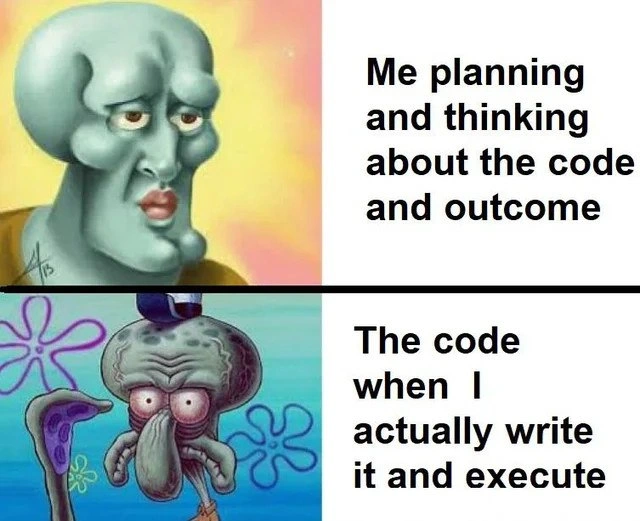
That’s exactly what this meme is joking about, but with writing code (instructions for computers). The first image (the handsome Squidward face) is like the perfect idea in the programmer’s head – it’s shiny and flawless in their imagination. The second image (Squidward looking tired and grumpy) is what the code actually ends up like – a sloppy result that wasn’t what they wanted. We find it funny because everyone understands that feeling: you expect a masterpiece, but you get a mess. It’s the same kind of laugh you have when a cake you tried to bake comes out looking nothing like the beautiful picture you had in mind. The meme is a big, silly way of saying, “Sometimes our big ideas turn out pretty goofy when we try them for real.” And that’s a feeling anyone – from kids doing art projects to grown-ups writing programs – can understand and chuckle about.

Level 2: Expectations vs Exceptions

Let’s break down the meme in simpler terms and real-world coding context. The two captions tell the story:

  • Top caption: “Me planning and thinking about the code and outcome.” This is describing the expectation – the developer imagining how great their code will be. The picture of Handsome Squidward (a Squidward with a chiseled, perfect face) stands for that perfect imaginary design. Everything in your head at this stage is shiny and ideal. You’re basically daydreaming about writing super clean code that solves the problem elegantly. Maybe you’ve drawn a diagram or written some pseudo-code, and it all looks flawless in theory.

  • Bottom caption: “The code when I actually write it and execute.” This part is about the reality – what the program truly looks like once it’s written and running. The image of normal Squidward with droopy eyes, sagging face, and a fed-up expression represents the messy, disappointing code that actually comes out. Squidward’s bloodshot eyes even hint that the developer might be tired or stressed after struggling with the code. In other words, when you finally run the program, it doesn’t look or behave like the masterpiece you imagined. It might be full of errors, or just structured in an ugly way that you didn’t intend.

In programming, it’s incredibly common to have a gap between vision and output like this. When you plan code (for example, thinking through logic in your head or on a whiteboard), you tend to imagine everything going right. You might not consider all the things that could go wrong. But when you execute (run the actual code on a computer), those neglected details come back to bite you. The meme exaggerates this by showing an expectation that’s as perfect as a polished statue and a reality that’s as rough as a grumpy cartoon squid.

Let’s talk about some terms and concepts here:

  • Bug: A “bug” in software is a mistake or problem in the code that causes it to produce the wrong result or crash. It’s like a flaw in your plan. In the top panel (planning phase), the developer isn’t considering bugs – they assume the code will just work. In the bottom panel, the code is likely full of bugs, which is why Squidward looks so shocked and upset. The plan didn’t account for a lot of these bugs. For example, maybe you planned to divide two numbers but didn’t consider what happens if the second number is zero – that would be a bug causing an error (division by zero).

  • Runtime: This refers to when the program is actually running on the computer. You can think of coding as having a writing phase and a running phase. You write the code (planning and writing), and then you run it (execution). Many issues only reveal themselves at runtime. The meme’s bottom caption “when I actually write it and execute” is emphasizing that when the code runs, that’s when the harsh reality hits. Perhaps the program crashes, or the output is nonsense. That’s a runtime surprise that contrasts with the smooth run we imagined.

  • Exception: An exception is a specific type of error that happens during program execution (runtime) which disrupts the normal flow of instructions. For instance, trying to read a file that doesn’t exist will throw an exception, or trying to use a variable that was never initialized could throw a NullPointerException in some languages. In simple terms, it’s what the computer does to say “I can’t do that – something went wrong.” In our context, the expectation phase usually doesn’t anticipate these exceptions. The reality (bottom Squidward) is the code throwing exceptions left and right, and the developer going “Oh no, I didn’t think it would do THAT.” This is why we cheekily call this section Expectations vs Exceptions – because what you expected and the exceptions (errors) you get are quite different!

  • Spaghetti code: This is a slang term developers use for code that is tangled and hard to follow, like a bowl of spaghetti. Picture noodles going in all directions – that’s what badly written code can feel like. In the planning stage, no one plans to write spaghetti code. You plan to write something well-organized. But if, in reality, your code’s logic ends up twisting and turning chaotically (maybe due to hurried fixes or poor structure), we dub it “spaghetti code.” Squidward’s disheveled look in the bottom image is like looking at a confusing plate of code noodles that you just cooked up by accident. Not tasty for the next developer who has to read it! :spaghetti:

  • Code quality: This refers to how good your code is in terms of readability, maintainability, and correctness. High code quality means the code is clean, easy to understand, and mostly free of bugs. Low code quality means it’s a dirty, confusing mess that might work, but is difficult to understand or maintain. In our meme, the top panel is implying high code quality in the plan (the CodeQuality we wish for) – it’s like a beautiful blueprint. The bottom panel implies low code quality in the implementation – it’s the difference between a nice neat blueprint and a crooked house that’s actually built. Developers strive for good code quality, but as the meme jokes, achieving it is not so simple once you’re in the thick of coding.

Now, why does this happen, especially for newer developers? When you’re new, you often underestimate the complexity of a task. For example, you think, “Sure, I’ll just read the data from input, sort it, and print it out. That’s straightforward.” In your head (or pseudo-code), it might look like this:

# Planning stage (pseudo-code): looks clean and straightforward
sorted_data = sort(data)
print(sorted_data)

This pseudo-code is like the handsome ideal – it assumes everything will work out perfectly: the data is there, the sort function will work, nothing unexpected happens. Now let’s see what actually writing the code might involve in a real scenario:

# Actual code with reality considerations: more complex to handle real-world issues
if data is None or len(data) == 0:
    print("No data to sort")
else:
    try:
        sorted_data = sorted(data)  # This might fail if data has different types or is unsortable
    except Exception as e:
        # Handle unexpected errors, for example if data elements can't be compared
        print(f"Error while sorting: {e}")
        sorted_data = list(data)  # Fallback: at least convert data to a list (unsorted)
    print(sorted_data)

In the first snippet, we had assumed data is a nice list of items that can be sorted. In the real code, we had to add a bunch of stuff:

  • Check if data is None or empty so we don’t error out or print nonsense.
  • Use a try/except block around sorting, because what if data contains elements that can’t be compared (say a mix of numbers and text, which would cause an error in Python)? We catch exceptions here to handle any unexpected issues during sort.
  • Provide a fallback or at least handle the error case so the program doesn’t just crash with a cryptic message.
  • Finally, print the result if all goes well.

You can see how the actual code grew more complex and “ugly” compared to the clean and simple plan. We had to account for things that could go wrong. This is a small example of how an initially handsome plan can become a bit monstrous when it meets reality. Multiply this by a whole project’s worth of code, and you start to understand why real codebases aren’t as pretty as the diagrams that preceded them.

For a junior developer (or anyone learning to code), it’s important to understand that this gap between expectation and reality is normal. Your first draft code might work, but it could be clunky. Debugging (finding and fixing bugs) and refactoring (rewriting code for clarity or better structure) are the processes that follow. In fact, many times you write code in order to just make it work (even if it’s not perfect), and then you improve it. Think of it like molding clay: your first shape is rough, and then you refine it. The meme humorously shows only the rough first shape vs what you thought the final sculpture would immediately look like.

This mismatch can definitely cause developer frustration. You feel “It looked so good in my head, what’s wrong with me?” But as any experienced dev will tell you, nothing’s wrong – this happens to everyone. Writing software is complicated. There are a lot of details (like those pesky edge cases and error conditions) that our brains don’t naturally simulate when we’re just imagining the solution. Part of the DeveloperExperience of growing in this field is learning to expect the unexpected. Seasoned programmers still hope their code will be clean, but they’re not shocked when the first run is a disaster. They know it takes multiple iterations to go from an initial, messy implementation to a polished final product.

The use of SpongeBob SquarePants characters (like Squidward) in a developer meme is just for fun – it’s taking a popular, easily recognizable image and giving it a new meaning in a coding context. This kind of cartoon mashup meme is super common in developer humor. It connects to our shared pop-culture knowledge. Even if you haven’t seen that SpongeBob episode, you can instantly tell: first picture = something ideal, second picture = something has gone very wrong. The captions then tie it directly to coding. It’s a lighthearted way to say, “Expectation vs Reality: Developer Edition.”

In summary, the meme and its text are explaining: “When I plan my code, I feel like I’ve got a perfect solution (I’m basically picturing a ‘handsome’ perfect outcome). But when I actually code it and run it, I end up with a limp, error-prone mess (the code turns out ‘ugly’).” This resonates with developers because we’ve all been there. It’s both comforting and comical to know that the pretty plan-to-ugly code pipeline is practically a rite of passage in programming. So if you ever find yourself staring at a program that isn’t nearly as nice as you intended, just remember Squidward’s transformative face: you’re living the meme, and with time you’ll learn to narrow that gap (or at least laugh about it and then improve the code). Good software often comes out of a cycle of expectation, disappointment, and then improvement. The meme just focuses on that big, shocking jolt of the middle step – and it’s a jolt every coder recognizes.

Level 3: UML vs OMG

This meme hits home with a classic developer predicament: the massive gulf between how we envision our code and how it actually turns out. In the top panel, the developer’s grand plan is represented by Handsome Squidward – a SpongeBob character drawn like a flawless marble sculpture against a radiant background. That’s the code in our head: polished, elegant, a real Michelangelo-worthy design. Then reality strikes. The bottom panel shows normal Squidward looking completely wrecked – drooping face, bloodshot eyes, and an exhausted teal pallor. That’s the code we end up writing and running: a shoddy creation that barely holds together, more Frankenstein’s monster than work of art. The contrast is extreme (marble statue vs. tired squid), and that absurd exaggeration is exactly why we crack a knowing smile. It’s architectural ambition colliding with brutal reality in cartoon form.

Every experienced developer recognizes this painfully funny scenario. We’ve all sketched out a mental masterpiece of a solution at the design stage – maybe drawing neat boxes and arrows on a whiteboard or writing pristine pseudo-code that follows all the best design patterns. In our imagination, the code is clean, modular, and bug-free, a shining example of high CodeQuality. But when we sit down to implement and hit “Run,” we often get something else entirely: a messy, bug-riddled program that barely works. It’s the ultimate DeveloperExpectationsVsReality moment. As the meme’s captions perfectly sum up: “Me planning and thinking about the code and outcome” (a glorious outcome imagined) vs. “The code when I actually write it and execute” (the inglorious result). The humor lands because it’s true – the difference between our vision vs output can be comically huge. You plan a Ferrari, you end up with a go-kart held together by duct tape and hope.

Why does this expectation-reality gap happen so often in coding? A cynical veteran might say: “Because no plan survives first contact with the code.” :smirk: In the planning phase, we see the happy path and the ideal scenarios. Our brains conveniently gloss over all the nasty edge cases and hidden complexities. It’s easy to be overconfident before writing a single line, picturing that everything will just click. But the moment you actually write code and run it, the universe of unanticipated problems comes rushing in. Suddenly, that elegant algorithm needs 10 extra lines of error handling. Your beautiful class structure gets peppered with if conditions and temporary fixes just to make it through a demo. The result? What was supposed to be a sleek design degenerates into spaghetti code – a tangled mess that’s as disheveled as Squidward’s face in the second panel. It’s a shock to the system (much like Squidward’s horrified, bulging eyes) when your program throws its first exception or produces gibberish instead of the neat output you expected. As one infamous adage in software goes:

In theory, theory and practice are the same. In practice, they’re not.

This meme is essentially that adage illustrated. In theory, our code (in our head) adheres to all the principles – maybe it even “feels” TDD-clean and follows the SOLID principles to a T. In practice, once we start coding, the system reminds us that theory is miles away from real life. Library functions don’t behave like we assumed, state mutates in unpredictable ways, and our mental picture wasn’t detailed enough to handle real inputs. The outcome is often riddled with Bugs we didn’t foresee. You find yourself debugging null pointer errors, off-by-one mistakes, and weird performance issues, wondering where it all went wrong. Those bloodshot Squidward eyes? That’s basically the developer at 3 AM, sweating over a runtime error in a piece of code that looked soooo handsome in the UML diagram.

This meme also pokes at a long-standing industry pattern: the ideal of upfront design vs. the reality of implementation. Old-school Waterfall development encouraged meticulous planning (lots of UML diagrams and architecture documents – the “handsome” phase) before coding. Yet, time after time, the actual software turned out differently once built, often requiring painful late-stage reworks. That’s one reason Agile methodologies became popular: accept that you won’t get it perfect on the first try, so iterate and refactor. Even so, on a smaller scale, every individual dev faces this in their daily DeveloperExperience. You might think a feature will be straightforward – “I’ll just do A, B, C and done!” – only to discover that A is harder than expected, B conflicts with some legacy system, and C exposes a race condition in your code. Suddenly your simple plan has morphed into a complex ordeal. This is how technical debt starts creeping in: you make quick fixes to salvage the project when it doesn’t match the plan, and those fixes make the code uglier. It’s both tragic and comic. Tragic because we want our code to be beautiful but circumstances sabotage it; comic because every coder ever has fallen into the same trap, making it a shared joke.

Notice also the developer frustration encapsulated in that bottom image. Squidward’s infamous grumpy, disillusioned expression is basically the face we make when the program we were so proud of keeps crashing. There’s a sprinkle of imposter syndrome here too: “Why does it look so easy in my head, but I struggle to get it working on the screen? Is it just me?” The meme reassures us that it’s not just you – it’s universal. Even rockstar devs have had moments where the code they wrote was embarrassingly far from what they intended. The difference is seasoned devs expect it. They know that bugs in software are inevitable, and the first draft is rarely pretty. A veteran programmer might even plan for a “first ugly version” and a later cleanup phase. But when you’re less experienced (or overly optimistic), you genuinely think you’ll nail it on the first go. Then runtime reality smacks you in the face, much like Squidward’s nose getting bent out of shape.

Importantly, this meme uses cartoon mashup humor to make the message lighthearted. SpongeBob characters are a bit goofy by nature, so combining them with a programmer’s internal drama creates a funny incongruity. The “handsome Squidward” meme itself is a famous visual for anything unrealistically perfect. By pairing it with a code scenario, the meme author essentially says: “I imagined my code being as over-the-top perfect as Handsome Squidward, but what I got was as underwhelming and battered as regular Squidward.” The expectation_vs_reality_meme format is instantly recognizable, and in the software context it nails an everyday truth. We laugh, perhaps a bit bitterly, because we’ve been there – typing away with high hopes, then running the program and doing the Squidward cringe when errors flood the console.

From an architecture standpoint, this also highlights the code quality gap that can happen when moving from design to implementation. You might start with lofty abstractions and clear modules, but due to time constraints, evolving requirements, or just the discovery of how complicated the problem really is, the final code doesn’t mirror that structure. Instead of a pristine layered architecture, you get a Big Ball of Mud (another fancy term for a chaotic codebase). And cleaning that up after the fact is a whole other battle. But that’s beyond the scope of the meme – the meme just captures that initial fall from grace: the shocking expectation-reality gap in coding. RealWorldVsIdeal in one quick snapshot, courtesy of a SpongeBob reference.

In the end, the meme’s humor is a form of commiseration. It says, “Look, this happens to all of us!” The next time you meticulously plan out something and the code comes out awful, you’ll remember Squidward’s two faces and hopefully chuckle instead of despair. It’s a gentle reminder not to be too hard on ourselves as developers. Software development is complex and often messy; even if your code ends up looking like a zombified Squidward at first, you’re in good company. You can always refactor that ugliness later – but only after you’ve had a good laugh (or cry) about the difference between your vision vs reality. After all, if you can’t make your code flawless, at least you can make a meme about it!

Description

A two-panel meme contrasting the idealized planning phase of coding with the messy reality of implementation, using two different depictions of Squidward from SpongeBob SquarePants. The top panel features 'Handsome Squidward,' looking refined and perfect, with the text 'Me planning and thinking about the code and outcome.' The bottom panel shows a frantic, bug-eyed, and disheveled Squidward, with the text 'The code when I actually write it and execute.' The meme humorously illustrates the common developer experience where the elegant, clean, and perfectly architected code envisioned in one's mind devolves into a complex, bug-prone, and chaotic mess once the practicalities of writing and running it are faced
Comments

7
Anonymous ★ Top Pick In my head, the code is a idempotent, stateless, functional marvel. In the IDE, it's a series of 'FIXME' comments, a global variable named 'temp', and a prayer
  1. Anonymous ★ Top Pick

    In my head, the code is a idempotent, stateless, functional marvel. In the IDE, it's a series of 'FIXME' comments, a global variable named 'temp', and a prayer

  2. Anonymous

    Architecture diagram: “stateless, event-sourced, self-healing service mesh.” Git commit: “add 700-line bash script to cron; please don’t reboot NFS.”

  3. Anonymous

    The whiteboard architecture was beautiful until someone asked about database consistency across regions during a network partition

  4. Anonymous

    Every senior architect knows this feeling: your mental model is a pristine microservices architecture with perfect separation of concerns, but the moment you hit 'run,' it's suddenly a distributed monolith with race conditions you didn't know were possible. The gap between 'this will be elegant' and 'why is the database locked' is where experience lives - and where we learn that no amount of whiteboard confidence survives contact with actual runtime behavior

  5. Anonymous

    Planned: Tail-call optimized recursion. Executed: Stack overflow from yesterday's 'simple' refactor

  6. Anonymous

    In the design doc: elegant CQRS with idempotent retries; in the code: a 900-line handler, two “temporary” feature flags, and a cron job pretending to be a message bus

  7. Anonymous

    In the design doc it’s an idempotent, event‑sourced pipeline; in the PR it’s 600 lines of async callbacks, three global flags, and a strategic sleep(200) to appease a race condition

Use J and K for navigation