Skip to content
DevMeme
6026 of 7435
When your shell prompt accidentally pipes into emoji pixel-art mode
CLI Post #6598, on Mar 29, 2025 in TG

When your shell prompt accidentally pipes into emoji pixel-art mode

Why is this CLI meme funny?

Level 1: Big Emoji Surprise

Imagine you’re typing on a computer where normally only letters and words show up, and suddenly the computer prints a giant picture made of little emoji. It’s like if you were writing a sentence, but instead of regular letters, a whole bunch of smiley and square emojis filled the screen and together they formed a big grinning face. You didn’t plan for that to happen – it’s as if the computer decided to play a prank on you by saying “Gotcha!” with a goofy grin. This feels funny and surprising, kind of like a friend secretly replaced your sticky note message with a giant sticker mosaic. You’re left half annoyed that your screen is full of this big silly face, but also laughing because it’s such a ridiculous surprise. The big emoji face is basically the computer joking around, turning a bunch of tiny pictures into a huge smiling face to give you a playful scare and a laugh.

Level 2: Emoji Mosaic Mayhem

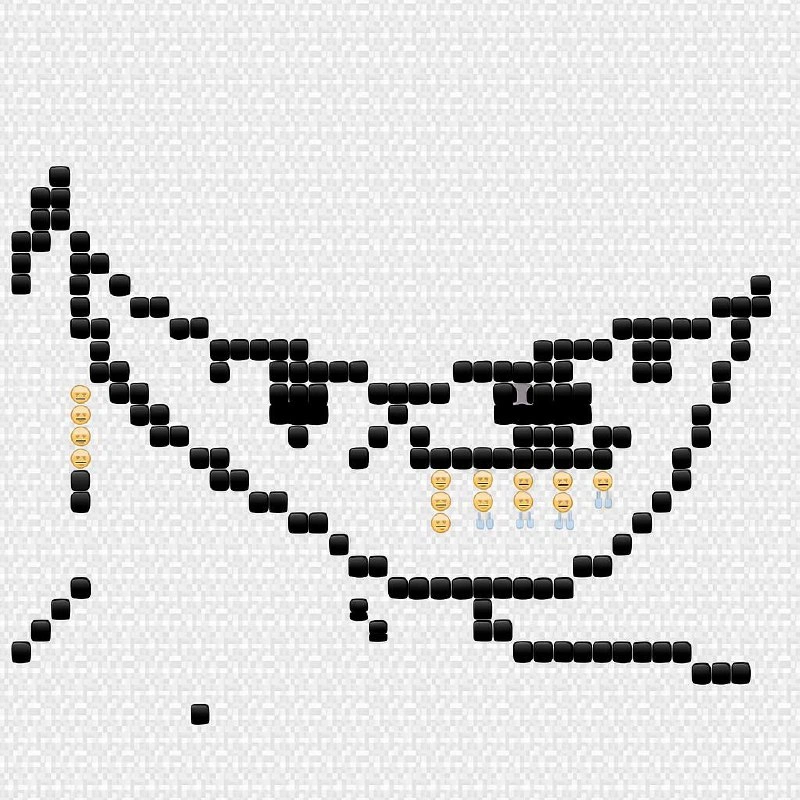
At this level, let’s break down what’s happening in simpler terms. The meme shows a terminal (text console) that has printed out a picture made of emoji characters. Specifically, it’s the famous “trollface” grin, composed entirely of little emoji like black squares and 😑 blank faces and 💦 sweat drops. Normally, your shell prompt – which is the little piece of text in a terminal that might look like username@computer:~$ – is just there to tell you “the computer is ready for your command.” It’s not supposed to generate a whole picture on its own. So the caption “when your shell prompt accidentally pipes into emoji pixel-art mode” is joking that something went haywire with the prompt, causing it to output this big emoji art by accident.

Let’s explain some terms:

  • Shell: a shell is a program like Bash or Zsh that takes your typed commands and tells the computer’s operating system what you want. It’s text-based, meaning you type commands (like ls or git status) and get text output. The shell prompt is the bit that appears each time waiting for you to type a new command. It often includes information like your current directory or user name.
  • Pipe (|): In shell, the pipe symbol is used to connect commands. For example, if you run ls | grep txt, it takes the output of ls (a list of files) and pipes it into grep txt (which filters to only lines containing “txt”). It’s a way to make one command’s output become another command’s input. Accidentally piping into something would mean you unintentionally sent your output somewhere you didn’t mean to.
  • Emoji pixel-art mode: Terminals don’t literally have an “emoji mode,” but the meme jokes as if there were a mode where everything output becomes an emoji picture. Pixel art is creating pictures out of small uniform pieces (like pixels on a screen). Here the “pixels” are emoji characters. So emoji pixel art is using many emoji arranged like a mosaic to form a larger image. Think of using tiny colorful stickers to make a big poster image – each sticker is like one dot of color in the big picture. In this case, the stickers are emoji symbols.
  • ASCII art: Before emoji were around, people used regular text characters (from the ASCII character set, which includes A-Z, 0-9, and punctuation) to draw pictures. For example, using slashes, dashes, and parentheses you can draw a stick figure or a face. It was popular because originally text was all you could easily display in terminals and early printers. ASCII art is essentially the precursor to this emoji art. The meme references ASCII art tradition, but using emoji (which are part of Unicode, the modern superset of ASCII that includes thousands of symbols).
  • Unicode: This is the standard that includes practically every character from every writing system, plus emoji. Modern terminals and programming languages use Unicode (often encoded as UTF-8) so that you can display characters beyond the basic English letters. Unicode support means your terminal can show characters like “😑” or “💦” properly. If a system lacks unicode support, those might appear as weird boxes or question marks. Thankfully, most developer tools today handle Unicode, allowing fun things like emoji art to actually render correctly on screen.

So what likely happened in this humor scenario? Possibly the user’s shell prompt was misconfigured. Maybe they (or a prankster friend) put a command in the prompt that outputs an image. For instance, some people set their prompt to show a fun message or animal (there’s a command called cowsay that prints an ASCII cow with a speech bubble). If someone replaced that with an emoji art generator, every time the prompt appears it could print a big emoji picture. “Accidentally” doing this might be as simple as a copy-paste gone wrong in a config file. The meme suggests the result is the classic trollface image appearing in the terminal. Trollface is an old-school internet meme – a cartoony drawing of a grinning face used to signify trolling (practical jokes or annoying humor). Seeing trollface appear made out of emoji implies that the computer or shell is essentially laughing at you or pranking you. It’s like the system going “haha, gotcha!” in a very visual way.

In developer communities and chats, posting large ASCII or emoji art is a known prank or fun trick. For example, on an IRC channel (which is an online chat mainly in text) or on Slack, someone might paste a huge block of text that, when you look at it in the chat, forms a picture. This is often greeted with a mix of amusement and mild annoyance, because it takes up a lot of screen space – everyone has to scroll a lot once that picture lands in the conversation. That’s why you might hear it called a scroll bomb – it “bombs” the chat with so much content that you have to scroll past this monolithic thing. In a shared terminal session (like using tmux to collaborate), one person doing this would flood everyone’s terminal windows similarly. The meme’s image description even noted a light-grey tiled background which resembles a chat or terminal background, and then the emoji making up the trollface. So it’s directly evoking that experience.

To sum up in more straightforward terms: a normally simple shell prompt somehow printed a huge emoji mosaic of a trollface. It’s as if your computer, instead of doing what you expected, decided to unleash an elaborate joke. This touches on developer humor because we developers often do see weird, unexpected output – sometimes due to our own mistake (like mis-typing a command), and sometimes because a colleague with a sense of humor set up a prank. The combination of ASCII art tradition with modern emoji flair makes the joke resonate: it’s old-school meets new-school. If you’re a newer developer (maybe you haven’t used IRC or ASCII art much), imagine it like this: you know how you can send a bunch of emoji in a message to create a larger shape or word? It’s that idea, but happening in a programming context where you totally didn’t expect an image to pop up. It’s both technically intriguing (whoa, the terminal can do that?) and funny because of the ridiculous content (that trollface grin, basically the computer teasing you).

Level 3: Terminal Trollface

This meme drops us into the world of command-line hijinks where a routine shell session takes a wild, graphical turn. It’s referencing a scenario in which your normally plain CLI (Command-Line Interface) prompt ends up spewing out a giant trollface composed entirely of emojis. In other words, the text-based terminal suddenly behaves like an art canvas, printing a mischievous grin made of Unicode characters. This is the terminal literally trolling you – a cheeky nod to how developers sometimes encounter unexpected or prankish outputs in their tools.

Under the hood, what’s being parodied is an accidental misuse of shell piping or output redirection. In a Unix-like shell, the | (pipe) operator takes the output of one command and pipes it as input to another. Here, the joke is that your shell prompt itself (the little text like user@machine:~$ where you type commands) got “piped into emoji pixel-art mode.” Of course, there isn’t an actual --emoji-art flag on Bash; this is humorous hyperbole. But it evokes real instances where a stray command or misconfigured prompt can dump bizarre output to your terminal. For example, if someone were to set their PS1 (the environment variable defining the prompt) to the output of a program that prints art, each new prompt could display a picture. A senior developer sees this and immediately recalls that one time they ran cat on a binary file or mis-used printf and their terminal started spitting out Unicode gibberish, beeping, or worse — a huge ASCII art surprise that scrolls everything away (a classic scroll bomb scenario in chatrooms or tmux sessions).

The image itself – a trollface rendered in black squares, neutral “😑” faces, and sweat droplets – is a perfect example of emoji ASCII art. It’s essentially CLI pixel art using Unicode symbols as building blocks. Back in the day, ASCII art (using the 95 printable characters from the ASCII standard) was the only way to add images or decoration in text-only interfaces. Developers would draw elaborate pictures with just letters, numbers, and punctuation. (Think of those multi-line text drawings of dragons or the famous "404 ASCII shrug: ¯\\_(ツ)_/¯.) These artworks were shared in early developer communities on BBSes, forums, and IRC. Everyone had fun with them, but they were monochrome and constrained to the ASCII set. Fast forward to today’s terminals: thanks to Unicode support, we have thousands of symbols and emoji at our disposal, effectively ASCII art on steroids. Now a prankster can use black square emoji as pixels (for dark outlines) and something like the 😑 neutral-face or a blue 💦 droplet as shading or highlights. The result is a Unicode mosaic – an image composed of emoji that preserves the cheeky spirit of the original trollface meme.

There’s an inside joke here about Developer Experience (DX) too: developers love customizing their workflow and prompt, sometimes to absurd lengths. Power users tweak their bash/zsh prompt to show git branches, weather, or system info, often using special characters and colors. Usually it’s useful, but sometimes these customizations misbehave. One typo in a shell configuration and you might end up with a prompt that executes unintended commands or prints out the entire content of a file on every enter. Ever heard of someone adding fortune | cowsay to their .bashrc? It means every new terminal session greets you with a random fortune cookie saying inside an ASCII art cow balloon. It’s fun – until you script it wrong and accidentally pipe the output into itself or into some emoji-art generator, flooding your screen with a bovine mosaic! Senior engineers chuckle at this because many have experienced or witnessed similar “it seemed like a good idea at the time” tweaks turning into chaotic output. In team chat applications (from old-school IRC to modern Slack), there’s also the phenomenon of the chatroom scroll bomb: one user pastes an enormous ASCII/emoji art and everyone else’s chat window scrolls like crazy to accommodate the surprise image. It’s disruptive, sure, but in a lighthearted setting, it’s part of developer humor. The trollface itself is the ultimate symbol of internet trolling — it’s as if the shell is grinning slyly, saying “Problem?” to the user. The combination of the dripping “😑” faces and sweat emojis even imitates the drool from a goofy grin, adding an extra layer of ridiculous detail. This level of craft in a terminal prank highlights the culture of DevCommunities finding joy in TerminalHumor: using whatever text glyphs available to get a laugh during an otherwise dry coding session.

On a technical note, pulling off a clean emoji mosaic in a terminal requires careful alignment. Terminals traditionally use monospaced fonts where each character (whether a letter or a block or an emoji) should occupy the same amount of space horizontally. However, not all emoji are equal – many render as double-width characters or combine into complex glyphs. The meme’s crisp trollface means whoever built it knew which emoji would render as neat squares of uniform size. The large black square (🟦 or a similar Unicode block element) is likely used as the primary pixel because it’s a solid block that in most fonts renders at one character cell width. The “😑” neutral face and “💦” droplet are narrower and fit into that grid as well (hopefully without breaking the alignment). This is an art and a science: Unicode mosaics sometimes need testing on different terminals to ensure the picture doesn’t warp due to font or encoding differences. It’s a playful exploitation of how modern terminals can display a vast range of Unicode characters. When everything lines up, the emoji_ascii_art looks brilliant (in a goofy way); if not, you get a jumbled mess of misaligned faces – which, to be honest, is its own kind of funny if you’re debugging it at 3 AM.

In summary, at the senior-dev level this meme hits all the right notes: it references the pipe (|) fiascos we’ve all had, leverages nostalgia for ASCII art and old meme faces, and demonstrates the ever-evolving creativity in our text-based tools. It’s a reminder that beneath our serious production environments and code, there’s a streak of hacker humor — turning even the $PS1 prompt into a joke canvas. The next time your terminal seemingly has a mind of its own and “draws” something crazy, don’t panic — it might just be your system’s way of sharing a laugh, one pixelated emoji at a time.

# An example of fun with pipelines (intentional, not accidental):
$ fortune | cowsay | lolcat

(The above command pipes a random fortune through an ASCII cow generator and then through a rainbow-colorizer called lolcat. It’s the kind of harmless CLI amusement that might inspire someone to go further… perhaps a bit too far, ending in an emoji trollface!)

Description

The image shows a light-grey tiled background overlaid with dozens of tiny black square emojis arranged like pixels to form an exaggerated, mischievous cat-like grin and half-closed eyes - essentially a Unicode rendition of the classic trollface. Down the left cheek and under the mouth hang vertical lines of neutral-face "😑" emojis, interspersed with a few blue "💦" sweat-drop emojis, mimicking dribble or comic drool. No other alphabetic text appears - everything is rendered purely with emoji glyphs, turning the canvas into a terminal-style mosaic. The composition evokes those moments in chat, tmux, or IRC where someone pastes an enormous ASCII art block and the whole scrollback blows up, highlighting the intersection of developer culture, CLI art hacks, and our obsession with squeezing humor through limited character sets
Comments

6
Anonymous ★ Top Pick Perfect example of why grep -c "😂" is still the most reliable engagement metric in our team’s code reviews
  1. Anonymous ★ Top Pick

    Perfect example of why grep -c "😂" is still the most reliable engagement metric in our team’s code reviews

  2. Anonymous

    The happy faces perfectly capture the expression of developers who bought Bitcoin at $69k and are still waiting for their distributed consensus on when to tell their spouse about the investment

  3. Anonymous

    When your zero-day exploit finally gets that six-figure bug bounty payout, or when you realize the 'technical debt' you've been accumulating is actually just equity in a legacy system that prints money because nobody else can maintain it

  4. Anonymous

    Docker whale post-Dockerfile 'COPY . .': bloated with emoji layers, just like that prod image nobody pruned

  5. Anonymous

    The hardest distributed systems problem isn’t consensus - it’s getting emoji widths to agree; the trollface stays eventually consistent, your layout doesn’t

  6. Anonymous

    Marketing banned PNGs to improve Core Web Vitals, so the hero shipped as 900 emoji codepoints; works on my Mac - until VoiceOver spends 30 seconds reading “black square” on every page load

Use J and K for navigation