Configuration Hell: The Proliferation of .dist Files
Why is this Configuration meme funny?
Level 1: Never-Ending Copies
Have you ever stood between two mirrors and seen your reflection repeat forever? This situation is just like that, but with a file name. Imagine you have a document called “Test Plan.” You make a copy of it and call it “Test Plan Copy.” Then someone copies that and calls it “Test Plan Copy Copy.” Now imagine that process just keeps going – “Copy Copy Copy,” on and on. Pretty silly, right? In the picture, the computer was told to leave out a certain test file when cleaning up the project, but it got confused and kept adding “another copy” of the file name to the list. It’s a little like a prank where every time you remove a sign, you find another sign underneath. 🤭 It’s funny because obviously we only ever needed one copy of that test file name, but due to a mistake the list kept growing as if the computer was stuck in a loop saying, “Oh, you mean exclude this file and its copy, and its copy’s copy, and so on…” Clearly that wasn’t what anyone wanted! It’s an exaggeration that makes us laugh – a simple instruction went haywire and created a never-ending to-do list for the poor computer, which is just plain ridiculous.
Level 2: Infinite Exclude List
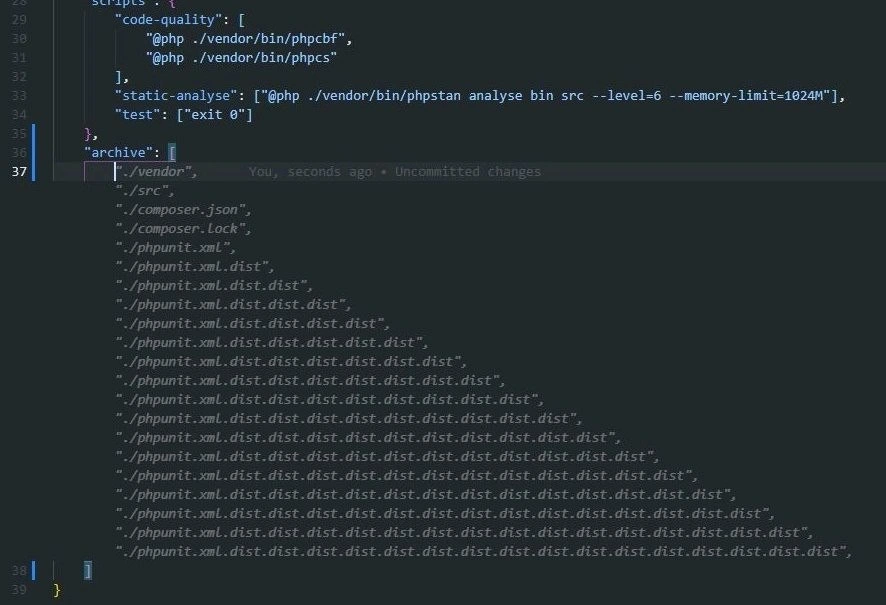
If you’re newer to PHP development, this image might look confusing at first. It’s showing part of a composer.json file opened in a code editor (with a dark theme for that cool hacker vibe). Composer is the tool PHP developers use for managing dependencies (kind of like npm for Node.js or pip for Python). The composer.json is basically a ConfigurationFile written in JSON format (notice the curly braces { } and square brackets [ ]). This file tells Composer what libraries your project requires, and it can also define scripts and settings for your project.
In the screenshot, there’s a "scripts" section where the project defines some handy commands:
- code-quality: runs code style fixers (
phpcbf) and linters (phpcs) via PHP (that’s why you see"@php ./vendor/bin/phpcbf"– the@phpmeans “run this command using PHP”). - static-analyse: runs a static analysis tool (PHPStan) on the
binandsrcdirectories to check for bugs or typing issues. - test: here it’s set to just
"exit 0", which is a cheeky way to make the test command always succeed (exit code 0 means “no error”). Essentially, they’re telling Composer, “if someone runscomposer test, just do nothing and report success.” This was probably done to temporarily disable tests in an automated process or continuous integration pipeline (so the package builds without actually running tests).
The funny part is the "archive" section right below. This is supposed to list files or folders to be excluded when the project is packaged for distribution. For example, when you publish a PHP library, you don’t want to bundle certain things in the archive (like your vendor folder of dependencies, since others will install those separately, or config files that only developers working on the project need). Typically, you might exclude:
/vendor– because that contains third-party code you don’t need to ship with your own (the person installing your library will fetch their own copy of those)./composer.jsonand/composer.lock– the metadata files describing the project and exact versions. They aren’t usually needed in the distributed package itself.- Test files or config like
/phpunit.xml– since users of your library don’t need your test configuration.
Now, normally you would just list each thing once. But do you notice something odd? After "/phpunit.xml" and "/phpunit.xml.dist", it continues: "/phpunit.xml.dist.dist", then "/phpunit.xml.dist.dist.dist", and on and on. It’s like it’s repeating the same file name, adding “.dist” again and again. That’s definitely not normal!
Let’s clarify what those files are:
phpunit.xmlis a configuration file for PHPUnit, which is a popular testing framework in PHP. This file tells PHPUnit how to run the tests (for example, which folders contain tests, what settings to use, etc.).- Many projects also have a
phpunit.xml.distin their repository. The “.dist” stands for “distribution” or “default.” It’s basically a template or default config. Developers can copyphpunit.xml.disttophpunit.xmlon their own machine to customize it if needed. Ifphpunit.xml(without .dist) is present, PHPUnit will use that; otherwise it falls back to the .dist version. This way, the repo provides a sensible default config (the .dist) without forcing every user to have exactly the same local config.
You might have one or the other of those files in a project, but you’d never have something like phpunit.xml.dist.dist. That isn’t a standard thing – it looks like a mistake. The meme shows an absurd scenario where somehow the exclude list includes phpunit.xml, then the “distribution” version, then a “distribution of the distribution,” and so on, theoretically forever. It’s basically an infinite list of what is meant to be the same file, with the name mutating each time by adding “.dist”! This likely started as a small oversight that snowballed.
For example, imagine the developer put "/phpunit.xml" in the exclude list first. Then they realized, “Oh, we also have phpunit.xml.dist in the repo, better exclude that too,” so they add "/phpunit.xml.dist". Now, why would phpunit.xml.dist.dist ever appear? Possibly a script or an automated tool was too aggressive – it might have read the updated exclude list and thought, “Hmm, there’s a pattern here, maybe I should also exclude any file that’s like a ‘.dist’ of a .dist,” inadvertently appending another “.dist” and creating a new entry. Or maybe a team member copy-pasted a line one time too many without noticing they were doubling up the suffix. Either way, it’s clearly a misconfiguration in the composer.json.
This situation is a good example of configuration drift: that’s when config files slowly diverge from the intended state because of many little changes or quick fixes over time. Here it’s like someone kept tweaking the file to chase an issue (“Why is our package still including that darn phpunit config? Let’s add another rule!”) until the config became a tangled mess. They were fixing the symptoms (one file left in the package) in a hacky way, rather than addressing the root cause properly.
For a junior developer, the takeaway is that config files and build setups can have bugs just like code can. It’s easy to think “it’s just a list of files, what could go wrong?” but as you see, mistakes or odd automation can lead to very strange outcomes. This example is funny because it’s so exaggerated – it’s like an inside joke about how complicated something simple can get if no one’s paying attention. The dark-themed IDE with the long, indented list really drives home how deep this rabbit hole went! It specifically pokes fun at PHP’s Composer tool, but honestly every programming ecosystem has its own “oops” stories with packaging and config. (Ever hear a Node.js developer talk about accidentally publishing their entire node_modules folder to npm? Same energy.)
In the end, this odd little screenshot serves as both a warning and a joke among developers. It warns that even config files can misbehave in bizarre ways if you’re not careful. And it gives us a reason to chuckle and say, “Wow, even our configs can go off the rails sometimes!”
Level 3: The .dist Hydra
In this meme we’re witnessing configuration gone wild – a seemingly endless list of file names with ever-growing suffixes. It’s a snapshot from a PHP project’s composer.json (the JSON config file for PHP’s Composer dependency manager) where the "archive" section is supposed to list files to exclude from the package. Instead of a tidy list, it’s become a mythical beast: chop off one filename, and two more heads (or rather, one more “.dist” at the end) appear. This .dist chain has taken on a life of its own, reminding seasoned developers of the Hydra from Greek myth – every time you think you’ve excluded the test config file, another slightly altered copy shows up to haunt your build.
Let’s unpack why this is hilarious (and horrifying) to an experienced developer. Composer is meant to handle DependencyManagement gracefully, bundling your code and its required packages so others can install them. Part of that job is creating an artifact (like a ZIP file) of your library’s source, minus unnecessary files like documentation, tests, or config files not needed in production. Developers can specify an "archive" section in composer.json to exclude certain paths from that artifact. For example, you might exclude /vendor (third-party libraries), your test directories, and files like phpunit.xml which are only useful when running tests in the project itself.
However, something clearly went off the rails here. The archive exclude list shows entries like:
"archive": [
"/vendor",
"/src",
"/composer.json",
"/composer.lock",
"/phpunit.xml",
"/phpunit.xml.dist",
"/phpunit.xml.dist.dist",
"/phpunit.xml.dist.dist.dist"
// ... and it just keeps going
]
This is not normal – you’d never intentionally have phpunit.xml.dist.dist or further nested versions in a project. The .dist suffix in PHP stands for “distribution” (a common convention for config templates). Typically you have one phpunit.xml.dist as a default testing configuration. If a developer wants a custom config, they’d copy that to phpunit.xml and tweak it. But here we have an absurd situation: a phpunit.xml, then a phpunit.xml.dist (likely the template), and then a phpunit.xml.dist.dist, then .dist.dist.dist, ad infinitum. How could that even happen?
One theory is configuration drift combined with a script or packaging quirk. Perhaps the project initially had phpunit.xml.dist in version control (as is common). When preparing the package, the developer noticed the phpunit.xml.dist file was being included in the release by Composer. “No good, we don’t want to ship test configs,” they think, so they add /phpunit.xml.dist to the exclude list. But maybe Composer (or a Composer plugin) automatically renames the file or leaves behind phpunit.xml in the archive as a result (since some setups might rename .dist to the real file or vice versa). In a misguided attempt to be thorough, someone then adds /phpunit.xml to the exclude list as well. Now, imagine a poorly written script that runs during release: it sees both a phpunit.xml and a phpunit.xml.dist, and maybe tries to tidy up by creating another variant or not understanding which to exclude. Each time, it appends another .dist to the name thinking it’s a new file to remove, spiraling out of control. The end result is this tortuously long list of exclude rules chasing an ever-moving target. In other words, an infinite exclude list of phpunit.xml files, each with one more “.dist” suffix than the last, which is as absurd (and hilarious) as it sounds.
Whether caused by an automated process or manual copy-paste gone awry, the humor isn’t lost on veteran devs: it’s a satirical example of a bug that isn’t a code bug per se, but a devops or build configuration bug. It captures that feeling when a simple task (like “don’t include the test config in the package”) turns into a nightmarish rabbit hole. We’ve all been there – what starts as a quick fix evolves into a surreal problem. The meme exaggerates it to drive the joke home: obviously, nobody would let “phpunit.xml.dist.dist.dist.dist...” actually ship, but seeing it in an editor triggers the memory of all those times we’ve encountered bizarre build issues that made us do a double-take.
From an architecture perspective, this chain highlights a kind of accidental recursion in the config. It’s as if the config system is applying a rule repeatedly instead of just once. Experienced engineers might chuckle because it reminds them of classical infinite loop bugs – but here it’s happening in a JSON config list, of all places! It’s both absurd and technically plausible, which is the perfect recipe for an inside joke in configuration management. The situation also hints at some deeper lessons: maybe the team patched the symptom (adding another exclude entry) instead of addressing the root cause (why was the file included or duplicated in the first place?), a common anti-pattern in rushed software fixes. Each “.dist” could represent one quick band-aid fix. And as those accumulate, you get a monster of a config file that newcomers gawp at and veterans facepalm about.
Historically, the .dist file convention and tools like Composer are meant to simplify our lives, but every tool has edge cases. The fact that Composer, which manages PHP library packages, ended up facilitating this folly is ironic. It’s as if the DependencyManagement system itself got caught in a dependency loop of file names. Seasoned devs might recall similar anecdotes in other ecosystems: maybe a .bak backup file accidentally getting included in distribution, leading to project builds shipping config.yaml.bak, or Node.js devs accidentally publishing their entire node_modules because of a misconfigured .npmignore. These tales all share the same moral: configuration is code, and it can misbehave just like any script or program if you’re not careful.
At the senior engineer level, this meme is a wink and a nudge about how something as trivial as packaging configuration can blow up into a comical problem. It’s a mix of “I’ve seen worse at 3 AM deploys” cynicism and genuine amusement. We laugh because it’s better than crying – recognizing that even our config files can enter an infinite loop (or at least look that way) when the build pipeline has a hiccup.
Description
A screenshot of a code editor displays a segment of a `composer.json` file, a configuration file used in the PHP ecosystem. The focus is on the 'archive' key, which lists files to be packaged. Initially, the list includes standard directories and files like './vendor', './src', and 'composer.json'. The humor escalates as the list continues with 'phpunit.xml.dist', followed by an absurdly long, repetitive sequence of the same filename with an increasing number of '.dist' extensions appended, such as './phpunit.xml.dist.dist', './phpunit.xml.dist.dist.dist', and so on. This visually represents a common developer mistake or frustration taken to a comical extreme. '.dist' files are typically version-controlled templates for local configuration files. The meme jokes about the chaos that ensues from mishandling these templates, perhaps through a misconfigured script or a manual copy-paste error repeated ad nauseam
Comments
7Comment deleted
That's not technical debt, it's a recursively-defined configuration strategy. The build process is idempotent if you run it an infinite number of times
Composer: “Sure, I can exclude phpunit.xml.dist.” Composer, five milliseconds later: “By the way, what’s your stack depth limit for paths? I’m implementing a recursive exclude without a base case - you’ll know it’s done when the build evaluates to ⊥.”
When you've been maintaining enterprise PHP for 15 years and finally discover the true meaning of 'dist' - it's not 'distribution', it's the distance your sanity travels from your body every time you inherit another legacy codebase with creative interpretations of configuration management
When your build script has a copy-paste accident and creates a file path so deeply nested it makes your call stack look shallow. This is what happens when you automate the automation of the automation... of the phpunit.xml.dist file. At this rate, the heat death of the universe will occur before composer finishes archiving './phpunit.xml.dist.dist.dist.dist.dist.dist.dist.dist.dist.dist.dist.dist.dist.dist.dist.dist.dist'. Somewhere, a senior architect is having an existential crisis about whether this violates DRY principles or achieves perfect immutability through sheer absurdity
Vendor 'dist' files so nested, they're basically a Merkle tree for PHP hell - proving Composer can out-recurs even your unoptimized quicksort
Peak enterprise PHP: phpstan needs 1GB, phpunit.xml has infinite .dists, ‘test’ is exit 0, and Composer excludes /src - CI stays green because the release contains nothing
If your CI’s test step is “exit 0” and your package rule is “list phpunit.xml.dist until heat death,” congrats - you’ve implemented the rare O(hope) build pipeline