How Special Symbols Transform a Weak Password
Why is this Security meme funny?
Level 1: Secret Ingredient
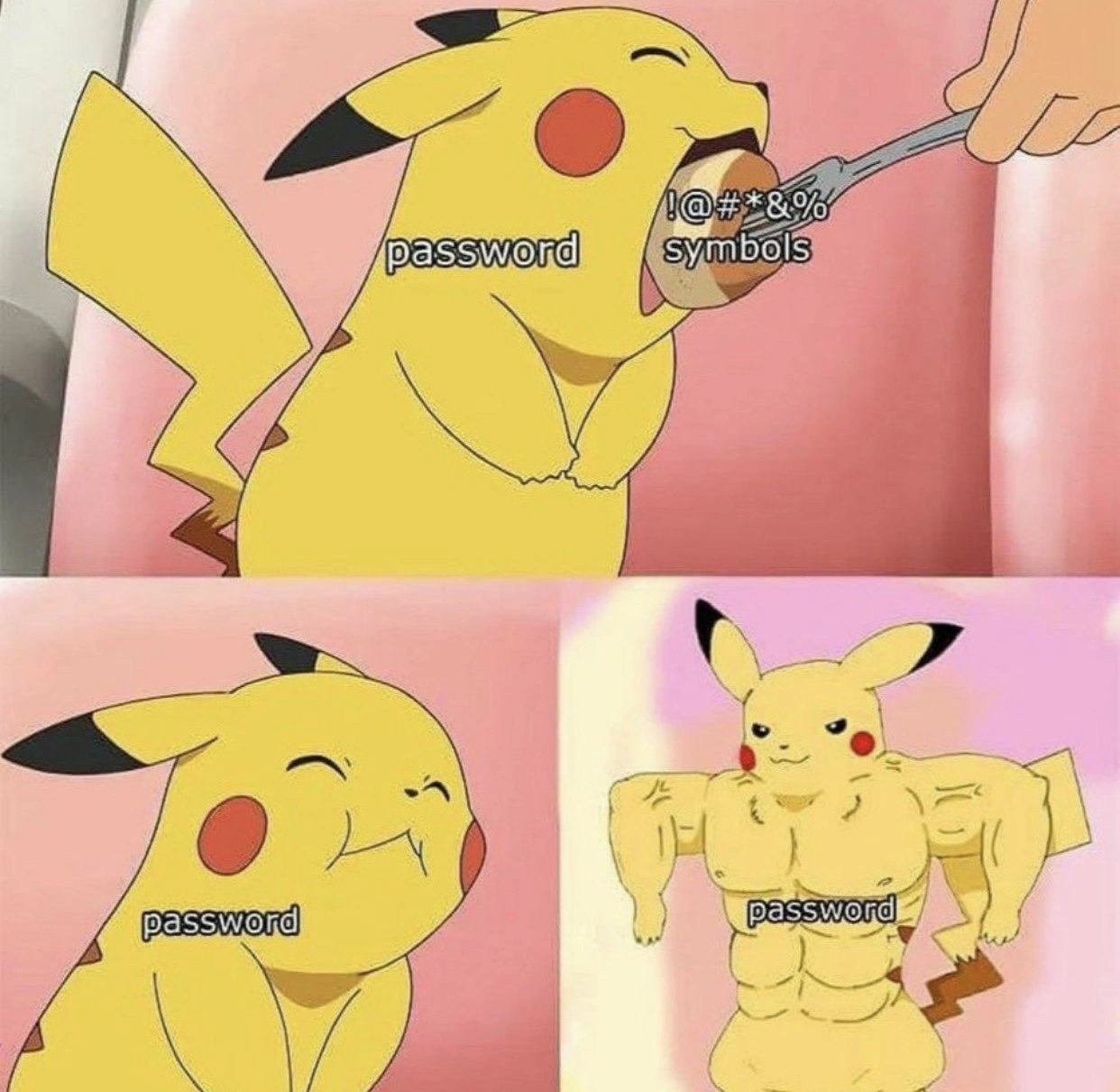
Imagine you have a little hero who isn’t very strong at first. Then you feed them a secret magic food, and suddenly they turn into a muscle-bound superhero! 💥 That’s exactly the joke here. The cute yellow character (Pikachu from Pokémon) is like a plain password – kind of weak by itself. The “special characters” (funny symbols like ! or @ – think of them as a secret spice or ingredient) are the magic food. In the picture, Pikachu eats those special symbol snacks, and POOF! he becomes super buff and powerful.
Why is this funny? Because it’s a big, silly change. We don’t normally see Pikachu with bulging muscles, just like we might not expect that simply adding a tiny symbol to a password can make it much safer. It’s the surprise of the transformation that makes us laugh. It’s like watching your small friend eat a special spinach and instantly grow superhero muscles – a crazy cartoon moment!
What it’s trying to tell us in a simple way is: adding a little extra (the secret ingredient) to your password makes it much stronger. In real life, that means if you include some unusual characters or symbols in your password, it’s a lot harder for any bad guy to guess it. So, the meme uses a funny Pikachu example to share a basic idea: give your password a special treat (like !@#&), and it will turn into a strong protector for you, just like a Pikachu turning into a mighty champion. 💪
Level 2: Symbols to the Rescue
Let’s break down what’s happening in this meme in simpler terms. Passwords are like the secret keys you use to unlock your accounts (email, games, etc.). A strong password means it's hard for someone else (or a malicious computer program) to guess. In this meme, Pikachu represents a password. In the first panel, Pikachu is normal and labeled "password," which stands for a plain or weak password (for example, something easy like "pikachu" or "abc123"). The hand on the right is feeding Pikachu a spoon labeled !@#*&% symbols. Those weird characters !, @, #, *, &, % are examples of special characters. Special characters (also called non-alphanumeric characters) are basically anything that’s not a letter (A-Z or a-z) or a number (0-9). So things like !, %, $, ?, & are all special characters.
In the second panel, Pikachu (the password) is chewing on these special characters — meaning the password is now including symbols as part of it. Think of a password like "pikachu!$" instead of just "pikachu". The Pikachu’s puffed cheeks indicate the password is processing or taking in these extra characters. In real life, when you create a password and add some symbols to it, you’re making it more complex. You might notice when signing up on some website, as you start adding a mix of uppercase letters, numbers, and symbols, a little password strength meter might go from "weak" to "strong." That’s exactly what’s being illustrated.
Now the third panel is the payoff: Pikachu turns into a ridiculously muscular version of itself, and it’s still labeled "password." This exaggeratedly buff Pikachu represents a very strong password. The meme is saying: if you feed your password some special symbols, it will become super strong! In tech terms, adding various character types (like symbols) increases the password strength or entropy, making it much harder for a hacker to crack. Hackers often use automated programs to try millions of guesses (this is called a brute force attack). A simple password (just letters or a common word) is much easier for those programs to guess. But a password with a mix of letters, numbers, and symbols is like a tough puzzle – there are so many combinations that guessing it becomes much, much harder.
Let’s define a few key terms and ideas here in a newbie-friendly way:
- Password Complexity Requirements: Many systems have rules for passwords, like "must be at least 8 characters and include a number and symbol." These rules are there to ensure you don’t choose a password that’s too easy to guess. The meme’s spoonful of symbols is referencing that rule about special characters.
- Weak Passwords: These are passwords that are easy to guess. Examples are
"password"(literally the word "password" – super common!),"123456", or"qwerty". Even"pikachu"as a password is considered weak because it’s a common name/word. Hackers try these first. Adding a symbol or number to them, like"pikachu!"or"pikachu1", makes them a bit better but still not ideal if it’s a known word. - Strong Passwords: A stronger password might look random, like
"Pik@Chu$19"or something not related to a real word at all, like"xYz!#5L9". These have a mix of character types. The reason they’re stronger is there are more possible combinations a hacker has to go through. It’s like having a lock with many different strange-shaped keys versus a simple lock that any small key could open. - Security Best Practices: This means the recommended ways to keep things secure. For passwords, best practices include using a mix of characters, making the password long (more characters is generally better), and avoiding obvious words or personal info. Another best practice is to use a password manager, which is a tool that can generate and remember really complex passwords for you so you don’t have to memorize
X7f!k&2Z-type gibberish. - Security vs Usability: Sometimes, making something very secure can make it a bit harder to use. Have you ever created a password so complicated that you ended up forgetting it? 😅 That’s the usability problem. The meme touches on this indirectly: sure, a buff password with tons of symbols is secure, but it might be harder to remember or type. There’s a balance to be found.
In summary, the second level of this analysis is that the meme is a fun visual metaphor: special_characters_in_passwords are like power food for your password. Just as Pikachu becomes super-powerful after eating the special food, a password becomes super strong (harder to break) after adding those symbols. It’s a lighthearted way to remind developers (and everyone) about security awareness: use a variety of characters for a safer password! The image communicates that lesson in one glance, using a beloved Pokémon character to make it memorable.
Level 3: Symbolic Power-Up
For veteran developers and security folks, this Pikachu meme lands a punch because it satirizes the almost magical reverence we give to special characters in passwords. We’ve all encountered those password complexity requirements: “must include at least 1 uppercase letter, 1 number, and 1 special symbol.” The meme takes that idea literally: feed a plain password some !@#*&% and suddenly it evolves into its superhero form. It’s like watching Pikachu gulp down a protein shake of ASCII symbols and emerge looking like a boss. 😄
Why is this funny? Because it hits on a shared experience in tech: the belief (often mandated by policy) that sprinkling a few symbols instantly transforms a weak password into an unbreakable one. The first panel shows a cute, unimposing Pikachu labeled "password" — think of a basic password like "pikachu" or heaven forbid, "password123". Along comes the spoonful of special characters (those weird symbols many people grudgingly add), corresponding to, say, changing "pikachu" into "Pikachu!" or "pik@chu!". The second panel (Pikachu chowing down with cheeks full) perfectly captures what happens when we force-feed a password these requirements: the password is digesting that complexity rule. Then the final reveal: Pikachu is absolutely ripped and labeled "password" – the password is now deemed “STRONG” 💪. It’s a tongue-in-cheek visualization of what corporate password meters and security rules do: go from red to green strength status as soon as you’ve thrown in that one special symbol. Authentication systems often give disproportionate weight to such symbols, and this meme winks at that fact.
Industry satire: Seasoned devs know that while adding ! or # does improve a password’s strength (by increasing entropy), it’s not a silver bullet. Yet, we’ve all seen environments where users take a weak base word and just tack 123! at the end because the policy demanded a number and symbol. (Looking at you, Summer2021! 😏) The meme exaggerates this common quick fix to comedic effect. Pikachu turning buff is how we feel when we finally satisfy that irritating password rule: “Boom, now I’m secure!”. In reality, of course, attackers anticipate these patterns. An experienced developer might recall the famous XKCD comic where "Tr0ub4dor&3" (which has uppercase, numbers, and a symbol) was actually far weaker than a longer passphrase like "correct horse battery staple". So while the meme praises symbols as a power-up, in practice we chuckle because we know length and unpredictability matter more. It’s funny and a bit ironic – the security best practice of including symbols is necessary advice to users, yet we also know it’s an oversimplification.
There’s also a nod to security vs usability here. Forcing people to include quirky symbols can lead to frustration or clever workarounds. Ever been forced to change your password every 90 days and you end up with Password1!, Password2!, etc., just incrementing a number? Yes, it’s a thing. We laugh (perhaps a bit bitterly) because we’ve done it or seen it. The meme’s buff Pikachu is that ideal strong password we envision, but behind the scenes, the real Pikachu might be cringing at having to remember all these special ingredients. Experienced devs recognize that while the security awareness message (“use special characters!”) is sound, it’s only one piece of the puzzle. You still need decent length, no common words, maybe even multi-factor authentication on top. And don’t forget the human element: a credential management strategy like using a password manager can achieve true strength without relying on memory gymnastics.
To sum up the senior perspective: this meme humorously simplifies a nuanced topic. It’s poking fun at the almost ritual significance of special chars in passwords by visualizing them as literal power food. We find it funny because it’s too real — countless IT policies and signup forms reduce password strength to a checklist of symbols and numbers. The shared joke is that feeling of “Ah, just add an exclamation mark and now I’m safe” that we know is only partially true. The Pikachu meme takes that moment and makes it absurd (tiny Pikachu to muscle-bound Pikachu), which is exactly how adding one character can feel when the password meter suddenly flashes GREEN. For those of us who’ve been in the trenches of authentication systems, implementing password validators or dealing with users who forget their fancy passwords, this meme is a perfect light-hearted encapsulation of our collective experiences. It acknowledges the value of complexity while giving us a wink that one little symbol might be treated as a miracle cure in the rulebook. And hey, at the end of the day, we’d rather have a buff Pikachu password than a scrawny one, even if it’s not the whole story!
def strength_meter(password):
# Very naive strength check for demonstration:
if any(not c.isalnum() for c in password): # contains a symbol?
return "Strong"
else:
return "Weak"
print(strength_meter("pikachu"), "->", strength_meter("pikachu!"))
# Output: Weak -> Strong
(Above: a tongue-in-cheek example of how a simplistic system might judge password strength. Simply adding "!" flips the verdict from weak to strong, just like our buff Pikachu scenario.)
Level 4: Exponential Gains
From an information-theoretic standpoint, this meme highlights password entropy — essentially the measure of unpredictability in a password. Adding special characters (the !@#*&% spoonful in the image) super-sizes the set of symbols a password can include, causing an exponential explosion in the number of possible passwords. In concrete terms, if a password uses only lowercase letters, there are 26 choices for each character. Allow uppercase and digits, it jumps to 62. Throw in punctuation and other symbols, and you're looking at around 94‐95 options per character. The total number of combinations is N^L (N choices ^ length L). A larger N means a vastly larger search space:
- Using only lowercase letters (26 options) for an 8-character password: 26^8 ≈ 2e11 possibilities
- Using letters + digits (62 options) for 8 chars: 62^8 ≈ 2.2e14 possibilities
- Using letters + digits + symbols (~95 options) for 8 chars: 95^8 ≈ 6.6e15 possibilities 😮
Each character from a bigger alphabet adds bits of entropy. We can calculate the entropy in bits as $L \times \log_2(N)$. For example, one character of a 95-character set has ~6.57 bits of entropy vs ~5.95 bits for a 62-character set. Over many characters, those extra bits stack up. Feeding a password more character variety is like giving it an entropy boost: the password’s theoretical strength grows buff, just like Pikachu turning into a muscle-bound beast in the third panel.
But why does this matter? Because attackers often attempt brute-force attacks, systematically guessing passwords by trying all combinations. A password drawn from a larger set of symbols is exponentially harder to guess by brute force because there are just so many more combinations to churn through. It’s as if, in the attacker’s eyes, the password went from a normal Pikachu to a swole Pikachu that can withstand attacks much longer. For instance, a simple 6-letter lowercase password might be cracked in minutes, while a 6-character password that includes a mix of symbols could take years or millennia (depending on computing power) to brute-force exhaustively. In security terms, adding those funky characters dramatically increases cryptographic strength: it’s the difference between breaking a tiny padlock versus a high-grade vault lock.
Now, a critical caveat in real-world credential management: all this holds if the password characters are truly random. If you just append ! to the end of a common word (like "pikachu!"), the pure math of $95^L$ possibilities doesn’t fully apply, because humans often follow predictable patterns. Attackers know this and will include common substitutions (like password! or Password1!) in their cracking dictionaries. Nonetheless, at a theoretical level, a password that freely mixes letters, numbers, and symbols is operating in a much larger combinatorial space. The meme humorously captures this theoretical truth – by visualizing a password bulking up on a diet of special chars – even if in practice a truly strong password also needs sufficient length and randomness. It’s a playful way to illustrate the math fact that more possible characters = more possible passwords, making your secret harder to uncover.
Description
A three-panel meme illustrates the concept of password strengthening using the Pokémon character Pikachu. In the top panel, a normal-looking Pikachu, labeled 'password,' is shown being fed a piece of food on a fork, which is labeled '!@#*&% symbols.' The middle panel on the left shows Pikachu looking content and chubby after eating, still labeled 'password.' The final panel on the right depicts a dramatic transformation: Pikachu is now incredibly muscular and buff, flexing its muscles, also labeled 'password.' This meme humorously visualizes how adding special characters to a simple password dramatically increases its strength and robustness, turning it from a weak credential into a strong one. It's a universally understood concept in cybersecurity, relatable to anyone who has had to comply with password complexity requirements, making a fundamental security principle accessible and funny
Comments
8Comment deleted
A junior dev's password is 'password'. A senior dev's password is what happens after that junior's password has been through three enterprise security audits and a SOC 2 compliance check
“Enterprise security in 2024: tack ‘!@#*&%’ onto ‘Winter2025’, watch the entropy calculator flex like Buff Pikachu - then commit it straight to GitHub and call it zero-trust.”
After 20 years in the industry, I've seen password policies evolve from 'password123' to 'p@ssw0rd123!' - and somehow we're still getting breached by teenagers with rainbow tables. Maybe the real security was the password managers we ignored along the way
Ah yes, the classic enterprise security strategy: force users to add '!' to 'Password123' and call it 'defense in depth.' Meanwhile, the real threat actors are laughing while running hashcat on your leaked MD5 hashes, completely unbothered by whether you used '@' or 'a'. But hey, at least we're NIST-compliant... from 2004
Every time the policy mandates one uppercase, one number, and one 'special', a compliance Pikachu gets swole while the attacker just replays the credential dump - NIST 800-63B has left the chat
Symbols bulk Pikachu like steroids, but sans Argon2id salting, one RTX 4090 still benches your 'P@ssw0rd!' in seconds
Password strength meters love feeding Pikachu punctuation until he looks swole; NIST says entropy wants length, the breach dump still reads “P@ssw0rd!”, so can we just do long passphrases + MFA + Argon2 and skip the punctuation diet?
But the database stores it in plain text Comment deleted