Skip to content
DevMeme
4712 of 7435
Operating-system backward-compatibility meme: Mac balks, Windows installs, Linux already has program
OperatingSystems Post #5163, on Apr 30, 2023 in TG

Operating-system backward-compatibility meme: Mac balks, Windows installs, Linux already has program

Why is this OperatingSystems meme funny?

Level 1: Three Friends and an Old Toy

Imagine you have three friends, and you want to play with a really old toy:

  • You ask the first friend (let’s call him Mac) if he can play with a toy that’s just a few years old. He freaks out and says, “No way! It’s too old, I don’t know how to play with that!” He’s like a kid who only likes brand-new toys and forgets the old ones, so he ends up upset when asked to use an older toy.

  • You then ask the second friend (Windows) if he can play with a toy from your parents’ time, something 25 years old. This friend smiles confidently and says, “Sure, no problem!” He takes the old toy, dusts it off, and plays with it as if it were new. He’s that easy-going friend who keeps all the old game consoles and can hook them up and they still work. Nothing fazes him — even if the toy is super old, he somehow can get it working and have fun.

  • Finally, you turn to the third friend (Linux) and ask about the same really old toy. This friend just laughs a little and says, “Oh, that? I already have it!” In fact, he opens his closet and the toy is sitting right there, ready to go. He’s like the friend who has a giant collection of every toy and tool ever made, so if you ever need something old, he’s got it handy. You don’t even need to teach him the game — he’s been playing with that toy forever.

Now, why is this funny? Because each friend’s reaction is so different!

  • The first friend (Mac) is picky and modern: he only likes new stuff and throws a fit with older things.
  • The second friend (Windows) is reliable and accommodating: even ancient toys are fine by him; he’ll make it work.
  • The third friend (Linux) is super prepared and old-school: he’s basically a walking museum of toys and already has whatever you ask for.

This is like how different computers or operating systems behave. Some won’t use older programs at all, some will, and some already come with those old programs. It’s humorous because it’s exaggerated but kind of true. We’re essentially laughing at how one “friend” says no, the second says yes, and the third says “I had it all along.” It’s the contrast — one refuses, one agrees, and one was never worried in the first place — that makes it silly and fun.

Level 2: Old Apps, New OS

Let’s break down what’s happening in simpler terms. This meme compares how three popular operating systems handle installing old software:

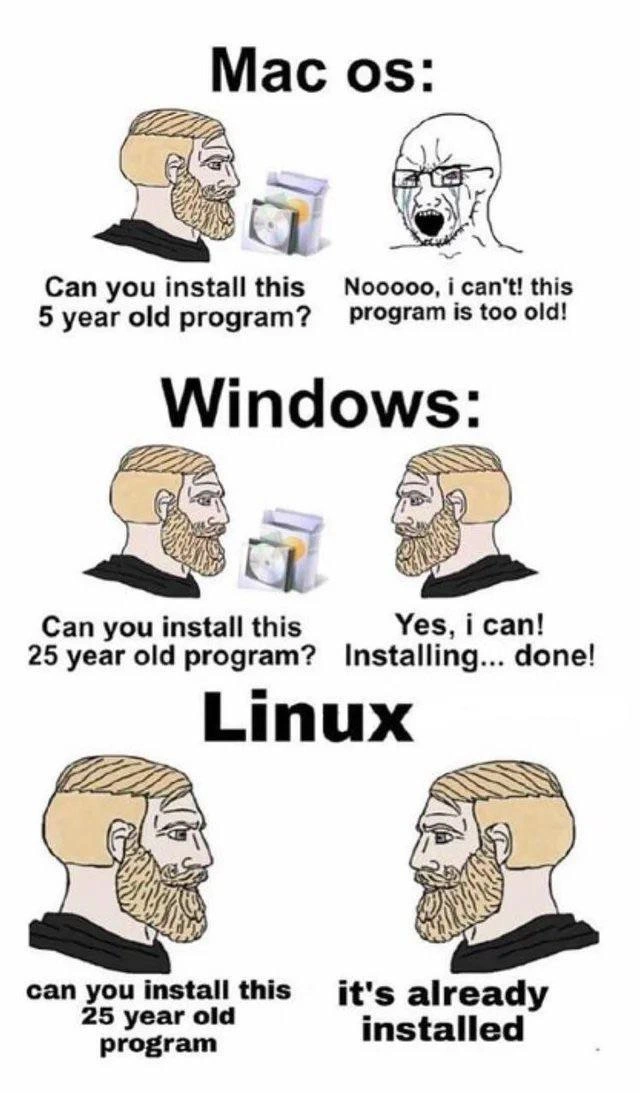
  • Mac OS: In the top panel, we see a label "Mac os:" and a conversation. The left character (with the blond beard) asks, “Can you install this 5 year old program?” The character on the right (representing macOS) is a crying Wojak face saying, “Nooooo, I can’t! This program is too old!” This dramatizes how macOS often doesn’t support older programs after a while. In real life, Apple’s macOS might refuse to run an application that isn’t up-to-date. For example, if you tried to run a Mac app from 2016 on a Mac in 2023, you might get an error. One reason is Apple removed support for 32-bit apps a few years ago, so any app not updated to 64-bit won’t open. Also, macOS updates sometimes require apps to be notarized or built against newer SDKs. The meme’s Mac character crying “this program is too old!” captures the frustration a user or developer feels when an older app simply won’t run on a new Mac. It’s like macOS is being picky: “Ew, that’s from 5 years ago — I don’t recognize it!” This is a common CompatibilityIssue Mac users joke about. If you’re a developer on Mac and you have an old tool (maybe a command-line utility or an app you haven’t updated), upgrading macOS might suddenly prevent you from using it. You’ll see dialogues like “App needs to be updated” or cryptic errors in Terminal. Essentially, macOS says “No” to older software unless it has been maintained.

  • Windows: The middle panel is labeled "Windows:" and shows the same blond-bearded character asking, “Can you install this 25 year old program?” The right-side character (Windows) calmly says, “Yes, I can! Installing... done!” Here, Windows is portrayed as happily running very old software. This reflects the reality that Windows has a strong focus on backward compatibility. A program from 25 years ago (say from 1998) was probably made for Windows 95 or Windows 98. Amazingly, many such programs can still run on modern Windows 10 or Windows 11. Windows often includes compatibility modes – you might have seen this when right-clicking an application’s .exe file and seeing options to run it as if it were on Windows XP or Windows 95. Microsoft really tries not to break old applications when they release new versions of Windows. For instance, if you had an old game or an old business program, there’s a good chance you can still install it or copy it over to a new Windows PC and it will work (maybe you have to click “Yes” on a couple of “Are you sure you want to run this?” warnings, but it works). The meme simplifies this as Windows happily saying “Installing... done!” without any drama. It’s funny because 25 years in tech is a long time – that’s several generations of software. The fact that Windows can accommodate that is both impressive and a little absurd. From a developer experience standpoint, if you wrote a Windows program many years ago, you’re often relieved (or surprised) that it still runs today without modifications. It’s a point of pride for Microsoft and a comfort for users who rely on legacy software.

  • Linux: The bottom panel is labeled "Linux" and again the left character asks, “Can you install this 25 year old program?” The right character (Linux) responds, “It’s already installed.” This is a punchline playing on the nature of Linux systems. Linux (really we mean GNU/Linux distributions like Ubuntu, Fedora, etc.) typically come with a lot of built-in software, much of it with a long history. A “25 year old program” could be something like a classic text editor, a shell utility, or some open-source tool that’s been around forever. In many cases, if it’s a well-known older program, a modern Linux distro might indeed include it by default or have it easily available via its package manager (like apt or yum). For example, Linux systems come with the GNU Core Utilities which include commands that have existed for decades. Or consider that most Linux installations include Python, which started in the early 1990s (over 25 years old). The meme takes this to an extreme joke: Linux saying “hah, that old program? I already have it.” It suggests that Linux is so laden with powerful tools and backward-compatible components that you don’t even need to ask — whatever tool you’re looking for might already be on the system. For a developer or user, this rings true when you do something like open a terminal on Linux and discover that even obscure classic commands work out-of-the-box. Linux also benefits from open source: if the program isn’t installed, you can usually download it easily, or compile the old source code on a new system. So Linux provides backward compatibility in a slightly different way: through continuity of software availability. It might not run a 25-year-old binary automatically unless you have the right libraries, but it likely has the source code or a recompiled version of that program available. The meme simplifies that whole idea into a one-liner: “it’s already installed.” This portrays the Linux user (or system) as extremely prepared and unapologetically old-school friendly.

Why is this funny and relatable? Because each OS has a reputation among developers:

  • MacOS is known for fancy modern tech but not caring about old stuff.
  • Windows is known for carrying all the old stuff forward so things still run.
  • Linux is known for having roots in very old Unix traditions, so it’s comfortable with old tools.

If you’ve ever tried to get an old program working:

  • On a Mac, you might have had to jump through hoops (or it was impossible without finding an update or workaround like running an older OS in a virtual machine).
  • On Windows, you might have been surprised: “Wow, it installed right away!” perhaps with just a minor compatibility tweak.
  • On Linux, you might discover the thing you wanted was either already present or trivially obtainable with a single command. Sometimes you type an old command expecting it to fail, but the system responds because the utility has been there all along.

The Wojak (crying) vs Chad (confident) meme format amplifies these stereotypes. The beard chad character usually represents someone or something that is ultra-competent and unfazed. Here, Windows and Linux are drawn as the confident Chad, while macOS is drawn as the crying, complaining Wojak when faced with legacy software. It’s a visual way to say:

  • Mac is the “fragile” one regarding old stuff (crying “Nooo!”).
  • Windows is the confident guy who gets it done.
  • Linux is the even more confident guy who had it done yesterday.

This resonates with developers’ lived experiences (hence the RelatableHumor tag). The meme is categorized under OperatingSystems and DeveloperExperience_DX because it’s essentially about how developers (or any power users) experience using different OSes when dealing with older programs. BackwardCompatibility is the central concept: that means an operating system’s ability to run programs from an earlier era. Mac, Windows, and Linux each handle that differently, and that’s precisely what each panel shows in a funny, exaggerated way.

Some of the terms and context here:

  • Installing_old_programs: literally the scenario of trying to set up old software on a new system.
  • OS_compatibility_jokes: jokes about what each operating system can or can’t do, based on their design choices.
  • Wojak_meme_format & beard_chad_character: A popular meme style. Wojak is usually a simple drawn face often used to express emotions like crying or anger. The “beard Chad” (a muscular blond bearded guy) is the meme figure for someone who is stoic, confident, and often used to depict the idealized or “cool” version of something. In this meme, macOS is depicted as a Wojak (crying that it can’t do something), whereas Windows and Linux are depicted as Chad-like characters who have no issue with the task.

In plainer terms:

  • Mac saying “this program is too old!” reflects that sometimes on a Mac you just can’t run older software. It’s not backwards compatible in some cases.
  • Windows saying “Installing... done!” reflects that Windows often can run very old software — it installs fine and works, even if it’s from a long time ago.
  • Linux saying “it’s already installed” is a tongue-in-cheek way to say Linux not only supports old software, it might ship with a lot of those classic tools built-in, due to its Unix heritage and open-source nature.

So, a junior developer or a casual tech user would see this meme and learn:

  1. macOS might force you to update your apps — it’s not great with old stuff.
  2. Windows values backward compatibility — old apps often still run.
  3. Linux systems include many long-standing utilities — an old app or its functionality might already be there in some form.

If you’ve ever switched from one OS to another, you might have felt these differences. It’s simultaneously an informative comparison and a joke. You can imagine a conversation:

  • Person A: “Why won’t this Mac app open? It’s only a few years old!”
  • Person B: “Heh, Windows would still run something from the 90s, no sweat.”
  • Person C: “On Linux, that tool is probably a default program that’s been around forever.”

The meme basically puts that conversation into a simple comic strip. And as exaggerated as it looks (5 years vs 25 years gap), there’s truth there that someone new to these OSes can understand with a little context: different operating systems treat old programs very differently. And that’s exactly what this meme is poking fun at.

Level 3: Survival of the Oldest

At the most technical level, this meme is highlighting backward compatibility philosophies across three major operating systems: macOS, Windows, and Linux. Each panel personifies an OS and its response to running an old program. The humor stems from the stark contrast in legacy support:

  • macOS (Apple) is depicted as the crying Wojak, unable to run a “5 year old program.” This is a jab at Apple’s tendency to drop support for older software and architectures relatively quickly. For example, in 2019 macOS Catalina eliminated all support for 32-bit applications. An app from just 5 years prior (if it wasn’t updated to 64-bit or to meet new code-signing requirements) would abruptly stop working. Apple frequently deprecates old frameworks and APIs (remember the transition from Carbon to Cocoa, or the removal of OpenGL in favor of Metal), which means an application that hasn’t been maintained might not launch on newer macOS versions. macOS will literally tell you “This application needs to be updated by its developer” or throw an error. In developer terms, Apple prioritizes a clean modern ecosystem over maintaining ABI compatibility with ancient binaries. It’s a classic case of planned obsolescence in the name of progress: by forcing updates, Apple moves the platform forward (often at the cost of breaking older apps). The meme exaggerates it as “Can’t run a program from a mere 5 years ago? Noooo!” – reflecting many developers’ (and users’) real frustration when a once-trusted tool or app suddenly refuses to open after a macOS update. Apple’s own history is full of such compatibility breaks: the shift from PowerPC to Intel CPUs in 2006 (with Rosetta emulation as a temporary band-aid), then Intel to ARM (Apple Silicon) in 2020, and the dropping of 32-bit support, each left some older software stranded. The crying Wojak represents that “Oh no, my old setup/installer is now useless” feeling. It’s an OperatingSystems in-joke that if you ask macOS to support something from even the last decade, it might just balk and say “program too old!”.

  • Windows (Microsoft), in the middle panel, is the opposite story. The meme shows Windows confidently responding “Yes, I can! Installing... done!” when asked to install a 25 year old program. Twenty-five years is an eternity in tech (25 years ago we’re talking Windows 95 era), yet Windows famously bends over backwards to run ancient software. This is true to life: one of Microsoft’s core philosophies has long been backward compatibility – ensuring that applications built for older versions of Windows continue to run on the latest versions. Windows has carried forward the Win32 API from the Windows NT days (1990s) up through Windows 10 and 11. In many cases, you can take a binary from the late 90s or early 2000s and it will just work on a modern Windows machine. They even include shims and compatibility modes for software that expects outdated behavior. There are legendary anecdotes of Microsoft engineers inserting special-case code so that very old programs or games wouldn’t break. For example, simulated older DirectX features, or hacks to support applications that relied on now-fixed bugs. Windows still has the WOW64 subsystem (Windows-on-Windows) to run 32-bit apps on 64-bit Windows, and in older 64-bit Windows they even had “NTVDM” to run 16-bit DOS apps. It’s as if Windows carries a massive library of legacy code in its backpack. This “Yes, I can!” attitude is represented by the calm, bearded "Chad" character. He’s not panicking; he just installs the old program and says “done!” like it’s no big deal. This reflects a shared developer experience: we’ve all seen that one clunky VB6 app or ancient game from decades ago that still launches on a modern Windows 10/11 system. It might run in a weird compatibility mode (you might see Windows 95 or XP compatibility mode in file properties), but the key is it runs. Microsoft has long viewed backward compatibility as a key feature to keep businesses on Windows – enterprises have mission-critical apps from the 90s and Microsoft doesn’t want that to block OS upgrades. The meme exaggerates it to 25 years for comedic effect, but it’s not far off. A Windows developer or power user will knowingly chuckle because they likely have a personal story of an ancient .exe that still miraculously works. Of course, this comes at a cost: Windows accumulates a lot of legacy baggage internally (lots of old DLLs and support code) to maintain this record of not breaking old apps. But from the user perspective, it’s a “Chad” move – BackwardCompatibility for the win. You can almost hear a Windows engineer saying, “No app left behind.”

  • Linux (the broad ecosystem of Linux distributions) is depicted in the meme’s third panel as the ultimate Chad move: when asked “Can you install this 25 year old program?”, Linux casually answers “It’s already installed.” 😂 This plays on a few layers of humor. First, many tools and programs that are decades old are pre-installed or standard on modern Linux systems. Linux (and Unix before it) has a tradition of including timeless command-line utilities and maintaining POSIX standards. A lot of the userland programs on a typical Linux distro (like Ubuntu or Fedora) trace their lineage back to the early days of Unix. For example, the text editor vi (or its improved version Vim) comes from 1976 and is likely present on your Linux system out of the box. The grep command (for searching text) is from the 1970s. The GNU coreutils (which provide basics like ls, cp, grep, etc.) have been around for decades. So if the “25 year old program” in question is some Unix legacy utility or a classic open-source tool, chances are your Linux distro already ships it by default. Hence the joke: Linux not only can run a 25-year-old program, it might already have it ready to go. No installation needed! This reflects the strong backward compatibility at the source level: because Linux is open-source, even if a program isn’t pre-installed, you can usually find its source code and compile it on a modern system, or install it via the package manager. The Linux kernel and GNU libraries strive for source-level compatibility and never break user-space intentionally, meaning a program written decades ago in C can often be recompiled today with minimal changes. In fact, many Linux distributions still package very old software for nostalgia or specific use. (Ever installed bsdgames or run the classic text adventure Zork? It’s from the 1970s, and yes, it runs on Linux). Technically, running a 25-year-old binary (compiled executable) might require some compatibility libraries if the binary expects old versions of glibc or other libraries, but the meme glosses over that. The spirit is: if it’s a known piece of software from the past, Linux likely has it or an equivalent in its repositories, if not already sitting in /usr/bin. The “already installed” line also pokes fun at the Linux culture of having everything and the kitchen sink available via the command line. Linux power users often boast that they have a tool for every task already at their fingertips. It’s a bit of a flex: DeveloperExperience_DX on Linux can sometimes mean less fuss obtaining tools, since so many are included or easily accessible via package managers like apt or yum. In the meme, the Linux Chad exudes smug confidence – he didn’t even need to go through an install process. This tickles developers who have experienced the convenience of Linux’s package ecosystem (or conversely, have struggled on other OSes to find a compatible version of an old utility).

In summary, the meme humorously contrasts OS compatibility ethos:

  • macOS“Wait, that’s old, I don’t support it!” (strict, forward-looking, but sometimes frustratingly so).
  • Windows“Sure, we support it – no problem!” (obsessively backward-compatible, carrying decades of legacy support).
  • Linux“We’ve always had it.” (built on decades-old foundations, open-source continuity means old tools never really disappear).

From a senior developer perspective, this is too real. We’ve seen Apple make beloved tools unusable overnight (RIP 32-bit apps), we’ve watched Windows successfully run even our prehistoric school projects, and we know that on Linux, a lot of “new” stuff is built on very old, reliable code that’s likely already sitting in the system. The meme’s Wojak/Chad format exaggerates the personalities of these OSes – Mac being the finicky one crying “Nooo!”, Windows being the dutiful workhorse, and Linux being the uber-prepared guru. It’s funny because it condenses real-world tech CompatibilityIssues into a simple comic, and any developer or IT veteran instantly recognizes the truth in it.

To illustrate the reality behind the joke, consider what happens if you actually try to run an old program on each OS:

# macOS trying to launch a 32-bit executable on a modern 64-bit-only system
$ ./someOldApp  
zsh: bad CPU type in executable: ./someOldApp  
# (Translation: macOS refuses to run this older binary - "too old!")
REM Windows running a decades-old .exe (it just works, in many cases)
C:\> someOldApp.exe  
... [The program launches successfully on Windows] ...
# Linux checking for an ancient tool that might already be present
$ which someOldTool  
/usr/bin/someOldTool   # It's already installed on Linux by default!

These examples mirror the meme’s panels: macOS throws an error, Windows proceeds to install/run it, and Linux just points to it sitting there in the filesystem. The shared laughter here comes from experience: every developer who’s juggled multiple OS environments has run into the os_compatibility_jokes portrayed. It’s RelatableHumor because perhaps you tried to resurrect a 10-year-old project on your Mac and macOS said “Nope.” Then you tried on Windows, and it chugged a bit but got it running. Meanwhile, your Linux box not only ran it, but maybe had an even older version pre-packaged.

Ultimately, the meme is commenting on OperatingSystems design trade-offs:

  • Apple optimizes for security and modernity over legacy (to the chagrin of devs with old dependencies).
  • Microsoft expends engineering effort to accommodate legacy software (sometimes at the cost of elegance – Windows is infamous for carrying old DLLs and quirks eternally).
  • Linux, as a community-driven OS, embraces continuity and open-source availability, so older software either remains available or can be rebuilt from source, preserving the past within the present. In the Linux world, if it ain’t broke (and even if it is), someone will fix it and keep it in the repos.

This contrast is funny because it’s quite accurate and well-known in the tech community. We laugh, but with a nod of agreement: “Yep, that’s Mac/Windows/Linux for you.” The Wojak vs Chad meme format is the perfect vessel here – it paints Mac as the fragile “modern but not legacy-friendly” guy, Windows as the robust “backwards compatible champ,” and Linux as the ultra-confident “already prepared” veteran. It’s a lighthearted take on what could otherwise be a dry topic (OS backward compatibility), turning it into a cartoon scenario every developer can chuckle at knowingly.

Description

Three stacked meme panels compare software compatibility across Mac, Windows, and Linux using the Wojak vs. "Chad" cartoon format. Panel 1 is labeled "Mac os:"; the blond-bearded character on the left asks "Can you install this 5 year old program?" while a crying Wojak on the right replies "Nooooo, i can't! this program is too old!". Panel 2 is headed "Windows:"; the same left character asks "Can you install this 25 year old program?", and the right character calmly answers "Yes, i can! Installing... done!". Panel 3 shows the heading "Linux"; the left figure repeats "can you install this 25 year old program" and the right figure responds "it's already installed". The joke highlights differing approaches to backward compatibility: macOS often deprecates older binaries, Windows famously supports decades-old executables, and Linux distributions frequently ship tried-and-true CLI tools by default
Comments

49
Anonymous ★ Top Pick Choosing an OS is basically a time-travel exercise: macOS makes you port code every two WWDCs, Windows will happily spin up a 1997 COM DLL in a UAC prompt, and Linux just shrugs - “it’s in /usr/bin, same build we shipped when Slashdot was cool.”
  1. Anonymous ★ Top Pick

    Choosing an OS is basically a time-travel exercise: macOS makes you port code every two WWDCs, Windows will happily spin up a 1997 COM DLL in a UAC prompt, and Linux just shrugs - “it’s in /usr/bin, same build we shipped when Slashdot was cool.”

  2. Anonymous

    The Linux box saying "it's already installed" because someone compiled it from source in 1999 and nobody knows where it lives, what it depends on, or why removing it breaks the print spooler

  3. Anonymous

    This perfectly captures the architectural philosophy divide: macOS treats backward compatibility like technical debt to be aggressively deprecated (looking at you, 32-bit app purge), Windows maintains a compatibility shim layer so deep you can still run Win95 binaries (because some Fortune 500 still needs that VB6 app), while Linux ships with tools from the 70s because 'if it ain't broke, it's in /usr/bin'. The real joke? Senior engineers have battle scars from all three: migrating legacy macOS apps post-Catalina, maintaining Windows XP compatibility matrices for enterprise clients, and discovering that production server is still using a Perl script from 1998 that nobody dares touch

  4. Anonymous

    Windows layers compat shims like an onion of regret; Linux's glibc ABI just says 'still good since '93'; Mac: time to rewrite in SwiftUI

  5. Anonymous

    macOS treats ABIs as deprecations, Windows treats Win32 as an SLA, and Linux treats POSIX as whatever lives in /bin

  6. Anonymous

    macOS deprecates it every WWDC, Windows keeps the Win32 ABI on life support since 1995, and Linux already shipped it as a symlink in /usr/bin

  7. @RiedleroD 3y

    my ass, windows can't do shit with programs from even the xp era sometimes

    1. @ZgGPuo8dZef58K6hxxGVj3Z2 3y

      What progra?

      1. @RiedleroD 3y

        I don't remember which one, but it's either spider/solitaire or minesweeper

        1. @RiedleroD 3y

          wine can run all three fine (you need cards.dll for spider/solitaire)

        2. @ZgGPuo8dZef58K6hxxGVj3Z2 3y

          Bruh even the W3.1 version runs on W11

          1. @RiedleroD 3y

            wait a sec let me test in my VM

            1. @ZgGPuo8dZef58K6hxxGVj3Z2 3y

              I even play win vista chess on my w10 machine

          2. @RiedleroD 3y

            huh, I could swear it didn't work last time I tried. Maybe it was something else…?

            1. @ZgGPuo8dZef58K6hxxGVj3Z2 3y

              Windows has exterme compatibility with old stuff. I am pretty sure if something doesn’t work and is not a mess in code then you just have to add the optional feature in settings. (Deprecated shit gets often optional feature)

          3. @RiedleroD 3y

            ahh it was full tilt pinball

            1. @ZgGPuo8dZef58K6hxxGVj3Z2 3y

              That works too you just need the right folder

              1. @RiedleroD 3y

                wdym?

            2. @ZgGPuo8dZef58K6hxxGVj3Z2 3y

              Where is that from?

              1. @RiedleroD 3y

                internet archive iirc

            3. dev_meme 3y

              Have you tried to right-click exe and enable compatibility mode in properties of it?

              1. @RiedleroD 3y

                I think so, but I already shut my VM off & I don't want to start it again

    2. @doodguy1991 3y

      Next time don't run shit with 16-bit code. That's not an OS issue that's a hardware issue. If you need 16-bit code run that badly just use Windows 10 32-bit

      1. @RiedleroD 3y

        yeah or wine I guess

        1. @RiedleroD 3y

          like I already do

      2. @NevermindExpress 3y

        wine and otvdm can run tho

        1. @doodguy1991 3y

          Idk how WINE does it but in theory you're not supposed to be able to run 16-bit code natively in 64-bit mode. Like you can't modify the AH register in 64-bit mode for example, but in 32-bit mode you can.

          1. @RiedleroD 3y

            Linux don't care 😎 they probably just transpile it

      3. Deleted Account 3y

        Use dosbox lol

  8. @RiedleroD 3y

    literally never had that issue

    1. @RiedleroD 3y

      oh, actually, ubuntu has both problems sometimes

    2. @GreatFireDragon 3y

      Happened to Linus https://youtu.be/0506yDSgU7M?t=596

      1. @RiedleroD 3y

        oh my god get this clown out of my face

        1. @RiedleroD 3y

          linus is a stupid mfer that can't do anything right when it comes to software

      2. @kandiesky 3y

        Linus is stupid

  9. Deleted Account 3y

    doas

    1. @RiedleroD 3y

      please

      1. @sylfn 3y

        please rm -rf /*

        1. Deleted Account 3y

          alias please=doas

  10. @RiedleroD 3y

    it doesn't on my machine. neither regular steam nor steam-native

  11. @Araalith 3y

    Linux-Reality: - Can you install this one year old program? - Yes... oh no, it's removed from main repository. - Use optional. - Yes... oh no, there are obsolete dependencies. - Install them manually then. - Yes! Oh no, some of them requires kernel featurs that were already disabled. - Enable and rebuild the kernel - Sure! Oh no, some features were completely removed or renamed... - I found an instruction for you. You should... (6 hours later) - ...and now even vim causes Kernel Panic

    1. @prirai 3y

      Which program? And why do you need it if it has no support and even the kernel has disabled features? Also, why not use a chroot, LXC or a VM?

      1. @Araalith 3y

        Yes-yes, the famous linux-communities motto: if something is broken - it's "not needed". Btw, chroot doesn't help when it comes to kernel features. VM can help sometimes for stand-alone applications that don't depend on PCI hardware. Meantime I just found my old Delphi program compiled in 1998. It works on Windows 11.

        1. @prirai 3y

          That's good then. Could be just the way Windows and Linux handle things. How do you execute this. Is it plain machine code you are talking about? I don't know much about Delphi.

        2. @Saeid025 3y

          Windows is a hell of compatibility That's why even looking at windows codes sucks You will see lots of #ifdef and... Those poor windows developers that have to work on these codes...

          1. @saniel42 3y

            I don't see why users should care about it

    2. @RiedleroD 3y

      actual linux reality: - can you install this 20 year old game? - hmm it's not in the main repositories - oh, it's in the AUR - only 4 dependencies, nice. installed. works.

      1. @RiedleroD 3y

        talking about frozen bubble, which had its last update in 2008 btw

      2. @endisn16h 3y

        * in the other portage ovelay

Use J and K for navigation