Bracing for the Build Script
Why is this BuildSystems CICD meme funny?
Level 1: What Could Go Wrong?
Imagine you spent an hour quickly building a tall tower out of toy blocks. You were in the zone, stacking one block after another without checking if each block was steady. Now the tower is done, and it's time to see if it stands up. You step back to look at it, but you're so unsure that you even cover your ears because you half-expect the whole thing to come crashing down with a loud bang! at any second.
That’s exactly how the developer in this meme feels. The "tower of blocks" is like the hour of coding changes they just piled up. Running the build is like letting go of the tower to test if it stays standing. The developer is smiling nervously at first (thinking "Alright, moment of truth... let's see if this holds up"), and then covering their ears because they suspect it’s all going to collapse into a mess of errors (the loud crash).
In everyday terms: you do a lot of work without double-checking it, and now you're a bit scared to see the result because you know there might be mistakes. It's funny and relatable because we've all been there in some way. It's that mix of hope and worry: you hope everything will be fine, but you're prepared for it to possibly go wrong. The meme makes us smile because even a kid building a block tower knows that feeling — when you step back and think, "Uh oh, I have a bad feeling this might fall apart!"
Level 2: Build Jitters
Let's break it down in simpler terms. When a developer writes code in a Node.js project (Node.js is basically a program that lets you run JavaScript outside of a web browser, often used for building tools and servers), they often have to "build" the project before it can run. In a modern frontend application, "building" typically means using tools to combine and process all your code. This is usually done with a command like npm run build. Here, npm stands for Node Package Manager (though it manages more than just packages – it also runs tasks for us by reading scripts defined in our project).
So, what happens when you run npm run build? A few things:
- Compilation/Transpilation: If the project is written in a newer version of JavaScript (or a language like TypeScript or JSX for React), the build will use a tool (like Babel for ES6+ or the TypeScript compiler) to convert that code into plain old JavaScript that browsers can understand. This is called transpiling. If there's a mistake in your code (say you used a new language feature incorrectly or have a syntax error), the compiler/transpiler will stop and throw an error.
- Bundling: Tools like webpack gather all your modules (all the
.jsfiles, CSS, images, etc.) and bundle them into a few output files (often just one big file) so the app can load efficiently in the browser. During this bundling, webpack checks that all the pieces fit together. For example, if you tried toimporta file that doesn't exist or you spelled a filename wrong, webpack will complain with an error like "Module not found" because it can't find that piece. - Other Steps: The build might also shrink (minify) the code to make it run faster, or run checks like a linter (which enforces code style rules), or even run some tests. Any issue in these steps will also produce errors or at least warnings in the console.
Now, imagine you've been coding for a full hour without ever running the code or the build in between. Maybe you were on a roll adding a new feature or changing several files at once. A lot can happen in that time: a variable name might have been changed in one file but not updated in another, or you might have temporarily disabled something and forgotten to re-enable it. Perhaps you installed a new npm package and didn't configure it exactly right. When you finally save all your files and run npm run build to see if everything works, all those little mistakes are going to surface at the same time.
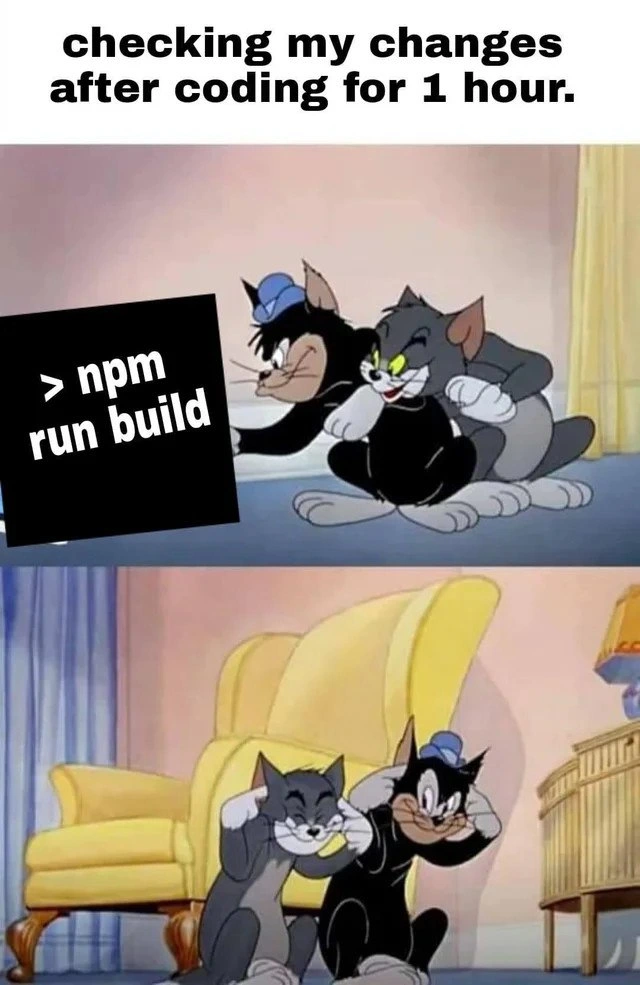
That's why the meme shows those two cartoon cats (Tom and his friend) smiling nervously in the first panel, and then covering their ears in the second. They're essentially bracing themselves. The caption says "checking my changes after coding for 1 hour." That means the developer (represented by the cats) is finally going to test the result of an hour's worth of coding by running the build. The > npm run build command is like pressing the "check everything" button on your project. The reason the cats look so anxious in the second image (with their ears covered and eyes scrunched) is because they're expecting a bunch of errors to come blasting out, almost like a loud noise.
In reality, when a build fails, you don't get a physical bang sound (unless your computer is set to beep on errors), but you do get a screen full of red or yellow text. It feels loud and chaotic. It's kind of like if you open a closet that hasn't been tidied in a long time and a bunch of stuff falls out all at once — it's startling! (Fun fact: some development setups do play an "error bell" sound when a build fails, so occasionally there's literally a beep from your PC when something goes wrong. No wonder the cartoon cats are covering their ears!)
This is a common scenario for developers:
- You run the build after a long coding session and suddenly see maybe 10+ error messages, each pointing to a different part of your code. It's overwhelming, kind of like hearing a bunch of alarms go off together.
- The meme exaggerates it by showing the characters physically covering their ears (as if the errors are a loud explosion). It's a funny visual way to say "Uh oh, this is going to be bad, better brace for it." The developer similarly expects the build output to be "ugly" with errors.
- The first panel with the cats smiling behind the
npm run buildcommand represents that tiny bit of optimism or denial we have: "Maybe I didn't break anything... maybe it will just work." The second panel with them cringing shows what we really expect: "This is probably going to blow up in my face with errors."
Now let's connect to those tags:
- NodeJS & NPM: Node.js is the environment that lets us run these build tools, and npm is the tool that actually executes the
buildscript. Almost every frontend project today relies on Node and npm (or Yarn, a similar package manager) for development. Without them, we wouldn't even have a consistent way to run builds and manage packages. - BuildProcess & BuildTools: This is about the pipeline (webpack, Babel, etc.) that turns your source code into a final bundle. For newcomers, it might be surprising how many steps are involved just to prepare JavaScript for the browser. Each step (transpiling, bundling, minifying) can throw its own kind of error if something is off.
- FrontendHumor: The meme is a joke that frontend developers find funny because it's so true to our experience. We often poke fun at how fragile our build setups can be, or how one little mistake can cause a huge chain reaction of errors. Using Tom & Jerry is perfect because it's a slapstick depiction of something going BOOM in your face, which is how it feels when a build fails.
- DeveloperFrustration & DeveloperPainPoints: Waiting for a build to finish and then seeing it fail is frustrating. It means more work before you can see your app run. It's a universal pain point: nobody likes staring at a long error log. This meme is basically laughing at that frustration — sometimes all you can do is laugh, fix the errors, and maybe get a coffee to de-stress.
- BuildFailures: This tag is exactly what's happening: the build fails with errors. A failed build stops you from moving forward. In professional teams, a failed build (especially on a CI server) can even block the team from deploying code. So it's a serious thing, but here it's presented in a lighthearted way: the developer is expecting the failure and already flinching before it even happens.
So to put it simply, the main takeaways are:
npm run buildis the command that triggers the whole process of checking and preparing your code (compiling, bundling, etc.) in a Node.js project.- If you wait a long time (like an hour) to run your build or tests, you might have piled up several mistakes. When you finally build, it will throw all those errors at you at once, which can be stressful (and a bit funny in hindsight).
- The meme uses a scene from Tom & Jerry to dramatize that feeling. Even without understanding the code, you can see one moment the characters are hopeful, and the next moment they're cringing. That's the emotional rollercoaster of checking your work all at once.
- It’s a gentle reminder that it's better to check your work in smaller pieces. We all learn that eventually: it's less scary to catch one error at a time than to face fifty errors after a long coding spree. But no matter what, every developer has had that "uh oh" moment, and that's why we find this meme both funny and painfully relatable.
Level 3: Brace for Build Impact
Hitting > npm run build after an hour of happy coding can feel like detonating a bomb in slow motion. Experienced developers know that a seemingly innocent hour of coding without running tests or a build is plenty of time to introduce a minefield of errors. In the meme's first panel, Tom and his buddy are grinning behind the terminal command. That smile is pure false confidence – a calm before the inevitable storm. The second panel, with both cats covering their ears, perfectly captures the brace-for-impact posture every developer assumes when they finally run the build pipeline after a long coding spree. It's as if they're expecting an explosion of error messages and warnings to go off like a string of firecrackers.
Why is this so relatable? Modern frontend build systems (think webpack, Babel, or a hefty TypeScript compiler) are powerful but notoriously fickle. One hour of unfettered coding in a JavaScript project is enough to accidentally:
- Miss an
importfor a module you used - Reference a variable that got renamed or doesn’t exist
- Introduce a typo in a config file
- Bump a package.json dependency that now conflicts with something else
Each of those mistakes will surface during the build as loud errors. And if you saved up a bunch of changes without checking, the build tool eagerly prints all the complaints at once. It's like you skipped all the small warning signs, only to get the entire avalanche of errors in one go. Senior devs have learned (often the hard way) that doing "just one more tweak" for an hour and then building is an invitation for a cascade of red-text errors. The meme brilliantly exaggerates this scenario: Tom (the grey cat) and his friend (the black cat) are literally covering their ears, as if the error output is about to be an earsplitting explosion. In real life, the "noise" is metaphorical – it's the terminal spitting out a wall of errors and warnings that feels overwhelming.
This humor comes from a place of shared trauma. Many of us have hit "build" after some coding and instantly regretted not doing it sooner. The first panel’s fake smiles represent that tiny hope every developer has: "Maybe this time it'll just work..." Spoiler: it rarely does, especially in a big Node.js project with dozens of npm dependencies. The second panel is the grim reality: brace yourself, here come the errors. It's a comedic portrayal of the common developer experience: even a short coding spree can break something fundamental, and the build process has zero mercy in revealing it.
Under the hood, what's happening with npm run build can be pretty complex:
- Transpilation & Bundling: Tools like webpack are combing through your code, bundling modules together, and using Babel to translate any fancy new JavaScript syntax (or compiling TypeScript down to JavaScript). If you introduced, say, a stray
{in your code or an unresolved import, webpack will scream about it now with a nasty error message. - Optimization Steps: The build might also minify and optimize assets. This is where a single mistake (like a misconfigured loader or missing environment variable) can cause cryptic errors buried in heaps of log output.
- Dependency Hell: Modern projects pull in lots of packages via npm. If one of your changes involved adding/updating a package, there's always a chance something in the dependency graph doesn’t mesh well. The build could break because Library X requires version 2 of Library Y, but you accidentally updated Y to version 3. The error that bursts out isn't a gentle "Please fix that"; it's usually a multi-line stack trace from deep inside
node_modules/that makes you want to cover your ears (just like Tom and his friend).
For a seasoned developer, this meme also conjures the specter of CI/CD pipelines. Think about pushing your code and watching the continuous integration job run npm run build on a remote server. You've seen those Slack notifications or emails when the build fails: a huge log file of errors that you have to sift through. That same cringe and dread we feel waiting for a CI build result is captured perfectly by the cats bracing themselves. It's a Pavlovian response at this point – we see the command run, we instinctively prepare for bad news.
There's a rich irony here: All these build tools exist to improve developer productivity and catch errors early. Yet when we don't continuously use them, they end up dumping a whole hour's worth of mistakes on us in one shot. The humor hits home because everyone preaches "integrate often, test often," but we've all been Tom the cat: we get in the zone, code for an hour straight, and then ask the build system "So, how did I do?" with a nervous grin. The answer is usually a loud, crashing FAIL (imagine the classic Tom & Jerry explosion sound effect). As a result, we end up cowering like the cats, mentally covering our ears and eyes as error after error scrolls by.
All told, this meme hits home because it reflects several truths at once:
- It's lampooning the Developer Experience (DX) of modern JS tooling – powerful but unforgiving.
- It highlights a common anti-pattern: not testing or building for an extended period and then facing the cumulative errors all at once.
- It wryly shows the gap between what we should do (integrate and test often) and what we actually do when we're "in the zone" (code now, pray later).
- It taps into our shared frustration and dark humor: we laugh because we've all been in that exact situation, hoping for the best but expecting the worst.
Description
A two-panel meme using a template from the 'Tom and Jerry' cartoon, with the top text reading, 'checking my changes after coding for 1 hour.'. In the top panel, the characters Tom and Butch are shown creeping forward, looking intently and confidently at something off-screen. A black box is superimposed over the scene, displaying the command line text '> npm run build'. The bottom panel shows the same two characters sitting down, plugging their ears with their fingers and grimacing, as if bracing for a loud, unpleasant explosion. The meme humorously captures the universal experience of frontend developers who, after even a short period of coding, run their build script with a mix of hope and dread. The punchline is the immediate shift from confidence to bracing for impact, perfectly illustrating the fragility and complexity of modern JavaScript build systems where a seemingly minor change can trigger a cascade of cryptic errors and warnings
Comments
9Comment deleted
Senior developers don't read the 'npm run build' output; we just gauge the severity of the failure by the scrollbar's velocity
Tweaked one prop, hit `npm run build`, and webpack spooled up like a 747 while TypeScript unearthed 482 legacy ‘any’s and ESLint filed a novella - so much for “incremental” builds
Nothing says "enterprise-ready" quite like webpack wrapping your three-line utility function in 47 polyfills, a source map the size of a small novel, and enough tree-shaken dependencies to make you question if you actually needed lodash just for debounce
After an hour of elegant refactoring and what you're certain is production-ready code, `npm run build` becomes the technical equivalent of a code review from that one senior engineer who actually reads every line - except it's automated, merciless, and somehow finds that one circular dependency you introduced three commits ago that TypeScript is now very upset about
One hour coding: 5 lines added, 50 transitive deps broken, build time now exceeds cosmic inflation
After an hour of “small changes,” npm run build turns into a Raft election - TypeScript, Webpack, ESLint, and 3,000 transitive deps trying to reach consensus on whether I broke reality, so yeah, I watch through my fingers
Nothing says fast feedback like kicking off a prod webpack build to verify a 1‑px CSS tweak - HMR’s broken in the monorepo, so the acceptance test is the squint, not Jest
Nodemon Comment deleted
😂😂 Comment deleted