
Skip to content
DevMeme
2966 of 7435
IDE vs. No-Code: A Fraction of Our Power
IDEs Editors Post #3276, on Jun 18, 2021 in TG

IDE vs. No-Code: A Fraction of Our Power

Why is this IDEs Editors meme funny?

Level 1: Sledgehammer to Crack a Nut

Imagine you want to open a small peanut, and instead of just using your fingers, someone brings in a huge sledgehammer machine to do it. It’s over-the-top and kind of funny, right? The peanut is tiny, and a simple squeeze could crack it, but they went and got this whole big machine. In this meme, writing code in an IDE is like using your own hands (simple for someone who knows how), and using a no-code tool is like using the giant machine. The superhero in the picture is basically saying, “Wow, look at all the stuff they need just to do a little of what I can do!” It’s a funny way to brag. Even if you don’t know coding, you get the idea: one side is doing something the straightforward way, and the other side is using a super complicated way to achieve just a tiny bit of the result. The humor comes from seeing someone use a lot of effort and fancy gadgets to accomplish something basic, and the person with the simple approach finds it ridiculous. It’s like watching a friend use a whole high-tech robot to tie their shoes, while you just bend down and tie yours in a few seconds – you’d probably laugh and say, “Look at what they need just to do what I can do easily!”

Level 2: Drag-and-Drop Dilemma

Let’s break down the joke in simpler terms. On one side, we have an IDE (Integrated Development Environment) – basically a powerful text editor combined with tools that programmers use to write software. Think of an IDE like a Swiss Army knife for coding: it highlights syntax in pretty colors, suggests auto-completions, checks for errors, and can even run and debug your code. Examples are Visual Studio Code, IntelliJ IDEA, or Eclipse. An experienced developer feels very at home in an IDE, writing actual code (like Python, Java, or JavaScript) to build applications.

On the other side, we have no-code tools. These are platforms that let people create apps or websites without typing out the code themselves. Instead, you might drag and drop buttons, forms, and images on a screen, and perhaps connect them with arrows or fill out settings in menus. The idea is that someone who isn’t a programmer can still “program” by using a visual interface. Some popular examples include website builders like Wix or Squarespace, or business app creators like Microsoft PowerApps, Zapier, or Salesforce’s Flow Builder. They often involve visual programming: making flowcharts or filling in forms to define what the app should do, rather than writing lines of code.

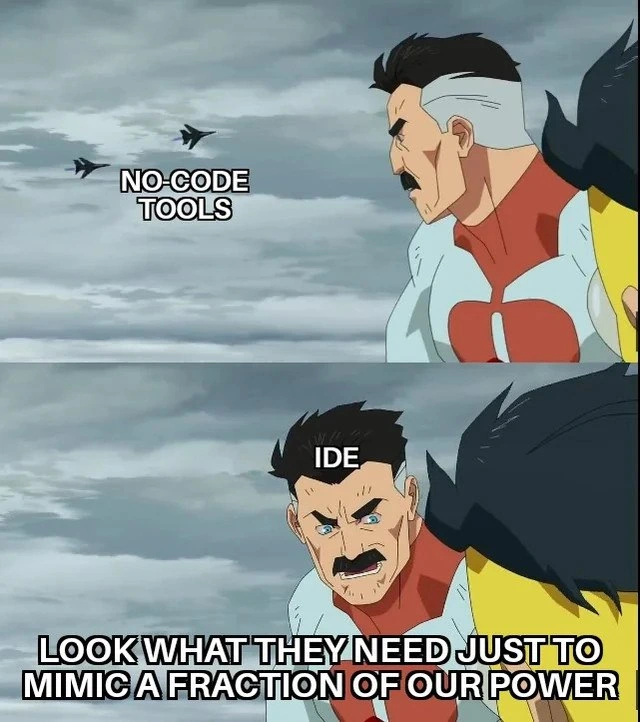
Now, what does the meme show? It uses a scene from the animated show Invincible. The character Omni-Man (a super-powerful hero/villain) is labeled “IDE”. In the first panel, he’s watching fighter jets zoom by, and those jets are labeled “NO-CODE TOOLS.” In the second panel, Omni-Man (the IDE) is smirking at someone off-screen and says, “Look what they need just to mimic a fraction of our power.” This is the original quote from the show, repurposed here to compare coding vs no-coding. In the show, Omni-Man is basically saying, “See how much effort they need to even come close to me.” In the meme, the IDE (Omni-Man) is bragging that the no-code platforms are using a ton of heavy machinery (fighter jets, which symbolize big complicated tools) just to achieve a small part of what a programming environment can do.

Why is this funny to developers? It’s a bit of developer humor and pride. Many programmers feel that while no-code tools are okay for simple stuff, they become clumsy or insufficient for tougher tasks. It often takes a lot of clicking around and a whole platform’s worth of configuration to do something that might be a few lines of code in a programming language. The meme exaggerates this: it visually suggests that no-code tools are like a whole squadron of fighter jets being deployed (so much effort!), whereas an IDE is like a single superhero who naturally has that power built-in.

In real life, this might translate to an example: Imagine you want to create a simple form that emails you when someone fills it out. A no-code tool might have you drag a form component, configure an email action, set up a database or spreadsheet to store responses, etc. You have to navigate through multiple menus and wizards. It works, but there’s a lot of stuff happening behind the scenes – the no-code platform might be generating code or XML files secretly, spinning up servers to host the form, etc. Meanwhile, a coder could open their IDE and write a short script or use a framework (like a few lines of Python with a library, or a small JavaScript function) to accomplish the same thing directly. The developer writes exactly what’s needed, no extra fluff. So from the coder’s perspective, the no-code approach looks like overkill and also somewhat inflexible (if something doesn’t fit the no-code tool’s pre-built options, you’re stuck).

The caption “Look what they need just to mimic a fraction of our power” has become a catchphrase in programmer communities for any situation where a simpler, classic solution (like plain code in this case) seems inherently more powerful or elegant than a newer, fancier solution that’s trying really hard to catch up. Here the IDE (with real code) is the classic powerful solution, and the no-code tools are the fancy new approach needing a lot of support to achieve the same ends. It pokes fun at the current trend of no_code_vs_code debates: will no-code platforms replace programmers? This meme firmly sides with programmers and says with a chuckle, “Not likely – just look how much those no-code tools have to do to even come close to what we programmers can do easily.” It’s a playful reminder that programming itself, while requiring skill, is extremely powerful and efficient in the right hands.

Level 3: Jet-Powered Overkill

No-code platforms often promise to let anyone build software through slick visual interfaces – a holy grail of point-and-click development. But experienced devs see the irony: behind those friendly drag-and-drop canvases lurk complex engines stitching together auto-generated code, config files, and cloud services. It’s like bringing in three fighter jets for an attack run, only to achieve what a single superhero (or senior dev with an IDE) can do bare-handed. The meme captures that tooling frustration perfectly. In the top panel, “NO-CODE TOOLS” zoom around with enormous effort, analogous to how a visual platform might spin up countless microservices, run heavy frameworks, and allocate gobs of memory just to accomplish a basic task. Meanwhile, the IDE (Omni-Man in the bottom panel) stands smugly unphased, representing a developer wielding a powerful code editor and saying “Look what they need just to mimic a fraction of our power.”

This sarcastic punchline hits home for many veteran developers. We’ve seen waves of hype “revolutionary” NoCodePlatforms that claim to replace programming: from 4GL tools in the 90s, to drag-and-drop web page builders, to the modern automation GUIs. Each time, initial demos look impressive – you can throw together a form or an app without writing a single line of code! But once you push beyond a toy example, reality bites. The no-code tool needs dozens of plugins, auto-generated files, and sometimes hacky workarounds to implement advanced logic that a programmer could script in a few well-placed lines. The meme’s joke exaggerates this disparity: the jets (no-code system) are overkill in machinery yet underpowered in outcome, while the lone hero (IDE + coder) does the job with inherent prowess. It’s a classic ide_supremacy vibe, with the IDE user flexing their mastery of code.

From a senior perspective, this speaks to Developer Experience (DX) and control. An Integrated Development Environment (IDE) like Visual Studio Code, IntelliJ, or VS, supercharges a coder’s productivity with tools like autocompletion, refactoring, and debugging. In skilled hands, an IDE is like Omni-Man: nearly omnipotent in creating and maintaining complex systems. On the other side, no-code platforms cater to non-developers or rapid prototyping by providing high-level building blocks. But that convenience can be a double-edged sword. The developer humor here is that those high-level tools often re-invent wheels or require enormous behind-the-scenes scaffolding for what feels trivial in a coding context. We chuckle because we’ve watched managers deploy elaborate no-code workflows (with their fighter jet fleets of UI components, rules engines, and cloud functions) only to hit a wall and call in a real developer to add one custom feature. The mimic a fraction of our power line perfectly captures the smug feeling when you realize your straightforward coded solution outperforms an over-engineered visual solution. It’s a mix of pride and schadenfreude that seasoned engineers know all too well.

To put it bluntly: Look what they need (massive GUI tools, wizards, and generated code) just to mimic a fraction of our power (the efficiency and elegance of writing code). The meme format (from the show Invincible, with Omni-Man’s infamous quote) adds an extra layer of flair – it’s a power fantasy where the IDE stands tall as the ultimate weapon, and anything less is futile by comparison. Sure, it’s exaggerated for effect (real no-code tools do have actual uses), but the core of the joke is a shared industry truth: a skilled coder with a good IDE often feels like they can move mountains, while no-code solutions throw everything and the kitchen sink at even modest problems. DeveloperHumor often pokes fun at these situations where tool hype doesn’t live up to practical reality. This meme nails that sentiment with one memorable quote and a dramatic cartoon scene.

No-Code Platform Approach Coding with an IDE
Drag-and-drop interface elements to build an app UI Manually code the UI (HTML, CSS, library calls, etc.)
Define logic with visual flowcharts or form configuration Write logic in a programming language (loops, functions)
Under the hood, generates bulky code/config you never see Code is explicit – you see and control every line
Easier to start without programming skills (great for simple cases) Steeper learning curve, requires coding knowledge
Trade-off: Limited flexibility when you need something custom, plus hidden complexity when things break at scale Trade-off: Requires time and skill to develop, but offers unlimited flexibility and easier debugging with full visibility

In real-world teams, the choice isn’t strictly either/or – no-code tools can quickly prototype or empower “citizen developers,” while IDE-powered coding handles the heavy lifting for complex, scalable systems. But the meme jokes that when you pit them head-to-head, the IDE is a mighty veteran warrior and the poor no-code tool looks like a rookie bringing jets to fight Superman. It highlights a bit of hubris many coders secretly feel: I can do this better with real code. The humor lands because, well, we’ve all seen the jets struggle to take down an Omni-Man.

Description

A two-panel meme using the 'Look What They Need Just to Mimic a Fraction of Our Power' format featuring the character Omni-Man from the animated series 'Invincible'. In the top panel, Omni-Man looks towards two distant fighter jets, which are labeled 'NO-CODE TOOLS'. In the bottom panel, the camera is zoomed in on Omni-Man's face, now contorted in a contemptuous sneer. He is labeled 'IDE', and the caption at the bottom reads, 'LOOK WHAT THEY NEED JUST TO MIMIC A FRACTION OF OUR POWER'. The meme humorously portrays the perspective of many seasoned developers. The Integrated Development Environment (IDE) is depicted as the all-powerful superhero, looking down with disdain on the comparatively weak 'no-code tools' (the fighter jets). It satirizes the hype around no-code/low-code platforms, suggesting they are a pale imitation of the raw power, flexibility, and control that a proper coding environment provides

Comments

9
Anonymous ★ Top Pick No-code platforms are great until you need a 'for' loop and end up with a Rube Goldberg machine of Zapier integrations that costs more than an engineer's salary
  1. Anonymous ★ Top Pick

    No-code platforms are great until you need a 'for' loop and end up with a Rube Goldberg machine of Zapier integrations that costs more than an engineer's salary

  2. Anonymous

    Love how the “no-code” demo needs Zapier, 12 webhooks, and a $4k/month enterprise tier to replicate the 50-line Lambda we shipped during stand-up

  3. Anonymous

    After 20 years of vim macros and emacs lisp, watching someone drag-and-drop a CRUD app together feels like watching your kid build a 'computer' out of cardboard boxes - adorable, but let's not pretend it's going to compile your kernel modules or refactor that 10-year-old monolith with 47 different dependency injection frameworks

  4. Anonymous

    The irony here cuts deep: we spent decades building increasingly sophisticated IDEs with features like intelligent code completion, refactoring tools, debuggers, and language servers - essentially creating no-code environments for writing code - only to watch actual no-code platforms market themselves as 'democratizing development.' Meanwhile, senior engineers know that the moment a no-code solution hits its abstraction ceiling (usually around the second sprint), you're either rewriting everything in a proper IDE or maintaining a Frankenstein's monster of visual workflows that would make any state machine diagram weep. The real power isn't in the tool - it's in understanding when you've outgrown the training wheels

  5. Anonymous

    No-code fleets scaling horizontally just to chase one IDE's vertical autocomplete leap

  6. Anonymous

    Your “no‑code” MVP with six SaaS connectors and a spreadsheet‑as‑DB is just a distributed monolith - no git, no tests, no rollbacks

  7. Anonymous

    Twenty draggable boxes to emulate map/filter while my IDE does an AST‑aware refactor and hits a breakpoint - guess which one survives Tuesday’s rollback

  8. @lazarester 5y

    🥲

  9. @Roman_Millen 5y

    Why would you eat meat with potato tho?

Use J and K for navigation
