The Ultimate 'Hello World' Development Environment
Why is this Hardware meme funny?
Level 1: Big Setup, Small Task
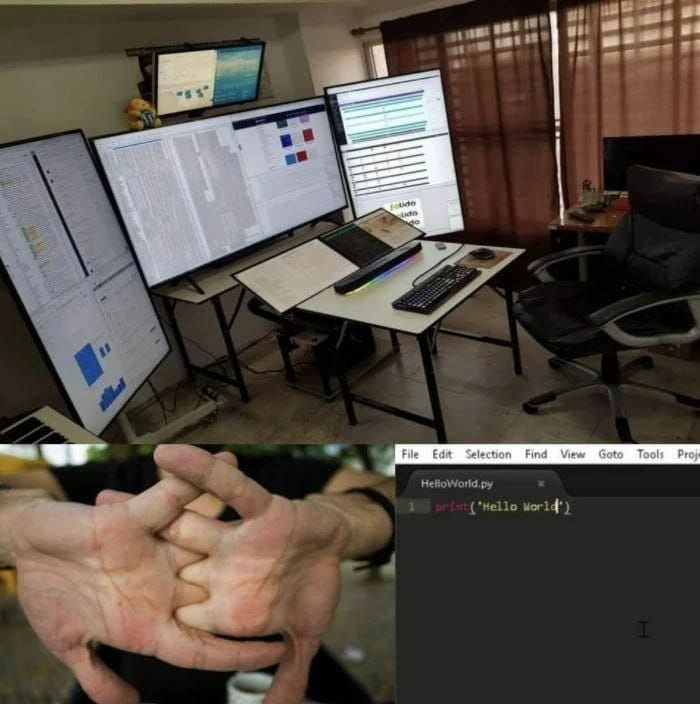
Imagine someone builds a huge super workstation with six big computer screens, like they’re about to do the most important work in the world. They crack their knuckles like an athlete getting ready to run a race. Everything looks very serious, like a spaceship control room. But then, all they do is type a tiny little message: “Hello World.” It’s like using a giant bakery kitchen with six ovens and every tool you can think of, just to bake one small cookie. It’s funny because you expect with all that preparation and equipment, they’d do something huge – yet they end up doing something really simple. The big fancy setup and the tiny easy task don’t match at all, and that silly mismatch is what makes us laugh.
Level 2: Fancy Gear, Simple Code
Let’s break down the humor in simpler terms. In the top picture, we see a developer’s ultimate setup: a powerful computer with six monitors (those are the six big screens). Some of these screens are even rotated vertically, which developers often do so they can see more lines of code or text at once (a tall vertical monitor is great for reading long documents or code files without needing to scroll as much). There’s also an external keyboard and mouse, a laptop in the middle, and lots of cables connecting everything. This kind of multi-monitor configuration is sometimes jokingly called a "battlestation" in developer and gamer slang – basically meaning an impressive, high-tech desk setup ready for serious action. It’s the kind of workstation you might expect from someone who takes their computer work very seriously, like a stock trader, a top-level programmer, or a gamer with an elaborate rig. It’s all about giving the user tons of screen real estate, which means a lot of screen space to have many windows and applications open simultaneously. For example, a developer might keep their code editor open on one monitor, documentation or reference material on another, and maybe a preview of the app or a debug console on a third. More monitors can mean less switching between windows – theoretically improving productivity because everything you need to see is visible at a glance. This falls under developer productivity tools and Developer Experience (DX): the idea that better tools and environment can help a programmer work more efficiently and comfortably.
Now, contrast that with the bottom panels of the meme. The first bottom image shows a close-up of someone cracking their knuckles, which is a common gesture people do when they’re about to start some heavy work or concentrate on a task. It’s almost like saying “I’m ready, let’s do this!” You might crack your knuckles before lifting weights, typing a long essay, or in this case, writing code. It’s a funny dramatic buildup, as if the person is preparing for an intense coding session or a serious challenge. We naturally expect that after gearing up with such an amazing multi-monitor command center and cracking their knuckles, the developer is going to tackle something huge – maybe writing a complex algorithm or debugging thousands of lines of code.
But then we see the second bottom image: the actual code editor (the window with texts like File Edit Selection Find View Goto Tools Project at the top, which looks like a typical menu bar of an IDE or code editor). In that editor, there’s just one single line of code:
print("Hello World")
This is a Python program that simply prints out the phrase “Hello World” to the screen. It’s famously the first program everyone writes when they are learning a new programming language – a basic sanity check to make sure everything is set up correctly. In other words, “Hello World” is the simplest coding task possible. It doesn’t require any special hardware or a fancy setup. You can run a Hello World program on an old laptop, a Raspberry Pi, or even a smartphone. It takes practically no computing power or screen space. It’s often used as a beginner’s first exercise or just to verify that your programming environment is working.
So the joke here is all about overkill and contrast. The developer has this amazingly powerful and elaborate workstation (that’s the overkill part – way more than needed), but all they are doing with it is a super simple task (writing one line of code to print a message). It’s like using a ten-ton crane to lift a pencil. The meme is poking fun at how developers (especially us enthusiasts) sometimes invest a lot in hardware and setup: multiple monitors, high-performance PCs, fancy keyboards – even for tasks that don’t really require that level of power. There’s a bit of gentle self-irony in it. Many of us developers love customizing our environment. We spend hours tweaking our text editor settings, arranging our three or four monitors "just so", and buying comfortable chairs or itsiest ergonomic mouse – all of that to improve our coding life. That’s part of developer culture and DevExperience: making the workspace optimized for coding.
However, if you’re new to coding, you should know that none of that fancy gear is actually required to program or to learn. You can write code on a simple laptop and many great applications have been built on far more modest setups. The humor is coming from the idea that someone went to the extreme – a six-monitor extreme – for something trivial. It’s also a light jab at the idea of over-engineering, which means designing a solution that is more complicated or advanced than necessary for the problem at hand. In this case, the “solution” (the workstation) is way over-engineered for the “problem” (printing Hello World).
Another layer to this is the knuckle cracking. That detail really emphasizes how the developer is psyching themselves up for serious work. We usually crack our knuckles in anticipation of a long haul or a tough challenge. So doing it before writing one line of code is a goofy exaggeration. It suggests the person is treating even a tiny task with the same ceremonious preparation as a massive project, which is funny. It’s like someone doing an athlete’s stretch routine before taking a single step. The whole combination of images basically says: “I have every tool and advantage set up and I’m so ready… to do almost nothing significant.” That contrast is what makes tech folks smirk when they see this meme.
To a junior developer or someone just starting out, this meme also playfully hints: don’t worry if you don’t have all that fancy setup when you code. Real productivity comes from understanding and solving problems, not from the number of screens you have. The six-monitor person likely enjoys a great developer environment, but the core of programming – even if done on one screen – is the logic and creativity. Hello World is where we all begin, whether on a simple setup or a deluxe one. The fancy gear might make coding more comfortable, but it doesn’t write the code for you. This meme is a light-hearted reminder that sometimes we geeks go a bit overboard with our toys, and it’s good to laugh at ourselves for it.
Level 3: Battlestation Overkill
The meme sets up a classic case of developer overkill. We see a multi-monitor battlestation worthy of a NASA mission control, all being marshaled for the most basic coding task imaginable: printing "Hello World" to the console. Seasoned developers immediately recognize the humor: it's the hardware equivalent of firing up a distributed microservice architecture to serve a single static page. In other words, a whole lot of firepower for a very small target. The top image shows six displays (some even rotated vertically for maximum line-length viewing), an external keyboard, mouse, cables everywhere – the works. This is a dream developer setup for hardcore productivity: tons of screen real estate so you can have code, logs, documentation, dashboards, and a browser all visible at once. In a serious work scenario, a setup like this is typically used to juggle multiple tasks or streams of information simultaneously:
- One monitor might host the main IDE or code editor, where you're writing and navigating code.
- Another screen could display the running application or a web browser with your app, useful for front-end dev or reviewing API responses.
- A third monitor (often vertical) is great for viewing long log files or documentation, letting you see many more lines without scrolling.
- Yet another might show a real-time dashboard or metrics (CPU usage, server health, CI/CD pipeline status) especially if you’re on ops duty.
- You might dedicate a screen for a database client or a container monitor if you're doing backend dev.
- And of course, one screen might be reserved for communication: your Slack, email, or Stack Overflow – the lifelines of coding help.
In other words, such an overkill workstation is usually justified when you’re dealing with complex, context-heavy tasks that genuinely benefit from quick visual access to many things at once. Picture a finance programmer with multiple live data feeds, or a devops engineer watching graphs during a deployment – there, each extra monitor earns its keep.
But here’s the punchline: after all that high-end gear and ergonomic optimization, our hero cracks their knuckles like a concert pianist about to tackle Rachmaninoff… and then writes exactly one line of code. Just one print("Hello World") in a file named HelloWorld.py. The contrast is hilarious to anyone in tech. Experienced devs have likely seen junior colleagues (or let’s admit it, sometimes our past selves) obsess about the perfect setup – custom build PC, multiple 4K monitors, the best mechanical keyboard – before even starting to code something substantial. It’s a form of productive procrastination: spending time on the feel-good improvements (hardware, fonts, themes, desk arrangements) as a way to avoid the scary part of actually building software. The meme exaggerates this to an extreme: a setup fit for debugging an entire distributed system at 3 AM, being used to execute the most trivial program possible.
From a seasoned perspective, there's also a gentle ribbing of over-engineering here. Over-engineering isn’t just about code; it can be about our tools and environments too. Sure, a six-monitor setup can genuinely boost productivity for complex work, but you should scale your solutions to your problem. It's like deploying Kubernetes and a service mesh to host a "Hello World" web page – technically impressive, but completely unnecessary. The veteran engineer in me chuckles because we’ve all seen situations where the preparation or infrastructure far exceeded the needs of the project. Maybe it was that time someone insisted on setting up a full CI/CD pipeline with multiple stages for a one-off script, or when a simple website ended up with more Docker containers than visitors. This meme nails that absurdity: the developer prepared for battle, but the “enemy” was just a harmless string literal.
Even the body language in the meme tells a story. The knuckle cracking close-up in the second panel is something developers do (often unconsciously) before diving into a long coding session or a tough debugging marathon. It signals “Alright, let’s do this!” — a mix of focus and determination. Seeing that gesture right before writing a trivial Hello World underscores the silliness. It’s a tongue-in-cheek way to say the dev means business… even if the business at hand is ridiculously small. It reminds seasoned devs of times when we psyched ourselves up to tackle some epic coding task, only to realize the solution was one line or a single config change. We’ve all had moments where we overprepare or overthink, and the solution ended up being laughably simple.
In essence, the meme humorously contrasts developer productivity gear with actual productivity. High-end hardware, multiple displays, and fancy setups are part of modern developer culture – often justified under the umbrella of Developer Experience (DX). Companies and enthusiasts pour money into standing desks, multi-monitor arms, RGB backlit keyboards, and ultra-wide screens to create an environment where coding is comfortable and efficient. There’s genuine value in these investments: reducing context-switching friction, lessening eye strain by having everything visible, etc. But at the end of the day, productivity isn’t measured by how many monitors you have or how loud your keyboard clicks – it’s measured by the code you ship (or the problems you solve). This meme playfully reminds us that all the gear in the world doesn’t automatically mean you’re doing epic work. You could use a supercomputer to add 2 + 2, but… why? Sometimes, simple tasks are just simple, no matter how many pixels or cores you throw at them. And that juxtaposition is pure comedic gold for anyone who’s fussed over their dev setup more than once.
Description
A three-part composite meme that humorously contrasts an elaborate setup with a simple task. The top panel showcases a programmer's 'battlestation' featuring at least five monitors of various sizes and orientations (including vertical ones), all displaying what appears to be code, graphs, and dashboards. The setup includes an ergonomic chair and a tidy desk, implying a highly professional and complex workload. The bottom half is split into two images. On the left, a person is cracking their knuckles, a classic gesture of preparing for intense, difficult work. On the right, a screenshot of a code editor shows a Python file named 'HelloWorld.py' containing only one line of code: 'print("Hello World")'. The joke hinges on the massive overkill of the sophisticated, expensive setup for writing the most basic program imaginable. It satirizes the tendency in tech culture to build elaborate workstations that far exceed the requirements of the actual work being done

Comments
7Comment deleted
That setup has more compute power than the original moon mission, all dedicated to achieving a task that was first accomplished on a PDP-11 in 1974
Call it Pixel-Driven Development: six 4K monitors, 48 million pixels, and every one of them focused on a single print('Hello World') - finally a pixel-to-LOC ratio that rivals our microservices
After 20 years in tech, you realize the inverse relationship between monitor count and actual productivity - the guy with six screens is debugging CSS while the person shipping microservices to production is coding on a ThinkPad from 2012
When your battlestation has more compute power than the Apollo program but you're still debugging why your print statement needs parentheses in Python 3. The four-monitor setup screams 'I orchestrate microservices across three cloud providers,' but the Hello World whispers 'I just finished reading the first chapter of Learn Python the Hard Way.' We've all been there - spending more time optimizing our tmux config and monitor arrangement than actually shipping features. At least when the PM asks what you've been working on, you can pivot the camera to show the impressive hardware investment
Six 4K dashboards for “observability,” and the first incident was a Python container that wouldn’t start because someone wrote print{'Hello World'} - turns out we needed a linter, not more monitors
Six monitors to track the latency of print("Hello World"); tracing shows the critical path is me context‑switching across displays
Two decades deep, 4K quad-monitors deployed for Go's Hello World - because goroutine Armageddon waits for no man, but this dopamine hit does