Microsoft Teams Finally Admits Its True Capability: Using All System Resources
Why is this Microsoft meme funny?
Level 1: The Greedy App
Imagine you have a toy that, when you turn it on, it starts using every battery in the house at once. It doesn’t just use one or two batteries – it grabs all of them. That would be a pretty ridiculous toy, right? You’d laugh because who would design something that gobbles up all the power like that?
This meme is joking that Microsoft Teams is like that greedy toy. Teams is a computer program used for talking to people at work or school (through messages and video calls). The joke says Teams can use “all your system resources,” which in simple terms means it would use all of your computer’s power if it could. Of course, it’s an exaggeration – no program should really do that. But people joke about it because sometimes when you run Teams, your computer slows down or gets hot and loud, kind of like it’s working super hard. It’s as if Teams is eating up a lot of the computer’s cookies and not leaving much for others.
So the funny part is seeing an official looking message claiming that. It’s like if a new microwave came with a note that said “Feature: Will use all the electricity in your kitchen!” You’d think, “that’s silly!” With Teams, people are humorously saying, “Yep, this app is so hungry for power, it might as well list that as one of its abilities.”
In the end, everyone is laughing because they know it’s a joke with a bit of truth – sometimes the things that are supposed to help us (like a chat app for meetings) end up taking more from our computers than we’d like. It’s a funny way to vent about a tool that’s a little too greedy.
Level 2: Resource-Hungry Apps
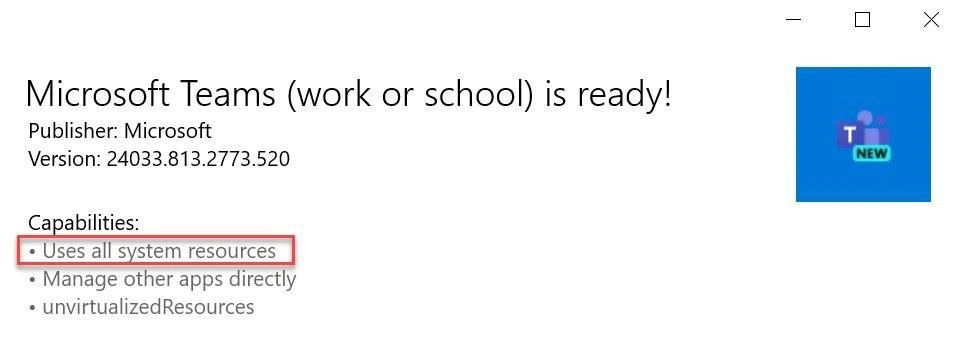
Microsoft Teams is a popular application for workplace communication – it lets people chat, share files, and have video meetings. Think of it like a mix between Slack and Zoom under the Microsoft umbrella. The meme shows a Windows installer message saying “Microsoft Teams (work or school) is ready!” and then listing some permissions or capabilities the app has. One bullet point in that list is “Uses all system resources,” which is pretty unusual and funny to see. This line is basically saying the app can use any of your computer’s resources it wants: CPU, memory, disk, you name it. Usually, these lists mention things like using your camera or microphone (which makes sense for a meeting app) or networking privileges. But here it sounds like Teams is claiming it could potentially gobble up all your computer’s power. For anyone who has used Teams (or similar apps like Slack), this joke hits close to home – these programs have a reputation for being resource hogs (meaning they use a lot of memory and CPU).
To understand why that is, it helps to know that Microsoft Teams is built on a technology called Electron. Electron allows developers to create desktop applications using web technologies (HTML, JavaScript, CSS – basically the stuff used to make websites). This is convenient because you can build one app that works on Windows, Mac, and Linux without rewriting it from scratch for each. The downside? Electron apps are essentially like running a web browser dedicated to that single app. So, when you open Teams on your computer, it’s kind of like opening a specialized Chrome browser that loads the Teams web app. We all know that having lots of browser tabs open can slow down a computer; similarly, an Electron app can be heavy on memory (RAM) and CPU usage, even for things that don’t seem super complex like text chat. That extra heft is often called memory bloat or performance overhead. In plain terms, it means the app is using more resources than you’d expect relative to the task it’s doing.
Now, the meme’s highlighted line “Uses all system resources” is an exaggeration – no app literally uses all the resources at once (your operating system wouldn’t allow one program to completely starve everything else… it would crash before that). But it sure can feel like it when you’re using Teams on an older or average machine. For example, you might notice your laptop’s fan kicking on loudly during a video call, or other programs slowing down because Teams is eating a large chunk of the CPU. If you open Windows’ Task Manager (a tool that shows what’s running on your system and how much memory/CPU each program uses), you might find multiple entries for Teams. It’s normal for Electron-based apps to run several processes (often labeled something like Teams.exe or helper processes) to handle different parts of the application (one for the user interface, one for rendering web content, etc.). The sum of those can be quite large. Many developers joke that running Slack or Teams is like having an extra Chrome browser always open – it’s not far from the truth.
The other capabilities listed are interesting too. “Manage other apps directly” implies that Teams has the ability to interact with or control other programs on your computer. In practice, this could mean it can launch a call in Outlook, or open a file in Word, or generally coordinate with other Microsoft applications. It’s part of how Teams integrates with the whole Microsoft 365 suite – for instance, you click a Word document in Teams and it can open Word on your PC to edit it. To a newcomer, that line might sound a bit scary (why would a chat app manage other apps?), but it’s mostly about integration features. The last item, unvirtualizedResources, is a technical term from Windows app permissions. Windows apps (especially those from the Microsoft Store or packaged a certain way) often run in a sandbox or a limited environment for security – virtualized resources means the app sees a sort of fake or limited version of certain system resources. If an app has unvirtualized resources, it means it’s allowed to bypass some of those limits and work with the real system files/hardware more directly. In simple terms, Teams is allowed to act like a normal, full-fledged desktop program with fewer restrictions. This is likely required for some of Teams’ features to work (like screen sharing or system notifications), but it also means it has the potential to use more system capabilities (and by extension, potentially more of the system’s resources).
For a junior developer or someone early in their tech career, the takeaway is this: Teams (and apps like it) can be quite heavy on your computer. You might have experienced moments where your computer slows down or battery drains faster during long video meetings – that’s because live video, constant chat updates, and background processes all consume CPU power and memory. In a perfect world, software is optimized to use as few resources as necessary, but in reality there are always trade-offs. Using a cross-platform framework like Electron makes development faster and ensures consistency across devices, but it isn’t as efficient as writing a native app tailored for each operating system. So, engineers trade some performance for convenience. The meme is poking fun at how large that trade-off has become. It’s basically saying, “This app is so bloated, it’s proudly announcing it will use everything your computer’s got!”
The humor also resonates because of the broader meeting culture in many companies. Beyond just technical resources, there’s an idea of “meeting overload” – spending so much time in virtual meetings that it drains people’s energy. Here, that concept is mirrored technically: the meeting software is draining the computer’s energy, too. It’s a bit of ironic empathy between developers: we’re all tired from too many meetings, and look, even our computers are getting exhausted by the meeting app. When you start your career, you might be surprised how much of your day (and your machine’s workload) can be consumed by communication tools and video calls, rather than actual coding or design work. This meme is a lighthearted way to say “Yep, welcome to the real world – even the chat app is a beast.”
In summary, the meme exaggerates a truth every developer learns sooner or later: some of the tools we rely on for everyday work (like Teams for communication) are far from lightweight. Seeing “Uses all system resources” listed as if it were a normal feature is funny because it’s an overstatement with a grain of truth. It personifies Teams as this greedy program that will take whatever it can. For a junior dev, it’s both a humorous introduction to the running jokes about Teams/Slack performance issues and a hint: don’t be alarmed if a chat app uses a gigabyte of RAM – unfortunately, that’s become normal. The best we can do is laugh about it and maybe keep that charger handy during long meetings!
Level 3: The Electron Tax
It’s almost refreshing to see Microsoft Teams openly admit its favorite hobby: devouring CPU cycles and RAM like there’s no tomorrow. The Windows installer dialog in the meme unapologetically lists a capability as “Uses all system resources.” Yes, you read that right – Teams is basically claiming it will take as much of your machine’s power as it can get. Experienced engineers have a dark chuckle at this because it’s hilariously accurate. We’ve all watched an innocent chat app transform into a resource black hole. At least this time, the software is honest about it.
Capabilities:
- Uses all system resources
- Manage other apps directly
unvirtualizedResources
In that screenshot (with “Uses all system resources” highlighted in red), Teams isn’t even pretending to be modest. Under the hood, Teams is an Electron app – essentially a Chromium browser running a glorified web app. This means every instance of Teams comes bundled with a full Chromium engine, Node.js runtime, and all the memory bloat that entails. It’s like running a dedicated Chrome browser tab just for Teams 24/7. In practice, that translates to hundreds of megabytes of memory usage (if you’re lucky) and significant CPU usage, even when the app is idle. Open Task Manager on Windows or run top on Linux during a meeting and you’ll often find Teams chewing up resources at the top of the list. It’s a running joke that Slack or Teams will eagerly consume whatever resources you have – if you add more RAM to your PC, these apps just say “Ooh, more snacks!” and use it up. This Electron tax on memory and CPU is the price paid for cross-platform convenience and rapid development, much to the chagrin of performance-conscious developers.
The humor here is as much about truth as it is about exaggeration. Typically, an installer’s “Capabilities” list might include things like access to camera, microphone, or network, but “Uses all system resources” is not a normal line – it’s effectively saying “I can hog everything, deal with it.” Seasoned developers immediately recognize the satire: they’ve endured their laptops thermal-throttling and fans blasting off just because Outlook message “Let’s hop on a Teams call.” The meme gives a nod to those frustrating moments by ironically elevating a notorious flaw to an official feature. It’s corporate meeting humor meets technical snark. After all, in many enterprises, running Teams (or its cousin Slack) is non-negotiable – it’s the cost of staying in the loop. So instead of screaming in frustration when the Developer Experience (DX) is degraded by a sluggish machine, we share memes to cope. It’s a collective release valve for all the times our code compile slowed to a crawl because our organization’s must-have communication tool decided to do an impromptu update or consume an extra gig of RAM.
Let’s talk about those other listed capabilities for a moment. “Manage other apps directly” sounds a bit scary, right? It hints that Teams can launch or control other programs (for example, it can directly open Word or Excel, or integrate with your calendar app). That’s by design – Teams ties into the whole Microsoft 365 ecosystem. But to a jaded engineer, it reads like “Teams might boss around your other apps, too.” Then we see unvirtualizedResources, a pretty hardcore Windows permission. In plain terms, that means the app isn’t confined to a strict sandbox; it can access local files or hardware more freely (comparable to running with full trust). In other words, Teams is basically saying, “I run almost like a native system process, no training wheels.” This is partly why it can use anything it wants on your system. It’s the kind of broad privilege usually reserved for utilities or antivirus software, not a chat client, which makes it both impressive and a bit eyebrow-raising. The meme’s author highlighting this implies: Teams demands a blank check on your machine’s resources and access. For battle-worn IT folks, it’s a tongue-in-cheek reminder that once Teams is installed, it’s going to embed itself deeply – your system’s performance and even other apps are at its mercy.
The reason this hits home for so many developers is because it captures a common Developer Frustration: our development machines are powerful, yet somehow a simple collaboration app manages to slow everything down. It’s not like the old days where a chat program was a tiny IRC client running in 30 MB of RAM. Modern communication tools have become bloated with features: rich text, video conferencing, screen sharing, giant Electron frameworks, and who knows what else – effectively bloatware from a resource standpoint. And in the day-to-day reality of software teams, you might be running heavy IDEs (like Visual Studio or Android Studio), maybe a local database, plus Docker containers, and then you have Teams gulping CPU on top of it whenever a GIF flies by in chat or someone shares their screen. The pain is real: you’re in the zone debugging, but suddenly a wild Teams call appears, and now your laptop feels like it’s mining cryptocurrency. So seeing “Uses all system resources” in black and white is both hilarious and a tiny bit traumatic.
Historically, one might recall when Microsoft apps were lean and mean (think early Skype or MSN Messenger) – but those days are gone. Slack started the trend of building a desktop app out of web tech, and Microsoft followed suit with Teams to rapidly catch up in the collaboration space. The outcome? Two hulking Electron beasts vying for chunks of your memory. It’s an industry anti-pattern now: trading efficiency for convenience. Everyone knows it’s not optimal to have multiple Electron apps each running separate Chrome instances (we joke that our 32GB of RAM is just to run Chrome, Slack, and Teams together), but it keeps happening because it’s easier for development and cross-platform support. Short-term wins, long-term performance debts – classic trade-off. And since meeting overload and constant pings are just part of modern work culture, we’ve accepted that a chunk of our system’s capacity is permanently reserved as overhead for these tools.
From an organizational standpoint, no one is incentivized to drastically slim these apps down. Companies prioritize new features (like Together Mode, virtual backgrounds, integrations, etc.) over under-the-hood performance refactoring. If Teams is slow, the unofficial answer is “get a faster computer” or “well, it’s the price of doing business.” It’s a resource constraint that becomes invisible because everyone deals with it. So the meme punches up at this reality by framing Teams as proudly boasting about its gluttonous design. It’s the kind of dry, sarcastic announcement a Cynical Veteran might make in the release notes: “Feature: Optimized Teams to now successfully use any and all available RAM – no memory left behind!”
In short, this meme lands with developers because it’s brutally on-point. We laugh, then we sigh, and then we check if we remembered to close Teams before hitting that compile button. Microsoft Teams consuming every resource is an exaggeration – but only a slight one. The humor lies in that thin line between hyperbole and reality. As the saying among ops folks goes, “It’s not a bug, it’s a feature.” Here we have Teams literally labeled as featuring extreme resource usage. It’s a perfect satire of both MicrosoftProducts marketing and the day-to-day DeveloperExperience of running corporate communication software. After years of feeling like these apps act this way, seeing it stated so bluntly is comedic catharsis.
And hey, at least if Teams is using all your system resources, you have a great excuse for why your code is building slowly: “Sorry, my meeting app is busy eating my homework.” 🙃
Description
This meme is a screenshot of a fake Microsoft Windows notification window for 'Microsoft Teams (work or school) is ready!'. The window has a white background, standard window controls (minimize, maximize, close), and the blue Teams logo with a 'NEW' badge. Below the title, publisher, and version information, there is a 'Capabilities' list. The first item, '• Uses all system resources,' is highlighted by a red rectangle to draw the viewer's attention. Other listed capabilities are '• Manage other apps directly' and '• unvirtualizedResources.' The humor in this meme stems from the widespread perception among tech professionals that Microsoft Teams is a resource-intensive application. By presenting a fabricated, brutally honest 'capability,' the meme satirizes the application's notorious consumption of RAM and CPU. This joke particularly resonates with experienced developers and system administrators who have often grappled with the performance impact of Electron-based applications in corporate environments

Comments
17Comment deleted
My laptop fan spins up not when I'm compiling code, but when I'm *thinking* about opening Teams. It's the pre-emptive resource allocation feature
At this point Teams isn’t a chat client, it’s a distributed systems experiment - your CPU and RAM are just the first two microservices it tries to autoscale
After 20 years in the industry, I've learned that 'Uses all system resources' isn't a bug report for Teams - it's the primary feature requirement that made it past QA, product management, and three architecture reviews because 'we need feature parity with the browser version.'
Finally, an installer that's honest about its resource requirements. Most apps claim they're 'lightweight' and 'optimized' - Teams just straight up tells you it's going to consume every available CPU cycle and RAM byte like it's mining cryptocurrency in the background. At least now when your Docker containers start OOMing and your IDE becomes unresponsive during standup, you can't say you weren't warned. The capability list reads like a threat assessment: uses all system resources, manages other apps directly (probably to kill them for more RAM), and demands unvirtualized access. It's the software equivalent of a houseguest who eats all your food, rearranges your furniture, and refuses to leave
Nice - finally a manifest that documents the NFR: “uses all system resources.” New Teams swapped Electron for WebView2, but my laptop’s thermal throttling API remains backward compatible
Teams requesting 'manage virtualized resources' - because your K8s cluster needed an IM overlord micromanaging the nodes
“Uses all system resources” - at least the manifest is accurate; my laptop now runs single‑tenant Kubernetes with one pod named Teams
haha electron app moment. Microsoft has its own .NET framework still using electron. such a shame Comment deleted
Imagine being so bad, that even your creator prefers electron over you Comment deleted
It's the revamped Teams version, in that one they ditched electron in favor of WebView2 Comment deleted
For clarification: Teams is C++ Desktop app hosting a WebView2. The app is packaged using MSIX, a package format originally intended for UWP apps running in AppContainer. Teams being a "classic packaged Win32" app, it defines the "runFullTrust" capability. App Installer (which is the app shown in the screenshot) shows "runFullTrust" as "Use all system resources". This is because "runFullTrust" allows packaged apps to access "system resources" such as the real registry and all Win32 apis. This has nothing to do with performance or cpu usage Comment deleted
From experience it has everything to do with using all system resources. And the "new" Teams hasn't gotten any better compared to the one it replaces (although I applaud the effort to establish a common reused "system" component again, instead of every crappy "app" bringing their own browser under the hood). Whether the "app" is packaged as MSIX or MSI or whatever and what language was used to compile whatever hosts the Chromium-based WebView2 makes crucially no difference, because at its core Teams has been and still is a crappy web app. Heck, when you and two of your colleagues use the "app" it's not even guaranteed you're all running the same version. As evidenced by the variety of defects and inconsistencies that you can encounter, which will differ in a large enough sample set of users. I still don't quite know why exactly people gravitate to the shoddiest "productivity" tools, but I guess it has to do with the fact that it came quasi-gratis initially before they started charging for some stuff last year. Probably the corporate spirit this "productivity" tool breathes is another reason. Built-in spyware, excuse me, I meant statistics and dashboards for the corporate side are an enticing way to get corporations to buy into this crapware. Comment deleted
Windows is dying. Microsoft is dying. x86 is dying. Intel is dying. and other funny jokes Comment deleted
Windows 11. nuf said. Microsoft Bing. nuf said. x86 is dead and gone, x86_64 is where it's at AMD > Intel, but i hope Intel won't die, competition is needed. I'd love if new player emerged and we could get 3rd option for desktop cpu that's still x86_64 and not arm... But then arm is sweet cpu and maybe it'll be arm that will creep onto desktops, who knows? Comment deleted
Intel actually cant die, they own the patent for x86 cpus Comment deleted
+ dollar is dying )) Comment deleted
Where’s this from? Comment deleted