Meta's $500k fix: pop-up warns that the next page is slow
Why is this Performance meme funny?
Level 1: Expect Delays
Think of it like waiting in line for a popular ride at an amusement park. The line is really long and moving slowly. Now, the proper solution to get people on the ride faster might be to add more cars to the rollercoaster or improve the loading process. But that’s hard and expensive to do on the spot. Instead, what does the park often do? They put up a sign that says, “From this point, your wait time is about 30 minutes.” They didn’t make the ride go any faster or the line any shorter. They just told you “Hey, it’s slow, so be ready to wait.” Strangely, that sign can make you feel a bit better because at least now you know what to expect.
In this meme’s story, the “slow ride” is a web page at Meta that takes a long time to load after you click a submit button. The company hires a really experienced (and very well-paid) developer to fix the issue. But instead of actually speeding up the page, the developer basically put up a “Please wait, this will take a few seconds” message – just like the amusement park putting up the wait time sign. It’s funny because you’d think with all that skill (and money spent), they would actually fix the problem (make the page load faster), but they opted for the easiest thing: telling people to expect delays. In simple terms, it’s as if you paid a handyman a huge sum to fix a door that’s hard to open, and instead of repairing the door, they just put a note on it saying, “Door sticks – pull hard and be patient.” It’s a silly solution, and that’s why it makes us laugh. The problem isn’t solved, but at least now everyone knows about it!
Level 2: Slap a Modal On It
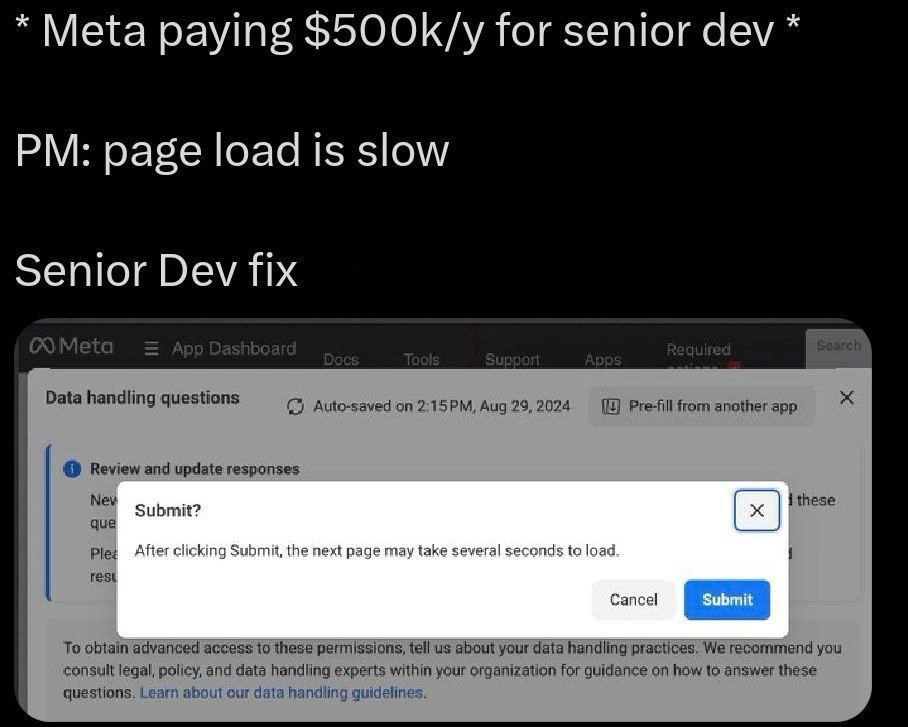
Let’s break down what’s happening in simpler terms. The meme shows a scenario at Meta (Facebook’s parent company) where a Product Manager (PM) says, “the page load is slow.” In response, a Senior Developer – someone with a lot of experience and a hefty salary – comes up with a fix. But instead of making the page load faster, the fix is a pop-up message (a modal dialog) that warns the user “After clicking Submit, the next page may take several seconds to load.” In essence, the developer just added a polite “please wait” note for the user. The joke is that this highly-paid dev isn’t speeding up the page at all; they’re just telling you in advance that it’s slow. It’s like having a road sign that says “Slow traffic ahead” instead of clearing the traffic jam.
Why might a page be slow in the first place? In modern web apps (especially at a big company like Meta), there are a few common culprits for PerformanceIssues:
- Heavy frontend code: Many web apps use frameworks like React. All the UI components and logic get bundled into files that your browser downloads. If that bundle is huge (lots of JavaScript), it can make the page slow to load or render. A heavy React bundle means there’s a ton of code executing or waiting to execute, which can delay showing the next page. The ideal fix here is to split the code into smaller pieces (so you only load what you need) or remove unnecessary stuff. That process is known as refactoring or code-splitting.
- Slow backend/database: When you click Submit, maybe the app has to fetch data from a server or database (using something like an SQL query). If that query is not well optimized – say it’s searching a huge table without an index, or pulling tons of data – the server response can take several seconds. The proper fix would be optimizing the SQL query or improving the backend logic. For example, developers might add an index to the database (so lookups are faster) or redesign how data is fetched.
- Lack of caching/CDN: Sometimes the slowness is because the data or files aren’t cached. A CDN (Content Delivery Network) is often used to store copies of images, scripts, and other static files on servers around the world. If a page isn’t using a CDN effectively, every user might be pulling resources from a far-away server, which is slower. The fix would be to enable CDN caching so that, say, an image or big script needed for the next page loads from a nearby server instead of across the globe.
All of these real fixes (smaller bundles, faster queries, caching) are part of genuine performance optimization. They can cut down the wait time for the next page. However, these fixes also require significant work: writing and testing code, coordinating with other teams (maybe the database team for that SQL query), and ensuring nothing breaks. They might even require weeks of effort and lots of careful testing in a big company environment.
Now enter the senior dev’s clever shortcut: a modal warning message. A modal is a pop-up dialog that appears on top of a webpage and usually disables the background until you interact with it. In the screenshot, you see a modal with the title “Submit?” and the message “After clicking Submit, the next page may take several seconds to load.” There are two buttons: “Cancel” or “Submit”. This means when a user clicks the original Submit, instead of immediately trying to load the slow page, the app first shows this modal. The user has to acknowledge, “Okay, I know it might be slow,” and then click Submit again in the modal to proceed. This doesn’t make anything faster in the backend or the frontend – the page will still take those several seconds – but it does something psychological and practical in terms of UX (User Experience):
- User feedback: Without this modal or some feedback, a user might click “Submit” and then stare at the screen wondering if their click registered or if the site froze. That uncertainty can be frustrating. By immediately showing a message, the app is at least responding to the click, which reassures the user that the process is underway. In UX design, providing immediate feedback for a user action is crucial.
- Expectation setting: The text literally tells the user to expect a wait (“several seconds to load”). This sets the expectation: “Don’t worry, nothing’s wrong, this next step just takes a bit.” If the user knows in advance it will take, say, 5 seconds, they are less likely to get annoyed at second 3. It’s a classic perceived performance technique — the system feels “faster” or less aggravating if you’re mentally prepared for the wait. You’re effectively moving the surprise of slowness upfront so it doesn’t feel as bad when it happens.
So the senior dev’s fix is a UX workaround: it addresses the symptom (user frustration with waiting) but not the cause (the slow code or slow query). This is often jokingly called a band-aid solution. In software, a “band-aid fix” means you didn’t really cure the disease; you just covered up the ugly part so people don’t complain as much. It’s like putting tape over a “Check Engine” light in your car – the problem is still there, you’re just not seeing the warning anymore. In our case, the problem (slowness) remains, but now the users are warned about it instead of being caught off guard.
Why is this funny to developers? Because it’s relatableDevExperience. Plenty of developers, even junior ones, have experienced pressure to deliver solutions quickly. Imagine your boss or PM saying, “Users are unhappy because this page is slow. We need to improve it by Friday.” And you look at the code and think, “Yikes, to really fix this I’d have to rewrite a huge chunk of the system… we definitely can’t do that by Friday.” So what do you do? Maybe you add a spinner animation, or a message “Loading, please wait…” to at least show something to the user. It’s not making the code better, but it might reduce the complaints because now users feel taken care of. This meme takes that common scenario to the extreme by highlighting the salary – a senior dev making half a million does the same kind of quick fix hack! That contrast is both funny and a bit of a facepalm moment.
Here’s a little pseudo-code to illustrate the approach:
function onSubmitClicked() {
// Proper fix would be to optimize the slow parts of the system...
// Quick fix implemented:
alert("Please note: the next page may take a few seconds to load.");
proceedToNextPage();
}
In the code above, instead of actually speeding up proceedToNextPage(), the developer just issues an alert (a simple pop-up message) to let the user know about the delay. The real Meta implementation is a nicer modal dialog with better styling and a confirm button, but the idea is the same. The user clicks “Submit”, sees the warning, then clicks the final Submit to actually go to the next page. The heavy lifting (loading the next page’s data) hasn’t changed at all.
Finally, let’s touch on the CorporateCulture aspect. Meta (and other big tech companies) are known to pay very high salaries for senior talent. The meme explicitly says “Meta paying $500k/y for senior dev” to set the stage – that’s a huge amount of money for one engineer annually (though at Meta, it’s not unheard of for very senior roles). The punchline is that despite this investment, the output is a trivial modal that any mid-level or junior developer could have implemented. It hints at a bit of dark humor: big companies sometimes have so much bureaucracy or conflicting priorities that even well-paid experts end up applying simplistic fixes. It’s not that the senior dev lacks skill – it’s that the system often rewards the fastest visible solution. In a fast-paced product environment, “slap a modal on it” can be the path of least resistance to keep users and bosses happy short-term. So, this meme is a way developers laugh at our own industry: we know what the right solution is (make the page faster for real), but we also know how often the practical solution is just to put a friendly sign up saying, “hey, it’s gonna be slow, thanks for understanding.”
Level 3: The $500k Band-Aid
At first glance, this meme highlights an expensive band-aid on a performance wound. Meta is paying a senior dev a jaw-dropping ~$500k/year, yet the fix for a slow page load is a simple pop-up warning. The humor is in the absurd contrast: a highly-paid engineer addressing a Performance problem with a cheap UX_UI trick instead of actual code improvements. It’s a textbook example of tackling PerformanceIssues via UXIrony rather than engineering effort. Essentially, the dev chose to “manage user expectations” instead of managing the code’s inefficiencies.
Why would a seasoned developer do this? Because genuinely speeding up a slow page can be hard and risky, especially in a massive codebase. The slow page might be due to a bloated frontend bundle (think of a giant React app loading tons of JavaScript), an inefficient SQL query in the backend, or missing CDN caching for heavy assets. Fixing those means refactoring code, optimizing queries, or configuring infrastructure – all time-consuming tasks that can introduce new bugs. In contrast, adding a warning modal is a one-afternoon quick fix. It’s a classic PerformanceTradeoff: skip the heavy lifting and do a perceived-performance hack. If you can’t make it faster, at least make it feel or appear faster (or in this case, make the user mentally prepared for slowness). This is the essence of a fake_fix_warning_message – nothing actually got faster, but now users are politely informed to “Expect delays.”
From the CorporateCulture angle, the meme digs at how big companies sometimes operate. A high_salary_low_effort solution can thrive in environments where immediate results trump ideal solutions. The Product Manager (PM) says “page load is slow” and expects a miracle. The senior dev, battle-scarred from prior FrontendPainPoints, knows a deep fix might spiral into weeks of work and cross-team meetings. Instead, they deploy a senior_dev_ux_workaround: a polite modal that essentially says “Yep, it’s slow. Please be patient.” Problem “solved”! It’s funny because it rings true – many of us have seen $1M projects where the outcome is a fancy dialog or a spinning wheel rather than any real performance gain. In big orgs, incentives often reward quick visible changes. The PM can check the box saying the issue is addressed, and the dev avoids risky refactors. The DeveloperHumor here is a bit dark: even top-notch engineers sometimes ship glorified “Loading...” messages as solutions.
To put it bluntly, this senior dev fix is the UXDesign equivalent of putting up a “Wet Floor” sign instead of fixing the leaky pipe. It’s a relatableDevExperience for many engineers: when under pressure, you sometimes reach for the fastest thing that stops the complaints, even if it’s a superficial fix. The meme’s punchline name-checks that $500k salary to emphasize the irony – paying premium for what is essentially a band-aid. It’s poking fun at the reality that in software, as in life, throwing money at a problem doesn’t guarantee an elegant solution. Sometimes, it just gets you a really nicely worded modal.
PM: "Users say the page after Submit is too slow. Can you do something?"
Senior Dev: "Sure, I'll add a warning that it's slow."
PM: "Perfect, ship it!"
For clarity, here’s the contrast between an ideal fix and the chosen fix:
| Real Performance Fix (Hard) | Chosen Fix (Easy) |
|---|---|
| 🔧 Optimize the code or database: e.g. refactor a heavy React bundle into smaller chunks, speed up the SQL queries, add CDN caching for assets. These take time, planning, and might require multiple teams. | 💡 Put up a modal dialog saying “After clicking Submit, the next page may take several seconds to load.” This took one dev an afternoon and little risk. |
In the end, this meme lands so well with experienced devs because it’s too real. We’ve all seen the “clever hack” that avoids the root cause. It’s both hilarious and a bit painful to realize that sometimes even at Meta-scale, the solution to a sluggish interface is essentially: tell the user to wait. The code performs no better than before, but hey, at least now shipping_latency_modal is part of the release notes! As cynical as it is, managing user perception can be as important as managing application speed. The senior dev in this meme just took that idea to its laziest extreme – and got away with it.
Description
The meme has a black background with three white text lines at the top: “* Meta paying $500k/y for senior dev *”, then “PM: page load is slow”, followed by “Senior Dev fix”. Below, a cropped screenshot of Meta’s App Dashboard shows a modal dialog titled “Submit?” with the message: “After clicking Submit, the next page may take several seconds to load.” Two buttons read “Cancel” and a blue “Submit”. The joke is that instead of improving performance, the highly-paid senior engineer simply inserts a latency disclaimer. Seasoned engineers will recognize this as the classic ‘perceived-performance’ hack that shifts expectations rather than refactoring heavy React bundles, optimizing SQL queries, or adding CDN caching
Comments
13Comment deleted
Why chase TTFB when you can meet the SLA by redefining ‘B’ as ‘Button click acknowledged’?
At $500k/year, you're not paying for someone to fix performance issues - you're paying for someone experienced enough to know that managing user expectations is cheaper than refactoring the entire data pipeline that marketing insisted needed 47 tracking pixels and real-time analytics for their A/B/C/D/E/F testing framework
When your $500k/year senior engineer's performance optimization strategy is essentially implementing a loading screen with extra steps - because why fix O(n²) when you can just set user expectations to O(∞)? It's not a bug, it's a feature... with a disclaimer
Optimizing for TC over TTFB: the true senior dev dark art at FAANG scale
Couldn't move p95, so we shipped DDD - Disclaimer-Driven Development - and met the PM's SLA for expectations
Nothing fixes p95 latency like moving it from the backend to the copywriter
Junior dev: #456842 fix page loading too slowly Senior dev: loudly takes a sip of coffee APPROVE, SQUASH AND MERGE, ah, what a tough workday Comment deleted
I've literally done the same lately. I should try applying to Meta Comment deleted
Me too. I used progress bar in client code showing the random complete percentage lol. Client find that app much faster with the change. Actually no Backend code change at all lol Comment deleted
You would need to explain O complexity of this solution on the interview and the chosen algorithm Comment deleted
it's a complex task due to a variance in user environments with instability in user behavior while guaranteeing user experience we need to use O(log(10^(x*(1/x)^e^(x-(x^(x*1/x))))) equation where x is a number of lavander rafs I drank today Comment deleted
I did the same tbh. I was too lazy (it it may have been impossible anyway) to make a progress bar, so I just wrote "may take several minutes". No one complained. Comment deleted
Is it real salary in meta? Comment deleted