Skip to content
DevMeme
6060 of 7435
The Personal Apple Silicon Supercomputer Cluster
Hardware Post #6637, on Apr 5, 2025 in TG

The Personal Apple Silicon Supercomputer Cluster

Why is this Hardware meme funny?

Level 1: Pillow Fort Data Center

Imagine you want a big fancy castle, but all you have are some pillows and blankets in your living room. So, you stack the pillows and make a little fort, then proudly call it your “castle.” It’s cute and it kind of works for playing, but it’s obviously not a real castle with stone walls and towers. This meme is doing the same thing, but with computers. The person has a few small Mac Mini computers and stacks them up, calling it their “data center” (which is normally a huge building full of computers). It’s funny because they’re comparing something tiny and homemade to something massive and professional. Basically, it’s like saying, “Look, I built my own mini-version of a big thing!” – just like a kid might call their pillow fort a real fort. The joke makes us smile because we get that the person is being playful and inventive, turning a little stack of gadgets into their own pretend high-tech server room. It’s a bit silly and a bit proud at the same time, and you can’t help but chuckle at how resourceful they are, treating four little boxes like it’s an entire warehouse of computers.

Level 2: Desktop Data Center

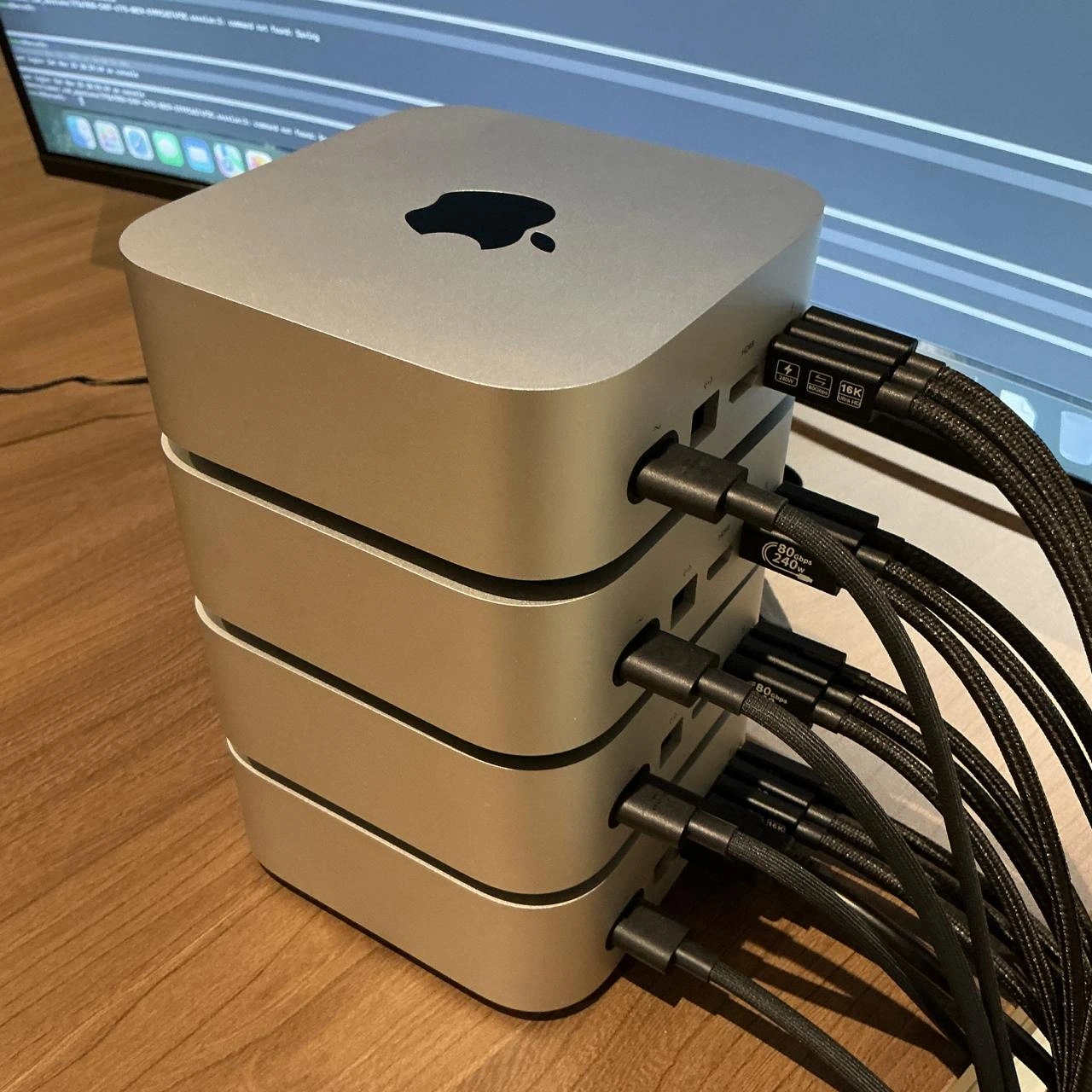
Alright, let’s break down what’s going on here in simpler terms. The picture shows what looks like four Mac Mini computers stacked on top of each other on a desk, with a bunch of cables coming out of them. The caption jokingly calls this an “on-prem data center.” On-prem (short for on-premises) means the computers/servers are kept locally at your location, rather than using remote cloud servers run by someone like Amazon or Google. And data center usually refers to a big facility filled with lots of servers, storage systems, and networking gear – the kind of heavy-duty setup big companies use to run websites or process data. So calling a little pile of Mac Minis a data center is intentionally silly – it’s an exaggerated way to say “this is our entire server infrastructure, right here on the desk.”

Now, why Mac Minis? A Mac Mini is a small form-factor desktop computer made by Apple. Despite its size (a Mac Mini is about 8 inches square and a couple of inches tall), it’s a fully functional Mac computer often used for things like media centers or small servers. The Mac Minis in the photo are likely the newer models with Apple Silicon chips (the M1 or M2). These chips are very powerful and efficient – the same kind of chips that run MacBook laptops – and they’re based on ARM architecture (which is a different CPU design than the Intel/AMD chips in most traditional servers). Apple’s chips run macOS and can do all the tasks needed for Apple platform development (like compiling iPhone apps), which is likely what these Minis are doing.

This setup is probably being used as a CI/CD pipeline or “build farm” for software. CI/CD stands for Continuous Integration/Continuous Deployment – basically automated processes that build and test code whenever developers make changes. For example, an iOS app team might have a CI system that, every time code is pushed to GitHub, will farm out the work of building the app and running tests to a pool of machines (the build farm). If you have multiple Mac Minis, you can run multiple builds and tests in parallel, speeding things up. Each Mac Mini could be running its own instance of the build process or handling different tasks (one might compile the code, another run unit tests, another run UI tests on simulators, etc.). This way, the team doesn’t have to wait too long to get feedback on their code – the workload is distributed.

Why not use the cloud? There are cloud services where you can run Mac instances (since iOS apps can only be built on macOS, you need a Mac even in the cloud). Companies like Amazon Web Services offer Mac machines you can rent by the hour. However, those can be quite expensive (and you might have to pay even when you’re not using them, due to how they allocate Mac hardware). Also, some organizations prefer not to put their code on external cloud servers for security or policy reasons. So instead, they do it “on-premises” – literally setting up their own mini data center. The photo description even hints that this might be to dodge cloud pricing or meet on-prem security policies. In plainer terms: either the cloud was too costly, or rules said “no cloud allowed,” so the engineers made their own solution with what they could get – four Mac Minis on a desk.

Let’s talk about the cables – those thick black braided cables plugged into the side of each Mac Mini, with labels like “8K@240”. Those labels suggest these are high-end Thunderbolt 4 / USB-C cables that can carry video (8K resolution at 240Hz) and data. Why so many cables? Each Mac Mini has a couple of Thunderbolt ports, and it looks like all of them are occupied. Possibly each Mac is connected to some central hub or switch. There are a few possibilities here, all a bit technical:

  • They might be using an external Thunderbolt hub or dock to connect each Mac Mini to other peripherals like external storage or a high-speed network. For instance, maybe each Mac is connected to a Thunderbolt dock that provides a faster Ethernet connection (some Mac Minis come with 1 Gigabit Ethernet built-in, but Thunderbolt could allow a 10 Gigabit adapter for faster network if needed to transfer large build artifacts quickly).
  • It could be a KVM switch (Keyboard-Video-Mouse switch) via Thunderbolt, allowing one monitor/keyboard to control all four Macs. This would explain using high-res video-capable cables – perhaps the person managing them wants to easily switch video output between these headless Macs to see what’s on their screens (like one moment you use the monitor for Mac Mini #1, then switch to #2, etc.).
  • Or they might be daisy-chaining some shared storage device. Thunderbolt allows you to connect external SSDs or even network storage. If these Mac Minis need access to the same files (say, pulling code or pushing artifacts), they might all connect to a speedy external drive.

In any case, the cluster of cables looks a bit messy – we call that cable spaghetti. In a more formal setup, you’d have neat cable management, but on a desk with a bunch of devices, it often ends up looking like a tangle. The tag thunderbolt_cable_spaghetti in the context confirms they’re joking about the mess of cables. It’s functional but not pretty, and it emphasizes the “home-brew” nature of this data center.

Now, the background monitor shows a macOS desktop with Xcode or a terminal log running. Xcode is Apple’s development environment for making Mac/iPhone apps. Seeing that on the screen suggests this stack is actively being used to build or test code (for example, the screen might be showing build logs or test results). So basically, these four Mac Minis are acting as build/test servers for an app – each one is likely logged in and running tasks as part of a continuous integration setup.

Let’s decode a few tags and context clues:

  • mac_mini_ci_farm: We’ve pretty much covered this – a “CI farm” means a group of machines used for continuous integration builds. Mac Mini CI farm = using Mac Minis for that purpose.
  • desktop_data_center: Exactly what we have – a data center (lots of computing power and servers) but shrunk down to something that sits on a desk.
  • poor_mans_cluster: This phrase “poor man’s X” means a cheaper or makeshift version of something. So a “poor man’s cluster” is a cluster built with budget or improvised hardware, rather than professional servers. Four Mac Minis instead of, say, four Xserve rack servers or expensive Mac Pros, definitely qualifies. It’s not literally “poor” perhaps (Mac Minis aren’t free), but relative to setting up a whole official data center, it’s a low-cost approach.
  • local_k8s_on_arm: This suggests that possibly they set up a local Kubernetes cluster using these ARM-based Macs. Kubernetes (often abbreviated “K8s”) is a system for managing containerized applications across a cluster of machines. If these folks containerized parts of their build or testing environment, they might orchestrate it with Kubernetes. That’s a pretty advanced setup for just four nodes, but techies sometimes do that to emulate a production environment or just because they can. The key point is that the Mac Minis use ARM chips (M1/M2), so any such Kubernetes cluster would be running on ARM architecture. Nowadays, Kubernetes supports multi-arch and you can have ARM nodes – but you need your containers to be built for ARM too. All this is to say, it’s possible they’re using some container management, but even if not, the tag hints at the general idea of running modern infrastructure software (like K8s) on this small local cluster.
  • xcode_cloud_on_prem: Xcode Cloud is Apple’s cloud CI service. “On-prem” Xcode Cloud implies they have essentially built their own version of that in-house. Instead of paying Apple to run their continuous integration in Apple’s cloud, they’ve made an equivalent environment themselves with these Minis. It’s like saying “we made our own cloud for Xcode, at home”.
  • heat_budget_ignored: In a real server setup, you calculate cooling needs (heat budget) to make sure you have enough AC to handle the heat output. Four Mac Minis doing heavy builds will produce heat (each might draw ~30W under load, so 4 could be ~120W of heat being dumped into the room constantly). If they’re in an office or closet with no extra cooling, things might get toasty. The tag jokes that whoever set this up probably didn’t thoroughly plan for heat dissipation – they just stacked them up and hoped for the best. It’s a playful jab at how DIY setups sometimes overlook such considerations (“It’s fine, just crank the AC!”).

For a junior developer or someone new to these concepts, the key takeaway is:
This meme is about improvisation in infrastructure. Instead of a proper server room, an engineer has literally piled up four small Mac computers to use as servers. It’s both clever and a bit funny because of the contrast: small elegant Apple devices serving in a role usually filled by big, loud server machines. And calling that little stack a “data center” is sarcastic humor – it acknowledges it’s not really the kind of data center you read about in textbooks, but hey, functionally for that team, it does the job of one (on a much smaller scale). It’s like saying “Here’s my supercomputer” while pointing at a cluster of game consoles or, in this case, Mac minis.

In practical terms, if you joined a company and they took you to a room and there was just a desk with four Mac Minis and said “This is our build cluster,” you might chuckle, but you’d also realize: those four little boxes are handling a lot of the heavy lifting for software development. There’s pride and humor in that. It embodies a do-it-yourself spirit: using available tools in creative ways to meet your needs. And it highlights a unique aspect of Apple development: sometimes, to get things done, you have to think different (pun intended) 😄 – even if that means stacking computers like Lego bricks and running your own mini “cloud” locally.

Level 3: Roll Your Own Cloud

For seasoned engineers, the humor in this meme hits close to home. It’s highlighting the absurd-but-real practice of building a mini on-premises Apple cluster to handle workloads that, in a perfect world, you’d just offload to the cloud. The phrase “on-prem data center” usually conjures images of tall server racks, blinking network switches, industrial cooling, and raised floors. Here, it’s literally four Mac minis on a wooden desk. 😂 The grandiose term “data center” applied to a shin-high stack of Mac minis is a tongue-in-cheek exaggeration that seasoned devs find funny because… well, they or someone they know has done exactly this kind of thing.

Why do this at all? The subtext is likely about Continuous Integration (CI) and build automation for Apple platforms. If you’re building and testing iOS or macOS apps, you must use macOS machines (because Apple’s tooling Xcode only runs on macOS). Cloud options exist (e.g., renting Mac instances on AWS or using a service like CircleCI with Mac executors), but they can be extremely expensive and sometimes slow or limited. Also, certain companies (especially in finance, health, or any security-conscious field) insist on on-prem builds for proprietary code – they won’t allow pushing source code to a cloud service or are leery of third-party clouds due to compliance. So, what’s a resourceful engineer to do? “Roll your own cloud.” Buy a bunch of Mac Minis, stack ’em up, wire everything together, and voila – your very own Mac mini CI farm. It’s a classic example of a poor man’s cluster: using relatively cheap, readily available hardware to achieve something that normally requires pricier, specialized equipment. The meme creator likely has this setup to dodge either insane cloud bills or draconian policies – turning a desktop into their mini data center.

The image itself is rich with details that senior devs appreciate (perhaps with a groan). The four silver Mac minis are stacked neatly, almost like a mini-server rack. On each unit’s side, every Thunderbolt/USB-C port is occupied with thick braided cables – labeled “8K@240”, which is actually a high-end DisplayPort/Thunderbolt cable spec (supporting up to 8K resolution at 240Hz). These aren’t normal Ethernet cables or power cords; they look like premium video/data cables repurposed for networking or KVM switching. Essentially, we’ve got Thunderbolt cable spaghetti erupting from the stack – a telltale sign of a DIY setup. In a proper data center, you’d have orderly cable management with color-coded Ethernet wires and power cables routed in trays. Here, it’s a bunch of hefty black cables arching into an unknown hub or switch, probably a Thunderbolt dock or a KVM switch. Why Thunderbolt? Possibly because these Mac minis might be using Thunderbolt 4’s high bandwidth to connect to a shared storage array or a 10 Gb Ethernet adapter (since Thunderbolt can carry PCIe for things like external NICs and storage). Or it could simply be that each Mac is connected to a central monitor/keyboard via a fancy KVM, allowing control of each mini in turn. Either way, the cabling is over the top – it screams “home-brewed cluster” the same way seeing five power strips daisy-chained would. Seasoned engineers chuckle because they’ve seen “cable spaghetti” in real life and know it’s the bane of maintainability (tracing which cable goes where is a nightmare, but hey, it works… until someone yanks the wrong cord).

Another layer to the humor: Apple doesn’t sell “servers” anymore. Back in the late 2000s, Apple had a product called Xserve – essentially a rack-mount, enterprise-grade Apple server. It was discontinued in 2011, leaving a void for anyone who needs Mac hardware in a server farm. The unofficial workaround has been Mac Mini colocation – literally, data centers that mount Mac minis on shelves or specialized enclosures because that’s all that’s available. Seeing four Mac minis on a desk is a miniaturized version of what some Mac cloud providers do at scale. The meme exaggerates this by calling a tiny stack a whole “data center,” poking fun at Apple’s neglect of that market. A veteran dev might smirk and think: “Apple killed off their real servers, so now we stack Mac minis like Jenga blocks – thanks, Tim Cook.” It’s both a jab at Apple and a nod to the scrappy ingenuity of developers.

Critically, senior folks know that maintaining a setup like this can be both satisfying and a pain. On one hand, you’ve got full control: no mysterious cloud outages or multi-tenant jitter – these Macs are right here “on-prem,” under your watch. On the other hand, you are now the data center ops team. If one of these machines panics and reboots at 3 AM, guess who’s troubleshooting? You can’t file a support ticket to AWS – you’re going to be crawling under that desk checking LEDs. If an OS update breaks the CI agent on one mini, you have to fix it manually. And have you considered backup power? One tripped circuit breaker or someone kicking the single power strip could take out the whole “data center.” Redundancy? Nah, this is a single point of failure cluster: one room, one power source, probably one network switch. Seasoned engineers find that simultaneously horrifying and hilarious, because it’s true – tight budgets or strict policies lead to such kludges more often than we’d like to admit. It’s the tech debt version of infrastructure: works fine until it doesn’t, and then it’s all-hands-on-deck to recover.

To illustrate the tongue-in-cheek comparison between a real data center and this Mac mini stack, consider the following:

Real Data Center Feature Our Mac Mini Stack “Data Center”
Rows of server racks (42U each) 4 Mac minis on a desk (≈4U if we’re generous)
Redundant power supplies + UPS One consumer power strip (surge protector if lucky)
Professional cooling (CRAC units, cold aisle) Office AC and maybe a desk fan aimed at the stack (heat? what heat?)
Structured cabling & patch panels Thunderbolt and USB-C cables spilling over the desk (cable spaghetti 🎢)
Remote management (IPMI, iDRAC) Logging in via Screen Sharing or SSH, and physically unplugging/re-plugging when frozen
Secure server room with keycard access Under somebody’s desk or in a closet, hope the janitor doesn’t accidentally power it off

Each comparison highlights why this scenario is both comical and somewhat cringe-worthy to experienced folks. It’s not to say Mac minis aren’t capable – they are amazingly powerful for their size – but calling a jerry-rigged pile of them a “data center” is deliciously ironic. We usually equate “data center” with robust, massively scalable infrastructure. Here, scalability might mean “I can maybe stack 2 more minis before my spouse/boss notices” 😅.

Now, let’s talk about the monitor in the background showing what looks like Xcode or a terminal. This suggests the stack is actively being used for build automation or testing. A common setup would be running a CI system (like Jenkins, GitLab CI runners, or TeamCity) with each Mac mini acting as a build agent. For instance, one mini might handle iOS unit tests, another builds the app binaries, another runs UI tests on simulators, etc., all in parallel to speed up the pipeline. If they really went fancy, they might have a coordinator that sends jobs to whichever mini is free. A senior engineer sees that and thinks, “Okay, they’ve basically recreated Xcode Cloud on-prem.” (Xcode Cloud is Apple’s own CI cloud service for app devs, which of course runs on Mac hardware behind the scenes. Doing it on-prem means you avoid the subscription cost and keep everything local.)

We also infer some tribal knowledge here: using Mac minis for CI is a known practice. Many iOS dev shops maintain a farm of Mac minis as their build servers, because alternatives are limited. So there’s a shared understanding (and maybe war stories) among senior devs about keeping such farms running. The meme elicits that knowing groan: “Yep, I’ve racked Mac minis in a closet to get our builds running too. It’s funny until one dies and you have to scramble.” It’s a badge of scrappiness and a scenario unique to Apple’s ecosystem.

Finally, the phrase “When your on-prem data center is literally four Mac minis high” uses hyperbole for comic effect. It’s basically saying: our grand infrastructure is… just this little stack. The senior-perspective irony is strong here. We’re simultaneously proud of this clever solution and painfully aware of its fragility. It’s humor born from the contrast between enterprise aspirations and budget realities. Much like a startup calling a single pizza box server their “cloud,” calling a Mac mini stack a “data center” is poking fun at ourselves as engineers. We know it’s not truly equivalent, but sometimes you gotta do what you gotta do. And hey, if it runs the nightly builds and keeps the App Store releases on schedule, this humble cluster is your data center – regardless of its 6-inch stature.

In summary, at the senior level, this meme is a wink and a nod to all the times we’ve improvised with hardware to meet a goal. It’s funny because it’s true: behind some polished software products, there might just be a rickety stack of Macs humming under a desk, held together with zip ties and hope. And as long as it works (and doesn’t catch fire 🔥), we’ll call it a win… just maybe don’t let the auditors see it.

Level 4: Beowulf in a Box

At the deepest technical level, this meme hints at a DIY compute cluster built from consumer hardware – essentially a modern Beowulf cluster made of Mac minis. In classic high-performance computing history, a Beowulf cluster means taking a bunch of off-the-shelf machines and networking them to act as a single powerful system. Here, instead of 1990s PCs or PlayStations, we have Apple’s sleek AppleSilicon Mac minis stacked like server nodes. Each Mac mini likely contains an M1 or M2 chip – Apple’s ARM-based System on a Chip (SoC) known for high performance per watt. Technically, an M1/M2 SoC integrates CPU, GPU, and memory on one chip with a unified memory architecture, delivering great speed for build tasks (like compiling code) while sipping power. Four of these chips working in tandem can crunch through builds or tests in parallel, much like a mini supercomputer cluster.

But why go to the trouble of clustering Mac minis? One advanced reason lies in Apple’s restrictive virtualization and licensing for macOS. Unlike Linux or Windows, running macOS in a virtual machine or on non-Apple hardware is prohibited frowned upon by Apple’s EULA. There’s no trivial way to spin up 100 macOS cloud VMs because each instance must run on genuine Apple hardware. This has forced even major cloud providers (like AWS) to literally install Mac mini servers in their data centers to offer Mac instances. Those AWS Mac instances are essentially dedicated Mac mini machines on a rack, exposed to you over the cloud – not the usual on-demand VMs that can run on generic host servers. It’s a wild deviation from typical cloud design and expensive due to hardware costs and the 24/7 dedicated nature of the service. The result: some teams “roll their own” on-prem Mac clusters, as shown in this meme, to avoid cloud costs or comply with on-prem requirements.

From a systems architecture perspective, coordinating workloads across multiple Macs introduces challenges akin to any distributed system. There’s the question of scheduling build jobs or tests to the right node (maybe using a CI coordinator or a mini orchestration setup). Some tinkerers go so far as setting up a lightweight Kubernetes cluster on these ARM64 Mac minis (local_k8s_on_arm vibes) – effectively treating each Mac as a node where containerized build tasks or microservices can run. Kubernetes on ARM is not theoretical at all: it’s fully possible, and tools like k3s (a slim Kubernetes distribution) can run on Mac minis to manage workloads. However, running K8s for a 4-node home cluster might be overkill; a simpler CI agent pool could do. But the mere thought of container orchestration with Apple M1 nodes is geeky goodness that senior DevOps folks chuckle at: it’s the intersection of cutting-edge tech (Apple’s ARM chips) and industrious hacking (using them as servers).

Let’s not ignore the hardware architecture quirks here: Mac minis are not designed as traditional servers. They lack things like ECC memory (error-correcting RAM), redundant power supplies, or integrated lights-out management. In a real data center, a server might have ECC RAM to prevent cosmic ray bit-flips from crashing a critical build, dual power supplies to survive one failing, and IPMI/BMC (Baseboard Management Controller) for remote reboot and monitoring. Our stacked minis have none of that. If a Mac mini crashes or freezes mid-build (maybe due to a heat spike from all cores maxed out compiling), someone might have to physically go and unplug it – there’s no remote reboot card here (unless you rig a smart power switch). Apple has introduced some remote management frameworks for AppleSilicon (for example, a bare-bones “lights-out management” in macOS for M1 that can do some remote power control via another Mac), but it’s nowhere near the robust out-of-band management found in enterprise servers.

Speaking of heat: four Mac minis under full load will generate a fair bit of warmth. The meme’s subtitle “literally four Mac minis high” hints that this is the entire “data center” – just four nodes – which presumably are expected to run continuous integration jobs non-stop. If you stack them with no airflow gaps, you risk thermal throttling. Each mini has an internal fan and intake/exhaust vents (the M1 Mini’s intake is the circular vent on the bottom, exhaust out the back). Stacking them directly might partially obstruct airflow or at least create a heat column where the lower ones run hotter. A true data center has cold air aisles, hot air aisles, climate control… This DIY stack likely ignores such heat budget calculations (as the tag heat_budget_ignored jokes). It’s a testament to how far you can push consumer gear – and a reminder of physical limits like cooling and dust that high-level distributed systems theory might abstract away but real hardware can’t.

In summary, from a deep technical angle, this image is a microcosm of distributed computing meets hardware hacks. It showcases how practical needs (e.g., building iOS apps) drive engineers to repurpose elegant consumer devices into makeshift servers. It’s equal parts brilliant and absurd: brilliant because Apple’s M1/M2 chips are phenomenal at build tasks (blazing fast compile times) and absurd because the solution sidesteps conventional infrastructure norms. This cluster is the descendant of earlier clever hacks – whether the Beowulf clusters of PCs in the 90s or the Mac mini server farms of the 2010s – continuing the tradition of scaling out with whatever hardware you can get your hands on. As a grizzled engineer might wryly note, “We’ve come full circle: the future of on-prem computing is a bunch of ARM boxes on a desk – what year is it again?

Description

A high-resolution photograph shows four silver Apple Mac Studio (or Mac mini) computers stacked vertically on a wooden desk. A multitude of thick, black braided cables are plugged into the various ports on the back of each machine, suggesting a complex, interconnected system. Some of the cable connectors have visible labels indicating high-performance specifications, such as '16K' and '80Gbps 240W'. In the out-of-focus background, a large computer monitor displays lines of code or terminal output. This image showcases a powerful, do-it-yourself compute cluster. By linking multiple high-performance machines, the user has created a personal supercomputer, likely for demanding, parallelizable tasks such as training large AI models, running complex scientific simulations, or high-resolution video rendering. It's a testament to the power of modern prosumer hardware and a practical example of building a 'homelab' data center, leveraging Apple's potent unified memory architecture for workloads traditionally dominated by server-grade hardware
Comments

7
Anonymous ★ Top Pick This is a senior engineer's homelab, also known as 'what happens when someone says 'just scale horizontally' and you have an expense account with a rounding error.'
  1. Anonymous ★ Top Pick

    This is a senior engineer's homelab, also known as 'what happens when someone says 'just scale horizontally' and you have an expense account with a rounding error.'

  2. Anonymous

    Because nothing says “enterprise-grade scalability” like Kubernetes nodes you can accidentally knock over while reaching for your coffee

  3. Anonymous

    When you realize your "distributed system" is just three Mac Studios held together by $2000 worth of Thunderbolt cables and the desperate hope that Apple's warranty covers whatever happens when you explain this setup to finance

  4. Anonymous

    When your CI/CD pipeline needs more horsepower but AWS bills are giving you anxiety, so you build a Mac Mini cluster and tell yourself it's 'cost-effective infrastructure' while ignoring the Thunderbolt cable budget that rivals a small country's GDP. At least when it goes down, you can't blame 'the cloud' - just your questionable life choices and the realization that you've essentially built a very expensive, very pretty space heater that occasionally compiles code

  5. Anonymous

    Kubernetes who? This cluster scales infinitely - until physics intervenes

  6. Anonymous

    iOS CI at scale: four headless Xcodebuild agents and a Thunderbolt octopus - throughput still capped by codesign/notarization; autoscaling means buying another Mac mini

  7. Anonymous

    Autoscaling our iOS pipeline: add another Mac mini until codesign starts failing in parallel - CAP theorem says portable, compliant, cheap; we picked compliant and cable spaghetti

Use J and K for navigation