
Linux Desktop Environments Roasted: Every DE Userbase Suffers Differently
Why is this OperatingSystems meme funny?
Level 1: No Easy Choices
Imagine you’re at an ice cream shop with six flavors, but there’s something funny wrong with each one. The first flavor is super fancy and cool-looking, but if you have it with a certain topping, it gives you a big headache. The second flavor is very plain and supposed to be easy on your tummy, but it’s so old that it’s kind of gone stale. The third flavor is newer and tastier, but every few licks your ice cream scoop falls off the cone! The fourth flavor is really simple (just one basic color), but when you eat it, you start seeing stripes in front of your eyes because it’s so jittery. The fifth flavor is an old recipe — not yummy or creamy like modern ice cream, but hey, it’s a tiny bit fewer calories… like so tiny you wouldn’t even notice. And the sixth flavor? Well, it’s actually pretty decent, but almost nobody else buys it, so you start to wonder if you’re the only one who likes it (even the person who made it is the only one clapping for it). 🤷♀️
Choosing a Linux desktop in this meme is just like that: every option seems to have a catch that makes you go “ugh, really?!” It’s funny in a goofy way because no matter what you pick, there’s a problem that comes with it. It’s as if all the roads you can walk down have banana peels on them. You can’t win! So you end up laughing and shaking your head, because all you can do is appreciate the silly truth of it: sometimes in life (and in tech), every choice has its own quirky downside.
Level 2: Desktop Environments Crash Course
Let’s break down what each part of this meme means in simpler terms. It’s all about different Linux desktop environments (the graphical look-and-feel on your computer) and the funny problems you might face with each. In Linux, unlike Windows or Mac, you can pick from many desktop environments (DEs) or window managers, which change how your desktop looks and behaves. Each one has its own perks and quirks. Here’s a quick intro to the “players” in this meme and the issue being joked about:
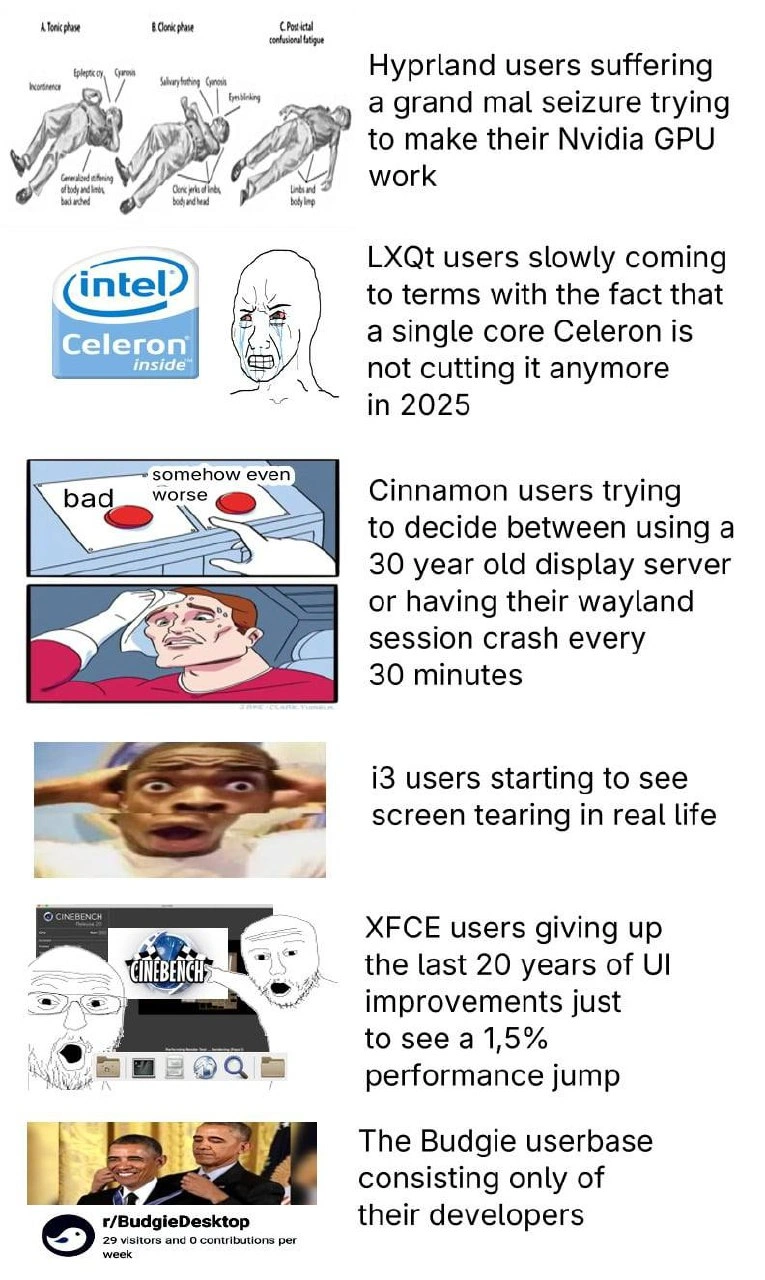
Hyprland (Wayland compositor) – This is a cutting-edge window manager that uses Wayland (a modern replacement for the old graphical system, X11). Hyprland is known for fancy effects and modern design. The meme jokes that Hyprland users with an NVIDIA graphics card are having a “grand mal seizure” trying to make it work. In plain terms: NVIDIA’s Linux drivers often don’t work smoothly with new Wayland-based setups. So getting Hyprland to run properly on an NVIDIA GPU can be extremely frustrating – picture someone flailing around because the screen is flickering or not displaying. The meme uses an over-the-top medical image to humorously exaggerate that struggle.
LXQt (lightweight desktop) – LXQt is a very lightweight desktop environment, meaning it’s designed to use minimal system resources. People often install it on old or low-powered computers. The meme shows the Intel Celeron logo (Celeron is a brand of cheap, slow CPU) and a crying figure, saying LXQt users are realizing a single-core Celeron isn’t enough in 2025. Basically, even though LXQt is super small and efficient, if your computer is that old (single core CPU from like 2005-2010 era), it’s still going to be painfully slow. The user is sad because they hoped Linux+LXQt would magically make their ancient PC fast, but modern apps and websites are too heavy. It humorously acknowledges that there’s a limit to what software optimization can do on really old hardware.
Cinnamon (user-friendly desktop) – Cinnamon is the desktop environment used by Linux Mint. It’s known for a traditional Start-menu and taskbar layout (like Windows XP style). By default, Cinnamon ran on Xorg (the 30-year-old display server that has powered Linux graphics for decades). They’ve been working on supporting Wayland (the new graphics system). The meme shows the “two red buttons” dilemma: one button is using Xorg (which is called “bad” here because it’s old tech), and the other is using a Wayland session (“somehow even worse” because in this scenario it crashes every 30 minutes). The sweating guy has to choose one. In simple terms: a Cinnamon user has two choices for how their display works, and both choices stink. Stick with Xorg – which might be reliable but considered outdated – or try Wayland – which is the future but might be unstable on Cinnamon and crash often. It’s a comedic way to say “damned if you do, damned if you don’t” regarding Linux display options.
i3 (tiling window manager) – i3 isn’t a full desktop environment with icons and menus; it’s a tiling window manager. This means it arranges windows in a grid, and you mostly use keyboard shortcuts to control it. It’s very minimal and beloved by advanced users who want speed and no fluff. However, i3 doesn’t do any fancy graphics by itself. If you use i3 on the old Xorg system, you might get screen tearing — that’s when you see horizontal splits or flicker in videos or animations because the graphics aren’t synchronized properly with the monitor. The meme shows a freaked-out face and says i3 users are “starting to see screen tearing in real life.” It’s joking that these users have gotten so used to their computer screen glitching with tears that they jokingly hallucinate it elsewhere. In reality, an i3 user would fix this by running a compositor (like a small program to sync frames), but the meme exaggerates the experience for a laugh.
XFCE (simple, old-school desktop) – XFCE is a lightweight, no-frills desktop environment that’s been around a long time. It doesn’t have flashy animations or modern gimmicks, which some people like because it’s fast. The meme claims XFCE users give up 20 years of UI (user interface) improvements for a 1.5% performance jump, showing a Cinebench window (a tool for measuring CPU performance) as if the user is obsessed with benchmarks. In simpler terms: someone who chooses XFCE is basically using a desktop that looks and feels like early 2000s, just to make their computer run slightly faster. The “1.5%” figure is tiny – almost unnoticeable – so the joke is they sacrificed all the nice visual and usability upgrades from the last two decades for a barely perceptible speed improvement. It’s poking fun at how far some folks will go in the name of performance tuning, even when it barely matters.
Budgie (niche modern desktop) – Budgie is a newer desktop environment (it was created as part of Solus Linux). It’s modern-looking and kind of in between GNOME and something like Cinnamon in style. The meme uses a gag from Reddit: “r/BudgieDesktop – 29 visitors and 0 contributions per week,” and the image shows a person (Will Smith) basically giving an award to himself. What this means in plain English: almost nobody uses Budgie aside from its developers. The community is tiny (the numbers 29 visitors, 0 contributions are exaggerated to make a point that it’s practically a ghost town). The developers are essentially the only cheerleaders for their own project – hence the guy high-fiving himself. It’s a humorous way to highlight that Budgie, despite being a pretty nice desktop, hasn’t gained a user base. In open-source, if no one is using or contributing to your project, it can feel like you’re talking to an empty room. This meme calls that out in a tongue-in-cheek way.
So, overall these are all desktop_env_tradeoffs – each choice (each desktop environment) has a downside that’s blown up to comedic proportions. Whether it’s tricky gpu_support_woes (like NVIDIA & Hyprland), the limits of supporting ancient hardware (LXQt on a Celeron), the awkward transition of wayland_vs_xorg (Cinnamon’s dilemma), visual glitches from ultra-minimal setups (i3’s screen tearing), sacrificing modern looks for tiny speed gains (XFCE’s trade-off), or the perils of a tiny user community (Budgie’s lonely developers). If you’re new to Linux, just know the meme is joking that “no matter which path you choose, you’re going to hit a funny bump.” It’s all exaggerated, but based on little truths long-time users will recognize.
Level 3: Pick Your Poison
This meme collage speaks to the heart of Linux desktop users’ shared pain: every choice is a trade-off, and often a comically bad one. Long-time Linux folks (the kind who’ve tweaked xorg.conf files by hand and survived numerous distro hops) will smirk knowingly at each panel. It’s basically saying, “No matter which desktop environment you go with, you’re in for some DeveloperExperience_DX headaches.” The humor lands because it exaggerates truths that veterans have lived through in slow motion over the years. Let’s break down these mini-scenarios and why they hit home:
Hyprland vs NVIDIA – the eternal struggle: The top panel shows a medical diagram of seizure phases, joking that Hyprland users have a fit trying to get NVIDIA GPUs working. Hyprland is a shiny new Wayland-based window manager known for cool effects (think of it as a hip, next-gen way to manage your desktop). But woe unto the person with an NVIDIA graphics card. The Linux community collectively groans at this because it’s almost a meme unto itself: “NVIDIA on Linux? Good luck, you’ll need it.” For years, NVIDIA’s proprietary drivers have been a thorn in the side of open-source graphics. In fact, there’s a famous incident where Linus Torvalds publicly flipped the bird and cursed at NVIDIA for their lack of Linux cooperation. 😅 So when a Hyprland user – eager to try modern Wayland tech – finds out their fancy GPU isn’t supported or yields glitchy behavior, it feels like tech déjà vu. We’ve seen this movie: the screen stays black, forums suggest obscure environment variables or beta drivers, hours pass in frustration. The meme’s seizure metaphor is obviously dark humor (no one is literally convulsing; it’s poking fun at the intensity of frustration). The “grand mal” reference emphasizes how extreme the ordeal feels. Veteran Linux users chuckle because they either a) have AMD/Intel graphics and smugly avoid this, or b) have indeed gone nearly insane wrestling with the NVIDIA blob driver. It’s a rite of passage in Linux desktop tweaking – hence it’s both painful and perversely funny. It underscores the broader point: cutting-edge OperatingSystems components (Wayland compositors) often collide with proprietary hardware quirks, and the user is caught in the middle doing proverbial backflips to make it work.
LXQt on a single-core Celeron – when “lightweight” isn’t light enough: The second panel hits on the nostalgia and delusion of trying to keep really old hardware alive. LXQt is known as a super-light desktop environment (successor to the old LXDE, using the Qt toolkit). It’s what you install on that 15-year-old laptop from the closet because surely Linux can make it usable, right? The meme shows the Intel Celeron logo (Celerons were budget CPUs, often underpowered even in their prime) and a crying Wojak-faced figure. The caption says LXQt users are slowly realizing a single-core Celeron in 2025 just doesn’t cut it. The humor here is twofold: First, the absurdity that it took “until 2025” for them to accept it – as if someone stubbornly clung to that CPU for decades. Second, it roasts the idea that a lightweight DE can indefinitely extend the life of ancient hardware. Seasoned Linux folks have likely tried this song and dance: install a minimal distro on old hardware to squeeze out a bit more use. And it does work… to a point. But eventually, web browsers barely run, or the system chokes on modern bloated websites, even if the OS itself is feather-light. The meme gets a laugh because it’s brutally honest – sometimes you have to let the old hardware go. In 2025, a single core (with who knows how low a clock speed) will struggle no matter what. So that crying face? It’s basically every dev or tinkerer who’s ever boasted “I have Linux running on a potato” coming to terms with the limits of that brag. It’s funny in a self-deprecating way: we applaud ourselves for frugality and then reality smacks us. The subtext also touches on PerformanceIssues and modern software demands; even the most stripped-down UX/UI can’t escape the fact that apps and websites in 2025 assume a baseline of computing power (like multiple cores, decent RAM). This panel resonates with anyone who’s tried to revive a Pentium 4 or Atom netbook only to discover that even YouTube is unwatchable on it.
Cinnamon’s two-button dilemma – stability vs modernity: The third panel leverages the classic two_button_meme_variant (the sweating guy who has to choose between two awful options). Here the buttons are labeled “bad” and “somehow even worse,” referring to Cinnamon’s choice of display server: one is the 30-year-old Xorg (the “bad” option, presumably due to age and legacy issues), and the other is a Wayland session that crashes every 30 minutes (the “even worse” option, because what good is a modern display that’s unstable?). If you’ve followed Linux desktop news, you know this is poking at the painful transition from Xorg to Wayland. Cinnamon is the desktop environment used by Linux Mint, and it traditionally runs on Xorg. The Linux Mint team has been cautious about Wayland – rightly so, if it’s not ready, users will be upset. The meme exaggerates that a Wayland session under Cinnamon would crash constantly (30 minutes is comedic specificity). So the poor Cinnamon user is like, “Do I stick with the devil I know (Xorg, with its screen tearing, older tech, perhaps fewer fancy features) or do I embrace the future and risk my session blowing up regularly?” There’s no winning, and that’s the joke. Experienced users laugh (or groan) because they have been in that exact predicament: e.g., “GNOME on Wayland is smooth… until it wasn’t, then I had to reboot and lost my work, so maybe I go back to X11.” or “My trackpad gestures don’t work on X, but on Wayland my app crashes.” It’s a comical encapsulation of the current era of Linux desktops — we’re in this awkward in-between phase. Xorg is like this old car that mostly still runs, with quirks. Wayland is the new sports car that should be better but breaks down on the highway sometimes. The meme’s blunt labels bad vs worse is what gives it the dark humor: neither option is truly “good,” which every power user can attest when juggling Wayland vs X. Until Wayland is 100% reliable for everything (and NVIDIA stops being a pain, and all apps support it), this dilemma isn’t going away. It’s funny because it’s true, and it’s true in part due to the desktop_env_tradeoffs developers have to make (support two systems, or drop one, etc., each choice upsetting someone).
i3 users and literal screen tearing vision: The fourth panel shows a blurred, shaky photo of a shocked man – a visual representation of screen_tearing_irony. The caption jokes that i3 users start seeing screen tearing in real life. Now, i3 is a beloved tiling window manager among advanced Linux users, especially developers who love keyboard navigation and a distraction-free environment. It’s minimalist – no desktop icons, no heavy compositing – which usually means very snappy performance even on modest hardware. However, as many discover, out-of-the-box i3 (which runs on X11) doesn’t enable any compositor. That can lead to noticeable tearing lines when watching videos or dragging windows, because frames aren’t synced to the monitor’s refresh. After experiencing a lot of unsynchronized screen redraws, you almost get conditioned to it. The meme imagines this going so far that an i3 user’s perception is altered – like they move their head quickly in real life and think they see a tear in their vision. It’s absurd, which is why it’s funny. It also jabs at the i3 crowd lovingly: these are folks who often tout how superior tiling WMs are, yet they quietly deal with something as basic as visual tearing until they figure out how to run
picom(a lightweight compositor) alongside i3. It’s a light poke: “you’re so hardcore with your setup that reality itself might start glitching for you.” Those of us who’ve gone down the tiling window manager path chuckle because, yes, the first time you open a video or scroll in a browser and see a jagged tear, it’s a mix of disappointment and determination: “Alright, time to read the ArchWiki and fix this.” The meme hyperbolizes that experience into a physical world phenomenon, which is a classic form of nerd humor – taking a niche technical quirk and blowing it up to Twilight Zone proportions.XFCE’s 1.5% performance gain vs 20 years of UI progress: Next, we have a panel mocking XFCE users. XFCE is often the go-to desktop for people who want something lighter than GNOME/KDE but more traditional than a tiling WM. It’s been around forever (late ’90s) and intentionally hasn’t reinvented its look drastically. The meme text says these users give up the last 20 years of UI improvements for a 1.5% performance jump, with a Cinebench window screenshot to hammer home the idea of benchmark obsessing. This is humorous because it caricatures the “ricer” or the performance tweaker mindset in the Linux community. We all know someone (or have been someone) who brags that their desktop only uses 200MB of RAM at idle, or that by using a barebones WM they can encode video 2% faster. In reality, 2% is usually negligible for everyday use – you won’t notice that difference outside of a benchmark tool. But you will notice if your UI looks like it’s from 2005 and is missing modern niceties (like intuitive settings, animations, or smooth fractional display scaling). The Cinebench image implies an XFCE user who runs a benchmark right after installing, searching for that slight edge, while ignoring that they’ve basically time-traveled their user interface. Experienced devs laugh here because it’s a gentle self-own of our community’s tendency to sometimes value specs over experience. It’s a Performance vs UX joke embodied: yes, you squeezed a bit more performance by using a Spartan setup, but at what cost? All the panels and widgets look dated, and you’ve forsaken conveniences (maybe your file manager looks straight out of 2002). The “1.5%” number is deliberately tiny to make it ridiculous. It hints that this sacrifice is largely in vain – a commentary that echoes through many tech choices (like using a fancy new framework for a tiny speed gain while introducing other headaches). It resonates especially with veteran Linux users who have probably gone through a phase of extreme minimalism and then crept back to something more balanced, realizing a fancy looking desktop can be worth a slight performance trade-off. In short, it’s poking fun at the elitism of ultra-optimization.
Budgie’s lonely developers high-fiving themselves: Finally, we have the Budgie desktop scenario, using the Will Smith self-congratulatory meme format. The text basically says the only people in the Budgie user base are the developers, illustrated by “r/BudgieDesktop – 29 visitors and 0 contributions per week.” This is an underhanded roast of how small and inactive Budgie’s community is. Budgie is a desktop environment that isn’t as mainstream as GNOME, KDE, or even XFCE. It was created with a lot of promise (it has a modern look, developed by the Solus OS team originally), but it never really exploded in popularity. So the joke is that there are almost no regular users – just the devs using their own creation. The Will Smith meme (where he’s basically giving an award to himself as both presenter and recipient) perfectly encapsulates that image: Budgie devs posting to their own subreddit and being the only ones there to upvote or cheer. If you’ve ever been involved in a small open-source project or an obscure programming language’s forum, this hits home. It humorously highlights a truth about tech ecosystems: without users and contributors, even a good project can wither in obscurity. The “29 visitors” line is probably hyperbole (or maybe pulled from a quiet day’s stats), but it emphasizes that Budgie’s community is a ghost town. As a senior dev reading this, you might recall other examples – e.g., “remember Enlightenment desktop?” or “that niche library only the author used.” It’s schadenfreude-laden humor: we feel a bit bad but can’t help chuckling at how brutally the meme calls it out. For those in the know, Budgie’s slow adoption is old news, so this is like a final punchline confirming what we suspected: hardly anyone’s using it. And if you didn’t know Budgie, the meme spells it out for you in plain terms. Essentially, it’s laughing at the fragmentation of the Linux desktop space – so many choices that some end up nearly empty, yet their devs soldier on as their own cheerleaders. In sum, this collage tickles veteran Linux users by validating our collective experiences: tricky hardware, outdated gear, transitional tech, extreme minimalism, and niche projects – each one a familiar chapter in the saga of running a Linux desktop and each one, in retrospect, pretty funny when exaggerated like this.
Level 4: Protocol Plumbing & Driver Drama
Deep beneath this meme’s humor lie fundamental Operating Systems design shifts and hardware realities. Take the wayland_vs_xorg battle: Wayland is a modern display protocol aiming to replace the aging Xorg (the X11 display server that’s been around since the 1980s). Wayland’s design is minimal and client-centric – it delegates rendering to compositors (like Hyprland or GNOME’s Mutter), avoiding Xorg’s all-in-one monolithic approach. In theory, this yields smoother graphics and better security. But in practice, Wayland’s newness clashes with decades of assumptions. For instance, NVIDIA driver pain comes from NVIDIA’s proprietary graphics drivers not initially playing nice with Wayland’s buffer handling. NVIDIA long used a different API (EGLStreams) while the open-source world gravitated to GBM (Generic Buffer Management) – two incompatible ways to feed frames to the screen. A Wayland compositor such as Hyprland (built on the wlroots library) historically had to contort itself or include special patches to support NVIDIA’s scheme. If it didn’t, an NVIDIA user’s screen either wouldn’t display properly or behaved erratically (flickering, black screens – what the meme dramatizes as a “grand mal seizure” of the display). The joke exaggerates a real technical headache: mismatched protocols causing chaotic output. It’s a GPU support woes saga rooted in fundamental driver architecture mismatches. Even as NVIDIA has slowly improved Wayland support (finally embracing GBM in newer drivers), the early adoption was rough enough to become legend. Seasoned Linux users still recall Linus Torvalds’s famous frustration with NVIDIA’s Linux support – a conflict stretching back years – so seeing Hyprland + NVIDIA depicted as a convulsing patient is darkly comedic because it rings true on a technical level: the system really does “thrash” when these pieces don’t align.
Meanwhile, the single_core_celeron bit highlights hardware evolution vs software demands. A single-core Intel Celeron (a low-end CPU from the early 2000s) in 2025 is practically a fossil. Over the years, Performance requirements for desktop environments grew – even “lightweight” ones like LXQt assume at least multiple cores and a few GB of RAM to comfortably multitask. Modern Linux desktops use threads and background services (for animations, indexing files, handling USB events, etc.). On a single-core machine, those tasks line up sequentially, fighting for slices of CPU time. There’s no parallelism, so you feel every context switch as lag. The meme’s crying faceless silhouette next to the Intel Celeron logo is a nod to this harsh reality: no amount of UX/UI minimalism can fully compensate for a 15-year gap in processor tech. It’s almost scientific — Amdahl’s Law in action — where the slow serial portion (an old single core) bottlenecks everything. The result? Even a super-trim LXQt desktop crawls on that hardware, dashing the user’s hope that Linux’s famed efficiency could defy physics. The DeveloperExperience_DX here (or rather, the user experience for a techie) becomes an exercise in futility: you can optimize software, but you can’t magically add transistors to that Celeron. Moore’s Law giveth, and Moore’s Law taketh away.
Display technology also underpins the screen_tearing_irony with i3. Screen tearing occurs when the display refreshes out of sync with the frame drawing, showing parts of two frames at once (a horizontal tear line). On Xorg, compositing window managers solved this via double buffering—draw the next frame off-screen, then flip to it during the monitor’s v-sync interval. But a barebones tiling window manager like i3 often disables compositing for speed and simplicity. It hands rendering straight to X, so unless you run an extra compositor (like picom), you’ll see tearing during fast motion. Here’s the irony: users choose i3 for minimalist, Performance-first computing, yet end up grappling with something as jarring as glitchy visuals for want of a tiny bit of “bloat” (a compositor). The meme jokes that i3 users begin seeing tearing in real life — a playful hyperbole. But technically, it hints that our brains get so trained to expect visual artifacts that we humorously imagine them outside the screen. It’s like a programmer seeing compiler errors in regular text after a long debugging session. The underlying issue is pure graphics pipeline 101: without synchronized buffer swaps (a core goal of any UXDesign in display systems), the visual experience breaks down. Wayland was actually created to enforce this synchronization globally (each Wayland compositor is a compositor by definition, so tearing is largely eliminated by design). Yet, because not everyone has moved to Wayland (or can, in i3’s case, without switching to a Wayland equivalent like Sway), this old-school glitch lives on, an artifact of transitioning technology. The humor lands because any Linux tinkerer who’s tried a tiling WM has likely encountered that first torn video frame and had an “ugh, now I gotta fix that” moment.
Even the desktop_env_tradeoffs around eye-candy vs speed get a technical spotlight in the XFCE panel. Modern desktop environments (GNOME, KDE) leverage GPUs for slick animations, high-DPI scaling, and effects — all of which cost a bit of CPU/GPU time and memory. XFCE, being staunchly minimalist, foregoes most of that. The Cinebench scene in the meme alludes to measurable performance difference: Cinebench is a CPU benchmark, and while in theory the desktop environment shouldn’t drastically affect a pure CPU render test, in practice a lighter DE means fewer background processes stealing CPU cycles or memory bandwidth. A 1.5% boost in a benchmark suggests XFCE’s frugality freed up just a tiny slice of resources. It’s practically within margin of error, but it is reproducible bragging rights for the truly obsessed. Technically, this touches on OS resource scheduling: fewer daemons and flashy services running means the scheduler can devote more CPU time to the task at hand, and the memory controller isn’t juggling as much UI overhead. However, the trade-off is giving up 20 years of user interface research and polish — things like smooth window transitions, richer APIs for apps (GTK4/Kirigami vs old GTK2 widgets), and advanced UX/UI conveniences. The meme exaggerates it as an absurd bargain (all that progress scrapped for 1.5% speed-up) — yet deep down it’s poking at a real principle in computing: diminishing returns. Past a point, shaving off more overhead yields trivial gains, and the sacrifice in usability isn’t justified. Veteran developers have seen this in other domains too (like writing kernel-level C to optimize something that only saved milliseconds). Here, XFCE is the archetype of diminishing returns for desktop performance – technically lean, but not that much leaner than a moderately optimized modern environment. The laugh comes from recognizing this Pyrrhic victory of optimization.
Lastly, the Budgie joke contains a subtler technical reality about open-source projects: network effects and collaboration are as crucial as code quality. Budgie Desktop was introduced by the Solus Linux team in mid-2010s, using modern tech (built on GNOME stack but custom shell). It’s technically sound, but to thrive it needed users and contributors. The meme’s fake Reddit footer “29 visitors, 0 contributions per week” isn’t just a jab at popularity; it highlights how a developer experience (DX) can sour when a project lacks community support. In open source, if only the core devs use the software, feedback loops dry up and bus factor risk soars (if one dev leaves, who maintains it?). Budgie’s situation (a small user base of basically its own devs) is an extreme case of a project not reaching critical mass. Historically, we’ve seen technically superior systems fade away when they can’t build momentum – whether it’s a programming language, an OS, or a desktop environment. The Will Smith self-congratulatory meme perfectly captures the echo chamber: the Budgie team might be patting themselves on the back because nobody else is around to appreciate their work. On a technical level, that also means fewer testers, fewer bug reports, and slower progress. The UXDesign of Budgie could be great, but if only a handful of people use it, it won’t evolve as fast as, say, GNOME or KDE which have thousands of eyes on them. In essence, the meme is hinting at the performance of a different kind – the performance of the project in the ecosystem, which in Budgie’s case is comically underwhelming. It’s a reminder that in technology, the best technical solution doesn’t always win; sometimes it’s the one that captures a community. And when it doesn’t, you get the dark humor of a “ghost subreddit,” a Disneyland with no visitors. For the seasoned observer, there’s almost a tragicomic history lesson here: we’ve been here before with other forlorn projects, and we likely will be again.
Description
A vertical meme compilation roasting various Linux desktop environment userbases. From top to bottom: Hyprland users suffering a grand mal seizure trying to make their Nvidia GPU work (shown with a seizure medical diagram). LXQt users slowly coming to terms with the fact that a single core Celeron is not cutting it anymore in 2025 (Intel Celeron Inside logo). Cinnamon users trying to decide between using a 30 year old display server or having their wayland session crash every 30 minutes (meme showing 'bad' and 'somehow even worse'). i3 users starting to see screen tearing in real life (distorted face). XFCE users giving up the last 20 years of UI improvements just to see a 1.5% performance jump (Cinebench screenshot). The Budgie userbase consisting only of their developers (showing r/BudgieDesktop with 29 visitors and 0 contributions per week)

Comments
37Comment deleted
Linux DE users are like Pokémon -- each one has a unique type weakness: Hyprland is weak to Nvidia, Cinnamon is weak to Wayland, i3 is weak to VSync, and Budgie is weak to having actual users
The Linux desktop is the only place you can choose between a UI from 1998, a compositor that doubles as a seizure-inducing light show for your GPU, or a window manager so minimal you start seeing screen tearing in your own eyeballs. We call this 'freedom'
Remember when we dreamed Wayland would fix everything? Turns out the real abstraction layer is coping strategies per desktop environment
After 20 years of arguing about the year of the Linux desktop, we've successfully fragmented into 47 different desktop environments, each with their own unique way of failing to render a window properly - but at least we can all agree that systemd was a mistake while our Wayland sessions crash in perfect harmony
This perfectly captures the Linux desktop paradox: you can have stability, modern features, or performance - pick one, maybe one and a half if you're lucky. Hyprland users are basically running a perpetual integration test against Nvidia's proprietary drivers, LXQt folks are discovering that 'lightweight' doesn't mean 'time-traveling CPU architecture support,' and Cinnamon users face the classic X11 vs Wayland trolley problem where both tracks lead off a cliff. Meanwhile, i3 users have stared at tiling layouts so long they're experiencing compositor-induced PTSD in meatspace, XFCE devotees are cosplaying Windows 95 for that sweet 1.5% performance gain, and Budgie's entire ecosystem is basically a very elaborate personal project. It's 2025 and we're still debugging display servers - truly, the year of the Linux desktop
Choosing a Linux desktop in 2025 is basically CAP theorem for graphics: with Nvidia you can pick Wayland features or stability under Xorg, but not both; meanwhile the XFCE crowd trades two decades of UX for a 1.5% Cinebench bump no one notices once vsync is on
Wayland promised to fix X11's tears, but delivered crashes instead - because in Linux desktops, CAP theorem now means Consistent Crashes, Always Painful
Linux DEs follow their own CAP theorem: with Nvidia you can pick any two of ‘Wayland works,’ ‘no tearing,’ or ‘a community larger than the dev team.’
it just works ™️ Comment deleted
Somerthing like number 4 happened after i played games on a gpu with completely stopped fan for several weeks. Comment deleted
GNOME and KDE, the goat of just works. Comment deleted
when I last tried KDE (about 5 years ago), a clean install with no configuration annoyed me with notifications of something constantly braking, shutting down and so on. Comment deleted
Gnome currently: oh, you're using that full-featured app that just worked? well, that sucks, we've replaced it with something worse but FaNcY (or "for modern audiences") samples: - gedit replaced by gnome-text-editor - gnome-terminal replaced by Console Comment deleted
distros (at least ubuntu and fedora) are replacing Console with Ptyxis though and it has more feature parity with gnome-terminal Comment deleted
fight me. Comment deleted
GNOME is "just works or a highway" Comment deleted
ELI5 what's budgie and what's wrong with it? Comment deleted
idk, I've been using hyprland on 1650 at my work almost for a year, and didn't have any issue Comment deleted
this gonna start a war Comment deleted
As far as I can judge, the gnome devs don’t care about their users and often make things worse. Comment deleted
any examples..? Comment deleted
On Wayland you have to make window decorations yourself when developing, cause gnome decided that you don't need default ones, when every other DE provides default ones Comment deleted
What UI improvements in 20 years? Comment deleted
don't get the XFCE point though. using xfce for already like, 10 years, only notable change was embedding of file search utility into file browser. everything else is just replacement of some libs through other libs — but it looks and feels just like before 🤷♂️ Comment deleted
Ragebait isn't meant to be accurate Comment deleted
I thought maybe somebody knows what they are talking about. may be there was some known case. Comment deleted
The author probably refers to the lack of fancy animations and transparency effects. Comment deleted
ah. actually xfce4-terminal supports transparent background and it supports themes with transparency level of interface. but animations — yes. but like, when you are deep into working, you don't need no animations. when I've still been using gnome I even disabled animations through gnome-tweaks or how this thing was called. Comment deleted
I've been rocking XFCE for about 8 years now. It just does what the DE needs to do without slowing my work down. Comment deleted
'xactly Comment deleted
even though I'm somewhat proficient with things like i3 or dwm, but for a multipurpose work I will still choose xfce only when I know, I will 99% of time spend in a terminal on this machine, I take those other two. Comment deleted
You can swap to a compton fork and have your xfce be all funny and blurry transparent Comment deleted
but do I need that? Comment deleted
another thing, that may be not Gnome's fault, is that since fedora 40 or 41 terminal app stopped supporting transparent background. And also there are two terminal apps now, two image viewers and two text editors, idk how or why Comment deleted
Mint seems to try and keep some sanity Comment deleted
GNOME sucks, that's it Comment deleted
LXDE to the rescue! 🤓 Comment deleted

