The 'I Use Arch, btw' Final Boss
Why is this DevCommunities meme funny?
Level 1: Shiny New Toy
Imagine a kid who spent all week building a super cool LEGO castle all by himself. He’s really proud of it because he picked every piece and made it just the way he wanted. Now, instead of just showing this castle to his friends at show-and-tell in a normal way, he decides to make it a big event. Picture him pulling off a blanket dramatically to reveal the Lego creation, wearing funny sunglasses and striking a pose like he’s on a TV commercial. He points at the audience with a huge grin as if unveiling the world’s greatest toy, saying “Ta-da! Check this out!”
It’s a bit silly, right? He’s treating his homemade Lego castle like it’s a new superstar toy release. Of course, his friends do think the castle is cool, but the way he’s presenting it is what makes everyone giggle. He’s combining something nerdy and personal (his Lego project that only certain friends really understand) with something flashy and dramatic (a big showy reveal like on a YouTube video). The humor is in that mix. It’s funny and charming that he’s so excited and proud that he’s basically doing a little performance to show off his work.
In the same way, this meme shows a computer guy who’s super proud of his customized computer setup (something only fellow computer enthusiasts might get excited about). He’s showing it off as if it’s a big, shiny new gadget on a famous tech show – even posing playfully on a couch to grab everyone’s attention. It’s the over-the-top excitement about a very geeky thing that makes it funny. You can’t help but smile, because his enthusiasm is both admirable and just a little overdone, like a kid proudly showing off his shiny new toy to the world.
Level 2: BTW I Use Arch
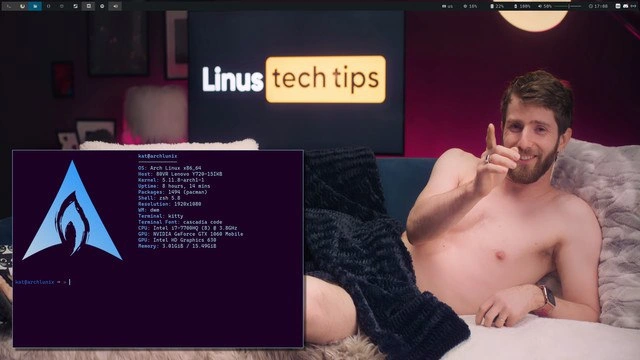
At first glance, this meme combines a Linux geek’s screenshot with a YouTube tech star’s pose. Let’s break it down in simpler terms. On the screen, we see a terminal window showing a bunch of system information – that’s the result of running a command-line tool called neofetch on an Arch Linux machine. In the background (and foreground), we see a man lounging on a sofa, pointing at the camera, with a sign that says “Linus tech tips”. This scene looks like something from a fun tech vlog or a product review video. The humor comes from mixing a super nerdy computer moment (showing off your Linux system specs) with an over-the-top presenter style you’d see in a popular tech YouTuber’s thumbnail or promo.
Arch Linux is the operating system here. An operating system (OS) is the main software that manages your computer (like Windows or macOS or other Linux distributions). Arch Linux is known for being a DIY, minimalist OS. Unlike easier Linux versions (Ubuntu, Fedora, etc.), Arch doesn’t hand-hold the installation; you pretty much build your system from the ground up by installing only what you need. This is why tech enthusiasts take pride in using Arch – it’s kind of like building your own custom car versus buying one off the lot. There’s even a running joke in dev communities: Arch users often slyly mention their OS with the phrase “I use Arch, btw” (BTW means “by the way”), just to subtly brag about it. In other words, using Arch has become a bit of a nerd badge of honor.
Now, the terminal window in the meme is running neofetch. A terminal (or command-line interface - CLI) is a text-based way to interact with your computer by typing commands. The screenshot shows purple terminal output with an Arch Linux logo and a bunch of text lines – that’s neofetch’s output. neofetch is a small program that collects system details (OS name, CPU, memory, etc.) and displays them alongside a cool ASCII art logo of your OS (the big blue Arch logo in this case). It’s often used for fun or to show off your setup in screenshots. Think of it as a quick bio for your computer. The user just typed neofetch at the shell prompt (kaist@archLinux ~ $) and got this nicely formatted summary of their system.
Let’s decode what neofetch shows here, line by line, in plain language:
- User@Host:
kaist@archLinux– This is the username (kaist) and host name (archLinux) of the computer. So the person named their machine “archLinux”. It’s just an identifier, kind of like saying “on John’s PC”. - OS:
Arch Linux x86_64– This says the operating system is Arch Linux, 64-bit. As mentioned, Arch is a popular choice for those who like to configure everything themselves. Seeing this is basically the user saying “yep, I’m running Arch!” proudly. - Host:
XPS 15 9570– The model of the computer. Here it’s a Dell XPS 15 9570 laptop. That’s a high-end laptop model. So now we know what kind of machine Arch is running on. - Kernel:
5.16.7-arch1-1– The kernel is the core part of the operating system that talks to the hardware. Version 5.16.7 is relatively new (Linux versions move fast). Listing this is like saying “my system’s core is up-to-date.” Arch Linux users usually run pretty new kernels because Arch updates continuously (a rolling release model). - Uptime:
13 hours, 29 mins– How long the computer has been turned on without rebooting. 13 and a half hours isn’t that long (not like days or weeks), but people sometimes share uptime to show stability. For example, if it was “20 days” that would mean the system hasn’t crashed or needed reboot in a long time – a bragging point for a stable setup. Here it just shows the PC’s been on since earlier that day or the night before. - Packages:
1225 (pacman)– This means 1,225 software packages are installed via pacman (the Arch Linux package manager, basically the tool that installs software on Arch). That number is quite high, implying the user has a lot of applications and tools installed. It’s like saying “I’ve set up everything I need, and then some.” Arch’s community has the AUR (Arch User Repository) which provides lots of extra software, so Arch users often install many niche packages. Seeing 1225 might make other Arch users go “whoa, that’s a lot of packages!” - Shell:
bash 5.1.16– The shell is the command-line interface program. bash is a common default shell (the thing that processes your typed commands). Version 5.1.16 is just a specific release of bash. Some users switch to fancy shells like Zsh or Fish for extra features, but using bash here shows they either prefer the classic shell or haven’t changed it. It’s like using the default tools because they get the job done. - Resolution:
1920x1080– The screen resolution, in pixels. 1920x1080 (1080p) is Full HD. This tells us the display size of the screenshot. If someone had multiple monitors, sometimes neofetch would list all the resolutions; here it’s just one screen at 1080p, probably the laptop’s screen. - DE:
i3– This stands for “Desktop Environment”. However, i3 is actually a tiling window manager rather than a full desktop environment like GNOME or KDE. What that means: i3 controls how windows appear on your screen. Instead of floating windows that you drag around, a tiling window manager places each new window in a non-overlapping tile, usually covering the screen in splits. It’s keyboard-driven and very lightweight. People who use i3 like how efficient and minimal it is — you don’t waste time or resources on fancy animations or heavy desktop icons. Seeing “i3” here signals that this user prefers a very streamlined, no-nonsense interface. It’s a bit hardcore, since i3 requires manual configuration (you edit text files to set it up the way you want). For context, a new user might be used to something like Windows or macOS where you click icons and move windows freely; i3 is a totally different, programmer-centric way to manage your desktop. - Theme:
Adwaita [GTK2/3]– This refers to the theme used for graphical apps, specifically GTK apps (GTK is a toolkit many Linux apps use for their interface). Adwaita is the default theme for GNOME (which gives windows and controls a certain look and feel). So even though the user is on i3, they likely still use some apps that rely on GNOME/GTK, and those apps are just using the standard Adwaita look. Basically, “Theme: Adwaita” says the appearance of any buttons, menus, or icons in apps is the normal GNOME style, not a custom skin. It’s a subtle detail about the visual consistency of the system. - Icons:
Adwaita [GTK2/3]– Similar to the theme, this means the icon set (the images for folder icons, application icons, etc.) is the default Adwaita set for GTK applications. So no custom icon pack is in use. The user didn’t go out of their way to install a fancy icon theme; they kept the default look for icons. - Terminal:
kitty– This is the name of the terminal emulator application. A terminal emulator is basically the program that opens a window to run the shell/CLI in. Common ones include GNOME Terminal, xterm, etc. kitty is a more modern, advanced terminal app that is very fast and supports graphics and other features. By choosing kitty, the user is again showing they like to optimize – kitty is known among enthusiasts for being efficient and feature-rich (for example, it can even display images in the terminal, and it’s GPU-accelerated for performance). So, instead of using a simpler or default terminal program, they deliberately installed kitty. It’s a bit like choosing a high-performance part for a custom car. - Terminal Font:
Cascadia Code– This is the font used in the terminal text. Cascadia Code is a font that was originally made by Microsoft for developers (it’s used in the Windows Terminal). It’s monospaced (all characters align in columns, which is ideal for coding) and has nice programming ligatures (special combined characters for things like!=,->, etc.). Using this font indicates our Arch user cares about the aesthetics and readability of their code/terminal. They didn’t just stick with whatever default font; they picked one that programmers appreciate. - CPU:
Intel i7-8750H (12) @ 4.100 GHz– This is the processor (brain of the computer). Intel Core i7-8750H is a 6-core/12-thread CPU commonly found in high-performance laptops a few years old. The “(12)” in the output likely refers to the 12 threads, and @ 4.100 GHz is the max clock speed. So it’s saying: “I have a pretty powerful 6-core Intel CPU that can go up to 4.1 GHz.” Sharing this in a screenshot tells the viewer the machine is no slouch – it’s a capable development or content creation laptop. - GPU:
NVIDIA GeForce GTX 1050 Mobile– The graphics card in the system. A GTX 1050 (mobile variant for laptops) is an entry-to-mid-level graphics card from a few years back. It’s decent for light gaming or GPU-accelerated tasks. Including it shows the system can handle graphics, and also implies the user dealt with NVIDIA drivers on Linux (which can sometimes be tricky, so it’s a small triumph too). - Memory:
5021 MiB / 31088 MiB– The RAM (memory) usage. This says out of ~31088 MiB (~30.4 GiB, which is roughly 32 GB of RAM total), about 5021 MiB (~4.9 GiB) is currently in use. In simple terms: the computer has 32 GB of memory, and right now about 5 GB is being used. That means the user has plenty of headroom left (they’re not doing anything that heavy at the moment of the screenshot). It also reveals they have a lot of RAM, which is common for a high-end setup.
Whew, that’s a lot of tech detail! And that’s exactly the point – the person is proud of their highly customized system, down to every component, and they’re showing all of it. In Linux and dev communities, posting your neofetch output or a screenshot of your desktop (especially if it’s something unique like a tiling window manager with a cool setup) is a way to share your “ricing” (slang for visual customizations and config tweaks) and get props from peers. It’s similar to how gamers share screenshots of their decked-out gaming rig specs or how car enthusiasts might show their engine mods. Here the “engine mods” are the Arch Linux OS and i3 interface and all the little choices like kitty terminal and Cascadia font.
Now, contrast that nerdy pride with the presenter in the meme. The guy on the couch pointing at the camera is doing what we’d call a clickbait pose. Clickbait is when something (like a thumbnail or title) is made extremely attention-grabbing, sometimes exaggerated or humorous, to make people want to click and see more. You might have seen YouTube video thumbnails where the host is making a shocked face, or there’s big bold text like “You won’t believe this!”. Here, the meme uses a silly scenario: the presenter is shirtless under a blanket, lounging like he’s posing for a goofy calendar, giving a playful “gotcha!” point to the viewer. The background says “Linus tech tips” – which refers to Linus Tech Tips, one of the most popular tech YouTube channels. The host, Linus (the man pictured), is known for making technology reviews and projects very entertaining with jokes and stunts. Seeing him shirtless and smirking is not a typical scene from his videos, but it’s mimicking the extreme thumbnail culture on YouTube, where creators sometimes do outlandish things to get your attention.
So why is this funny? Because normally, what’s on that screen (a bunch of text about system specs) is the kind of thing only a programmer or Linux user would geek out over. It’s generally dry information, not exciting to a general audience. And normally, Linus Tech Tips or similar channels focus on flashy hardware (like new GPUs, custom PCs, fancy gadgets) presented in a very accessible, hype way. By combining them, the meme is joking that an Arch Linux user is so eager to show off their setup that they’re treating it like it’s the latest hot tech product – worthy of a dramatic reveal. The Arch user is basically saying, “Look at my cool terminal!” with the same energy that someone else might say, “Look at this cool sports car!”
We have two worlds colliding: Dev community clout and tech influencer showmanship. In dev communities (especially among Linux users), having a custom setup on something like Arch, with a tiling window manager and all those tweaks, gives you clout (credibility and respect). It’s like street cred for geeks. People will ask, “Wow, how did you configure that?” or “That’s so cool, share your config!” On the other hand, tech influencers aim for mass appeal – making tech fun and exciting for a wide audience, often using humor or sensational presentation. This meme plays on the idea that even a nerdy achievement (setting up Arch Linux with custom configs) could be turned into a sensational headline or thumbnail like “You won’t BELIEVE my Linux setup!”. The shirtless pose is just the meme pushing it to comical extremes, highlighting how silly it would be to market a terminal output in a sexy, flashy way.
In summary, the meme is explaining an inside joke: Arch Linux users love to flaunt their setups, and here one is doing so as if they’re a famous YouTuber promoting a new gadget. It’s poking fun at both the Arch user’s pride and the YouTuber’s style. Even if you’re new to these terms, you can see the contrast – a screen full of technical info versus a guy acting like it’s the coolest thing ever. That contrast is exactly why it’s humorous. If you know a bit about tech: imagine someone proudly saying “I configured my whole OS from scratch!” while winking at the camera like it’s a blockbuster announcement. It’s endearingly nerdy and over-the-top at the same time.
Level 3: Neofetch & Chill
This meme is a glorious collision of hardcore Linux culture with YouTube tech influencer theatrics. On one side, we have an Arch Linux power-user flexing their setup via a terminal screenshot. On the other, we see a presenter (famously Linus from Linus Tech Tips) striking a shirtless, clickbait pose on a plush sofa. The humor comes from merging these two disparate forms of bragging: the subtle “check out my Arch Linux config” flex and the over-the-top tech influencer clickbait style used to grab eyeballs on YouTube. It’s as if an Arch user’s humble neofetch output got invited to a glamourous prime-time show – terminal meets thumbnail. The backdrop even features the official Linus Tech Tips logo glowing on the wall, bathing the scene in magenta light. It’s a tongue-in-cheek nod to the tech influencer world, where hosts make even mundane tech seem exciting. Here, our Arch enthusiast has literally stepped into the limelight (quite literally with that neon backlight) to show off a terminal window. The result is irresistibly absurd: a minimalist Linux desktop being presented with maximum showmanship.
Let’s unpack the brag on the screen. The overlaid terminal running neofetch is essentially a badge of honor in certain dev communities. neofetch prints out a big ASCII art logo of the distribution (in this case, the blue Arch Linux logo) alongside a wealth of system information. It’s the CLI equivalent of popping the hood of a sports car to list off engine specs, except here it’s listing OS version, kernel, packages, and more. Each line of that output is chosen to impress fellow techies:
- OS: Arch Linux x86_64 – “I use Arch, by the way.” This is the classic brag. Arch Linux is a notoriously do-it-yourself distribution. Installing Arch (with no graphical installer) and maintaining it is seen as a geek merit badge. By flashing “Arch Linux” on screen, the user is subtly flexing their elite OS choice. In dev circles, there’s a running joke that some Arch users can’t resist mentioning their OS – hence the meme phrase “BTW, I use Arch.” Here it’s right at the top, loud and proud.
- Host: XPS 15 9570 – A Dell XPS 15 laptop model. It’s a well-regarded developer laptop. Not as custom as a water-cooled desktop from Linus’s lab, but it tells us the user’s running Linux on premium hardware (another point of pride: Linux on a sleek machine).
- Kernel: 5.16.7-arch1-1 – The Linux kernel version. Arch Linux is a rolling release, so it often has the latest kernel. Showing 5.16.7 indicates this user is cutting-edge. It’s like saying “I’m running the newest engine under the hood.” Experienced Linux folks know newer kernels mean latest features (and occasionally breakages, which Arch users bravely risk).
- Uptime: 13 hours, 29 mins – How long the system’s been on. Uptime can be a flex if it’s very high (servers running for months). Here it’s 13 hours – not too dramatic, but at least it shows the system is stable since boot. Some Arch aficionados reboot often due to updates, so maybe 13 hours means they just finished tweaking things last night!
- Packages: 1225 (pacman) – The number of installed packages via Arch’s package manager,
pacman. 1225 is quite a lot, showcasing that this user has loaded their system with many tools and apps. It hints they’ve explored the vast Arch ecosystem (perhaps even the fabled AUR, Arch User Repository). In Arch land, boasting a high package count or some rare packages from AUR is a subtle “I’ve got all the toys” brag. - Shell: bash 5.1.16 – The command-line shell in use (Bash). Many power-users switch to zsh or fish with custom prompts, so sticking to Bash could imply a purist simplicity or just default. It’s the tech equivalent of saying “classic is good enough for me.”
- Resolution: 1920x1080 – The screen resolution (Full HD). Nothing crazy, but it tells us the environment shown is on a standard 1080p display. It’s basically setting the stage dimensions for this screenshot flex.
- DE: i3 – This is huge in nerd-cred. i3 is a tiling window manager – a very minimalistic GUI where windows are auto-arranged in a grid (tiles) and controlled mostly by keyboard shortcuts. Listing i3 (under “Desktop Environment”) screams “I prefer lightweight and efficient setups over bloated graphical desktops.” It’s a hallmark of the Linux customization crowd (often posted on r/unixporn with pride). Using i3 means the user likely wrote config files to set it up just how they like – definitely a flex for the LinuxCustomization enthusiasts.
- Theme/Icons: Adwaita [GTK2/3] – Adwaita is the default theme and icon set for GNOME (a popular desktop environment). Seeing it here means the user hasn’t skinned everything – possibly they only care about function, or just haven’t changed the default look for GTK apps. It’s a minor detail, but it shows even a minimalist i3 setup can mix in standard themes. Hardcore ricers often mention their custom themes, but using Adwaita is like saying “I keep it vanilla where it doesn’t matter.”
- Terminal: kitty – The terminal emulator application in use. kitty is a modern, GPU-accelerated terminal known for its speed and cool features (like graphics support). Choosing kitty over the default terminal is another suave move. It tells fellow devs, “I did my research and picked a slick, efficient terminal.” It’s part of the whole flex: every component of the workflow has been optimized.
- Terminal Font: Cascadia Code – Even the font is customized! Cascadia Code is a monospaced font released by Microsoft (originally for VS Code and the new Windows Terminal), appreciated for its clean design and programming ligatures. By mentioning the font, the user shows an eye for detail: “I even picked a stylish coding font for my console.” It’s the polish on the bragging rights trophy.
- CPU: Intel i7-8750H (12) @ 4.100 GHz – The processor model with 6 cores / 12 threads, often found in powerhouse laptops. Including the exact model and clock speed is typical neofetch – it says “this is my machine’s brain.” Techies reading it might nod approvingly at a solid CPU. It’s not an overclocked desktop monster from a Linus Tech Tips build, but it’s a capable chip for development work.
- GPU: NVIDIA GeForce GTX 1050 Mobile – The graphics card in the laptop. Not a top-tier GPU, but enough to game or run graphical workloads. Running NVIDIA on Arch can be tricky (drivers!), so it subtly also says “I managed proprietary drivers on Arch, no biggie.”
- Memory: 5021 MiB / 31088 MiB – RAM usage out of total. They have about 32 GB of RAM, with ~5 GB in use. This line basically conveys “I’ve got plenty of memory to spare.” It’s another way of saying the rig is beefy. High RAM is common for dev work or bragging rights, and seeing a lot free might imply the system is efficient (thanks to that lightweight i3 and Arch, perhaps!).
All together, this neofetch output is the ultimate developer status card. It’s showing off a bleeding-edge kernel, a fully-stocked Arch system, a fancy tiling setup, and thoughtfully chosen tools (i3, kitty, Cascadia font). In online dev communities (especially Linux enthusiast circles), sharing something like this is fishing for admiration (and a bit of good-natured envy). It’s like telling other devs, “Check out my battlestation – minimal, powerful, and entirely under my control.” The bragging rights are real: Arch users famously take pride in having built their system from the ground up, and this screenshot is tangible proof of that effort. There’s even an entire subreddit (with the cheeky name r/unixporn) where folks regularly post glamorous screenshots of their *nix desktops and configurations to earn internet points. Usually, those posts stay within niche forums.
What cranks this meme’s humor to 11 is the presentation. Instead of just posting the terminal output on Reddit, the meme frames it as if it’s a segment on a popular tech channel. The shirtless presenter lounging on a sofa, finger-guns at the camera, is a parody of the overstated showmanship seen in tech influencer culture. On YouTube, creators like Linus Sebastian (the face of Linus Tech Tips) often use catchy thumbnails and goofy setups to grab attention — perhaps not typically shirtless, but definitely theatrical and clickbait-y. It’s not every day you see someone advertising their OS choice with the same energy as unveiling a $10,000 gaming PC. The meme basically asks: “What if an Arch Linux user behaved like a tech YouTuber star?”
Consider the “Linus Tech Tips” sign glowing in the background. Linus’s channel is known for making technology entertaining to a broad audience. They’ll do wild things like dunking PCs in mineral oil or building insane multi-user workstations, all while keeping a fun, accessible vibe. Here, that brand is co-opted to hype up something only a hardcore Linux geek would normally care about. It’s a hilarious contrast: the mainstream tech channel vibe being used to glorify a command-line screenshot. The presenter’s pose itself screams classic clickbait – he’s practically saying “You won’t believe what’s on my screen!” with that playful point and grin. The plush sofa and mood lighting add an almost comically seductive tone, as if this Arch config is hot stuff deserving a sultry advertisement. (Who knew i3 workspaces could be so sexy?)
The meme lands so well because it exaggerates truths from both worlds. In the dev world, flexing your custom Arch rice (setup) is definitely a thing — it’s about earning cred from a niche crowd. And in the influencer world, dramatizing tech for views is the norm — it’s about hype and broad appeal. Put them together and you get a scene that’s absurdly fun: a guy showing off his minimalist tiling desktop with the swagger of a prime-time tech presenter. It pokes fun at how even the most esoteric developer accomplishments can be presented as epic if you add the right amount of showbiz. Essentially, the meme is saying: we techies sometimes show off our command-line conquests as if they’re shiny new gadgets — and that’s both ridiculous and awesome. Neofetch output on Arch never looked so ready for its close-up!
Description
A screenshot featuring the popular tech YouTuber Linus Sebastian of 'Linus Tech Tips', who is seen shirtless and reclining on a couch with a smirk, giving a thumbs-up. In the foreground, a terminal window is prominently displayed, running the 'neofetch' command. The output shows system information for an Arch Linux installation, including the iconic Arch logo in ASCII art, the kernel version, shell (zsh), terminal (Kitty), and hardware specs like an Intel i7 CPU and NVIDIA GTX 1060 GPU. In the background, a screen displays a 'Linus tech tips' logo styled exactly like the PornHub logo, adding a layer of adult, meme-centric humor. The image is a multi-layered joke for the tech community, primarily satirizing the 'I use Arch, btw' stereotype, where users of the Arch Linux distribution are known for taking any opportunity to mention their OS choice as a mark of technical superiority. The entire composition humorously frames this act of 'flexing' in a suggestive, over-the-top manner
Comments
7Comment deleted
The only thing more minimal than a default Arch install is the clothing worn while bragging about it
Flexing a 13-hour Arch uptime on i3 is cute - until the 437-day JVM in prod leans over and says, “adorable.”
The only thing more intimate than your relationship with your Arch config is explaining to your spouse why you need to recompile the kernel at 2 AM because upstream broke your WiFi driver again
When you finally get Arch Linux installed after 47 hours of reading the wiki, troubleshooting bootloader issues, and manually configuring every single package dependency - naturally, the only logical next step is to casually mention it in every conversation, technical or otherwise. This meme perfectly captures that moment when an Arch user achieves peak smugness: system information displayed like a badge of honor, ready to seduce you with tales of rolling releases, the AUR, and why they'd never touch Ubuntu with a ten-foot pole. The real installation challenge isn't the OS - it's resisting the urge to tell everyone about it
Arch users treat neofetch like a service-mesh sidecar - it injects into every demo and logs “BTW I use Arch” at INFO
Arch Linux: where pacman -Syu is your daily chaos monkey and neofetch doubles as the autopsy report
When you're so close to bare metal, even shirts count as abstraction leaks