Kubernetes: The Architectural Diagram vs. The Gritty Reality
Why is this Containerization meme funny?
Level 1: Neat Poster vs Messy Room
Imagine you have a big school project due. When you go to present it, you show the class and the teacher a beautiful poster with charts and pictures, and you explain everything in a very organized way. That’s like the top part of the meme – showing a nice, clean plan. But now think about what your bedroom looked like the night before while you were actually working on that project: there were papers all over the floor, glue sticks without caps, empty snack bags and soda cans, and you sitting in the middle of this mess trying to get things to work. That’s the bottom part of the meme. It’s saying that what we show to others (especially our bosses or teachers) is like the neat poster – it looks perfect – but how we actually get things done is more like the messy room – kind of chaotic and crazy. This contrast is funny because it’s so relatable: everyone knows the feeling of tidying up the story for showtime even if, behind the scenes, it was a bit of a disaster. In simple terms, the meme is joking that we pretend our work life is super organized, but really we’re just managing chaos (with lots of coffee and maybe in our pajamas).
Level 2: Under the Hood
For a junior developer or someone new to these concepts, let’s break down what’s going on. This meme is showing two different views of a Kubernetes cluster – one idealized for an audience of higher-ups, and one realistic for those who work with it every day. Kubernetes (often abbreviated “K8s”) is a system for running and managing containers across many machines. Containerization is a bit like putting an application and all its dependencies into a neat little box (a container) so it runs the same everywhere. Kubernetes is the big automation tool that places those boxes on servers, starts/stops them, and handles scaling and failures. It’s hugely popular in DevOps and SRE circles for deploying microservices.
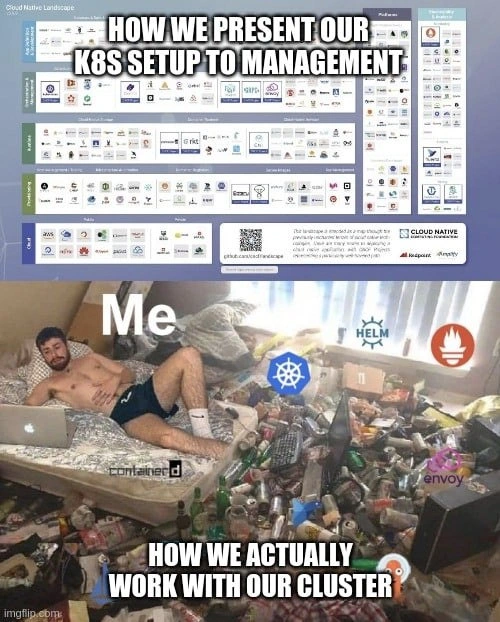
Now, in the top panel, the text says “HOW WE PRESENT OUR K8S SETUP TO MANAGEMENT.” Management here means non-technical bosses, like project managers (PMs), product managers, or executives. They often want a high-level overview of the system: what tools are we using? how is the system structured? So, teams prepare nice architecture diagrams or slides. In this case, the diagram is actually the CNCF Cloud Native Landscape poster (maintained by the Cloud Native Computing Foundation). This poster is basically a big index of all the Cloud Native tools and projects out there – databases, messaging systems, container runtimes, CI/CD tools, you name it. It’s extremely dense (hundreds of tiny logos). Companies sometimes highlight the parts they use to show “We have a full, modern stack.” It’s like saying: “Look, our Kubernetes cluster is set up following all the best practices and using industry-standard components in each category.” It gives an impression of completeness and order. The bold white caption on top is part of the meme: we are explicitly saying this is the image we portray to management. In other words, we make it look impressive and perfectly organized.
The bottom panel shows a very messy room/bedroom. It has a person labeled “Me” (implying the developer or DevOps engineer) lying casually on a bed with a laptop. The room is strewn with trash – empty cans, bottles, fast food containers everywhere. Around this chaotic scene, we see logos for Kubernetes, Helm, Prometheus, Envoy, and containerd floating as if they are part of the mess. The caption for this panel says “HOW WE ACTUALLY WORK WITH OUR CLUSTER.” This implies that when we’re actually in the thick of working on our Kubernetes cluster, it’s disorderly and improvised, not at all like the neat diagram above. It’s a classic “expectation vs reality” comparison.
Let’s identify those logos and what they mean in simple terms:
Kubernetes (the blue pinwheel-like logo in the center) – This is the core of our setup, the platform that manages containerized applications across a cluster of machines. In the meme, it’s central because most of the chaos revolves around the Kubernetes cluster’s operation.
Helm (the ship’s helm wheel logo, upper right) – Helm is like a package manager or automation tool for Kubernetes. Think of it as a way to ship and deploy apps on Kubernetes easily, using templates called Helm charts. Instead of manually writing long configuration files, you use a Helm chart to set up an application. It’s supposed to simplify deployments (so on slides, we brag “we use Helm for easy deployments”). But in practice, Helm itself has to be configured and sometimes troubleshooting a Helm deployment can be tricky – which adds to the mess depicted.
Prometheus (the orange flame logo, far right) – Prometheus is a popular monitoring tool. It collects metrics from various services (like CPU usage, memory, request rates) and lets you set up alerts. For example, “Alert me if CPU goes above 90% for 5 minutes” – that’s Prometheus’s job. It’s part of what we call observability (seeing what’s going on inside the system). In the slide to management, we’d say “We have Prometheus for monitoring and alerting, so we always know the system’s health.” But in reality, Prometheus can generate a ton of data and if not tuned, it might be overwhelming (imagine getting 1000 alerts at once) or it might miss things. Keeping an eye on Prometheus is its own task – hence its logo is floating in our messy room, showing that dealing with monitoring is part of the everyday chaos.
Envoy (the pinkish hexagon logo at bottom right) – Envoy is a high-performance proxy/communication bus often used in a service mesh. In plain terms, Envoy helps route network requests between different services in your architecture. If you have many microservices (small specialized applications that talk to each other), something like Envoy can manage that communication, do load balancing, and add security or logs. In the management slide, one might say “We run Envoy sidecars for robust service-to-service communication.” It sounds very advanced and neat. In practice, running a service mesh with Envoy can be complicated: sometimes configuration issues in Envoy cause services not to talk properly, or an Envoy proxy uses too many resources, etc. So it’s another moving part an engineer has to sift through, often with config files and logs – contributing to the mess.
containerd (the word “containerd” in black/white at the bottom left) – containerd is the container runtime that actually launches and runs containers on a node (server). Originally, many used Docker as the runtime, but Kubernetes now commonly interfaces with containerd under the hood. It’s a relatively low-level piece of the puzzle. In a presentation, we might not even mention containerd to management (too low level detail), but to an engineer it’s important: if containerd has a bug or runs out of disk space for images, containers won’t start. The meme includes it to show even these low-level details are part of our daily work (like cleaning up images, dealing with runtime errors).
So, the bottom picture with “Me” in a messy room is basically saying: when I’m actually deploying and managing this “K8s + Helm + Prometheus + Envoy + containerd” system, it’s anything but tidy. I might be working from home in a messy environment, multitasking issues from all those tools. Each logo around me represents an area that can cause headaches. It’s chaos, in contrast to the tidy representation above.
Why is it chaotic though? Imagine you’re new on a DevOps team. On Day 1, they show you documentation with nice diagrams (like the top panel): “Here’s our infrastructure.” It looks logical – each tool has its purpose. But then you start the job and discover, say, the Helm charts are poorly documented, or everyone has been copy-pasting a Helm config without really understanding it. When something breaks, you find yourself digging through YAML files (Kubernetes config files written in YAML format) trying to figure out why a deployment isn’t working. Or maybe Prometheus is alerting that memory is high on one service, and you have to log into Kubernetes (kubectl logs) to see what’s wrong – only to discover that service had a memory leak. Then you apply a quick fix (perhaps limit the memory or restart it) at 1 o’clock in the morning. None of these messy details make it to management reports; they only see “All services operational” or “We use industry-standard monitoring.” The day-to-day involves a lot of troubleshooting, adjusting, and frankly learning by trial and error.
Also, note the cultural reference: Many developers have amusingly messy workspaces, especially when crunching on a problem – it’s not that we’re always that untidy, but during a big deployment or outage, we might neglect cleaning and proper attire! The meme humorously exaggerates this: the guy is shirtless in bed with his laptop, surrounded by trash. It’s poking fun at the stereotype that engineers under pressure might end up working in their pajamas, with energy drink cans piling up, while keeping the system running. Meanwhile, the next day at the meeting, they’ll put on a normal shirt and calmly explain how “the deployment went fine after some optimizations.” See the disconnect?
For a junior dev, the takeaway is: Systems in reality are more chaotic than they appear on paper. It doesn’t mean things are always disaster; it means that the neat architecture diagrams abstract away a lot of the nitty-gritty work needed to make those things run. The top image is what it’s supposed to be, and the bottom is how it actually feels. As you gain experience, you’ll collect your own stories of things being messier than advertised. This meme is a lighthearted way for experienced folks to laugh about that fact. It falls under several humor categories: DevOps humor (poking fun at the life of DevOps engineers), Management humor (the difference between what you tell your boss and what you actually do), and “cloud native” humor in general (since all the technologies mentioned are part of the cloud-native movement). So don’t worry – if you ever feel like you’re the person in that messy room trying to keep a Kubernetes cluster from exploding, just know that it’s a common experience and even something people joke about to cope.
Level 3: PowerPoint vs PagerDuty
From a senior DevOps/SRE perspective, this meme hits home because we’ve lived both panels – the rosy presentations and the gritty reality. The top half (“HOW WE PRESENT OUR K8S SETUP TO MANAGEMENT”) is every polished slide deck we’ve shown to CTOs and PMs. It’s that cloud native architecture diagram with neatly arranged logos and arrows, implying our systems are perfectly designed, well-oiled machines. We boast about containerization (“we’ve dockerized everything and orchestrate with Kubernetes!”), about our observability stack (“we have Prometheus monitoring every metric and alerting on call”), about our smart traffic routing (“Envoy proxies handle service-to-service communication seamlessly”), and about automated deployments (“we use Helm charts for consistent, repeatable releases”). Each logo on that slide is a buzzword bingo tile that management loves to hear: it means we’re following industry best practices, we’re on the cutting edge, and everything is under control. It’s the Instagram filter version of our infrastructure – clean, modern, and impressive.
But the bottom half (“HOW WE ACTUALLY WORK WITH OUR CLUSTER”) is the unfiltered reality that veteran engineers know all too well. It’s basically DevOps Humor 101: the glorious Kubernetes cluster, in practice, feels like a cluttered dorm room where you’re on call at 3 AM, half-dressed, surrounded by empty Red Bull cans and stale pizza, furiously typing to fix one problem after another. The me in the image – an exhausted, shirtless engineer in a bedlam of junk – might as well be any of us during an all-night production outage. Those floating logos (Kubernetes, Helm, Prometheus, Envoy, containerd) are each like little gremlins we’re trying to appease in the chaos. Need to deploy a hotfix? You’re grappling with a half-broken Helm chart, overriding values on the fly. CPU spiking in production? You’re digging through Prometheus queries at 2AM, trying to figure out which microservice memory-leaked. Services failing unexpectedly? Time to play detective with Envoy proxy logs or the container runtime (containerd) to see if it’s a networking issue, a certificate expiration, or some container image that decided to go on strike. It’s a far cry from the calm, diagrammed cloud_native_landscape where each tool cleanly does its job. In the trenches, all these tools overlap and collide in unpredictable ways, and you – the SRE – are the one holding everything together with bash scripts and sheer willpower.
The humor here comes from that expectation_vs_reality_meme contrast. Management (and sometimes we ourselves, at the planning stage) expects a well-organized orchestra of services – what I like to call slideware utopia. But running a Kubernetes cluster day-to-day is more like herding cats in a hurricane. We present our setup as if it’s a perfectly tuned engine, but under the hood it’s more like a Rube Goldberg machine – a convoluted assembly of tools and scripts that somehow, just somehow, keeps working… until it doesn’t. The polished management presentation conveniently omits the nightly Slack alerts, the hacked-together Helm patches, and the Grafana dashboards blinking red like a Christmas tree. In meetings we say, “Our Kubernetes cluster enables auto-scaling and self-healing.” True enough, Kubernetes does reschedule failed pods automatically – but the part we leave out is when the cluster itself fails: like the time the node upgrade daemon misfired and half the cluster went down, or when Prometheus ran out of memory due to a barrage of high-cardinality metrics, or when a Helm chart upgrade script removed our persistent volumes by accident. Those war stories aren’t making it into the slide deck, but every veteran on the team has a few scars from them.
This meme resonates because it satirizes a common workplace dynamic: management_presentation_vs_operations. There’s often a pressure in tech teams to present a confident front to higher-ups – after all, nobody wants to tell executives, “Actually, our fancy new system is held together by duct tape and luck.” So we prepare diagrams and status reports that highlight successes and smooth over the ugly parts. It’s not that we lie; we just sanitize the truth. We might show a nice CNCF landscape diagram segment to prove we have all areas covered (“Look boss, our stack covers Container Runtime, Orchestration, Monitoring, Service Mesh – we’re so ahead of the curve!”). Meanwhile, the engineers are drowning in DevOps pain points: YAML files so complicated they might as well be ancient spells, CI/CD pipelines failing half the time, deployments that require three manual tweaks despite all the automation, and on-call rotations that leave everyone sleep-deprived. It’s the difference between theory and practice, or as an old saying in engineering goes: “In theory, theory and practice are the same. In practice, they’re not.”
For a seasoned developer, every object in that messy room tells a story. The empty cans and fast-food containers? Yep, that’s the result of late-night deployments and on-call shifts – sustenance from whatever was available, because who has time for a proper meal when the cluster’s on fire? The shirtless, lounging position of “Me” suggests an exhausted state — maybe this poor DevOps engineer has been working from home in comfort (or discomfort) for 18 hours straight, laptop literally in bed, trying to sort out a production issue with one hand while holding an iPad with a dashboard in the other. There’s a kind of gallows humor here: we’re so far from the immaculate, professional image we project in slides. Instead of a sleek control room with monitors and graphs (the imagined operations center from management’s dreams), the reality might be one overworked person in a messy apartment, using a kubectl command with shaky hands to delete a stuck pod, praying that will resolve the incident. The cluster_chaos depicted is simultaneously hilarious and painfully accurate to anyone who’s been in the on-call trenches.
Moreover, this meme pokes at the cloud-native hype vs reality. Kubernetes and its ecosystem (Helm, Prometheus, Envoy, etc.) are powerful, but adopting them doesn’t magically grant you enlightenment or efficiency. In fact, it often introduces a steep learning curve and a host of new failure modes. Seasoned engineers remember the pitch: “Containers will solve our deployment problems!” – which quickly morphed into “Okay, now we have different problems: container networking not working, image pulls timing out, mysterious CrashLoopBackOff errors…” We joked that Kubernetes is Greek for “Now you have 99 problems.” We embraced microservices for agility, only to realize we’ve created a distributed monolith that’s harder to debug. So when we show management a slick microservices diagram with Kubernetes at the center orchestrating, we make it seem like we’ve tamed the beast. But every experienced DevOps knows that underneath that calm veneer, the beast is thrashing. We’ve simply become experts at surfing on chaos. The meme’s bottom image – the disheveled developer amid junk – is the DevOps/SRE reality after wrestling with that chaos for months. It’s survival mode, not the utopia the top diagram might imply.
Finally, consider the cultural aspect: this is also management humor because many tech managers themselves chuckle knowingly at this. Good managers are aware that the tidy reports they get are abstractions and that the dev team is sparing them the gory details. In fact, part of the trust between engineers and management is that unspoken agreement: we won’t alarm you with every messy incident, and you trust us to handle the bedlam. When something like this meme circulates in a company chat, both sides often laugh. The managers see “Haha, so this is what it’s like for you guys, huh?” and the engineers smirk “If only you knew the half of it…” It’s cathartic. It’s a meme that says what everyone’s thinking: Our polished narrative is far from our actual daily grind, and that’s okay – it’s the nature of complex systems and the heroic efforts of those who maintain them. In summary, the senior perspective recognizes the comic exaggeration but also the core truth here: the gap between slideware and software is filled with the sweat and tears of DevOps, and we cope by joking about it. After all, if we didn’t laugh, we might just cry into that pile of empty soda cans.
Level 4: Orchestrating Chaos
At the most intricate level, this meme underscores the inherent complexity of a Kubernetes (K8s) cluster and the chasm between theoretical architecture and emergent reality. In theory, a Kubernetes-based cloud native architecture looks perfectly modular and manageable: you have a control plane maintaining desired state via a distributed datastore (like etcd using the Raft consensus algorithm), and various controllers orchestrating containers with mathematical precision. The CNCF Cloud Native Landscape poster in the top panel is practically an eye-chart of logos and categories – a grand, deterministic blueprint of how all the pieces fit. It’s reminiscent of a neatly defined taxonomy or even a dependency graph of microservices and tools, suggesting that each component lives in a well-defined box. Academically, one might compare it to a state machine diagram where every transition is known. This is the presentation layer – an orderly map of containerization and services that promises clarity and control.
However, the meme wryly hints at the chaos theory lurking underneath. Real distributed systems exhibit emergent behavior that can’t be fully captured in a slide. Kubernetes clusters, by nature, are dynamic and stochastic: containers crash, nodes go offline, network latencies fluctuate, and telemetry data (metrics, logs, traces) flows in torrents. The interplay of numerous components leads to a combinatorial explosion of states. This isn’t just poetic language – in computer science, the state space of a system grows exponentially with each additional component or integration. For example, adding a service proxy like Envoy into your microservice mix doesn’t just add one new element; it introduces new interactions at runtime (routing, retries, circuit-breaking decisions) that multiply the possible behaviors of the system. The polished architectural diagram belies that state-space explosion. To put it another way, if you have N components, the possible interactions and failure modes can approach O(2^N) in the worst case. It’s a combinatorial chaos hidden behind a combinatorial cloud-native checklist.
Consider the Kubernetes scheduler: conceptually it’s a single box on the slide, but it’s actually solving a complex optimization (packing containers onto nodes) that’s known to be NP-hard. That means there’s no quick algorithm to guarantee the perfect placement – the problem is as hard as the classic “bin packing” puzzle which is computationally intractable for large inputs. So K8s uses heuristics and approximations. In theory that’s fine, but in practice it means sometimes the scheduler makes odd placement decisions (e.g., multiple heavy workloads accidentally scheduled on the same node causing hotspots) and an SRE must step in to rebalance or tweak settings. The perfect equilibrium promised by an orchestration algorithm is always dancing just out of reach, constrained by fundamental computational limits. Essentially, the cluster is a living example of Gödel’s incompleteness in software systems: no matter how robust your architecture, there will always be conditions or states you didn’t account for – a “mess” that isn’t captured in the formal plan.
We can also invoke the famed CAP theorem from distributed systems theory. In the boardroom slide, our cluster looks Consistent, Available, and (implicitly) partition-tolerant – just an always-on, well-monitored system. But CAP tells us that in a distributed system we cannot guarantee strong Consistency and Availability in the presence of network Partitions. Reality reflects this: maybe etcd sacrifices availability under a network split to keep consistency, or maybe we’ve chosen eventual consistency for certain data. Management might hear “our cluster is highly available and reliable” – but the gritty truth is that you juggle trade-offs: e.g., Prometheus might drop metrics during a network partition to remain responsive (availability over consistency of data), or a deployment might pause to ensure correctness (consistency over immediate availability). These subtleties are never on the pretty diagram, but they bite engineers in real scenarios. In short, the theoretical limits expressed by CAP theorem and other distributed computing fundamentals manifest as surprise outages and weird behaviors in day-to-day cluster ops.
Another theoretical lens: the law of leaky abstractions. Kubernetes and its tools (Helm, Prometheus, etc.) are abstractions meant to simplify life — Kubernetes abstracts away individual servers, Prometheus abstracts away individual data collection, etc. But as any battle-scarred DevOps engineer will attest, all abstractions leak. The slide abstraction shows a clean separation (each tool in its box doing its job), yet in reality, those layers bleed into each other. For instance, a misconfiguration in a Helm chart (supposed to abstract app deployment) might lead to a Kubernetes resource issue (failing pods), which then shows up as alert fatigue in Prometheus (thousands of firing alerts), eventually requiring manual shell commands (kubectl fixes) to remedy. This cascade is the leakage of abstraction layers: a problem that was supposed to be contained in one layer percolates through the whole stack. The meme’s chaotic bedroom with all the logos strewn about visualizes this entanglement.
Finally, consider a principle from systems theory known as Ashby’s Law of Requisite Variety: it states that to control a complex system, the controller itself must possess comparable complexity. In our context, that means to manage a wild microservices ecosystem (with all its variety), we load up on an equally complex array of control tools – Kubernetes, Helm, service meshes, custom scripts, dozens of dashboards, etc. The result is that the “control apparatus” (the tools and ops practices) becomes massive. The top diagram is that control apparatus depicted as tidy modules, but the bottom image shows the true cost of requisite variety: the operator (the poor developer labeled “Me”) drowning in complexity, trying to wrangle a system that’s inherently high entropy. It’s almost thermodynamic: a tidy system (low entropy) left on its own will drift towards mess (high entropy) unless energy (engineering effort) is constantly expended. The chaotic cluster and the messy room both illustrate entropy at work; the second law of thermodynamics in an office meme format. In essence, the meme captures a fundamental truth: distributed systems are hard. No matter how slick the PowerPoint, the cluster chaos is always lurking, governed by the unforgiving laws of computation and complexity that ensure no non-trivial system can remain perfectly organized for long.
Description
This is a two-panel 'expectation vs. reality' meme contrasting the idealized presentation of a Kubernetes setup with the chaotic nature of managing it. The top panel, captioned 'HOW WE PRESENT OUR K8S SETUP TO MANAGEMENT,' features the notoriously dense and complex Cloud Native Computing Foundation (CNCF) landscape diagram, which shows a vast ecosystem of tools in a clean, organized layout. The bottom panel, captioned 'HOW WE ACTUALLY WORK WITH OUR CLUSTER,' depicts the reality: a man ('Me') lying shirtless on a mattress in a room completely filled with trash, empty cans, and general filth, working on a laptop. Superimposed on the mess are the logos of key cloud-native tools like Kubernetes (k8s), Helm, Prometheus, containerd, and Envoy. The joke satirizes the disconnect between the neat, orderly architectural diagrams shown to stakeholders and the messy, complex, and often overwhelming reality of day-to-day DevOps work. For senior engineers, it's a deeply resonant commentary on the hidden complexity and technical debt that lies beneath a polished presentation layer

Comments
9Comment deleted
The top diagram is what we show the CTO to justify our budget. The bottom picture is our terminal's screen session after trying to debug why the ingress controller is flapping
Management slide: “Fully automated, self-healing Kubernetes stack.” Reality: me SSH-ing into a node named “dont-reboot-pls” at 3 AM to live-edit YAML because Helm diff swore nothing would change
We tell management our K8s cluster is 'self-healing' and 'auto-scaling,' but we don't mention that we're the ones manually performing CPR on pods at 3 AM while drowning in a sea of YAML indentation errors and mysterious CrashLoopBackOffs
Ah yes, the Cloud Native Landscape - that beautiful poster we show management to justify our Kubernetes budget, conveniently omitting the part where we're drowning in YAML files at 3 AM because someone's liveness probe is flapping and taking down the entire service mesh. The diagram says 'graduated project' but the reality is more 'graduated to existential crisis.' At least when the cluster's on fire, we can warm ourselves with the glow of our burning PagerDuty notifications
Deck to management: “CNCF‑aligned platform.” Reality: kubectl -n prod exec into random pods, Helm rollback roulette, and a Prometheus silence named “business hours.”
Executive deck: "multi-cluster, mesh-native, SLO-driven platform"; reality: kubectl port-forward on a pet node, values.yaml copied from a random Helm chart, and Prometheus happily scraping only itself
Management sees a tidy K8s dashboard; we see deprecated CRDs breeding like rabbits in a GitOps petting zoo
Where is his right foot? Comment deleted
He shoot in his foot. That’s easy Comment deleted