The Two Simple Steps to Kubernetes Mastery
Why is this Containerization meme funny?
Level 1: Building a House from One Brick
Imagine your teacher shows you the very first step of a project, and it’s super easy – but then the next thing you know, they expect you to finish an extremely complicated project all on your own. It’s like if someone taught you how to place a single brick and said, “Great, now you know how to start, so go ahead and build the entire house!” You’d probably laugh because putting down one brick is simple, but constructing a whole house is a gigantic task with many steps (and they didn’t show you any of those steps!). This meme is funny for the same reason: it’s poking fun at a guide that starts with a tiny easy example and then skips straight to the end, as if the middle parts are magically obvious. The feeling you get is “Wait, you want me to do all that now?!” – a mix of surprise and being overwhelmed. We find it humorous because everyone knows you can’t really learn something complex in just one simple step. It’s a silly reminder that some instructions make things sound way easier than they actually are, and that huge jump from a basic start to a master-level finish is pretty ridiculous when you think about it.
Level 2: Draw the Rest of the Cluster
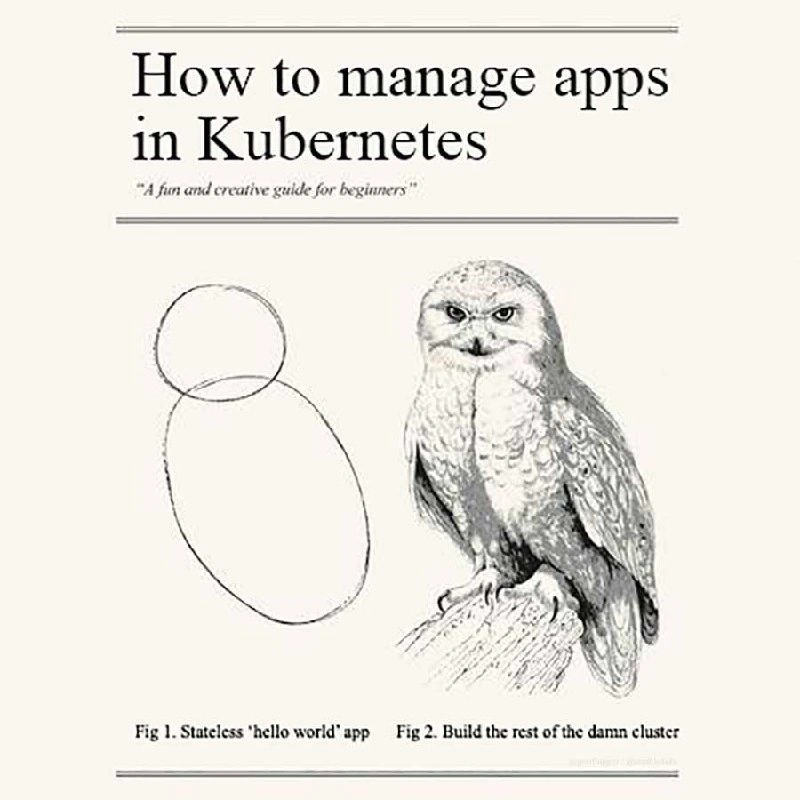
In the image, we see two sketches side by side under the title "How to manage apps in Kubernetes." This mimics a well-known joke tutorial about drawing an owl: the first figure shows a couple of simple shapes (two ovals) and the second figure suddenly shows a fully detailed owl. In our meme, Figure 1 is labeled "Stateless 'hello world' app" and just shows two rough circles – representing a super simple starting point. Figure 2 is labeled "Build the rest of the damn cluster" and shows a beautifully detailed owl – representing a fully set-up Kubernetes environment with all the complexity included. The joke here is that many Kubernetes tutorials do exactly this: they start with a very basic example (the equivalent of two ovals) and then they expect you to somehow jump to the extremely complex final result (the owl) without guiding you through the middle steps.
Let’s break down the terms to understand why this is funny and true. Kubernetes (often shortened to K8s) is an open-source system for managing containerized applications. Containerization is like packaging an app with everything it needs to run (code, runtime, libraries) into a neat little container (similar idea to a shipping container but for software). Kubernetes helps you run lots of these containers across a cluster of machines, handling things like starting/stopping containers, scaling them up, and networking between them – that’s why we call it a container orchestration platform. It’s a key part of the modern Cloud Native approach to deploying software, and it’s beloved by DevOps teams because it automates many tasks that used to be done by hand. However, it’s also infamous for having a steep learning curve – meaning it starts simple but gets complicated very quickly.
In programming and tech, a "Hello World" is typically the first, simplest program you write just to make sure everything runs. It usually does nothing more than print out “Hello, World!” or something benign. In a Kubernetes tutorial, a “hello-world” app is a trivial example application, often one that just returns a hello message, which doesn’t require any complex setup. It’s also stateless, which means the application doesn’t save any data or remember anything between runs. If you shut it down and restart it, it’s as if nothing happened before. Stateless apps are easy in Kubernetes – you can start or stop them any time without worrying about data. That’s why beginner guides use them: no need to explain databases, storage, or what happens if a container dies. Figure 1 in the meme is highlighting this: a stateless hello-world Pod is as simple as two circles in the grand scheme.
Now, Figure 2 – the “rest of the cluster” – refers to everything else you’d need for a real-world Kubernetes deployment, which those beginner examples often skip. A cluster is basically a collection of computers (physical or virtual) that Kubernetes uses to run your applications. Instead of running your app on one server, you have many servers (or nodes). Kubernetes coordinates work across all of them, which is how it can handle large applications and loads. But to “build the rest of the cluster”, you suddenly have to deal with a lot of moving parts:
- Multiple Pods and Services: In real apps, you’ll have many Pods (each Pod might run one part of your application, like one microservice, or a database, etc.). You also define Services to group Pods and give them a stable network address so different parts of your app can talk to each other reliably. The hello-world app probably only had one Pod and maybe a simple Service or none at all. A full cluster will have dozens of Pods and multiple Services.
- Networking and Ingress: In Kubernetes, each Pod gets its own IP address, and you need a networking solution so that any Pod can communicate with any other Pod in the cluster, even if they’re on different machines. This usually requires setting up a CNI plugin (container network interface plugin) – basically a piece that handles networking behind the scenes. On top of that, if you want users from the outside world to reach your application, you set up an Ingress. Ingress is like a smart router at the entrance of your cluster: it takes incoming requests (e.g., to your website) and directs them to the right service inside the cluster. The “hello world” might not have needed this (maybe you just saw it print in the console or used a simple port-forward), but any real web application in Kubernetes will. Configuring an Ingress controller (and possibly a cloud load balancer, DNS entries, TLS certificates for HTTPS, etc.) is part of that “rest of the cluster” that wasn’t shown in the simple guide.
- YAML configuration: Kubernetes is configured using YAML files. YAML (which jokingly stands for "YAML Ain’t Markup Language") is a text format that’s easy for humans to read and for machines to parse. In Kubernetes, you describe everything – Pods, Services, Ingress rules, storage, you name it – in YAML documents. In a quick tutorial, you might only write one small YAML (or none at all, if you use a
kubectl runcommand which hides the YAML). But in a real deployment, you may end up writing dozens of YAML files. This is what we call YAML sprawl: soon your beginner “hello-world.yaml” grows into a forest of configuration files. Each file might describe one piece of the puzzle (one Deployment, one Service, etc.). It’s a lot to manage, and can be quite overwhelming for someone who thought running one example was straightforward. - Stateful components and storage: The example given was stateless, meaning it didn’t need to save data. But real applications often need databases or storage – for example, a webshop needs to store orders, user info, etc. In Kubernetes, handling storage means dealing with PersistentVolumes (actual disk space in some server or cloud storage) and PersistentVolumeClaims (how a Pod requests that disk space). If your app needs a stable identity or needs to keep one instance always running (like a primary database), you’d use a StatefulSet which is a special kind of controller for stateful apps. All of this is definitely not shown in a basic intro, but you’ll quickly encounter it once you try to deploy something real like a WordPress site, a Redis cache, or any service that can’t lose its data.
- Setup and maintenance: Even getting a Kubernetes cluster in the first place can be complicated. Often, beginners use tools like Minikube (which runs a single-node cluster on your PC) to experiment, or they use a managed service like Google Kubernetes Engine or Amazon EKS where the cloud provider sets up the control plane. But if you were to set it up manually (with something like
kubeadm), there’s a whole checklist of steps (initializing masters, joining worker nodes, setting up certificates, networking, etc.). And once it’s running, you have to keep it running – update the cluster, monitor its health, etc. This is usually the job of SRE (Site Reliability Engineering) or DevOps folks: keeping the cluster itself healthy. Beginners aren’t usually taught that in a quick tutorial.
So why is the meme so spot on? Because it’s showing how learning Kubernetes often feels for newcomers: you do the easy part and then immediately face a giant leap in complexity. The text even teases “A fun and creative guide for beginners,” which is exactly the kind of tagline a blog post might have – making you think “This will be easy!” Then the guide shows you how to deploy a trivial app (fun!), and next it basically says, now you’re ready to run this in production with multiple microservices, databases, scaling, etc. – which is absurd. The emotional punchline is that mix of surprise and frustration. New learners feel lost and have this “Wait... what? That’s it? How do I go from here to that?” moment. Meanwhile, experienced Kubernetes users laugh because they remember being in those shoes, and they know that the “hello world” barely scratches the surface. It’s a form of insider humor in the DevOps humor community: we’re collectively acknowledging that Kubernetes is powerful but complex, and that the way it’s taught sometimes skips from 0 to 100.
In simpler terms: the meme is telling us that mastering Kubernetes isn’t as easy as some tutorials make it seem. Getting a single container to run (“Look, it prints Hello!”) is one thing, but deploying a whole application with all the necessary parts in Kubernetes is on a completely different level. If you’re a beginner, don’t feel bad if you find that second step hard – everyone does! That’s why entire teams and many tools exist to handle “the rest of the cluster.” The meme just uses a bit of dark humor to illustrate that huge jump in complexity.
Level 3: Hello World vs Real World
This meme hilariously exposes the gap between a tutorial and production reality. It riffs on the classic “how to draw an owl” joke: Step 1, draw two simple circles; Step 2, ta-da! draw the rest of the incredibly detailed owl. Here, Figure 1 is the easy part – a stateless "Hello World" deployment – and Figure 2 is everything else: a fully-fledged Kubernetes cluster with all its intricate details filled in. Seasoned engineers see Figure 2 and go, “Yup, that’s about right,” while recalling their own shell-shocked feeling when they first went from a toy example to deploying in the real world. The humor (tinged with PTSD) comes from how DevOps folks know that many “beginner friendly” guides stop after the hello-world, leaving you on your own to fight build the entire infrastructure. The meme’s caption nails that exasperation: “Build the rest of the damn cluster.” In other words, “we’re not going to walk you through the hard parts, good luck!”
It’s funny because it’s true – countless Kubernetes tutorials show you how to deploy a single Pod or Deployment (maybe printing Hello Kubernetes), then wave their hands and assume you can scale that up to enterprise-grade architecture in one go. Every experienced SRE/DevOps engineer has watched a naive demo and thought, “Sure, just spin up a multi-node, production-grade cluster… what could possibly go wrong?” The meme format perfectly captures that sarcastic eye-roll. After the quick win of a hello-world, you’re suddenly knee-deep in YAML files, wondering why your app can’t talk to the database, or how to expose it on the internet, or where on earth your logs went. It’s like being shown a door and then asked to build an entire house around it.
In reality, the jump from Fig 1 to Fig 2 is massive. To go from one Pod to a full cluster, there’s an entire checklist of things the tutorial likely glossed over or labeled “beyond scope.” It feels a bit like this pseudo-guide:
# Step 1: Run a simple Hello World in Kubernetes
kubectl run hello-world --image=busybox --restart=Never -- echo "Hello Kubernetes"
# Great, that was easy. Now for Step 2...
# ...[just configure the remaining 99% of the cluster infrastructure]...
# (i.e., draw the rest of the owl)
Between that tiny hello-world demo and a real deployment, here are a few of the “missing chapters” the meme implies:
- Provision the cluster – First, you need an actual Kubernetes cluster running. Is the tutorial assuming you used Minikube, or a cloud service, or
kubeadm? Setting up the control plane (the Kubernetes master components) and worker nodes is non-trivial. Many guides skip this, but in practice someone has to create the cluster or use a managed service. - Networking setup – In a real cluster, all those Pods need to communicate. Configuring a CNI plugin for networking, dealing with cluster IP ranges, and ensuring services can find each other (DNS within the cluster, etc.) all happen behind the scenes. The hello-world app didn’t need any special networking, but a “real” app likely does (microservices have to talk!). If you skip this, you get the classic “Why can’t my pods talk to each other?” 3 A.M. issue.
- YAML everything – The tutorial probably gave you one tiny YAML (or even ran a command without showing YAML). But for a real application, you end up writing YAML manifests for Deployments, Services, Ingress resources, ConfigMaps (for configuration), Secrets (for sensitive data), and more. Each of these is its own file with dozens of lines of indentation and parameters. This is the notorious YAML sprawl. Suddenly you have a Git repo full of
.yamlfiles and you’re essentially programming your cluster with declarative configs. It’s a far cry from that onehello-world.yaml. - Handling state – That “stateless” hello-world doesn’t need a database or file storage. But most real apps do. So, you have to figure out PersistentVolumeClaims and maybe set up a StatefulSet for things like databases or any service that can’t just be killed and respawned freely. Want a PostgreSQL in your cluster? Congratulations, you now have to worry about persistent disks, backup/restore, and ensuring only one live primary at a time. None of that was in the fun beginner guide’s scope.
- Ingress and external access – Exposing your app to users safely is another hurdle. In Kubernetes, you often set up an Ingress Controller (like an Nginx or Traefik ingress) to route external HTTP/HTTPS traffic into your cluster. The simple tutorial might have skipped this by using
kubectl port-forwardor a dummy NodePort, but in a real cluster, you’ll be writing Ingress rules, getting TLS certificates, and possibly configuring a cloud load balancer. Definitely not covered in “Fig 1. Hello World”. - Extras (Monitoring, Scaling, Security) – In production you’ll also need logging and monitoring (maybe Prometheus, EFK stack), autoscaling rules (Horizontal Pod Autoscalers), and proper security/RBAC configuration so not everyone can access everything. The “creative beginner guide” cheerfully ignores these necessities, but in practice, not setting them up will come back to bite you.
Each bullet point above represents a heap of work and learning. It’s no wonder that the meme struck a chord in DevOps humor circles. Essentially, it’s poking fun at the learning curve of Kubernetes – how it goes from “I deployed a container 🎉” to “I need a team of experts to manage this thing 😰” in the blink of an eye. The phrase “build the rest of the damn cluster” is the meme’s mic-drop: it humorously voices the frustration of every newbie who’s been told "and now just do the hard part". Seasoned engineers laugh (perhaps a bit darkly) because they remember being that person, confronted with a supposedly “fun and easy for beginners” guide that skipped all the messy details. Kubernetes is incredibly powerful, but the joke is that getting from a toy example to a real-world deployment isn’t a gentle progression – it’s a leap off a cliff. The meme manages to encapsulate that entire experience with one glaring owl diagram, and every Kubernetes veteran seeing it goes, “Heh, been there – welcome to the club.”
Level 4: From Pod to Paxos
Behind the meme’s jump from a simple Hello World Pod to a fully operational cluster lies the brutal truth of distributed systems complexity. In a trivial demo, a single container running a stateless app is easy because it doesn’t need to remember anything or coordinate with others. But a real Kubernetes cluster must solve hard problems that computer science PhDs love (and beginners dread). For instance, keeping the cluster’s state in sync across multiple nodes isn’t magic – Kubernetes uses a distributed key-value store (etcd) under the hood, which relies on the Raft consensus algorithm (akin to the infamous Paxos). This ensures all cluster managers agree on what’s running where. Consensus comes with theoretical limits (thanks to the CAP theorem you can’t have perfect Consistency and Availability in a partitioned network), but Kubernetes opts for strong consistency for cluster data. In other words, your “easy” app was quietly benefiting from some serious academic computer science to maintain cluster state reliably.
Then there’s scheduling. Placing containers onto the best-fitting nodes is basically a constrained optimization (the kind you’d recognize as NP-hard if you’ve tackled algorithms). Kubernetes’ scheduler uses heuristics to handle this bin-packing problem, evaluating CPU, memory, affinities, and other constraints to decide which node should run your Pod. That one-click kubectl run hides a flurry of calculations and decisions to keep the cluster balanced and redundant. And we haven’t even mentioned networking: in a cluster, every Pod gets a virtual IP and can talk to others via a software-defined overlay network. Implementing this means Kubernetes works with CNI (Container Network Interface) plugins (like Flannel or Calico) to stitch together an internal network across machines. Those two circles in “Fig 1” glossed over the fact that cross-node communication requires routing packets through virtual bridges, proxies, or iptables rules (or nifty eBPF magic in newer setups) – concepts straight out of advanced networking courses.
Finally, consider what happens when your app is stateful (say a database or a message queue). Now you’re dealing with Persistent Volumes and StatefulSets, which introduce guarantees about ordering and stable network identities. Provisioning storage in a cluster invokes its own mini-universe of complexity: Kubernetes talks to storage drivers (CSI plugins) to allocate disks or network storage, and it must ensure only one Pod attaches to the volume or that data is replicated safely. These are essentially distributed file system concerns – think consensus and replication again, but this time for user data. Even the way Kubernetes manages application configuration is sophisticated: it’s all declarative. You write desired states in YAML, and Kubernetes controllers constantly run control loops to reconcile reality with your declaration. This idea of continuously ensuring eventual consistency between desired and current state is drawn from control theory – it’s like a thermostat for your cluster, always adjusting to reach the target state. In short, the “rest of the damn cluster” involves everything from consensus algorithms to networking protocols and scheduling theory, all humming in concert. No beginner tutorial draws those parts of the owl, because under those cute two ovals are the gears of a distributed operating system at work.
Description
A meme using the classic 'How to Draw an Owl' two-panel format to satirize the steep learning curve of Kubernetes. The image is styled like a page from a vintage textbook. The title reads 'How to manage apps in Kubernetes' with a subtitle '"A fun and creative guide for beginners"'. The first panel, labeled 'Fig 1. Stateless 'hello world' app', shows two simple hand-drawn ovals, representing an easy starting point. The second panel, 'Fig 2. Build the rest of the damn cluster', abruptly shows a highly detailed, photorealistic drawing of an owl, symbolizing the immense, unexplained complexity of creating a production-ready Kubernetes environment. The joke is that beginner tutorials often cover trivial examples but fail to bridge the massive gap to real-world application, a frustration deeply familiar to any engineer who has tackled Kubernetes

Comments
7Comment deleted
Step 3: Spend the next two years debugging YAML files and wondering why the owl is on fire
“Kubernetes in Five Minutes”: 1) kubectl run hello-world; 2) add Helm, CRDs, Istio, multi-tenant RBAC, spot-instance autoscaling, cross-region DR, and congratulations - you’ve just reinvented Borg, but the tutorial’s over so… good luck
The gap between "kubectl apply -f hello-world.yaml" and explaining to the board why you need three full-time engineers just to keep the ingress controller from having existential crises
This perfectly captures the Kubernetes onboarding experience: 'Just deploy a stateless pod!' they said. Three months later, you're debugging CNI plugins, writing custom operators, tuning etcd performance, implementing service mesh policies, and explaining to management why you need a dedicated platform team. The gap between 'kubectl run hello-world' and 'production-grade multi-tenant cluster with zero-downtime deployments, automated certificate rotation, and compliance-ready audit logging' is roughly the same as two circles and a photorealistic owl
K8s motto: App's a stateless circle; cluster's the owl - etcd heartburn, CNI feathers, and ingress talons forever
Managing apps in K8s: draw two circles (Deployment + Service); then Day‑2 shows up with RBAC, NetworkPolicy, PKI rotation, etcd backups, CSI quirks, and a platform team you didn’t plan to hire
Every K8s beginner guide: 1) kubectl apply hello.yaml; 2) design multi-AZ etcd, pick a CNI, wire CSI+Ingress+cert-manager, lock down RBAC, set HPAs/PDBs, then explain to finance why “managed” still needs three SREs