Skip to content
DevMeme
4726 of 7435
Keyboard Layout From Another Dimension
Hardware Post #5180, on May 7, 2023 in TG

Keyboard Layout From Another Dimension

Why is this Hardware meme funny?

Level 1: The Wrong Drawer

It is like using a kitchen where the spoons, forks, plates, and light switches are all in almost the right places, but not quite. You reach without thinking and keep grabbing the wrong thing. The joke is funny because the keyboard looks usable at first, then slowly reveals that it would make every simple action feel a little cursed.

Level 2: Layout Is UX

A normal keyboard works because most people already know where common keys are. Enter submits commands, Shift changes letters or symbols, Delete removes text, arrow keys move the cursor, and media keys control sound or playback. Developers use these constantly, often without looking down.

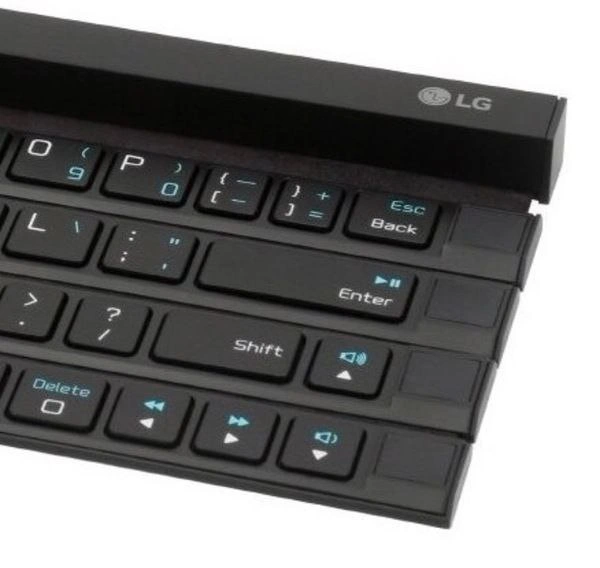
This photo is funny because those familiar pieces are rearranged into a strange physical shape. The keys are not just small; they are offset and mixed with alternate functions printed in blue. That means a person has to stop and think about actions that are usually automatic. For coding, that is especially annoying because programming uses many punctuation marks and shortcuts. A misplaced bracket, slash, or navigation key can interrupt the whole flow.

The meme belongs with hardware, UX design, and dev experience because it shows how a physical interface can create software pain. Even if the keyboard technically works, it makes the user do extra mental work. That is the same problem as a confusing settings panel or inconsistent UI: the tool becomes something you must manage instead of something that disappears into the task.

Level 3: Muscle Memory Betrayal

The image shows a black LG compact keyboard where the right side of the layout has been broken into staggered horizontal slabs. The visible labels include Esc Back, Enter, Shift, Delete, arrow icons, volume icons, and media playback symbols. The post message says, "Longer you look at it the worse is feeling," and that is exactly the joke: every second of inspection reveals another tiny betrayal of normal keyboard expectations.

For developers, keyboards are not just input devices. They are part of the execution environment. Your hands carry a cached map of where Enter, Shift, Backspace, punctuation, and arrows live. Editors, terminals, debuggers, shells, and window managers all assume that map is stable enough that you can issue commands without consciously searching for keys. This keyboard attacks that assumption by making familiar controls look close to normal while shifting them just enough to punish confidence.

That is why this lands as a developer ergonomics and UX failure meme rather than merely a "weird hardware" photo. Bad interface design is often most painful when it is almost familiar. A completely alien keyboard would make you slow down and adapt. This one invites normal typing habits and then moves the floorboards. Esc Back sitting where a developer's panic reflex expects escape or backspace is a tiny incident waiting to happen in Vim, a terminal, or any tool where one accidental keypress can turn "editing a line" into "why did I just close that state?"

The deeper satire is about tooling that optimizes for packaging, novelty, or product differentiation while externalizing the cost onto users. Compact hardware often tries to solve space constraints by combining functions, compressing rows, and hiding secondary actions behind modifiers. That can be defensible, but the bill comes due in cognitive load. Every blue alternate symbol is another little negotiation between the user's memory and the manufacturer's idea of efficiency. Somewhere, a product manager saved twelve millimeters and a developer lost the will to type curly braces.

Description

A close-up product photo shows a black LG compact keyboard with separated, staggered horizontal sections. Visible keys include punctuation keys, "Esc Back", "Enter" with a media-play icon, "Shift", and "Delete", plus arrow and volume symbols printed in blue. The odd physical layout makes a familiar input device look spatially hostile, which lands as a developer ergonomics joke for anyone whose muscle memory depends on predictable key placement.

Comments

41
Anonymous ★ Top Pick This keyboard has enough layout entropy to make Vim users discover new modes by accident.
  1. Anonymous ★ Top Pick

    This keyboard has enough layout entropy to make Vim users discover new modes by accident.

  2. @dmytrijza 3y

    why

  3. @anatoli26 3y

    🤣

  4. @anatoli26 3y

    Is this a real keyboard?

    1. @dp229 3y

      Yes (sadly)

  5. @beton_kruglosu_totchno 3y

    the fuck was delete sacrificed for?

    1. @RiedleroD 3y

      delete is to the left of the arrow keys

      1. @beton_kruglosu_totchno 3y

        yes, i'm not blind the fuck is the square?

        1. @sylfn 3y

          for ps emulation

        2. @RiedleroD 3y

          the key to switch to a better keyboard

          1. @azizhakberdiev 3y

            To this one?

            1. @sylfn 3y

              WHY THE FUCK THIS

            2. @RiedleroD 3y

              ah, the "cram as many symbols as possible into every key" keyboard

              1. @azizhakberdiev 3y

                I wonder why they just don't make it hexagonal and add this f*ing 6th row

        3. @azizhakberdiev 3y

          I think this square supposed to have a burger symbol inside (like E without left stick), I also have one on my keyboard, but I still dunno why it exists

          1. @sylfn 3y

            context menu key

            1. @azizhakberdiev 3y

              Thanks, now I know

  6. @sylfn 3y

    Who designed this.... and WHY

    1. @azizhakberdiev 3y

      ...and WHERE

  7. @azizhakberdiev 3y

    Okay, now I'm getting why. Conventional keyboard used to have 6 rows, but they apparently tried to fit it all in 4 rows

    1. @RiedleroD 3y

      fn row number row q a y modifier row + spacebar yeah, 6 rows checks out. some keyboards don't have the fn row though

  8. @azizhakberdiev 3y

    Japanese one seems to solve issue by using 5 rows, but maybe just because they couldn't manage to fit all symbols into 4

  9. @RichStallman 3y

    anything other than dvorak is stone-age

    1. @azizhakberdiev 3y

      dvorak is english specific

    2. @sylfn 3y

      anything other than たていすかん is unusable

      1. @sylfn 3y

        (keys that correspond to QWERTY ones on combined qwerty+kana keyboards, reading: ta.te.i.su.ka.n, meaning: probably none)

        1. @callofvoid0 3y

          suka

      2. @sylfn 3y

        turns out this is usable too

  10. @callofvoid0 3y

    this isn't useful for anything

  11. Someone 3y

    Don't let Apple see it. They might be inspired by it.

    1. @Araalith 3y

      So they will release it in 5 yrs and sell it as a "revolutionary product". And know what? It will bring them money anyway.

  12. @ZgGPuo8dZef58K6hxxGVj3Z2 3y

    Where are the F keys then?

    1. @ZgGPuo8dZef58K6hxxGVj3Z2 3y

      Oh nvm ipad “power” user

    2. @sylfn 3y

      On your keyboard to press for the ones who have THIS

      1. @ZgGPuo8dZef58K6hxxGVj3Z2 3y

        I have Fn lock on mine. Lmao i think the only thing it does is replacing the F keys with media, brightness and such buttons

        1. @RiedleroD 3y

          fn lock is like capslock, but for fn. useless as fuck and everytime when I use someone else's laptop I have to guess if theirs is normal or not

          1. @ZgGPuo8dZef58K6hxxGVj3Z2 3y

            No no you will know it on mine. It has an led and if you press it by itself it acts as lock, if you press it in combination it acts as if its normal Fn key, and it memorizes its state regardless of the os or rebooting

            1. @RiedleroD 3y

              great. did you know some laptops like to invert that LED based on a BIOS setting?

              1. @ZgGPuo8dZef58K6hxxGVj3Z2 3y

                Invert?

                1. Someone 3y

                  On my laptop, you can configure in the firmware whether the F1-12 keys function as F1-12 or as their other functions. This setting affects the light-off state of Fn lock. With the light on, it's the opposite of what was set in the firmware.

  13. @ZgGPuo8dZef58K6hxxGVj3Z2 3y

    Is this a computer keyboard layout from the 70s?

Use J and K for navigation