Skip to content
DevMeme
4473 of 7435
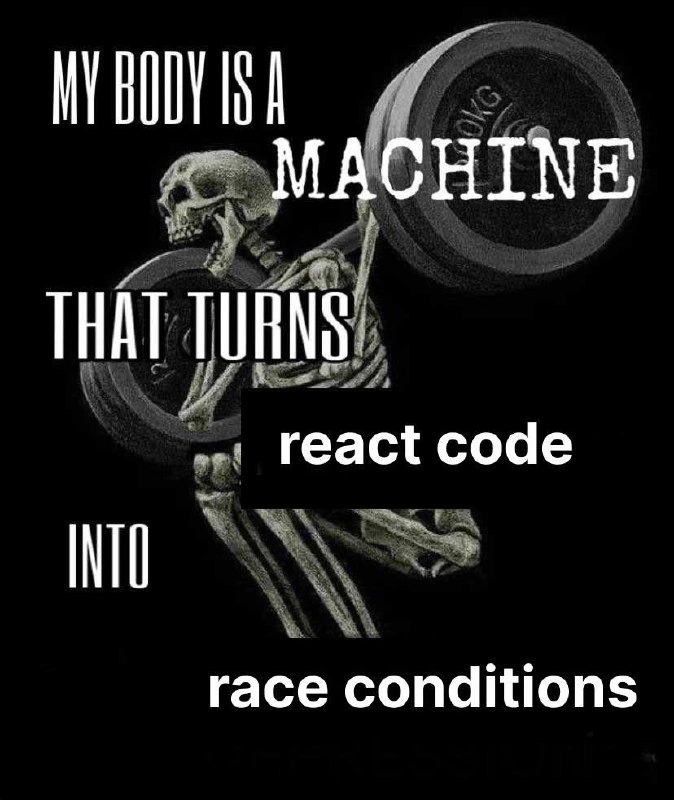
The late-night panic of shipping a JavaScript print() to production
Bugs Post #4907, on Oct 6, 2022 in TG

The late-night panic of shipping a JavaScript print() to production

Why is this Bugs meme funny?

Level 1: Accidental Alarm

Imagine you are at school and you see a little switch on the wall. You flip it, thinking it’s no big deal — maybe it just turns on a light. But instead, bells start ringing loudly everywhere: you’ve accidentally set off the fire alarm! Your tiny action caused a huge commotion, with everyone in the building startled and the whole school day interrupted. Now, later that night, you’re lying in bed and you suddenly remember what you did. Your eyes snap open wide in the dark as you think, “Uh-oh… that was me.” You feel scared and can’t sleep, because a small mistake you made turned into a big problem for everyone, and your brain just won’t stop reminding you about it.

This meme is showing that exact feeling in a funny way. In the picture, the person in bed realizes they made a little mistake in their work that actually bothered a lot of people (kind of like setting off an alarm by accident). At first they didn’t worry, but when they fully understood what happened, it gave them a shock. It’s humorous because we’ve all had moments like that — where a small slip-up becomes a big deal, and we only think of it right when we’re supposed to be sleeping! The poor developer’s wide, sleepless eyes in the last panel say it all: “I really messed up, and now I can’t relax.”

Level 2: From Log to Dialog

This meme highlights a classic goof that can slip into any project: leaving a print statement in your code when it goes out to real users. In programming, a "print" statement usually means outputting some text for debugging or logging purposes. For example, in Python you might write print("Debug info") to show a message in your program’s console, or in Java you might use System.out.println("Check me") for a similar effect. These messages are typically meant for developers, not end users. They appear in a terminal or log file. So if you accidentally leave one in the code, it's usually not a disaster — it might clutter your logs, but regular users won't notice it. That’s probably why the character in the comic initially says, "Big deal. I'll just remove it in the next release." She assumes the print statement is harmless and can wait until the next deployment to be removed.

Now, here’s the crucial detail: it’s not just any print statement; it’s JavaScript. In a web frontend context (code that runs in a user’s browser), calling print() isn't the same as printing to a hidden log. In web browsers, window.print() is a special function that opens the "Print dialog" — you know, that popup window that asks you to select a printer or save the page as PDF. It’s the same as if the user hit Ctrl+P on the page. So if you leave window.print() in your code and deploy it to production (meaning the live website), every user who visits that page will immediately get a printer selection popup from their browser. 😱 In other words, a function meant for debugging or testing (perhaps the developer was quickly checking how a page looks when printed, and temporarily put in window.print()) becomes a very visible, annoying bug for everyone.

To make the difference crystal clear, compare what "print" does in different contexts:

Environment / Language Example debug print code Does the user see it?
Python (server-side script) print("Hello") No. Only appears in the server’s console/log. Users never know it happened.
JavaScript (in browser, using console) console.log("Hello") No. Shows in the browser’s developer console (accessible via F12), which typical users don’t open.
JavaScript (in browser, using window) window.print() Yes! Triggers the browser’s print dialog on the user’s screen (as if they pressed "Print page").

In most cases, a print or log is hidden in some console or log file. But window.print() in a browser is meant to involve the user directly by opening a system dialog. It’s intended for legitimate features (for example, a "Print this page" button on a website would call window.print() when a user clicks it). If it’s called automatically without the user expecting it, it’s very jarring.

Now let’s connect this to the four panels of the comic:

  • Panel 1: The brain character (the pink, anxious brain) warns the developer in bed:

    Brain: “Hey, you left a print() statement in the production deployment.”
    This is the developer’s own brain reminding them of something they forgot. Production deployment means the version of the code that is live on the website for real users (as opposed to your local development environment or a testing server). Leaving a print statement in production code is generally a slip-up — it’s considered sloppy because such statements are meant to be removed before code goes live. The developer is lying in bed, which means this worrying thought hits her late at night, after the code has already been deployed. Uh-oh.

  • Panel 2: The woman (our developer) responds calmly:

    Dev: “Big deal. I’ll just remove it for the next release.”
    She initially thinks this is no emergency. "Next release" implies the next planned update or patch to the website/application (maybe tomorrow, next week, or whenever the team regularly deploys). So her first reaction is to shrug it off as a minor issue that can wait. After all, if it were an ordinary print to a log file, that would be fine until the next release.

  • Panel 3: The brain, looking more stressed, adds one crucial detail:

    Brain: “It’s JavaScript.”
    This is the moment of realization. The brain basically means, "This isn’t just logging some text to a server log. This is running in a user’s browser, and that print function will do something visible!" In our context, the brain is specifically referencing that the print statement left in the code is actually window.print() in a front-end JavaScript file. That means every user’s browser will try to print. The brain knows this is a big deal.

  • Panel 4: Now the room is dark and we see only the wide, white eyes of the developer lying in bed. She’s completely awake and horrified, staring at the ceiling. No words are needed in this frame. She has realized the gravity of her mistake and is now in a panic. Why the terror? Because she understands that every user who opens the app or webpage is going to see an unexpected print dialog pop up. That’s super embarrassing and disruptive. It definitely can’t wait until the next release — it’s a production bug that might have customers flooding the support line or Twitter with confusion. The thought of all those users encountering a glitch she caused is terrifying to her, and it’s keeping her up at night (exactly when she hoped to relax).

This scenario is like a rite of passage for web developers. It’s very common to use print statements, console.log() calls, or alert() pop-ups while testing and debugging a feature. The key lesson is: always remove or disable those before pushing code to production. Even something as simple as alert("Test") (which shows a little message box in the browser) can annoy users if left in by accident. In the case of window.print(), the effect is even more extreme because it actually interrupts the user with a printer dialog. Imagine the confusion of a non-technical user: they just visit your webpage, and suddenly their browser is asking them to print the page out of nowhere! They might think the site is broken or even some kind of prank.

So, the meme is both funny and a little scary, especially for newer developers. The humor comes from that sudden twist — the brain saying "It's JavaScript" — which flips the situation from no big deal to huge problem in an instant. It’s relatable because many of us have had a moment where we’re almost asleep and then remember “Oh no, did I forget to remove that?!” and our heart skips a beat. This comic exaggerates it with the brain personified as a character, but the feeling is true to life.

In short, the meme is showing a simple truth: know your environment and the impact of the code you write! A print statement isn’t always just an invisible log message — if you’re dealing with front-end JavaScript, certain functions like window.print() will directly affect the user’s experience. A tiny oversight in that context can turn into a big, user-facing bug. The poor developer in the comic learned that the hard way, and it gave her a sleepless night. Let this be a friendly reminder (with a chuckle) to always double-check your code for those sneaky leftover debug lines before deploying. 😉

Level 3: Production Print Panic

In this four-panel comic, a developer's worst ProductionBugs nightmare is playing out: a seemingly trivial code oversight has become a serious production issue after deployment. The cartoon brain in the first panel is like the experienced part of the developer's mind raising a red flag: "Hey, you left a print() statement in the production deployment." At first the developer (trying to sleep) responds casually: "Big deal. I'll just remove it in the next release." This response reflects a common initial reaction to a minor debug statement left in code — under normal circumstances (like a server log or a harmless console printout), it wouldn't be an emergency. Many languages allow a harmless print or log statement to remain, only creating a small clutter in logs or consoles, nothing visible to end users. It’s a tiny slip-up (one of those DeveloperMistakes practically everyone makes) but usually not one that keeps you awake at night.

But then the twist hits hard in the third panel when the brain ominously reminds her: "It's JavaScript." That is the pivotal detail turning a minor oversight into a full-blown panic. In a front-end JavaScript context running in a browser, a stray call to window.print() is definitely not harmless — it will trigger the browser's print dialog for every user who loads that page. This is the kind of bug that is both hilarious and horrifying: instead of quietly logging some info in the background, the code is essentially spamming each user's screen with a prompt to print the webpage. Imagine thousands of users visiting the site and suddenly seeing their browser ask them to print the page — confusion, annoyance, and support tickets would ensue. It's a front-end Production disaster caused by a single line of code.

The humor here taps into shared developer trauma. Any seasoned programmer can recall a time when a trivial line (maybe a leftover debug alert(), an accidental debugger; breakpoint, or in this case a window.print()) caused a disproportionate fiasco in production. It's an unwritten rule of bugs in software that the smallest mistakes often slip past code reviews and tests and lie in wait until the code hits real users. Here, the developer initially downplays the severity because in her mental model "print() statements" usually just log information. But her cautious brain knows better when it comes to front-end scripts. The line "It's JavaScript" in the meme is effectively shorthand for, "This isn't just a server-side log that no one notices; this is client-side and user-facing." In other words, the brain is saying: "That print call is going to literally pop up in your users' faces."

From an experienced perspective, this scenario encapsulates classic deployment-night dread. You're lying in bed after a late deployment or a round of LateNightCoding, running through mental checklists of what could go wrong. Everything seemed fine during tests, but then that one nagging thought surfaces: Did I leave some debug code in there? It's that cold-sweat moment captured perfectly by the final panel: the developer's eyes snap open in the dark, now wide awake with horror as reality sets in. The meme format of the "brain keeping you awake" is especially apt for tech folks who often find their minds unwilling to let go of work worries after hours. In this case, the worry is extremely well-founded.

There's extra irony that this happened specifically with JavaScript on the frontend. In back-end code, leaving a print statement might bloat your logs or slightly affect performance, but it wouldn't directly interrupt user workflows. However, front-end JavaScript executes in the user's browser, so its "print" function is tied to the browser UI. (Web developers have a tongue-in-cheek twist on a classic saying: if network engineers joke "It's always DNS" when tracking down weird outages, web developers might quip "It's always JavaScript" for baffling client-side bugs.) Here JavaScript’s quirk (window.print() opening a dialog) is the root cause of the panic. The comic exaggerates it humorously, but anyone who has accidentally triggered a mass user-facing glitch knows the sinking feeling.

Another hidden joke for the veterans: the developer says "I'll remove it in the next release" as if this can wait. A senior dev knows that some bugs simply cannot wait for the next scheduled rollout; a window.print() popping up for every user is one of those showstopper issues that likely warrants an immediate hotfix or rollback. The brain, acting like a battle-hardened on-call engineer, recognizes the urgency and is effectively screaming, "We can't leave this until tomorrow!" That mismatch between the developer's initial calm and the brain's panicked urgency is comedic, but it also highlights a common scenario under pressure: we sometimes convince ourselves a bug isn't that bad until a second of clear thinking (or a colleague's gasp) reveals the true impact.

In sum, this meme pokes fun at how a tiny oversight in front-end code can spiral into a nightmare scenario. It's a form of dark humor among developers: we've all been there, deploying something we later regret, then lying awake imagining users (or bosses) encountering our mistake. The combination of a ProductionIssue with the all-too-relatable "can't sleep because my brain won't shut up" trope makes this meme painfully on point. It's the perfect storm of a trivial bug meeting an unforgiving context (JavaScript in production), presented in a way that makes experienced devs both laugh and cringe — because they've survived similar incidents (and likely double-check their code for stray window.print() calls before going to bed now). In the end, developers share this laugh as a form of FrontendHumor that also reminds us: never underestimate even a single line of JavaScript in production.

Description

Four-panel comic in desaturated pink and gray. Top-left: a worried cartoon brain with bulging eyes says, “Hey, you left a print() statement in the production deployment.” Top-right: a woman lying in bed under a blanket answers calmly, “Big deal. I’ll just remove it for the next release.” Bottom-left: the brain, even more anxious, adds, “It’s javascript.” Bottom-right: the bedroom is now dark; the woman’s eyes are wide open in horror as she stares at the ceiling, unable to sleep. The humor hinges on the fact that, unlike a harmless debug print in many languages, a stray window.print() in JavaScript triggers the browser’s print dialog for every user in production, turning a minor oversight into a critical frontend bug and perfect fuel for developer insomnia
Comments

19
Anonymous ★ Top Pick Nothing shatters the illusion of “just a harmless debug line” faster than discovering your stray window.print() has basically turned the frontend into a distributed print-dialog DDoS - and yes, the uptime SLA apparently covers your users’ sleep too
  1. Anonymous ★ Top Pick

    Nothing shatters the illusion of “just a harmless debug line” faster than discovering your stray window.print() has basically turned the frontend into a distributed print-dialog DDoS - and yes, the uptime SLA apparently covers your users’ sleep too

  2. Anonymous

    The real horror isn't the console.log in production - it's explaining to the security team why your 'TODO: remove before prod' comment containing the database schema has been visible in the browser DevTools for six months while your React bundle happily served it to every script kiddie with F12 privileges

  3. Anonymous

    The real horror isn't the print statement itself - it's that in JavaScript, it's console.log(), it's already executing in millions of browser sessions, your analytics team is wondering why page load times spiked, and your next deployment window isn't until Thursday. Meanwhile, that log is cheerfully dumping your API keys, user IDs, and that embarrassing 'TODO: fix this hack' comment directly into every customer's F12 console. Sweet dreams, indeed

  4. Anonymous

    Console.log: JavaScript's unkillable zombie that laughs at your bundler and haunts every prod devtools session

  5. Anonymous

    A stray print() is a footnote in Python; in JavaScript it either pops window.print() to real users or throws a ReferenceError - turning “fix it next release” into “why is our checkout page printing?”

  6. Anonymous

    That moment you realize your “debug log” is window.print() - a synchronous, user‑gesture‑gated modal that hijacks the main thread and your CFO’s printer during the board demo

  7. @sylfn 3y

    why was it even inserted?

    1. @batuto 3y

      Debugging?

      1. @sylfn 3y

        with pen and paper...

  8. @LionElJonson 3y

    explain to non-js dev pls could it be exploited?

    1. @paul_thunder 3y

      he realized: "i`m coding in JavaScript.. what am i doing to my life?"

    2. @exhausted 3y

      it opens dialogue to print pages via printer

    3. @ZgGPuo8dZef58K6hxxGVj3Z2 3y

      No in C or C# or Java or whatever you use its precompiled and you cannot call a function that doesn’t exist.*** In JavaScript you write code and it gets saved a a text file no matter if it has invalid syntax or whatever. In case you call a function that does not exist the JS code will run up to that call and on that call it will throw an exception. So basically the code will fail and you know whats the worse in that? The browser will not even mention you that the button you clicked did nothing.

    4. dev_meme 3y

      It’s better. It will fail to run!

    5. Deleted Account 3y

      Print() at least in chrome opens print menu for the printer

  9. @viktorrozenko 3y

    JS doesn't have print().. it had console.log()

    1. dev_meme 3y

      true

    2. @misesOnWheels 3y

      tell it to chorme

  10. @WatashiWaSeireidesu 3y

    This doesn’t make any sense

Use J and K for navigation