Saving every jar: a Java dev’s venn diagram of hoarding and zero-waste ideals
Why is this Languages meme funny?
Level 1: Always Save the Jar
Imagine you have a big shelf at home where you keep every empty jar from peanut butter, jam, pickles – any jar you’ve ever used. You tell yourself, “I shouldn’t throw this jar away, I might use it later!” Pretty soon, your shelf is full of jars that you’ve saved. Now, think about a computer programmer working in Java. This programmer also saves jars – but not glass ones! In Java, a “jar” is a file that holds bits of a program (kind of like a little container full of code). Every time the programmer gets a new piece of code from somewhere else, it comes in a JAR file, and they store it on their computer. They never throw any of those away either, just like the person who keeps all the kitchen jars. So the programmer ends up with a computer full of saved JAR files. The funny part is both the person at home and the programmer say the same thing: “I’m going to save this jar.” One is saving an actual jar for reuse, and the other is saving a code jar for later. In the end, they’re both holding on to every jar they get, and that’s why this makes people laugh – it shows that in some ways, programmers can act just like someone who never throws anything out!
Level 2: JARs Everywhere
Let’s break down the joke in simpler terms. Java is a programming language that uses JAR files to package code. A JAR file is like a zip file full of compiled Java classes (the building blocks of Java programs). When you write a Java program and need extra functionality (for example, logging or working with JSON), you add dependencies – basically references to other people’s code libraries. Tools like Maven or Gradle (Java build systems) will automatically download the necessary JAR files for those libraries from the internet (specifically from repositories like Maven Central, which is a huge public collection of Java packages). To avoid downloading the same library again and again, these tools save the JAR files on your computer in a local folder (often ~/.m2/repository for Maven). This local cache means next time you need that library, it’s already there. It’s a bit like saving pickle jars in your garage so you don’t have to buy a container when you need one.
Over time, if you work on many Java projects, you accumulate a lot of JAR files in that cache. Different projects might use different versions of the same library, and the cache will keep all of them (for example, guava-27.0.jar, guava-28.2.jar, etc.). The joke compares this to hoarding and zero-waste habits with real jars. A hoarder is someone who can’t throw things away – they might keep every glass jar from every sauce or jam they’ve ever bought, thinking “Maybe I’ll use this later.” A zero-waste enthusiast is someone who tries not to throw anything useful out, reusing containers to reduce trash – they also will keep empty jars to store spices or leftovers instead of discarding them.
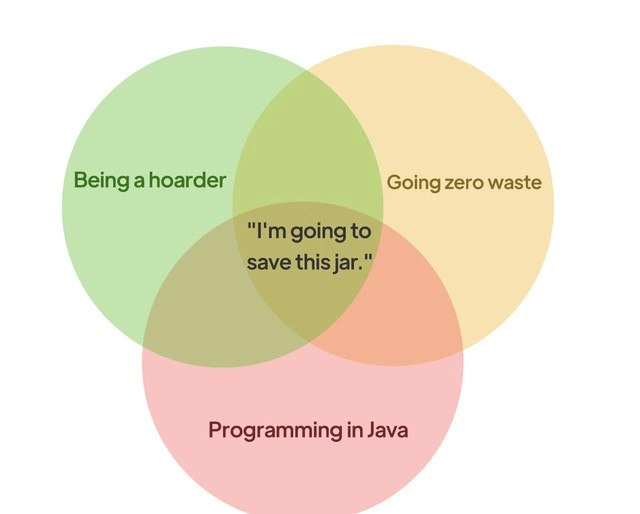
Now enter the Java developer. We often joke that Java devs “never delete a JAR”. We keep all those downloaded libraries sitting on disk because the build system doesn’t remove them and we feel safer having them around. The meme’s Venn diagram shows these three groups overlapping, meaning they all share a common behavior. In the center, the text “I’m going to save this jar.” is exactly what all three would say! For a hoarder, it’s a physical jar from the kitchen; for a zero-waste person, it’s also a glass jar to reuse; and for a Java programmer, it’s a .jar file (with code inside). The humor comes from the double meaning of “jar” – one is a real object, the other is a file type – and the fact that saving jars is a habit in both everyday life and programming. It’s a classic case of a programming pun: a word that means one thing in tech and another in normal life, and here it connects two very different lifestyles.
To make it even clearer, here’s a side-by-side comparison of the three scenarios the meme is tying together:
| Being a Hoarder | Going Zero-Waste | Programming in Java |
|---|---|---|
| “I might need this later!” Saves every jar, bottle, or old item instead of throwing it out. | “Better not toss this; I can reuse it.” Keeps every glass jar or container to reduce waste. | “Add it to the cache, just in case.” Never deletes a downloaded .jar library file (each dependency stays saved in the computer). |
| House gradually fills up with boxes of random saved items and containers. | Kitchen shelves are stacked with empty jars waiting to be useful for storage or shopping. | Hard drive accumulates thousands of JAR files in the build cache (e.g. a bloated ~/.m2/repository full of old library versions). |
As a newer developer, you might recall the first time you ran a Maven or Gradle build and saw a flurry of “Downloading...” messages followed by dozens of .jar files appearing in some folder. It’s a bit magical – you add a dependency to your project, and poof, the build tool grabs the code for you. But it also means your computer is quietly collecting jars behind the scenes. If you’re not aware, you might wonder, “Can I delete these? They’re taking space.” You can delete them, but the next build will just download them again. So most of us just leave them be. After a few projects, that cache becomes a library hoard. This is a relatable humor moment for developers: we realize we’ve become like our grandparents who keep every rubber band and jar “just in case” – except we’re doing it with software libraries!
In summary, the meme is funny to programmers because it points out a quirk of the Java ecosystem (LanguageQuirks, if you will). Java’s culture of heavy reuse and caching of packages means we inadvertently behave like packrats. It’s one of those developer in-jokes where you laugh and think, “Haha, it’s true, my ~/.m2 folder is basically a jar collection.” We’re proud of reusing code (it’s a best practice), but the visual of JAR files piling up is the nerdy parallel to pantries full of empty mason jars. 🤓
Level 3: Transitive Treasure Trove
At the intersection of Java programming, compulsive dependency caching, and an eco-friendly waste-not mindset lies a funny truth: Java developers are jar hoarders. The meme’s Venn diagram overlays three worlds – “Being a hoarder”, “Going zero waste”, and “Programming in Java” – converging on the statement: “I'm going to save this jar.” This punchline is a play on the word “jar”: in real life, a jar is a container you might save; in Java, a JAR file (short for Java ARchive) is the standard container for compiled code and libraries.
Seasoned developers recognize this as a dig at Java’s build process and dependency management. Over years of building projects, a Java dev’s machine accumulates a massive stash of .jar files in places like the Maven or Gradle cache (e.g. the infamous ~/.m2/repository for Maven). This local artifact repository is essentially a trove of every library (and every version of that library) you’ve ever downloaded – tens, hundreds, sometimes thousands of jars. Each time you add a new Maven dependency (say a logging framework or JSON parser), the build tool dutifully fetches the corresponding JAR file from Maven Central (the global Java package repository) and saves it to disk for future use. It’s a very transitive process: your project depends on library A, which depends on B and C, which each depend on others… soon a single mvn install or Gradle build pulls in dozens of JARs. You end up with a treasure trove of transitive dependencies – and like a true hoarder, you never throw any of them away.
Why is this so relatable? Because practically every Java dev has looked at their disk and muttered about that 5 GB .m2 folder swelling with old libraries. Cleaning it up feels risky or futile – the moment you delete a jar, you might need it again. “We might need this someday,” says the hoarder in our heads. Java build tools encourage this permanence in the name of efficiency: once downloaded, a library jar is reused across projects to save time and bandwidth. It’s actually a smart form of cache – but it results in zero waste of artifacts. Nothing gets discarded automatically. The joke, of course, is that this well-intentioned reuse (like an environmentalist reusing containers) turns into digital hoarding.
This overlaps with a classic Java pain point known as “JAR hell.” In the early 2000s, Java developers often faced classpath conflicts due to multiple versions of the same library jar lurking in their project. While build tools today manage versions better, we still carry all those old versions in our local repo just in case some project or module needs them. It’s like having 10 slightly different-sized lids for the same jar – you keep them all around because throwing any one away might jinx your next container-needing occasion. Senior engineers joke that our beloved build tools have no concept of garbage collection when it comes to dependencies: once a JAR enters your cache, it’s there forever (or until you nuke the whole cache). We’ve all had that moment: Disk space low? The .m2 directory is an easy target, but you hesitate – what if you go offline or Maven Central goes down? Better to stash those jars like a survivalist storing canned goods.
On an organizational level, this habit scales up: companies host artifact repositories (like Nexus or Artifactory) that proxy Maven Central and hoard every version of every dependency ever used in the company’s projects. Terabytes of jars accumulate, because policy often says never delete artifacts (builds should be reproducible years later!). It’s the enterprise equivalent of a warehouse full of glass jars – not exactly KonMari minimalism. Build systems & CI pipelines even cache these dependencies on agents to avoid repeated downloads, effectively duplicating the hoard across many machines. The result: a literal web of jars, entangling storage and build environments, much as a hoarder’s collection entangles their living space.
The humor resonates with veteran devs because it’s painfully true: Java developers glorify reusability, but end up with mountains of cached packages. The meme cleverly equates that scenario to someone obsessively saving empty jars in their pantry. Both the coder and the hoarder feel a virtuous reason for their behavior (efficiency for one, sustainability for the other), yet an observer just sees piles of jars everywhere. The Venn diagram format shines here, because who would’ve thought Maven Central cache and zero-waste lifestyle had overlap? And yet, here we are – proudly chirping “I’m going to save this jar” at every new library inclusion, while our SSDs groan under the weight of years of Java archives.
Description
The image is a simple three-circle Venn diagram on a white background. The left green circle is labelled "Being a hoarder", the right pale yellow circle reads "Going zero waste", and the bottom light red/pink circle says "Programming in Java". Where all three circles overlap in the center, darkened by the layered transparencies, the text states: ""I'm going to save this jar."" The visual joke hinges on the homonym "jar": glass jars that hoarders and zero-waste advocates keep, and the JAR archives Java developers endlessly stash in their build directories. For seasoned engineers, it nods to the ever-growing ~/.m2 or Gradle cache, illustrating how environmental virtue signals inadvertently mirror the compulsive retention of build artifacts
Comments
12Comment deleted
If a senior Java dev ever Marie-Kondo’d their ~/.m2 folder, Maven Central’s outbound bandwidth would spike like a Black Friday sale
After 15 years in the industry, my .m2 repository has become a digital archaeological site where ancient versions of commons-logging coexist with cutting-edge reactive streams, all because somewhere, somehow, a transitive dependency from 2009 still thinks it needs them
Every Java developer knows the struggle: you start with one JAR dependency, then suddenly your lib folder looks like a zero-waste enthusiast's pantry - except instead of reducing waste, you're accumulating every version of Apache Commons ever released. The real question isn't whether to save the JAR, it's whether you can even remember what half of them do anymore. At least hoarders can Marie Kondo their collections; we're stuck with transitive dependencies that spark absolutely no joy but break everything if removed
Our zero waste policy in Java: never delete a .jar from Artifactory; it’s either rollback insurance or the only thing keeping the monolith compiling
Java's zero-waste manifesto: Every JAR gets classpath immortality, because one day you'll need that obscure 2005 dependency
Nothing says zero waste like an Artifactory retention=forever policy, until the classloader grabs the 2017 Guava and you rediscover jar hell
👋😼 Comment deleted
owning anime figurines Comment deleted
How dare you 😳 Comment deleted
zero waste people are just hoarders who don't buy anything Comment deleted
It's 2010-ish You got that cellphone running java apps. You know that you will go broke if you enable your data in your place so the only source for jars is your local dc++ network. You casually check it for new ones once in a while simply typing something like .jar or .jad into the search bar. You are downloading all of them, because chances of getting a compatible one are quite small. Scrolling through the list of colored lines (means that you already have or had the file) you see the white one. Bit of excitement in your eyes -"I'm going to save this jar" Comment deleted
People with one-way satellite equipment (DVB-T) may scan the brodacast signal and grab a copy of any interesting file dowloaded by other people on the same transponder — this is called "satellite fishing". 😎 Comment deleted