The 'We Have IntelliJ at Home' Starter Pack
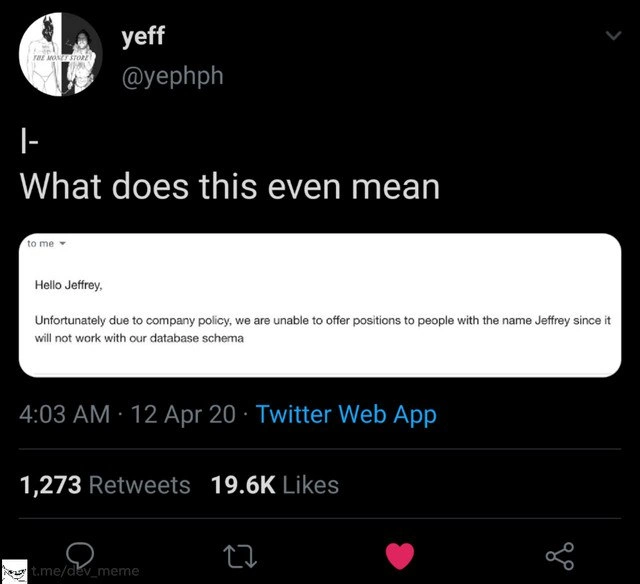
Why is this IDEs Editors meme funny?
Level 1: Name-Brand vs Generic
Imagine you really want a specific toy or treat, and you ask your mom for it. Maybe it’s a famous brand of chocolate or the newest video game console. Now, picture your mom saying, “No, we don’t need to buy that. We have one at home.” You get home, and instead of the thing you dreamed of, she gives you something completely different – like an off-brand candy or an old console that barely works. You’d recognize it’s not the same at all, and you’d feel totally let down, right? That mix of hope and then disappointment is exactly what this meme is joking about.
In the meme’s case, a kid (the developer) wanted a fancy coding program (IntelliJ, the equivalent of the cool new toy), but Mom said no and pointed to what they have at home (Eclipse, the old toy from the closet). It’s funny because the “at home” version is clearly a cheap knock-off compared to what was asked for, and we can all laugh at how moms (or bosses) sometimes just don’t get why the new thing is better. It’s a way to poke fun at that feeling we all know: asking for something great and getting a not-so-great substitute. The humor comes from recognizing that situation in our own lives and finding it absurd and amusing.
Level 2: The "At Home" Edition
Let’s break this down in simpler terms. This meme uses the familiar “Mom, can we have X? No, we have X at home” format. In internet culture, that phrase is a joke template: someone (usually a kid) asks for something they really want (a cool toy, a treat, etc.), and the parent says no because “we have that at home.” The twist is that the version at home is a crummy, unwanted substitute. Here, IntelliJ IDEA is the cool thing the kid (the developer) is asking for, and Eclipse is the disappointing version at home that the mom insists on using.
Now, what are these things we’re comparing? Both IntelliJ IDEA and Eclipse are IDEs, or Integrated Development Environments. An IDE is basically a programmer’s toolkit all in one application: it’s a text editor, plus a compiler, plus a debugger, with many extra features to make coding easier. Think of an IDE as a supercharged word processor for writing code – it doesn’t just let you type code; it also helps you catch mistakes, navigate your project, and run the software you’re building.
IntelliJ IDEA (often just called IntelliJ) is a popular IDE made by a company called JetBrains. It’s especially loved in the Java programming community. Why? Because it’s smart. As you type Java code, IntelliJ can auto-complete your code, suggest fixes, and even warn you about errors before you run the program. It has a modern, slick user interface (many developers use a cool dark theme in IntelliJ), and a ton of built-in tools. JetBrains offers a paid Ultimate edition with all the bells and whistles, as well as a free Community edition for basic use. A lot of Java devs rave about IntelliJ because it often makes coding feel easier and more efficient. It’s the kind of tool that might make a newcomer say, “Wow, it’s almost like it reads my mind when I’m coding!”
Eclipse IDE is another very well-known IDE for Java (and other languages too). Eclipse is open-source, which means it’s free to use and its source code is maintained by a community (in this case, the Eclipse Foundation). Eclipse has been around for a long time (since the early 2000s) and was a go-to Java IDE for many years. It has a large ecosystem of plugins (add-ons that provide extra features). However, Eclipse is often seen as a bit more old-school in terms of look-and-feel. For instance, when you start Eclipse, it might show a welcome screen (like in the meme image) with links to tutorials and samples. The design is functional but not very flashy – lots of gray panels and traditional menus. It also requires setting up a workspace (a special folder for all your projects) when you first use it, which can confuse beginners who just want to open and edit a single project quickly. Eclipse can definitely do a lot, and many developers still use it, but it sometimes feels less “automated” or helpful out-of-the-box compared to IntelliJ. You might need to tweak settings or add plugins to get features that IntelliJ provides by default.
The meme labels the Eclipse screenshot as “IntelliJ at home,” which is the jokey way to say “the supposed IntelliJ we have at home (according to Mom) is actually just Eclipse.” This implies that Eclipse is a knock-off or inferior version of the “real thing” (IntelliJ) in the eyes of the person asking. The humor is a bit tongue-in-cheek – of course Eclipse isn’t literally a fake IntelliJ; it’s its own respected IDE. But among many developers, IntelliJ is considered the premium experience, while Eclipse is the okay, it works choice. It’s similar to how you might prefer a shiny new iPhone, but your parent says, “We have a phone at home,” and that turns out to be an old flip phone. The old phone can make calls, sure, but it’s nowhere near as fun or powerful as the smartphone you wanted.
Let’s connect this to a junior developer’s experience. Imagine you just started learning Java. Perhaps your college course or an online tutorial told you to use Eclipse because it’s free and standard. You download it, open it up, and see that welcome screen with options like Overview and Tutorials. It feels a bit like opening an old textbook – useful, but not exciting. You might manually set up a project, write a simple “Hello World,” and it runs – great. Now sometime later, you hear other programmers talking about IntelliJ: “IntelliJ is so good at catching mistakes!” or “I sped up my coding when I switched to IntelliJ.” So you decide to try IntelliJ IDEA. You open it and the interface looks more modern; the editor might highlight potential problems in your code instantly. You type a few characters and it suggests completions that make sense. Perhaps you rename a variable, and IntelliJ automatically updates every place that variable is used (that’s called refactoring, and IntelliJ is very good at it). You realize, “Whoa, this feels easier!”
At this point, you might prefer IntelliJ and ask your team or professor, “Can I use IntelliJ for this project? It feels nicer.” If you’re unlucky, the response might be, “No, stick to Eclipse.” That moment is exactly what the meme is capturing. Disappointment! It’s like being told the cooler new toy isn’t an option, and you must play with the older one you have at home. A junior dev can relate to the frustration of being limited to a tool that’s harder to use just because “that’s what we have.”
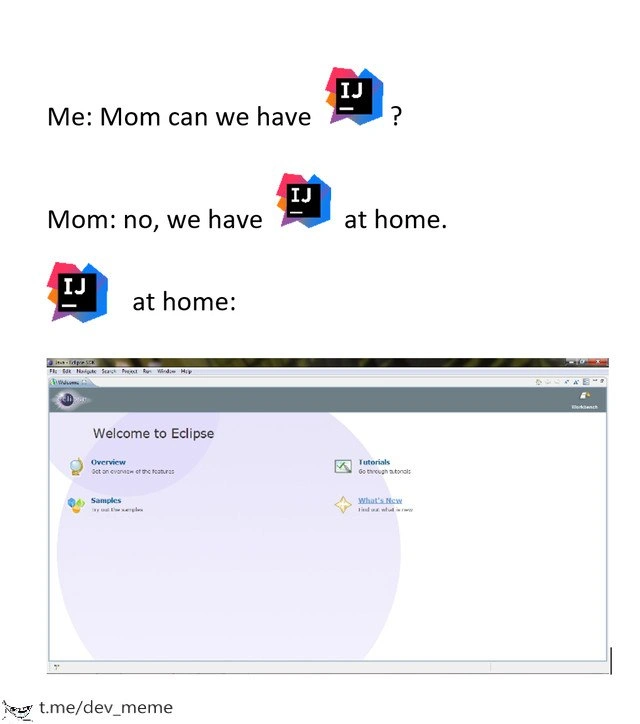
The meme’s text and images are chosen carefully for this contrast. The IntelliJ IDEA logo appears in the first part (the thing the kid wants). That logo is pretty colorful and modern-looking – it’s black with pink, purple, and blue accents, kind of edgy and cool. Then the mom’s answer uses the IntelliJ logo again followed by “at home,” setting us up to expect a less exciting home version. Finally, we see the Eclipse IDE welcome screen: it has a big word “Eclipse,” some dated icons, and a pale color scheme. To someone who’s seen both IDEs, just that screenshot alone screams “old-school tool.” It’s the perfect visual punchline. Even if you haven’t seen these before, you can guess: the bottom image doesn’t look as fun or modern as the thing the kid was asking for.
This scenario is also about developer experience (DX) in a straightforward way: a tool that’s easier and more enjoyable can genuinely make a programmer happier and more productive. IntelliJ and Eclipse both let you code in Java, but the experience of using them day-to-day can be quite different. That difference in experience is exactly why this meme exists – it’s exaggerating the preference many developers have. If you ever hear programmers humorously debating editors or IDEs, that’s often called the editor wars or IDE wars. It’s similar in spirit to, say, gamers debating Xbox vs PlayStation, or designers debating Photoshop vs GIMP. Here it’s IntelliJ vs Eclipse for Java folks. And just like those other debates, people joke about the side they don’t prefer. This meme is clearly joking that Eclipse is the lame “imposter” of IntelliJ.
In summary, at this level, understand that the meme is using a popular joke format to highlight a common feeling among programmers: wanting to use a shiny, well-loved tool (IntelliJ) but being told to use an older, less cool one (Eclipse) instead. The result? Comedy, through relatability. Even if you’re new to programming, you can relate if you’ve ever been given a generic alternative when you wanted the name-brand item. It’s that little bit of irony and disappointment that makes the meme funny.
Level 3: IDEology Clash
Me: Mom, can we have IntelliJ IDEA?
Mom: No, we have IntelliJ at home.
IntelliJ at home: [shows the Eclipse IDE welcome screen]
In the software development world, this meme hits a nerve by poking fun at the great IDE wars – specifically the long-standing JetBrains vs Eclipse rivalry in the Java IDE choice arena. Seasoned developers recognize the scenario: you ask for that polished, next-gen tool (IntelliJ IDEA), but circumstances (or management) hand you the older, clunkier alternative (Eclipse IDE), assuring you it’s “just as good.” The humor comes from the implicit IDE preferences every Java dev holds dear, often as passionately as sports fans support their teams. We’ve all been there, and it’s painfully funny how accurate this feels.
From a senior dev perspective, the meme exaggerates a common workplace situation. Maybe you joined a project and requested a JetBrains license for IntelliJ – renowned for its smart code completion, deep static analysis, and sleek interface – only to hear, “We already have an IDE: use Eclipse, it’s free.” It’s the classic off-brand substitute story. Many companies default to Eclipse because it’s open-source (zero cost) and was the de facto Java IDE for ages. But to a developer spoiled by IntelliJ’s Developer Experience (DX), that’s like being told to trade in your sports car for a reliable old sedan. Sure, both get you to your destination (code runs in the end), but one makes the journey a lot more enjoyable.
The developer humor here stems from just how real this feels. IntelliJ IDEA is often seen as the modern, “premium” IDE, packed with features that make coding feel almost luxurious: intelligent refactorings, real-time error highlighting, integrated version control, and a UI that doesn’t look like it was frozen in 2006. Eclipse, by contrast, despite being a powerful integrated development environment, has a reputation for being stuck in time. Its spartan grey welcome screen (like the one shown with “Welcome to Eclipse” and links to Tutorials and Samples) triggers memories for seasoned devs – memories of wrestling with project configurations, hunting for the right plugin, or waiting for the entire IDE to unfreeze after a big refactor. The meme’s “IntelliJ at home” = Eclipse gag nails that notion: Eclipse is the tool you settle for when you can’t get the one you really want.
There’s a layer of workspace_setup_irony here that veterans smirk at, too. IntelliJ lets you open a project and go – it indexes the code and you’re off to the races. Eclipse, on the other hand, insists on a “workspace” — a predefined directory for all your projects — and often greets you with that welcome page urging you to read documentation and samples before you start coding. It’s the IDE equivalent of a board game with a 10-page instruction manual. Experienced devs recall the pain of workspace misconfigurations and elusive .metadata errors. The “at home” Eclipse screenshot, with its Overview and Tutorials, wryly implies: “Hope you’re ready to do some setup and reading!” In contrast, when we think of IntelliJ, we imagine jumping straight into editing code with intuitive shortcuts and intelligent assistance. So the meme lands a jab: the mom (or boss) claims the two IDEs are interchangeable, but every dev knows that’s a false equivalence – the difference in productivity (and sanity) is night and day.
Historically, this meme reflects a real ideology clash in Java circles. Back in the early 2000s, Eclipse was the hotshot – an open-source project initially backed by IBM, eclipse-ing (pun intended) commercial competitors of the time. It had an extensive plugin ecosystem and was the standard in many enterprise environments. But as years passed, IntelliJ IDEA (by JetBrains) steadily won hearts by focusing on developer-centric design. By the 2010s, especially after Google chose IntelliJ’s platform for Android Studio (moving away from Eclipse’s ADT plugin), many of us saw the tide turning. The meme’s subtext, “Every Java dev’s IDE disappointment,” carries the shared nostalgia of senior developers who lived through this transition. We remember trying to convince colleagues or IT departments to let us use IntelliJ because it would save time in the long run. Often the answer was, “We have Eclipse, why do you need something else?” – exactly like a parent dismissing a child’s plea for the latest toy. It’s a soft trauma retold as comedy.
There’s also a layer of anti-pattern commentary: organizations sometimes stick with older tools (Eclipse) out of inertia or frugality, even when newer options (IntelliJ) clearly boost productivity. The meme captures the absurdity: a decision-maker thinking “Eclipse at home” is an adequate substitute for IntelliJ is akin to thinking a homemade go-kart is the same as a Tesla because, hey, both are cars. Experienced devs laugh (maybe a bit bitterly) because they’ve seen how such false economies actually cost more in developer hours and frustration. Yet, this scenario persists – a testament to how technical decisions can be driven by budget or habit rather than developer happiness. And so, the meme resonates as a communal wink: we laugh to keep from crying about the times we were stuck in Eclipse while dreaming of IntelliJ.
In summary, the humor at this level comes from recognition. The elements (IntelliJ logos vs. Eclipse welcome screen) aren’t random; they’re chosen to maximize the “I’ve been there” factor. It’s satire of developer experience gaps. When reality hands you Eclipse but your heart was set on IntelliJ, you get a perfect mix of disappointment and dark comedy that every seasoned Java coder understands. The meme format brilliantly delivers that punch, and if you’re a battle-scarred Java veteran, you’re probably smirking, remembering the day you realized “at home” meant opening Eclipse and sighing deeply.
Description
A three-tier meme in the popular 'Mom can we have' format, satirizing the rivalry between integrated development environments (IDEs). The first line shows a user asking, 'Me: Mom can we have' followed by the logo for IntelliJ IDEA. The second line is the mom's reply, 'Mom: no, we have [IntelliJ IDEA logo] at home.' The final, punchline panel, labeled '[IntelliJ IDEA logo] at home:', displays a screenshot of the 'Welcome to Eclipse' startup screen from the Eclipse IDE. The watermark 't.me/dev_meme' is visible at the bottom. This meme plays on the common developer debate where IntelliJ IDEA is often seen as a more premium, powerful, and modern tool, while Eclipse is positioned as the less desirable, free, or corporate-mandated alternative, making it the disappointing 'at home' version

Comments
7Comment deleted
Using Eclipse after being accustomed to IntelliJ feels like debugging your code with a hand crank generator and a single flickering lightbulb
Eclipse: the only IDE where launching with -clean, re-importing the workspace, and babysitting m2e takes longer than the production outage you opened it to fix
Eclipse is what happens when you ask a committee of enterprise architects from 2003 to design a modern IDE, and they're still debating whether to implement code completion while IntelliJ users are already refactoring with AI
The real tragedy isn't using Eclipse - it's that the 'What's New' section hasn't been updated since 2012, and somehow that's still more current than the last time someone voluntarily chose it over IntelliJ for a greenfield project
Eclipse at home: where 'quick fix' means 30 seconds of plugin roulette and a prayer for no NPE cascade
IntelliJ is Alt+Enter; Eclipse is Project > Clean, Preferences spelunking, update-site roulette, and occasional .metadata exorcisms - procurement calls it “free.”
Asking for IntelliJ's AST-aware refactors and inspections, mom hands you Eclipse - enjoy 20 minutes of 'Building workspace...' and a .metadata exorcism for a simple rename