Skip to content
DevMeme
2948 of 7435
The Editor Wars: IDEs vs. Vim/Emacs Power
IDEs Editors Post #3257, on Jun 16, 2021 in TG

The Editor Wars: IDEs vs. Vim/Emacs Power

Why is this IDEs Editors meme funny?

Level 1: Superpowers vs Gadgets

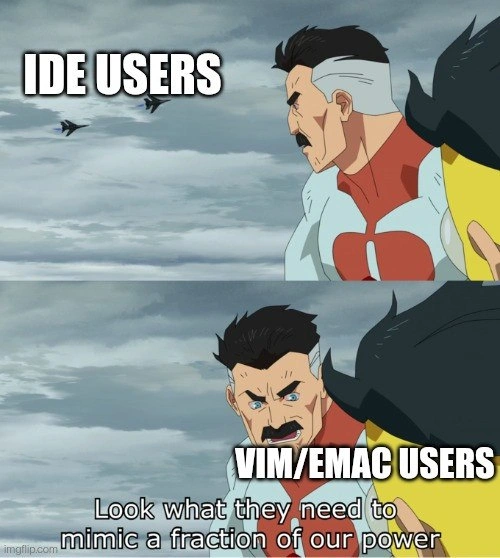
Imagine a super-strong superhero who can lift a car with one hand, standing next to some ordinary people who built a big machine just to lift the car a little. The superhero crosses his arms and says, “Look at all the stuff they need to use, just to do a bit of what I can do.” In this meme, the superhero represents programmers who use very powerful old-fashioned coding tools (Vim or Emacs) with just their keyboard – that’s like having a special power. The people with the big machine represent programmers who use modern all-in-one coding programs (IDEs) that have to load a lot of features and add-ons to try to be as fast or efficient. The joke is that the superhero is bragging a little, saying others need fancy gadgets to imitate a small part of his natural ability. It’s funny because it’s like saying, “I’m so strong (or good at this), and you need all that equipment to keep up even a little bit!” Everyone can laugh because it’s a playful exaggeration – both sides get their work done, but the superhero is having a proud moment showing off his simple, strong approach.

Level 2: IDE vs Terminal Editors

At its core, this meme is about the long-running rivalry between IDEs and text editors, especially the old-school terminal editors. An IDE (Integrated Development Environment) is a feature-packed software application for coding. It typically has a graphical interface with menus, buttons, and windows. Think of IDEs like Eclipse, Visual Studio, or IntelliJ: they come with a code editor plus extras like auto-completion suggestions, a debugger, visual designers, and one-click build or run buttons. They’re kind of like the fighter jets in the meme’s first panel – powerful machines loaded with tools and technology. In the meme, those jets labeled “IDE USERS” symbolize developers who rely on these full-featured, often heavy, GUI-based programs to write and manage code.

Now contrast that with Vim and Emacs, the editors named in the second panel alongside Omni-Man. Vim and Emacs are text editors that run primarily in a CLI (Command Line Interface), which means they operate in a text-only window (no fancy buttons or mouse-driven menus by default – you interact with them through the keyboard). Vim and Emacs are legendary among programmers. They’ve been around for decades (Vim’s predecessor vi dates back to the Unix systems of the 1970s, Emacs as well) and have accumulated almost mythical status. They are super customizable and lightweight compared to modern IDEs. For example, Vim is just a few megabytes and can launch in an instant inside a terminal, whereas an IDE might take several seconds (or more) to load a project and can use hundreds of megabytes of memory. Emacs is larger than Vim but still much leaner than, say, Visual Studio.

One key difference is how you use them. In an IDE, a beginner might use the mouse to click around, open files, highlight text, and use drop-down menus to refactor code or view documentation. In Vim or Emacs, you do almost everything with keyboard shortcuts and commands. Vim uses modal editing: it has modes like Normal mode (where keys do commands), Insert mode (where you type text), etc. If you’ve ever seen someone frantically pressing Esc and then a sequence like dd or yw in a terminal – that’s Vim in action (here dd deletes a line, yw copies a word). Emacs, on the other hand, uses key combinations (often holding Ctrl or Alt plus other keys) to do things – for example Ctrl+S to search, or Ctrl+X Ctrl+F to open a file. It also has an entire Lisp programming system inside it, so users can script and extend it almost endlessly. Both editors let a developer perform tasks very quickly without lifting their hands off the keyboard. There’s a steep learning curve: at first, a new user struggles to even quit Vim (:q is the command to exit, which is a famous bit of trivia). But once you learn, you can edit and navigate code at high speed. This is why some developers absolutely love these tools and feel very productive in them.

So what does the meme’s joke mean by “mimic a fraction of our power”? It’s pointing out that modern IDEs often add special modes or plugins to copy features that Vim and Emacs have had for ages. For instance, if an IDE user wants the efficiency of Vim’s keyboard shortcuts, they might install a Vim emulation plugin. In VS Code there’s one that lets you use Vim keybindings inside the editor. Similarly, many IDEs have settings or extensions to use Emacs-style key combinations. Essentially, IDE users sometimes say, “Wow, I wish I could navigate text as quickly as in Vim,” and then they get an add-on to imitate that behavior. The meme jokingly portrays Vim/Emacs users as saying: Look, even your fancy GUI tools need to borrow our tricks to be half as good! It’s a playful “superiority complex” moment.

This falls under the classic EditorWars in programmer culture – a friendly (and sometimes not-so-friendly) debate about text editor choice. Just like some people argue about which programming language is best, developers have long argued whether using a bare-bones terminal editor and mastering it yields better productivity than using an all-in-one IDE. There’s also a bit of Developer Experience (DX) in here: some folks find their experience coding is better when they use minimalist tools that they can tailor exactly to their workflow (perhaps they enjoy writing their own .vimrc or Emacs Lisp configurations), while others prefer the convenience of an IDE that “just works” out-of-the-box with lots of guidance. The meme takes the side of the CLI veterans, humorously exaggerating how much more “powerful” they feel. In reality, of course, both approaches can be effective – it often comes down to personal preference and the specific task. But the joke lands because anyone who’s spent time on a development team has seen the pride of the terminal in action: that one colleague who smugly types at the speed of light in Vim, and the teammate who replies, “Well, my IDE has a plugin for that too!” The Vim/Emacs user just smirks, much like Omni-Man in the meme, implying “It’s cute that you need all that.” It’s a light-hearted jab that most developers, even IDE users, find funny because it highlights how passionate (and a bit prideful) people can get about their tools in the world of programming.

Level 3: Power Without Plugins

In the pantheon of editor battles, Vim and Emacs are like ancient deities of text manipulation, boasting powers that modern IDEs often try to imitate. This meme humorously casts Vim/Emacs users as Omni-Man (the nigh-invincible character from Invincible) looking at fighter jets labeled "IDE Users" with disdain. The caption “Look what they need to mimic a fraction of our power” is a direct hit of editor war pride. It's poking fun at full-featured IDEs (think Visual Studio, IntelliJ, VS Code) which load up on heavy plugins and complex features just to approximate the keyboard wizardry that veteran Vim/Emacs users wield naturally in a terminal.

To experienced devs, this lands as a playful jab at how bloated some modern tools feel compared to the streamlined efficiency of old-school editors. Vim and Emacs have decades of engineering lore behind them – Emacs was first released in the 1970s, Vi (ancestor of Vim) around 1976 – and they were built in an era when you couldn’t afford to waste a byte of memory or a millisecond of CPU. Over time they’ve evolved into extremely powerful, scriptable environments. Emacs can be extended so much that it's jokingly called "a great operating system, lacking only a decent editor," and you can literally run your email or play Tetris inside it. (Ironically, Emacs itself was once considered heavy – the classic joke was that EMACS stood for “Eight Megabytes And Constantly Swapping” back when 8 MB was monstrous – but even that pales next to today’s multi-gigabyte IDEs!). Vim, on the other hand, is revered for its modal editing paradigm and lightning-fast responsiveness. A skilled Vim user can perform elaborate text transformations with a few keystrokes, chaining commands like 5dw to delete five words in a blink. It’s like having a keyboard kung fu superpower. Experienced developers have seen how a true Vim/Emacs guru can refactor code or navigate files at a speed that seems almost impossible to someone used to click-and-drag. There’s a mix of awe and old-timer smugness there – “I can do this in 2 seconds with a 40-year-old tool, while your fancy IDE is still opening its project workspace.”

The humor also comes from IDE users “needing” so much to match that efficiency. Modern IDEs often borrow or steal ideas from these editors: for example, many IDEs have a Vim mode plugin (vim.keyBindingEnabled = true in VS Code settings) that lets you use h, j, k, l to navigate and Vim commands for editing. JetBrains IDEs ship with IdeaVim for the same reason. There are Emacs keybinding emulation packages, so you can press Ctrl+A or Ctrl+E to move to line start or end, just like in Emacs. But from the perspective of a Vim/Emacs power user, these additions feel like training wheels on a superbike. They see an IDE user boasting about how their editor can finally do a multi-cursor edit or regex find with a plugin, and scoff: Vim and Emacs had those tricks in their toolbelt ages ago! This shared sentiment is part of developer humor culture – a mix of truth and exaggeration. The meme nails an insider joke: that smug moment when a terminal guru chuckles at a GUI-based team mate who needs “look what they need to mimic a fraction of our power” – meaning all those extensions, RAM usage, and GUI aids just to catch up to the speed of plain old Vim or Emacs. It resonates with senior engineers because we’ve all seen something like this in real life: the graybeard in the corner using Vim inside an SSH session, barely touching the mouse, versus the junior loading half a dozen extensions in VS Code to boost productivity. The EditorWars tag lives on because, despite all the advances in Developer Experience (yes, DX is a thing), these battles of pride and preference are eternal. The meme’s comedy stems from that superiority complex caricature: Vim and Emacs users (once rivals themselves) united as all-powerful beings, amused that IDE users come armed to the teeth with add-ons, menus, and GUI tools to achieve only a fraction of the efficiency that true keyboard mastery provides. It’s a lighthearted nod to the fact that sometimes, less (a plain terminal editor) is more – or at least that’s what the veterans love to claim with a wink and a smirk.

Description

A two-panel meme using the 'Look what they need to mimic a fraction of our power' format from the animated series 'Invincible,' featuring the character Omni-Man. In the top panel, Omni-Man looks down with a calm, superior gaze at two fighter jets, with a white text overlay that reads: 'IDE USERS'. The jets represent the complex, feature-heavy nature of Integrated Development Environments. In the bottom panel, Omni-Man's expression is more intense and condescending, with a text overlay saying: 'VIM/EMAC USERS'. The original subtitle of the meme is visible at the bottom: 'Look what they need to mimic a fraction of our power'. This meme taps into the long-running 'editor wars' in the developer community. It humorously posits that users of classic, terminal-based text editors like Vim and Emacs are inherently more powerful and efficient, and that modern IDEs, with all their graphical interfaces and built-in tools, are merely clumsy attempts to replicate the raw, keyboard-driven power that masters of these older editors wield


Comments

18
Anonymous ★ Top Pick An IDE gives you a powerful car with automatic transmission and a GPS that's always slightly out of date. Vim gives you a dismantled engine and a box of parts with the implicit challenge: 'Build your own damn car. It'll be faster.'
  1. Anonymous ★ Top Pick

    An IDE gives you a powerful car with automatic transmission and a GPS that's always slightly out of date. Vim gives you a dismantled engine and a box of parts with the implicit challenge: 'Build your own damn car. It'll be faster.'

  2. Anonymous

    Watching an IDE spin up half a gig of Electron just to emulate :%s/foo/bar/g feels like when we wrapped the 3-million-line monolith in “microservices” - same payload, now with extra latency

  3. Anonymous

    After 15 years, I've realized the real superpower isn't knowing every Vim motion or Emacs chord - it's billing the same hourly rate whether you're using butterflies to manipulate cosmic rays or just hitting tab-complete in IntelliJ

  4. Anonymous

    The irony is that modern Vim/Emacs users spend more time configuring LSP servers, tree-sitter parsers, and debugging their 2000-line init files than actually writing code - essentially rebuilding an IDE from scratch, just with more YAML and fewer mouse clicks. Meanwhile, IDE users are shipping features while we're still arguing about whether to use Telescope or fzf for fuzzy finding

  5. Anonymous

    IDE folks install IdeaVim + 40 extensions to approximate 20 years of my muscle memory; the only feature they still can’t copy is my .vimrc-as-legacy-system

  6. Anonymous

    :i for insert mode? Nah, IDE users need a debugger armada to mimic Vim's ggG teleport mastery

  7. Anonymous

    IDE plugins are microservices for text - eventually you need observability to debug your editor; meanwhile the Vim/Emacs crowd :%s a fix over ssh before indexing even starts

  8. Deleted Account 5y

    this

  9. @PartOfTriforce 5y

    this x2 Nvim is love, nvim is life

  10. @nuntikov 5y

    Not emacs. Emac, singular

  11. @FLIPFL0P_T 5y

    How about using nano?

    1. @alhimik45 5y

      True programmers use cat and sed

      1. Deleted Account 5y

        echo that is

  12. @bun4uk 5y

    what is the cartoon?

    1. @boildead 5y

      Invincible

      1. @bun4uk 5y

        thanks

  13. @cheburgenashka 5y

    Fighter jets are cool. Mustached Men até not.

  14. @biskwiq 5y

    IDE + Vim

Use J and K for navigation