
Skip to content
DevMeme
4684 of 7435
Developer existential crisis instantly cured by cycling through endless IDE color themes
IDEs Editors Post #5134, on Apr 18, 2023 in TG

Developer existential crisis instantly cured by cycling through endless IDE color themes

Why is this IDEs Editors meme funny?

Level 1: A Fresh Coat of Paint

Imagine you have a bedroom where you do your homework every day, and after a while, it feels super dull and boring – the same walls, the same desk, every single day. You feel grumpy and think, “Ugh, everything is always the same. I want something to be different!” So, what do you do? Instead of moving to a new house or buying all new furniture (that’s too hard), you decide to do something small but exciting: you paint your walls a new color and put up some cool new posters. Suddenly, your room looks fresh and different, and it makes you feel happy and refreshed, right?

Well, that’s exactly what the person in the picture did, but with their computer program that they use for coding (writing instructions for computers). They were feeling sad and bored because every day looked the same. So, they didn’t change their whole job or life; they just changed the colors on their computer screen where they write code – kind of like changing the room’s paint. Before, the screen had dull or regular colors, and it made them feel “blah.” After they switched to bright, fun colors, they felt new and cheerful, just like you feel in a newly decorated room. It’s funny because it’s such a small change (just colors!) but it made a big difference in their mood, at least for a little while. Sometimes even a tiny splash of color can make our boring routine feel a bit more fun, just like drawing with a brand-new set of crayons can make homework time a little happier.

Level 2: IDE Makeover Magic

Let’s break down what’s happening in this meme, in plain terms. First, an IDE (Integrated Development Environment) is basically a programmer’s primary workspace on the computer. Think of an IDE as a supercharged text editor specifically designed for coding – popular ones include VS Code, IntelliJ IDEA, or Visual Studio. It has features like showing different parts of code in different colors (that’s called syntax highlighting), auto-completing code, debugging tools, and so on. Since developers stare at these screens for hours, the look and feel of the IDE is actually a pretty personal thing. Just like you might decorate your desk or change your phone’s wallpaper, programmers often customize their IDE’s appearance to make it comfortable or just more fun to use. One major way to do that is by changing the color theme (also called a color scheme) of the IDE.

So, what is a color theme in this context? It’s basically a preset collection of colors that the IDE uses to display your code. For example, your IDE might show keywords (like if, for, or function) in one color, strings (text in quotes) in another color, and background in yet another. A theme defines all those choices – maybe a dark gray background with neon text colors, or a light beige background with softer pastel text. There are endless IDE color themes out there, often with creative names: Solarized Light, Solarized Dark, Monokai, Dracula, Gruvbox, to name a few well-loved ones. Each gives the code editor a distinct look. Importantly, changing the theme does not change the actual code or how the program runs; it only changes how the code is colored and presented on your screen. It’s purely a visual preference – kind of like switching the color of your Lego mat but building the same Lego structure on top of it.

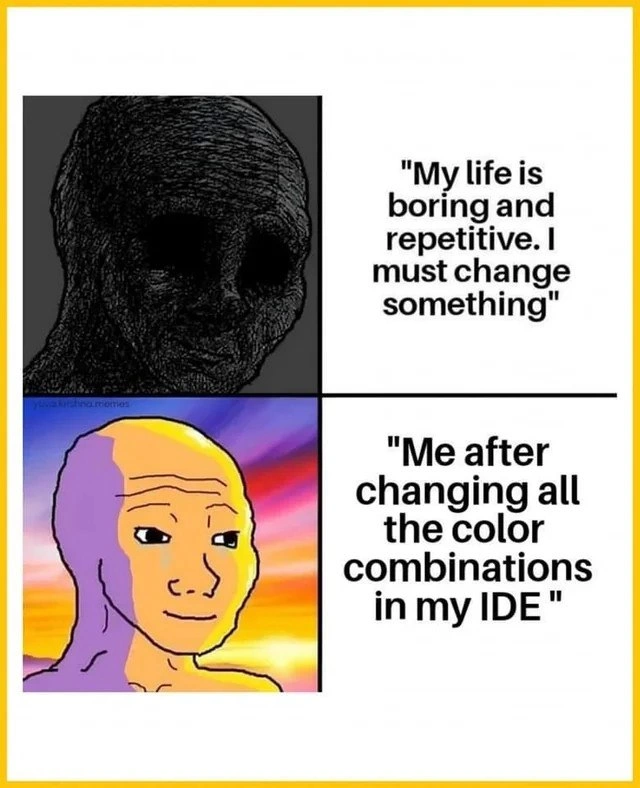
Now, the meme highlights a funny reality: as a developer, when you feel bored or stuck in a rut, one of the easiest “changes” you can make is to your environment settings. The quote in the top panel, “My life is boring and repetitive. I must change something,” could be a melodramatic way a programmer feels after dealing with routine tasks or staring at the same black-on-white code for weeks. The context tags like ide_color_theme and customizing_ide point to exactly this scenario – tweaking the IDE’s color scheme. The next panel shows the programmer’s blissful face after doing that small customization: “Me after changing all the color combinations in my IDE.” It’s basically saying, “I was feeling down, so I gave my coding screen a makeover, and now I feel oddly happy.” This is humorous because it’s such a small, almost silly thing to do, yet many of us truly have felt a little spark of joy from it.

For a junior developer or someone new to coding, it helps to know that this is extremely common developer behavior. You spend a lot of time in front of the screen, so even minor tweaks can refresh your mood. It’s like rearranging icons on your desktop or applying a new skin in a video game – it doesn’t change the substance of what you’re doing, but it feels fresh. There’s even a long-running light-hearted debate in the programming world: dark mode vs. light mode. Dark mode means a dark background with light-colored text (imagine white or green text on a black background – classic “hacker” style), while light mode is dark text on a light background (like writing on paper). Some swear dark mode eases eye strain and looks cool, others prefer light mode for readability in bright rooms. It often boils down to personal comfort. Because these choices are so personal, developers can be surprisingly passionate about them – hence lots of jokes and memes about “My theme is the best” or “Only psychopaths use light theme” (that’s an exaggerated joke in dev circles). In reality, use whatever makes you comfortable – the goal is to reduce fatigue during those long coding sessions.

Finally, why does the meme specifically call this an “existential crisis instantly cured”? It’s poking fun at the idea that a developer might be questioning their life choices or feeling very down (existential dread, as the dramatic term) due to a monotonous routine… and the instant cure wasn’t a vacation or a new project or a raise – it was simply cycling through all the color themes in the editor until one felt nice. It’s an exaggeration, of course. Changing your IDE’s colors is a quick mood boost, not a real solution to big life/career frustrations. But in the day-to-day slog, even a tiny change like seeing your code in a new color palette can make you oddly content. That’s why the meme resonates: it’s making light of the small things developers do to keep themselves sane and happy, even if it’s as trivial as switching from a light theme at morning to a dark theme after sundown just for a change of scenery. It’s a harmless, fun form of customizing your developer tools to inject a bit of joy into the routine.

Level 3: Bikeshedding in Technicolor

The humor here taps into a familiar cycle of developer malaise and trivial relief. Every seasoned programmer knows the existential dread of staring at the same codebase day after day – the tasks get boring and repetitive, and one starts craving any change to break the monotony. In the meme’s first panel, the dark, shadowy “doomer” Wojak represents that classic burned-out developer soul: drained, disillusioned, and silently muttering, “My life is boring and repetitive. I must change something.” This feeling isn’t just meme-fiction; it’s a genuine Developer Experience (DX) low point that many of us chuckle at only because we’ve been there. The punchline is that instead of addressing the deeper issues (like improving the project, learning a new skill, or, you know, actually taking a break), the developer reaches for the quickest placebo: cycling through endless IDE color themes.

Why is this so on-point? It’s riffing on the well-known phenomenon of bikeshedding – focusing on trivial things as a way to procrastinate or feel in control. Changing your editor’s theme falls squarely in that category: it’s the programming equivalent of repainting the bike shed while pretending you’re renovating the whole house. It’s easy, safe, and gives an instant (if superficial) sense of accomplishment. The meme exaggerates this coping mechanism to comic effect: our dejected programmer morphs into the radiant “glowing Wojak” after an IDE makeover, as if switching from dark mode to light mode were a life-altering epiphany. Developer tooling is supposed to boost productivity, but here it’s employed as emotional DIY therapy. It’s funny because it’s true – plenty of veteran devs have spent an afternoon fiddling with syntax highlighting colors or toggling between Visual Studio Code themes like Dracula, Solarized, and Monokai in search of that spark of joy. We laugh at ourselves for how developer productivity hacks sometimes devolve into rearranging deck chairs (albeit very colorfully) on the proverbial ship.

This meme also satirizes the almost religious fervor around IDE customization. The tags hint at the classic dark_mode_vs_light_mode debates: something as innocuous as background color can ignite passionate discussion among programmers. We treat our editor color scheme like a reflection of our identity – “I’m a dark theme person, it’s easier on the eyes and looks cool” versus “I prefer light theme for print-like clarity.” Entire TextEditorChoice wars (Vim vs Emacs, VS Code vs JetBrains) are often accompanied by theme evangelism. Yet, at the end of the day, whether your code is highlighted in neon or pastel, the job at hand remains the same. The meme wryly implies that while our brains feast on the novelty of a new color palette (dopamine hit achieved!), the actual tedious ticket in JIRA is still waiting unresolved. It’s a gentle roast of developers’ tendency to seek developer ergonomics comfort: when deploying to production is fraught with stress and uncertainty, at least changing your IDE’s theme won’t cause a midnight outage. In an industry that’s constantly pushing “serious” optimizations – microservices architectures, algorithmic efficiencies, 10x engineers – it’s hilariously relatable that sometimes our mental reboot comes from something as simple as making our editor look “brand new” again.

The senior dev perspective here sees both the comedy and the quiet truth in this behavior. It’s essentially a form of digital repainting that gives us agency. We can’t instantly refactor that legacy spaghetti code or bypass the bureaucratic sprint planning, but we can control how our code looks on our screen. That little sphere of control can feel like a big win during a mundane week. It’s a short-lived high, of course – like a fresh pair of sneakers on the first day, soon the novelty fades and you’re back to the same old stride. But the meme’s glowing after-panel perfectly captures that fleeting bliss when a developer loads up a new color scheme and thinks, “Ah, that’s the stuff – now I can tolerate looking at this code again.” We’ve all been that person basking in the monitor’s glow, convinced for a moment that a theme tweak has rejuvenated our passion for coding. It’s both pathetic and endearing – and that absurd self-awareness is what makes the meme funny. After all, wouldn’t it be great if all our deeper programming woes could be fixed by a simple palette swap? If only solving burnout was as easy as :colorscheme dopamine. For now, we’ll take our placebo where we can get it, chuckling in the knowledge that sometimes the smallest change in hue can stave off the big blues of developer life – at least until the next standup meeting.

Description

The image is a four-panel meme laid out as a 2×2 grid separated by thin black lines and framed in a yellow border. Top-left: a dark, heavily cross-hatched 'doomer' Wojak face on a black background, conveying emptiness. Top-right white panel contains the bold black text: "My life is boring and repetitive. I must change something". Bottom-left: a vividly colored, sunrise-hued 'glowing Wojak' with lavender and gold skin against a radiant gradient backdrop, looking calm and fulfilled. Bottom-right white panel shows the bold black text: "Me after changing all the color combinations in my IDE". The joke highlights how developers sometimes treat tweaking their IDE’s syntax-highlighting palette or switching between dark and light themes as a life-changing event, illustrating the minimal yet emotionally satisfying nature of tooling customization in daily engineering work


Comments

12
Anonymous ★ Top Pick Why fight the 200-class god-object when toggling the IDE to “Dracula Pro” lets you rebrand it as a successful migration to Color-Driven Architecture?
  1. Anonymous ★ Top Pick

    Why fight the 200-class god-object when toggling the IDE to “Dracula Pro” lets you rebrand it as a successful migration to Color-Driven Architecture?

  2. Anonymous

    After 15 years of optimizing distributed systems and leading architecture reviews, the most impactful change I made this week was switching from Dracula to Tokyo Night theme - and yes, I documented it as a 'developer experience enhancement' in the sprint retrospective

  3. Anonymous

    The eternal cycle: spend 3 hours perfecting your IDE's color scheme to achieve peak productivity, then spend the next 2 hours adjusting it again because that one shade of purple for string literals just doesn't spark the same joy anymore. Meanwhile, the actual feature you were supposed to ship remains in a perpetual state of 'TODO: implement core functionality' - but at least your syntax highlighting is *chef's kiss* immaculate

  4. Anonymous

    Hours refactoring hex values > optimizing Big O; true senior dev priorities

  5. Anonymous

    When you can’t rewrite the monolith, you rewrite the palette - instant deploy, zero regressions, and a +10% “developer experience” KPI straight to the retinas

  6. Anonymous

    Quarterly modernization plan: migrate from Monokai to One Dark Pro - zero code changed, 100% dopamine shipped to prod

  7. @callofvoid0 3y

    you are a dead beef

  8. @RiedleroD 3y

    average russian brutalist IDE

  9. @Dark_Embrace 3y

    IDE or text editor ? 🤔

  10. @SamsonovAnton 3y

    64 shades of gray?

    1. @Dark_Embrace 3y

      As a child, I tried many colors. Currently I'm more discreet.

  11. @rubelem 3y

    Dracula ftw. I do not put my dog in Dracula theme only because I don't have any dog 😄

Use J and K for navigation
