
Skip to content
DevMeme
219 of 7435
The Blinding Light of a Default IDE Theme
IDEs Editors Post #266, on Mar 25, 2019 in TG

The Blinding Light of a Default IDE Theme

Why is this IDEs Editors meme funny?

Level 1: Sudden Lights On

Imagine you’ve been in a dark room for a long time, and then someone suddenly flips on a big bright light. 😵 You’d probably squeeze your eyes shut, throw your hands up, or maybe even shout in surprise because it’s so blinding at first. That’s exactly what’s happening to the developer in this meme. They were used to coding with a comfy dark screen (like how your eyes get used to the dark), and then their computer program came up with a shocking bright white screen all at once — like the sun coming out in midnight! The developer panics and holds up a “shield” (in the picture, it’s a frying pan) as if the screen’s brightness is something to physically defend against. It’s a funny exaggeration.

So why is this funny? Because normally a bright screen can’t really hurt you – it’s just light. But if you’ve ever had someone turn on the lights when you weren’t expecting it, you know it can make you yelp for a second. Developers often joke that they are like nocturnal creatures (think of a vampire seeing sunlight). They work long hours on the computer, and many prefer dark, soothing colors on their screen. When that suddenly changes to glaring white, it feels awful, just like being in a dark bedroom and someone pulls open the curtains on a sunny morning. This meme makes us laugh because we see the developer react in a super dramatic way to a very everyday thing – a bright computer screen. We find it cute and relatable, because hey, who hasn’t been a little scared of the light when they weren’t ready for it?

Level 2: Light Mode Jump Scare

For a newer developer, let’s break down why this scenario causes “confused screaming.” An IDE (Integrated Development Environment) is a software application that provides comprehensive facilities to programmers for software development – think of it as Microsoft Word for code, but way more powerful. Popular IDEs and code editors (like Visual Studio Code, IntelliJ, or Eclipse) let you customize the appearance, including switching between a light theme (usually black text on a white background) and a dark theme (light text on a dark background).

Now, dark mode isn’t just a trendy feature – many developers prefer it because it’s gentler on the eyes, especially if you’re staring at code for hours or working at night. Imagine coding in a dim room: a white background on your screen can feel as harsh as a flashlight shining in your face. So over time, a lot of programmers flip all their tools to dark themes by default. It’s almost an unwritten rule in programming circles: the darker the background, the cooler (and happier) the developer! 🌙

What happens in the meme is a classic light_mode surprise. The person has reinstalled their IDE, meaning they likely either updated it, moved to a new computer, or reset it. Upon reinstall, the IDE didn’t remember the user’s previous settings (like their preferred theme) because those settings were not carried over. Most software starts with default settings on first launch. In many IDEs, the default theme is a bright, white background (light theme). So when our developer friend opens the freshly-installed editor, they’re greeted with an ide_theme_default that’s blindingly bright. If you’ve ever opened a blank document or website in a dark room, you know the feeling – ouch!

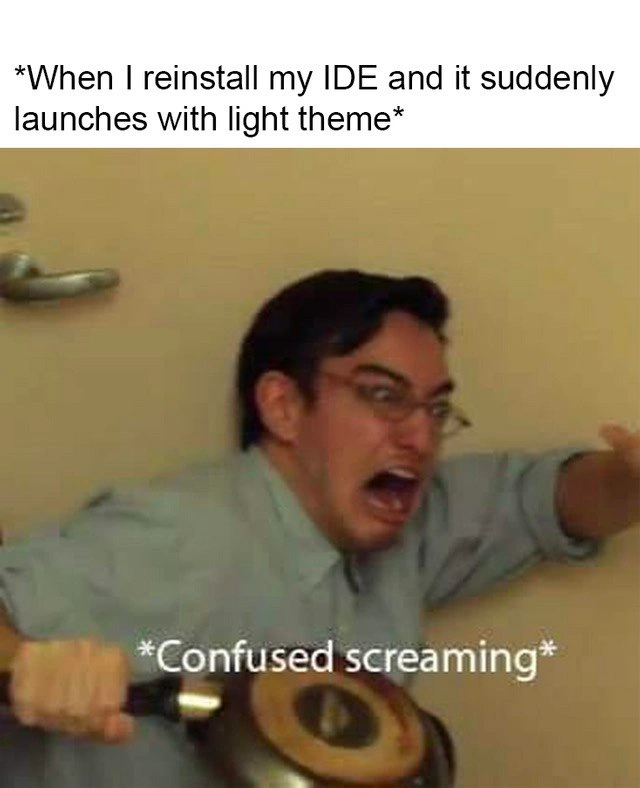
The meme’s image of the man cowering and lifting a pan in defense is an exaggeration of the developer’s reaction: he didn’t expect that sudden brightness and he’s treating it like a jump scare from a horror movie. It’s funny because, in reality, nothing is actually harming him – it’s just an unexpected screen color. But any programmer who’s been blinded by a surprise light theme finds this highly relatable. It captures a common developer frustration: when your carefully chosen settings or workflow get reset, even something minor like a color scheme can feel momentarily panic-inducing. It’s like opening your tool and feeling for a second that it’s not really yours until you tweak that one setting. This speaks to a broader developer pain point: we rely on our tools being just the way we like them, and when defaults override our choices (due to a reinstall or update), it can disrupt our concentration. The humor comes from realizing we’re basically screaming at a color scheme – it’s a harmless problem that we treat as a big deal. And the next step is obvious: we’ll sprint to the settings menu to switch back to Dark Mode, restoring peace (and saving our eyes). In short, this meme is a lighthearted take on how something as simple as a theme setting can cause a developer disproportionate shock, highlighting the quirks of developer experience (DX) and our almost comical devotion to customizing our tools.

Level 3: Blinded by Defaults

At the highest level, this meme satirizes a Developer Experience (DX) hiccup that seasoned coders know all too well. The top caption sets the stage: "When I reinstall my IDE and it suddenly launches with light theme". This seemingly trivial event triggers panic because the IDE (Integrated Development Environment) has lost its saved configuration and reverted to its default theme – an unforgiving light mode that floods the screen with white. To a developer who lives in dark-themed editors, this is like a sudden flashbang. The lower image of a man crouching with a frying pan shield (captioned "Confused screaming") hilariously amplifies the overreaction: he’s treating a bright screen like an incoming attack.

Why is this so funny and relatable? Experienced devs invest time tailoring their coding environment – font size, keybindings, plugins, and definitely the color theme. A comfortable dark theme isn’t just aesthetics; it reduces eye strain during those late-night coding sessions and helps you focus on the code. When a fresh install forgets those preferences (perhaps due to a wiped config file or a machine switch), it’s a jarring DX regression. The tool is technically working fine (nothing is actually broken in the code editor), but the sudden blaze of a blinding UI feels like a betrayal. It’s a classic case of configuration_reset_after_reinstall: the IDE didn’t remember your user preferences because maybe you skipped migrating a settings file or the IDE’s syncing feature wasn’t enabled. In the world of IDEs & Editors, such oversights can momentarily feel catastrophic even though the fix is usually just digging into the settings and toggling on the beloved Dark Mode again.

This meme also pokes fun at how emotionally attached developers are to their setups. The drama of a frying-pan defense for a bright screen highlights an open secret: many devs behave like nocturnal creatures (coffee-fueled dark mode devotees) who recoil at bright light. It’s humor born from truth – so many of us have been startled by an IDE’s light_theme_jump_scare at least once. Veteran programmers might even chuckle remembering how they scrambled to find the “theme: dark” setting amidst the glare. Some have learned the hard way to back up their IDE settings or use dotfile repositories and cloud sync, precisely to avoid these kinds of DeveloperPainPoints. In essence, the meme exaggerates a small but deeply relatable frustration: after painstakingly tuning our tools, even a simple theme reset can feel like a dramatic ordeal. The DeveloperHumor here comes from recognizing that irrational surge of panic and frustration in ourselves – an experience so common that it’s become an inside joke across the industry.

Description

A two-part meme reacting to the default settings of a development tool. The top section contains the text: '*When I reinstall my IDE and it suddenly launches with light theme*'. Below this, the image features the character Filthy Frank (Joji) in a bathroom, looking utterly horrified and screaming widly. A caption at the bottom of the image reads '*Confused screaming*'. The meme humorously captures the intense aversion many developers have to light-colored user interfaces in their Integrated Development Environments (IDEs). Dark themes are a strong cultural preference in the programming community, often cited for reducing eye strain during long coding sessions. The sudden, unexpected appearance of a bright white background after a reinstall feels like a personal attack and a jarring disruption to a carefully configured workspace, making the over-the-top reaction relatable


Comments

8
Anonymous ★ Top Pick A reinstalled IDE defaulting to light theme is the universe's way of reminding you that your carefully crafted `.dotfiles` are not, in fact, under version control
  1. Anonymous ★ Top Pick

    A reinstalled IDE defaulting to light theme is the universe's way of reminding you that your carefully crafted `.dotfiles` are not, in fact, under version control

  2. Anonymous

    Light-theme IDE on first launch: the instant reminder that our infra is declarative, but my dotfiles - and retinas - are still snowflake servers

  3. Anonymous

    The same feeling as when you realize your 200-line settings.json wasn't in version control and you just discovered why "works on my machine" includes IDE configurations

  4. Anonymous

    Twenty years of experience and still no dotfiles repo - the light theme isn't the bug, your disaster recovery plan is

  5. Anonymous

    The real horror isn't the light theme itself - it's realizing you forgot to export your settings.json before nuking the installation, and now you're staring at Comic Sans in 10pt font while your carefully tuned keybindings have reverted to whatever sadistic defaults the IDE shipped with in 2015

  6. Anonymous

    We treat missing 'workbench.colorTheme: Dark+' in settings.json as a Sev‑1 - rollback to #1e1e1e and add a preflight so the dev environment stays idempotent

  7. Anonymous

    Light mode is my retinas’ chaos monkey - and the RCA always ends at “settings.json wasn’t restored from dotfiles.”

  8. Anonymous

    IDE reinstalls: where dark theme persistence lags behind even our legacy COBOL monoliths

Use J and K for navigation
