
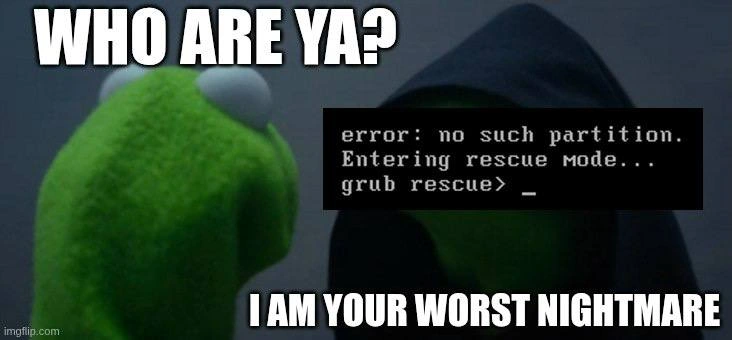
GRUB Rescue Mode Is Your Worst Nightmare Evil Kermit Meme
Why is this OperatingSystems meme funny?
Level 1: The Lost Key
Imagine you’re trying to unlock your house, but when you insert your key, the door suddenly speaks: “Error: no such key. Entering lock rescue mode...” The door won’t open, and now a little hooded frog figure pops out and says, “I am your worst nightmare.” Sounds like a silly spooky cartoon, right? In real life, that’s how a computer person feels when a critical piece of their computer is missing and the machine won’t start. The “key” to start the computer (some important information on the disk) is gone or can’t be found, so the computer just stops right there and asks the user to fix it. It’s dark, late, and nothing is working – pretty frightening! The meme makes it funny by showing Kermit the Frog in a hood saying the scary line, which is a playful way to describe that panicky moment. In simple terms, the computer can’t get going, the person in charge is effectively locked out of their own system, and that’s why it feels like a worst nightmare come true (with a Muppet villain to boot!).
Level 2: Where’s My OS?
Let’s break down what’s going on in this meme in simpler terms. The black square in front of Evil Kermit shows a message from a computer’s bootloader. The bootloader is the first program that runs when a computer starts, and its job is to load the main Operating System (like Linux or Windows). One very common bootloader on Linux systems is called GRUB. When you turn on your machine, GRUB usually either jumps straight into loading your OS or presents you with a menu (especially if you have multiple operating systems installed). It’s the traffic cop that directs the computer to start the right system.
The text in the image – “error: no such partition. Entering rescue mode... grub rescue>” – is GRUB’s way of telling us something went really wrong. A “partition” is like a section of your hard drive. Think of partitions as dividing a disk into labeled pieces – usually, an OS lives in one partition, maybe your files in another, etc. GRUB is complaining that a specific partition it expected to find isn’t there (“no such partition”). In practical terms, this often means GRUB was configured to use or boot from a certain partition, and now that partition can’t be found. Maybe it was deleted, maybe the drive letters or order changed, maybe the data on it got corrupted – but bottom line, GRUB looked for something and came up empty.
When GRUB can’t find the files it needs (like the instructions on how to boot your OS), it drops you into what’s called rescue mode. That’s why you see grub rescue> on the screen. This is a minimal command prompt provided by the bootloader itself. At this point, the operating system hasn’t started at all – you’re basically interacting with the little piece of software that lives on the disk and is trying to start the OS. Rescue mode is like a tiny lifeboat: the main ship (your OS) is nowhere to be found, so GRUB is giving you a minimal environment where a knowledgeable user might try to fix things. To someone who’s never seen it, though, it’s just a black screen with white text and it can be very intimidating. There’s no graphical interface, no mouse, not even the usual familiar commands of a full Linux shell. It’s the computer equivalent of a “Check Engine” light, but instead of just lighting up, your engine stops and asks you to fix it interactively.
A common situation that causes this is a dual boot misconfiguration. Imagine you have a laptop with both Windows and Linux installed. Linux sets up GRUB as the bootloader to let you choose between them at startup. Now say one day you decide, “I’m not using Linux, let me delete that partition to free space for Windows.” If you just delete the Linux partition without reinstalling or fixing the bootloader, guess what? The next time you turn on your computer, GRUB will still be there (it was installed to the disk’s boot sector), but its configuration was on that Linux partition you nuked. So GRUB boots up, tries to find its files in what used to be the Linux partition, and… “no such partition.” It can’t even show you a menu to boot Windows because that menu was a file on the Linux partition. You’re left staring at grub rescue>, essentially locked out of even getting to Windows. This exact “dual-boot gone wrong” scenario is how a lot of people (unfortunately) learn about GRUB rescue for the first time.
Another scenario: bootloader corruption or misconfiguration. Maybe there was a system update or an installation that involved the disks, and the GRUB settings got messed up. For instance, if you add a new hard drive or re-order them, what used to be “hd0” might now be “hd1” – so GRUB’s pointers are off. Or an update installed a new version of GRUB that didn’t properly carry over the old settings. Result: GRUB can’t find what it’s looking for and throws you into rescue mode.
So why do sysadmins and developers consider this a “nightmare”? Well, when you see this, it means the machine hasn’t even started to boot the operating system. It’s not sitting at a login screen, it’s not accessible over the network, nothing. It’s hung up at the earliest stage. If this is a personal computer, you can imagine the panic: you can’t get into your OS to access your files. If this is a server running a website or service, that service is now down until the issue is fixed. And fixing it isn’t always straightforward – a junior IT person might not even know where to start. There’s no obvious “press here to recover” button. You might have to resort to booting from a Linux live CD/USB (an external system) to repair GRUB or the partition table. It’s a pure debugging & troubleshooting exercise with high stakes.
To put it simply, GRUB rescue mode is the computer saying, “I can’t find the operating system. Could you help me point to where it is (if it’s even there)?” The meme dramatizes this by implying the computer is an evil entity tormenting the sysadmin. Of course, in reality the computer isn’t evil – it’s just extremely literal and will halt everything if it can’t find the next step. But emotionally, it feels evil when this happens unexpectedly. You get that sinking feeling, because you know you’re in for a world of hassle to get things running again.
The bottom line for a newer developer or tech enthusiast: this meme is riffing on a very specific SysadminPainPoints moment. It’s the kind of inside reference that says, “Remember that time the system wouldn’t boot and just gave you a grub rescue prompt? Yeah, we do too. It was awful.” People who have dealt with it laugh at the meme because they remember the panic and absurdity of essentially arguing with a bootloader at 3 AM. If you haven’t dealt with it, count yourself lucky – but now you know why your sysadmin friend got that thousand-yard stare when their computer once said, “Entering rescue mode…” 😅. It’s a crash-course (literally a system crash at boot) in how computers start up, and it’s usually learned the hard way.
Level 3: Bootloader Boogeyman
If you’ve ever been on-call as a sysadmin, you know the folklore: anything that can go wrong will go wrong at the worst possible time (usually at 3 AM on a weekend). This meme taps straight into that collective trauma. The image shows Kermit the Frog confronting a hooded version of himself. The top text yells, “WHO ARE YA?” and the bottom responds, “I AM YOUR WORST NIGHTMARE.” Covering Evil Kermit’s face is the ominous black terminal screen that reads, “error: no such partition. Entering rescue mode... grub rescue>”. For folks in SystemsAdministration, that line is enough to send a shiver down the spine. It’s the computer equivalent of waking up to a burglar at the foot of your bed – or as the meme portrays, your friendly frog puppet suddenly turning into a Sith Lord. 👻🐸
Why is this so funny (and horrifying) to seasoned developers and sysadmins? Because we’ve all been there, at least once. The scenario practically writes itself: you perform what you think is a routine change – maybe resizing a disk partition or updating a system on Friday – and head home. Come Saturday morning, the phone rings: the server rebooted and didn’t come back up. Bleary-eyed, you remote into the console (or drive to the data center) and instead of the nice login screen, you see that GRUB rescue prompt. In your head, you can almost hear an evil chuckle. The meme nails this feeling by personifying the bootloader error as Evil Kermit declaring itself your nemesis. Oncall_horror distilled into a single image.
The humor is that it’s so specific and so true. The text “I am your worst nightmare” could not be more appropriate – for a sysadmin paged in the middle of the night, an unbootable system is the worst nightmare. It’s not a quick glitch you can fix with a simple restart; the entire server is at a standstill, essentially bricked until you fix the boot problem. That bold GRUB rescue message on a black screen is like the boogeyman of IT ops: rarely seen by normal users, but dreaded by those who know what it means. There’s a shared understanding that once you’re in that rescue shell, you’re in for a long, delicate recovery process. As a bit of dark SysadminHumor, we joke about it, because what else can you do? You laugh to keep from crying.
Consider what “no such partition” implies in a real-world situation. Maybe someone accidentally deleted a partition or changed the disk order. Maybe an update to the bootloader configuration didn’t install correctly. In a development environment, this might happen when dual-booting your laptop: say you removed an old Linux partition but left the GRUB bootloader in place – next reboot, GRUB can’t find the Linux it was looking for, and hello grub_rescue_prompt. In a production OperatingSystems context, maybe a cloud VM had an extra disk that got detached, or a cloning script misconfigured the disk IDs. Regardless, GRUB now basically says, “I can’t find the OS I’m supposed to boot.” The machine is powered on but can’t actually start the operating system. It’s like a car engine that won’t turn over – except the car also locked you out of the hood.
Now, recall the meme format: Kermit vs. Evil Kermit is usually about one’s inner voice suggesting something devious (“Eat that cake!” says Evil Kermit, for example). But here, the format is subverted brilliantly. The regular Kermit (perhaps representing the hapless sysadmin or user) asks this hooded figure, “Who are you?” The hooded figure isn’t an inner voice at all – it’s the computer’s bootloader corruption manifesting as a villain. Evil Kermit has become the system itself telling you that you’re in deep trouble. It’s a clever twist: instead of an internal temptation, it’s an external catastrophe. The meme frames the error message as the villain’s self-introduction, like a scene from a movie: “I am GRUB Rescue, the Destroyer of Sleep.” 😈
For a senior engineer, this situation triggers a whole checklist of DebuggingFrustration and recovery rituals. First comes the wave of dread (you might literally say “oh no” out loud at that screen). Then the scramble: do we have a recent backup? An recovery ISO ready? Is there documentation (a runbook) for this? Often, you’ll find yourself searching online for that one blog post on fixing GRUB, or digging up an old company wiki page that has the magic sequence of commands (like the ones shown in Level 4 above). Sometimes you’re typing those commands by memory, hands shaking slightly, hoping you don’t typo something like hd0,msdos2 as hd0,msdos3. Each attempt to reboot or exit rescue mode is heart-pounding, because if it fails, you’re back at that grim prompt. It’s the ultimate SysadminPainPoints test: fix the unbootable system without the usual tools available.
The meme also alludes to those “manual partition table reconstruction” nightmares. That’s an extreme case where something like the partition table (the map of disk layout) got wiped or corrupted. I’ve seen sysadmins who had to literally recreate partitions by remembering the exact sizes and offsets from memory or scribbled notes – because if they create them just right, the data (and OS) might still be there intact. Talk about pressure: one wrong move and you can make things worse (overwrite data, etc.). When the description says “delicate dance of manually reconstructing partition tables from memory or dusty runbooks,” it’s referencing this insane kind of hail-mary recovery. It’s the stuff of legends (or horror stories told over coffee). If you ever hear an old Unix graybeard say, “I once rebuilt an MBR partition table by hand at 4 AM,” buy them a drink – they’ve truly been to battle and back. 🏅
One cannot overstate the drama of this when you’re responsible for production systems. Picture the scene: a dark server room (or your dark home office), the only light coming from the glow of the console. You’re staring at white text on black: grub rescue>. It’s silent – no OS boot messages, no login prompt – just that. It’s almost cinematic that this meme gives the error a hooded cloak; it really is the phantom of the opera(ting system). Everyone else is sleeping soundly while you’re negotiating with a bootloader that’s acting like a bouncer who lost the guest list. Debugging_Troubleshooting at this level is lonely and high-stakes. You mutter under your breath, you try to remember if that server had a separate /boot partition or if the config was pointing to the wrong disk. Each attempt to fix it feels like defusing a bomb (cut the blue wire? the red wire?). And of course, failures like these love to happen when maybe the one colleague who knows the system best is on vacation, or the documentation is outdated. Murphy’s Law in full effect.
The line “I am your worst nightmare” also speaks to the emotional side. A kernel panic or an application crash can be nerve-wracking, but at least the system started and gave you logs or errors to dig into. Here, you have almost nothing to go on. It’s just you and this cryptic prompt. The nightmare isn’t just the technical problem – it’s the feeling of utter helplessness that can accompany it. The meme uses a bit of absurdity (a muppet turned evil) to soften that feeling and make us laugh. It’s comedic precisely because it’s exaggerating a truth: in that moment, the bootloader issue does feel like a monster jumping out of the shadows. Only after you’ve resolved it (perhaps as the sun comes up) can you chuckle and say, “Well, that was awful – someone make a meme out of this!”
In summary, this meme resonates with devs and IT folks because it’s a perfect storm of reference and experience. It combines a popular meme format (Kermit vs. Evil Kermit) with an inside joke about SystemCrashes and SysadminPainPoints. The Kermit meme format is widely recognizable, but only those who have tangoed with GRUB at midnight truly appreciate the punchline here. It’s the kind of image you’d post in your team’s chat after surviving a tough night, and everyone would react with 😅 or “OMG so true.” By equating the unbootable grub_rescue_prompt to a hooded nightmare villain, the meme turns a painful ordeal into a shared laugh. It’s the tech world’s way of whistling in the dark – finding humor in the scariest corners of our everyday work. After all, if you can joke about that time the server bootloader went haywire, it means you conquered it. The Evil Kermit (GRUB rescue) showed up to ruin your day, and you ultimately sent him packing... but you’ll remember the encounter forever.
Level 4: Pre-Kernel Purgatory
Deep inside a computer’s startup sequence is an arcane ritual called bootstrapping. When you power on a PC, the CPU looks for a tiny program to run – the bootloader – which in Linux systems is often GRUB (the GRand Unified Bootloader). GRUB’s job is to find and load the operating system kernel, but it has to perform this feat in stages due to historical limitations. The first stage of GRUB lives in the Master Boot Record (MBR), the very start of the disk, which is only 512 bytes in size. In that tiny 512-byte space, there’s room for little more than some rudimentary code and perhaps a terse error message. GRUB overcomes this by using multiple stages: Stage 1 (in the MBR) hands off to a Stage 1.5 (a slightly larger core image often stored in the gap between the MBR and the first partition, or in a special BIOS boot partition on GPT disks), which then loads Stage 2 (the full GRUB program and menus, usually stored on your disk in the /boot directory). It’s a delicate chain – a bit like a Rube Goldberg machine for starting an OS – and if any link breaks, the whole boot process falls into limbo.
The error shown in the meme, error: no such partition. Entering rescue mode... grub rescue>, is a sign that this chain broke before the operating system kernel could even load. It typically means GRUB tried to find a particular disk partition – for example, the one containing its configuration files or the OS itself – and that partition wasn’t there or wasn’t readable. Perhaps the partition table got corrupted, or the disk order changed, or someone deleted/moved a partition without updating GRUB. In other words, GRUB’s Stage 1.5 or Stage 2 looked for data in a specific spot on the disk and came up empty. The bootloader is essentially saying, “I can’t find the next step.” At this pre-kernel stage, there is no Operating System running yet – not even a kernel panic is possible because the kernel hasn’t been loaded into memory. We’re stranded in the bootloader’s own little world.
Now, GRUB is actually designed with a fallback for this scenario: it drops to a minimal rescue mode (hence the grub_rescue> prompt). In rescue mode, only the most basic functions are available, because many of GRUB’s features (like reading complex filesystem types, or graphical menus) rely on modules and files located on that missing partition. The grub rescue prompt is extremely limited – for example, the ls command might still work to list drives/partitions, and you can use set to tell GRUB which disk/partition to use as its new root, and insmod to manually insert modules if you can find them. But you’re essentially working with the bootloader’s bare-bones brain. It’s as if you’re in purgatory before the OS heaven (or hell) – the system firmware has done its job and handed control to the bootloader, but the bootloader can’t proceed to hand control to an OS. You’re caught in between, in a twilight state where only low-level disk poking is possible.
A seasoned system engineer or kernel hobbyist can sometimes escape this limbo by manually guiding GRUB to the right place. For example, they might list available disks and partitions, then set the GRUB prefix (where GRUB looks for its files) to a known good partition, load the normal module, and continue booting. It’s a bit like performing CPR on the boot process. Here’s a snippet of what that bootloader sorcery looks like:
grub rescue> ls # list disks/partitions, e.g. (hd0), (hd0,msdos1), (hd0,msdos2)
grub rescue> set prefix=(hd0,msdos2)/boot/grub
grub rescue> set root=(hd0,msdos2) # assume (hd0,msdos2) is where /boot lives now
grub rescue> insmod normal # load GRUB's normal module (adds full commands/menu)
grub rescue> normal # try to launch the normal GRUB prompt or menu
These arcane incantations attempt to point GRUB to the correct partition and restore its normal functionality. If you guess right (say, you identified that (hd0,msdos2) has the /boot directory with the kernel and GRUB modules), the bootloader may spring back to life, and you’ll be able to boot your Linux kernel from there. If you guess wrong… well, you’re still stuck in rescue mode with an impatient ticking clock. Often, the next step is to boot from external media (like a live Linux USB) to perform some serious disk recovery – perhaps rebuilding the partition table or reinstalling GRUB correctly. It’s low-level, meticulous work: you might even use a hex editor or specialized tools to reconstruct missing partition entries. In essence, you’re doing Linux disk recovery surgery on your system’s soul.
Under the hood, what’s happening here is a fundamental OperatingSystems problem of consistency and state. The bootloader’s information about disk layout has diverged from reality. There’s no dynamic discovery service at this stage robust enough to fix a missing partition reference automatically (that would require a lot more code than fits in a boot sector). Instead, GRUB follows a simple algorithm: trust the stored pointers (e.g., “boot from partition #2”) and proceed. If that pointer is invalid, GRUB fails in place. In academic terms, the bootloader is performing a critical lookup in a static table (the partition table or its saved config), and the lookup returned null. Since this lookup is literally step one of bringing up the OS, a failure here halts the whole system. There’s no OS process to catch the error, no recovery daemon to the rescue – just a spartan firmware-based shell blinking at you.
It’s worth noting that newer technologies like UEFI have changed parts of this process. With UEFI, there’s usually an EFI System Partition (ESP) that stores bootloaders as files, and the firmware knows how to read FAT file systems to find those bootloader files. Even so, similar issues occur: if the UEFI boot entry is wrong or the ESP is missing, you can end up in the UEFI shell or simply stuck without a bootable system. In other words, whether BIOS+MBR or UEFI+GPT, the system still has to locate the bootloader and the OS, and if those coordinates are off, you’re in trouble. The specifics differ, but the nightmare rhyme is the same.
Ultimately, this meme’s scenario is a textbook example of how decades-old design decisions in PC architecture can come back to haunt. The boot process inherits an old-school constraint (tiny boot sectors, out-of-band configuration), and even though bootloaders like GRUB are smart within those constraints (supporting multiple OSes, filesystems, etc.), they can only do so much. When GRUB says “no such partition,” it’s essentially the computer saying, “I lost the map to your Operating System.” And until you, the human, provide a new map or fix the old one, nothing else can move forward. In this pre-kernel purgatory, the sysadmin has to play the role of an exorcist — coaxing the machine back from the dead of a failed bootstrap with a mix of skill, memory, and a bit of luck. It’s equal parts Debugging_Troubleshooting and dark art, and every experienced ops person has a healthy respect for how critical and fragile this step can be. As the saying goes, “Any sufficiently advanced technology is indistinguishable from magic” — and at 3 AM with a non-booting system, it sure feels like you’re dealing with a mischievous spirit rather than just circuits and code.
Description
An Evil Kermit meme where Kermit asks 'WHO ARE YA?' to a hooded figure. Overlaid on the hooded figure is a terminal screen displaying 'error: no such partition. Entering rescue mode... grub rescue> _'. The bottom text reads 'I AM YOUR WORST NIGHTMARE'. The meme captures the dread every Linux user feels when GRUB bootloader fails and drops them into rescue mode, which typically means a broken boot partition, a botched dual-boot setup, or a failed OS update. The imgflip.com watermark is visible
Comments
17Comment deleted
GRUB rescue is that friend who shows up uninvited at 2 AM, gives you a blinking cursor, and expects you to remember the exact UUID of your root partition from memory
`grub rescue>` is the command line's version of a 404 error, but for your entire operating system. It's the one time you'd actually prefer a Blue Screen of Death for its relative helpfulness
Seeing “grub rescue>” on boot is the universe’s way of checking whether you really remember the fdisk flags you swore you’d never forget
After 20 years in the industry, you realize GRUB rescue mode is just the bootloader's way of asking 'Have you tried turning your entire partition table off and on again?' - except this time, 'off' happened involuntarily during that Windows update you trusted
GRUB rescue mode is the bootloader's way of saying 'I quit' - except you can't just restart the process, you need to manually reconstruct the entire boot chain from memory at 2 AM while your production servers are down and your phone won't stop buzzing. It's the digital equivalent of your car's engine falling out on the highway, except the tow truck driver expects you to rebuild it yourself using only a command line and half-remembered partition UUIDs
GRUB rescue: the bootloader's polite reminder that your partitioning deserves a full refactor, not just a resize2fs
GRUB's rescue> prompt is the only REPL where seniority is measured by how many partition tables you can rebuild from memory
Nothing collapses a decade of HA/DR slideware faster than GRUB calmly saying “no such partition” after your dd went to /dev/sda
entering systemd-boot... Comment deleted
Timeshift Comment deleted
Jokes on you, I don't have a bootloader! Comment deleted
one little thingie that turns people that don't make backups into relligious backup fanatics :) Comment deleted
Every time I install or update drivers on my laptop with Ubuntu, somewhere, someone flips a coin. On heads, I continue working as normal. On tails, I begin the reinstallation process as setting things up from scratch would be easier than fixing all this. Moved to Mint since, hope it wouldn't give me the same headache again Comment deleted
yea ubuntu has gotten pretty shit in the last 7ish years Comment deleted
I moved away from it in 2020 when after an upgrade it decided to replace budgie (my WM at the time) with gnome despite being the officially supported 'ubuntu budgie' variant Comment deleted
The reason I had Ubuntu on my laptop once but not anymore. There was no wifi driver in existence for the particular piece of hardware I had, except for one written for other distributives and for slightly other model of the wifi card. It worked but with every update it required to reinstall all the packages, and at some point it fubar'd the whole package manager which refused to be repaired ever since. I'm no system geek, so I've decided WSL is just everything I need Comment deleted
Cygwin for the win! Comment deleted


