
A Developer's Poetic Solution for Desperate Times
Why is this VersionControl meme funny?
Level 1: Starting Over
Imagine you’re writing a story in pen and you make a big mistake on the page. If it was just a small oops, you could erase it easily with a pencil eraser (that’s like pressing undo, Ctrl+Z, on the computer). But here, you wrote it in permanent ink and it’s a complete mess. Simply erasing one word won’t fix it. What can you do? You might have to grab a fresh sheet of paper and start all over from the last good part.
This funny poem is saying the same thing about coding. “Ctrl+Z won’t do” means the quick fix isn’t enough to solve the problem. So instead, the person jokingly says they’ll do something big – like throwing away the messed-up work and beginning again (that’s the “Git rebase --hard” part). It’s like they’re declaring their love for the ability to undo a huge mistake and go back to how things were before. It’s funny because they put this very un-romantic idea (completely redoing work) into a sweet love-poem style. In simple terms: when a tiny Band-Aid (undo) won’t fix your giant boo-boo, sometimes you just have to start over – and somehow, developers find a way to laugh about that!
Level 2: Beyond Ctrl+Z
At its core, this meme highlights a version control scenario that many developers learn early on. Let’s break down the pieces. Git is a popular version control system – basically a tool that keeps snapshots of your code, so you can track changes and revert to earlier versions if needed. Think of it as a timeline of your project where each commit is a saved state (like a checkpoint). Now, Ctrl+Z (or Cmd+Z on a Mac) is the universal “undo” shortcut in editors and many programs. Pressing Ctrl+Z undoes your last change, and you can often hit it multiple times to step backwards through recent edits. It’s great for minor mistakes: you accidentally deleted a line? Undo. You typed something wrong? Undo again.
But what if the mistake isn’t just a simple recent typo? For example, imagine you made a bunch of changes over an hour and hit “save,” or you committed those changes to your Git repository. Maybe you even closed your editor. At that point, Ctrl+Z can’t reach back to undo all those saved changes – it's limited to your current editing session. If you’ve already told Git “here, remember this version,” a regular undo won’t magically erase that commit from history. This is where Git’s own undo mechanisms come into play.
The tweet specifically mentions git rebase --hard. Let’s clarify that in newbie terms. git rebase is an advanced Git command that lets you take a sequence of commits and reapply them on a different base commit. In simpler words, it’s like changing the order or parentage of commits – editing the timeline of your project. It’s often used to straighten out messy commit histories by moving commits around or combining them. However, using rebase can rewrite history: it creates new commit IDs for the moved changes. Because of this, it’s powerful but a bit risky, especially if you’ve already shared those commits with others. The meme pairs rebase with --hard, which is actually a flag typically used with git reset.
Now, git reset --hard is one of Git’s heavy-duty undo commands. git reset moves the HEAD pointer (which is basically “where you currently are” in your commit timeline) to a specified commit. The --hard option means “and also throw away any changes in the working directory and staging area that haven’t been committed.” In plainer terms: go back to an old commit and make my working copy look exactly like that commit, no matter what I did afterward. It’s like a time machine to an old state of the project, erasing any changes that came after. For example, if you made a bad commit and then realized it caused chaos, you might do:
git reset --hard HEAD~1
This command would move you back one commit (HEAD~1 means “the commit just before HEAD”) and completely remove the bad commit’s changes from your code as if it never happened. It’s extremely useful when you really mess up and just want to start fresh from a known good point, but it’s also dangerous — if you had any uncommitted work, --hard will delete it. There’s no Ctrl+Z for a --hard reset; once it’s done, that work is gone from your local repository (unless you have it on another branch or stash somewhere).
So, in the tweet, when Carla writes “Git rebase --hard when Ctrl+Z won’t do,” she’s humorously saying: “When a normal undo can’t fix my mess, I’ll use the big guns in Git to rewrite history.” This is classic VersionControlHumor. Every developer who’s struggled with Git can relate to that feeling. Maybe you tried a quick fix and it failed, or you made a series of mistakes that snowballed. Your code is in a tangled state, and closing the file or hitting undo isn’t enough to back out of it. You might need to revert a commit, or force-push an older state, or squash away those embarrassing buggy commits. New developers often first encounter this when they commit something regrettable – like committing to the wrong branch, or committing broken code right before a demo 😬. The simple solution might be to “undo” that commit. Git actually has a git revert command for a safe undo by making a new commit that reverses changes, but if you truly want to pretend the bad commit never happened, you might do a git reset --hard as an eraser for that part of history.
Using such commands can be intimidating for juniors. You have to double-check: “Am I on the correct branch? Did I specify the right commit? Will I lose anything important?” It’s almost a rite of passage to accidentally lose some work with a wrong Git command and learn to be careful. That’s why this meme hits home: it acknowledges that sometimes our usual tools (like the trusty Ctrl+Z for undo) aren’t enough in the world of code. Instead of just one file or one line, you might need to undo an entire sequence of changes. Git gives us that power, but with great power comes great responsibility (and occasionally, headache). The joke wraps this serious tool in a playful rhyme, making the learning pain a bit more fun.
For a junior developer, the takeaway is: version control is like a supercharged undo/redo system for your whole project. Ctrl+Z is your first line of defense for small mistakes, but Git commands are there for bigger blunders that span multiple files or commits. Just be cautious – commands like git reset --hard or heavy rebases will indeed “fix” your history by changing it, which can confuse you or others if you’re not careful. But when everything’s truly messed up, knowing you can hit a big red reset button is oddly comforting. This meme simply dramatizes that scenario with humor. It’s basically saying: “Dear Git, I cherish you for being there when I really mess things up.” And as you spend more time coding, you’ll likely come to appreciate that dark little joke more and more!
Level 3: Hard Reset Heartache
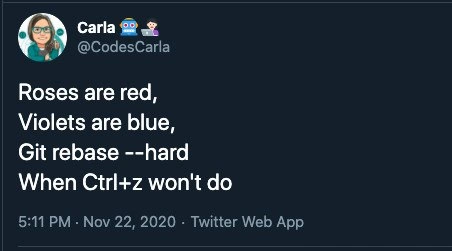
Roses are red,
Violets are blue,
Git rebase --hard
When Ctrl+Z won't do
This meme is a cheeky developer love poem that mashes up a classic romantic verse with a Git command. Instead of ending with “...and I love you,” it delivers the punchline git rebase --hard with the closing line “when Ctrl+Z won’t do.” For seasoned developers, this immediately evokes a mix of amusement and mild anxiety. Why? Because git rebase (especially combined with a mythical --hard flag) represents a dramatic, history-altering action in version control – basically the nuclear option for fixing a mistake – whereas Ctrl+Z is the casual everyday undo. The humor comes from treating a drastic Git operation with the same rhythmic reverence as a tender love poem. It’s the absurd romanticization of something that normally makes coders sweat.
In real-world version control workflows, hitting Ctrl+Z a few times will undo recent edits in your code editor, but it won’t save you if you’ve already dug a deep hole – say, a messy series of commits or a bad merge. That’s where heavy artillery like git reset --hard or an interactive rebase comes in. The tweet jokingly chooses git rebase --hard as the tool of last resort. Technically, git rebase doesn’t have a --hard option (unlike git reset --hard), but we get the poetic license: it’s combining the idea of rebasing (rewriting commit history) with a hard reset (discarding changes) to signify an extreme undo. Experienced devs recognize this as hyperbole – a bit like saying “I’ll rewrite history mercilessly to fix this”. It’s funny because it's DeveloperHumor born out of real pain: everyone who’s wrestled with Git has that war story of things getting so tangled that a normal undo or revert wasn’t enough, leading to desperate commands that can either save the day or blow things up even more.
The tweet’s format itself – the roses-are-red poem template – is a popular meme structure in tech circles. It sets you up with a familiar romantic cadence and then surprises you with a nerdy twist. Here the twist is pure VersionControlHumor. We chuckle because the contrast is rich: flowery poetry vs. blunt command-line brutality. The author, @CodesCarla, essentially confesses affection not to a person, but to a Git command that can rewrite history. It’s an inside joke that plays on our collective experience: we’ve all felt that mix of dread and relief invoking a forceful Git command at 5:11 PM on a frantic day when simple fixes failed. Seasoned developers nod knowingly at the “when Ctrl+Z won’t do” part – it’s a gentle nod to those late-stage 💻 coding crises where the quick undo just won’t cut it because the mistake is already committed (literally).
There’s also an implicit commentary on DeveloperExperience (DX): version control tools are powerful, but not always friendly. Undoing things in Git can require dark magic (like resetting HEAD pointers or rebasing), which feels dramatically out-of-proportion compared to the simplicity of an editor undo. The poem humorously elevates that drama to Shakespearean levels. Instead of saying “when all else fails, use force,” it wraps that sentiment in rhyme. For veteran devs, the line git rebase --hard might even trigger a phantom heartbeat skip – recalling times they’ve lost work with a bad reset or had to appease teammates after a forced push. But in the safe context of a meme, we laugh at it. It’s cathartic: the same tool that can break our heart (one stray --hard and poof goes your code) is being serenaded like a lover. Irony at its finest.
In essence, this meme resonates on multiple levels with experienced coders. It encapsulates the dramatic flair of those “oh no” moments in software development. It satirizes our commitment issues – pun intended – with lines of code. And it reaffirms a shared truth in the dev community: sometimes you have to do something drastic to fix a mess, and if you can rhyme about it, maybe it hurts a little less. After all, nothing says “I care” like saving your project from disaster with a ruthless Git command, right? Roses are red, violets are blue, code can be heartbreaking, but Git will see you through. 🌹💔
Description
A screenshot of a tweet from user Carla (@CodesCarla). The tweet is a four-line poem in the style of 'Roses are red, Violets are blue'. The full text reads: 'Roses are red, Violets are blue, Git rebase --hard When Ctrl+z won't do'. The tweet was posted at 5:11 PM on November 22, 2020. The humor lies in using a lighthearted, classic poetic form to describe a severe and potentially destructive technical action. 'Ctrl+z' (Undo) is a common, low-stakes way to revert changes, while 'git rebase --hard' is a powerful and often irreversible Git command used to discard commits and reset the branch history. The poem humorously suggests that when a simple 'undo' isn't enough to fix a mess, it's time for the nuclear option in version control
Comments
7Comment deleted
Ctrl+Z is asking for forgiveness. `git rebase --hard` is wiping the slate clean and pretending you never made the mistake in the first place... until the reflog brings up your past sins
Git rebase --hard is the enterprise equivalent of eloping: rewrite all the history overnight, break every downstream pipeline, and pray the compliance auditors sleep in
The real poetry here is that 'git rebase --hard' doesn't actually exist - it's 'git reset --hard' - which means Carla's rebase went so wrong she's inventing new Git commands. That's the kind of desperation that only comes after you've already tried reflog, lost your stash, and are one force-push away from updating your resume
The real tragedy isn't that 'git rebase --hard' is destructive - it's that we've all been conditioned by decades of Ctrl+Z to believe every mistake is reversible. Git's reflog is technically your safety net, but let's be honest: by the time you remember it exists, you've already rewritten three feature branches, force-pushed to main, and started updating your résumé. At least with 'git reset --hard HEAD@{1}' you can pretend you knew what you were doing all along
“git rebase --hard” is panic poetry - there isn’t even a --hard flag; seasoned devs just whisper “reflog,” trust branch protections, and back away from the keyboard
Pro tip: “git rebase --hard” isn’t a command - the hard part is explaining to audit why you rewrote prod history and force-pushed without --lease
Git rebase --hard: Ctrl+Z for juniors, reflog incantations for those who've survived the purge


