
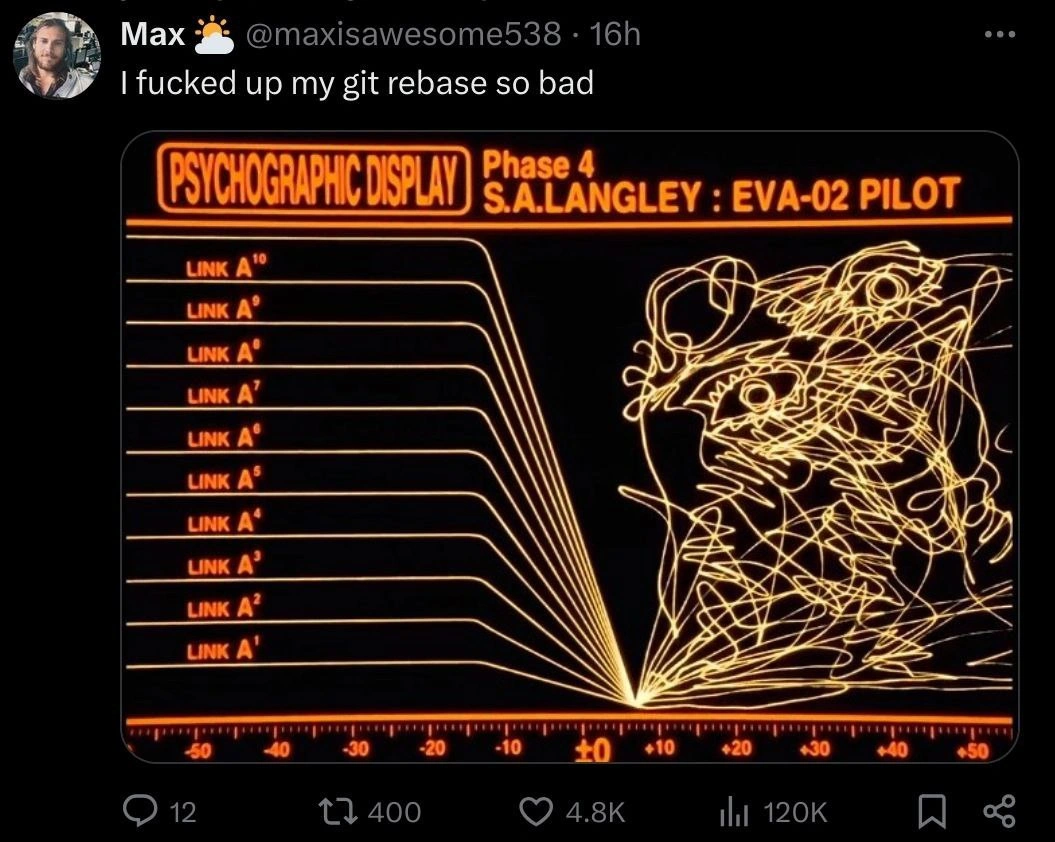
When git rebase turns your commit DAG into Evangelion chaos
Why is this VersionControl meme funny?
Level 1: Tangled Ropes
Imagine you have a bunch of ropes that were all laid out nice and straight, side by side. You try to tie them together into one long rope so it looks neat and connected. But uh-oh, you did it the wrong way, and now all the ropes are knotted and tangled into a big messy ball. 😬 It was supposed to be one straight line, but it turned into a scribbly mess! In this meme, the person tried to tidy up their project’s history (kind of like tying those ropes into one line), but they made a mistake. The picture with crazy orange lines is just a funny way to show how mixed-up and wild the result was. It’s like taking a nice organized thing and, by accident, turning it into complete chaos. The reason it’s funny is because everyone who works with that project stuff (called Git) has had a moment where they messed up and everything looked confusing. It’s a way to say “Whoops, I really tangled things up!” with a bit of humor.
Level 2: Commit Graph Spaghetti
Let’s break down what’s happening for those newer to Git (and maybe not as familiar with 90s anime references). The meme shows a tweet where a developer says “I messed up my git rebase so bad” alongside an image of a futuristic monitor full of tangled lines. This image is actually from a famous anime called Neon Genesis Evangelion. In that show, the screen with “PSYCHOGRAPHIC DISPLAY – Phase 4” and those Link A¹, Link A²... labels is a cockpit readout indicating something has gone very wrong with the pilot’s connection. In simpler terms: it’s an alarm screen. All the clean lines suddenly turning into a scribble means the system is out of control. The meme cleverly uses this sci-fi visual to represent a Git commit history that has gone out of control.
Now, what does it mean to “mess up a git rebase”? To answer that, we need to understand a few Git concepts. Git is a version control system that tracks changes in your code. Every time you save your work in Git, you make a commit – think of a commit like a snapshot of your project at a point in time, with a label (hash) and a pointer to the commit before it. Together, many commits form a chain or graph, showing the history of changes. Usually this history is a Directed Acyclic Graph (DAG), which is a fancy way of saying it’s a bunch of nodes (commits) connected by one-way links with no loops – basically a family tree of code changes that always moves forward in time.
A commit graph (or commit DAG) can have branches. For example, you might create a new branch to develop a feature. Git will then have one line of commits for your main branch and another line for your feature branch. These are like two parallel timelines. Eventually, you might merge the feature branch back into main. If you look at a visualization (with a tool or git log --graph in the terminal), you’d see two lines (branches) that join into one at the merge point. That’s the normal way: a merge commit brings two histories together, and from then on there’s one unified line again.
Git rebase is an advanced command that lets you take commits from one branch and reapply them onto another base, as if you had started that branch from a different starting point to begin with. Imagine you and a friend started writing a story from the same beginning, but then each wrote different chapters (branches). If later you want your chapters to follow your friend’s updated beginning without the messy “meanwhile in an alternate timeline” merge, you’d rewrite your chapters to start after your friend’s. That’s rebase: it moves your commits to a new starting point (often updating your feature branch with changes from main, but without creating a merge commit). It’s great for making the commit history look clean and linear, as if everything happened sequentially on one branch.
However, rebasing can be tricky! You’re essentially rewriting history. Each commit gets a new identity (new hash) because its parent commit has changed. If something goes wrong during this process, you can end up in a very confusing state. For instance, if there are conflicts (when changes in your commits clash with changes already in the target base branch), you have to resolve those at each step of the rebase. It’s like untangling knots as you weave two histories together. If a developer gets confused or does the steps incorrectly – maybe picking the wrong commit order, or accidentally including commits that don’t belong, or aborting and merging in a panic – the result can be a tangled commit graph. Instead of a straight line of commits, you might see multiple lines criss-crossing. People often call this “spaghetti history” because it resembles a bowl of tangled spaghetti noodles. (We also call messy source code “spaghetti code” for the same reason – lots of twisty, entangled pieces.)
In the meme image, those ten straight “Link A” lines on the left symbolize how the commits from different branches ideally line up under one unified history after a successful rebase. The single point where they converge (at the 0 mark) is like saying “all these separate lines of development have now joined into one timeline.” That’s the dream scenario when you run git rebase: your feature commits cleanly attach on top of the latest main branch, and everything looks as if you developed on one continuous branch from the start. Branch graph hygiene achieved!
But on the right side of the image, all hell breaks loose – those lines explode into a knot of curves. This represents what the commit history might look like when the rebase is not clean. Perhaps our developer tried an interactive rebase (where you can reorder, squash, or drop commits manually) and got the sequence wrong, or encountered conflict after conflict and made a misstep while resolving them. It’s possible they accidentally created new merge commits during the rebase (for example, by merging a branch when they shouldn’t have), or they rebased the wrong branch onto the wrong place. The specifics can vary, but the end result is the same: a normally tidy commit history ends up looking like a plate of noodles thrown against a wall. The meme exaggerates it to an absurd degree (real Git history never literally loops and scribbles in on itself like an abstract drawing), but it feels that messy to the developer when it happens. It’s confusion and panic embodied in a graph.
Now, the Evangelion part: Neon Genesis Evangelion is a popular Japanese anime from 1995. It’s about teenagers piloting giant bio-robots (Evangelions) to save the world from mysterious monsters called Angels. The show is known for its psychological depth and sometimes surreal, chaotic imagery. The screenshot in the meme is from one of the cockpit displays. When things are going wrong – for example, when the Eva robot is going berserk or the pilot is mentally overwhelmed – these monitors erupt in insane visuals (like overlapping waveforms and erratic data readouts). So the meme is basically saying, “My Git repo’s history is as messed up as an Evangelion going berserk!” It’s using that dramatic sci-fi chaos as an analogy for rebase chaos. If you’re not an anime person, just know: that image equals system overload, which is exactly how a new developer might feel looking at their git log after a botched rebase.
Why is this such a relatable joke in the developer community? Because almost everyone playing with advanced Git has felt this pain. Git is powerful but notoriously complex at times. Commands like git rebase or solving merge conflicts can make you feel like you’re defusing a bomb – cut the wrong wire (or pick the wrong option) and boom, your repository history looks terrifying. There’s even a saying, “Git – it’s not scary until it is.” The tweet got so many likes and retweets because other developers have been there: you try to do the “right” thing to make your commits pretty, and instead you end up with something ten times more confusing. It’s equal parts comforting and comic to see that experience captured with such a perfect visual metaphor. Even if you didn’t get the Evangelion reference at first, the image clearly says “this is total chaos,” and any coder who’s tangled with Git can laugh (or cringe) in sympathy.
So, in summary: git_rebase_gone_wrong -> commit history becomes commit_graph_spaghetti. The meme’s author chose an over-the-top anime psychographic display to illustrate that feeling of “What on earth happened to my commits?!” It’s a mix of VersionControlHumor and a little pop culture. Even without knowing Evangelion, you understand a messy tangle vs a nice straight line. And if you do know Evangelion, the joke gets an extra layer: you recall those intense scenes of synchro rates failing and pilots screaming, which is exactly how a developer internally feels upon realizing the repo’s history is now an eldritch scribble. This is a lighthearted way to learn a hard lesson: Git gives you great power to rewrite history, but with great power comes great responsibility (and occasional disaster). If you ever find yourself in Max’s position, don’t worry – you’re in good company, and there’s usually a way to recover. Until then, it’s a story to laugh about and share with others in the coding trenches.
Level 3: Third Impact of Rebase
When a seasoned developer sees this, they immediately recognize a Git rebase gone horribly astray. The meme mashes up advanced version control humor with an Evangelion reference to convey pure chaos. In Git, rebasing is supposed to linearize your commit history – kind of like those ten neat lines labeled Link A¹ through Link A¹⁰ all converging at the zero mark on the left. That convergence is what a perfectly executed rebase looks like: multiple branches cleanly collapsing into a single, tidy lineage. It’s the holy grail of branch graph hygiene – a straight line of commits as if the code was developed in one smooth sequence.
But oh boy, when rebases go wrong, they really go wrong. The right half of the image – an explosive scribble of intersecting curves – is a spot-on visualization of a commit DAG turned to spaghetti. In Git’s commit graph (a Directed Acyclic Graph of commits), lines usually flow nicely from one commit to the next. A messed-up rebase, however, can introduce all kinds of twisted relationships: duplicate commits, confused parent pointers, orphaned changes, and merge commits where they shouldn’t be. The result? Your once orderly commit history now looks like an incomprehensible tangle of branches weaving over and under each other. It’s as if the timeline of your project hit a paradox and imploded into scribbles. Experienced devs have seen this in git log --graph outputs that resemble abstract art. It’s the commit graph spaghetti nightmare – technically still a DAG (no cycles, because Git won’t allow actual time loops), but so convoluted that it might as well be an eldritch summoning circle of code.
The humor here comes from the contrast: Git rebase is intended as a surgical tool to rewrite history, often used to make things cleaner (like squashing minor fix commits, or rebasing a feature branch onto the latest main to avoid a messy merge commit). We do it to impress code reviewers with that pristine linear story. Yet, in this meme, our intrepid developer (Max ☀️ @maxisawesome538) admits “I f**ked up my git rebase so bad” that the commit graph looks like an Evangelion-style system failure. The Neon Genesis Evangelion cockpit monitor is a dramatic choice: in the anime, when those monitors light up with wild scribbles, it means the pilot’s synchronization with the giant robot has gone haywire, an impending catastrophe. Here, it's the dev’s synchronization with Git that’s gone off the rails. The label “S.A. LANGLEY : EVA-02 PILOT” refers to Asuka Langley piloting Evangelion Unit-02, who famously has an emotional breakdown in the series. That’s a clever parallel to a developer emotionally breaking down when their careful rebase turns into a disaster. It’s version control humor meeting anime drama – a perfect recipe for DeveloperHumor on Twitter.
Why do so many engineers chuckle in pain at this? Because rewriting commit history is an advanced Git move that can indeed induce existential dread. We’re taught from early on: “Don’t rewrite shared history!” Mess up a rebase on a shared branch and you might force your whole team to reconcile divergent realities of the repository. The meme exaggerates this fear – the commit history isn’t just a bit off, it’s a full-on Third Impact (Evangelion’s apocalyptic event) in Git form. The once linear narrative of code changes has fractured into a mind-bending scribble. Every single one of those “LINK A” lines that was supposed to smoothly merge has instead exploded into chaos. It implies maybe each commit reapply went wrong – perhaps conflicts were resolved by accidentally creating new merges, or commits got reordered incorrectly, or multiple branch heads ended up coexisting. This is the stuff of Git nightmares. 😅
From a senior perspective, the meme also hints at the recovery dance that follows. A catastrophic rebase can leave you frantically digging through git reflog (Git’s emergency log of HEAD changes) to find lost commits or restore a previous state. It’s the equivalent of calling in tech exorcists. The tweet’s huge engagement (over 120K likes!) shows that countless devs have been in Max’s shoes – staring at gitk or GitHub network graph in despair, seeing a commit history that looks like it was drawn by a seismograph during an earthquake. The shared trauma is real: whether you’re a battle-worn engineer who’s dealt with merge conflicts hydra or an adventurous junior who went git rebase -i for the first time, you know the gut punch of seeing a beautiful code history become a mangled knot. And yet, we laugh, because if we didn’t, we might cry. The meme captures the catharsis of “Yep, been there, done that” in a delightfully nerdy way. It’s both a cautionary tale and a badge of honor among devs: you’re not truly initiated into VersionControl wizardry until you’ve created a commit graph so crazy it belongs in an Evangelion battle scene.
Description
Tweet screenshot: the user "Max ☀️ @maxisawesome538 · 16h" writes, "I fucked up my git rebase so bad". Below the caption is an orange-on-black cockpit monitor from Neon Genesis Evangelion that reads "PSYCHOGRAPHIC DISPLAY Phase 4 S.A. LANGLEY : EVA-02 PILOT". Ten straight lines labeled "LINK A¹" through "LINK A¹⁰" converge cleanly at a single origin, then explode into an incomprehensible scribble of intersecting curves across the right half of the screen, suggesting a wildly corrupted signal. Seasoned engineers will instantly map the tidy converging lines to a normal linearized history and the scribble to the nightmare commit graph that appears after a botched interactive rebase. The meme plays on advanced Git workflows, branch graph hygiene, and the existential dread of rewriting shared history

Comments
13Comment deleted
Pro tip: if your rebase output starts resembling an AT-field waveform, it’s time to `git reset --hard` and pray for instrumentality
The only thing more tangled than Asuka's psychological state in End of Evangelion is your git history after attempting an interactive rebase across 47 commits while your coworker force-pushed to main and you forgot you had uncommitted changes in three different worktrees
When your git rebase goes so catastrophically wrong that it triggers Third Impact and merges all branches into a single point of existential dread - at which point you realize the only way forward is `git reflog` and prayer, or just nuking the repo and force-cloning from origin like it never happened. The real horror isn't the merge conflicts; it's explaining to your team lead why the commit graph now looks like Instrumentality
Interactive rebase: when the “linear history” OKR yields an Evangelion‑grade Merkle spaghetti and you’re praying to reflog before a force‑push --with‑lease
Interactive rebase: the only feature that turns a deterministic DAG into interpretive art - until reflog quietly walks you back from the detached HEAD
Rebase so berserk, even Asuka's sync graph looks linear by comparison
Xplain Comment deleted
git rebase --abort Comment deleted
Looks like IDM album cover Comment deleted
rm -rf .git problem solved Comment deleted
why this thing has two eyes and a big smile? Comment deleted
pretty sure Asuka's mind was being invaded by an angel in this scene so it could be the angel Comment deleted
It's near the end of the show when things goes terribly wrong. Arael invades Asuka's mind and throws her into deepest traumatic memories. NGE commonly uses data HUDs when showing things going irrational. https://youtu.be/vMFLcEGo7AQ Comment deleted

