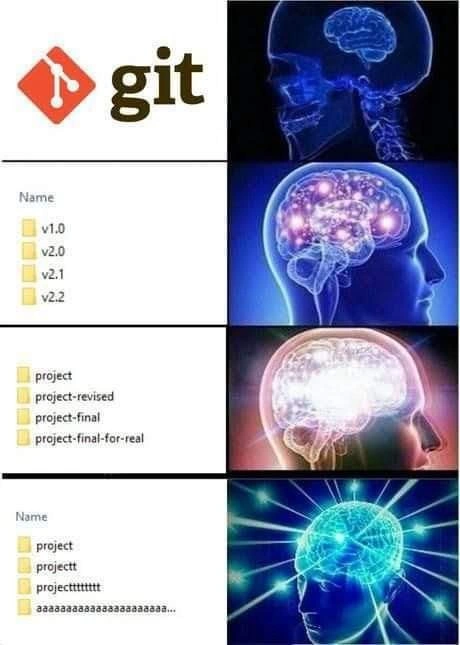
Galaxy-brain escalation of project versioning: from Git to 30-letter “final” folders
Why is this VersionControl meme funny?
Level 1: Never Truly Final
Imagine you’re writing a story and you think it’s done. You title it “My Story FINAL.” But then you spot a mistake, so you fix it and save a new copy called “My Story FINAL 2.” Then your friend gives you more suggestions, you make changes and name that one “My Story REALLY FINAL.” Eventually, you have a bunch of papers or files like “FINAL,” “FINAL2,” “FINAL_REALLY_FINAL” – and maybe one just named “aaaaaaa” because you got so frustrated you just hit the keyboard! It’s pretty silly, right? You’ve got a pile of versions and it’s hard to tell which is the real final draft.
This meme is joking about exactly that situation, but for coding projects. The smart way (using a tool called Git) is like keeping one notebook with all your story drafts neatly organized and labeled by date – you don’t need multiple messy copies. But the joke shows someone doing the opposite: making a new folder for each draft and giving it a crazier name each time. The funniest part is that the more ridiculous the names get (“final-final-for-real” and then gibberish), the meme pretends that’s galaxy brain genius. It’s poking fun at how we sometimes know the right way to do things, but end up in a silly situation anyway. In simple terms: it’s funny because we’ve all tried to say “This is the last time I’m doing this!” – only to do it again, with even more confusion. The meme just shows that with project folders and makes us laugh at how final is never really final.
Level 2: Manual Version Madness
Let’s break down the humor in more straightforward terms. This meme compares Git-based version control with manual folder versioning in a funny way. The image is the classic “galaxy brain” template. That means it has four panels, each with a brain that’s more lit-up than the previous, next to some text or images. Here’s what each panel shows and why it’s funny to developers:
Panel 1 – Using Git: The first picture shows the Git logo next to a normal (dimly lit) brain. Git is a popular version control system. Version control is a tool/software that helps developers keep track of changes in their code over time, kind of like a save history. In Git, you commit changes instead of making new copies of files. The meme implies this is the “dumb” or basic level (small brain), even though in reality Git is the smart way. Essentially, this is the starting point: using Git properly to handle project versions.
Panel 2 – Numbered version folders: The second image shows a list of folder names in what looks like a Windows File Explorer. The folders are named
v1.0,v2.0,v2.1,v2.2. The brain next to it is glowing a bit more. This is poking fun at people who manually make a new folder every time they want to save a version of their project. Instead of using Git commits to handle versions, they copy-paste the whole project directory and give it a version-like name. The namesv1.0,v2.0, etc., resemble semantic versioning (a common way to number software releases, where you increment numbers for new releases: 1.0, 1.1, 2.0, etc.). But here it’s done by hand, by naming folders. This method is workable for a few versions (and sometimes beginners or non-technical team members do this to keep track of drafts), but it gets unwieldy. It’s funny because it’s a bit old-fashioned: before tools like Git or Subversion existed, people did keep different versions in separate files or folders. Seeing it now feels clumsy – hence the humor. The meme suggests the person doing this thinks they’re being smarter (their brain “expands”), but really it’s not ideal compared to proper version control.Panel 3 – “final” and “revised” folders: The third panel’s folder names are:
project,project-revised,project-final,project-final-for-real. The brain image is extremely bright, indicating an even higher level of “galaxy brain” thought. This set of names will make almost every developer (or student, or office worker) laugh or cringe in recognition. Here, instead of numbered versions, the person is labeling folders with words like “revised” and “final”. This happens when someone thinks, “Okay, this latest version is the final one, I’ll call it final,” only to have to change something afterward. Because they already used “final”, they append something like “-for-real” to show this one is truly the final version. Of course, life happens and sometimes even that isn’t final. This naming habit is common in shared projects, school assignments, or any scenario where you have multiple drafts. It’s a running joke in the community: a file named “final” is never actually the final version 😅. There’s even a trope of files ending in “final_final_REAL”. The humor in the meme comes from recognizing this chaotic process. It highlights a developer pain point: without proper version control, it’s easy to end up with confusing names and uncertainty about which file is the actual latest. In terms of Developer Experience (DX), this is pretty bad — imagine coming back a week later and trying to remember whetherproject-finalorproject-final-for-realhas the code you shipped! The meme is basically saying, “Look how ridiculous it gets when you don’t use a systematic approach.”Panel 4 – Gibberish naming chaos: The bottom panel lists folders with nearly nonsensical names:
project,projectt,projecttttttt, and one folder that’s just a long string ofa’s (aaaaaaaaaaaaaaaaaaaaa…). The brain in this final image looks cosmic and electrified, as if achieving ultimate enlightenment. This is the punchline: the worse the naming scheme, the more “enlightened” the meme pretends it is. In reality, by this point, the versioning approach is totally off the rails. Why would someone have folder names like these? It could be a few things: maybe they tried to create another folder named “project” but the name was taken, so they added an extra “t” (we’ve all seen duplicate files likedocument(1).txt– here it’s done by just altering spelling). Or perhaps they just got frustrated and mashed the keyboard to name the last folder (that longaaaaaaaa...name feels like banging your head on the keyboard). It symbolizes complete disorganization. Yet in the meme’s ironic style, this is shown as the largest, most advanced brain – because from the outside, it’s obviously a silly way to manage versions. Developers find this hilarious because it’s a hyperbolic (exaggerated) version of a real problem. It’s the nightmare end-state of not using tools: you end up not even sure how to label things anymore.
So, essentially, this meme humorously contrasts proper version control (Git) with progressively worse manual versioning tactics:
- Using Git (best practice, but depicted as small brain for irony).
- Making numbered folders (somewhat organized but manual, a rookie move).
- Making “final” and “final-final” folders (common messy habit when panicking or improvising).
- Utterly random naming (absolute chaos, the breaking point of organization).
Each level is funny to developers because it’s relatable. Most of us have either done this in our early days or encountered a project from someone’s drive that looked like this. It’s essentially showing the evolution of a project’s folder on a computer desktop over time if no version control is used. The joke is that as the situation worsens, the brain in the meme grows – highlighting the absurdity. In reality, of course, the truly “galaxy brain” move would be to use Git from the start and never have to make these folders at all. But the meme’s charm is in that role reversal (smart appears dumb, dumb appears smart) to poke fun at bad habits.
For a junior developer or someone new to the concept:
- Git is a tool that would automatically keep all these versions for you, without needing multiple folders. You’d commit changes and could tag a commit as v1.0 or v2.0, etc.
- Without Git, people often copy the whole project folder to make a backup before major changes – that’s what the second panel shows.
- If they’re unsure, they might label one copy “final”, but then something changes… so they make another copy – that leads to labels like “final-final” or “final2” or in this case
project-final-for-real(as if saying “seriously, this one is final!”). - In the worst case, this gets so out of hand that even the naming loses meaning (extra letters, random characters, anything to make a unique folder name).
The meme falls under VersionControl humor and DeveloperPainPoints because it jokes about the pains of poor version control. It also touches the classic problem of NamingThings – how choosing clear, consistent names is difficult when you’re doing it ad hoc. The humor works because anyone who’s spent time working on projects (especially under time pressure) can see a bit of themselves in those progressively desperate folder names. It’s a funny reminder of why tools like Git (and good naming conventions) make our lives easier: so we don’t end up with 30-letter “final” folders on our machines.
Level 3: Final Is Never Final
At the top tier of complexity, this meme highlights a version control anti-pattern with biting sarcasm. It uses the "expanding brain" (aka galaxy brain meme) format to ironically celebrate worsening project versioning habits. The smallest brain (least "enlightened") is next to the Git logo, implying that using a proper version control system is the primitive baseline. Each subsequent panel shows a more chaotic naming convention accompanied by a more radiantly lit brain, as if greater intelligence is achieved by more absurd file versioning. Of course, every experienced dev recognizes the satire here: in reality, relying on Git is the smart approach, while those glowing cosmic brain levels represent progressively dysfunctional practices we’ve all seen (or done) under pressure.
Why is this funny to seasoned developers? It’s because it rings painfully true. The meme skewers the common progression when someone ignores real version control:
Panel 1 (Git) – The sensible baseline: All project versions tracked cleanly in a single repository with commits. The red Git icon stands for using branches,
git commit, andgit diffto manage changes. The brain here is dim, suggesting that just using Git is “low-level” in this tongue-in-cheek ranking. In reality, Git (a distributed version control system) is a hallmark of professional development. But the joke implies some folks consider this too basic or “not galaxy-brain enough.”Panel 2 (Numbered Folders) – Introduces semantic versioning style folder names (
v1.0,v2.0,v2.1,v2.2). The brain glows a bit more. This mocks the semi-organized approach of manually copying the entire project directory and appending version numbers. It’s a step up in galaxy-brain absurdity: instead of using Git’s internal history, the person creates separate folders for each version. This is what you might call "folder-based version control" or folder_versioning. It superficially resembles real version numbers (like Major.Minor releases), but it’s all manual. Experienced devs chuckle here because we remember doing this in early days or seeing a colleague’sOldProject_v3_FINALfolder on a shared drive. It’s basically reimplementing version control poorly, and it doubles the work (and disk space!).Panel 3 (“final” folders) – Now the brain is white-hot, and the folder names abandon numeric versioning for emotionally charged labels:
project,project-revised,project-final,project-final-for-real. This is the classic final_final_version_joke every developer (and designer, and writer) knows. The word “final” has lost all meaning here. 😂 By now, the person has likely labeled something "final" only to discover it wasn’t final at all. Maybe a manager or client requested one more last-minute change, so “final” got revised, then re-revised. The meme exaggerates by adding “for-real” to the folder name — a desperate promise that this one is truly the last version. (Spoiler: it never is.) The humor is in that shared pain: We’ve all seen files like Final_v2 or Final_copy. In software teams, this happens when someone lacks Git confidence or when merging changes feels too complex, so they resort to duplicating folders. It’s chaotic and error-prone: one wrong move and you’re coding in the wrong folder or losing track of changes. The DeveloperExperience (DX) here is awful — you spend mental energy just remembering which “final” is the real final. The meme’s third panel gleefully mocks that habit.Panel 4 (Absolute Chaos) – The apex of the “enlightenment” (the brain is a luminous cosmic web) corresponds to pure naming chaos. The folder list is absurd:
project,projectt,projecttttttt,aaaaaaaaaaaaaaaaaaaaa…. This suggests someone has completely given up on sensible naming. Perhaps they tried to make another “project final” but got naming collisions (you can’t have two folders with identical names in the same directory), so they started adding extrat's or mashing the keyboard (aaaaaaaaaa...) in frustration. It’s the naming convention death spiral. This resonates with devs because it’s an exaggeration of real scenarios under extreme stress: e.g., “I’ve made so many copies, I don’t even care about names anymore”. It might also hint at novices who accidentally create files with slight typo differences (projectvsprojectt) and confuse themselves. The cosmic brain implies a joke: Truly galaxy-brained individuals don’t bother with Git or orderly versions; they achieve transcendence by creating 30-letter-long folder names. It’s poking fun at the absurdity of human behavior when deadlines loom or organizational discipline breaks down. Everyone knows the right solution is to use version control, yet here the “most enlightened” image is doing the opposite – that irony is the core comedic twist.
From a senior developer perspective, this meme also hints at deeper truths in our industry: naming things is notoriously hard (there’s an old joke: “There are only two hard things in Computer Science: cache invalidation, naming things, and off-by-one errors.” 😉). When proper tools or processes aren’t in place, even smart people fall back to primitive methods to avoid losing work. Before modern DVCS like Git, teams did use shared folders and suffixed file names to track versions. It was as painful as it looks – prone to mix-ups and accidental overwrites. The meme exaggerates it to an absurd degree for humor. It also subtly reminds us that using a tool like Git requires learning and effort. In fast-and-frantic moments (say a production hotfix needed now), someone might panic and just copy the folder “to be safe.” Sure, it’s technical debt in the making, but it feels quick. Ironically, this “galaxy brain” move creates more work later when you have to diff those folders manually. The truly enlightened path is to invest in proper version control habits early, so you’re not stuck with a directory of final-final follies. In short, the meme strikes a chord because it transforms a relatable developer pain point – messy versioning and the struggle of naming – into a visual gag where the worst practices get the biggest brain. It’s a playful roast of our occasional lack of discipline, and a wink that says “We’ve been there, and we know it’s ridiculous.”
Description
Meme uses the classic four-tier “expanding brain” template to poke fun at versioning habits. 1) Top left shows the red Git logo alongside a dim, undeveloped brain - implying sensible use of Git is the baseline. 2) Second tier shows a Windows-style file explorer list titled “Name” with folders: “v1.0”, “v2.0”, “v2.1”, “v2.2”; the adjacent brain glows slightly more. 3) Third tier lists folders: “project”, “project-revised”, “project-final”, “project-final-for-real”; the brain is brighter and white-hot. 4) Bottom tier lists: “project”, “projectt”, “projecttttttt”, “aaaaaaaaaaaaaaaaaaaaa…”, while the brain is depicted as a radiant, cosmic network of electric blue lines - supposedly the “highest” intelligence. The joke contrasts proper version control with progressively chaotic folder-naming approaches that every developer has encountered when deadlines loom and Git is ignored
Comments
6Comment deleted
Git gives you immutable SHAs; saving “project-final-for-real-really” to SharePoint is just force-push with no reflog and all the existential dread
The evolution from semantic versioning to 'projecttttttt' is just your git history documenting the exact moment your architecture review meeting got rescheduled for the fifth time while prod is on fire
The real galaxy brain move is having Git installed, visible in your taskbar, and still manually versioning folders like it's 1995. It's the software engineering equivalent of buying a Tesla and pushing it to work - technically you own the technology, but somewhere along the way, you've fundamentally misunderstood the value proposition. The progression from semantic versioning to 'aaaaaaaaaaaaaaaa' perfectly captures that 3 AM moment when your commit history could have told you which version actually worked, but instead you're playing filesystem archaeology with folders that sound like someone's head hit the keyboard during a production incident
Semantic tags: O(1) checkout bliss. Exclamation branches: O(n!) merge regret
If your release plan is “project-final-for-real,” you’ve implemented an eventually consistent, single-node VCS where conflict resolution is adding t’s
We preach semantic versioning and annotated tags; the auditors still track releases by folders named “final”, “final-for-real”, and “projecttttt” on the network share - our branching strategy is NTFS and panic