
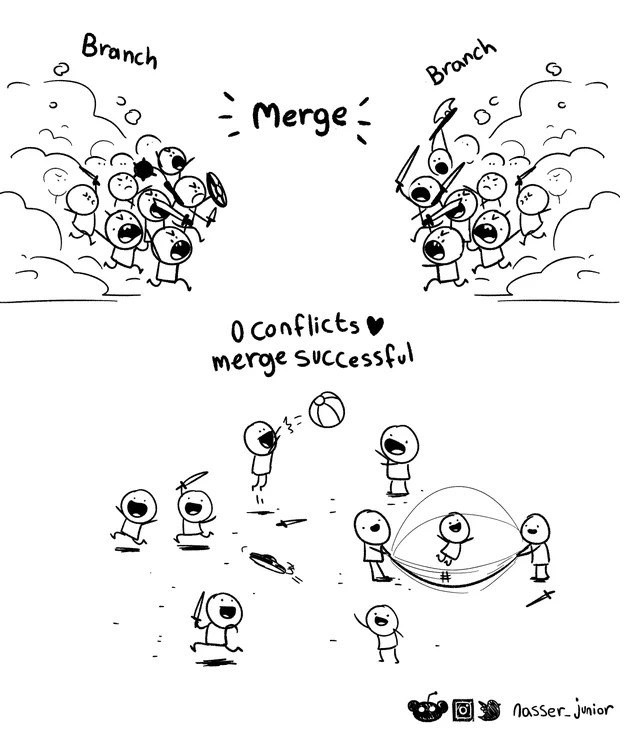
Git Merge: From Battlefield to Playground
Why is this VersionControl meme funny?
Level 1: From Fight to Fun
Imagine two groups of kids playing on a playground. Usually, if both groups want the exact same swing or the same ball, they might start shouting and arguing over it – a real tug-of-war for the toy. That's like when two people make changes to the exact same part of something and end up in a fight. But now picture that each group of kids plays with different toys instead. One group goes to the swings while the other group plays on the slide. They aren't trying to grab the same thing, so there's no arguing at all. Later on, they even come together to play a game of catch, laughing and having a great time. Nobody fought and everyone is happy.
This meme is funny because it shows that kind of surprise peaceful outcome in a situation that usually has conflict. We expect a big fight, but instead we see instant friendship and fun. It's like watching kids who normally quarrel suddenly share and play nicely – it warms your heart and makes you smile. That feeling of relief and joy when there's no fight is exactly how developers feel when their code merges with zero conflicts. It's a happy surprise where everything works together perfectly, and that's why seeing those branches go from battle to playground is so satisfying and relatable.
Level 2: Branches in Harmony
Git is a popular tool for tracking code changes, and it allows multiple developers to work in parallel using branches. A branch in Git is like a separate workspace or sandbox for your code changes. For example, you might create a new branch to develop a feature or fix a bug, while someone else works on a different branch for another task. Both branches start from the same codebase (often the main or master branch) but then go their own way. This is a common GitWorkflow: everyone does their work on branches, and later you bring those branches together.
Bringing branches together is called a merge. When you run git merge <branch-name>, Git tries to combine the changes from one branch into another. If each branch touched completely different files or different parts of the code, the merge is straightforward and Git can do it automatically. It's like two people working on different chapters of a book: one wrote chapter 1 and the other wrote chapter 2. When you put the chapters together, you get a complete story without any overlap – easy! In coding terms, if Branch A added a new file for the login screen and Branch B modified the settings page, Git will include both changes with no problem. The result is a merge success message. Developers love seeing that because it means everything integrated cleanly.
However, if two branches edit the same section of a file, Git gets confused about which change to accept. This situation is called a merge conflict – basically Git is asking for human help. It's like if two authors unknowingly wrote different endings to the same chapter; the editor now has to choose how to combine them. When a merge conflict happens, Git will pause the merge process and mark the conflicting parts of the code for you to resolve. You'll see the affected file with special markings showing both versions side by side. For instance, if Branch A and Branch B both changed the same line in a file, the file after an attempted merge might look like this:
<<<<<<< HEAD (Branch A's version)
print("Hello, world!")
=======
print("Hi, world!")
>>>>>>> branch-b (Branch B's version)
The <<<<<<< HEAD and >>>>>>> branch-b lines are Git’s way of saying: "Here are two different changes to the same piece of code." The section between them is the code from your current branch (HEAD), and after the ======= is the code from the other branch. Git cannot decide which one is correct, so it's giving you a chance to fix it. As a developer, you have to edit this file, choose or merge the correct lines (maybe you want "Hello, world!" or maybe "Hi, world!" — or even combine them), and then delete these <<<<<<< ======= >>>>>>> markers. Only after you clean up all such markers will Git allow you to finish the merge. This process is called resolving conflicts, and every new programmer has to learn it sooner or later.
Now, what does "0 conflicts ♥ merge successful" mean? It means Git didn't find any conflicting changes at all. In our analogy, it's like those two authors wrote chapters that fit together perfectly with no overlapping scenes. In Git terms, every change on one branch neatly slotted into place alongside the changes from the other branch. Perhaps Branch A and Branch B were working on totally unrelated parts of the project, so nothing they did stepped on each other's toes. Git was able to auto-merge everything. In some cases, if one branch was just an updated version of the other (no divergent changes), Git can do a fast-forward merge, which is even simpler (it just moves the branch pointer forward because one branch already contained all the other's history). Either way, "0 conflicts" is basically Git saying "I merged it all, and nothing conflicted."
For a junior developer, seeing "Merge successful. 0 conflicts." pop up is a moment of pure relief (and maybe a bit of disbelief!). The first few times you merge branches, you might be bracing yourself for those scary conflict markers or error messages. But when Git happily merges everything with no issues, it's like a small victory. You don't have to stop and ask a senior dev, "Uhh, what do I do with these <<<< lines?" because they never appeared. Instead, you get to move on and run your app, confident that both sets of changes are now together.
The comic exaggerates this feeling by showing former fighters becoming friends. Normally, merging code can feel like two groups arguing over the same toy (the code), but here it's as if each group had their own toy and there's no argument at all. The once chaotic "branch war" turned into instant harmony. This is super relatable humor for anyone who has been through a tough merge. It reminds new developers that while merge conflicts are common (and nothing to panic over), sometimes everything goes smoothly and it's worth appreciating that little miracle. After all, a conflict-free merge means you can get back to coding new features instead of playing referee between code versions. And that always puts a smile on a developer's face!
Level 3: Git War & Peace
In the top panel of this stick-figure comic, we see an all-out brawl between two "Branch" factions, swords raised and dust flying — a perfect metaphor for the typical chaos of a Git merge conflict. It's basically depicting a branch war. Seasoned developers know that combining two long-lived code branches often feels like a battlefield: each branch has conflicting changes that clash at merge time. The caption "Merge" hovers between these warring sides like a mediator about to shout "Fight!" Beneath the cartoon violence is a very real technical issue: merge conflicts. When using a Version Control system like Git, each branch is essentially a separate timeline of changes. To merge them, Git performs a three-way merge algorithm: it finds the last common ancestor commit of the two branches and then tries to automatically integrate all changes made on both branches since that point. However, if both branches modified the same lines of code in different ways, Git doesn't know which version to keep – so it throws up its hands and declares a conflict. It's as if two knights claimed the same territory on the battlefield; someone (the developer) has to manually decide who wins that spot in the code.
In Git, a conflict typically happens when:
- Both branches edit the same section of a file differently (for example, one branch says
color = "blue"while the other sayscolor = "red"). - Or one branch deletes or renames a file that the other branch continues to modify.
Essentially, any overlapping change that Git can't neatly reconcile will stop the automatic merge in its tracks. A merge conflict requires the developer to step in as the peacekeeper, manually cleaning up the code differences. This process is time-consuming and can introduce bugs if done incorrectly. No wonder it's depicted as a messy skirmish in developer humor — we've all felt that frustration of untangling a conflicted merge at the worst possible time (usually Friday 5 PM, right?).
Now, the bottom panel shows the dream scenario: 0 conflicts and merge successful! After the merge, all those combative little coders are suddenly playing together—tossing a ball, bouncing on a net—like old pals at recess. It's a hilarious and heartwarming contrast because it almost never happens with complex branches in real life. The comic even celebrates it with a little heart:
0 conflicts ♥ merge successful
For any developer, seeing that message in your terminal is like finding out you aced an exam you dreaded – pure relief and joy. That ♥ conveys the love we feel for this rare outcome. It’s the kind of moment where you half-expect confetti to stream out of your IDE because the no-conflict merge is practically a unicorn. Veteran engineers often joke that a truly clean, peaceful merge is so rare it's almost suspicious. ("No conflicts? Are we sure we merged the right branch?") Maybe one branch had almost no overlapping changes, or the team was exceptionally disciplined about keeping their work isolated. Either way, Git basically said "I got this, no worries," and merged everything without a peep. One minute your branches are poised for war, and the next minute poof — all the code just seamlessly slots together. No code casualties, no frantic diff resolving; just an instant calm. It's a bit eerie for the battle-scarred dev, but also tremendously satisfying.
Beyond the joke, this scenario highlights a truth about Developer Productivity. A merge with zero conflicts means hours not spent wrestling with merge tools or tracing which teammate's change broke the build. It’s a huge productivity win and moral booster. In fact, avoiding "branch wars" is one reason many teams practice continuous integration: merging small changes into the main branch frequently so that differences stay manageable. The longer branches live in isolation, the more they drift apart and the more explosive the "merge day" becomes. But here, by luck or good planning, the two branches didn't step on each other's toes at all. It's the ideal GitWorkflow moment we all strive for. The meme plays on this shared pain and relatable humor by presenting the ultimate wish-fulfillment: what if merging was always this easy? We laugh because we know the reality (merge conflicts) and we appreciate the fantasy (zero-conflict playground). In short, the comic turns a dreaded slog into a cute playground scene, and every developer who’s endured merge conflicts finds that absurdly satisfying and funny.
Description
A two-panel, black-and-white cartoon that humorously illustrates the process of merging branches in version control. In the top panel, two large, chaotic groups of angry stick figures, each labeled 'Branch', are running towards each other, brandishing weapons like swords and shields. Between them, the word 'Merge' is written, symbolizing the anticipated clash and potential for conflicts. The bottom panel shows a completely different scene with the caption '0 Conflicts ♥ merge successful'. Here, the same stick figures are now happily playing together. Some are throwing a ball, one is tossing a frisbee, and a few are using a stretched piece of fabric as a trampoline for another figure. The cartoon effectively contrasts the high-stress expectation of a merge conflict with the joyful, peaceful reality of a clean, successful merge, a rare and celebrated event for many developers

Comments
7Comment deleted
A zero-conflict merge is the universe's way of telling you that you've just broken production in a way you won't discover for three weeks
Git says “0 conflicts.” My staff-eng brain hears, “All semantic landmines successfully merged - detonation scheduled for tonight’s 2 AM deploy.”
The real merge conflict isn't in the code - it's explaining to the PM why a 'successful merge with zero conflicts' somehow broke three unrelated features that were working fine in both branches
The most unrealistic part of this comic isn't the stick figures playing peacefully - it's the '0 conflicts' message. In reality, even merging a README typo fix somehow triggers conflicts in package-lock.json, three migration files you've never touched, and that one binary asset that Git insists on diff-ing character by character
“0 conflicts” - Git resolved the text; the semantic war begins at 3am when both branches ship migrations renaming the same column in opposite directions
‘0 conflicts’ just means the diff parser signed a ceasefire; the semantic conflicts are deploying to staging
Merge conflicts: dev gladiator pit. 0 conflicts: 'git merge' turns into pickup game - until rebase season

