
Git Checkout: The Command for Everything, Apparently
Why is this VersionControl meme funny?
Level 1: One Button for Everything
Imagine you have a magic remote control with just one big button that runs your whole house. Press that one button and it might turn on the TV. Press it again and – oops – it flushes the toilet. Try a different trick with it, and it opens the garage door or dims the lights. You never quite know, because it’s the same button doing everything. Sounds pretty silly and confusing, right? You’d probably end up turning off the lights when you really just wanted to watch cartoons. That’s the joke here: in a computer tool that programmers use, they had one single command that was being used for lots of different tasks – kind of like that do-it-all button. It technically worked, but it was super easy to mix up what would happen. It’s funny because it’s such a crazy way to design things, and anyone could see how it might lead to oopsie moments. The meme is basically laughing about how ridiculous (and relatable) it is to have one thing that’s supposed to control so many unrelated actions. Even the people in charge of that tool eventually said, “This is too confusing,” and decided to split the jobs into separate buttons – which, as you can imagine, makes life a lot easier (and less accidentally flushy!).
Level 2: Command Overload
If you’re a newer developer working with Git, it’s easy to be puzzled by the many faces of the git checkout command. First, some quick definitions: Git is a version control system – basically a tool that tracks changes in code over time and allows multiple pathways (branches) for development. A branch in Git is like an alternate timeline of your project, so you can work on new features without disturbing the main code. The CLI (Command-Line Interface) is how we often interact with Git: by typing commands into a terminal.
Now, git checkout historically meant a bunch of different things depending on how you used it. For example, git checkout could:
- Switch branches:
git checkout mainwould move you to the main branch, updating your files to that branch’s version. - Create a new branch:
git checkout -b new_featuremakes a new branch called new_feature and switches to it in one go. - Get a specific file version:
git checkout 1234abcd -- src/app.jsupdates src/app.js in your working directory to the version from commit 1234abcd (a specific past commit). - Discard changes to a file:
git checkout -- src/app.jsthrows away any edits you’ve made to src/app.js, restoring the last committed version of that file.
Notice how one single command name, git checkout, is being stretched to cover a lot of different actions. In programming terms, this is called overloading – using the same name for multiple purposes. It’s as if git checkout spoke several dialects: you have to look at the extra options or arguments (like -b or the -- or a file name) to know which “language” it’s speaking and what it will do.
This all-in-one approach caused a ton of confusion for people learning Git. It’s not very intuitive at first. You might wonder, “Why does the same command that I use to switch my project’s branch also get rid of changes in a file?!” Usually, we expect one command to do one kind of job, so it felt weird that checkout was the answer to so many different Git tasks. A common newbie experience was trying to remember the right syntax: Do I put -b to make a branch, or is that for something else? Did I need a -- or not? Mistakes could be risky – for instance, using git checkout -- filename on the wrong file could wipe out changes you meant to keep.
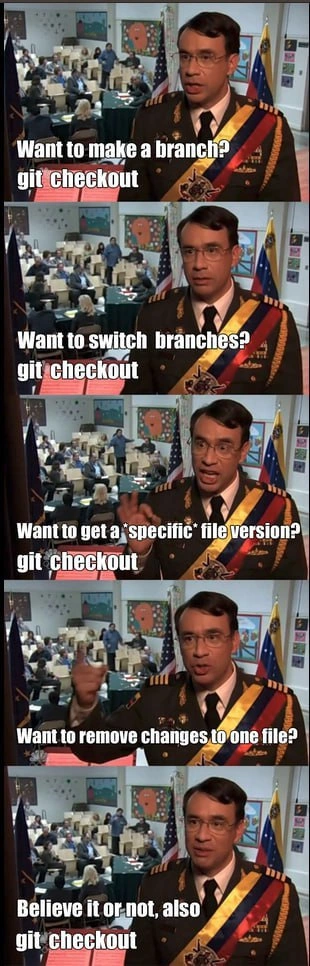
The meme jokingly shows an official-looking guy giving a thumbs-up and saying “git checkout” no matter what the question is. That’s funny (and a bit painful) because it reflects reality: for a long time, whenever you asked “How do I do X in Git?”, the answer was very often “just use git checkout” with some special option. It was like the Swiss Army knife of Git commands – handy to have one tool for everything, but also easy to cut yourself with it if you weren’t careful.
The good news is that Git’s maintainers eventually recognized this confusion as a real developer experience (DX) issue. In newer Git releases, they introduced two dedicated commands to clear things up:
git switch: used for switching branches (and creating new ones with an extra flag). Example:git switch mainswitches to branch main, andgit switch -c new_featurecreates and checks out a new branch called new_feature.git restore: used for restoring file contents and discarding changes. Example:git restore src/app.jsdoes whatgit checkout -- src/app.jsused to do (throw away local edits to that file). You can also restore a file from a specific commit with options like--source.
By breaking checkout into these two clearer commands, Git made it easier for everyone to understand what’s going on. “Switching” and “restoring” are actions that make sense on their own, so it reduces the mental load. If you read older documentation or work with experienced Git users, you might still see the old git checkout being used for everything – which is exactly why this meme gets a laugh. It’s pointing out how one command used to rule them all, and how nice it is that now we have more appropriately named tools for each job.
Level 3: One Command to Bind Them
When a single Git command is asked to wear too many hats, experienced developers can't help but chuckle and cringe at the same time. This meme highlights how historically git checkout was the switchblade of Git: one command performing multiple distinctly different operations. Need to create a new branch? Sure, git checkout -b new_branch did that. Want to switch to an existing branch? Yup, git checkout main handles that too. Need to retrieve a specific version of a file from history? You guessed it, git checkout commit_hash -- path/to/file was the incantation. Even if you just want to throw away local changes to one file, a quick git checkout -- file.txt magically reverts it. It truly was one command to rule them all (and sometimes in confusion bind them).
Veteran developers have seen this one-size-fits-all command create endless confusion on teams. The humor in the panels – each scenario getting the same thumbs-up answer "also git checkout" – rings true because, for years, no matter what Git task you asked about, the reply could legitimately be “just run git checkout”. This overloading is more than just a quirk; it’s a product of Git’s early design and user experience debt. Git prioritizes powerful features, but early on it sacrificed clarity in the CLI. The git checkout command ended up like a Swiss Army knife with too many attachments: incredibly versatile, yet notoriously easy to misuse. Mistype something and you might end up on a detached HEAD or wiping changes unintentionally. Seasoned devs have war stories of accidentally discarding work because the context of git checkout wasn’t exactly what they thought.
From an API design perspective, this is a classic command overloading problem. Git’s interface was effectively making one verb handle multiple verbs’ jobs, depending on subtle context. For example, whether checkout treats its argument as a branch name or a file path can hinge on the presence of a --. (That -- is Git’s way of saying, "the next thing is definitely a file name, not a branch," to disambiguate.) It's like the command has multiple personalities:
git checkout -b featureX # Create and switch to new branch "featureX"
git checkout develop # Switch HEAD to existing branch "develop"
git checkout 2f3e1c7 -- app.js # Restore app.js from commit hash 2f3e1c7
git checkout -- app.js # Discard local changes to app.js (restore from HEAD)
Each of those invocations does something conceptually distinct, yet it's all checkout. The meme’s absurdity – the same man in each frame proudly affirming “git checkout” – underscores how this one command became a golden hammer for many jobs.
This pain was felt so widely that in 2019 Git’s maintainers introduced dedicated commands to finally untangle the mess: git switch for changing branches (and creating new ones with -c), and git restore for reverting file changes or retrieving file snapshots. These additions are essentially Git’s core team saying, “Okay, okay, git checkout was doing too much. Let's give people clearer tools.” The old all-in-one checkout isn't gone (backward compatibility is king), but the official advice is to use the more focused commands for better clarity going forward.
For the battle-hardened programmer, this meme elicits a knowing grin because it perfectly captures an era of Git usage where whenever in doubt, you’d try git checkout. It’s a tongue-in-cheek tribute to a command that could do everything except maybe brew coffee (and give it a few more years, we might have tried to make it do that too). Through shared pain and laughter, the dev community can appreciate how far our tools have come – and why a single command that does five different things was too much power for one ring... er, one CLI to hold.
Description
A five-panel meme using the 'Believe it or not, jail' format from the TV show Parks and Recreation, featuring actor Fred Armisen in a military-style uniform. Each panel presents a different task in Git, and the answer is always 'git checkout'. The tasks are: 'Want to make a branch?', 'Want to switch branches?', 'Want to get a *specific* file version?', and 'Want to remove changes to one file?'. The final panel concludes with the punchline, 'Believe it or not, also git checkout'. This meme humorously critiques the overloaded and often confusing nature of the `git checkout` command, which historically handled many unrelated operations, from navigation to creating new branches to destructive file restorations. This ambiguity was a common pain point for developers, which led to the creation of the more explicit `git switch` and `git restore` commands in later versions of Git

Comments
14Comment deleted
`git checkout` is the original 'function that does three things and two of them are destructive.' The introduction of `switch` and `restore` was Git's first-ever pull request that actually reduced complexity
git checkout is the CLI’s legacy monolith - does everything, terrifies new hires, and no matter how many ‘git switch’ or ‘git restore’ microservices we spin up, prod traffic still tunnels through the big ball of mud
The real reason Git 2.23 introduced 'git switch' and 'git restore' was to prevent senior engineers from having existential crises explaining to juniors why one command does seventeen different things depending on whether you use -b, --, or just pray to the Git gods correctly
This perfectly captures why Git finally introduced 'git switch' and 'git restore' in 2019 - because having one command handle branch creation, branch switching, file restoration, and detached HEAD states was the kind of API design that made even Linus question his life choices. It's the command-line equivalent of using a single HTTP endpoint for GET, POST, PUT, and DELETE based on moon phase
Git checkout: the monolith command ruling branches and restores - until we microserviced it into switch and restore for that sweet separation of concerns
Git 2.23 split checkout into switch/restore to remove the footguns, but my hands still type `git co -b` and speedrun a detached HEAD faster than our CI warms the cache
git checkout is the CLI monolith that violates SRP - branching, switching, restoring, and occasionally deleting your afternoon; Git shipped “switch” and “restore,” my fingers shipped “checkout -b” and a detached HEAD
Explain please 😁 Comment deleted
git checkout -B branch git checkout branch git checkout <version> ./path/to/file git checkout HEAD -f Comment deleted
every commit has own unique ID (we usually see first 6 characters, like "6aed21f"), basically, git checkout just moves you to a specific commit Comment deleted
Git is literally the hardest thing i have to deal with as C++ programmer Comment deleted
Is this why they're bringing in git switch? Comment deleted
Yep. Git switch for dealing with branches and git restore for dealing with file versions. Git checkout is technically deprecated because it can do so much (but it probably will never be removed). Comment deleted
git checkout . Comment deleted

