
Git Blame: The Official Scapegoat Identification Tool
Why is this VersionControl meme funny?
Level 1: Bad File!
Imagine you’re playing with a bunch of friends building a huge Lego tower. At some point, one of the pieces falls out and the tower collapses. You get upset and point at that specific Lego piece and say, “Bad block! Who put you there?” even though the block is just a thing and can’t really be “bad” on its own. That’s basically what’s happening in this joke. The computer program (the IDE) actually has a button that says “Blame File”, like you’re scolding the file for making a mistake. It’s funny because people don’t usually blame objects – we know it’s really a person who wrote the code in that file. But when we’re frustrated, it’s easier to pretend the code itself did something wrong. It’s like stubbing your toe on a chair and then saying “Stupid chair!” out loud. Here, the developers are clicking a “Blame” button to figuratively yell at the piece of code that’s causing trouble. It’s a silly way to cope with bugs: instead of getting mad at a person, we jokingly get mad at the file. Everyone knows the file can’t be evil, but saying “Bad, bad file!” when the program misbehaves just makes us feel a little better while we fix the problem.
Level 2: Who Wrote This?
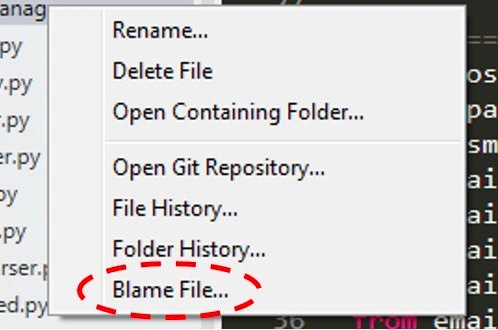
Let’s break down what’s happening in this meme for those newer to Git and coding. The picture is showing a right-click context menu from a code editor (an IDE, which stands for Integrated Development Environment – basically a programmer’s workshop app). In that menu, along with common actions like “Rename…” or “Delete File”, there are special options related to Git, the popular system developers use for version control. Version control is how developers keep track of changes in code over time. It’s like a giant undo/redo and history log for your entire project.
One of the menu items circled in red is “Blame File…”. This is actually referring to the git blame command. Despite the harsh-sounding name, the GitBlame feature isn’t about yelling at the code – it’s a tool that shows you who last edited each line and when they did it. When you click “Blame File…”, the IDE will usually display the file with annotations: next to each line of code, you’ll see the name of the developer who last changed that line, along with the commit identifier (like an ID) and maybe a date. It’s essentially file history at the line level.
Why would anyone want this? Imagine you discover a bug or something confusing in the code. You’re a junior dev, and one of the first questions that pops up is, “Which brave soul wrote this, and what were they thinking?” That’s where git blame helps. It’s like checking a change’s time-travel log. For example, if line 50 of app.py is throwing an error, using blame might show you it was John Doe who last edited that line two months ago in a commit titled “Optimize payment calculation”. Now you have a lead: you can go find John (or the commit message details) and ask, “Hey, what was the reason for this change? Could it be causing this bug?” It’s a bit of detective work. In fact, one of the context tags, who_broke_it, is a tongue-in-cheek way developers talk about this: when something breaks, we often half-jokingly hunt for “who broke it” by checking the commit history.
The wording “Blame File” makes developers chuckle because normally blame is something you do when you’re accusing someone. Here it’s just the official label for line-by-line history. Many IDEs with git_integration have this feature built in so you don’t have to jump to a terminal. In plain Git command-line usage, you’d open a terminal and type something like git blame <filename> to get that info. But in an IDE like the one shown, you just right-click the file and select Blame File… from the context_menu. It’s conveniently located right under “File History…”. Notably, File History will show you a list of all commits (changes) that affected the file as whole over time. Blame File, in contrast, points at each individual line’s last change. They’re related: both answer questions about “what happened to this code before?”, but blame is very granular.
Now, because it’s called “blame”, developers often jokingly act as if they’re literally blaming the code or the coder. The meme’s text “📛Bad, bad file! 📛” is making fun of the idea that we scold a file when it misbehaves. Of course, we know a file isn’t actually responsible on its own – it’s just text written by someone. But it feels that way when you’re frustrated with a bug. It’s also poking fun at a bit of developer culture: sometimes, when bugs happen, there’s a rush to find who wrote the code rather than what the problem is. That’s why the option isn’t “Investigate history” but literally “Blame” – it acknowledges that impulse in a humorous way.
For a newer developer, it’s worth understanding that Git and other version control systems (like Mercurial or Subversion) often used the term blame for this functionality. It’s not that all programmers are mean or looking to shame each other (at least, we try not to be!); it’s more that historically, that command name stuck and we all know what it means. Some tools might use nicer terms like “Annotate”, but most programmers will immediately get what you mean by “git blame”. It’s even used as a noun sometimes: “According to the blame, Alice changed this line last.” So, in summary: Blame File… in that menu is a quick way to see who last touched each part of the code, and it’s labeled in a cheeky way that plays into programmer humor about blaming code for issues.
Level 3: The Blame Game
The screenshot captures an IDE context menu unabashedly offering to “Blame File…” – a direct hook into the git blame command. Seasoned developers recognize this as the ultimate VersionControl detective tool: it shows who last modified each line of the file and in which commit. The humor here lies in how literal the phrasing is. The IDE isn’t sugar-coating it as “Annotate” or “Line History” (terms some gentler tools use); it just says Blame. It’s as if the editor itself is urging you to point a finger at the code.
In practice, git blame is used during debugging or code reviews to find the culprit line and its author. Our typical scenario: Something broke in production, and the on-call engineer groans, “Who wrote this?!” With a right-click and Blame File…, the IDE quickly highlights exactly who to “thank” for that bug. It’s a common ritual in Git-powered teams – a bit of a witch-hunt UI for the curious or the frustrated. The term blame_feature is so ingrained in developer culture that even serious tools like GitHub have a “Blame” button on each file. We joke about it, but it reflects a real impulse: when a test fails or an app crashes, the first question is often “OK, who broke it?” (git blame to the rescue!).
Under the hood, Git is traversing the commit history of the repository, pinpointing the last commit where each line changed. It’s doing line-by-line archaeology: for each line in the file, Git digs through the Git repository timeline to find out when that line last changed and by whom. This is immensely useful for understanding why a piece of code exists (“blame” can reveal the commit message explaining a change), not just who wrote it. In fact, here’s an example of what a blame output might look like for a particularly suspicious line of code:
$ git blame main.py -L 8,8
^2f4d3c1 (Alice 2021-07-10 15:32:45 8) launch_missiles()
In this hypothetical output, Git tells us that line 8 (launch_missiles()) was last modified by Alice in a commit with hash 2f4d3c1. So if “launch_missiles” suddenly went haywire, we know Alice is the one who last touched that line (and we might playfully send her a Slack message like, “Hey, what’s with the missile launch code? 😅”). DeveloperHumor often comes from these tense moments – we’re lightening the mood about something that could be stressful by jokingly “blaming” each other through the tools.
Yet, experienced devs also cringe a bit at the word blame. Modern DevOps culture preaches blameless postmortems – solving problems without finger-pointing. But here we have an IDE downright inviting us to assign blame! The friction is hilarious: the software Git integration is oblivious to office politics or team morale; it just exposes the raw truth of the commit history. And let’s be honest, every senior engineer has seen the blame game play out: a critical bug surfaces, someone hastily runs git blame or checks File History, and suddenly all eyes turn to the developer who made the last change. In a healthy team, this leads to debugging and learning, not a firing squad. But the phraseology here – “Blame File” – taps into that guilty pleasure of pinpointing exactly who wrote the code that’s causing you headaches.
The meme highlights this shared experience. We laugh because we’ve been there: late night, tracking a sneaky bug, half-jokingly hovering over that “Blame” option while muttering “Bad, bad code! Who did this?” The context menu itself seems to encourage our grumpiest instincts. It’s a bit of sardonic UI design humor: the tool gives you a button to blame the code directly, as if the file (or its author) deserves a scolding. This is classic DeveloperHumor — taking a routine workflow (using git blame in an IDE) and revealing the comedic truth: we sometimes treat debugging like a whodunit, and our tools are in on the joke with an actual “Blame” command.
Description
A close-up screenshot of a right-click context menu within a code editor or IDE. The menu displays several file operations such as 'Rename...', 'Delete File', 'Open Containing Folder...', 'File History...', and 'Folder History...'. The final item in the visible list, 'Blame File...', is circled with a red dashed oval, drawing immediate attention to it. This option is a graphical user interface representation of the 'git blame' command. The humor lies in the command's name, which playfully yet accurately reflects a developer's intent when investigating a bug or problematic code: to find out exactly who wrote the offending line. It's a universally understood joke among developers about accountability and the archaeological dig through commit history to uncover the source of an issue

Comments
7Comment deleted
`git blame` is the most passive-aggressive tool in our stack. It doesn't fix the bug, it just tells you who to schedule a 'quick sync' with to 'better understand the context' of their code
Every time I click “Blame File”, Git scrolls to a 2010 commit with my name on it - turns out source control is just immutable guilt with SHA-1 checksums
Git blame: the only forensics tool where finding out who did it makes you wish you hadn't, especially when the commit message just says "fixed stuff" and the author left the company three years ago
Ah yes, 'git blame' - the command that transforms 'collaborative development' into 'archaeological witch hunt.' Nothing quite matches the experience of tracking down who wrote that cursed line of code, only to discover via `git blame -w -C -C -C` that you're actually blaming yourself from 3 years ago after the code survived two refactors and a repository migration. Pro tip: always blame on Fridays so people have the weekend to forget, and remember - the real power move is aliasing it to `git praise` in your .gitconfig to maintain team morale while still conducting your forensic investigations
Ninety percent of my 'Blame File' clicks point to merge-bot; the other ten percent are me from 2017
Enterprise RCA, simplified: right-click -> Blame File...; annotation says 'author: deactivated_ldap_user' - open a rewrite epic and declare victory
Git blame: because 'it was working yesterday' meets its commit-hash matchmaker

