GCP names the obvious, AWS names the indie band’s track list
Why is this AWS meme funny?
Level 1: Plain vs. Fancy Names
Imagine you have two friends who like to organize things. One friend labels everything very clearly: a box of toy cars is just called “Toy Cars”, the jar of cookies is labeled “Cookies”, and the folder for drawings is named “Drawings”. When you see these labels, you instantly know what’s inside.
Your other friend is a bit more creative and uses code names for fun. Their box of toy cars is labeled “Lightning Racers”, the cookie jar says “Sweet Circles”, and the drawing folder has a sticker that reads “Masterpieces Vault”. These names sound cool and interesting, but if you didn’t already know what they meant, you’d probably have to ask, “What’s actually in here?” to figure it out.
This meme is like that. Google Cloud is like the first friend: it names its services plainly so you know what they are (a storage service is just called “Cloud Storage”). Amazon Web Services is like the second friend: it gives services fancy or unusual names (like “Aurora” or “Redshift”) that don’t immediately tell you what they do unless you learn the meaning behind them. It’s poking fun at how one company makes things easy to identify, while the other makes you do a little thinking or guessing. That’s why the picture shows one person looking calm and another looking frantic with papers on the wall – it feels easy with the obvious names, and a bit crazy with the mysterious names. In the end, both friends have the same toys and cookies inside their boxes, they just have very different labeling styles, and that contrast is both funny and relatable.
Level 2: The Name Game
Let’s break down what’s going on here in simpler terms. This meme is highlighting how Google Cloud (GCP) and Amazon Web Services (AWS) choose very different styles for naming their cloud services. Cloud services are basically building blocks that developers use to create software applications on someone else’s servers (the cloud). Both Google and Amazon offer many of these services (for storage, databases, machine learning, etc.), but they label them differently.
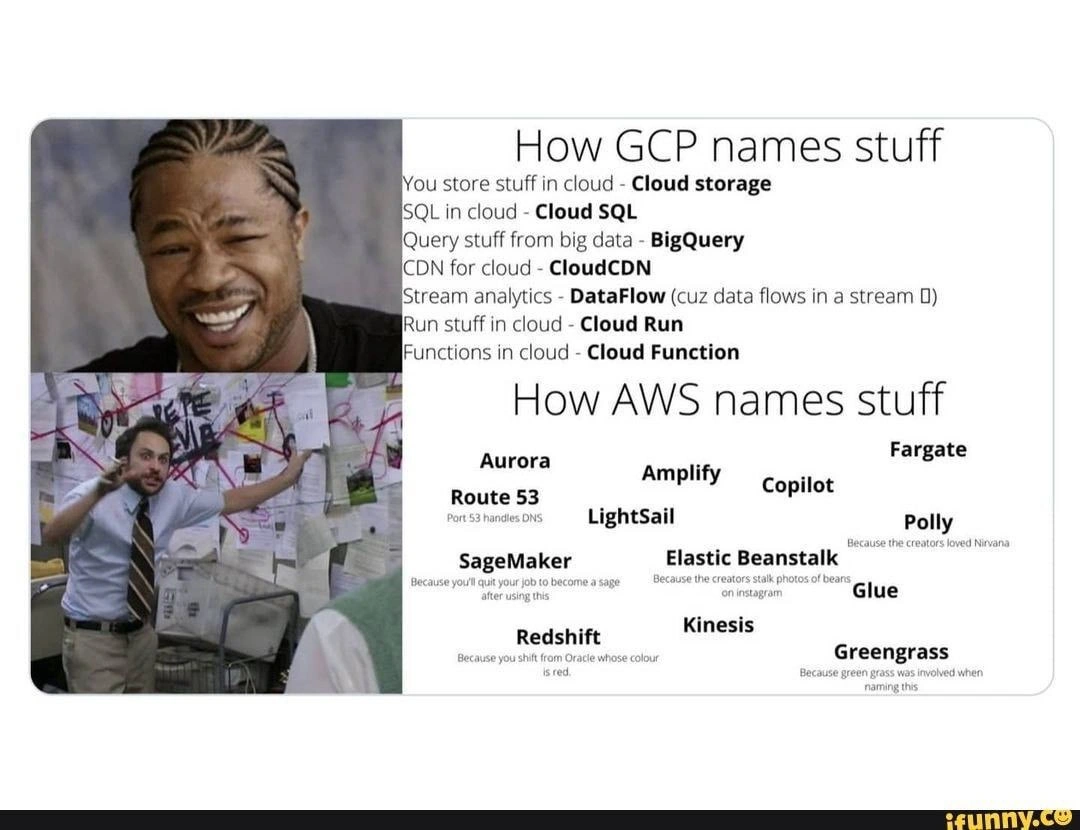
On the left side of the meme (under "How GCP names stuff"), Google’s names are straightforward and literal. For example:
- Cloud Storage – just like it sounds, it’s a place to store your stuff (files, data) in Google’s cloud.
- Cloud SQL – a managed SQL database service (SQL databases are like organized data tables; Google’s service name basically says “SQL in the cloud”).
- BigQuery – a service to run big queries on huge datasets (essentially Google’s giant data analysis database; the name implies “query big data”).
- Cloud CDN – a content delivery network service (CDN means servers around the world that cache and deliver your website’s content faster; Google simply calls it Cloud CDN).
- Dataflow – a stream data processing service (used for handling data that’s continuously flowing in streams, e.g. analyzing real-time data; named because data flows through it – the meme even adds a surfer emoji 🏄 to joke about “flow”).
- Cloud Run – a service to run your code or applications in containers without managing servers (basically, you give your app to Google and they run it for you in the cloud; the name says your app runs in the cloud).
- Cloud Functions – a serverless functions service where you can execute code snippets on demand (Google calls it what it is: functions in the cloud).
Notice a pattern? Google often just takes a familiar tech term and slaps “Cloud” or a descriptive word in the name. It’s very easy to guess what the service might do from the name alone. If you’re a newcomer, GCP’s naming conventions feel intuitive; it’s like each product name is a little explanation.
Now, the right side (under "How AWS names stuff") shows Amazon’s style, which is quite different (and the text is all jumbled in crazy fonts to emphasize the chaos). Amazon’s service names can be more creative or branded, and you might not know what they are until you learn about them. Some examples from the meme:
- Aurora – Without context, “Aurora” sounds like the dawn or the Northern Lights. In AWS, Amazon Aurora is a high-performance cloud database engine (compatible with MySQL/PostgreSQL). Amazon gave it a pretty name rather than a descriptive one.
- Route 53 – This one is a bit of an inside joke: it’s AWS’s service for DNS (Domain Name System), which is what directs internet traffic to the right place (like mapping
www.example.comto the right server IP address). DNS traditionally uses port 53 on the network, so Amazon named their DNS service “Route 53”. If you’re new, that name isn’t self-explanatory (you might think it’s a mapping or GPS service!), but if you know about port numbers, you get the geeky joke. - Fargate – AWS Fargate is a service for running containers without managing servers (similar concept to Cloud Run). The name “Fargate” doesn’t immediately tell a newcomer “this runs my containers”; it sounds a bit like a sci-fi term. In fact, it might be a mashup of “far” (as in far away, serverless) and “gate”, or a reference to a pop culture thing – but ultimately, you have to look it up to know its purpose.
- Amplify – AWS Amplify is a set of tools and services for building and deploying web and mobile applications (especially front-end stuff). The name “Amplify” is a common word (meaning to make louder or bigger). It’s a positive, energetic word, but it doesn’t directly scream “mobile app backend service” to someone who hears it for the first time.
- Copilot – AWS Copilot is a CLI tool to help developers deploy containerized applications. The name suggests a “helper” or “assistant” (a copilot sits next to the pilot to help), which loosely makes sense. But again, you wouldn’t immediately think “Oh, Copilot, that must be for setting up my ECS containers.” It requires explanation or prior knowledge.
- LightSail – Amazon Lightsail is a simplified virtual private server (VPS) service for quickly launching small websites or applications. The name “Lightsail” evokes a sailboat or a spaceship with a solar sail – cool imagery, but not obvious that it’s about easily hosting a WordPress blog, for example.
- Polly – Amazon Polly is a text-to-speech service (it turns written text into spoken voice audio). “Polly” likely refers to a parrot (polly is a common parrot name, like “Polly wants a cracker,” since parrots mimic speech). If you know the hint, the name is clever. If you don’t, “Polly” could be anything – an AI assistant? a chat bot? It’s not clear until you learn it.
- SageMaker – Amazon SageMaker is a machine learning platform for developers to train and deploy ML models. The idea in the name is perhaps that it makes you a data science “sage” (wise person) or it “makes sages” out of ordinary developers by providing powerful ML capabilities. It’s a cool name, but by itself “SageMaker” doesn’t immediately say “machine learning service” – it could be a fantasy game or a spice brand for all a newcomer knows.
- Elastic Beanstalk – This is AWS’s platform-as-a-service for deploying web applications easily. The whimsical name comes from the fairy tale “Jack and the Beanstalk” – you plant a tiny seed (your code) and it grows into a huge beanstalk (a fully managed deployment) that can scale up (elastic implies stretchy/scalable). The name is imaginative (and Elastic is also a common prefix in AWS like “Elastic Compute Cloud”), but it’s long and certainly not as immediately clear as something like “App Engine” (which is what GCP’s equivalent is called).
- Glue – AWS Glue is a service for data ETL (Extract, Transform, Load) and cataloging; basically it helps you glue together data from different sources. Here, Amazon actually chose a simple, relevant word – “Glue” – because it connects pieces. This one is nearly as straightforward as a Google name.
- Redshift – Amazon Redshift is a petabyte-scale data warehousing service (for big analytics databases). The name “Redshift” comes from a term in physics (light wavelength stretching, implying moving away or expansion) and possibly a playful jab at Oracle (whose logo color is red, so shifting away from Oracle). It’s a short, cool name, but you wouldn’t guess “huge cloud database” from it without context.
- Kinesis – Amazon Kinesis is a streaming data ingestion and processing service (for real-time data, like streaming video, logs, or stock ticker info). “Kinesis” means movement in Greek (think kinetic energy). It’s actually somewhat descriptive if you know the meaning, but it’s not an everyday word. So a junior developer might not intuitively know Kinesis relates to streams of moving data.
- Greengrass – AWS IoT Greengrass lets connected devices (Internet of Things) run some of their code locally and communicate in a secure way with the cloud. Why “Greengrass”? Possibly to evoke imagery of devices out in the field (literally in the grass, like sensors on a farm) or a sense of being down-to-earth. The meme jokes “because green grass was involved when naming this,” cheekily suggesting maybe the team was “on grass” (slang for marijuana) when they came up with the name – highlighting how offbeat it feels.
So, the meme points out that learning AWS service names can feel like learning the names of Pokémon or an indie band’s track list – they’re unique and interesting, but you need a guide to know what each one really is. In contrast, learning GCP’s services is more like reading a straightforward menu – you pretty much get it from the name (“Ah, this is storage on the cloud, got it.”).
The photographs in the meme reinforce this difference:
- The top-left image (usually a calm, smiling guy – in many versions it’s the rapper Xzibit from a famous meme) represents the easy, no-brainer approach. He’s chill because “You need to store stuff in the cloud? We’ll call it Cloud Storage.” No mental gymnastics needed.
- The bottom-left image is Charlie from It’s Always Sunny in Philadelphia, looking wild-eyed and pointing at a crazy conspiracy board full of red lines and papers. This image is an internet-famous meme used to depict someone who’s desperately trying to make sense of a complex, confusing situation. Here it perfectly represents a developer trying to decipher AWS’s web of oddly named services, making connections like a mad conspiracy theorist: “Aurora… SageMaker… Redshift… how do these all tie together?!?!”
For a junior developer or someone new to cloud computing, this meme is highlighting a real learning curve. With GCP, you can often guess what a service does just by its plain name. With AWS, you often have to memorize the names or constantly refer to documentation until you internalize them. It’s almost like needing a glossary when you start using AWS – hence the phrase “glossary fatigue” in the description. Every service is powerful, but first you must recall which fancy name maps to which functionality. It can feel a bit overwhelming, like you’re solving a puzzle.
This meme is popular in cloud humor circles because it’s a shared experience: many developers have exclaimed “Why on earth is it called Route 53?!” or “What does Lightsail even do?!” while learning AWS. Meanwhile, Google’s approach can sometimes be boringly consistent (everything is “Cloud this” or “Cloud that”), but at least it’s one less thing to be confused about. The meme playfully jabs at AWS for its quirky naming style and at GCP for being almost too straightforward.
In summary, the meme uses a funny comparison to show that Google names its cloud services very literally, while Amazon gives its services creative, sometimes opaque names. If you’re new to cloud computing, be prepared: with AWS you might feel like Charlie with his conspiracy board, connecting names to services until it clicks. With GCP, you’ll more likely say, “Oh, I need to run some code? Probably something called Cloud Functions or Cloud Run… yep, there it is.” Both approaches have their charm, but one definitely involves keeping a little dictionary in your head!
Level 3: Two Hard Things
In software, naming things is legendarily one of the two hardest problems (right up there with cache invalidation and off-by-one errors). This meme savagely contrasts the naming conventions of Google Cloud Platform (GCP) versus Amazon Web Services (AWS), and every seasoned engineer in multi-cloud has felt this pain. GCP’s approach to service names is painfully obvious – almost Captain Obvious-level straightforward. You need to store files? They give you Cloud Storage. Want an SQL database? Cloud SQL. Big data queries? BigQuery. No surprises there – the name is basically the service description. It’s so literal it’s like the Yo Dawg meme came to life in product branding (the top-left image is indeed a nod to that classic Xzibit "yo dawg, I heard you like X, so we put X in your Y" format). Google’s product taxonomy feels almost bland in its literalness, but you instantly know what you’re getting.
AWS, on the other hand, seems to have a secret indie band naming committee on payroll. Their services sound like an eclectic album track list or a D&D character roster. Route 53, Aurora, Fargate, Kinesis, SageMaker, Greengrass, Amplify… each name is unique and trademarkable, but not immediately transparent. The meme’s right side mocks this with names scattered haphazardly in varying fonts, as if they’re titles of songs on a Nirvana tribute album. The joke captions (like “SageMaker – because you’ll quit your job to become a sage after using this” or “Greengrass – because green grass was involved when naming this”) exaggerate how cryptic and seemingly random these names feel to developers. It’s funny because there’s a kernel of truth: when confronted with AWS’s catalog, you do start to wonder if the product managers were high on something (or just big Nirvana fans) during naming sessions.
From an experienced engineer’s perspective, the humor cuts deep. We’ve all been that frantic Charlie Day from Always Sunny, standing in front of a whiteboard covered in red string, trying to connect AWS service names to their purposes. (That’s exactly the bottom-left image: the infamous “Pepe Silvia” conspiracy board scene, a perfect metaphor for deciphering AWS’s naming scheme.) The cognitive load and glossary fatigue are real: you practically need a Rosetta Stone or a translator browser tab just to map AWS’s whimsical labels to what they actually do. For example: “Okay, Route 53 is DNS hosting (because DNS uses port 53 – clever, AWS, clever), and AWS Aurora is a fancy managed SQL database (Aurora, like a new dawn of database performance?). Fargate… that’s for running containers without servers (maybe named after a sci-fi Stargate vibe?). SageMaker is their machine learning platform (apparently to make data scientists into sages). Elastic Beanstalk – a PaaS for deploying apps (a nod to Jack’s beanstalk that magically grows). AWS Glue – that one actually glues your data pipelines together (for ETL jobs, sensible for once). Redshift – a petabyte-scale data warehouse (perhaps referencing the astronomical redshift or shifting away from Oracle’s red branding). And Greengrass – AWS’s IoT edge computing service (the name suggests grassroots IoT, or maybe someone just liked the color green).” By the time you decode all that, your brain does feel a bit like it ran a marathon through a jargon jungle. 🏃♂️🌴
This naming disparity also highlights deeper industry patterns. AWS, being first to major cloud market, often chose unique brandable names (sometimes stemming from internal project codenames or playful metaphors), while GCP, entering later, opted for clarity and consistency with the “Cloud [Thing]” pattern. Culturally, Amazon’s tech naming has a history of quirk (remember EC2 and S3? Even those acronyms – Elastic Compute Cloud, Simple Storage Service – got shortened into branded gibberish). Google’s culture, by contrast, leans toward straightforward labels (with a few oddballs like Dataproc or Anthos, but nothing as left-field as AWS’s Polly or Lightsail). The meme humorously frames this as obvious vs. obtuse, and that resonates with devs who’ve had to flip between cloud platforms. Every multi-cloud architecture diagram practically requires a glossary cheat-sheet: “Let’s see, the design calls for a message queue – that’s Pub/Sub on GCP or SQS on AWS. Need object storage – that’s Cloud Storage on GCP, which corresponds to S3 on AWS. Function as a Service? Cloud Functions vs AWS Lambda. Got it.” It’s like learning two dialects of the same language. You store data in one cloud’s BigTable, in the other’s DynamoDB; you deploy containers to Cloud Run in GCP, or to AWS Fargate; you use BigQuery for big data on Google, or wrangle Redshift (and maybe Glue for ETL) on Amazon. You almost need flash cards to keep it straight.
It’s funny, but it also hints at the headache of multi-cloud strategy: engineers juggling GCP and AWS aren’t just switching tools, they’re switching vocabularies. This adds an extra layer of friction (and slyly, a bit of vendor lock-in via terminology – your expertise in “Cloud Spanner” doesn’t immediately translate to AWS’s world of “DynamoDB” and vice versa). The meme nails this shared experience. The top half’s calm, obvious naming (with that grinning meme face implying “hey, we put storage in your cloud storage” simplicity) versus the bottom half’s chaotic scramble of weird names (with poor Charlie losing his mind). Every seasoned dev who’s opened the AWS console for the first time has likely had a “What on earth is a CloudFormation vs CloudFront vs CloudTrail?!” moment, followed by frantic documentation searches – exactly like piecing together a conspiracy.
In essence, this meme is a humorous commentary on service name semantics. It highlights a real-world tech observation: Google’s cloud names tell you exactly what the service does, while Amazon’s could be anything without context. This combination of truth and absurdity is what makes it hilarious to developers. It’s the relief in knowing “Phew, it’s not just me; these names really are bonkers”, and the camaraderie of collectively rolling our eyes at AWS’s indie band naming vibes. After all, when you’re on call at 3 AM trying to remember which service cleans up your data stream, BigQuery vs Kinesis is a lot easier on the brain than remembering that some Greek term for movement was Amazon’s choice for streaming data. The meme’s comparison is both a roast and a truth bomb: GCP calls a cloud spade a spade, AWS calls it something like “Aurora Borealis Deluxe” and expects you to dig into the docs. No wonder the guy on the bottom left looks like he hasn’t slept in days – he probably just finished an AWS certification exam.
To survive in this GCP vs AWS naming wilderness, developers turn into walking dictionaries. We joke that AWS service names are like an inside joke or an ARG (Alternate Reality Game) – you unravel clues to figure out what they do. Meanwhile, GCP’s names are the boring friend who just plainly states everything (“I store stuff in the cloud; I’m Cloud Storage.”). Boring, yes, but at 3AM during an incident, boring clarity beats clever obscurity. The veteran engineers reading this are likely smirking in agreement: we’ve been there, deciphered that. Naming things is hard, sure – but AWS, did you have to flex your creativity on every single service? The result is equal parts impressive and exhausting, and that’s exactly why this meme hits home for so many of us.
Cross-Cloud Cheat Sheet: To further illustrate the naming gulf, here’s a quick mapping of GCP’s straightforward names to their AWS counterparts (the stuff that turns our architecture diagrams into a cloud service glossary):
| Service Purpose | Google Cloud Service (Name says it all) | AWS Service (Cool Name 😎) |
|---|---|---|
| File/Blob Storage | Cloud Storage (stores files in cloud) | S3 – Simple Storage Service (aka S3 bucket) |
| Managed SQL Database | Cloud SQL (cloud-hosted MySQL/Postgres) | Amazon RDS (Relational Database Service) using an engine like Aurora |
| Big Data Warehouse Analytics | BigQuery (query big data) | Redshift (massive scale analytics DB) |
| Global Content Delivery (CDN) | Cloud CDN (Content Delivery Network) | CloudFront (one of AWS’s rare literal names) |
| Stream Data Processing | Dataflow (data flows in streams) | Kinesis (Greek for movement, real-time data streams) |
| Serverless Container Runtime | Cloud Run (runs your containers) | AWS Fargate (serverless containers for ECS/EKS tasks) |
| Functions-as-a-Service (FaaS) | Cloud Functions (triggered functions) | AWS Lambda (event-driven code, named after λ calculus) |
| Machine Learning Platform | AI Platform (formerly just ML Engine) | SageMaker (build/train ML models, become a sage?) |
| App Deployment PaaS | App Engine (engine for your app) | Elastic Beanstalk (app grows magically, Jack’s beanstalk) |
| IoT Edge Computing | Cloud IoT Edge (edge processing for IoT) | AWS Greengrass (IoT devices running Lambda at the “grassroots”) |
Notice how in GCP’s column, you hardly need parentheses – the name itself tells the story. In AWS’s column, we often add a hint in parentheses because the name alone can be opaque. This is exactly the meme’s punchline exaggerated: Google’s naming is like labeling a folder “My Vacation Photos”, while Amazon’s is like labeling it “Project Aurora” – intriguing, but you’d have to open it to know what’s inside. The veteran cloud architects reading this have likely internalized both columns, and wryly recall the learning curve of getting there. As the meme title quips, GCP names the obvious, AWS names the indie band’s deep tracks – and it’s funny because it’s spot on.
Description
Split-panel meme. Left side shows two well-known reaction images: top is a calm office portrait with the person’s face blurred, bottom is the frantic Charlie-from-‘It’s Always Sunny’ conspiracy board scene, also blurred. Right side is white text comparing cloud vendors. Section header: "How GCP names stuff" followed by bullet-style lines: "You store stuff in cloud - Cloud storage", "SQL in cloud - Cloud SQL", "Query stuff from big data - BigQuery", "CDN for cloud - CloudCDN", "Stream analytics - DataFlow (cuz data flows in a stream 🏄)", "Run stuff in cloud - Cloud Run", "Functions in cloud - Cloud Function". Below, another header: "How AWS names stuff" with service names scattered in varying font sizes: "Aurora, Amplify, Copilot, Fargate, Route 53, LightSail, Polly, SageMaker (Because you'll quit your job to become a sage after using this), Elastic Beanstalk (because the creators stalk photos of beans on instagram), Glue, Redshift (Because you shift from Oracle whose colour is red), Kinesis, Greengrass (Because green grass was involved when naming this)". The visual joke highlights GCP’s literal naming versus AWS’s eclectic branding. For seasoned engineers juggling multi-cloud diagrams, the contrast pokes fun at the cognitive load and glossary fatigue that come with AWS architectures

Comments
30Comment deleted
My architecture reviews now allocate two hours: ten minutes for the diagram, one hour-fifty just to decode which AWS poet named the components
After 15 years in the industry, I've realized AWS service names are actually a sophisticated form of job security - nobody can replace you if you're the only one who remembers that Elastic Beanstalk isn't a vegetable monitoring service and that Greengrass has nothing to do with sustainable computing
The real reason AWS service names sound like they were generated by a neural network trained on 90s band names and kitchen appliances? It's actually a brilliant retention strategy - by the time you've memorized that 'Elastic Beanstalk' handles application deployment and 'Kinesis' streams data (not the other way around), you're too invested to switch to GCP's boringly logical 'Cloud Run' and 'DataFlow'. It's the tech equivalent of Stockholm syndrome, except your captor is a naming committee that definitely had access to some very creative 'greengrass' during their brainstorming sessions
GCP is grep-able nouns; AWS requires a runbook-backed service registry to resolve marketing DNS - Aurora equals RDS MySQL, Fargate equals ECS tasks - otherwise the incident stalls on human name resolution
GCP: services named like clean READMEs. AWS: like obfuscated minified JS - good luck grepping for that endpoint
Multi‑cloud ADR: GCP speaks Noun‑English, AWS speaks Product‑Marketing - so our runbooks now include a glossary longer than the VPC list just to map Cloud Run ↔ Fargate and DataFlow ↔ Kinesis
Touch the Greengrass Comment deleted
I'm convinced AWS purposefully names all their stuff baffling bullshit, and makes a garbage-tier UI so that they can sell training courses, and lock people into their service using sunk cost fallacy Comment deleted
Based Comment deleted
Oh sweet summer child, I'll wait for your screams of horror and disgust when you see Azure. Comment deleted
No one uses azure though, haha.. Have had to use that at work a little bit, but not much Comment deleted
Goverments. MS lobby traditionally strong there. Comment deleted
Yeah, we work with banks, and some of them wanna use azure Comment deleted
they dont? Comment deleted
Am not sure what you meant, but the Azure interface doesn't look completely bad Comment deleted
The names are honestly shit, though the courses are worse cuz the official ones are free and are aimed at kindergarteners (though it's so funny how they try to find reasons AWS is a good choice, like "Yeah, you could set up any load balancer, it's not so difficult but it's just a load balancer so why not use AWS ALB") Comment deleted
It only costs 6x more because reasons™️ Comment deleted
Honestly I'm not a fan of all the cloud stuff that doesn't give you complete control of what you rent but life's tough and working on a guy isn't working on yourself.. So my boss only knows that there is AWS and a Mac laptop, the rest is a dark forest for him Comment deleted
We stopped using AWS a long time ago mostly because of it being the most expensive Comment deleted
I mean since I work in outsourcing co and most clients don't want to know the details and just want it cheap, the guy once deleted an entire redis cluster saying "It's too expensive, I'm sure you can find a solution to keep everything in MySQL", after that I spent 10 hours patching a chinese library we used for admin panel, so yeah, AWS if fun (no) Comment deleted
I prefer mariadb but not much beats redis for a caching layer + limited data storage Comment deleted
Yeah me too, though I'm not familiar with redis yet, I just set it up as a dependency Comment deleted
Redis is generally really fast, and it's a key store database, so don't expect to store anything fancy without serializing it first It has optional persistence so it's primarily in memory but not entirely and caches will survive restarts Are you using a framework or nah Comment deleted
So the point I'm trying to make is that there are such individuals that are like "cheap is bad, expensive is good, I like my new mac and that cool stone I have in my cave", not even mentioning complete bullshit enterprises like snowflake, who basically provide you with over-overpriced AWS servers under the hood so AI devs can focus on their AI tasks (hire a devops dammit) Comment deleted
Me who does most of my own stuff lmao Comment deleted
Obviously if you like to waste money, there are tons of cheaper clouds, like hetzner, but generally a strong VPS will be enough for most small-mid sized businesses because anyways you'll pay less for unused resources than "pay for what you use" on AWS Comment deleted
We use a mixture of dedicated hardware and cloud hardware from hetzner. US infra is on cloud, Europe is on dedicated Comment deleted
I'm pretty sure you still pay less monthly than a single-project setup at AWS and hetzner is a great option, I run freelance projects there, no complaints from clients and everyone's happy Comment deleted
C/S can be a bit slow to respond but we've only needed them like once Comment deleted
AWS marketing team is another level Comment deleted