Skip to content
DevMeme
1802 of 7435
Deciphering a Standard C++ Compiler Error from GCC
Compilers Post #2009, on Sep 5, 2020 in TG

Deciphering a Standard C++ Compiler Error from GCC

Why is this Compilers meme funny?

Level 1: LEGO Instructions Overload

Imagine you’re building a big LEGO castle and you accidentally use the wrong piece somewhere. Instead of a friend simply pointing out “Hey, this piece should be a different one,” they hand you the entire 100-page Lego instruction book and highlight every single step from the very beginning. You’d be staring at all those pages, totally confused, just to find one tiny mistake in the castle. It’s funny in this meme because that’s basically what the compiler (the program checking the code) did – it gave a hugely over-the-top explanation for a small problem, leaving the poor developer just as baffled as you would be with those overwhelming LEGO instructions.

Level 2: Unraveling the Error Scroll

If you’re newer to programming, let’s break down what’s happening. GCC is the GNU Compiler Collection, a popular program that turns C++ code into something the computer can run. The process is called compiling. If your code has a mistake, the compiler will stop and give you an error message to explain what’s wrong (so you can fix it before trying to run the program). The joke here is that GCC sometimes gives you an error message that’s so long and detailed that it feels like reading a small novel when all you wanted was a one-line hint.

In the meme image, the big sheet of paper covered in text is representing one of these overly long error messages. Let’s understand the pieces of it:

  • “In file included from …”: C++ programs often use #include lines to use code from other files or libraries. The error message is showing a chain of these inclusions. For example, your code might include <random> (to get random number functionality). That, in turn, might include an older header like auto_ptr.h behind the scenes (for historical reasons), and so on. The compiler is basically saying “I was processing these files, one after another, and then ended up in this file…”. Think of it as the route the compiler took through different files until it hit a roadblock.

  • The actual error line (look for “error:”): This is the heart of the issue. In our case, it says something like “error: no matching function for call to ‘__introsort_loop(..., )’”. Translated to plain English, that means “you tried to call a function in a way that doesn’t match any known version of that function.” The function name looks weird (__introsort_loop) because it’s an internal part of the sorting routine. And <lambda> indicates the problem involves a lambda function (an inline little function) that you provided. Essentially, the compiler is complaining, “I attempted to use your little function in my sorting algorithm, but it doesn’t fit what I need.”

  • “note: candidates are: …”: The compiler, trying to be thorough, lists the possible functions it knows about that kind of look like what you were trying to do. These are the “candidates” that it tried to match your call against. For instance, it might list something like void std::__introsort_loop(_RandomAccessIterator, _RandomAccessIterator, _Size, _Compare). That’s a lot of jargon, but the key point is: it’s telling you “I do have a function named __introsort_loop, and it expects a certain type of _Compare (comparator) parameter.” Your lambda was supposed to fulfill that role, but didn’t. The compiler shows you this to hint at what it was expecting. It’s a bit like saying, “Here’s what I can work with… and your input didn’t match any of these patterns.”

So what likely happened to trigger this? The developer probably used std::sort (a function to sort a list of items) and provided a custom comparator lambda that had a bug. A common mistake is forgetting to have the lambda return a value. The comparator is supposed to return true or false to tell sort which item is “less” than the other. If you accidentally omit the return (so your lambda function doesn’t return anything, which means it returns void by default), the compiler gets confused because it expected a bool.

Now, C++ compilers are very strict about types. std::sort is defined in a generic way (a template) to work with any data type and any comparator, as long as the comparator meets certain requirements (like returning a bool). If your comparator doesn’t meet those requirements, the compiler tries to instantiate the generic sort code with your version and fails. In our scenario, std::sort internally calls that __introsort_loop function. The error is basically the compiler saying: “I tried to plug in your comparator where a _Compare type is needed, but it didn’t work out. I couldn’t find any version of __introsort_loop that accepts what you gave me.”

For someone new to C++, seeing an error referencing a bunch of files you never wrote (like stl_algo.h or bits/auto_ptr.h) is really confusing. You might think “I didn’t touch these files… is something wrong with the library?” In reality, nothing’s wrong with those standard files. The error messages include them because that’s where the compiler noticed the problem while following your code. It’s a bit like following a trail: your code called a library function, which called another, and so on, until the compiler hit a snag. The message is retracing that trail for you. The actual mistake is in your code (e.g., how you called sort or how your lambda is written), not in the system files.

How do you figure out the actual mistake? One trick is to look for the first mention of something from your code. In the error text, that might be a line like from src/Random.cpp:1 (just as an example). That typically indicates, “the journey to the error began in your file Random.cpp at line 1.” That could be where you included a header, or it could even be the line with the std::sort call. Once you pinpoint the location in your code that’s involved, you inspect what you did there. In our lambda example, you’d realize “Oh! I didn’t return anything from the comparator.” Adding a return a.id < b.id; would likely fix the issue. On the next compile, instead of an epic multi-page error, you’d either get no error or a much simpler one.

It’s definitely an overwhelming experience to see such an error for the first time. The developer’s bewildered face in the meme’s last panel says it all: “I have no idea what all this means.” And that’s okay – everyone starts there. Over time, you get familiar with the pattern. You learn that most of the pages of text are context, and the real message is usually a line or two telling you what you did wrong. In this case, all the compiler wanted was to tell the programmer “your comparison function isn’t returning a value.” But it delivered that message in a really convoluted way!

So, in simple terms: the compiler was being extremely verbose, giving a ton of information when only a little was needed. The meme makes us laugh because it dramatizes that situation – GCC handing over a massive stack of paper for a relatively small bug. It captures the mix of confusion and exasperation a lot of us feel when we encounter these overly long error messages during debugging. Don’t worry, though: as you gain experience, you’ll know how to sift through the noise and pinpoint the issue, and these giant errors will become a lot less scary (and maybe even a fun story to tell later!).

Level 3: Diagnostic Deluge

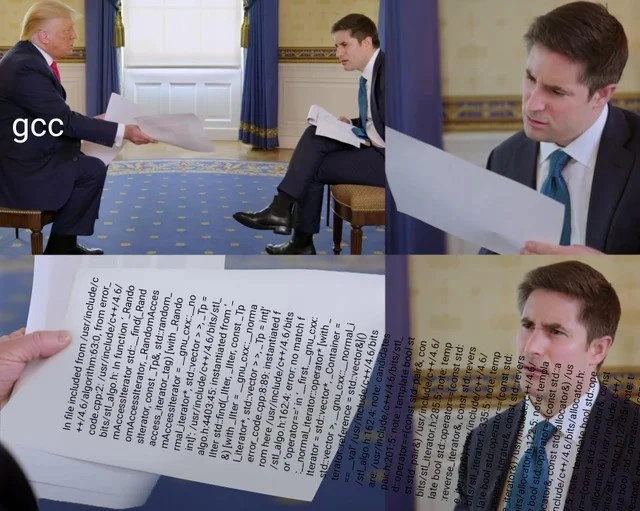
In this meme, GNU Compiler Collection (GCC) is personified as a person casually handing over a gigantic error printout, and the developer (the interviewer character) is left utterly perplexed by it. The humor hits home for any seasoned C++ developer: we’ve all been confronted by a compile error so verbose and cryptic that it feels like reading a novel of nonsense. The four-panel format, borrowed from the viral Trump–Jonathan Swan interview, is perfect here – GCC (like a confident authority figure) nonchalantly presents an absurdly long compiler error message, and the developer stares in debugging frustration as if to say, “What am I supposed to do with this?!”

Why is this so funny (and painful)? Because it’s true. C++ compilers (especially older versions of GCC) are notorious for spewing out multi-page CompilerErrors when something goes wrong with templates or overloaded functions. The meme exaggerates it slightly by literally showing a “scroll” of text being handed over, but it’s not far from reality. Many of us have scrolled terminal windows for ages or even copy-pasted error logs into editors just to parse them. There’s a shared understanding that GCC’s error messages can be an overload of information – technically all the info is there, but finding the one line that matters is like finding a needle in a haystack.

For example, consider a scenario in code that could lead to such an error:

#include <algorithm>
#include <vector>
struct Data { int id; };

int main() {
    std::vector<Data> items = /* ... initialize ... */;
    // Sorting with an incorrect comparator (missing return statement):
    std::sort(items.begin(), items.end(), [](const Data& a, const Data& b) {
        a.id < b.id; // Oops, no 'return' here
    });
}

A tiny mistake like forgetting to return a.id < b.id; in that lambda can unleash a torrent of errors. Instead of a simple “comparator must return bool,” GCC will dive into the internals of std::sort. It prints messages about files you’ve never heard of (stl_algo.h, backward/auto_ptr.h, <random> header internals) and an error about __introsort_loop not matching the call. To a developer, the first time seeing this, it feels like “My code called sort, so why is the compiler complaining about some introsort loop in bits/stl_algo.h at line 1961?” It’s bewildering. The poor developer in the meme (with that bewildered expression in Panel 2) perfectly captures this “Wait… what?” reaction.

Experienced devs find humor here because we’ve learned to decode this “wall of text.” We know the compiler is basically telling us, “Hey, I tried to compile your sort call, went through all these template instantiations, and in the end I couldn’t find a matching function because your lambda isn’t right.” But it says it in the most roundabout way possible. We chuckle because we’ve been that developer, squinting at lines of error output at 2 AM, muttering “thanks, GCC…” with heavy sarcasm.

There are unwritten rules and coping strategies senior engineers develop for these situations:

  • Skim from the bottom: Often the actual error message is near the end of the output. In our example, the key line is the one with “error: no matching function for call to … ”. Everything above it (all those “In file included from…” and “note: candidate is…” lines) is context leading up to the error. We learn to scroll upwards from the bottom to find where our code is mentioned as the source of the issue.
  • Identify your code vs. library code: We get good at spotting file paths. Lines that start with /usr/include/c++/... are pointing to standard library files, not our own code. They’re usually not where we’ll fix the bug - they’re just showing how our mistake bubbled up through library code. The presence of something like backward/auto_ptr.h (an antiquated C++ header) is a red herring 99% of the time; it’s included as part of some library support. The crucial clue is often a line with our file, e.g. src/Random.cpp:1 – that tells us the error originated where we did something in our code (maybe at line 1 of Random.cpp).
  • Leverage friendlier tools: Not all compilers are equally verbose. Modern C++ developers sometimes use Clang, which tends to produce more human-readable errors. Clang might underline the exact expression and say something like “lambda must return bool” – a much clearer hint. There are even IDEs and plugins now that format template errors to be more approachable. But if you’re stuck with raw GCC output, it’s back to old-school detective work.

The meme also touches on an inside joke about how formal and detached the compiler is versus how confused the developer is. In the image, the setting is an ornate interview room, adding to the absurdity. It’s like GCC is proudly delivering a report it thinks is perfectly reasonable, while the developer is thinking “This is gibberish!”. That disconnect – between what the compiler thinks is a helpful diagnostic and what a human actually finds helpful – is the comedic crux. It’s a bit of dark humor for developers: the tools we rely on can sometimes feel hilariously unfriendly.

Every C++ programmer has a war story of fighting these kinds of errors. Fixing the actual bug might be trivial (just add that return or correct a type), but deciphering the error message is the real challenge. As a community, we cope by turning that frustration into jokes – hence memes like this. We laugh because otherwise we’d cry at the prospect of reading those 50 lines of error log. This meme says, “Yep, been there, haha, classic GCC.” And maybe next time, we’ll remember to write our code a bit more carefully or use tools that make life easier. But let’s be honest – as long as C++ exists, so will the epic error messages, and so will our ability to find humor in them.

Level 4: Template Turing Tarpit

C++ templates effectively allow Turing-complete computations at compile time. This immense power comes at a cost: the compiler must instantiate templates, deduce types, and often backtrack through multiple overloads or specializations. When something goes wrong in this metaprogramming maze, the compiler’s diagnostics try to capture every step of the journey.

In the meme’s example, GCC is producing a multi-page diagnostic output because a seemingly simple code issue triggered a cascade of template instantiations deep within the C++ Standard Library. The snippet std::__introsort_loop mentioned in the error is part of the internal implementation of std::sort (using the introspective sort algorithm, which blends quicksort and heapsort). When the developer’s comparator (a <lambda> in the error message) didn’t match the expected signature, the compiler had to report a substitution failure. Per C++ template rules (often summarized as SFINAE, Substitution Failure Is Not An Error), the compiler tries each overload or template specialization in turn. Here, it likely attempted to instantiate __introsort_loop with _Compare being the type of that lambda, and found no match.

Because no overload matched, GCC emits an error along with every “candidate” function signature it considered. This results in an avalanche of text: the error message shows the chain of included headers (e.g. auto_ptr.h and <random>) that led to this point, and then the final failure: “no matching function for call to ‘__introsort_loop(..., )’”. The subsequent notes show what definitions of __introsort_loop do exist (like a candidate taking a _Compare parameter that presumably must meet certain requirements). Essentially, the compiler is dumping out the instantiation stack and the mismatch details – akin to a deeply nested trace of a computation that failed.

This verbosity has been a notorious aspect of C++ compilers. It’s born from the complex interplay of templates, overload resolution, and deduced types. Academically, you can see parallels to proof systems: the compiler is proving whether your call is valid, and the error is the proof of contradiction, showing how each assumption (each possible overload) failed. Each “note” is like a clue to why that particular attempt didn’t fit the required concept of a valid call.

Over the years, both GCC and other compilers like Clang have worked to improve such diagnostics. Modern C++ introduced concepts (in C++20) to put clearer constraints on templates. For instance, if std::sort had a concept requiring the comparator to be a StrictWeakOrdering (basically, a formal way to say the comparator returns a boolean and imposes a consistent ordering), then a failure might yield a concise message like “Comparator does not satisfy requirements” instead of diving into __introsort_loop internals. But in older compilers (the meme even references GCC 4.4 by its include paths), the raw template expansion trace is what you got. The humor is that the compiler isn’t really wrong — it’s thoroughly listing everything; it’s just that the resultant “explanation” reads like a dense academic paper when all the developer wanted was a straightforward “return a bool in your lambda”.

Description

A four-panel meme based on the Donald Trump and Jonathan Swan interview format, humorously depicting the frustrating experience of C++ debugging. In the first panel, Donald Trump, labeled 'gcc' (the GNU Compiler Collection), is shown handing a paper to interviewer Jonathan Swan. Swan, representing a developer, looks at the document with a confused and strained expression in the second panel. The third panel provides a close-up of the paper, revealing it's filled with a dense, multi-page C++ template instantiation error message, showing file paths like '/usr/include/c++/' and mentions of 'std::vector' and 'iterator'. The final panel is a close-up of Swan's bewildered face, with the wall of cryptic error text superimposed over it. The meme perfectly captures the notoriously verbose and often unhelpful nature of GCC's error output for C++ template errors, a shared trauma for systems and C++ developers who must sift through hundreds of lines to find a single, simple mistake
Comments

7
Anonymous ★ Top Pick The actual error is on page 4, paragraph 3, line 12: you forgot a semicolon. The first three pages are just the compiler showing you its work
  1. Anonymous ★ Top Pick

    The actual error is on page 4, paragraph 3, line 12: you forgot a semicolon. The first three pages are just the compiler showing you its work

  2. Anonymous

    gcc: “Compilation failed.” *slides over 40 pages of template backtrace* - “Footnote 42 explains why the comparator in your three-line lambda violates a SFINAE constraint eight instantiations deep. Good luck.”

  3. Anonymous

    The only thing more impressive than C++ template metaprogramming is GCC's ability to turn a missing semicolon into a dissertation on why your entire understanding of type theory is fundamentally flawed, complete with citations to the ISO standard and a genealogy of every template instantiation since the Big Bang

  4. Anonymous

    GCC's error messages are like that senior architect who insists on explaining the entire history of your codebase's type system when you just want to know which semicolon you forgot. After 20 years, you learn that the actual error is usually in the first line, but GCC feels obligated to show you every single template instantiation path that led to this moment - a full stack trace through your STL containers' ancestry going back to std::allocator's great-great-grandfather. Clang may have stolen the 'readable error messages' crown, but GCC remains the undisputed champion of making you question whether that missing const qualifier was really worth three pages of angle brackets

  5. Anonymous

    GCC’s idea of DX is handing you 12 pages of 'in file included from…' and one real error on line 3 - should’ve passed -fdiagnostics-show-template-tree and -fmax-errors=1

  6. Anonymous

    gcc: the coworker who responds to a missing semicolon with a 4-page “In file included from…” genealogy ending in /usr/include/bits, then blocks the release under -Werror

  7. Anonymous

    GCC's ultimate fantasy: a wall so epic, even -Wall can't warn about it

Use J and K for navigation