
Skip to content
DevMeme
631 of 7435
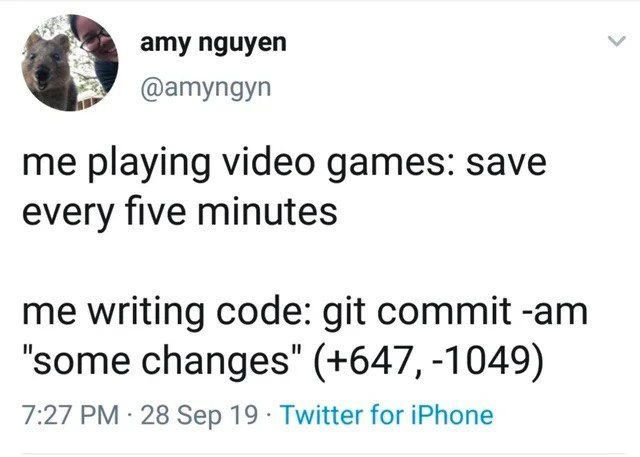
Gamers spam saves, developers push giant vague Git commits - priorities reversed
VersionControl Post #719, on Oct 1, 2019 in TG

Gamers spam saves, developers push giant vague Git commits - priorities reversed

Why is this VersionControl meme funny?

Level 1: Better Save Than Sorry

Imagine you're writing a story for school on the computer. You work really hard on it for a long time but forget to click the save button. Suddenly the computer freezes – all that work disappears because you never saved! You'd be really upset because you lost so much progress. On the other hand, when you're playing a video game, you probably save the game every time you finish something important. You don't want to lose your levels or items, so you save as often as you can. If the game crashes or you make a mistake, you can load your last save and everything's fine. Now here's the funny part: in this meme, the person does the opposite of what you'd expect. They're super careful about saving in the game every few minutes, but when they're writing code (which is like their real work), they don't "save" their work often at all. They write a ton of code (hundreds of lines) and only then do one big save, calling it "some changes" as a title. It's like doing hours of homework and then labeling it just "stuff" — not very helpful! The joke shows how silly it is to be more cautious in a game than with something important like code. It reminds us that whether it's a school project, a video game, or writing software, it's better save than sorry: always save your progress often and give it a good name so you don't lose anything important.

Level 2: Commit Early, Commit Often

If you're newer to programming or Git, let's break down the joke. Git is a popular tool developers use for version control – essentially a system that tracks changes in code over time. Think of it like a special undo/redo superpower for your code, where you can go back to earlier versions if needed. A git commit is like hitting a "save" button for your work: it takes a snapshot of all your files at that moment and stores that version in the repository's history. Developers are supposed to write a short commit message to describe what they changed (for example, "Fix login bug" or "Add user profile page"). In the tweet, the developer runs git commit -am "some changes". This command does two things at once: the -a option automatically stages (includes) every file you modified, and the -m option lets you add the commit message in quotes. Here, the message they used is the very unhelpful "some changes."

The (+647, -1049) part is showing how many lines of code were added and removed in that commit (647 lines added, 1049 lines removed). That's a huge set of changes for a single commit! Usually, you'd expect a commit to affect maybe a few lines or a handful of files for one focused change. Seeing hundreds of lines changed at once means the developer probably crammed many edits together instead of saving their work in smaller pieces. It's a bit like writing an entire chapter of a book and only then hitting "save." If something goes wrong or you need to find a specific change, you have to sift through everything at once. It’s much harder to pinpoint problems when all the changes are lumped together.

Now compare this to the gaming reference: "save every five minutes." In video games, especially tough or unpredictable ones, it's common to save your progress frequently. For example, if you're about to fight a big boss or attempt a tricky level, you save right before it. That way, if you fail or the game crashes, you only lose a few minutes of progress instead of hours. Gamers learn pretty quickly: always save your game often! Here the meme jokes that the same person who is super careful about saving their game is being pretty careless about saving their code. When coding, "saving" your progress means making commits. Instead of committing frequently with clear messages, they're doing one giant dump of code changes with a message so vague it might as well say "I did stuff."

For someone early in their coding journey, this scenario is both funny and a bit of a cautionary tale. Maybe you've been working on a project and realize you haven't used Git to save your work in a while. When you finally commit, you write something like "updated code" or "misc fixes" as the message because you can't summarize everything easily – you've just done too much at once. Later on, you (or anyone else) looking at that commit will have no clue what "some changes" means without digging into the code. This is why the advice is to commit early, commit often. That means save your work in Git in smaller chunks whenever you finish a logical piece of work. Each commit should ideally do one thing (fix a bug, add a feature, update documentation) and have a message that clearly says what that thing is. It's much easier to understand and undo changes when each commit is focused. Plus, if a bug creeps in later, a detailed history of small commits makes it much simpler to figure out exactly where things went wrong. The meme is basically making us laugh at ourselves, because it shows how sometimes we do the opposite of what we know is smart. We religiously save our games to protect our progress, but then turn around and neglect to save our code in the same safe way. The takeaway for a new developer is clear: treat your code like a game that could crash at any time – save it often and with a good description, so you won't be sorry later!

Level 3: Commitment Issues

Amy Nguyen's tweet humorously highlights a classic coding paradox that experienced engineers know too well: we often treat game progress more cautiously than our code changes. The first line, "me playing video games: save every five minutes", depicts the hyper-vigilant gamer behavior known as save-scumming, where you constantly hit "Save Game" so you never lose progress. In stark contrast, the second line "me writing code: git commit -am 'some changes' (+647, -1049)" shows a single monolithic Git commit bundling hundreds of lines of code changes behind an almost comically uninformative commit message. For any seasoned developer, this scenario is painfully relatable and darkly funny. It's a perfect storm of bad version control hygiene that we've all seen (or been guilty of) at some point.

At a technical level, that git commit -am "some changes" command is doing a lot of heavy lifting – and not in a good way. The -a flag stages every modified file automatically, and the terse message "some changes" tells you nothing about what actually changed. The snippet (+647, -1049) implies this commit added 647 lines and removed 1,049 lines across the codebase – a monolithic commit of epic proportions. In industry terms, this is the opposite of an atomic, well-scoped commit. Instead of breaking the work into logical chunks (e.g. one commit per bug fix or feature), the developer has bundled everything into one blob. Reviewing such a large diff is a nightmare: imagine opening a pull request to find hundreds of changed lines with a comment like "some changes". You'd likely spit out your coffee. Debugging becomes equally challenging – when a bug pops up later, git blame will point to this commit, but the cryptic message provides zero clues. It's the commit history equivalent of a shrug.

So why do smart developers end up with a commit like this? Often it's a mix of procrastination, tunnel vision, and deadline pressure. When you're "in the zone" coding for hours, it's easy to defer making commits – you think you'll "clean up and commit later," but later turns into the end of the day with a massive diff. In fact, developer productivity suffers because, without intermediate checkpoints, you can’t easily roll back to a known good state. Ironically, any gamer would shudder at the thought of playing for hours without saving. In code, skipping those checkpoints (commits) means if you realize a change was a mistake, you have no smaller commit to revert – it’s all or nothing. Large commits also greatly increase the risk of merge conflicts. If two developers both make big sweeping changes in infrequent commits, their code will collide like two giant asteroids when they try to merge. Smaller, frequent commits act like incremental save points, integrating changes gradually with fewer surprises.

The commit message "some changes" itself is an infamous hallmark of lazy version control. It's akin to labeling a medical report as "did some stuff" – technically true but utterly unhelpful. Clear commit messages are critical in collaborative projects and even for your own future self. Good commit logs help track down when a bug was introduced or understand why a certain decision was made. On the flip side, a vague message attached to a colossal code drop all but guarantees confusion later. There's a reason every version control best practices guide preaches: "commit early, commit often" and "write meaningful commit messages." This meme gets a laugh because it flips those ideals upside-down: the developer who would never risk losing five minutes of Skyrim progress is perfectly willing to risk a day's worth of code changes with one flippant commit. If only we treated git commit with the same reverence as the game save button, our codebases (and colleagues) would thank us!

Description

Screenshot of a tweet on a white Twitter interface. The profile area shows a small circular photo of an animal, the display name “amy nguyen”, and the handle “@amyngyn”. The tweet text reads: “me playing video games: save every five minutes me writing code: git commit -am "some changes" (+647, -1049)”. Beneath the text is the timestamp “7:27 PM · 28 Sep 19 · Twitter for iPhone”. Visually, it is standard Twitter formatting with black text on a white background and blue hyperlink styling. Technically, the joke contrasts obsessive save-scumming in games with a careless single Git commit that bundles a huge diff (+647, -1049) under the meaningless message “some changes”, highlighting poor version-control hygiene and developer productivity habits familiar to seasoned engineers


Comments

6
Anonymous ★ Top Pick The dev who quick-saves Witcher before looting a potato is also the one who labels a 1,700-line diff “some changes” - as if git rebase comes with an F5 key
  1. Anonymous ★ Top Pick

    The dev who quick-saves Witcher before looting a potato is also the one who labels a 1,700-line diff “some changes” - as if git rebase comes with an F5 key

  2. Anonymous

    The real irony is that in games you're afraid of losing 10 minutes of progress, but in coding you're willing to risk your entire career with a single 'fix everything' commit that somehow breaks three unrelated features

  3. Anonymous

    The real tragedy here isn't the 1049 deletions - it's that when this inevitably breaks production at 2 AM, git bisect will be about as useful as a chocolate teapot. Meanwhile, they probably have 47 quicksaves from the last boss fight, each meticulously named with timestamps. Priorities: a developer's guide to risk management where production code gets less backup strategy than a Skyrim playthrough

  4. Anonymous

    Games enforce atomic saves; Git lets us batch Big Bangs into 'some changes' until bisect reveals the crime scene

  5. Anonymous

    I quicksave every five minutes in games, but at work I drop a +647/−1049 'some changes' - apparently “atomic” describes the blast radius, not the commit

  6. Anonymous

    Peak senior move: one "some changes" commit bundling a schema migration, refactor, and dependency bump - expertly tuned to defeat git bisect and any chance of a sane code review

Use J and K for navigation
