Skip to content
DevMeme
900 of 7435
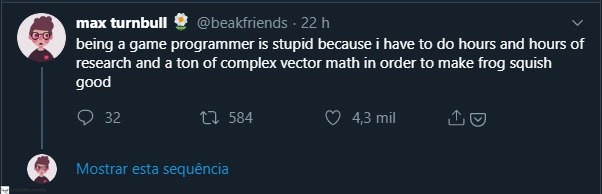
The Absurd Effort of GameDev for Perfect 'Frog Squish'
GameDev Post #1018, on Feb 3, 2020 in TG

The Absurd Effort of GameDev for Perfect 'Frog Squish'

Why is this GameDev meme funny?

Level 1: Big Effort for a Squish

Imagine having to do a really hard math problem just to make a little frog toy do a funny squish. Sounds silly, right? That’s exactly why this scenario is amusing. The game programmer spent a ton of time and brainpower (using lots of math and research) to get a tiny detail in the game – the frog squishing when it lands – to look just right. It’s like building a huge, complicated machine just to make a one-second sight gag happen. The humor comes from that extreme contrast: a huge amount of work behind a small, cute effect. Even if you don’t understand the technical details, you can appreciate the idea that an entire day’s work went into making a cartoon frog flatten for a split second. It’s a little reminder that there’s often a lot of unseen effort behind the fun things we enjoy.

Level 2: Vectors and Frogs 101

Let’s break down what “complex vector math” means in this frog squish scenario. A vector is basically a list of numbers that represent a direction and magnitude. For example, in a 2D game a position or velocity might be (x, y) – in 3D it could be (x, y, z). When the frog jumps, it has a velocity vector indicating how fast and in what direction it’s moving. Game engines use vectors for all sorts of things: moving characters, applying forces, detecting collisions.

Now, the frog “squishing” is a small physics effect. Imagine the frog lands on the ground after a jump: we want it to briefly flatten out (like a squishy toy) and then pop back up. How do we get that effect with code? First, we detect the collision when the frog hits the ground. The engine will usually tell us when two objects collide, along with info like the surface normal (basically, which way the ground is facing) and the frog’s velocity at that moment. From the velocity vector, the programmer can figure out how hard the impact was – usually by looking at the magnitude of that vector (which is the overall speed). A faster fall means a bigger squish. This is where some math like the Pythagorean theorem sneaks in: to get the speed from an (x, y, z) velocity, you compute √(x² + y² + z²) (that’s what a function like velocity.magnitude does under the hood).

With the impact speed in hand, the developer decides how much to squish the frog. “Squishing” basically means scaling the frog’s shape – making it shorter vertically and perhaps wider horizontally for a moment. In a game engine, every object has a scale property (often an X, Y, Z scale for each dimension). So the code might do something like this on impact:

// Pseudo-code for squish effect on frog landing
Vector3 v = frog.Velocity;
float impactSpeed = v.magnitude;                       // how fast was the frog moving?
float squishAmount = Math.Min(impactSpeed / 10.0f, 0.5f); // convert speed to squish factor, cap at 0.5
frog.Scale = new Vector3(1 + squishAmount, 1 - squishAmount, 1);
// e.g., if squishAmount = 0.2, scale becomes (1.2, 0.8, 1) -> 20% wider (X), 20% shorter (Y)

In this snippet, if the frog hits the ground hard, squishAmount might be larger (we cap it at 0.5 here, meaning at most a 50% squish so the frog doesn’t completely pancake). We then adjust the frog’s scale: the X axis (width) is 1 + squishAmount and the Y axis (height) is 1 - squishAmount. So the frog gets a bit fatter and a bit flatter — a cartoony squish. After that, the programmer would likely add code to smoothly restore the scale back to normal over a short time, so the frog “bounces” back to its original shape. They might even add a little overshoot (making it briefly taller than normal) to mimic a bounce effect. All of these tweaks involve numbers, formulas, and careful tuning.

For a newer developer, it’s eye-opening that making a simple frog look good involves all this math and tinkering. Terms like vectors, normals, and scaling might sound intimidating at first, but this is how game development works: behind the cute visuals, the computer is crunching a lot of numbers. The “ton of complex vector math” in the tweet refers to exactly this kind of work – using math to calculate how an object should behave or appear. It might feel like doing a homework exercise, but it’s all for the sake of cool game moments! The frog squish example is a fun reminder that even a tiny feature relies on real math (yes, even some trigonometry sneaks in when angles are involved). The takeaway for a budding game programmer: those math and physics lessons really do come in handy when you want to bring a game character to life in a convincing way.

Level 3: Small Frog, Big Equations

To an experienced game developer, this tweet is painfully relatable. It highlights the classic minor feature, major effort scenario in GameDev: a seemingly trivial visual detail (a frog squishing when it lands) ends up requiring serious brainpower and custom graphics programming work. The humor comes from the contrast: a cute frog cartoon effect vs. the hours of vector math and research needed to pull it off. Game dev veterans have all been there – spending days tweaking physics parameters or solving geometry problems so that a character’s motion looks “just right.”

In the tweet, Max Turnbull jokes that “being a game programmer is stupid” because of all this. It’s a tongue-in-cheek way to say: “I can’t believe I actually needed advanced math for something this silly!” The absurdity is that making the frog “squish good” is not a one-liner fix; it involves understanding game physics deeply. This resonates with senior developers because we’ve juggled similar tasks:

  • Calculating collision normals and impact forces so an object reacts correctly on contact.
  • Using trigonometry to find angles for orientation or to smoothly interpolate a rotation.
  • Tuning spring-like behavior to make something bounce or jiggle naturally (the classic squash and stretch from animation, implemented in code).
  • Debugging why an object sometimes teleported or stretched into oblivion when our math had a sign error or a misplaced decimal.

Designer: “Hey, can you make the frog squish a bit when it lands? That would look cute.”
Programmer: “Sure...” [six hours of linear algebra later] “...the frog squishes perfectly.”

In reality, those “hours and hours of research” might include poring over forum threads, engine documentation, or even academic articles to recall how to do things like build a proper transformation matrix or use the physics engine’s API correctly. Perhaps the developer tried a naïve approach first (like just scaling the frog’s sprite on impact) and then encountered edge cases – maybe the frog landed at an angle and the squish looked wrong, or the timing felt off. Each tweak requires understanding the underlying system better.

Seasoned devs know that polished game interactions are built on countless micro-solutions to math and physics problems. We also know the audience might not consciously notice the frog’s squish, but they’d definitely notice if it wasn’t there or looked off. That’s why we invest time in these details. It’s a mix of pride and exasperation: pride in making the game world feel alive, exasperation that even a frog’s belly flop demands a mini calculus lesson. The tweet’s popularity (with thousands of likes and retweets) shows how many developers have felt this exact pain – laughing at the fact that even a tiny frog can demand such a big technical effort.

Level 4: Vectors of Squishiness

Under the hood, making a frog squish convincingly on impact is a surprisingly rich mathematical problem rooted in linear algebra and physics. The developer isn't just playing with a cartoon frog – they're effectively solving a mini physics simulation. Consider what happens when the frog lands: in physical terms, it's an inelastic collision with the ground where kinetic energy goes into deforming the frog's body (the "squish"). Simulating that deformation means dealing with vectors (quantities with direction and magnitude) and matrices to transform the frog's shape.

Linear algebra provides the language for these transformations. Imagine the frog’s orientation and shape in space: to squash it properly, you often need a transformation matrix that scales its dimensions non-uniformly (flattening vertically, stretching horizontally) aligned to the ground surface. If the frog lands on a tilted surface, the math gets even more intricate: you must align the squish with the surface normal vector. That often involves constructing a rotation matrix that orients the frog’s local axes to match the ground’s orientation, applying a scaling matrix for the squish, then rotating back. In formula form, it’s like applying ( M_{\text{squish}} = R^{-1} S R ) – where (R) rotates the frog’s coordinate system to align with the impact plane, (S) scales (squashes) one axis, and (R^{-1}) rotates it back. All of that is heavy vector math just to compute how to deform the frog’s mesh or sprite correctly.

Meanwhile, the collision response itself – detecting that the frog hit the ground and how hard – uses vector dot products and maybe some trigonometry. The impact force can be estimated from the frog’s velocity vector at collision. For example, the component of velocity along the ground’s normal (computed via a dot product ( \mathbf{v} \cdot \mathbf{n} )) tells us how “hard” it hit. A larger perpendicular velocity implies a bigger squish. The developer might derive an equation to map impact speed to a squish factor. They could even enforce volume preservation (a squished frog spreads out wider as it gets flatter) which is an extra mathematical constraint (e.g., scale_x * scale_y = constant area, to keep the frog’s overall size consistent). Ensuring the frog’s deformation looks natural might lead the programmer into the realm of spring-damper systems: conceptually treating the frog’s body like a spring that compresses and then bounces back. In physics terms, a damped spring’s motion follows a differential equation like ( m\ddot{x} + c\dot{x} + k,x = 0 ). Solving or approximating that means delving into classical mechanics formulas so that the frog squishes and un-squishes with a satisfying little bounce but then quickly settles (damping so it doesn’t wobble forever).

In essence, the tweet jokes about doing graduate-level math to achieve a slapstick cartoon effect. And it’s true – the fundamental equations of motion and linear algebra don’t cut us any slack just because the end goal is a cute frog animation. Game developers often find themselves reading research papers or digging through old SIGGRAPH proceedings to implement something like “squishy frog physics.” The humor is that a playful visual tweak involves the same Mathematics that aerospace engineers or physicists use. Making a frog “squish good” is a deceptively complex challenge: the laws of math and physics are hiding behind every adorable hop.

Description

A screenshot of a tweet from user Max Turnbull (@beakfriends). The user has a cartoon-style avatar of a person with glasses. The tweet text reads: 'being a game programmer is stupid because i have to do hours and hours of research and a ton of complex vector math in order to make frog squish good'. Below the main text, the tweet shows engagement metrics: 32 comments, 584 retweets, and 4.3 thousand likes ('4,3 mil'). There is also a link in Portuguese which translates to 'Show this thread'. This tweet perfectly encapsulates a core reality of game development: an immense amount of highly technical, often invisible work is required to create small, satisfying user-facing details. The humor comes from the contrast between the high-level effort (complex vector math) and the seemingly silly goal ('make frog squish good'). For experienced developers, this is a relatable expression of 'juicing' or improving 'game feel,' where the most challenging technical problems are often in service of creating a more tactile and engaging player experience

Comments

7
Anonymous ★ Top Pick Some engineers spend their careers optimizing database queries to be milliseconds faster. Game developers spend theirs in a feverish quest for the perfect easing function to make a frog squish with just the right amount of visceral satisfaction. Both are exercises in madness
  1. Anonymous ★ Top Pick

    Some engineers spend their careers optimizing database queries to be milliseconds faster. Game developers spend theirs in a feverish quest for the perfect easing function to make a frog squish with just the right amount of visceral satisfaction. Both are exercises in madness

  2. Anonymous

    Spent two sprints writing a GPU shape-matching solver so the frog squishes in under 0.3 ms per frame - PM’s takeaway: “Perfect, now make the lily pad feel 12% bouncier.”

  3. Anonymous

    After 20 years in the industry, you realize the difference between junior and senior game devs isn't the ability to implement quaternion interpolation - it's knowing that players will spend 0.3 seconds looking at your perfectly calculated frog squish before immediately trying to clip through the geometry to speedrun the level

  4. Anonymous

    The eternal paradox of game development: spending three weeks implementing quaternion-based squash-and-stretch deformation with proper mass distribution and collision response, only for the product manager to ask 'can we make the frog squishier?' Meanwhile, players will spend 10 hours repeatedly jumping just to see that perfect squish you mathematically derived from first principles. This is why game programmers simultaneously love and hate their jobs - we're essentially building physics engines to simulate cartoon logic

  5. Anonymous

    Only in game dev do you implement Verlet integration and tune collision normals so QA can file a bug that says: frog squish feels 3% off

  6. Anonymous

    Game dev: deriving custom deformation matrices for 'cute frog squish' while physics engine users just tweak damping

  7. Anonymous

    Game dev is when you derive constraint Jacobians and vectorize the soft-body solver so the frog squish doesn't explode at 60 FPS, and the Jira ticket still reads: "make frog squish good"

Use J and K for navigation