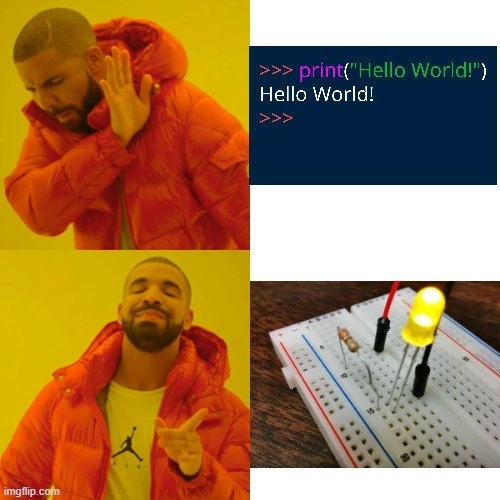
Drake prefers blinking an LED to printing the classic Hello World
Why is this EmbeddedSystems meme funny?
Level 1: Hello in Lights
Imagine two ways of saying hello. The first way: you just write the word "Hello" on a screen or a piece of paper – it's simple and gets the message across, but it's not very exciting. The second way: you use a little light (like a flashlight) and make it blink on and off as a special signal to say "Hello". That’s a bit more work (you have to set up the light and maybe blink it in a pattern), but it’s a lot more fun and eye-catching. This meme is funny because the person in it (Drake) is much happier with the blinking-light hello than the plain written hello. In other words, he thinks a hello in flashing lights is cooler than a hello in plain text. And honestly, who wouldn't smile a bit more if they saw a friendly light blinking at them instead of just reading the word "Hello"? It's that extra sparkle that makes the difference!
Level 2: Breadboard Beats Terminal
Let’s break down what’s happening in simpler terms. We have the well-known Drake meme format where he rejects one thing (top image) and approves another (bottom image). In the top-right, you see a screenshot of a Python interpreter (the >>> prompt is a giveaway) where someone typed print("Hello World!"). That is literally printing the text "Hello World!" to the screen. In programming, a "Hello World" program is traditionally the first thing you learn to do: it just makes your code output the words "Hello World" as a greeting. It’s a very simple test to make sure your programming environment is set up and you understand the basics of the language’s syntax for output. When you run that line, the computer responds by showing Hello World! in the console (which is basically the text-only window or terminal). It's the classic starting point for learning to code in any language – from Python to C to Java, printing "Hello World" is like the universal handshake between you and a new programming language.
Now, look at the bottom-right panel. That photo shows a tiny hardware setup. The white board with lots of holes is a solderless breadboard. A breadboard is a tool for building circuits without soldering; you just plug wires and components into the holes, and the board internally connects certain rows of holes together so you can create an electrical circuit. In the photo, there’s a bright yellow LED (short for Light Emitting Diode) plugged into the breadboard, along with a small resistor (the little component with colored stripes) and a red wire. The LED is lit up, meaning current is flowing through it. In practice, this LED is connected to a small computing device (like an Arduino or another microcontroller board) which isn’t directly visible in the shot. That device is running a program that turns the LED on and off – making it blink.
For someone who is learning embedded systems or just playing with hardware for the first time, making an LED blink is often the equivalent of printing "Hello World". It's the go-to starter project in the hardware world. The idea is to write a tiny program that repeatedly sends a signal to one of the board’s pins where the LED is connected: turn the pin on (so the LED lights up), wait a moment, then turn it off, and keep doing that. To set this up, you connect the LED to a controllable output pin of the microcontroller and also to the ground (through that resistor, which protects the LED from too much current). Then in code, you configure that pin as an output and toggle it HIGH (on) and LOW (off) with delays in between. For example, in an Arduino program, it might look like this:
pinMode(LED_PIN, OUTPUT); // set the LED pin as an output
while (true) {
digitalWrite(LED_PIN, HIGH); // turn the LED on
delay(1000); // wait 1000 milliseconds (1 second)
digitalWrite(LED_PIN, LOW); // turn the LED off
delay(1000); // wait another second
}
This little loop will make an LED connected to the LED_PIN blink on for one second, then off for one second, repeatedly. In contrast, the Python "Hello World" is just one line:
print("Hello World!") # prints Hello World to the console
Drake’s meme stance is basically saying he isn’t impressed by the basic print-to-console approach, but he’s very pleased with the blinking LED approach. Why is that amusing? Because normally, printing "Hello World" is super easy and doesn’t require anything fancy – it's just one line of code and you instantly see the text on your screen. Blinking an LED, on the other hand, needs a few extra steps: you have to build a small circuit with real hardware and write a program to control that hardware. It’s more work, and you don't just get output in a window – you get a little light physically flashing on your desk! But that extra effort is exactly why a lot of beginners (and hobbyists) love it: it feels more real and exciting. You’re not just interacting with the computer’s virtual world; you’re making something happen in the real world (a tiny light turning on and off in front of you).
So the meme is comparing two "first steps" in coding:
- Software first step: Print a simple message like "Hello World" on the screen.
- Hardware first step: Make an LED blink to say hello using a bit of wiring and code.
Drake (the guy in the meme) is shown preferring the second one. It humorously captures the mindset of an enthusiast who finds building a gadget more rewarding than a basic software printout. For anyone who’s tried both, it’s a funny nod of recognition: printing "Hello World" is neat, but seeing an LED blink because you wrote code and wired up a circuit – that just hits differently. It's a little victory that combines programming with a tangible result, and it makes saying hello a lot more fun.
Level 3: The Real Hello World
This meme plays on a classic inside joke in programming and electronics circles: "Hello World" versus the Blinking LED. In the top panels, Drake is essentially saying "nah" to the time-honored tradition of printing "Hello World" to a terminal. That's the go-to first exercise when learning any new programming language – simple, straightforward, but admittedly a little underwhelming visually (just plain text in a console). In the bottom panels, Drake is enthusiastically pointing at a small hardware project – powering up an LED on a breadboard and making it blink. This is the hardware enthusiast’s equivalent of Hello World, and it’s immediately more tangible and exciting.
Experienced developers recognize this scenario instantly. The meme is highlighting a divide in the learning journey: some beginners stick to software-only exercises, while others dive right into hardware and embedded systems. The humor comes from the exaggerated preference: Drake (representing community sentiment) "prefers" the project that actually involves wiring up a real LED and making it blink, which is objectively more effort than printing text. It's funny because it's true – many of us find that little LED way more satisfying. Why? Because when that LED blinks, it’s like the code is literally reaching out of the computer to say hello in the real world. It's a tiny yellow beacon of success, proof that your program isn’t just pushing pixels but actually moving electrons through a circuit. Embedded-systems folks often joke that blinking an LED is the “Hello World” of hardware, and this meme nods exactly to that.
The composition of the meme nails the point. The top-right panel even shows an interactive Python prompt (>>>) executing print("Hello World!") – the most bare-bones output one can produce. Meanwhile, the bottom-right panel is an actual photograph of a mini electronics setup: a solderless breadboard with an LED, a resistor, and some wires likely connected to a microcontroller off-screen. The LED is visibly lit. To someone who’s done it before, that image screams "I got the circuit working!" The juxtaposition is relatable: printing "Hello World!" is practically a non-event for a seasoned coder (we do it in every new framework or language just to test things out), but getting an LED to blink the first time feels like an achievement. There’s an almost universal nostalgia among hardware-oriented devs recalling the first time they saw a little diode flicker; it's a mix of pride and relief (given how easy it is to plug something in wrong the first time around!).
By showing Drake giving the cold shoulder to the simpler task and celebrating the more complex one, the meme also pokes fun at the maker mindset. The maker/hardware hobbyist community often jumps straight into projects that interact with the physical world because it’s more rewarding and fun, even if it means dealing with extra complexity like wiring and microcontroller code. It’s as if the meme is saying: "Why settle for a dull console message when you can have a mini light show as your greeting?" Seasoned devs chuckle at this because they've seen (or been) the person who writes off the textbook Hello World in favor of tinkering with an Arduino LED project right away. It's a gentle ribbing of our tendency to find the flashier (literally, in this case) intro project more appealing, even though the plain "Hello World" print is the easier and more universally taught start. In short, the meme humorously crowns the blinking LED as the real Hello World for those who love hardware. It highlights a shared sentiment in tech: making something blink or move in real life just trumps printing text to a screen when it comes to that first-time coder excitement.
Level 4: From Bits to Photons
At the deepest level, this meme highlights the difference between purely digital output and controlling the physical world with code. When you run print("Hello World!") in a high-level environment (like the Python REPL shown), the text "Hello World!" is rendered in a console – it's an abstract output, handled by the operating system's I/O routines. Under the hood, that print statement triggers system calls that write bytes to an output buffer, eventually lighting up pixels on your screen to display characters. It's all happening within the confines of the computer's virtual environment.
In contrast, blinking an LED is a bare-metal affair. There is no operating system quietly doing the heavy lifting – your code must manipulate hardware registers directly to toggle a voltage on an output pin. In an embedded system or microcontroller (the kind often used in IoT gadgets and hardware hacks), a specific memory-mapped register controls the state of each physical I/O pin. Setting a particular bit in that register to 1 might raise the voltage on that pin from 0 to 5 volts (or 3.3V on many boards). That high voltage allows current to flow through the LED (with a resistor in series to limit the current), causing the LED's semiconductor junction to emit photons (light!). Then the code clears the bit to 0, dropping the pin back to 0 volts and turning the LED off. By repeating this on/off toggling with a delay, you create a blinking effect – essentially generating a square wave signal in the physical domain.
What makes this meme especially chuckle-worthy to seasoned developers is that Drake is implicitly favoring a solution that involves more low-level complexity. A "Hello World" in hardware means dealing with things like GPIO configuration (setting up a General Purpose Input/Output pin), timing loops or hardware timers to get the blink interval right, and ensuring you don't fry the LED by calculating an appropriate resistor value using Ohm's Law. Even the simplest electronics project forces you to dabble in a bit of electrical engineering, which is far more involved than just printing text to a screen. It's a tiny dance between software and electronic circuits – your code, the microcontroller's architecture, and the laws of physics all come together just to wink a little light at you.
From a theoretical perspective, printing "Hello World" and blinking an LED both illustrate performing an output operation from code, but they operate at vastly different levels of abstraction. The meme playfully valorizes the latter. After all, controlling hardware directly is as close as programmers get to wielding real-world power through code – literally turning bits (binary data) into photons (light energy). For many of us, that first LED blink is a profound "it’s alive!" moment: a physical confirmation that our code has moved beyond the CPU to affect the real world. That's the deep magic Drake is chasing here – the fundamental thrill of making a machine interact with the physical universe, even at the modest scale of a single blinking light.
Description
Four-panel Drake meme: In the top-left panel, Drake (face blurred) turns away with a hand of refusal. Top-right panel shows a dark IDE/terminal screenshot containing the exact text: '>>> print("Hello World!")' followed by the echoed output 'Hello World!' and the prompt '>>>'. Bottom-left panel shows Drake approvingly pointing forward. Bottom-right panel is a close-up photo of a white solderless breadboard with a red wire, a current-limiting resistor, and a yellow LED lit, implying an introductory hardware blink project. The joke contrasts software beginners who settle for a terminal Hello-World with hardware enthusiasts who jump straight to driving a real LED, touching on embedded development culture and maker motivation

Comments
7Comment deleted
Blinking an LED: the senior sanity test that your compiler, linker script, clock tree, pin-mux, and power rail all agreed on reality
After 20 years of distributed systems, I finally understand why embedded engineers are so happy - their race conditions actually involve actual races to see if the LED turns on before the watchdog timer resets
Hardware Hello World hits different: when the LED lights up, you've debugged your code, your wiring, and your power supply - three layers of doubt, one photon of validation
After 20 years in software, you realize the real 'Hello World' is when you finally make an LED blink without accidentally creating a smoke signal. At least with hardware, when something goes wrong, you can literally see the magic smoke escape - unlike production bugs that haunt you at 3 AM with no physical evidence of their existence
Software: one print(). Embedded: 47 jumper wires, a prayer, and victory glow - or smoke
Software hello world checks stdout; embedded hello world checks clock init, pin mux, power rails, toolchain - and your resistor math - otherwise your integration test emits smoke
print('Hello World') is a unit test; blinking an LED is the integration test for power rails, clock tree, pinmux, linker script - and whether the JTAG cable is plugged into a 'charge-only' USB port