
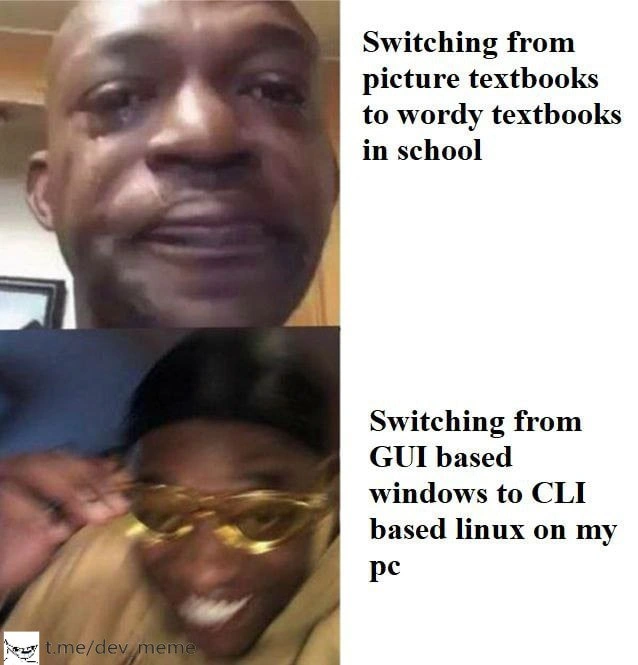
Tears upgrading from Windows GUI comfort to hardcore Linux command line life
Why is this CLI meme funny?
Level 1: No More Pictures
Imagine you’ve been reading fun picture books all your life, with colorful images on every page, and then one day you’re handed a thick book that’s nothing but words. No pictures at all! That’s a bit what this joke is about. Using a Windows computer is kind of like having a nice picture book: you can click on little icons and see menus, and it’s all very friendly and easy to understand. Switching to a Linux command-line computer is like suddenly only having books with tons of words and no pictures: now you have to read everything and type out exactly what you want. It feels hard and overwhelming at first. The man in the meme is trying not to cry when he loses his picture books, and then really crying when he has to use the all-text computer. In simple terms, it’s showing how a person feels sad and frustrated when something that used to be easy and visual becomes complicated and text-heavy. It’s a big change, and just like a kid missing their storybook pictures, a computer user might “cry” (or feel like crying) when they lose their comforting clicky buttons and have to deal with a screen full of text.
Level 2: From Clicks to Commands
Let’s break down what this meme is talking about in simpler tech terms. It’s comparing using a computer with a GUI versus using one with a CLI, and how jarring it is to switch from one to the other.
GUI (Graphical User Interface): This is the familiar visual way of using a computer. In Windows, for example, you have windows, icons, buttons, and menus that you can click with a mouse. Want to open a program or find a file? You might click on the Start menu or an icon on your desktop. The GUI gives you visual clues (like a trash can icon for deleting files, or a gear icon for settings) so you can navigate and perform tasks by recognizing symbols and clicking on them. It’s user-friendly and great for beginners because you can explore and discover features just by looking around the screen.
CLI (Command-Line Interface): This is a text-based way of using a computer. On Linux (and other operating systems like macOS or even Windows’ PowerShell/Command Prompt), you often have a Terminal window where you type commands instead of clicking on things. There are no icons or buttons in a pure CLI environment – just text input and text output. For example, to see what files are in a folder, you might type
lsand press Enter, and you’ll get a list of filenames. To delete a file, you might typerm filename.txt. Every action is done by typing the right command and options. It’s very powerful because you can do complex things with a single line of text, and you can script a whole sequence of actions to automate tasks. But if you don’t know the commands, a CLI can feel empty and confusing. There are no visual hints – the computer is essentially waiting for you to tell it exactly what to do.
Switching from Windows to a Linux CLI-only environment is a big change in user experience. In the meme, the first scenario talks about having to switch from picture-filled textbooks to word-only textbooks in school – something many of us remember as a boring or tough adjustment when growing up. The second (and even more dramatic) scenario is switching from a comfortable GUI-based Windows PC to using Linux via just the command line. This implies that on the Linux system, there’s little or no graphical interface, so the user has to do things by typing commands. If you’ve never used a command line before, this can be intimidating. You might sit at that blank Terminal screen and think, “Uh… where’s the Start button? How do I open my web browser now?” Everything that used to be a click or an icon is now a command you have to recall or look up. In short, your whole method of interacting with the computer changes. It’s like relearning how to use a computer from scratch. This is the learning curve the meme is hinting at — going from an easy, guided experience to a challenging, type-it-yourself experience.
To make it clearer, here are some everyday tasks and how they differ between a Windows GUI approach and a Linux CLI approach:
| Task | Windows (GUI) 💻 | Linux (CLI) 💾📟 |
|---|---|---|
| Navigating files | Open File Explorer, click through folders, see icons & previews. | Type cd foldername/ to change directory, ls to list files (all text output). |
| Opening a program | Click the program’s icon or find it in the Start menu. | Type the program name (e.g. firefox to launch Firefox browser) in the terminal. |
| Installing software | Download an .exe installer and run a setup wizard with “Next” buttons, or use an app store. |
Type a command like sudo apt-get install <program> (no wizard, the program installs via text output). |
| Changing settings | Go to Control Panel or Settings app; adjust options via checkboxes, sliders, drop-down menus. | Open a config file in a text editor (e.g. nano /etc/config.txt), read through plain text settings and edit them manually. |
| Deleting a file | Drag the file to the Recycle Bin (and you can restore it if you change your mind). | Run rm filename.txt. There’s no visual confirmation – the file is gone unless you have backups. |
| Getting help | Click on a Help menu or search online and find guides with screenshots and step-by-step instructions. | Use man <command> to read the manual page in the terminal, or search online for solutions (most guides for CLI are text-heavy, with maybe some example commands). |
As you can see, the Windows GUI approach relies on visuals and step-by-step dialogs, while the Linux CLI approach requires memorization and comfort with text. It’s normal for a new developer or any user switching to Linux CLI to feel a bit lost. You might find yourself constantly googling things like “How do I list files in Linux?” or “How to rename a folder via command line?” because the actions that were obvious in Windows now require knowing the right words to type. The meme’s joke is that this sudden change feels just as disheartening as when a kid has to put away their picture books and start reading dense textbooks: it can take the fun out of it, at least initially.
The phrase “Tears upgrading from Windows GUI comfort to hardcore Linux command line life” in the title of the meme says it all. “Upgrading” to a more advanced system doesn’t feel rewarding at first; it actually feels like a lot of work and frustration. Developer experience (DX) can take a hit during this transition. New Linux users often feel clumsy: tasks that took seconds in Windows might take much longer as you figure out the right command or fix syntax errors. For example, installing a printer in Windows might be a matter of clicking “Add Printer” and following a wizard. On a pure CLI Linux, you might end up editing config files or typing obscure setup commands — a process that could easily lead to developer tears if you have no idea what the output messages mean.
The good news is that this painful phase is temporary. With time and practice, the commands and patterns become familiar. Many developers even start to prefer using the terminal because once you know what to do, it can be faster and very powerful (you can automate tasks with scripts, remotely manage systems, etc.). But the meme isn’t showing a confident power-user — it’s capturing that early “Oh no, I hate this, why is this so hard?” moment. It’s funny to experienced folks exactly because it’s true: everyone has to go through that steep learning curve. If you’re in that phase, don’t worry, you’re not alone. Every expert Linux user was a beginner who once felt overwhelmed by all-text interfaces. Those “wordy textbooks” eventually make you smarter, and those cryptic commands eventually feel like second nature. Until then, it’s okay to have a few tears (and maybe keep a cheat-sheet of commands handy!). The meme just lets us laugh at that universally bewildering experience of switching from a GUI to the CLI.
Level 3: Shell Shock
Switching from the cozy world of Windows GUIs to the stark land of Linux CLI can feel like being dropped into another universe. This meme nails that feeling by showing a man holding back tears (for textbooks with pictures turning into all text) and then openly sobbing (for Windows GUI turning into Linux CLI). It’s a classic GUI vs CLI culture clash. On Windows, everything is designed to be intuitive with a Graphical User Interface (GUI): you have icons to click, menus to navigate, and dialog boxes to confirm your choices. By contrast, a Linux Command-Line Interface (CLI) often presents you with nothing but a terminal prompt — a blinking cursor on a black screen — waiting for you to type the right commands. The meme humorously equates the developer experience of this transition to a kid losing their picture books. In both cases, the comfort of visuals is replaced by a wall of text, and the brain goes, “Whoa, this got hard!”
For seasoned developers and system administrators, the terminal is home turf. They know that the CLI is incredibly powerful and scriptable. But we’ve all witnessed (or been) the newbie who opens a Linux terminal for the first time and feels utterly lost. The term shell shock is more than a pun here: the command-line interface is often called a "shell," and the shock of using it without prior experience is very real. In usability design there’s the idea of recognition vs. recall. GUIs lean on recognition – you can visually scan for a file or a button and recognize what to do (e.g., see a trash can icon and realize it means delete). CLIs force recall – you have to remember the exact command (rm to delete, cp to copy, etc.) and proper syntax. It’s like the difference between picking an item from a menu versus having to remember the chef’s recipe by heart. Naturally, that makes the learning curve for CLI much steeper. Until commands become second nature, using the terminal feels like doing schoolwork in a foreign language.
The meme’s two-panel joke exaggerates the pain, but only slightly. In a GUI, the system holds your hand: if you try to delete an important file in Windows, you’ll get a pop-up, “Are you sure?”, or the file goes to a Recycle Bin where you can retrieve it. In a raw Linux CLI, you type rm -rf important_folder/ and poof – it’s gone forever, no questions asked. No pretty progress bars, no cancel button if you change your mind. Freedom and power, meet responsibility and danger. The “upgrade” from Windows to Linux CLI can feel like a downgrade in comfort because all the guardrails are off. It’s both terrifying and exhilarating. We see the crying man in the meme and we laugh because we remember that “Oh no, what have I gotten myself into?” moment. Maybe you mistyped a command and got a face full of scary permission denied errors. Maybe you wanted to uninstall a program and had to literally type out sudo apt-get remove package-name instead of just clicking “Uninstall,” and you weren’t even sure what that command actually did. A classic newbie panic is not knowing how to exit the vim editor and frantically Googling “how to exit vim” because the CLI doesn’t give you obvious hints (:q! isn’t exactly intuitive). These experiences are almost a rite of passage. The developer tears in the meme are funny because they’re true — even confident programmers have been reduced to frustrated humans yelling at a terminal at 2 AM.
And yet, ask those same developers a year or two later, and many will tell you it was worth it. Once you survive the initial shock and gain fluency, life in the terminal opens up a world of efficiency and control. You become that person who automates tasks with a one-liner, who tailors the environment exactly to your needs, who feels OperatingSystem-agnostic superpowers at your fingertips. But the meme isn’t about that triumph — it’s about that awkward, painful beginning. It taps into a shared memory: the daunting first encounter with a CLI that made us all feel like schoolkids forced to read grown-up books. It’s terminal humor with an undercurrent of empathy. We laugh at the crying reaction, remembering our own “tears” when we left the training wheels of the GUI behind and wobbled into the command-line life. The pain was real, but looking back, it’s also pretty hilarious how dramatic that transition felt.
Description
The meme is a two-panel reaction format: in the top-left a close-cropped face of a man fights back tears, while the lower-left shows the same figure fully crying (the lower section is intentionally blurred for effect). On the right, black serif text in two blocks reads, “Switching from picture textbooks to wordy textbooks in school” next to the restrained face, and “Switching from GUI based windows to CLI based linux on my pc” next to the sobbing frame. The juxtaposition humorously equates childhood disappointment over losing illustrated books with the developer pain of abandoning a point-and-click Windows environment for a terminal-only Linux setup. It highlights the cognitive load and learning curve of command-line tooling that many engineers experience when moving from GUI workflows to pure CLI productivity

Comments
10Comment deleted
Swapped the Windows Start button for /bin/bash - five aliases, three tmux panes, and a 200-line .bashrc later, I’ve basically open-sourced my own Start menu and a mid-life crisis
The real flex isn't knowing 200 kubectl flags by heart, it's explaining to the CTO why the production fix requires editing /etc/sudoers through vi over a serial console because someone disabled SSH while 'hardening' the bastion host
The moment you realize `rm -rf` gives you more dopamine than any GUI 'Empty Recycle Bin' animation ever could - that's when you know you've crossed over to the dark side of enlightenment, where your mouse collects dust and your keyboard shortcuts have shortcuts
GUIs optimize for discoverability; CLIs optimize for composability - the onboarding cost is paid up front, then amortized over years of Ctrl-R and one-liners your shell history refuses to forget
School's prose induced comas; CLI's man pages spark one-liner symphonies that make GUIs feel like training wheels
CLI only hurts until you realize text is an API; one weekend of dotfiles and aliases later, history is your UX and git reflog your Ctrl+Z
Please no more ASCII animations Comment deleted
haha so true for me :) Comment deleted
https://t.me/sendmegifs/292 Comment deleted
👍 Comment deleted

