
Skip to content
DevMeme
2820 of 7435
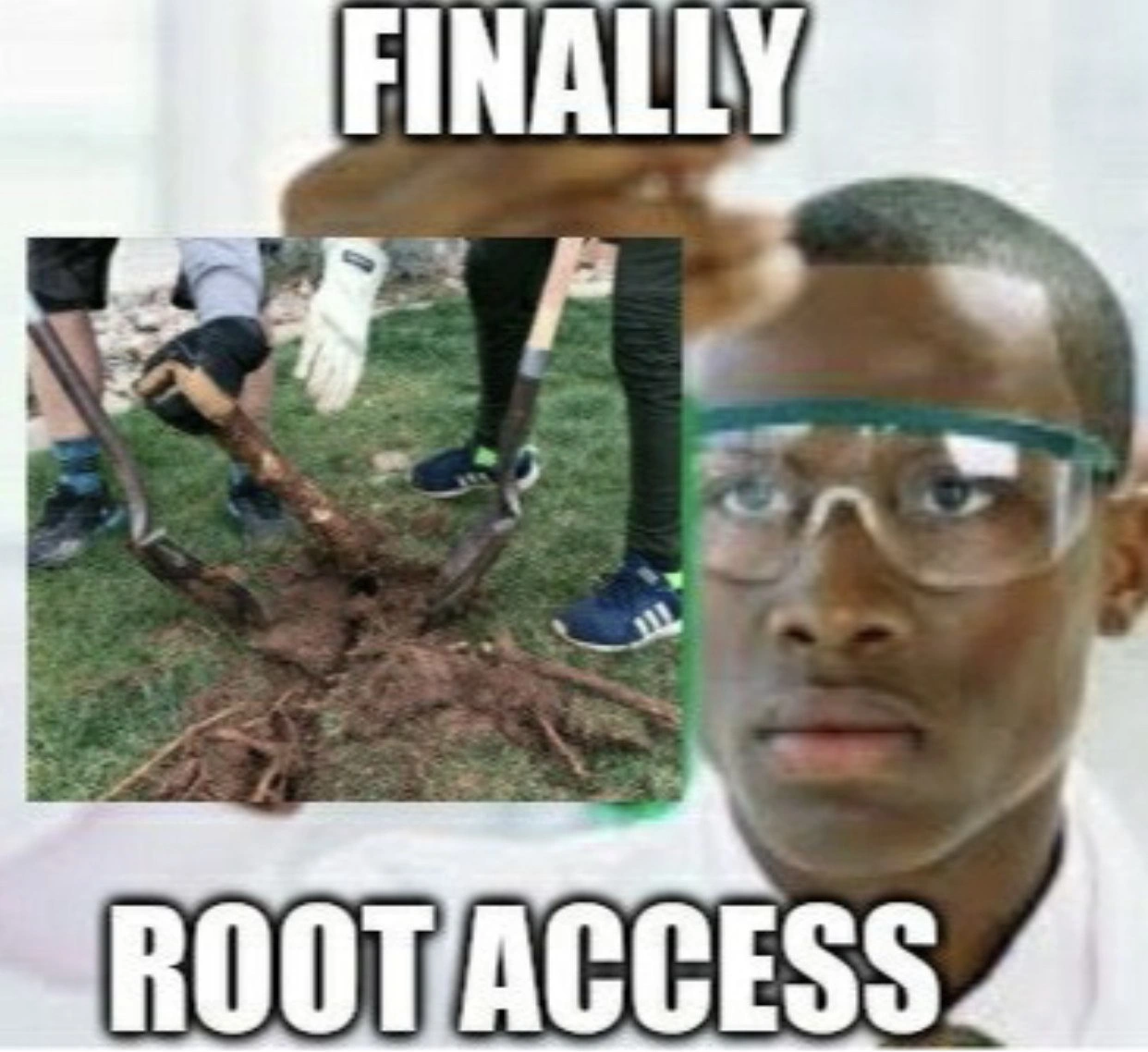
When sysadmin finally gets root access, but takes it literally
OperatingSystems Post #3116, on May 16, 2021 in TG

When sysadmin finally gets root access, but takes it literally

Why is this OperatingSystems meme funny?

Level 1: Digging in the Wrong Place

Imagine you learned a new word that has two meanings. For example, the word “mouse” can mean a little animal, but it also means the thing you use to move the cursor on a computer. Now, picture someone hearing about a “computer mouse” and then actually putting cheese next to the computer to catch the mouse! That would be pretty silly, right? They mixed up the everyday meaning with the computer meaning.

This meme is funny in the same kind of way. In computers, “root” is a special term meaning the boss of the computer – the person or account that can do anything. It’s like having the master key to all the doors in a huge building. When a tech person says “I have root access!”, it means they got the master key to the computer system. They’re really happy because now they can open any file or change any setting.

But the word “root” also usually means the roots of a plant – those long, tangled things under the ground that keep a tree or flower fed and stable. In this picture, instead of showing someone using a computer with their special access, it shows people digging up actual tree roots in the dirt. They have shovels, gloves, and they’re pulling out a big clump of muddy roots from the grass. They look busy, like they’re working hard in a garden.

Why is this funny? Because the people in the meme totally misunderstood what “root access” meant. It’s as if someone told them “Hey, you finally have root access!” and they thought that meant “Guess what, you can finally go dig up some roots!” It’s a big mix-up. We laugh because we know they’re doing a lot of unnecessary work. It’s like if a teacher said, “You have the green light to start the project,” and a kid ran to find a green light bulb instead of just beginning the project. The phrase “green light” means permission, not an actual green-colored light – and “root access” means computer power, not real roots.

So the joke is a simple play on words: one meaning is about computers (boring for kids, but important for adults who work with tech) and the other meaning is about plants (something we all know). The sysadmin (a fancy word for the person who takes care of computers) was excited to finally get special permissions on the computer, but the meme pretends he took it literally and started digging in the ground. It’s a bit like a cartoon misunderstanding. The feeling behind it is happiness turned into goofy confusion – he’s happy to have “root access,” but oops, he’s got the wrong root!

In very simple terms: the meme is funny because someone mixed up a computer term with a gardening idea, and the picture shows them doing something totally unexpected. Even if you don’t know much about computers, you can understand that confusion and giggle at how absurd it is to see tech workers acting like gardeners just because of a word mix-up.

Level 2: Not That Kind of Root

Let’s break it down. In the world of computers (especially Linux/Unix systems), “root access” means having the highest level of privilege on a machine. A system administrator (aka sysadmin) who has root access can do anything on that system. This is often called superuser access. For example, on a personal Windows PC, an equivalent would be the Administrator account. On a Linux server, the root user (often just named “root”) is the boss account that can read, write, and delete any file, install or remove programs, and change any setting. It’s like being the owner of the whole computer system. In day-to-day tasks, a sysadmin usually logs in with a normal user account and then uses a special command like sudo (short for “superuser do”) to temporarily elevate their privileges to root when needed.

Here’s a tiny demo on a Linux command line interface (CLI) showing a user switching to root:

$ whoami
alice
$ sudo -i         # become root (will ask for alice's password)
# whoami
root

In this session, the user “alice” ran sudo -i and became root (you can tell because the prompt changed to # and whoami now prints “root”). This means Alice now has full root privileges. In practice, she can modify system files or perform admin-only tasks that were previously off-limits.

Now, why is everyone so eager about “finally” getting root access? In a secure setup, not just anybody can use the root account. It’s usually locked down because of security – you don’t want every user to have the power to break or snoop on the system. Often, junior admins or developers have to request access or get added to a sudo list to do certain tasks. It can be frustrating to run into “Permission denied” errors when you’re trying to configure something important. So, getting root access feels like a big accomplishment – it means no more walls, no more “you are not allowed to do that” messages. Privilege escalation is the process of gaining those extra permissions. In a legitimate way, that might be an admin granting you access or you proving you’re authorized via sudo. (Illegitimately, it could mean hacking – but let’s stick to the good guys here!)

With those concepts in mind, the meme’s joke becomes clear: The text says “Finally root access” because presumably our sysadmin has at last been granted those almighty powers on a system. But the image is of people literally digging up tree roots from the ground. The humor comes from confusing technical meaning of root with the everyday meaning. It’s a classic case of a homonym (one word, two meanings). In tech, root is an abstract concept – no relation to plants at all – whereas in normal speech, root usually means the part of a plant under the soil.

So, the scene shows a trio of folks with shovels and gloves ripping out actual roots from the earth, as if “root access” meant they need to go access some roots! They took the phrase way too literally. A sysadmin “getting root” in real life would be typing away on a keyboard (perhaps editing config files or running sudo apt upgrade on Linux). There’s no grass, no dirt, and certainly no shovel involved in gaining computer privileges. The contrast is what makes it funny: these IT professionals have swapped their usual tools (keyboard, terminal, maybe remote SSH connections) for gardening tools. It’s the literal vs. technical mix-up.

This pun also highlights how tech folks often use everyday words in very specific ways. For example:

  • A “server root” is not a plant; it usually means the root directory of a server’s file system (or root user of the server).
  • The command root doesn’t dig into soil; it’s just the name of the user with ID 0.
  • A sysadmin might say “I’m rooting through the logs” meaning searching thoroughly, but that doesn’t involve any actual roots either.

When you know the tech context, you understand that “root access” is extremely powerful and sought-after in system administration. When you see those words slapped on a photo of actual roots, your brain does a double-take. It’s as if the meme is shouting, “Oops, not that kind of root!”

Even if you’re a junior developer or just starting with Linux, you likely know sudo asks for your password to do something admin-like. Maybe you’ve tried to edit a file and the system told you “you must be root to do that.” So you learned you need root rights, and how big of a deal it is. The meme exaggerates someone finally getting those rights and then acting like they were told to do landscaping. It’s goofy and memorable. Plus, it indirectly teaches a lesson: tech terms can have non-tech meanings. (Always good to clarify if your non-tech friend hears you say you “killed a process” – they might worry you did something terrible to a procession or something!)

So, in summary: The meme plays on the double meaning of root. For techies: root access = complete control over a computer system. For everyone else: roots = those brown tangled things under a tree. The sysadmin in the joke has mixed up these meanings in a hilarious way, yanking out plant roots as if that’s how you log in as admin. It’s a lighthearted poke at how confusing computer jargon can be and a fun nod to every IT person’s desire to get “admin rights” after being restricted for too long.

Level 3: Shovel vs. Sudo

At a senior level, this meme hits on a classic bit of sysadmin humor: the pun between root access (full admin privileges) and actual roots in the ground. Picture a veteran system administrator finally getting the coveted password or sudo rights to a locked-down server. They might exclaim “Finally, root access!” after weeks of red tape. That phrase is practically a rite of passage in Systems Administration — gaining root is like being handed Excalibur. But here, instead of typing commands, the sysadmin is wielding a shovel! 🥔 (Imagine explaining to a non-tech friend you spent all day “digging through root causes,” and they hand you a spade — same energy.)

The top text “FINALLY” and bottom “ROOT ACCESS” mirror the dramatic setup of many IT memes. There’s an emotional arc compressed into two words: relief and victory (“Finally!”) followed by an absurd misinterpretation (“Root access” becomes literal roots). The photo seals the joke: three folks in work gloves and sneakers, hunched over grass, literally excavating a gnarly tangle of tree roots from the ground. If you work with Linux or Unix, you instantly get the double meaning. It’s the kind of facepalm pun that makes admins chuckle during coffee breaks.

Why is it funny to an experienced developer? Because it plays on the daily reality of permission struggles. Root is the superuser account on Unix/Linux – the one account that can run any command, edit any file, or install any package. In real life, getting root access on a server can be hard: perhaps you’re a developer asking IT for elevated rights, or a junior admin waiting for the senior to share the keys. Maybe you’ve been typing sudo !! all week (re-running commands with sudo after “Permission denied” errors) and finally got added to the sudoers list. “Finally, root access!” is exactly what you’d jubilantly say when that access comes through. Every seasoned dev or admin has felt that spike of power when the # prompt (which denotes root in the CLI) appears – it’s like leveling up.

Now, the pun: instead of showing a terminal window or the Linux # prompt, the meme shows actual roots being dug up. It’s a clever literal twist. We use the word "root" so often in tech that we forget it has a life outside the command line. This meme yanks it back to reality, almost mocking us: “You wanted root access? Here it is, grab a shovel!” It highlights how absurd our jargon can sound. A system admin’s world is full of words like mount, kill, dump, and root that mean something totally different in normal life. (No, mounting filesystems has nothing to do with climbing, and killing a process isn’t a crime – but outsiders raise their eyebrows!)

For a senior audience, there’s also an implied joke about devops and getting one’s hands dirty. As sysadmins, we usually “dig through logs” or “root-cause issues” metaphorically, not literally yank out plant roots. The image of techies in safety goggles uprooting a stump is hilarious because it’s so out of place. It’s as if after years of fighting for admin rights, the sysadmin has been handed a physical shovel as the final step — which is of course nonsense, and that’s why it’s funny. There’s even a subtle nod to privilege escalation: in security, a “rootkit” is malware that gives attackers root access, but here our poor sysadmin is using a root kit of gardening tools to achieve the same (with much more manual labor!).

This meme also pokes fun at how literal-minded tech folks can be. Many of us have a story of someone misunderstanding a figure of speech in a tech context. The phrase “took it literally” in the title says it all: it’s humor born from a simple misunderstanding. It resonates because it reminds experienced devs of common communication gaps – like when a manager hears about the need for “more memory” and sends over some sticky notes (true story 😜). It’s a safe, goofy joke that everyone “in on the lingo” can laugh at without any victims (except maybe those poor tree roots).

In short, “Finally, root access” with people digging roots is a tongue-in-cheek celebration of finally getting admin privileges, wrapped in a dad-joke caliber pun. It’s the kind of joke you groan at and forward to your fellow Linux-loving colleagues because you’ve been there. After all, the only digging a real sysadmin usually does is running the dig command to troubleshoot DNS — seeing one literally digging is comedy gold for the command-line crowd.

Level 4: One Root to Rule Them All

In multi-user operating systems like Unix and Linux, there is a concept of an all-powerful account named root. This superuser (User ID 0, often written as UID 0) has virtually unlimited privileges. Why "root"? Early Unix designers visualized the file system as an upside-down tree, with the root directory ("/") at the top. The root user was so-called because it had access to everything in that file system tree, from the root on down. Essentially, root is the source of all authority in the system – one account to rule them all (and in the darkness bind them, if misused 😅).

Under the hood, the kernel (the core of the operating system) checks your user ID whenever you perform a privileged operation (like opening a protected file or changing system settings). If your ID is 0 (root), the kernel will grant access, otherwise it returns an error. In pseudocode, it’s something like:

// Simplified privilege check in kernel code
if (current_user_id == 0) {
    // It's root, permit the restricted action
} else {
    return -EPERM;  // Not root: error "Operation not permitted"
}

This design dates back decades, balancing simplicity with security: all-or-nothing access. Over time, operating systems introduced finer-grained controls (like Linux capabilities and role-based access) to avoid relying purely on one omnipotent user. But by default, root can do anything – install software, delete system files, restart services, inspect any user’s data – you name it. It’s the ultimate key to the kingdom. In security terms, privilege escalation means finding a way to obtain root access when you’re not supposed to, because once you have it, you effectively own the system.

The meme riffs on this foundational concept. “FINALLY – ROOT ACCESS” is the triumphant cry of a sysadmin who’s acquired the coveted UID 0 powers after a long wait. The twist is that the image takes root literally: showing people digging up actual tree roots. It’s a playful intersection of computer science terminology with its ordinary English meaning. For seasoned pros, there’s an extra layer of irony: the term root itself comes from a tree metaphor in computing, so the meme is almost bringing the word back to its botanical origin. The result is a nerdy pun that digs down to the root of language itself, mixing system security jargon with gardening gear.

Description

Meme with bold white Impact-style text: top caption reads “FINALLY” and bottom caption reads “ROOT ACCESS”. The central photo shows three people standing on grass, each wearing work gloves and sneakers, using shovels to pry a thick tangle of tree roots out of the ground. The joke is a pun on the Unix/Linux concept of gaining super-user privileges (“root”) versus literally excavating plant roots. Humor targets developers and system administrators who spend their days chasing sudo privileges and dealing with privilege escalation

Comments

8
Anonymous ★ Top Pick After three change tickets and a two-week CAB review, we finally got root access - turns out excavating actual tree roots is still faster than parsing the 12-year-old sudoers file in prod
  1. Anonymous ★ Top Pick

    After three change tickets and a two-week CAB review, we finally got root access - turns out excavating actual tree roots is still faster than parsing the 12-year-old sudoers file in prod

  2. Anonymous

    The only time a senior engineer gets excited about gardening is when someone mentions they need help getting to the root of the problem - though we all know the real roots we care about come with a '#' prompt and the ability to accidentally delete /etc in production

  3. Anonymous

    After years of carefully crafted sudo commands and permission denied errors, you finally achieve root access - only to realize the real root access was the tree stumps you extracted along the way. At least now you can chmod 777 everything without judgment... until your security team finds out

  4. Anonymous

    Finally got root: UID 0, but chrooted to /yard and SELinux context grass_t still denied write - so we escalated to physical I/O with a shovel

  5. Anonymous

    The ultimate root cause analysis: when 'sudo' fails, grab a shovel - 90% dirt, 10% not rm -rf-ing the wrong tree

  6. Anonymous

    Thanks to zero-trust, the only “root access” we’re allowed is landscaping - safer than NOPASSWD in sudoers and still fixes more problems than chown -R /

  7. @ANeufeld 5y

    It's like Magisk. 🙌

    1. @RiedleroD 5y

      root-enabled apps be like: I want to speak to the manager.

Use J and K for navigation


