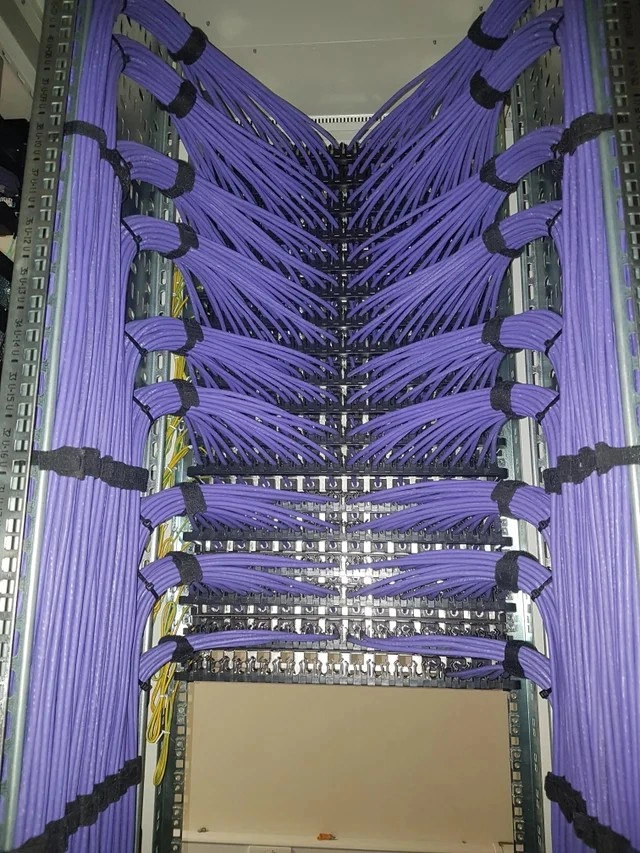
Server Rack Cable Management Perfection
Why is this Infrastructure meme funny?
Level 1: No More Tangles
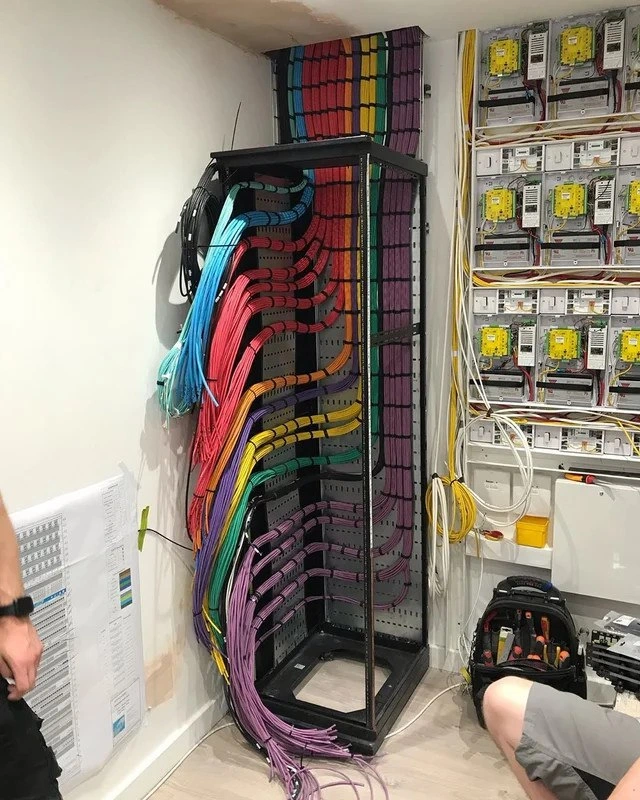
Imagine you have a big box of cables and wires at home – like charger cords, headphone wires, and maybe some old game console cables – and they’re all tangled up in a messy ball. Normally, trying to pull one out means you get five others snaking along, all knotted together. It’s frustrating, right? Now picture the opposite: someone takes the time to untangle every cord, then lays each one out nicely so none of them cross over each other. They even tie groups of them together gently with soft straps so they stay in place, and line them up in a pretty pattern. It’s so neat and tidy that it almost looks like art on the wall! That’s basically what’s happening in this picture, but in a professional computer closet called a server rack. All the network wires (the purple cords) are organized perfectly. They run alongside each other like a bunch of perfectly combed ponytails – no knots, no mess. The idea is that, just like a tidy room makes it easier to find your toys, a tidy network rack makes it easier for the computer folks to see what’s what. If something needs to be fixed, they can follow a single cable easily, because everything is in order. And it just feels good to look at, kind of how you feel proud after you finish organizing your desk or coloring all the crayons in order. The joke here is that the person who set this up treated these normally messy wires as if they were making a beautiful painting or doing fine art. It’s funny and satisfying at the same time – even if you don’t know about computers, you can appreciate how organized and clean it looks compared to a chaotic tangle of cords. It’s the kind of picture that can make even non-computer people say, “Wow, that’s beautiful – and it must make things so much easier!”
Level 2: Rat’s Nest No More
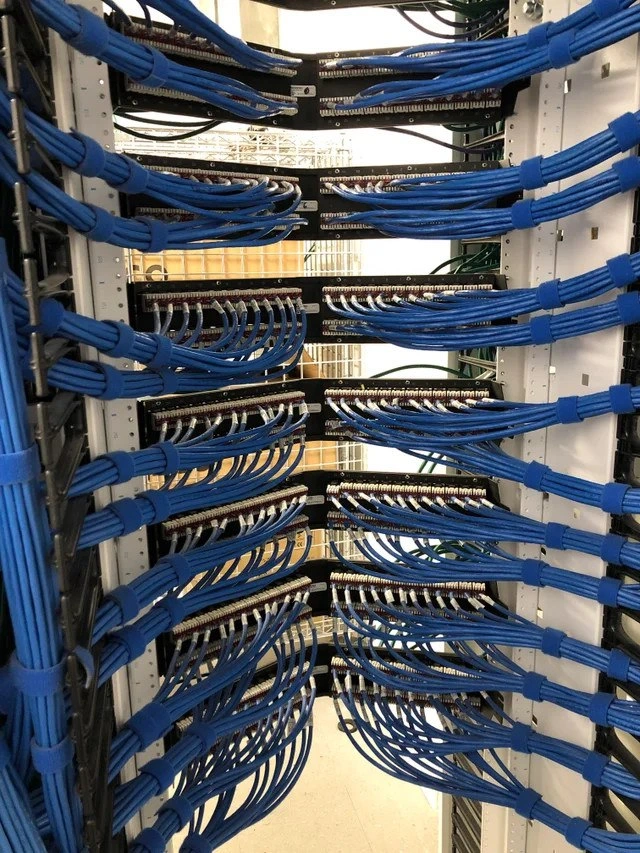
At this level, let’s break down what we’re seeing and why it’s a big deal for IT folks. This photo is of a network rack (a tall metal frame/cabinet that holds servers, switches, and other networking gear) filled with rows of neatly arranged cables. These purple cables are most likely Ethernet cables (specifically Cat6 or a similar category), which are used to connect computers and servers to the network. In a data center or server room (think of it as a big room full of computers that power websites and services), you often have hundreds of cables interconnecting everything. Cable management is the practice of organizing all those cords so they run side by side in an orderly way instead of becoming a tangled mess. Good cable management makes it easier to work on the equipment and prevents problems that can happen with messy cables (like unplugging the wrong cord by mistake, or blocking the cooling fans).
Key to this setup is the use of a patch panel – those are the horizontal rows of ports you see in the middle of the rack. A patch panel is like a hub or junction: cables from various devices (or from other rooms) plug into the front of the panel, and another set of cables runs from the back of the panel to the network switches (which likely sit just off to the sides or behind in this cabinet). Think of a patch panel as a organizer that lets you reroute connections easily. Instead of running one very long cable from a computer directly to a switch port (which can get messy), you run a fixed cable from the back of the patch panel to the switch, then use a shorter patch cable at the front to connect the panel to each computer’s line. This way, all the connections meet at a neat panel, and you only have short, tidy jumps at the front if you need to reconfigure things. In the photo, each horizontal row of the patch panel has cables that curve inward from the sides in a tidy V shape. This means the installer grouped the cables by rows: the ones coming from the left side all bend into that row from the left, and similarly from the right. The result is a mirrored pattern – notice how for every row, cables swoop in from both left and right toward the middle. This symmetry isn’t required for function, but it looks very organized and also logically separates cables by origin (left bundle vs. right bundle).
The cables are all the same color (a violet/purple). In many setups, different colored cables might be used to label different purposes (for example, blue for regular data, yellow for management, red for critical links, etc.), but here using one uniform color gives that ultra-clean, uniform look. All the cables also appear to be cut to the exact length needed. You don’t see any loops of extra slack hanging around. Cutting cables to precise length is part of good cable management: it avoids large coils of spare cable which can tangle or block space. Running the cables along the side of the rack in vertical bundles (you can see the straight runs on the left and right edges) keeps them out of the way of equipment. Those side areas are basically like cable highways called cable ladders or vertical managers, where cables can go up and down. From there, cables enter the patch panel in neat groups, as opposed to crossing the middle of the rack chaotically.
Another important detail: the black straps holding the cables together are Velcro straps (also called hook-and-loop ties). In professional settings, Velcro is preferred over plastic zip ties for binding cables. Why? Because Velcro straps can be easily undone and redone when you need to add or remove a cable, and they don’t pinch or damage the cables. Plastic zip ties, if overly tightened, can squeeze a cable’s insulation and affect the delicate copper twists inside (which might hurt network performance), and you have to cut them to remove them (risking cutting a cable by accident). Velcro, on the other hand, is gentle and reusable. In the photo, you can see these straps are placed at regular intervals to train the cables to stay together in those smooth curves. This kind of consistency – same strap spacing, same curve radius for each bundle – is a hallmark of a careful, analytical approach to cabling. It not only looks nice, but it also means each cable likely has a similar length and path, which can be helpful for keeping signal timings uniform in high-speed networks (minor point, but it can matter for really high frequencies).
Why do IT people care so much about this? First, troubleshooting is simpler: if something goes wrong with, say, a specific connection, a well-managed rack lets you trace the cable from the server to the switch just by following the neatly bundled path. There’s no massive tangle to sort through, so you save time and avoid mistakes. Second, maintenance and upgrades are less risky: you can replace one cable or move one connection without disturbing ten other cables that happen to be knotted around it. Third, neat cables help with cooling – servers and network switches get hot and rely on fans to push air through. If you have a big clump of cables blocking the airflow or covering ventilation holes, devices can overheat. In this rack, notice how the middle is mostly open space (just the front of the patch panels) and cables are routed along the sides; this leaves plenty of room for air to flow front-to-back through the equipment. And let’s not forget the psychological factor: working on a tidy rack is just less stressful. It gives a sense of order and control. A messy rack (often jokingly called a “rat’s nest” or spaghetti cabling) is frustrating – it’s hard to tell what’s what, you worry that any change will break something else, and it just looks overwhelming. Many junior techs first encountering a live data center are shocked at how cables can either be beautifully managed or, if not, how quickly chaos takes over. So this meme is basically showing the gold standard that everyone talks about in Infrastructure best practices. It’s the neat, ideal scenario that you might see in textbooks or vendor showcase rooms. Seeing it in the wild is both impressive and a little amusing, because it requires someone really dedicated (and maybe spending extra hours) to keep it that perfect.
In summary, what you see is a beautifully organized network rack where every Ethernet cable is carefully routed and secured. It demonstrates how NetworkEngineering isn’t just about configuring routers and switches in software – it’s also about the physical art of connecting everything together. This level of organization makes the system more reliable and easier to manage. It’s the kind of thing that can make a systems administrator stand back and literally clap their hands in joy. The meme celebrates that feeling, showing that even something as mundane as cabling can be a source of pride and humor in the IT world. After all, not all SysadminLife lessons are about code or config files – some are about keeping your closet clean so you can actually find your socks… or in this case, find your servers’ connections! 😃
Level 3: Velcro Virtuosity
In the realm of Networking and data center Infrastructure, a rack wired like this is the stuff of legend. We're looking at a server cabinet where CableManagement has been elevated to an art form. Each violet Cat6 Ethernet cable is meticulously routed with military precision, sweeping into the patch_panel in mirror-image symmetry. The bundles form elegant V-shapes down the rack, as if a network engineer planned out a geometric design before plugging anything in. Black hook-and-loop Velcro straps cinch the cables at perfect intervals, keeping every run neatly aligned. This isn't just tidy for tidy’s sake – it's textbook NetworkInfrastructureDesign discipline. In fact, this kind of structured cabling is often outlined in professional standards and manuals. By keeping cables organized in defined pathways (like vertical side rails and horizontal raceways), you reduce tangles and even aid airflow through the rack. Hardware like switches and servers stay cooler when bundles aren't blocking the fans, which boosts reliability. Seasoned SystemsAdministration pros will tell you that good cable management prevents a lot of headaches: it means troubleshooting a connectivity issue is as simple as following a single neat cable from end to end, instead of digging through a rat’s nest and praying you pulled the right one.
The humor (and satisfaction) in this meme comes from the contrast to real-world IT chaos. Every sysadmin has horror stories of opening a network cabinet only to find an explosion of tangled wires – the dreaded “spaghetti cabling” or rats nest that accumulated after years of quick fixes. In those scenarios, tracing one cable can feel like solving a maze, and accidentally yanking the wrong cord is a constant fear. Here, by contrast, we have the holy grail: a rack so neat and orderly that it’s practically a shrine to InfrastructureManagement. It’s funny because it’s absurdly perfect – almost no one has the time (or patience) to achieve this level of symmetry in a busy production environment. When you do encounter it, it’s usually the result of a passionate NetworkEngineering wizard who probably spent an entire weekend re-cabling for the sheer pride of it. (Yes, this is what SysadminLife humor looks like – being in awe of tidy cables!) As the meme title jokes, “cable management is treated as fine art” here. The uniform color and geometry make it look like a modern art sculpture – one that also happens to carry Gigabit Ethernet. SysadminHumor often finds comedy in pain points or exaggerations, and this image hits a sweet spot: it’s both an aspirational goal and a gentle parody of those of us who get a little OCD about wiring.
On a more serious technical note, this level of organization has concrete benefits beyond aesthetics. Notice the generous bend radius on those loops – none of the cables are kinked or strained. This matters because Ethernet cables (especially cat6_wiring for high speeds) maintain signal integrity when you respect their minimum bend radius. Over-cinching with zip ties or sharp bends can degrade performance by altering the twist of the pairs or introducing interference (crosstalk). That’s why you see velcro_straps instead of plastic zip ties: velcro can be snug without crushing the cable, and it’s reusable, so you can add or remove cables later without clipping anything. The cables are also likely cut to exact lengths, which is why the bundles swoop so uniformly – excess slack isn’t spilling out all over. A well-planned cable_loom like this keeps related connections together; for example, all cables going to the same patch panel row travel the same path, making it obvious which bundle to look at for a specific port. Even without visible labels in the photo, a seasoned admin could guess that each row or color grouping has a purpose. The result is physical_layer perfection: easier maintenance, safer hardware changes, and fewer accidental disconnects. If a server needs replacing, you can identify and move its network cable in seconds – no trial-and-error amidst chaos.
Finally, there’s the pride factor. This meme resonates because many in IT have a almost parental pride when their server room is immaculate. A rack like this is something you’d show off to colleagues, maybe even post on forums (there’s a whole subculture that shares “cable porn” images just like this, showing off rack_cable_aesthetics). It’s both humorous and heartwarming that we engineers can find beauty in Hardware and cables. In a world where much of our work is abstract software, the tangible satisfaction of a network_rack so orderly you could trace any cable path with your finger is truly gratifying. As one commenter quipped, “This rack sparks joy.” 😄
To put the significance into perspective, here’s a lighthearted comparison between a setup like this and the more... "organic" style of cabling we've all seen before:
| Neatly Managed Rack 🏅 | “Spaghetti” Mess Rack 🙈 |
|---|---|
| Cables aligned in tidy, symmetric bundles. | Cables snarled and tangled in every direction. |
| Easy to trace any wire end-to-end quickly. | Hard to even tell which cable goes where. |
| Good airflow; nothing blocking the fans. | Bundles clog up vents and trap heat/dust. |
| Uses gentle Velcro ties (no cable damage). | Often uses tight zip ties or no ties at all. |
| Looks like an art piece; sparks joy. | Looks like a plate of spaghetti; sparks panic. |
Description
A close-up photograph of a server rack showcasing meticulous cable management. Hundreds of purple ethernet cables are arranged in perfect, symmetrical bundles, secured with black velcro straps. The cables flow from the sides of the rack towards the center, creating a visually stunning pattern that resembles wings or a complex organic structure. The precision and cleanliness of the wiring are exceptional, a hallmark of professional data center work. This type of image is often referred to as 'cable porn' within the IT community, celebrated for the satisfaction it brings to engineers who value order and craftsmanship in their work. It's a testament to the discipline required for building and maintaining scalable and serviceable infrastructure
Comments
7Comment deleted
This isn't just cable management; it's a disaster recovery plan. If the service goes down, you can just stare at this until you feel calm enough to read the alerts
Our cabling linter enforces zero cyclomatic complexity and fails the build if a single Cat6 breaks symmetry - shame we can’t run it on the microservices graph
This is the cable management equivalent of writing documentation: everyone agrees it should look this good, but we all know it'll be spaghetti within six months when someone needs to trace a single connection at 3 AM
When your network engineer has OCD and a background in textile design - this is what happens when someone takes 'clean architecture' a bit too literally. Meanwhile, somewhere in this rack, there's one cable 2mm out of alignment keeping the engineer awake at night. The real question: did they document which purple cable goes where, or is troubleshooting going to be a game of 'follow the perfectly-routed strand through 47 identical bundles'?
Cable tracing complexity here hits O(n!) - factorial worse than naive recursive fib, no wonder outages cascade
Layer 1 is linearizable, purple, and perfect; once those cables touch DNS and Kubernetes, consistency becomes a best-effort - just like our roadmap
This rack is the only monolith ops still worship, because adding one port turns O(1) patching into O(n) re-lacing and a week of CAB rituals