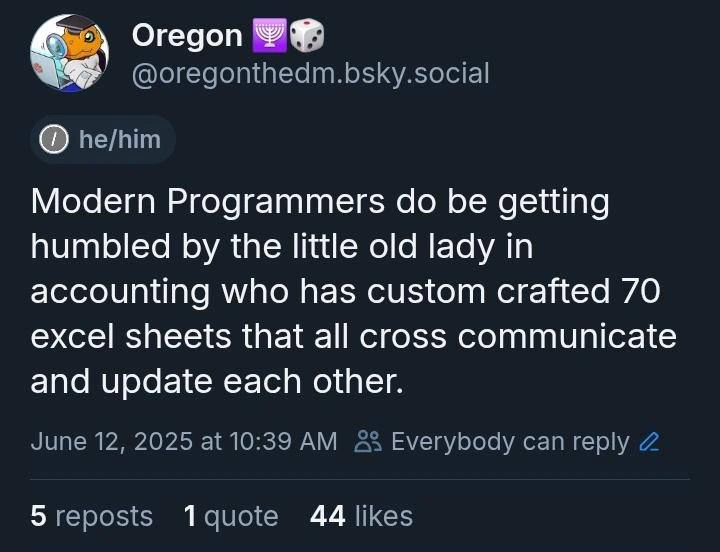
Humbled by the Unofficial Excel-Based Microservice Architecture
Why is this CorporateCulture meme funny?
Level 1: Grandma Outsmarts the Pros
Imagine a group of young chefs armed with the latest high-tech kitchen gadgets, trying to prepare a huge feast. They have fancy blenders, digital timers, and specialized machines for every task. Meanwhile, there’s a grandma in the corner of the kitchen with a simple old cookbook and a single large pot. The young chefs are busy coordinating between all their devices (which sometimes don’t sync up or one gadget breaks), but Grandma just smiles, mixes all the right ingredients in her one trusty pot, and creates a perfect meal. In the end, her dinner tastes amazing and is ready on time, while the pros with their shiny tools are still scrambling to get things working together.
The meme is just like that story. The grandma represents the “little old lady in accounting” and her cookbook is like her big collection of Excel sheets. The young chefs represent modern programmers with their “microservices” – all those fancy tools and separate pieces they have to manage. We find it funny because you’d expect the high-tech approach to win, but Grandma’s old-school single pot method ends up doing the job better (or at least more easily) in that scenario. It’s a playful reminder: sometimes the simplest, old-fashioned solution can surprise all the experts and save the day, leaving the high-tech folks both impressed and a bit embarrassed.
Level 2: Spreadsheet Magic 101
Let’s break down what’s going on in this meme in simpler terms. It’s comparing two ways to solve problems: using modern programming techniques (microservices) versus using Excel spreadsheets (the way our accounting lady did).
First, what are microservices? In software, instead of having one big program do everything (which we’d call a monolith), many companies now use microservices – lots of smaller programs each handling a specific task. For example, an online store might have one service just for handling payments, another for inventory, another for user accounts, etc. These microservices talk to each other through APIs (kind of like digital phone calls where they request and send data). This approach can make systems easier to scale and maintain in theory, because each piece is separate. It’s a very modern style of architecture, and engineers are proud of it because it uses the latest frameworks, CI/CD pipelines (automated testing and deployment), and often strong typing (so everything is checked for correct data types before it runs). “Shiny” microservices basically means fancy new tech that everyone is hyping up.
Now, on the other side, we have the Excel sheet monolith. Excel is a program most often used by non-programmers to handle data and calculations. Think of an Excel spreadsheet as a big table (with rows and columns); you can type numbers or text in the cells, and you can also write formulas in cells that automatically calculate things. For example, if you have numbers in a column, you can put a formula =SUM(A1:A10) to add them up. Excel is super popular in business, especially in accounting and finance, because you can do a lot without writing traditional code – you just use formulas and built-in functions. People often make multiple sheets in one workbook to organize data, and you can even link one sheet to another (so one sheet might pull data from another sheet’s cell).
What the meme describes is a lady in accounting who has 70 Excel spreadsheets that all cross-communicate and update each other. That sounds extreme, but it really happens! This could mean she has 70 separate Excel files or maybe one file with 70 tabs (worksheets). Either way, it’s a ton of interlinked data. For instance, she might have one spreadsheet for “Sales for each region”, another for “Inventory”, another for “Budget Calculations”, etc., and they all look up information from each other. Excel allows a cell in one file to reference a cell in another file. A formula might look like:
=VLOOKUP($A2, '[Inventory.xlsx]Sheet1'!$A:$F, 4, FALSE)
That scary-looking formula is using VLOOKUP, a classic Excel function, to find something in the Inventory spreadsheet. Essentially, it’s like saying “go to the Inventory file, look up this item, and bring me its quantity”. So, one spreadsheet can fetch data from another with formulas like that.
If she truly has 70 of these linked up, she has basically built an entire system using Excel. There might be a central summary sheet that pulls in numbers from many other sheets. Some Excel gurus also use macros (small programs written in Excel’s own scripting language, often Visual Basic) to automate things, like “press this button to update all sheets”. It’s both impressive and a bit scary, because it’s all custom-made without the usual safeguards software engineers use. There’s no formal testing or code review for her spreadsheets – she just trusts her process and double-checks the results manually. This kind of setup is often called “Excel hell” or a spreadsheet monolith because it can become a nightmare to tweak or understand for anyone except the person who made it.
Now, why would modern programmers be humbled by this? Imagine you’re a new developer in a company. You’ve learned about clean code, proper databases, microservices... then you arrive and find out the finance department is actually running critical workflows on this massive Excel solution. At first you might think, “Oh, I can rewrite this as a proper application in a database with a nice UI.” But then you start digging and realize it’s not so easy. The Excel system has evolved over, say, 10 years. Every time someone needed a new report or calculation, they added another sheet or file. There are hidden dependencies everywhere. If you change one formula, five other places might break and show #REF! or #DIV/0! errors (Excel’s way of saying something went wrong in the formula). It’s the equivalent of a giant jenga tower of data – pull out the wrong piece and the whole thing might collapse.
So, developers gain a newfound respect (and fear) for these kinds of solutions. They realize that this little old lady in accounting basically programmed something, even if she didn’t use a traditional programming language. We often call this kind of thing Shadow IT: when people in departments like accounting or marketing create their own tech solutions without involving the official IT department. It happens because those folks have immediate problems to solve and can’t wait for the IT team (which might be busy or take months to deliver a software update). Excel is one of the most common shadow IT tools because it’s readily available and powerful for data tasks.
The humor in the post comes from the image of a “little old lady in accounting” outdoing “modern programmers”. It’s a bit like saying: while the young techies are busy setting up their complex microservice architecture (which can take a lot of time and knowledge), the elderly accountant already built something that does the job using a tool everyone thought was simple. LegacySystemsAndModernization is a tag hinting that this Excel structure is a legacy system – it’s been around and now the challenge is how (or whether) to modernize it. The technical debt here is high: that means the solution works, but it will be hard to maintain or change without a lot of effort or risk. The company might depend on it, yet it’s not in a “clean” state for future development.
For a junior developer, the big takeaway is: don’t underestimate Excel or the people who use it expertly. It may not be “real code” in the traditional sense, but it can solve real problems – sometimes too well, to the point everyone becomes dependent on it. And when something like that works, it tends to stick around. If you ever try to replace it with a proper software project, be prepared for a tough journey understanding everything it does. Many new devs have been surprised that their first task on the job was not building a new app from scratch, but translating or interfacing with an Excel sheet that the business runs on. It’s a crucial and eye-opening experience – you learn that in corporate tech, fancy tools aren’t always the heroes; sometimes an old spreadsheet is the quiet backbone of the company. That’s why this meme is both funny and a little painful: it’s funny because it’s true, and painful because every developer knows it’s a hard problem to fix!
Level 3: Shadow IT Showdown
This meme strikes a chord with any seasoned developer who’s witnessed Shadow IT in action. It paints the familiar picture of a scrappy legacy system lurking in the enterprise: an ungodly web of Excel spreadsheets crafted by a business user (the “little old lady in accounting”) that runs circles around the company’s official, shiny tech stack. The humor comes from role reversal — the hotshot developers, fluent in CI/CD pipelines, container orchestration, and strongly-typed APIs, are getting humbled by a solution built in plain old Excel. It’s a classic CorporateCulture tale: while the engineering teams prattle on about microservice architectures, the real mission-critical logic might be sitting in an .xlsx file on someone’s desktop.
Why is this funny? Because it’s true in so many organizations. Businesses often have these “Excel monsters” that started as a simple report or a quick calculation and, over the years, ballooned into a full-blown Frankenstack. We’re talking dozens of interlinked workbooks, each one packed with formulas like =VLOOKUP() or =INDEX(MATCH()) chaining into the next. This is the spreadsheet_monolith: one giant, entangled system made of cells and formulas instead of classes and microservices. It’s the ultimate LegacySystem – not written in Java or C#, but equally opaque and critical. And because it was created outside the formal development process, it’s also prime TechnicalDebt. No version control, no automated tests, no documentation – just a labyrinth of worksheets that “update each other” through fragile references. It’s the “spaghetti code” of the accounting world: change one cell over here, something breaks over there, and you get a cascade of #REF! errors (Excel’s version of a null pointer exception). Seasoned devs chuckle (or cringe) because they’ve been called in to fix or replace such beasts, only to realize how deeply embedded they are in daily operations.
The meme specifically contrasts Modern Programmers vs the “little old lady in accounting.” That juxtaposition is pure gold. On one side, you have developers implementing a sleek microservices architecture – dozens of small services each with its own database, communicating over the network with well-defined schemas. On the other side, you have Edna from Finance, who’s not a software engineer by title, but has effectively built a 70-module system all by herself, using nothing but Excel’s grid and maybe some VBA macros. It’s relatableDeveloperExperience to see those devs realize that Edna’s system, however kludgy, actually works and is delivering value every day. In fact, it’s probably been working for years before IT even noticed. This is a shadow_it_accounting classic: a solution developed in a business unit to solve immediate problems, without waiting for the official IT project (which might be years late or over-engineered). By the time IT says “we should build a proper app for this”, the end-users have moved on, and that Excel has quietly become the backbone of their workflow. The corporate humor lies in how common this is – the “little old lady” or any power user becomes the unsung software hero (or villain, when it breaks).
From a senior developer perspective, the meme highlights a few sobering realities:
- ExcelSpreadsheets are ubiquitous: You can roll out the fanciest cloud platform, but users will still export to Excel to “do a quick analysis.” That quick analysis grows and grows... and suddenly Excel is the real source of truth.
- Monolith vs Microservices trade-offs: We preach that splitting systems into microservices yields agility and scalability. Yet here, a big monolithic Excel workbook can be more agile in practice for a single user. Need a change? Just open the sheet and tweak the formula – no deployment pipeline, no code review. It’s the Wild West of “continuous production editing,” and for small-scale data, it works fast. The developers with their microservices sometimes can’t keep up with the speed of business changes that a spreadsheet allows.
- TechDebt and Bus Factor: The term vlookup_bus (a cheeky nod to the “bus factor”) is spot on – if our Excel guru (Edna) gets hit by the proverbial bus or retires, the company is in big trouble. All that knowledge is in her head and embedded in those sheets. That risk is huge, just like any large legacy system owned by a single programmer. The difference? Management often underestimates the complexity of an Excel system. To them, it’s just a “document” or a “report”, not 10,000 lines of unversioned code hiding in plain sight. The meme’s humor is partly from developers recognizing that disconnect: “They have no idea that little old lady basically wrote a 100k LOC application in Excel.”
- Enterprise Reality vs Purity: Best practices say “don’t use Excel as a database or integration tool,” yet here we are. The little old lady’s workbook network is effectively a database, an ETL pipeline, and a reporting engine all in one. It violates every rule of scalable design, but it aligns perfectly with the CorporateCulture of getting things done with whatever tools are on hand. There’s irony in how often the real workflow lives in Office tools while the official software sits underutilized. As a result, developers often end up writing code to interface with these Excel files (import/export scripts, automation to load CSVs, etc.), turning that monolith into a de-facto microservice anyway (an office_automation_frankenstack emerges, with parts Excel, parts Python scripts, maybe an Access database for good measure).
This shared experience generates a kind of dark camaraderie among developers. We laugh because we’ve all seen the Excel Hell scenario: the interminable Excel workbook with dozens of tabs (or separate files) that no one dares to fully rewrite. It’s too valuable and too risky to touch. In meetings, the “little old lady” (could be anyone from accounting or operations) proudly shows her color-coded mega-spreadsheet that produces the quarterly numbers. The dev team forces a smile while internally thinking “If only she let us replace this with a proper system…” But as the meme implies, it’s not so easy to outperform her creation. Often when IT does try to replace it, the first few attempts fall short because they didn’t capture all the business rules she intuitively baked into those cells over years. That’s humbling indeed – the shiny new microservices might be more elegant in code, but they initially miss the decades of edge cases handled in the spreadsheet.
In essence, the meme is poking fun at engineering hubris. We like to think our modern tools and architectures are superior, yet here’s a reminder that sometimes an old, messy solution can beat the new stuff in practice. It’s a cautionary tale for senior engineers: don’t underestimate legacy, even if it’s “just Excel.” The relatable humor comes from that pang of recognition – we’ve all had a moment where an Excel wizard schooled us with a quick spreadsheet solution, while we were still whiteboarding microservice APIs. It’s both humbling and hilarious, a reminder that at the end of the day getting the job done sometimes matters more than doing it in the trendiest way. The meme captures that with a single image of a BlueSky post, but behind those 44 likes lies an army of developers nodding furiously and tagging their colleagues: “This is so us!”
Level 4: Turing-Complete Spreadsheets
At the most theoretical end of this scenario, those 70 interlinked Excel sheets form a kind of ad-hoc dataflow system. Under Excel’s hood, each formula and cell reference creates a directed acyclic graph (DAG) of dependencies. When the little old lady in accounting updates one cell, Excel’s engine propagates changes through that graph automatically. This is essentially a reactive programming model: cells are like little pure functions, and Excel ensures all dependent cells recalc in the correct order. It’s a far cry from a slick microservice orchestration on Kubernetes, but conceptually it’s similar to a stream processing pipeline – just one built out of =SUM() and VLOOKUP instead of Kafka and JSON APIs.
In fact, modern Excel has grown so powerful that it’s effectively a domain-specific programming language. With the introduction of the LAMBDA function, Excel formulas became almost Turing-complete (yes, you can write loops/recursion via formulas now). So what our accounting wizard has done is program a 70-part monolith using a functional style: each spreadsheet (or worksheet) might represent a module in the overall logic, pulling in data from others. Cross-file links (like 'Budget2025.xlsx'!Q1!A1) serve as her “API calls”. One workbook’s table is queried by another via formulas – Excel’s equivalent of a remote procedure call. It’s synchronous and tightly coupled (no network latency, just file I/O), guaranteeing consistency as long as everything is opened together. CAP theorem isn’t exactly front-of-mind here; by keeping it all on one machine (no partitions) and usually single-user, she skews towards consistency and availability implicitly. No need for distributed consensus algorithms – her consistency model is “let Excel recalc everything while I grab coffee.”
From a software architecture perspective, this monstrosity is a single-process monolith that has organically grown features like a coral reef. Traditional microservice design prizes clear boundaries and well-defined interfaces (e.g., REST endpoints or message queues). By contrast, the Excel monolith’s “interfaces” are cell references and maybe the occasional macro calling into another workbook. It’s all implicit and in-memory. Yet, surprisingly, Excel’s recalculation engine handles dependency resolution much like a built-in orchestrator – no explicit service discovery needed, a cell reference IS the address. The entire apparatus can be seen as a giant (if fragile) state machine where the state is the cell grid and formulas are the transition functions. And because it’s built on Excel, it leverages decades of optimizations in Excel’s kernel – from efficient recomputation algorithms to caching.
One could even draw parallels to a distributed system if those spreadsheets are on shared drives or passed around: you get issues akin to eventual consistency. (Ever seen the “Workbook is locked for editing” message? That’s a primitive concurrency control!). Instead of Paxos or Raft consensus, coordination might happen via an email: “Hey, don’t update your sheet until I finish mine.” It’s laughably human-in-the-loop, but it sort of works – a manual two-phase commit protocol by way of phone call. And unlike microservices, there’s zero type safety: everything’s essentially a string or number in a cell (untyped until an error like #VALUE! blows up). Yet the system’s resilience is remarkable in its own way: Excel will recalc as best it can, propagate #REF! errors if links break, and the user will manually intervene to correct data – a feedback loop outside the code. Ironically, her ETL pipeline (Extract-Transform-Load) is just copy-pasting CSV exports into one sheet, formula-transforming them, and then linking results into summary sheets. It’s ETL without an ETL tool – but functionally the same DAG of transformations a data engineer might build with Spark jobs. The difference? This one’s maintained by a lone accountant with a mastery of hidden macro magic and way too many color-coded cells.
In summary, the “Excel sheet monolith” embodies a grassroots software architecture. It’s unorthodox, but under analysis it implements many concepts computer scientists recognize: functional reactive programming (cells reacting to input changes), an implicit global state (the workbook), and even a pseudo-module system (each sheet with a specific purpose, akin to microservices but without the network). It’s simultaneously horrifying and impressive from a theoretical standpoint. The joke, at Level 4, is that something as mundane as Excel has evolved into a computational beast that can rival a cluster of microservices in complexity – a testament to the unintended power of end-user programming tools.
Description
A screenshot of a social media post from the platform Bluesky, presented in a dark mode interface. The post is by a user named 'Oregon' (@oregonthedm.bsky.social). The main text of the post reads: 'Modern Programmers do be getting humbled by the little old lady in accounting who has custom crafted 70 excel sheets that all cross communicate and update each other.' Below the text, the post shows a timestamp of 'June 12, 2025 at 10:39 AM' and engagement metrics of 5 reposts, 1 quote, and 44 likes. The meme resonates with developers who have encountered surprisingly complex, mission-critical systems built by non-programmers using tools like Excel. These 'shadow IT' systems, while often fragile and undocumented, represent a form of powerful, user-driven automation that can rival bespoke software in complexity, humbling engineers who might underestimate the ingenuity of their business counterparts

Comments
15Comment deleted
We build resilient, scalable systems with 99.99% uptime, but the entire company's financials are one circular reference away from oblivion in 'Copy of Final_final_v3_USE_THIS_ONE.xlsm'
Her 12-megabyte cocktail of VLOOKUPs and circular references has stricter SLAs than your whole Kubernetes cluster
That moment when you realize the accounting department's 70-sheet Excel monstrosity with circular references, VBA macros, and hidden pivot tables has better uptime than your microservices architecture - and Karen from accounting can debug it faster than you can trace a distributed transaction
That accounting spreadsheet is basically a distributed system with eventual consistency, circular reference resolution as the consensus algorithm, and VLOOKUP as the query language - except it has better uptime than your microservices and she's the only one who understands the 'documentation' (which is color-coded cells and cryptic comments from 2003)
Her Excel empire: VLOOKUP microservices with circular refs for that sweet eventual inconsistency
It’s a fully distributed system: service discovery is the shared drive, RPC is VLOOKUP, and F9 is the consensus algorithm - somehow still more reliable than our microservices
Her 70‑sheet fabric nails CAP: consistency after she hits F9, availability until Outlook crashes, and partition tolerance courtesy of the shared drive - a service mesh with a bus factor of one
💝 Comment deleted
Been there a couple times lol Comment deleted
But can she launch doom in excel? Comment deleted
Yes. Because bureaucracy is - considered by many - instance of doom Comment deleted
Facts Comment deleted
If she puts her mind to it, yes. https://www.youtube.com/watch?v=J2qU7t6Jmfw Comment deleted
No way Comment deleted
In my former company (a VR and esports center), we routinely created franchise packages for investors. Each required a full business plan: CAPEX, OPEX, revenue projections, and ROI calculations. Most teams would draft this manually—painstaking, inconsistent, error-prone. I built a Google Sheets workbook that automated the entire pipeline: - Parametrized service catalog with operator count, wages, pricing, and environment-based demand multipliers (e.g. mall vs roadside) - Location-sensitive revenue models using scenario matrices - Inflation-adjusted cost outputs using a multiper that acts on all prices - at the end my sheet could export data as CSV to be used in illustrator. Then I made a data import script in Illustrator (via JavaScript) to auto-generate styled A4 PDFs—presentation-ready with zero design time. 2 days of work collapsed into 2 hours, with consistent outputs across all branches and reduced human error. It wasn’t glamorous code—but it was scalable tooling, and it worked. Sometimes you don't need a full-stack app or a cloud deployment. Just well-structured sheets. Comment deleted