Skip to content
DevMeme
5844 of 7435
Excel as a Main Programming Language: A Horror Story
Interviews Post #6401, on Nov 20, 2024 in TG

Excel as a Main Programming Language: A Horror Story

Why is this Interviews meme funny?

Level 1: A Surprise Solution

Imagine you’re in a class and the teacher says, “You can solve this problem in any way you like.” Everyone else starts writing normal answers with pencil and paper, but one clever kid decides to use a spreadsheet – those grid tables on the computer used for calculations – to solve the math puzzle. It’s as if the teacher expected an essay, and the kid answered with a giant calculator table showing the work. It’s a very unconventional solution. At first, the teacher almost laughs, thinking the kid is joking. But then the kid actually does it – they solve the problem using that big table of numbers and formulas, and it works! The whole situation is funny and surprising because nobody thought “solving a problem” meant doing it that way. It’s like asking someone to tell a story in any language, and they choose to do it in Morse code or emojis – technically allowed, but totally unexpected. In the end, the solution is correct, but the method is so unusual that it makes everyone smile in disbelief. This meme is capturing that feeling: someone took the instruction “any way you want” very literally and came up with a wild, creative way to solve the task – using Excel – and it caught everyone off guard, in a hilarious way.

Level 2: Spreadsheet Coding 101

Let’s break down what’s happening in simpler terms. In a typical coding interview, an interviewer gives a problem and asks the candidate to solve it by writing code. They usually let the candidate choose any programming language they are comfortable with (common choices are languages like Python, Java, or JavaScript). In this case, the interviewer said “any language of your choice,” expecting the candidate to use one of those normal coding languages. But the candidate surprised them by choosing Microsoft Excel – yes, the spreadsheet program – as their “language.” This is highly unusual! Excel is generally used for making tables of data, doing calculations, and creating charts, not for writing full-blown algorithms in an interview setting. That’s why the interviewer “almost let loose a chuckle”; he thought it was a joke at first.

However, Excel isn’t as innocent as it looks. Under the hood, Excel has its own formula language, which you write in the cells. If you’ve ever seen someone do =SUM(A1:A10) in a cell to add up numbers, that’s a tiny piece of code. Excel formulas can be quite powerful. They have functions for logic like IF (which works like an if-else in traditional code), lookups like VLOOKUP/XLOOKUP (to retrieve data from other parts of your sheet, almost like querying a database), and math/statistical functions (SUMIFS, averages, etc.). Advanced Excel users (think financial analysts or engineers) sometimes build very complex models with these formulas – essentially mini-programs that update automatically when you change inputs. So what the candidate did here is sometimes called “spreadsheet programming”: using Excel formulas to implement logic. It’s definitely a nontraditional programming approach. In fact, it’s so nontraditional that most people forget it’s even programming at all! That’s why this scenario is both funny and impressive.

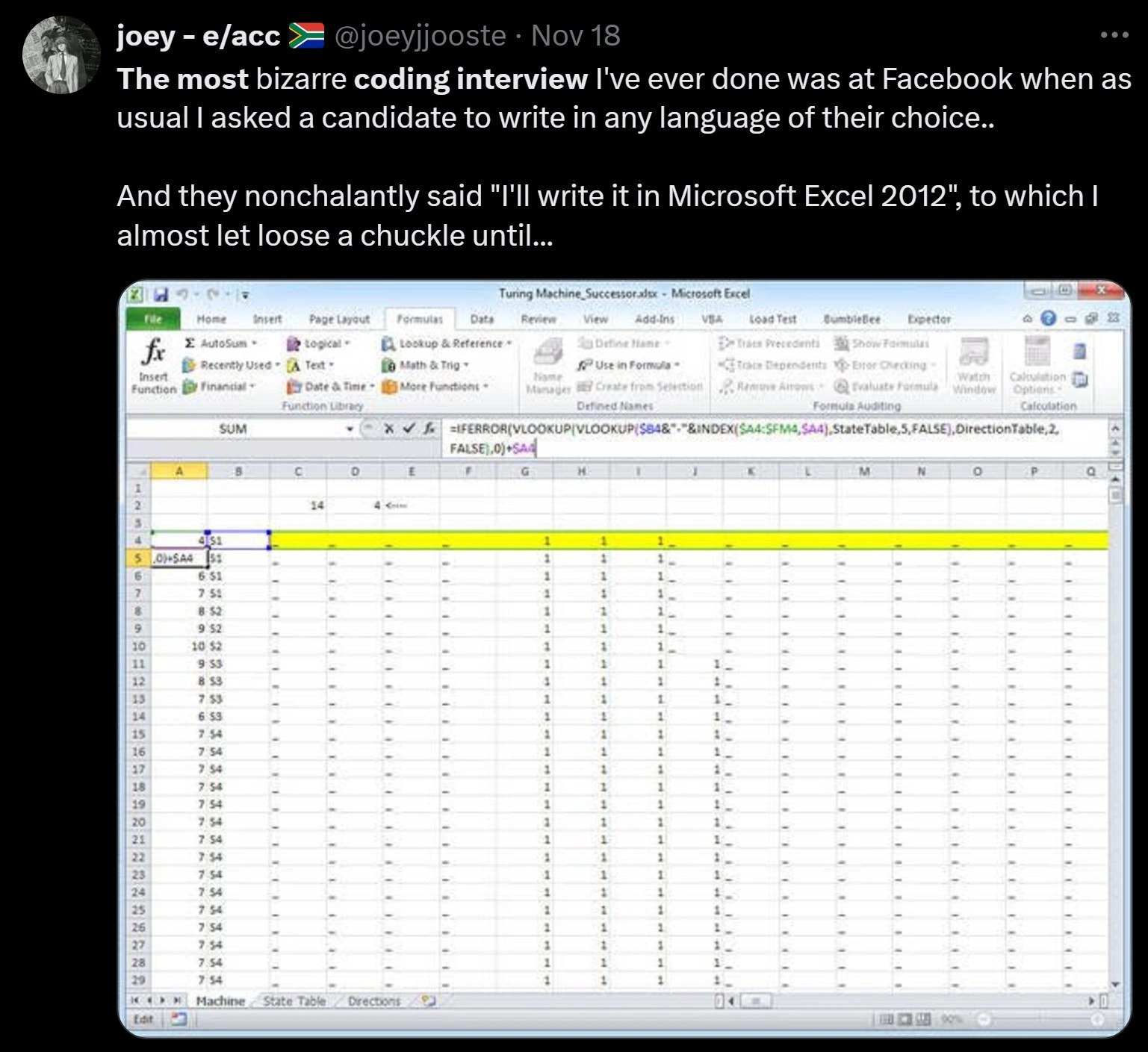
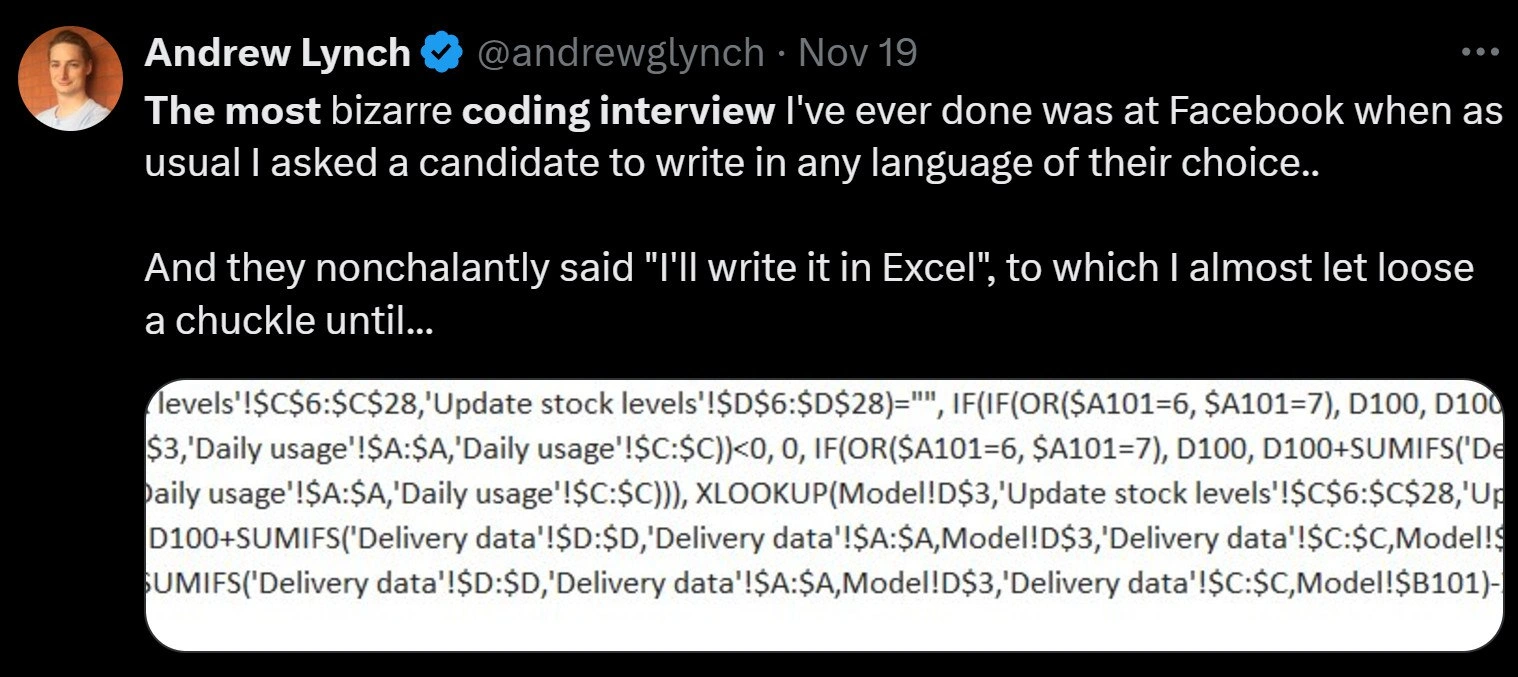
In the meme’s image, we see a glimpse of the actual Excel formula the candidate wrote. It’s huge and nested, which means they put an IF inside another IF, and so on, like a set of Russian dolls. Parts of it include things like IF(OR($A101=6,$A101=7), D100, D100+SUMIFS(...)). Let’s decode that a bit: OR($A101=6,$A101=7) checks if cell $A$101 equals 6 or 7 (maybe representing a weekend day as a number, like Saturday=6, Sunday=7). So that IF is saying, “if it’s the weekend, then do one thing, otherwise do another.” The D100 refers to the value in the cell above (same column, previous row). So likely, if it’s a weekend, they keep the value the same (D100 meaning no change from the previous day’s stock), and if it’s a weekday, they do D100 + SUMIFS(...) – probably adding the daily usage or deliveries. The formula uses SUMIFS('Daily usage'!$A:$A, 'Daily usage'!$C:$C, ...) which is summing up some data from a sheet named "Daily usage" based on certain criteria (SUMIFS can filter and sum data, maybe summing the usage for that day). There’s also an XLOOKUP(Model!D$3, 'Update stock levels'!$C$6:$C$28, 'Update stock levels'!$D$6:$D$28) part, which likely pulls an initial stock value or something from another sheet (XLOOKUP is like a more powerful VLOOKUP to find a match in one column and get the corresponding value from another). In short, the candidate’s formula is doing a multi-step calculation: it looks up initial values, iterates day by day adjusting stock levels, and uses conditions to handle special cases (like weekends or not dropping below zero stock). They managed to cram the entire solution into one long formula bar. It’s as if they wrote a whole program, but instead of writing it in a normal text editor, they wrote it in one cell of a spreadsheet.

For a junior developer or someone new to this, the key takeaway is: Excel formulas are a kind of programming, just visually laid out in cells. A formula can take inputs (from other cells), do computations (using functions and arithmetic), and produce an output in its own cell. When the interviewer said “any language,” the expectation was a typical coding language. The candidate’s response of “Excel” was unexpected because we don’t usually think of a spreadsheet as a programming language choice in a coding interview. It’s a bit like if you were asked to draw a picture using any tool and you chose a calculator – you might technically make it work (like plotting points), but it’s not the normal way to do it.

To put it in perspective, imagine a simpler example of Excel formula vs. code. If we want to check a number and output “Pass” or “Fail”, in Excel you might put in a cell: =IF(A1 >= 50, "Pass", "Fail"). That formula reads the value in cell A1 and returns "Pass" if it’s 50 or more, otherwise "Fail". In a Python-like pseudocode, the same logic would be:

if score >= 50:
    result = "Pass"
else:
    result = "Fail"

Both do the same thing – one in Excel’s way, one in a standard programming way. The candidate in this story just did something on a much larger scale, using many such formulas and Excel-specific functions to solve a presumably complex problem. It’s an example of a nontraditional programming language choice. The humor is partly because Excel is usually associated with accountants and simple calculations, yet here it was used to tackle a coding challenge at a big tech company. The interviewer had to adapt: he offered "any language," and got a spreadsheet in return! This story became popular in developer circles (hence the tweet and the meme) because it’s a perfect crossover of corporate tech culture and programmer humor. People are laughing, but also kind of nodding, thinking, "I guess we did say any language… and Excel does have formulas… Touché." It showcases the importance of thinking outside the box, and also the need to be precise in what you ask for during interviews. After all, Excel formulas aren’t something you’d find on a list of approved languages for coding challenges, but here we are talking about excel_formula_programming as a real thing!

Level 3: When Any Language Means Any

For seasoned developers and interviewers, this story hits on the absurdities and loopholes in the technical interview process. Typically, when an interviewer says "use any programming language you like," they mean any conventional programming language (Python, Java, C++, JavaScript, etc.). It’s an invitation to choose a familiar tool so the candidate can focus on problem-solving rather than syntax. But here, a clever (or mischievous) candidate pushed that offer to the extreme. They responded with "I'll write it in Excel," a choice so unorthodox that the interviewer nearly laughed, thinking it was a joke. We can imagine the scene: the interviewer is ready for some Python or Java on the whiteboard, and instead the candidate opens up a spreadsheet or stares down an imaginary grid, intending to solve the problem with cells and formulas. This is the bizarre coding interview scenario the meme flags, and it’s dripping with InterviewHumor.

Why is this funny to developers? Because it subverts expectations in a space that’s usually very regimented. A coding interview at a major tech company (this was at Facebook, allegedly) is a serious affair with unwritten rules. Both interviewer and candidate usually stick to a playbook of well-known languages and structured pseudocode. Excel is definitely not on the usual menu. It’s the equivalent of showing up to a sword fight with a rubber chicken – technically you said “any weapon,” and hey, a rubber chicken is a weapon in some zany interpretation. The immediate reaction is a mix of surprise and incredulity: Are they for real? The interviewer’s almost-chuckle ("I almost let loose a chuckle until...") suggests he realized the candidate was dead serious and actually capable of formulating a solution in Excel. That’s both hilarious and oddly impressive. It turns an otherwise routine algorithm challenge into a spectacle of creativity.

From an experienced developer’s perspective, there’s also a nugget of respect here. Many of us have encountered the power user or domain expert who crafts massive, mission-critical solutions in Excel or other unexpected tools. (Entire corporate processes sometimes run on gargantuan Excel sheets with labyrinthine formulas or on Access databases held together by hope.) We chuckle because we know an Excel wizard can do mind-bending things with pivot tables and VLOOKUPs that feel like black magic. In a sense, this candidate was one of those wizards, treating a coding challenge like a spreadsheet coding problem. They effectively said, “Why not solve it with the tool I know best?” It’s unorthodox, but it demonstrates problem-solving and deep knowledge of an oft-underestimated technology.

There’s a layer of industry satire here too. Big tech companies pride themselves on letting candidates choose any language – it sounds flexible and inclusive. Yet, in practice, interviewers expect a programming language, not something like Excel. This story pokes fun at that policy. It’s a bit of a gotcha: you said any language! – and Excel does have a formula language, so technically the candidate isn’t wrong. For senior engineers, it raises questions: How would you even judge a spreadsheet solution in real-time? (Do you break out Excel on a laptop in the interview room? Do you transpose the logic to normal code to verify it?) It highlights how DeveloperExperience_DX in interviews can go off-script in comical ways.

We also see humor in the sheer complexity of the solution. The screenshot shows a formula bar crammed with a monster expression, referencing multiple sheets ('Daily usage', 'Delivery data', 'Update stock levels') and using functions like SUMIFS and XLOOKUP. This is clearly not a trivial “sum two numbers” Excel usage; it’s a full-blown algorithm. The candidate essentially wrote what looks like a supply chain or inventory update algorithm in one cell formula. That’s both insane and brilliant. Experienced devs laugh because it’s reminiscent of those times someone crams too much logic into a single line of code – the infamous one-liners that work but are a nightmare to read. Here it’s that taken to the next level: one-cell to rule them all. It’s also funny because Excel formulas lack the usual readability and structure we strive for in code. If a colleague handed you a single 300-character cell formula as “the solution,” you might cry. It’s a maintenance nightmare. But in an interview, where the code doesn’t have to be maintained, why not go wild? It’s a one-shot stunt.

In the developer community, there’s an almost legendary status to finding out-of-the-box solutions like this. It’s akin to those stories of candidates writing quine programs on the whiteboard or solving a problem entirely in SQL or even in Morse code – moves that are technically valid but completely unexpected. As a senior dev, you appreciate the chutzpah. Perhaps you’d never recommend managing production logic in Excel formulas (please, no), but you can’t deny the candidate’s creativity and confidence here. This meme gets a nod and a laugh because it underscores a truth: sometimes the difference between a coding horror and a stroke of genius is context. In a production codebase, an Excel formula doing heavy logic would be horrifying. In a job interview setting, it’s comedic gold and maybe even a little genius. The candidate both obeyed and subverted the rules in one move. And every experienced dev knows that one guy or gal who always has to do things a bit differently – this meme is a shoutout to those mavericks.

Level 4: Turing-Complete Tables

At the most theoretical level, this meme touches on the computability and expressiveness of what many consider a mere office tool. Spreadsheets like Excel form a functional dataflow programming system: each cell is essentially a function of other cells, recalculated whenever inputs change. In computational theory, a system that can perform conditional logic (like Excel’s IF statements) and simulate iteration or recursion can achieve Turing-completeness – the ability to compute anything that a Turing machine could, given enough time and memory. Remarkably, Excel formulas (especially augmented with features like iterative calculations or clever cell references) have been shown to be Turing complete. This means that, in theory, an Excel sheet can implement arbitrarily complex algorithms, just as a Python or C++ program can. Of course, actually doing so is convoluted – akin to building a working computer out of dominoes – but it’s possible in principle.

In the tweet’s screenshot, the candidate’s gigantic nested formula is essentially a single-cell program. It uses Excel’s built-in functions (IF, OR, SUMIFS, XLOOKUP, etc.) to express logic that would normally span many lines of code. Notice how IF(OR($A101=6,$A101=7), D100, D100+SUMIFS(...)) mimics an if/else branch: it checks a condition (is $A101 equal to 6 or 7, perhaps representing weekend days) and produces one result if true (just carry forward the previous value D100) or another if false (update D100 by adding some daily usage via SUMIFS). By copying this formula down a column, the spreadsheet achieves an iterative process: each row’s output D101 becomes the next row’s input D100, effectively creating a loop across the rows of the sheet. This is the essence of how a loop or state carry is done in a functional spreadsheet world – each row is like an iteration. The formula even uses XLOOKUP to fetch data from other sheets (like 'Update stock levels' or 'Delivery data'), similar to how a program queries a database or data structure. The whole thing reads like tangled Lisp or a deeply nested ternary expression – a testament to how spreadsheet formulas constitute a real programming language, just one organized in cells and ranges instead of linear text.

From a programming language theory perspective, Excel’s formula language is a domain-specific, declarative language. It has no explicit loops or mutable variables in the traditional sense; instead, it relies on a dependency graph of cells. Under the hood, Excel’s recalculation engine is solving a constraint satisfaction and functional evaluation problem: it must recompute cells in the correct order when precedents change, akin to a topologically sorted execution of a directed acyclic graph of formulas. This makes spreadsheets a paradigm of reactive programming – similar to how electronic circuits propagate signals, or how reactive frameworks update a UI when data changes. Computer scientists have even studied spreadsheets as the most widely used form of end-user programming. There’s academic literature treating complex Excel sheets as programs, with efforts to bring software engineering practices (like testing, version control, and even formal verification) to spreadsheet models. It’s both amusing and profound that an interview candidate leveraged this hidden computational power. They essentially treated the Excel grid as their coding canvas, demonstrating that even a “business” tool can be bent into executing sophisticated logic. In summary, at this deep level, the humor has an edge of awe: Excel – often underestimated – is theoretically as powerful as many programming languages (thanks to that sneaky trait of Turing-completeness), and someone actually dared to use that fact in a high-stakes coding interview.

Description

This image is a screenshot of a tweet from user Andrew Lynch (@andrewglynch), following the popular 'bizarre coding interview' meme format. The text reads: 'The most bizarre coding interview I've ever done was at Facebook when as usual I asked a candidate to write in any language of their choice.. And they nonchalantly said "I'll write it in Excel", to which I almost let loose a chuckle until...'. The punchline is an image of an extremely long and complex Excel formula, featuring nested functions like IF, OR, SUMIFS, and XLOOKUP, and referencing multiple sheets such as 'levels', 'Daily usage', and 'Delivery data'. This meme humorously highlights the shocking complexity that can be achieved within a spreadsheet. For senior developers, it's a relatable nightmare, representing the ultimate 'wrong tool for the job' scenario. While technically impressive as a demonstration of Excel's Turing-complete capabilities, such a solution in a real-world scenario would be an unmaintainable monstrosity, symbolizing a form of technical debt from the moment of its creation
Comments

7
Anonymous ★ Top Pick The solution was accepted, but now the company's core logic is a single cell in a spreadsheet that the finance intern is terrified to touch
  1. Anonymous ★ Top Pick

    The solution was accepted, but now the company's core logic is a single cell in a spreadsheet that the finance intern is terrified to touch

  2. Anonymous

    Told the candidate they could use any language - so they opened Excel, wrapped a 12-level LET/LAMBDA around nested SUMIFS, and I realized our “cloud-native, event-driven microservice” is basically the same spreadsheet with more YAML

  3. Anonymous

    The candidate passed the interview and is now maintaining a critical production system that processes $50M in daily transactions through a VBA macro that nobody else understands or wants to touch

  4. Anonymous

    When they said 'any language,' they clearly didn't anticipate someone treating Excel as a legitimate programming environment - yet here we have a candidate who's essentially written a distributed transaction processor using SUMIFS and nested IFs. The real plot twist? This formula probably handles more production traffic than half the microservices at most startups, and unlike your Kubernetes cluster, it actually fits on one screen. The interviewer's suppressed chuckle turned into existential dread when they realized this person might actually be solving real business problems while the rest of us are bikeshedding over which functional reactive framework to adopt

  5. Anonymous

    Excel is the only "language" where your DAG is a workbook and deployment is emailing v23-final-FINAL.xlsx - yet that XLOOKUP+SUMIFS join still beats half the services in our data mesh

  6. Anonymous

    Offer “any language” in an interview and you’ll discover the enterprise’s true runtime: a reactive, globally mutable, grid-based monolith where XLOOKUP is RPC and SUMIFS the reducer - aka Excel, the only production system with no package manager, no grep, and unlimited circular dependencies

  7. Anonymous

    Excel: the language where every PM's 'quick fix' becomes your architectural nightmare

Use J and K for navigation