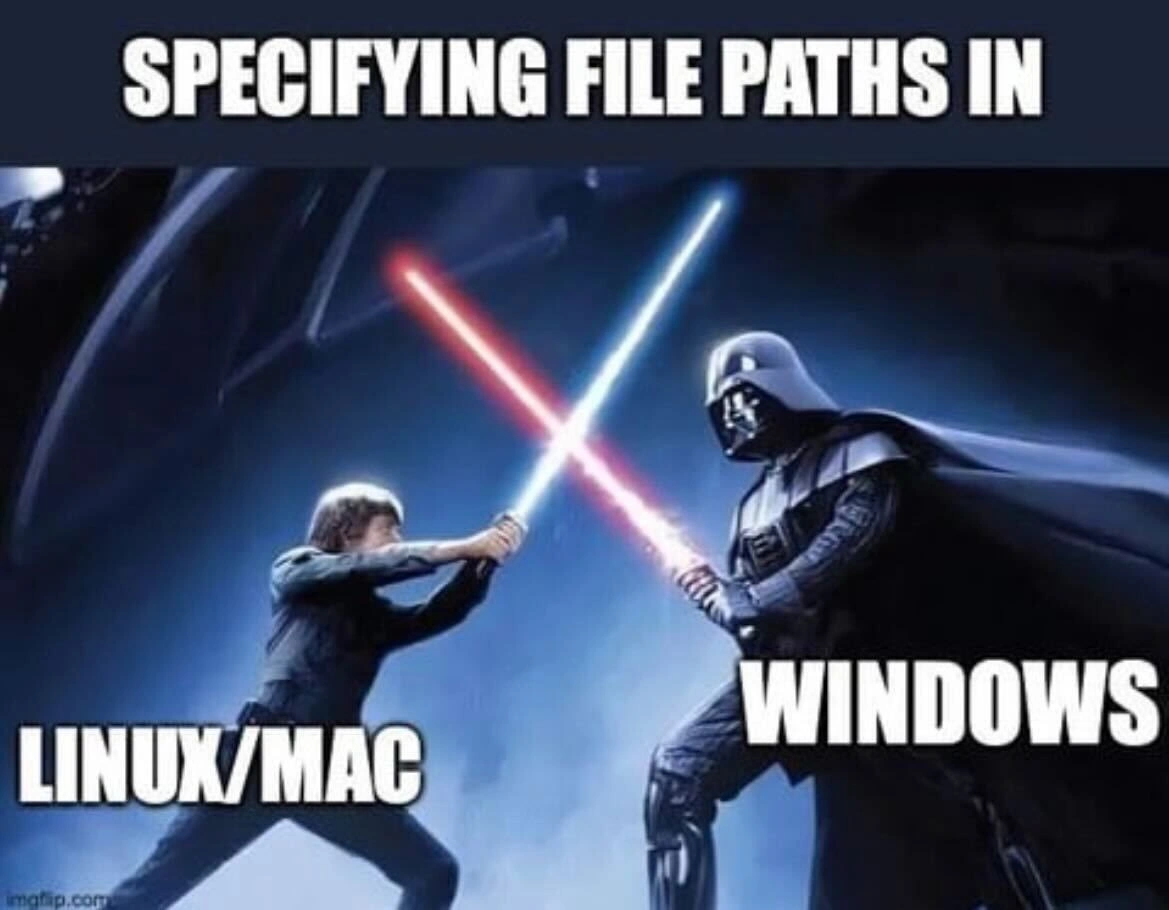
File path separator battle: Linux/Mac slashes vs Windows backslashes lightsaber duel
Why is this OperatingSystems meme funny?
Level 1: Choose Your Path Wisely
Imagine you have two playgrounds, and each one has a rule for going through the gate: one playground wants you to push the gate forward, and the other wants you to pull it backwards. If you try to push when you’re supposed to pull, you just thump into the gate and it doesn’t open! In the same way, computers have different “gate” characters for finding files. One kind of computer (like Linux or Mac) uses a forward-slash / in its file addresses – that’s like pushing the gate forward. Another kind of computer (Windows) uses a backslash \\ – like pulling back on the gate. They both do the same job (letting you into folders), but you have to use the right one in the right place. If you mix them up, the computer gets confused and won’t find your file, just like going to the wrong side of the road causes chaos.
This meme shows that idea as a huge space movie battle with laser swords (lightsabers). It’s funny because it takes a tiny detail – the direction of a slash in a file path – and blows it up into an epic duel between heroes and villains. To a programmer, using the wrong slash feels like a big mistake (and can cause big problems in your program), so it’s easy to joke that it’s as dramatic as fighting Darth Vader. In simple terms, the meme is saying: “On Linux/Mac vs on Windows, specifying file locations is a fight!” And anyone who’s seen their program break due to a silly \ vs / mix-up can’t help but laugh, because they’ve been in that silly battle too. In the end, it’s a reminder to choose your path wisely — even a little slash can decide victory or defeat in the world of coding!
Level 2: Slash Clash
For newer developers, the first encounter with this issue often feels like a head-scratcher. Why does one computer use / and another use **\** to separate folders in a path? This comes down to different **Operating Systems** having different rules for file paths. **Linux** and **MacOS** (which is Unix-based) follow the POSIX standard and use the **forward slash** / to divide folder names. Think of a typical Linux/Mac path: /Users/luke/Projects/jedi.txt. This path starts at the root / then goes into Users, then luke, then Projects, and finally the file jedi.txt. The forward slash is like saying “inside,” guiding you deeper into directories.
Windows, on the other hand, uses the backslash \ in its paths. A Windows example would be C:\Users\Vader\Documents\sith.txt. Here the backslash plays the same role, separating the drive C: and the folder names. But if you use the wrong symbol on the wrong system, the computer gets confused. For instance, a Windows program might see C:/Games/level1 and think the /Games part is some sort of command-line **CLI** option or an unusual input, since Windows historically expects C:\Games\level1. Likewise, if you tell Linux to look for Photos\Vacation\beach.png, it will literally search for a folder named "Photos\Vacation" (with an actual backslash in the name) because \ isn’t special to Linux paths – it’s just another character. The result? Nothing is found, and you’re left wondering why your file isn’t opening. This is a classic cross-platform compatibility issue: each system speaks a slightly different “address format” for files.
Now, what about those escape characters we mentioned? In programming and shell scripting, certain characters have special meanings. The backslash \ is commonly used to escape** or give special meaning to the character that follows. For example, \n means a newline (line break) and \t means a tab. This convention can cause chaos when you’re dealing with Windows paths in code. If you write a string like "C:\new_folder\file.txt" in many languages, the \n in there won’t be treated as a backslash and an “n” — it becomes a newline character! Suddenly your file path is split into two lines. The \f in \file might similarly be interpreted as a form feed (another control character). Your intention was a simple file path, but the program sees something totally different. That’s why Windows paths in code often require doubling the backslashes, like "C:\\new_folder\\file.txt", so that each \\ actually yields a single literal backslash in the path. It’s a bit like writing \\ is an escape sequence for a single **\. Here’s a visual example in Python:
# Wrong way: a Windows path in a normal string (will misbehave)
path = "C:\new_folder\file.txt"
print(path)
# Output may surprise you:
# C:
# ew_folderile.txt
# Explanation: "\n" became a newline, "\f" might be an unprintable character,
# so the string got mangled.
# Right way: escape the backslashes or use a raw string
path = "C:\\new_folder\\file.txt"
print(path)
# Output:
# C:\new_folder\file.txt
In the corrected version, "C:\\new_folder\\file.txt", each \\ tells Python to include a real backslash character. Many other languages (Java, C, JavaScript, etc.) share this escape syntax, so this issue isn’t unique to Python. Alternatively, some languages offer raw string literals where backslashes aren’t treated specially (for example, r"C:\new_folder\file.txt" in Python or @"C:\new_folder\file.txt" in C#). The need for these tactics underscores how ingrained the forward-slash vs backslash divide is in programming.
For those starting out, encountering these problems is a rite of passage. You might be writing a cross-platform script or configuration file and suddenly realize it works on your Mac but not on a coworker’s Windows PC. Maybe you wrote something like:
# Bash script example (works on Linux/Mac, fails on Windows)
LOG_PATH="/var/logs/app/output.log"
echo "Logs are in $LOG_PATH"
On Linux or Mac, /var/logs/app/output.log is a valid location. But on Windows, there is no base /var directory — Windows would expect something like C:\logs\app\output.log instead. The script would either crash or output nonsense on Windows. Conversely, a batch script with mkdir C:\temp\new_folder will run on Windows, but if you run that in a Unix shell (say, in a cross-platform build tool or WSL), the \ might be treated as an escape. You’d need to write it as mkdir C:\\temp\\new_folder in some contexts, or use Unix style /mnt/c/temp/new_folder for WSL. These are all examples of cross_os_scripts headaches: you have to account for each environment’s expectations.
The good news is that modern programming practices encourage using built-in path utilities to avoid these issues. Functions like Path.Combine in .NET or os.path.join in Python let you build paths without thinking about slashes at all. They’ll insert the correct one for the OS you’re on. There are also libraries that can convert a path from one style to the other (some tools automatically swap \ to / on the fly for convenience, since Windows actually tolerates forward slashes in many APIs, even if its own CLI is picky). This **path normalization** is essentially the computer acting as a translator between the two “languages” of file paths. Still, if you’re working directly with strings or config files, you as the developer have to be bilingual: know your / and \ usage, or face the wrath of the file-not-found error.
The meme nails the humor by comparing this minor detail to a lightsaber duel. It’s a star_wars_reference that perfectly captures the feeling: a dramatic, high-stakes fight over something as small as the direction of a slash. In reality, no one’s losing a hand (like Luke did) over a file path typo, but when your build breaks on Windows because of a forward slash, it feels like a mini galactic crisis. Everyone who has dealt with multi-OS development can laugh at how true it is — we’ve all had that moment of “oh no, it’s the backslashes again!”
Level 3: The Separator Strikes Back
In the developer galaxy, seemingly trivial details can spark epic battles. The meme’s caption “SPECIFYING FILE PATHS IN” sets the stage for a classic Linux vs Windows showdown, dramatized as a Star Wars lightsaber duel. On the left, Luke (the hero) is labeled “Linux/Mac,” wielding the trusty forward slash /. On the right, Darth Vader (the dark side) represents Windows, clinging to the backslash \. This tongue-in-cheek scene resonates with experienced devs because it exaggerates a real cross-platform pain point: the eternal struggle of the file path separator.
Under the hood, this is an OperatingSystems tale of legacy conventions. Unix and its descendants (like Linux and modern MacOS) standardized on the forward slash for directory paths back in the 1970s as part of the POSIX norms. Meanwhile, Windows inherited the backslash from MS-DOS in the 1980s. Why the difference? Historically, early DOS (influenced by CP/M) used the forward slash for command-line CLI options (e.g., DIR /W for wide listing). When subdirectories were later introduced in DOS 2.0, they couldn’t use / for paths without confusing the shell. The solution: repurpose the backslash \ as the directory separator. It seemed like a small decision at the time, but decades later, that divergence still haunts every cross-platform project. It’s as if two rival coding factions developed their own dialects for something as basic as “go into this folder,” and neither side ever surrendered. Because using one universal separator would have been too easy, right?
Seasoned developers know this battle all too well. Mixing up / and \ can lead to **CompatibilityIssues** that are as sneaky and destructive as any Sith plot. For example, a path like /home/projects/data.csv works flawlessly on Linux or MacOS, but put that in a Windows environment and it’s like speaking Jawa to a Wookiee — the system doesn’t understand you. Conversely, a Windows path C:\Users\Vader\docs might slither through on Unix as a weird file name containing backslashes (or not at all), breaking your script. The humor cuts deep because we’ve all debugged that “File not found” error only to realize we used the wrong slash in a config file or string literal. It’s the software equivalent of a lightsaber to the gut after you thought everything was going smoothly.
The plot thickens with escape characters. In many programming languages and shells, the backslash is a special symbol to denote escape sequences. It can spawn newlines (\n), tabs (\t), or other control characters. This means a naive Windows path in code can unintentionally activate invisible forces. For instance, "C:\new\folder" might be read as “C:” + newline + “folder” — ouch! Seasoned devs have learned to double up their backslashes ("C:\\new\\folder") or use raw string notations to safely summon a literal \. Meanwhile, forward slashes mind their own business and rarely need such escaping acrobatics. The meme’s lightsaber duel vibe captures the feeling that writing a simple file path across systems can turn into a dramatic struggle with unseen powers (like the force of escape sequences) attacking from the shadows.
Over years, the developer community has armed itself with tools and best practices to broker peace in this forward_slash_vs_backslash duel. We use path normalization functions and libraries to automatically choose the correct separator at runtime. For example, Python’s os.path.join("dir", "file") or Node’s path.join will produce dir/file on Linux and dir\file on Windows. High-level APIs (like Java’s File.separator or C++17’s std::filesystem) act as protocol droids, translating between the two worlds. Despite these solutions, the war isn’t over – a hard-coded path or a misconfigured build script can still tip the balance to the dark side. Many a CI/CD pipeline has failed because a test data path "/tmp\test\data" was wrong for one environment. The collective groan and chuckle from senior devs comes from recognizing how CompatibilityIssues this minor can cause outsized drama. We’ve tamed cloud clusters and mastered container orchestration, yet a single misplaced slash can still bring things crashing down. It’s absurd, it’s relatable, and it’s why this meme hits home: even in 2023, the file_path_separator battle rages on, and the lightsaber duel over slashes vs backslashes remains an “ancient injury” every coder remembers.
Description
The meme uses a dramatic Star Wars lightsaber duel scene - Luke Skywalker on the left and Darth Vader on the right - set against a dark, bluish sci-fi backdrop. Across the very top, bold white text reads “SPECIFYING FILE PATHS IN.” Overlaying Luke’s side is the label “LINUX/MAC,” while Vader’s side is labeled “WINDOWS.” The visual joke equates the struggle between forward-slash syntax (POSIX paths) and backslash syntax (Windows paths) to an epic, adversarial showdown. Developers who write cross-platform scripts or configuration files instantly recognize the pain of escape characters, path normalization, and CLI tooling breaking when the wrong separator is used
Comments
29Comment deleted
After 20 years shipping ‘cross-platform’ tools, the only thing that still force-chokes our CI is a single Windows backslash sneaking into a Bash script - the true power of the dark side is the escape character
After 20 years of writing path.join() and os.sep everywhere, you realize the real dark side was the friend who insisted on hardcoding 'C:\Users\' in the shared codebase because 'it works on my machine.'
The eternal struggle of path.join() versus manually concatenating strings with hardcoded separators - a battle as old as time itself. Senior engineers know the real dark side isn't Windows paths, it's the legacy codebase that has both hardcoded throughout, mixed with the occasional os.path.sep for good measure. And just when you think you've normalized everything, someone commits a Dockerfile with Windows-style paths in the COPY command. The Force may be strong, but it's no match for a regex that tries to handle both slash types while accounting for escaped backslashes in JSON configs
Pro tip: 'C:\\new\\test' in JSON isn’t a path - it’s 'C:' + newline + 'est'; use a path library or keep funding the backslash empire in your CI budget
Windows paths: the dark side where backslashes multiply like technical debt, demanding escapes just to resolve
Specifying paths: Unix gives you '/', Windows gives you '\', UNC gives you '\\\\', and JSON gives you '\\\\\\\\' - by the time CI fails, it’s not a file path, it’s string theory
Platform.pathSeparator 🤝 Comment deleted
wait till you hear about C:\\ Comment deleted
Uri.parse ? Comment deleted
I don't even know what language that is Comment deleted
Dart Comment deleted
ok I can't say anything about that, I don't use dart. I just know python solved this by just using unix-style paths and Rust and C++… who knows. I haven't done any file work on windows with those. Comment deleted
win32 can handle it usually, heck you can even use forward slashes on cmd and explorer Comment deleted
Correct. The exception is when you basically tell the Win32 subsystem to sidestep its usual processing and practically pass the path directly to the object manager. The three forms \??\, \\?\ and \\.\ supress different parts of path processing. Such a path will have to be already an absolute path and therefore won't accept \..\ or similar path components and will also choke on forward slashes. Some of the gory details can be found at: https://googleprojectzero.blogspot.com/2016/02/the-definitive-guide-on-win32-to-nt.html Comment deleted
sample of latter on w2k (i am too lazy for installing w2k compatible compiler and showcasing as WinAPI code) Comment deleted
os.sep Comment deleted
use.mac.or.linux.instead Comment deleted
aka / because Linux /MacOS/BSD and also Windows are all fine with / Comment deleted
MAC also case insensitive..should be in the dark force… Comment deleted
Only if you are about the address (-_-) Comment deleted
I can get behind case insensitivity, but backslashes as path separators is the true evil here Comment deleted
Use forward slashes. Earliest versions of NT could deal with it already. It's just not the canonical form and that can create issues below the Win32 subsystem. Comment deleted
huh Comment deleted
you can configure it to be case sensitive at disk format time Comment deleted
Well "Windows" is not case-insensitive, the Win32 subsystem/personality (csrss) accesses file systems case-insensitive by default, that's all. Claiming "Windows" being case-insensitive is as much BS as claiming Linux is case-insensitive based on mounted FAT-based file systems alone ... Case-retaining and case-sensitive are features of the file systems in combination with the file system drivers/OS. NTFS ACLs equally have no meaning on their own, if the driver/OS doesn't heed them. Comment deleted
Thanks for your explanation Comment deleted
The worst is when you're on Windows and you run a program built for Windows and you copy a path for file explorer and the program says "path not found" or whatever. But then you put the same path but switch the slashes and suddenly everything is ok Comment deleted
I've been using / on Windows anywhere it makes things easier. Comment deleted
I don't use Windows. It makes life easier Comment deleted