Skip to content
DevMeme
1537 of 7435
Enterprise Infrastructure vs. The Homelab Special
Infrastructure Post #1718, on Jun 17, 2020 in TG

Enterprise Infrastructure vs. The Homelab Special

Why is this Infrastructure meme funny?

Level 1: Big Dreams, Small Budget

Imagine a child who really wants a giant, fancy toy – let’s say a huge remote-control race car that can zoom super fast. The kid asks his parents for this awesome expensive toy car. The parents reply, “We have a race car at home.” The child is a bit confused but says, “Okay…” Then at home, the “race car” turns out to be a little toy car made from old plastic blocks and bottle caps. It kind of rolls, and maybe the parents even painted it red to look like the fancy car, but it’s obviously not the same. The child can’t help but laugh because it’s such a silly, smaller version of what they wanted. But it’s also kind of sweet and creative.

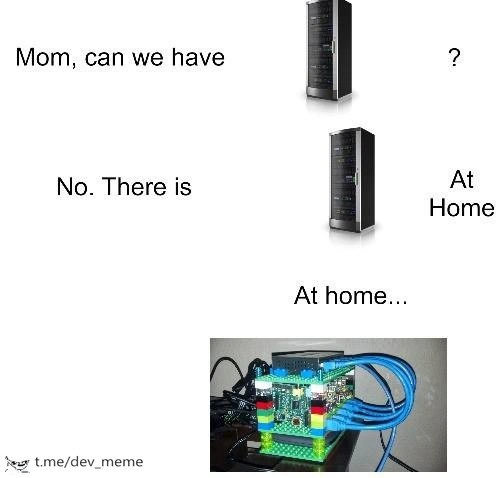
This meme is just like that story. The developer (like the child in our story) dreams of a big impressive server – that’s the fancy toy they want. The parent (reality) says, “No, we have one at home,” and the thing at home is a tiny Raspberry Pi computer in a LEGO case – that’s the little homemade toy car. It’s funny because the home version is so underwhelming compared to the dream version. Yet, there’s a warm, relatable feeling: you use what you have and make the best of it. Just like a kid playing with a cardboard box as a spaceship because they can’t go to a real spaceship, a tech enthusiast will turn a mini-computer and some LEGO pieces into their own personal server. It might not be powerful or fancy, but it works and it brings a smile. The humor comes from that gap between big dreams and humble reality – and seeing how we creatively fill that gap with whatever we’ve got.

Level 2: DIY Data Center

Let’s break down what’s going on in this meme in simple terms. The meme uses the popular “Mom, can we have X? No, we have X at home” format. In this format, a child asks for something fancy, and the parent says “we have that at home” – but the version at home is a disappointing knock-off or much cheaper version. It’s a way to joke about high expectations vs. reality. Here, the thing the “kid” (think of this as the tech enthusiast) wants is an enterprise rack server – basically a big, professional computer system. Those tall black boxes in the pictures are rack servers commonly found in company data centers. They are powerful machines used by organizations to host websites, databases, or lots of apps. They usually slide into a rack (a metal frame) along with many others, stacking into a “server tower.” They need lots of cooling (they get hot and have loud fans) and use a ton of electricity, but they deliver serious performance and reliability.

Now, the “Mom” in the meme says “No, there is [a server] at home.” The third panel, “At home…”, reveals what the at-home server actually is: a Raspberry Pi computer inside a case made of LEGO bricks. This is the punchline. A Raspberry Pi is a very small, single-board computer – about the size of a pack of cards – originally designed to teach kids programming and electronics. It’s a favorite for hobby projects because it’s cheap (around $35) and can run a full operating system (often Linux). People use Pis for all sorts of things: from running a media center, to acting as a retro game console, to controlling robots, and yes, even as mini web servers. But a Raspberry Pi is tiny compared to a server. Imagine comparing a tricycle to a race motorcycle – both have wheels and can move, but one is way more powerful.

The humor is that the Raspberry Pi in the meme is trying to stand in for that huge server. To make it even funnier, it’s housed in a LEGO case. This literally means instead of a professional metal case or chassis, someone built a little box around the Pi using LEGO bricks (the same colorful bricks you use to build toy houses and cars). You can see in the image: the case is multicolored (red, green, yellow bricks) and it’s not an official case, it’s completely homemade. Four bright-blue Ethernet cables are plugged into it, which likely means there are multiple Raspberry Pis or network connections being bundled – kind of like how a big server might have multiple network ports for redundancy or more bandwidth. Seeing bright blue cables sprouting out of a LEGO creation on a messy desk is the exact opposite vibe of those tidy, black enterprise servers neatly mounted in a climate-controlled server room. That contrast is the joke! The meme essentially says: “You wanted the super expensive, robust solution, but here’s the DIY version at home – it’s much, much simpler (and kinda silly looking)”.

Let’s clarify some terms and context for those newer to this:

  • Homelab – This is a term the tech community uses for a home setup where someone experiments with networking gear, servers, and services. Think of it as a personal mini data center. Instead of a company’s professional lab, it’s at home, often pieced together with repurposed old computers or small devices like Raspberry Pis. A homelab is usually on a tight budget, so creativity is key. This meme’s scenario is a homelab in action: using a Pi (or a few of them) as servers because buying a real server is too expensive or impractical.

  • Self-hosted solutions – This refers to running services yourself on your own hardware instead of using a cloud service or third-party provider. For example, instead of using Dropbox, someone might set up a file server on a Raspberry Pi at home. It’s “self-hosted” because you host it on hardware you control. The meme shows a very DIY self-hosted hardware setup: rather than renting a rack server in a data center or using AWS, the person is hosting whatever service on their little Pi in a LEGO case.

  • Hardware trade-offs – This means the give-and-take choices made when picking different hardware. In the meme, the trade-off is clear: an enterprise server gives high performance, stability, and features (like we discussed: lots of memory, storage, etc.), but it’s costly and loud and uses a lot of power. The Raspberry Pi is super cheap and quiet and only uses a few watts of power, but it’s comparatively slow and not as reliable for heavy workloads. By choosing the Pi (for a homelab), the person in the meme traded power for cost and convenience. They’re likely okay with that because maybe they don’t actually need the full power of a big server for their personal projects.

  • Raspberry Pi cluster – The presence of four Ethernet cables hints that this could be not just one Pi, but multiple Pis connected together (each Pi usually has one Ethernet port, so four cables might mean four boards). People sometimes create a cluster of Pis to simulate how a cluster of servers would work. For instance, they might try to set up a tiny Kubernetes cluster (a platform for managing containers) or practice distributed computing, where each Pi does part of the work. It’s mostly for learning and fun, because four Pis together still have only a fraction of the power of an actual multi-server cluster. But it’s a great hands-on project – many enthusiasts love building Pi clusters to see how “scaling out” works. And what’s a cheap way to hold a bunch of Pis together? A LEGO case! There are even famous projects where someone built a mini “server rack” out of LEGO to hold a dozen Raspberry Pis, mimicking a real server rack structure but tiny. So our meme likely references that kind of project – it’s a playful nod to those who’ve built a lego_server_case or Pi clusters as a hobby.

Now, think about the imagery and why it’s funny: It’s like expecting a Ferrari and getting a go-kart made of spare parts. The elements in the meme are intentionally extreme to make the joke obvious. Enterprise server = serious, sleek, expensive. Raspberry Pi with LEGOs = cute, clunky, cheap. Yet, in a way, they do serve the same purpose: both can be “servers” that host some software. So the meme isn’t completely random – it’s funny because a Raspberry Pi is a tiny server in its own right. The developer asking “Mom, can we have [the big server]?” is basically us wishing for high-end gear, and “we have it at home” is the reality check that our current setup (the Pi) will have to do. If you’re new to tech, just know this: running your own server at home is totally possible, but most of us aren’t running anything like a full datacenter in our basement (despite occasionally wishing we could). We make do with these clever small-scale solutions. And there’s a lot of pride and fun in that – which is exactly what this meme playfully highlights.

Level 3: From Racks to Blocks

For the seasoned developer or sysadmin, this meme hits on the homelab ethos versus enterprise reality. We’ve got a kid (a stand-in for an eager developer) asking for a shiny new rackmount server – the kind you’d find humming in a datacenter, all sleek black metal with blinking LEDs. That’s the dream: serious infrastructure power, the stuff of IT pro fantasies. But mom (a stand-in for either budget constraints or one’s practical alter-ego) shuts it down: “No, we have a server at home.” And then “At home” turns out to be a single Raspberry Pi in a case made of LEGO bricks, with a tangle of blue Ethernet cables. In other words, the “server at home” is a DIY mini-server, the kind of scrappy setup hardware geeks build when they can’t afford (or don’t actually need) real enterprise gear.

The humor here is the disparity between enterprise-grade hardware and a homebrew solution. As experienced tech folks, we immediately recognize the top image: a formidable rack server, possibly a 4U-high unit meant to be bolted into a server rack. Those things cost thousands of dollars, pack redundant everything, and weigh as much as a small child. They scream “official business – handle with care (and a forklift)”. Many of us have dreamed of having our own server rack for tinkering – running a personal cloud, hosting VMs, or just for the geek cred of it. Now, contrast that with the bottom image: a single Raspberry Pi board, a $35 microcomputer famous for being as big as a deck of cards, encased in a clunky yet lovable LEGO case. It’s literally child’s play compared to the pro gear. The Pi is perched on a cluttered desk with cables going every which way; it’s the far cry from the tidy cable management and cooling of a real server cabinet. This visual juxtaposition is comical to anyone who’s set up hardware: it’s the glossy ideal vs. the homemade reality.

Why do we find this so relatable? Anyone who's tried building a self-hosted solution at home knows the routine: you start reading about enterprise architectures – load balancers, NAS storage, maybe a Kubernetes cluster – and then you look at your bank account or the electricity bill. 😅 A top-tier server might draw a few hundred watts and sound like a jet engine. Running that 24/7 in your apartment? Not gonna happen. So, you improvise. The Raspberry Pi is beloved in the developer community because it lets you run real servers on a shoestring budget. Want a personal file server, VPN, or home automation hub? A Pi can do it. Want to learn Docker, set up a mini web server, or even a tiny Hadoop cluster for practice? Grab a few Pis and you’ve got a raspberry_pi_cluster for under $200. It won’t be fast, but it works – mostly. The meme exaggerates this dynamic: instead of a rack full of servers, you’ve got one tiny board pretending to be the whole rack. It’s tongue-in-cheek hardware humor that plays on the pride and absurdity of the homelab hobby.

Let’s unpack the elements a bit more from a senior perspective. The LEGO brick case isn’t just for laughs; many enthusiasts actually do this! Why spend $100 on a fancy case when a box of LEGO from the attic can do the job? It’s a nod to the playful creativity in tech culture – building a literal lego_server_case is part engineering, part art installation. Plus, there’s a practical side: LEGO cases have decent airflow (all those gaps) and are easily reconfigurable. If you add another Raspberry Pi to your setup, just snap on more bricks! It’s modularity on a budget. Compare that to an enterprise rack where adding a new server means budgeting thousands of dollars and needing another 2U of space and proper rail mounts. The homelab folks love to mix and match like this. That cluster of Pis with four blue Ethernet cables suggests the person might actually be networking multiple Pis – maybe running a mini cluster for fun, complete with different services on each or even experimenting with distributed computing (there’s that ambitious sparkle in a dev’s eye).

Now, of course, the experienced crowd also knows the limitations and trade-offs here, which adds an extra layer of chuckling. Sure, you can host a website or a Minecraft server on a Pi – but try to run an enterprise database or a high-traffic application, and you’ll quickly hit a wall. The CPU on a Raspberry Pi is an ARM chip designed for efficiency, not raw power. It might have 4 cores running at 1.5 GHz, whereas a server Xeon CPU could have 16+ cores at 3+ GHz with advanced out-of-order execution, huge caches, and support for virtualization. The Pi’s memory might be 2GB or 4GB (common circa 2020), while the server might rock 128GB of ECC RAM. And storage? The Pi usually runs off a microSD card or maybe an external SSD – fine for light use, but those cards can corrupt if you throw too many writes at them (veterans probably have at least one tale of a Raspberry Pi SD card giving up the ghost). In contrast, the enterprise server likely uses RAID arrays of SSDs or even NVMe drives that can handle heavy I/O all day, plus battery-backed controllers to prevent data loss.

Even the maintenance is worlds apart. Need to reboot or troubleshoot a remote enterprise server? Use the IPMI web interface or a lights-out management console – you can power cycle or check hardware logs from your couch. Need to debug the Raspberry Pi at home? You might end up crawling under your desk, yanking out LEGO bricks to get to the SD card, or plugging in an HDMI cable to see why it’s not booting. The meme tickles us because yes, we’ve been there: improvising with whatever we have. We laugh in part because we’re proud of it – that scrappy Pi server might host our personal blog or a git server we set up for giggles. It’s running on $35 hardware and a prayer, but hey, it works! And it feels like a rebellion against the notion that you need expensive gear to do cool projects.

However, the senior perspective also carries a wink of “I see what you did there”. We know that running a homelab teaches valuable lessons (including why enterprise gear is so pricey). That LEGO-Pi contraption might overheat if the room gets too warm, or maybe the power goes out and there’s no battery backup (enterprise racks would have UPS units). Perhaps the four Ethernet cables mean the builder tried something fancy, like bonding interfaces for more throughput or just connecting to different network segments – classic overkill that makes us grin and shake our heads approvingly. It’s endearing and a bit absurd. Experienced devs have likely witnessed or done similar jerry-rigging: like using a diy_server_build made from an old PC in a closet, or cooling a rig with a desk fan because the server fans died. These quirky solutions are almost a rite of passage.

To sum up the senior view: the meme is funny because it’s true in spirit. We all start somewhere, and often that’s with less-than-ideal hardware. Yet, there’s a genuine admiration in the joke – that little Pi is punching above its weight, even if it’s a far cry from the real deal. It encapsulates the engineer’s optimism: “I can make do with what I have.” And sometimes, for a personal project or learning experience, the pint-sized solution is good enough. Just don’t try to run your critical production website on it… unless you also enjoy practicing your incident response skills at 3 AM! 😉

Here’s a light-hearted comparison that a seasoned techie will appreciate:

Enterprise Rack Server 🏢💻 Homelab LEGO Pi 🏠🧱
Multiple high-performance CPUs (e.g., 32-core Xeons) and lots of ECC RAM One low-power ARM CPU (4-core) with a few GB of RAM (no ECC)
Redundant storage arrays (RAID 5/10 with fast SSDs or SAS drives) Boots from a single microSD card or USB disk (prone to corruption)
Dedicated hardware cooling (powerful fans, AC in server room) – sounds like a vacuum cleaner Tiny heatsink, maybe a small fan; mostly silent but watch that temp under load
Remote management (IPMI/iLO: reboot, reinstall OS remotely anytime) Pull the power plug or hook up a monitor/keyboard when it crashes (physical presence required)
Runs dozens of VMs/containers with heavy workloads concurrently Can run a couple of light Docker containers or one small web/server app comfortably
Price tag: costs as much as a car 🚗 (and draws lots of power) Price tag: costs as much as a dinner for two 🍕 (and sips power, ~5W)
Lives in a data center or server closet (needs proper rack mounting and noise isolation) Sits on a desk or shelf; you can literally hold it in your hand, LEGO case and all

Reading this, the experienced folks are nodding and chuckling: the right column is our scrappy little friend, and the left column is the “real deal” we mimic at home. The meme takes this entire table of differences and crams it into one image contrast, which is why it’s instantly humorous. It’s an ode to HardwareTradeoffs: you trade brute-force power and reliability for creativity and low cost. And as long as you’re not running a mission-critical app, that trade-off can be worth it just for the fun and learning experience. In the end, “enterprise rack vs LEGO Pi” is a geeky twist on “expectations vs reality,” and every developer with a home lab or side project understands that all too well.

Level 4: Scale-Out vs Scale-Up

At the deepest technical level, this meme pokes fun at a classic architecture strategy debate: do you scale up with a single powerful machine or scale out with many small ones? An enterprise rack server – the tall black tower pictured – represents scaling up. It's a single machine packed with high-end multi-core CPUs, heaps of RAM, fast storage, and specialized hardware like RAID controllers. It can handle heavy workloads in one place due to its robust hardware architecture. In contrast, a cluster of Raspberry Pi boards (the "LEGO-cased Pi") is scaling out: using several modest computers working together. This is essentially a tiny distributed system, and it runs into the same fundamental challenges any distributed system faces, just on a toy-sized scale.

One key issue is communication overhead. Inside an enterprise server, CPUs communicate via ultra-fast internal buses and share memory with nanosecond latency. They might use cache-coherent NUMA architectures where each core can access a common memory space with sophisticated cache syncing protocols. In a Raspberry Pi cluster, each board is a fully separate computer; the only way they communicate is by sending data over network cables (like those bright-blue Ethernet cables looping out of the LEGO case). Even at gigabit speeds, network latency is millions of times slower than a CPU’s internal communication. Memory access that takes ~100 nanoseconds on a single server could take ~100 microseconds or more across a network – that’s a thousandfold difference! Bandwidth is vastly lower too: a high-end server’s memory can move tens of GB/s, while a Pi’s network tops out around 0.1 GB/s. This huge gap means tasks that are trivial on one big machine can become bottlenecked by network delays on a cluster of tiny ones.

This brings to mind Amdahl’s Law, a principle from parallel computing theory. It states that the speed-up from splitting work across multiple processors is limited by the portions of the work that must be done sequentially (or the overhead of coordinating). In our context, a single beefy server might crunch through a job efficiently, while four little Pi boards divide the job but then spend extra time coordinating and sharing data. If the job isn’t “embarrassingly parallel” (meaning easily split with almost no need for communication), the cluster’s advantage dwindles. For example, imagine running a database or a web service: on the big server, each query hits a shared memory and disk; on the Pi cluster, nodes must message each other over Ethernet to synchronize data or requests. The latency and protocol overhead could make the cluster even slower than the single machine for many real-world tasks. The meme humorously exaggerates this: expecting a LEGO-encased Pi to substitute for a data-center server is like hoping a wagon hitched to ponies can replace a freight train – theoretically you can add more ponies (more Pis), but they’re not operating on the same level as a locomotive engine.

There’s also the aspect of hardware trade-offs and specialized features. Enterprise infrastructure isn’t just about raw speed; it’s engineered for reliability and scale. A professional server will have ECC memory (catching and correcting bit flips), redundant power supplies, hardware virtualization support (Intel VT-d, etc.), and remote management tools (like IPMI or iDrac) that let you reboot or repair it from afar. It’s built to minimize downtime. A Raspberry Pi, by contrast, is a barebones single-board computer – charmingly minimalistic. No ECC, one tiny SD card instead of mirrored disks, and if it crashes, someone (probably you, the homelab hero) has to manually pull the power or re-flash the card at home. From a reliability theory standpoint, clustering multiple low-end nodes could give some redundancy (one Pi dies, maybe others still run), but then you as the developer have to architect your software for fault tolerance just like the big cloud providers do. That’s non-trivial – think consensus algorithms or careful state replication, even topics like the CAP theorem if you tried to distribute a database across those Pis. Suddenly your fun LEGO server has you contemplating papers by Lamport! The meme’s punchline leverages this contrast: the absurdity of equating a tiny DIY cluster to a serious enterprise machine underscores how much complex engineering is baked into that black rack tower. No matter how clever or cute your home setup is, some fundamental laws of computing (and physics) can’t be escaped.

Yet, there’s an elegance in this contrast too. Modern computing has trended from big iron mainframes to distributed microservices running on lots of little nodes – the homelab Pi cluster is like a microcosm of cloud architecture on a shoestring budget. In fact, a cluster of Raspberry Pis is often used to learn distributed computing in a safe way. It’s a hands-on lesson in why things like network partitions, latency, and synchronization are hard problems. The meme gets a laugh by showing an extreme oversimplification: turning an enterprise-grade server farm into a LEGO playset. But beneath that joke lies real engineering wisdom about scaling: more machines can tackle bigger problems, but only if you can effectively manage communication, consistency, and failures. A pile of tiny bricks can’t just magically do a crane’s job – unless you re-engineer the whole process. This is the scale-out vs. scale-up dilemma in a colorful nutshell (or rather, a colorful brick case).

Description

A three-part meme in the 'Mom, can we have' format. The first part says, 'Mom, can we have' followed by an image of a sleek, professional black server rack. The second part continues, 'No. There is [server rack image] At Home'. The final part, labeled 'At home...', shows a photograph of a DIY server cluster. This homemade setup consists of several single-board computers (similar to Raspberry Pis) stacked vertically with colorful Lego bricks as supports, all resting on a green Lego baseplate. A small network switch sits on top, with a tangle of blue ethernet cables and black power wires connecting everything. A watermark 't.me/dev_meme' is in the bottom left. The meme humorously contrasts expensive, enterprise-grade server hardware with the resourceful, budget-friendly, and often chaotic-looking 'homelab' setups that tech enthusiasts build to learn and experiment with advanced concepts like networking and distributed systems


Comments

7
Anonymous ★ Top Pick The main difference is that when the enterprise server goes down, it costs the company a million dollars an hour. When my Lego server goes down, it just means I have to stop watching Plex to jiggle the power strip
  1. Anonymous ★ Top Pick

    The main difference is that when the enterprise server goes down, it costs the company a million dollars an hour. When my Lego server goes down, it just means I have to stop watching Plex to jiggle the power strip

  2. Anonymous

    It’s just a Pi in a LEGO case - until the slide deck labels it a “cost-optimized hyper-converged edge cluster,” right up to the moment the microSD dies and we call it an unscheduled DR exercise

  3. Anonymous

    The real enterprise-grade solution isn't the rack servers - it's convincing finance that your LEGO-based Kubernetes cluster with exposed PCBs counts as 'disaster recovery infrastructure' because technically it survived your cat knocking it over twice

  4. Anonymous

    The real enterprise architecture pattern: convincing your spouse that the humming Raspberry Pi cluster in the closet is 'just a small hobby project' while you're actually running a full Kubernetes deployment with more YAML than your company's production environment

  5. Anonymous

    Enterprise racks: redundant PSUs for HA. Homelab: one ATX brick and a surge protector holding back the apocalypse

  6. Anonymous

    “Server at home” = Raspberry Pi data center: HA by hope, persistence on a single SD card, and an SLA that ends whenever someone needs the wall outlet

  7. Anonymous

    Enterprise spec: five nines on‑prem; budget: $35 - so we shipped k3s on a Raspberry Pi in a LEGO case, with RAID made of SD cards and hope

Use J and K for navigation