Skip to content
DevMeme
5127 of 7435
JetBrains' Unintentionally Juvenile Naming for Educational IDEs
IDEs Editors Post #5612, on Oct 31, 2023 in TG

JetBrains' Unintentionally Juvenile Naming for Educational IDEs

Why is this IDEs Editors meme funny?

Level 1: Sports Means Soccer

Imagine you go to a school where every kid’s first sport is soccer. All the PE classes, all the junior leagues – it’s soccer, soccer, soccer. Now picture the school bulletin board with two flyers: one says “Join our Sports class!” and right below it another flyer says “Join our Soccer class!” You’d probably giggle and think, “Wait, do they think sports basically just means soccer?” It’s silly because, of course, sports can be anything from basketball to tennis to swimming – soccer is just one sport. But at that school, since everyone starts with soccer, someone might mistakenly start thinking “sports = soccer.”

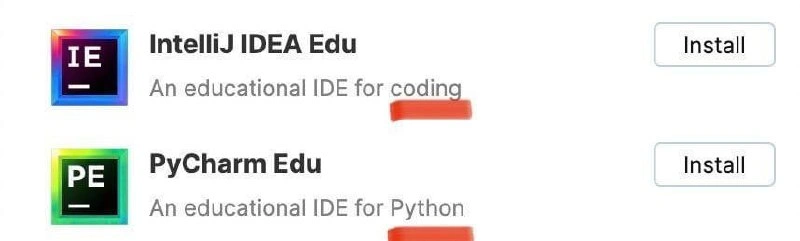
This meme is doing the same thing but with coding and Python. Coding is like sports – a big broad activity. And Python is like soccer – just one way to do it (one programming language among many). The picture shows an app listing an IDE for coding (like a general coding class) and an IDE for Python (like a specific soccer class). By highlighting those words, it jokes that they’re treating “coding” and “Python” as if they’re the same thing. It’s funny in the way it’s funny to realize someone thinks the one thing they learned is the whole universe. It’s like a kid who’s only ever had chocolate ice cream saying, “ice cream is chocolate, right?” – cute, a little misguided, but totally understandable given their limited experience. The meme makes us smile because we’ve all been that kid at one point, thinking our small world was the whole world. Here, the small world is Python, and the whole world of coding is so much bigger – but you might not know that until you try a different “sport.”

Level 2: Spot the Difference

Let’s break down what’s happening in simpler terms. The image is a snippet from the JetBrains Toolbox UI, which is a neat desktop app for installing and managing JetBrains IDEs (Integrated Development Environments). In that UI, we see two products listed: IntelliJ IDEA Edu and PyCharm Edu. An IDE is basically an all-in-one software application that programmers use to write and test code. It typically includes a text editor (for writing code), a debugger (for finding errors), and other handy tools (like code suggestions or project management) – all in one package. JetBrains, the company behind these, makes a bunch of popular IDEs, each usually focusing on a particular programming language or domain. For example, IntelliJ IDEA is famous among Java developers (and can handle many other languages via plugins), while PyCharm is the go-to IDE for Python developers.

Now, JetBrains also offers Educational (Edu) editions of some of their IDEs. These are tailored for people who are learning to code. They often come with interactive lessons or simpler settings to help newbies. In the meme image, each row is one of these educational IDEs, ready to be installed via a handy “Install” button on the right side. The first row shows IntelliJ IDEA Edu, and right below it is PyCharm Edu. Under each name, there’s a short description. IntelliJ’s says “An educational IDE for coding,” and PyCharm’s says “An educational IDE for Python.” The meme creator drew a red line highlighting the word “coding” in the first description and “Python” in the second. The humor comes from comparing these two phrases: coding vs. Python. It looks like the app is subtly saying coding = Python.

To a newcomer, that might not even register as odd. If you’re just starting out, you might only be familiar with Python, since it’s a super popular first language to learn. (Python is a high-level programming language known for its easy-to-read syntax and versatility. It’s used for everything from web development to data science, and yes, a lot of people’s first exposure to coding is through Python because it’s friendly to beginners.) In fact, many coding bootcamps, online courses, and school programs begin with Python. So if you’re a student who only learned Python so far, you could easily equate “programming” with writing Python code.

This meme gently ribs that situation. The “spot the difference” moment is realizing that one IDE is described generically (“for coding”) and the other specifically (“for Python”). It’s like the app itself is implying that “coding” implicitly means “Python coding.” Of course, in reality, you can code in lots of languages. Java is one, which IntelliJ IDEA often caters to; it’s a more rigid language used in many enterprise applications and was a common teaching language for years. C++ is another, used in systems and game development (and JetBrains has CLion for that). JavaScript is the language of web browsers. There’s Ruby, C#, Go, and many others. Each language has its own flavor and typical uses. An IDE like IntelliJ IDEA Edu can support multiple languages (with the right plugins it can handle Python, Java, Kotlin, etc.), which is probably why its description is broad: “for coding” in general. Meanwhile, PyCharm Edu is dedicated to one language (Python), so it says so outright.

Now imagine you’re a junior developer or a student who’s just gotten the hang of Python. The description might make you chuckle or go “hmm.” It’s as if the tool is validating a bias you didn’t even realize you had: you’ve been coding all semester, but exclusively in Python, so “coding” and “Python” felt like the same thing anyway! Experienced devs find this amusing because they remember when they first learned about other languages and thought, “Oh, coding isn’t just one thing.” It’s a little gotcha moment from the UI. In developer communities, this kind of joke falls under DeveloperHumor – poking fun at our own tools and habits. And indeed, the tags here like python_equals_coding and language supremacy meme hint at the inside joke: sometimes people act like their favorite (or first) language is the only one that counts.

Let’s clarify a few terms and context from the tags and categories:

  • IDEs (Integrated Development Environments): As mentioned, these are applications like IntelliJ IDEA or PyCharm that provide a complete environment to write programs. They often support plugins – add-ons that give the IDE extra abilities, like teaching it a new programming language. JetBrains IDEs are known for a powerful plugin ecosystem. In fact, PyCharm is basically IntelliJ under the hood with the Python-specific plugins and settings pre-configured. That means IntelliJ IDEA Edu could be used for Python if you set it up right, but PyCharm Edu is ready out-of-the-box for Python learning. JetBrains simply gives each popular setup its own name and icon (hence “IE” and “PE” in those icons, standing for IntelliJ Education and PyCharm Education).

  • Python: A very popular programming language. If coding languages were spoken languages, Python would be like English – widespread and often the first one people learn to “speak” in code. It emphasizes readability (you use indentation instead of lots of braces or keywords, which makes it look clean). Python is interpreted, meaning you can run your code directly without a separate compile step, which is nice when you’re learning because you get feedback quickly. Due to its popularity, there are tons of libraries (pre-written code) and a huge community, which further lowers the barrier for beginners who can find answers and tutorials easily. This contributes to a gentle learningCurve for beginners. They can get something working without understanding every detail of the computer’s inner workings.

  • Learning: The meme touches on learning in that it shows the “Edu” versions of IDEs. These are specifically designed to help people who are new to programming. For example, PyCharm Edu might include exercises or interactive courses (like “Step 1: print something to the console. Step 2: do some math with variables,” etc.). The idea is to make that first exposure to coding less intimidating. When a product is labeled “for coding” generally, it hints that it might accommodate multiple languages or concepts, not just one. “For Python,” on the other hand, is clearly targeting one language’s learning track.

  • JetBrainsPlugins: This tag reminds us that JetBrains IDEs share a core platform. You can install a Python plugin in IntelliJ IDEA, or a Go plugin, or a JavaScript plugin, etc. So IntelliJ IDEA can become a sort of all-in-one IDE if you want. But for an educational setting, it might be simpler to just install PyCharm Edu if the course is specifically about Python. In the JetBrains Toolbox UI, they list both options. The phrasing difference likely comes from the original product descriptions. It wasn’t necessarily intended to equate “coding” with Python – it’s just shorthand. But side by side, the contrast is comical. It’s like the UI is a languageSupremacy meme in itself, quietly saying: “We have a tool for coding in general and a tool for Python (which apparently isn’t under ‘general coding’?).”

  • DeveloperHumor: This is the category of the joke. It means only folks with some programming background and familiarity with these tools would get why it’s funny. If you show this to someone who’s never coded, they might not see any joke at all. But show it to a developer, and they’ll likely grin or roll their eyes at how PyCharm (Python) is given special treatment separate from generic “coding.” In essence, it’s an inside joke about our industry’s current state.

So, what’s the takeaway in simpler terms? JetBrains’s app listing inadvertently created a spot-the-difference puzzle. The only difference is the words “coding” vs “Python,” and that hints that perhaps the app (or the people writing its labels) subconsciously treat Python as synonymous with coding education. Many of us have observed that trend: nowadays if someone says “I started coding,” very often it means “I started learning Python.” It’s a bit like how everyone assumes if you’re “developing an app,” it must be for smartphones — one specific context overtook the general term. Here Python overtook “coding” in the learning context. It’s a small UI quirk that perfectly captures a broader cultural moment in programming. And that’s why this image got a laugh and a share in the programmer community. It’s recognizing a real phenomenon in a cheeky way.

Level 3: One Language to Rule Them All

At first glance, this meme highlights a programming monoculture creeping into education. The JetBrains Toolbox UI lists two educational IDEs side by side: IntelliJ IDEA Edu labeled as “An educational IDE for coding,” and PyCharm Edu labeled as “An educational IDE for Python.” The red highlight under those words draws attention to the implicit joke: coding is being equated with Python. Seasoned developers chuckle because we know “coding” is a vast world of languages — Java, C++, JavaScript, Go, Ruby, you name it — yet here the generic term seems to map to one specific language. It’s as if Python has become the default poster child for all of programming. This plays into the classic language_supremacy_meme format, where one language (Python, in this case) is humorously portrayed as the one language to rule them all.

Why is this funny to an experienced dev? It hints at our collective experience with trends in teaching and tool support. JetBrains – known for specialized IDEs like IntelliJ (for Java and more), PyCharm (for Python), CLion (for C/C++), etc. – typically advertises each IDE for a specific ecosystem. Seeing IntelliJ IDEA Edu marketed vaguely “for coding” next to PyCharm Edu “for Python” suggests that coding = Python in the educational context. In reality, IntelliJ IDEA Edu is a polyglot teaching IDE (historically centered on Java, but supports other languages via JetBrainsPlugins), while PyCharm Edu is laser-focused on Python. However, side by side in the Toolbox app, the wording unintentionally implies Python has subsumed the meaning of coding in general. This resonates with a trend: many intro-to-programming courses today use Python so widely that newcomers might not realize there’s a whole world beyond print("Hello, World!").

Historically, the “first language” taught has shifted with industry trends. Veterans remember when “learning to code” meant wrestling with C’s pointers or Java’s verbose syntax. Over time, educational priorities changed: Java became popular in AP Computer Science courses in the 2000s, and now Python has swept the field due to its simplicity and readability. We’ve effectively gone from a world where Java was king for CS101, to one where Python is the new default. The meme winks at this shift. Older devs see the irony: back in my day, coding didn’t just mean Python! And yet, here we are in 2023, where a top IDE vendor’s UI might give that exact impression.

There’s a deeper truth underneath the humor. Python’s rise in education is no accident – it has a low barrier to entry and lets beginners do meaningful things quickly. Compare a simple “Hello, World!” in Python versus Java:

# Python: straightforward and beginner-friendly 
print("Hello, World!")
// Java: a bit more ceremony for the same result
public class HelloWorld {
    public static void main(String[] args) {
        System.out.println("Hello, World!");
    }
}

It’s clear why instructors love Python: less boilerplate, instant feedback, no worrying about types or memory on day one. The learning curve for Python is gentle; students can focus on fundamental concepts without tripping over complex syntax. As a result, many newbies come to believe Python equals coding. They might even ask questions like, “Should I learn programming or learn Python?”, inadvertently treating “Python” and “programming” as separate when one is actually a subset of the other. This meme riffs on that confusion. The JetBrains Toolbox UI labels unintentionally feed the idea that Python is THE programming language, the way some might say Google is the internet. Seasoned devs find it funny because we’ve encountered countless other technologies and languages – we know coding is more than one language, no matter how ubiquitous Python is right now. In a tongue-in-cheek way, it’s as if JetBrains is trolling us by reflecting the current zeitgeist: python_equals_coding for the next generation. Some developers even joked, “Is this cyberbullying 😏 of other languages?” because it’s like Python is hogging the limelight and shoving Java and friends off the stage. Of course it’s not bullying – it’s just a quirk of marketing copy – but it pokes fun at how dominant Python’s become in learning.

From a senior perspective, the meme also hints at the tooling ecosystem. Under the hood, PyCharm is built on the same platform as IntelliJ IDEA (with a specific Python plugin and educational features). JetBrains could have labeled IntelliJ IDEA Edu as “for Java and more” or PyCharm Edu as “for coding in Python,” but the phrasing they chose accidentally reinforces this one-language-to-rule-them-all vibe. We can’t help but smirk because it reflects reality: walk into an intro programming class today, odds are you’re learning Python. The DeveloperHumor here comes from that “too real” feeling — experienced devs recognize the pattern (we’ve seen similar fads before), and newbies might not get the joke yet because to them it’s just normal. It’s a lighthearted nod to how our industry’s educational focus has narrowed (for better or worse) on a single technology. In short, the meme lands a punch because it’s pointing out something absurd yet true: the language supremacy of Python in education, summed up by a tiny UI detail that speaks volumes.

Description

This meme is a screenshot showing two software products from JetBrains' educational suite. The first is 'IntelliJ IDEA Edu', described as 'An educational IDE for coding', with its icon displaying the letters 'IE'. The second is 'PyCharm Edu', described as 'An educational IDE for Python', with its icon showing 'PE'. Small red lines are drawn under the words 'coding' and 'Python' respectively, seemingly for emphasis. The humor is derived from the unfortunate phonetic interpretation of the product names, which resembles a juvenile, slightly vulgar joke. It highlights a comical oversight in product naming, where professional development tools are accidentally given names that can be interpreted in a childish manner, something developers with a sense of humor would quickly point out. The provided caption 'Cyberbulling?🤔 🤔 🤔' adds another layer of ironic humor

Comments

20
Anonymous ★ Top Pick This must be from the JetBrains department of 'Acronyms We Didn't Say Out Loud.' The daily stand-up for that team must be absolutely hilarious
  1. Anonymous ★ Top Pick

    This must be from the JetBrains department of 'Acronyms We Didn't Say Out Loud.' The daily stand-up for that team must be absolutely hilarious

  2. Anonymous

    Step one: install IntelliJ Edu to learn "coding". Step two: realize it just launched PyCharm and call it a curriculum

  3. Anonymous

    After 20 years in the industry, the most educational thing about IDEs is discovering they still can't spell-check their own product descriptions without flagging 'coding' and 'Python' as typos - truly preparing students for a lifetime of ignoring red squiggly lines in documentation

  4. Anonymous

    The red underlines under 'coding' and 'Python' perfectly capture the educational IDE experience: even the marketing copy gets syntax highlighting. At least these IDEs are honest about what they'll be doing to your code from day one - marking everything as potentially problematic until proven otherwise

  5. Anonymous

    JetBrains taxonomy decoded: “IDE for coding” vs “IDE for Python” - same JVM, different plugin preset; procurement just bought two SKUs of the same thing

  6. Anonymous

    So IntelliJ is 'for coding' and PyCharm is 'for Python' - JetBrains’ plugin-bundled SKU matrix accidentally shipped a philosophical type system

  7. Anonymous

    JetBrains marketing: proving even IDE descriptions accrue tech debt faster than unchecked dependencies

  8. @ShiningFlames 2y

    XD

  9. @dugeru42 2y

    Sometimes i am getting paid just for reading python, so it is fair i guess

  10. @TERASKULL 2y

    Basically a segregated table for kids in the far corner of a restaurant, while the adults are having fun, so they don't mess under their feet

    1. @dugeru42 2y

      well, adults can join them too, there is python support in idea it is very useful when you want to help kids eat not too many crayons while they are making frontend for your api

  11. @danylo1554 2y

    Who the fuck is using jetbrains shit on purpose?)

    1. @SinnerK0N 2y

      me

    2. @dugeru42 2y

      Same people who use popular distro and customize/change only kernel in it, i mean if it is necessary for hardware support People who want something that reliably works

  12. @sylfn 2y

    they have emacs

  13. @Strangerx 2y

    Idea stands for coding in any language PyCharm is just for Python coding Seems legit for me

    1. @pod1425 2y

      Idea is only for Java, Kotlin and web

      1. Deleted Account 2y

        It is a limitation for the community version, isn't it?

      2. @tohir_ahmad 2y

        I have a couple of friends, they said idea good for golang too. Better and cheaper then goland

      3. @qtsmolcat 2y

        You can install any of the language extensions on IDEA, btw

Use J and K for navigation