Skip to content
DevMeme
1174 of 7435
A Very Literal Interpretation of Drive Partitioning
Hardware Post #1312, on Apr 14, 2020 in TG

A Very Literal Interpretation of Drive Partitioning

Why is this Hardware meme funny?

Level 1: Not With a Saw

Imagine your teacher says, “Let’s split your notebook into two sections: one for math and one for science.” You wouldn’t take a huge saw and cut your notebook physically down the middle, right? That would ruin the notebook, scattering pages everywhere and making it impossible to use. You’re only supposed to divide it by using the first half for one subject and the rest for the other, keeping the notebook intact. In this meme, someone did the silly equivalent of cutting the “notebook” for a computer. A computer’s hard drive is like a big notebook that stores all your information. When people say to “partition” (divide) a hard drive, they mean make pretend sections for different data inside the computer’s memory – not actually chop the hard drive hardware into pieces! The picture is funny because the person took the instruction way too literally: they used a saw on the poor hard drive. It’s a goofy misunderstanding, like using a hammer to fix a typo. We laugh because it’s obviously the wrong way to do it, and the result is a big mess instead of a working drive.

Level 2: Not That Kind of Partition

In computing, a drive partition means carving up a storage device into separate sections using software – no saws involved! A hard disk (like the 1TB Western Digital drive in the image) is a physical box containing spinning magnetic discs called platters and a moving read/write head. By default, the entire disk might be one big storage space. Partitioning it logically means telling the computer, “treat part of this disk as Drive A and the other part as Drive B.” For example, you might split a 1TB drive into two 500GB partitions so one could hold your Windows system and the other could hold Linux in a dual-boot setup. Tools like Windows Disk Management, the Linux fdisk or gdisk command, or macOS Disk Utility let you do this. They update a small map at the start of the disk (the partition table) which records the size and boundaries of each partition. So the operating system sees two drives (like C: and D: on Windows, or /dev/sda1 and /dev/sda2 on Linux) even though there’s physically only one disk. This is super handy for organizing data or running multiple OSes on one hardware drive.

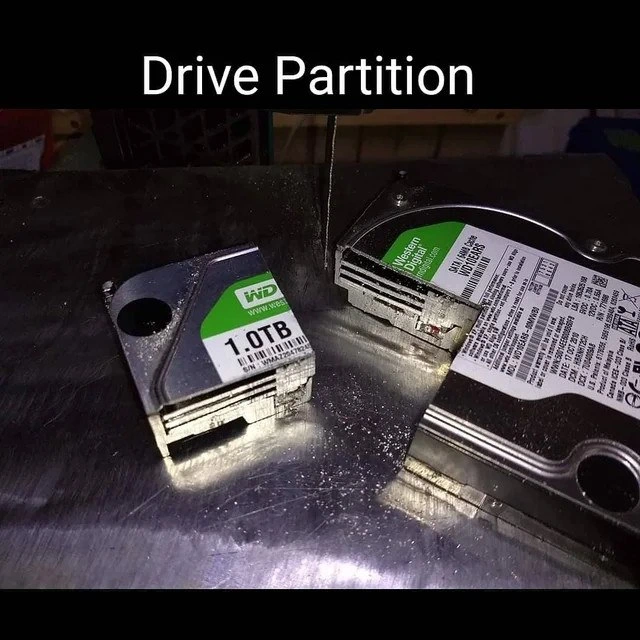
What doesn’t happen in a normal partitioning procedure is any physical cutting of the drive! The meme shows a comically extreme misunderstanding: the sysadmin takes “drive partition” as an instruction to literally partition the drive with a saw. In the photo, you can see the poor HDD has been cut into a smaller chunk and a larger chunk, with shiny metal dust (sawdust-like shavings of the drive’s internals) scattered around. Of course, doing this in reality destroys the drive completely. No computer on Earth will recognize two separate hard drives just because you physically sliced one in half – you’ll just have two pieces of scrap metal and lost data. The humor comes from this physical_vs_logical_partitions mix-up. We usually operate at a logical level: the DiskPartition process involves bytes and software instructions, not blades. The phrase “drive partition” is jargon that means a software-defined subdivision of the disk. But taken at face value in plain English, “partition the drive” could mislead someone unfamiliar into thinking you need to physically divide the drive. This meme plays on that literal interpretation. It’s a classic example of tech wordplay: a literalInterpretation of a phrase that’s meant figuratively in the tech world. For a junior developer or someone new to IT, it’s a memorable lesson – always double-check if an instruction is literal or figurative. (In this case, please, always figurative when it comes to computer parts!) The image is also a nod to the reality that behind our virtual partitions and filesystems, there is real hardware. We talk about slicing up storage space in terms of gigabytes, but here we see what not to do with an actual storage device. It’s funny and a bit painful to look at, especially if you know how delicate hard drives actually are. One moment of violent misunderstanding with a band-saw, and that 1TB WD Green drive is now 0TB of useless parts. The meme’s joke lands because it highlights the gap between what tech jargon sounds like and what it actually means.

Level 3: Cutting-Edge Partitioning

This meme slashes through abstraction layers literally. In the photo, a 3.5-inch WD Green 1TB hard disk drive (HDD) has been bandsaw-bisected into two chunks, metal shavings and all. The caption "Drive Partition" at the top is a deadpan label of the carnage. For seasoned developers and sysadmins, the humor is immediately apparent: drive partitioning is supposed to be a logical operation performed with software tools, not a physical act with power tools. Normally, when you partition a disk, you use something like fdisk on Linux, Disk Management on Windows, or parted with a GUID Partition Table (GPT). These create separate logical volumes (like having a C: and D: drive on one disk) without altering the hardware. But here, someone took the term drive partition and executed it in the most literal way possible—by physically cutting the drive in half. It’s a glorious bit of HardwareHumor and wordplay: a visual pun on what “partition” means in computing versus plain English.

For anyone who has set up dual-boot systems or managed servers, the idea of physically sawing a disk is equal parts hilarious and cringe-inducing. It satirizes those moments when technical jargon meets misunderstanding. The image exaggerates a sysadmin “following instructions” to partition a disk by turning a software task into a hardware disaster. It’s as if an overzealous IT tech heard “split the 1TB drive into two partitions” and—rather than typing commands—fired up a workshop saw. We can practically hear the gasp from the storage engineers: the partition table (whether MBR or GPT) lives in the first sectors of the disk, and slicing through the platters like this utterly obliterates it (and everything else!). In real life, of course, creating two partitions on a drive doesn’t involve slicing the platter into pieces; it involves updating metadata so the OS treats different regions of the disk as separate volumes. By taking “partition” to the extreme, the meme pokes fun at literal interpretation of tech lingo. Seasoned devs chuckle because they’ve seen how non-tech folks (or inexperienced juniors) can misinterpret terms—though hopefully not this badly! The contrast between the abstract nature of software instructions and the physical reality of hardware is what makes this so funny. It’s a tongue-in-cheek reminder that underneath our virtual machines, DiskManagement utilities, and cloud storage, there’s still literal hardware that we definitely should not cut in half. This “solution” guarantees a 100% 0% success rate: you get two pieces of a drive, zero usable data. In other words, a surefire way to void the warranty and achieve permanent data loss. The senior engineers reading this can’t help but grin at the absurdity—literalInterpretation of tech jargon has never been so destructive or so perfectly captured as a joke.

Description

A meme displaying a brutally literal take on a common tech term. The image shows a Western Digital 1.0TB hard drive that has been physically cut into two pieces with a saw, resting on a metal surface with shavings scattered around. A thin saw blade is visible in the background. At the top of the image, the text "Drive Partition" is displayed in white. The humor comes from the pun, contrasting the software-based action of partitioning a disk (logically dividing its storage space) with the destructive physical act of literally partitioning the hardware. This joke resonates with anyone familiar with setting up computer storage, from helpdesk technicians to systems administrators
Comments

7
Anonymous ★ Top Pick This is what happens when you ask a junior sysadmin to partition the drive and they take the term 'bare metal' a little too seriously
  1. Anonymous ★ Top Pick

    This is what happens when you ask a junior sysadmin to partition the drive and they take the term 'bare metal' a little too seriously

  2. Anonymous

    Told ops to carve the 1 TB drive into “three primaries and an extended” - they showed up with a bandsaw and asked if I wanted MBR or GPT engraved on each slice

  3. Anonymous

    When the junior dev takes "physical to logical volume migration" a bit too literally and brings a hacksaw to the data center

  4. Anonymous

    When the junior dev takes 'sudo fdisk /dev/sda' a bit too literally and reaches for the power tools instead of the partition editor. This is what happens when you confuse physical sectors with logical ones - though I suppose this does technically achieve a 50/50 split with zero fragmentation. The RAID controller is going to have some questions

  5. Anonymous

    Security asked for hard partitioning and legal wanted air-gapped; Facilities delivered 0 IOPS, infinite latency, and instant GDPR compliance

  6. Anonymous

    When fdisk won't repartition without a backup, the bandsaw delivers: perfect 50/50 split, zero data migration issues

  7. Anonymous

    In the storage team’s defense, the ticket said “partition the drive” - now it’s air-gapped, GDPR-compliant, and the RTO is infinite

Use J and K for navigation