Docker Desktop's Pro-Level Move: Skipping Updates is a Luxury
Why is this Containerization meme funny?
Level 1: Update Now or Pay
Imagine you’re playing a video game and suddenly a big message pops up: “Time to update the game!” You’re right in the middle of a tough level, so you’d love to say “not now.” But here’s the catch – the game says you can only skip the update if you buy a special VIP pass. Otherwise, you have to update right away and restart the game. 😠 Feels unfair, right? That’s exactly the joke here. Docker Desktop is like a tool on your computer that helps developers (kind of like how a game helps you have fun). It popped up an update at a bad time, and it basically told the user: update immediately or pay for the privilege to click the “skip for now” button. It’s a silly and frustrating situation – just like a TV that only lets you snooze an alarm if you put a coin in. The humor comes from how ridiculous it is to charge someone just to postpone an update. Developers see this and laugh (or groan) because it’s such a relatable “UGH!” moment – nobody likes being forced to stop what they’re doing, and certainly not being asked to pay to avoid an interruption.
Level 2: Pay to Snooze
Let’s break down what’s going on for those newer to Docker and development tools. Docker is a platform for containerization, which means it lets you package an application with all its dependencies into a neat container. Think of a container like a little isolated box (a mini-computer) where your app runs the same everywhere – solving the "but it works on my machine!" problem. Docker Desktop is an application for Windows and Mac that makes it easy to run these containers on your own computer. Since Docker’s container technology is native to Linux, Docker Desktop actually runs a lightweight virtual machine behind the scenes on your Mac/PC to host those containers. It provides a nice tray icon, an easy installer, and yes – it also manages updates for you by showing a graphical update_prompt when a new version is available.
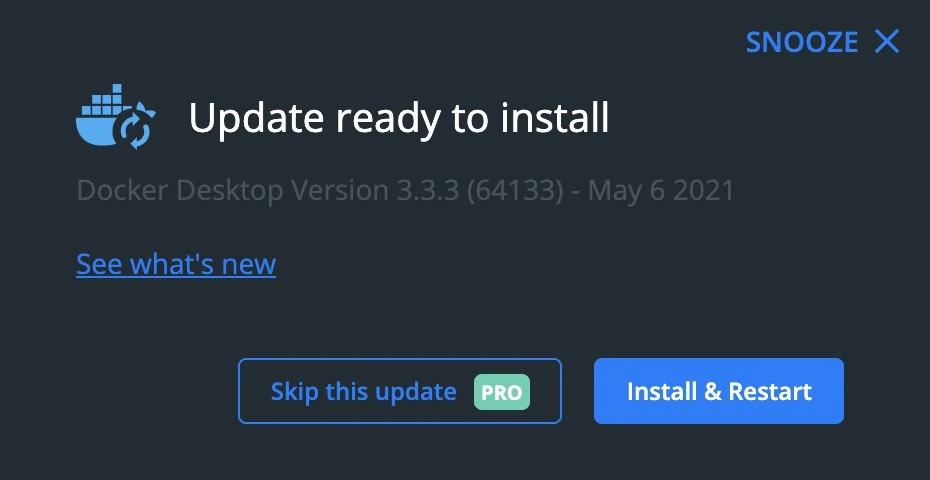
In the meme image, we see an update notification from Docker Desktop. It says “Update ready to install – Docker Desktop Version 3.3.3 (64133) – May 6 2021”. That’s basically Docker telling the user: “Hey, there’s a new version (3.3.3) of Docker Desktop available, released on May 6, 2021.” Often, these updates include bug fixes, new features, or security patches. There’s a link that says “See what’s new,” which would show the release notes (a list of changes in that update). Now, usually software updaters give you a few choices: you can install the update right now (often requiring an application restart), or you can skip or remind later if you’re not ready. Docker Desktop’s dialog indeed has two big buttons at the bottom: Install & Restart (the bright blue one) and Skip this update (the outlined one). However, in this case, the “Skip” button has a little green PRO label on it. That small “PRO” badge indicates this option is only available to users who have a Docker Pro subscription – a paid plan Docker offers for professional users. In simpler terms: if you haven’t paid for Docker’s Pro tier, the “Skip this update” button isn’t clickable for you. Skipping the update is locked behind a paywall.
For a new developer or someone early in their career, this might be puzzling or frustrating. Imagine you’re just trying to work on your project, maybe using Docker for the first time in a tutorial. All of a sudden, Docker Desktop says there’s an update. Perhaps you’re thinking, “I’ll install it later, I’m in the middle of something.” You move your mouse to click “Skip this update”… and it’s disabled unless you pay for Pro. 🤔 ToolingFrustration kicks in here: the tool that’s supposed to help you is now getting in your way. If you don’t have a Pro subscription (which many individual developers don’t, especially if they’re just starting or tinkering), you effectively have no easy way to skip the update indefinitely. Your options are either: go ahead and click Install & Restart right now, which will shut down Docker temporarily to update (interrupting any work you were doing with containers), or find the tiny “SNOOZE” link at the top to maybe postpone it just for a short while. It feels a bit like an ultimatum: update now or keep being nagged.
Let’s clarify some of those terms and why this matters:
Update: This is a new release of the software (Docker Desktop in this case). Updates are generally good because they bring improvements or fixes. But they often require restarting the application. Here, “Install & Restart” means Docker Desktop will close, apply the update, and start back up. During that time, any running containers (your mini computing environments running your apps/databases) will likely stop and have to be started again. That’s why updates can disrupt your workflow.
Skip: To skip an update means choosing not to install it, usually until later or until another version comes out. Many software updaters have a “Skip” or “Remind me later” option because users might be busy or want to wait. Skipping doesn’t mean you’ll never update; it just means “not now.”
Pro subscription: Docker offers different plans. The basic Docker Desktop is free for personal use, small companies, or educational purposes (this was called the Community edition). The Pro plan is a paid subscription (at the time, something like $5 per month for individual developers) which includes some extra perks – for example, increased rate limits when pulling images from Docker Hub, or advanced collaboration features. In this meme, Docker decided that being able to permanently dismiss/hide an update (Skip) is one of those perks. So if you pay for Pro, you can click “Skip this update” and it will likely not bother you about this particular version again. If you’re on free, that button is effectively locked.
Snooze: The top-right says SNOOZE. That usually means “remind me later.” It’s a temporary dismiss – likely the update prompt will pop back up after some hours or next day. Snooze is like saying “Not right now, but check again soon.” The meme highlights the difference: you can snooze short-term (probably available to everyone), but you can’t truly skip long-term unless you pay. For a developer without Pro, they might click Snooze and keep working, but they know the nuisance will return.
Version churn: This phrase wasn’t explicitly in the image, but in the description we talk about "version-churn fatigue." It means being tired of how often new versions come out that you’re asked to install. For someone working with Docker a lot, Docker Desktop updates were quite frequent. Constantly updating (and occasionally dealing with new bugs or changed features) becomes a chore. Developers sometimes deliberately stay on a stable version that “just works” for them. That’s why the ability to skip or delay updates is valued – it gives you control over when to move to the next version.
Now, picture being a junior dev encountering this. It teaches a quick lesson in both software and business: tools can have catches. You learn what a paid_skip_button means – that not all features or conveniences are free. It might spark a conversation in your team: “Hey, do we really need Docker Desktop’s latest version right now, or can we continue with the one we have? Should we pay for a subscription, or just live with updating whenever it forces us?” Many new developers also learn that while updates are important, you should update at a suitable time (for example, not right before a critical demo or deadline). With Docker Desktop making “skip” a Pro feature, even juniors would chuckle and sigh at how a basic option turned into a sales pitch. It’s a crash course in how developer tooling companies sometimes operate: by offering a great free tool but keeping some levers (like comfort features) for paying users. In the end, Docker is still an amazing technology for containerization, but this meme is a reminder that even in serious tech infrastructure, you’ll encounter a bit of upsell and some DevExperience quirks that you have to navigate with a sense of humor.
Level 3: Snooze as a Service
The meme captures a Docker Desktop update prompt that feels like a dark UX comedy sketch. In this pop-up, Docker Desktop proudly announces an update_ready_to_install (Version 3.3.3) and offers two choices: a big blue Install & Restart button (go ahead, take the update plunge right now and restart your containers), or a dimmed Skip this update button tagged with a bright green PRO badge. Yes, you read that right – Docker is effectively saying “Skipping an update is a premium feature.” This is the ultimate ToolingFrustration moment for developers who just want to get on with their work. It’s as if the Docker whale (that friendly container ship icon) has suddenly turned mercenary, holding the snooze button hostage behind a paywall.
Seasoned developers immediately recognize the DeveloperFrustration being lampooned here. In the world of containerization, Docker has become indispensable for local development and testing. But Docker Desktop (the official GUI and service for running Docker on Windows/Mac) has a notorious habit of popping up frequent update_prompts. Each update often means a download of several hundred MB and a full restart of the Docker engine (which stops all running containers). It’s the kind of interruption that strikes at the worst times – like when you’re in the middle of debugging or about to demo your application. Historically, we’d just click “Not now” or snooze such prompts and carry on. But this meme shows that in mid-2021, Docker took a bold (some say tone-deaf) step: they literally put the skip_update_pro feature behind a subscription. The free-tier users are essentially told, “Either update immediately and endure the disruption, or upgrade to Pro if you want the luxury of postponing this update.” This had devs doing a double-take: skipping an update isn’t exactly an advanced feature like enhanced security scanning or team collaboration – it’s basic UX courtesy!
Why is this funny (in a head-shaking, are-you-serious? way) to experienced devs? Because it reflects a trend of monetizing even the tiniest conveniences in developer tools. It’s reminiscent of freemium mobile games where you pay to remove ads or speed up a wait timer. Here, Docker turned DevExperience into a micro-transaction: pay to delay. The Versioning irony is strong – Docker Desktop’s version 3.3.3 isn’t some critical zero-day security patch, it’s one of the many iterative releases that year. Seasoned developers know the rule “if it ain’t broke, maybe don’t rush to fix it.” We’ve been trained by hard experience that occasionally an update can introduce new bugs or break an existing workflow. So the ability to skip an update until we’re ready is not just laziness – it’s pragmatism. By putting a PRO paywall on “Skip”, Docker Inc. effectively said, “Free users, we don’t trust you to decide when to update. Pro users, you’ve paid for the privilege of not being nagged.” It’s upside-down logic that got laughs and groans.
There’s also a layer of industry context here. Docker, the company, had been searching for a sustainable business model. After giving the core Docker Engine away as open source and building a huge user base (practically every developer doing containers uses Docker), they needed revenue. In 2021, Docker introduced new licensing for Docker Desktop aimed at large enterprises and started pushing their Docker Pro subscriptions for individual developers. Gating something as trivial as the “Skip update” button behind a paid plan was an almost absurd example of this push. It’s like the update_prompt itself became an advertisement: “Snooze this annoyance – upgrade now!” Senior engineers have seen this pattern before: essential developer tool becomes ubiquitous, then starts carving out features to charge for. It’s a bit of corporate tooling dysfunction that we share a dark laugh about.
To visualize the absurdity, consider a pseudo-code snippet of Docker Desktop’s update dialog logic:
# Pseudocode for Docker Desktop's update dialog behavior
if user.plan == "Pro":
show_button("Skip this update", enabled=True)
else:
show_button("Skip this update", enabled=False, badge="PRO")
prompt_user("🌟 Upgrade to a Pro subscription to postpone updates!")
In essence, the paid_skip_button means free-tier developers get a nag screen with one real option: hit Install & Restart and watch all your local containers stop cold. The SNOOZE link in the corner might let you delay for a few hours, but you know it’ll be back tomorrow morning like an alarm you can’t shut off. The meme’s author jokingly said, “I think we didn’t pay enough attention to it,” playing on the word “pay.” Exactly – we didn’t pay for Pro, so now Docker demands our attention (or money) at inconvenient times. The humor here is laced with pain: every dev can relate to being in a flow state only to be interrupted by an update notification. Now imagine that, plus a cheeky attempt to upsell you a subscription. It’s a perfect storm of DeveloperFrustration and ironic monetization in the dev tools space. No wonder this meme’s combination of a restart_required update and a PRO-locked skip button hit a nerve in the community – it’s funny because it’s true, and it hurts just enough to laugh about it.
Description
A screenshot of the Docker Desktop update notification dialog on a dark gray background. At the top, the Docker logo is visible next to the main header, 'Update ready to install'. Below this, smaller text specifies the version: 'Docker Desktop Version 3.3.3 (64133) - May 6 2021'. The dialog presents several user actions. In the upper right corner, there's a 'SNOOZE' option. Below the version information is a link to 'See what's new'. At the bottom, there are two primary buttons: a bordered, less prominent button that says 'Skip this update' with a green 'PRO' label next to it, and a solid blue button that says 'Install & Restart'. The humor and frustration stem from the fact that a basic feature, the ability to skip a software update, has been placed behind a paywall as a 'PRO' feature. This screenshot captures a moment in time when Docker's monetization strategy for Docker Desktop became more aggressive, which was a point of major contention and debate within the developer community, highlighting a negative developer experience
Comments
77Comment deleted
Docker finally achieved true containerization: they put the 'skip update' button in a walled garden and are charging for admission
Docker just containerized procrastination - “Skip update” is now a premium feature, because even deferring tech-debt apparently requires a subscription
Ah yes, the eternal Docker Desktop update dance - where 'Snooze' is just developer speak for 'I'll update when production breaks and I need that one bug fix from 47 versions ago that I suddenly care about.'
Docker Desktop updates: where 'Install & Restart' is free but 'Skip this update' requires PRO - a brilliant monetization strategy that perfectly captures the SaaS era's approach to developer tooling. It's the digital equivalent of 'you can leave the meeting, but only if you have a premium subscription.' Meanwhile, that SNOOZE button has seen more action than your CI/CD pipeline, because nothing says 'I'll deal with this later' quite like postponing a Docker update during a critical production deployment window
“Skip this update - PRO” is Docker’s most honest enterprise feature: pay to pin the one version where BuildKit, Compose, and the local k8s cluster still make eye contact
Docker Desktop updates: Orchestrating a full restart just to patch the whale - true hyperscale disruption at home
Docker Desktop’s premium feature is “Skip this update” - the free tier is discovering that Install & Restart doubles as Chaos Monkey for localhost when it flips Compose v2 and borks WSL2 networking five minutes before your demo
Can someone explain? Comment deleted
>paid >pro Comment deleted
U unable to skip updates unless u r pro I suppose Comment deleted
Oh. I am so got used to this that I wasn't even surprised Comment deleted
Pay money to skipping the update) Think it's so smart in today reality) Comment deleted
Didn’t paid Comment deleted
Don't understand Comment deleted
Update or paid for skip update? Comment deleted
да Comment deleted
) Comment deleted
Please, refrain from usage of Russian over there Comment deleted
why? Comment deleted
Potomu chto Comment deleted
Please, refrain from usage of Russian over there Even in latin form Comment deleted
why russian don't allowed. Only russian is banned to use? Comment deleted
Any except English Comment deleted
Marvelous. I hope British English is still allowed here ))) Comment deleted
Actually good question Comment deleted
Muchas gracias! Comment deleted
SPEAK ENGLISH!¡! Comment deleted
Ja, natürlich! Comment deleted
わかりました! Comment deleted
yes, because we are a civilized society Comment deleted
i'll shut down bot server, if you continue mocking me Comment deleted
Some people fear the power of supremacy Comment deleted
they hate Russians here and want them to die. Every other language (such as Spanish and German) are allowed. So, you understood Comment deleted
Maybe that's because people from other countries don't tend to break the rules time and time again by sending non-English messages, like Russians do? Comment deleted
well, i bet there no ad of this channel in other non-Russian channels and percentage of Russians is more that any other nationality here. I bet, if it was ~70% of spanish people, we'll see a lot of español here. So, that's not the reason to blame Russians but it's incredibly bad to ban only Russian, when natürlich and other words in other languages (there was a warning only because of a single "yes" in Russian) are free to use Comment deleted
Well, obviously in this particular case these messages in Spanish or German were more like trolling, and admin mentioned that trolling is fine. But outside of this case I have yet to meet non-English comments that are in some other language but Russian. So, there. Comment deleted
Firstly, it doesn't destroy other my arguments and secondly, how do you know freaking word "yes" or another single word/little sentence was not trolling or a joke‽ Comment deleted
Not trolling, but testing! Comment deleted
nothing other than English is allowed here, though you're getting more obnoxious by the minute. Comment deleted
look, imma get a warn for using non-russian and non-english: москаляку на гілляку, нам не потрібні недолюди тут Comment deleted
!report Comment deleted
∞/3 warnings for @borgar_umlaut Comment deleted
And that's why I love this channel Comment deleted
Admin is ukrainian, I guess. But as we all know, nobody asks the ukrainian Comment deleted
oh boy this escalated over time lol Comment deleted
If you pin some research basically telling that social group longevity depends on whether they speak same language it will probably be less burdensome. Comment deleted
or just paste a link every time Comment deleted
or just tell them… smh Comment deleted
Эм Ай доинг зис райт? Comment deleted
No Comment deleted
Trolling is ok Comment deleted
Kinda like Windows 10 Enterprise, automatic updates can be disabled there Comment deleted
The real question is - why would you even want to skip an update... It's not like docker updates will break your containers and have you debug and rewrite your code Comment deleted
docker desktop killed container build few updates ago, with buildkit, disabled it, and now it's ok Comment deleted
Restart is required Comment deleted
Oh, you really think so? Comment deleted
https://github.com/docker/roadmap/issues/183 Comment deleted
Polski? Comment deleted
Why not just "snooze" always?) Comment deleted
I feel like EA is behind all this Comment deleted
EA? Comment deleted
Gamer's joke Comment deleted
If this was done by EA, the paid option would be available after purchasing the "Administrative Options DLC", for which you'll need an Origin account. For applying the upgrade you would need to buy loot boxes until you find one with the update. Ups, wait, it's not loot boxes is a user-side-only non-deterministic paid arcade game, totally not loot boxes... Comment deleted
You gave me an idea... How about developing an app (or a game, maybe) that let's you find access to updates inside its lootboxes? ... Thinking of it, it has been done before Comment deleted
wait i thought this was a meme Comment deleted
Aren't there other alternatives for Windows or whatever that is? Comment deleted
I made this screenshot on Mac Comment deleted
In overall docker is best choice/balance Comment deleted
I have been seeing https://podman.io/ gain popularity, supposedly having the same flags so aliasing docker to it should work and Fedora people were migrated to it in 34 if I understood correctly. Also no daemon running as root Comment deleted
Many thanks to big community, mainly Comment deleted
Didn't pay. Comment deleted
no, this is docker :P Comment deleted
No jokes here Comment deleted
That's my screenshot Comment deleted
Rabinovich started his business in software Comment deleted
Love those offended Russian puppies, how they cry everytime about their language and gets mad on everybody around Comment deleted
We should be condescending to them though. Who needs english if there will be no USA visas for you anymore lmao Comment deleted