Docker on WSL2: A Recipe for Excessive RAM Consumption
Why is this Containerization meme funny?
Level 1: Big Jug, Tiny Bowl
Imagine you’re at dinner and you have a huge bottle of salad dressing, but only a small salad in front of you. Now picture pouring almost the entire giant bottle onto that one little salad bowl. 🥗 The salad is drenched and overflowing, and almost all the dressing is gone – nothing left for any other dish. It’s obviously way too much for that tiny salad, and it makes a big mess. This meme is funny for the same reason: it shows someone (the computer) dumping an absurd amount of one thing into something that clearly can’t use that much. It’s like one friend at a pizza party grabbing almost the whole pizza for themselves, leaving only a tiny slice for everyone else – an over-the-top, unfair share. We laugh because it’s a silly, exaggerated situation. In the computer’s case, it’s pouring almost all the memory into one task (Docker’s Linux bowl), which is just as overkill as flooding a small salad with a huge jug of oil. The humor comes from that ridiculous mismatch in size – a giant jug versus a tiny bowl – showing in a simple way how one thing is needlessly using almost everything.
Level 2: Docker Desktop Under the Hood
Let’s break down what’s happening in this meme in simpler terms. Docker is a popular tool that developers use for containerization – basically, packaging up applications along with everything they need to run, in a neat little container. On a Linux system, Docker is fairly lightweight; the containers share the Linux system’s kernel, so you’re not duplicating an entire operating system for each app. However, on Windows, things get tricky because those containers usually expect a Linux environment. That’s where Docker Desktop comes in for Windows: it creates a hidden Linux environment on your Windows machine so that Linux-based containers can run. In early days, this was done with a full virtual machine. Nowadays, Docker Desktop uses WSL2 (Windows Subsystem for Linux 2) as its backend. WSL2 is a feature of Windows 10+ that lets you run a real Linux kernel inside Windows. You can think of WSL2 as a tiny Linux PC living inside your Windows PC.
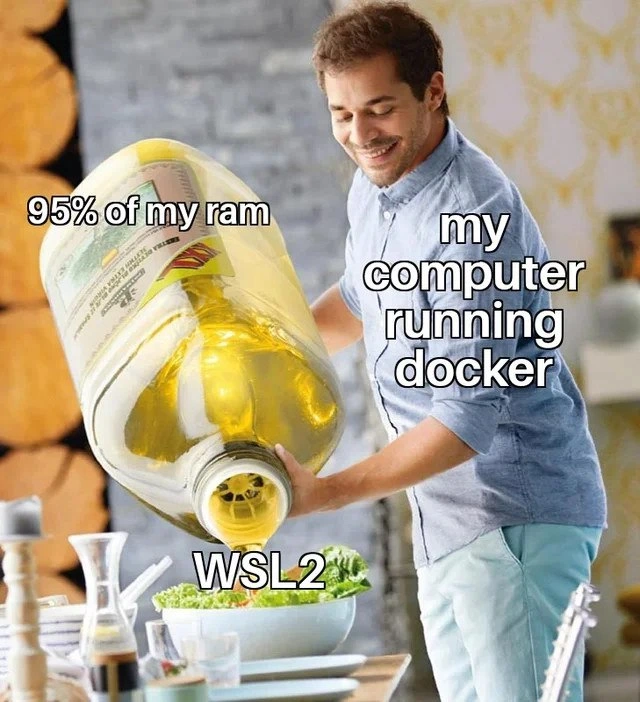
Now, about the meme: it’s highlighting how running Docker with that WSL2 Linux layer can use up a ton of memory (RAM). RAM, or Random Access Memory, is your computer’s short-term working memory – it’s what programs use to store data they’re actively working with. Your computer has a limited amount of RAM (say 8GB, 16GB, etc.), and all running programs share that pie. If one program takes a huge chunk, the others have to squeeze into the remaining space, which can make your whole system slow down. In the meme, “95% of my RAM” written on the giant oil jug means one process is gobbling up almost all the memory. The “my computer running Docker” text on the man pouring the oil indicates it’s Docker (through the WSL2 Linux layer) doing this. And “WSL2” on the little salad bowl represents that Linux subsystem receiving an absurd amount of memory – far more than a small bowl can realistically handle! It’s a comical way to show that Docker’s Linux backend is getting almost all the memory resources from the Windows host.
Why would Docker/WSL2 use so much memory? For a newcomer, it’s not immediately obvious – after all, you might be running just a simple app or two in Docker. The reason is that when you start Docker on Windows, you’re effectively launching that whole Linux environment (WSL2). That environment by default can grab memory as needed to make sure your containers run well. Linux is designed to use available memory to cache files (which normally makes things faster). So if you, say, run a database in Docker, the Linux system might cache a lot of data in memory to speed up database access. To Linux, this is good behavior – unused memory is wasted memory, so it tries to use what’s there. But Windows doesn’t exactly understand what Linux is doing inside; it just sees that the WSL2 subsystem (shown as a program called vmmem in Task Manager) is using, for example, 8GB out of your 8GB RAM. That leaves only a sliver (say 5%) for the rest of Windows and your other apps, which can make your whole machine slow or unresponsive. It feels like someone pouring nearly all the resources into one bucket.
For a junior developer or someone new to Docker on Windows, this can be confusing and frustrating. You might recall the first time you set up Docker on a Windows laptop: maybe you followed a tutorial to containerize a simple web app or run a Linux-only tool. Everything was fine until your system started lagging. You open the resource monitor and gasp – Docker (via WSL2) is eating up almost all your RAM! It’s common to wonder, “Did I do something wrong?” The meme reassures us that this is a common experience and makes a joke out of it. In terms of Developer Experience, this is a known issue: Docker Desktop’s heavy resource usage is like the price of admission for using Linux containers on Windows. It’s not that Docker wants to eat your memory; it’s just how the architecture works.
Let’s demystify some terms from the tags. WSL2_backend means Docker is using WSL2 in the background as its engine. Windows Subsystem for Linux 2 (WSL2) essentially runs Linux distributions (like Ubuntu) inside Windows, and Docker piggybacks on that to run Linux containers. RAM_overconsumption and resource_hogs refer to how certain programs use more than their fair share of memory or CPU – in this case Docker/WSL2 is the hog. Virtualization_overhead is the extra cost (in resources) you pay when you run something in a virtual machine versus running it natively. Here, the overhead is that running Linux on top of Windows isn’t free – it needs extra memory and CPU to maintain that separate environment. All of this contributes to PerformanceIssues where your machine might slow down. Knowing these terms: if someone says “Docker on Windows has a lot of overhead,” they mean it uses a lot of extra resources. When they joke about it, calling it a “memory hog,” they mean Docker’s using more memory than one would expect for the tasks at hand.
The good news is that there are ways to manage this. Tools have settings – for example, you can limit how much memory WSL2 is allowed to use by editing a configuration file (.wslconfig). Alternatively, if you only need Docker occasionally, you can stop it when you’re not using it to free up RAM. Some developers even use remote Docker hosts or switch to Linux for development to avoid this issue. But if you’re sticking with Windows, it’s helpful to understand that this big gulp of memory is somewhat normal. It’s the trade-off for convenience: you get to run Linux containers seamlessly, but it might cost a chunk of your system’s performance. The meme takes this rather dry technical quirk and makes it funny by literally showing your PC dumping almost everything it has (95% of RAM) into just running Docker’s Linux layer (WSL2). Once you’ve experienced it, you can’t help but smirk at how spot-on that image feels!
Level 3: Whale of an Appetite
For seasoned developers, this meme hits close to home. Docker Desktop on Windows has a bit of a reputation – that friendly Docker whale icon might as well be Moby Dick with how hungry it gets. The image of a man gleefully pouring a giant jug of oil labeled “95% of my RAM” into a small salad bowl (“WSL2”) perfectly captures the feeling of launching Docker on a Windows machine. The “man” is my computer running Docker, smiling as it generously (and obliviously) douses WSL2 with nearly all the memory it has. Meanwhile, the rest of the system – much like the rest of that salad – is soaked and struggling. It’s funny because we’ve all seen it: you start a couple of containers for a development project, and soon your laptop’s fans kick into overdrive and Task Manager shows memory usage bar practically hitting the ceiling. That one process called Vmmem (which represents the WSL2 VM) is gulping down gigabytes of RAM like it’s at an all-you-can-eat buffet.
This meme resonates as developer humor because it exaggerates a common pain point in the Developer Experience (DX). It’s poking fun at the PerformanceIssues that arise from modern development tooling. We’re promised lightweight, isolated containers, but on Windows that convenience comes with a hefty overhead. The community joke is that running Docker on Windows is sometimes like using a sledgehammer to crack a nut – you invoke this huge virtualization apparatus just to run a tiny service or two. Everyone with a Windows setup has a story: “I was just trying to run a small Node server in Docker, and suddenly my IDE started freezing and my music stopped – checked resources and Docker had eaten my RAM!” It’s a classic tooling overload scenario: the combination of Docker, WSL2, maybe your IDE and browser open, can max out 16GB or even 32GB machines as if nothing. The meme’s hyperbole (95% RAM for one subsystem) might make us chuckle, but it’s only a slight exaggeration for some real cases. That’s why it’s too real.
Why does this happen? Experienced devs know it’s not exactly a bug, but a trade-off of how containerization works on Windows. Docker was born in a Linux world – on a native Linux machine, containers share the host kernel directly and are pretty efficient. But on Windows, unless you’re using Windows-native containers (which are a whole different ecosystem), Docker has to run a Linux kernel in the background. Early versions of Docker for Windows used a static VM (with something like VirtualBox or Hyper-V) where you had to manually allocate say 2GB or 4GB. WSL2 integration was heralded as a improvement: a more seamless, faster I/O, auto-growing VM. Ironically, that auto-growing nature is exactly what this meme mocks. Without a fixed cap, WSL2 will expand to use as much memory as it “thinks” it needs. In practice, it overcommits memory for caching and doesn’t return it until the host really screams for it. So the developer sees the RAM continuously climb until Windows maybe starts to hitch or issue low memory warnings. The “95% of my RAM” jug in the meme is a nod to how one might glance at their memory usage and see Docker (via WSL2) taking a ridiculously large slice of the pie.
The humor also reflects a bit of exasperation and resignation in the dev community. Docker is an amazing technology for consistency and deployment, and WSL2 is a great hack to get Linux working inside Windows. But combine them, and you often get performance headaches. It’s the kind of issue that senior developers joke about because they’ve had to explain it to teammates or have done the ritual of restarting Docker Desktop to clear out memory. Some have even automated nightly Docker shutdowns or instituted a habit of closing Docker when not actively using it, to free up RAM for other tasks. Others tweak settings by creating a .wslconfig file to constrain resources – essentially putting a diet plan on that hungry whale. There’s an implied “we’ve all been there” camaraderie. The salad bowl in the meme (WSL2) is tiny compared to that massive oil jug; similarly, many dev tasks we do in Docker are actually quite small (maybe running a single database or a test environment), yet the overhead – the runtime, the VM – is huge by comparison. This mismatch induces a kind of dark humor: why on earth does a simple dev environment need the memory equivalent of an entire buffet?
From an organizational standpoint, this meme also hints at the costs of abstraction. Many companies standardized on Docker for development and CI. On a Mac or Linux machine, it’s heavy but manageable. On Windows, devs often felt second-class due to issues like these. It’s an open secret that some Windows-using devs either upgraded their RAM, switched to dual-boot Linux, or even leveraged remote Linux servers to alleviate the strain. In daily stand-ups or team chats, you might hear someone quip, “Hold on, my machine’s swapping because Docker decided it needed all the RAM again,” followed by a knowing laugh from colleagues. Containerization is supposed to simplify life, but here it’s giving Windows users a borderline performance crisis. The meme distills that frustration into a single, humorous visual: your computer enthusiastically overdoing it. And as any senior dev knows, overprovisioning or misallocation of resources is a classic gotcha – whether it’s memory, CPU, or budget, pouring 95% into one thing is rarely a good idea. This shared understanding is what makes the meme funny: it’s a laugh so we don’t cry situation, where we recognize the absurdity in our everyday tooling.
Level 4: Virtual Memory Buffet
Deep beneath the humor lies a tale of virtualization and memory management quirks. Docker Desktop on Windows isn’t just an application; it’s actually running a lightweight Hyper-V virtual machine via WSL2 (Windows Subsystem for Linux 2). This means your Windows host is lending a chunk of its hardware resources to run a real Linux kernel in parallel. In an ideal world, the hypervisor’s dynamic memory allocation would size that Linux VM just right. But in practice, WSL2 can aggressively consume RAM because the guest Linux assumes it might as well use what’s available. Modern Linux has a “use-it-or-cache-it” mentality with memory – any free RAM is often used for disk caching and buffers to improve performance. Inside that WSL2 VM, the Linux kernel cheerfully slurps up memory for caching Docker images and container I/O, thinking, “Hey, free memory! I’ll make use of it.” From Windows’ perspective, however, that memory is “claimed” by the VM, even if Linux would release it under pressure. The result? Windows sees something like 95% of your RAM tied up in that subsystem, as if it vanished into a black hole – hence the meme’s giant oil jug labeled “95% of my RAM” being poured in.
This scenario exposes the nuance of how operating systems manage memory across virtualization boundaries. When one OS runs atop another, you get a two-layer memory dance. The host OS (Windows) provides memory to the guest OS (Linux in WSL2) in big chunks. The guest then manages that chunk independently. If the guest decides to cache tons of data (which Docker’s processes encourage by reading/writing container layers), it can fill the allotted memory. Without proactive coordination, the guest won’t immediately hand back unused memory to the host. Traditional hypervisors use techniques like memory ballooning (a driver that forces the guest to relinquish memory) or strict memory limits, but out-of-the-box WSL2 is more laissez-faire. By default, WSL2 can grow its memory usage near the host’s limit and only shrink when absolutely necessary. This is why savvy developers discovered they could configure a .wslconfig file to impose a memory cap (say 4GB) – otherwise the Linux VM will gladly expand to a resource hog, grabbing whatever it can. The meme humorously exaggerates this “grab it all” behavior – it’s essentially depicting a memory allocation algorithm turned up to eleven.
Under the hood, Docker itself isn’t explicitly trying to be a memory bully; it’s a side effect of layering containers inside a VM. Each Docker container on Linux uses Linux kernel features (namespaces, cgroups, etc.) which assume fast, direct access to hardware resources. On Windows, those containers live in the WSL2 VM, meaning there’s an extra translation and allocation layer. If you run many containers or a heavy workload, the Linux VM requests more host RAM to accommodate, and Windows obliges. The virtualization overhead here isn’t just the fixed cost of running a VM; it’s also the mismatch in how memory is accounted. Windows’ memory manager thinks in terms of processes and working sets, while Linux (inside WSL2) manages pages and will happily keep cached data until it’s told not to. The two OSes don’t perfectly communicate real-time needs. Thus, you get situations where Linux is essentially saying “I have plenty of free memory (for my use),” while Windows is panicking “I only have 5% free for everything else!” It’s a classic case of misaligned memory reporting across a VM boundary.
In theoretical terms, this is an example of the challenges of layered abstractions. We have containerization (Docker) built atop virtualization (WSL2/Hyper-V), built atop a host OS (Windows). Each layer abstracts resources in a different way. The humor in the meme stems from a very real technical constraint: there’s no free lunch with layers. The virtual memory allocated to a guest must come from somewhere, and if the guest uses it greedily, the host’s capacity appears drained. It’s almost like an instance of the CAP theorem, but for memory: you can optimize for container isolation or host efficiency, but not perfectly both at once in this setup. In essence, the meme highlights how a sophisticated piece of engineering (Docker on WSL2) can lead to a comically disproportionate resource allocation. It’s absurd yet inevitable given the architecture – a “virtual memory buffet” where the guest OS piles its plate high with RAM while the host looks on in horror. This deep technical interplay is what makes the meme resonate on an almost academic level: it’s funny because it’s a tiny salad of actual workload being drenched in an industrial quantity of computing resource, a direct consequence of the under-the-hood design.
Description
This is a meme using the 'man pouring giant bottle of olive oil' format. A smiling man, labeled 'my computer running docker', is enthusiastically pouring from an enormous bottle of olive oil, labeled '95% of my ram', onto a small, unassuming bowl of salad, which is labeled 'WSL2'. The visual gag hilariously exaggerates the user experience of running Docker on Windows via the Windows Subsystem for Linux 2 (WSL2). For senior developers, this meme is highly relatable as WSL2, while powerful, has a reputation for aggressively consuming system memory by default. Docker Desktop's integration with WSL2 often leads to significant RAM allocation, making it feel like the majority of the system's resources are being poured into the virtualization layer, leaving little for anything else

Comments
14Comment deleted
WSL2's memory management has a simple philosophy: RAM is like a cookie, and it's always the last one in the jar
Spinning up a 10 MB Alpine container and watching Docker Desktop hoard 48 GB into WSL2 really drives home that on Windows, cgroup limits are more of a gentle suggestion than a rule
The real container orchestration challenge isn't managing Kubernetes at scale - it's managing to keep any RAM available when Docker Desktop decides your 32GB machine is actually just its personal memory playground, while WSL2 gleefully enables this resource hostage situation
Ah yes, the classic WSL2 + Docker combo: where your 32GB of RAM becomes a distant memory as Docker generously 'borrows' 30GB for that single nginx container you're running. It's not a memory leak if it's a feature, right? At least the .wslconfig file gives you the illusion of control before Docker decides it needs just a bit more... for caching... indefinitely
WSL2 + Docker Desktop: the elegant architecture where 'lightweight containers' demand a 64GB rig just to compile hello world
Docker Desktop on WSL2 behaves like vmmem has a blank check - until you remember cgroup limits are ‘best effort’ on Windows and your laptop becomes a space heater
Docker on Windows is manual GC: WSL2 grabs 95% of RAM for page cache and the only sweep phase is me typing wsl --shutdown
https://t.me/dev_meme/2608 Comment deleted
uhmm... it's 3rd time i see this meme here Comment deleted
Joke about wsl2 goes out of control Comment deleted
Man: admin Salad: dev_meme Oil: WSL2 meme Comment deleted
https://t.me/dev_meme/2600 https://t.me/dev_meme/2608 Comment deleted
t h i s Comment deleted
Хахахах, рекльно Comment deleted