Skip to content
DevMeme
7225 of 7435
Distracted by Someone Coding With a Cursor This Huge
IDEs Editors Post #7923, on Apr 14, 2026 in TG

Distracted by Someone Coding With a Cursor This Huge

Why is this IDEs Editors meme funny?

Level 1: The Giant Pencil

Imagine your friend keeps bragging about their amazing new magic pencil called "Pencil" that practically does homework by itself. Then one day you peek over someone's shoulder and see them writing with a pencil the size of a baseball bat — and you text your friend, "someone here is working with a pencil THIS huge." Same word, totally different thing, and now nobody can concentrate. That's the whole joke: a fancy computer tool and a plain old blinking typing-marker share the same name, and the photo picks the silly meaning on purpose. It's funny because the man looks completely serious while his screen contains something gloriously ridiculous.

Level 2: Carets, Cursors, and a Company Named After One

Some vocabulary to untangle the pun:

  • The text cursor (technically a caret or I-beam) is the blinking vertical bar in an editor marking where your next keystroke lands. Most IDEs let you customize it — width, blink rate, even block vs line style — which is how you end up with the absurdly fat one visible mid-screen in this photo.
  • Cursor (capital C) is an AI coding assistant built as a fork of VS Code: it embeds large language models directly into the editor so you can generate, edit, and refactor code with natural-language prompts. It became shorthand for the whole AI-assisted coding wave, the way "Google it" means search.
  • An IDE (Integrated Development Environment) is the application where developers write code — the dark window full of syntax-highlighted text on the monitor. The dark theme, split panels, and colorful code shown here are instantly recognizable to anyone who's opened VS Code or a JetBrains tool.

If you're newer to the field, you've probably already experienced the real version of this meme: someone asks what you code with, and the answer carries weird social weight. Saying "Cursor" in an interview or standup signals you're riding the AI tooling wave. This image is what happens when that phrase escapes into the physical world — "coding with cursor this huge" is technically true of the man in the photo, just not in the way the hype cycle intended.

Level 3: Polysemy-Driven Development

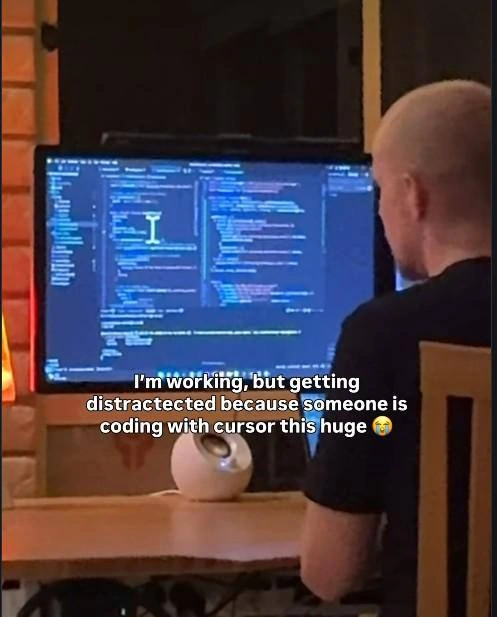
The entire joke hinges on a single overloaded identifier. The caption — "I'm working, but getting distractected because someone is coding with cursor this huge 😭" — reads one way if you parse cursor as the blinking I-beam in a text editor, and a completely different way if you parse it as Cursor, the AI-powered VS Code fork that swallowed a chunk of the developer mindshare during the AI coding boom. The photo resolves the ambiguity in the dumbest possible direction: an over-the-shoulder shot of a guy at a dark-themed IDE with a genuinely enormous green I-beam cursor sitting mid-screen, several lines tall, like someone set the caret width to a value normally reserved for accessibility testing or a prank.

That's the deeper layer experienced developers are smirking at. For roughly two years, "are you coding with Cursor?" became the new "do you even lift" of software — a status signal in the AI tooling arms race, alongside Copilot, vibe coding, and the quiet anxiety that your editor's autocomplete now writes better code than your coworkers. The meme deflates all of that hype with deliberate literalism: the most impressive thing on this man's screen isn't an LLM refactoring his codebase, it's a caret that could be seen from space. It's the same comedic move as answering "we use the cloud" with a photo of cumulus — collapsing a brand name back into the common noun it colonized.

There's also a sly bit of cultural commentary in the framing itself. The candid, slightly voyeuristic photo mimics the genre of "spotted someone coding in public" posts, where strangers' screens get judged for their editor, theme, and tooling choices. Here the judgment lands not on tech stack but on caret girth — a parody of how shallow editor-tribalism (vim vs emacs, light vs dark theme, JetBrains vs VS Code) has always been. The misspelling "distractected" is the chef's kiss: the author is so distracted they can't even type "distracted," which is either an authentic typo or the most committed bit in the caption.

Description

A candid photo taken from behind shows a man with a shaved head in a dark t-shirt sitting at a wooden desk, facing a large monitor displaying a dark-themed IDE full of code; a comically oversized text cursor (I-beam) is visible in the middle of the editor. A small white spherical speaker sits on the desk and warm lamp light glows at the left against a brick wall. Overlaid white caption text reads: "I'm working, but getting distractected because someone is coding with cursor this huge 😭" (typo 'distractected' included). The joke is a double entendre on the AI coding editor 'Cursor' versus the literal giant text cursor on screen, riffing on the wave of AI-assisted coding tools

Comments

11
Anonymous ★ Top Pick Twenty years in and the most disruptive thing Cursor shipped is making 'check out my huge cursor' a legitimate standup update
  1. Anonymous ★ Top Pick

    Twenty years in and the most disruptive thing Cursor shipped is making 'check out my huge cursor' a legitimate standup update

  2. @Algoinde 2mo

    He was told that coding with cursor will speed up his work massively

    1. @deimossos 2mo

      He was told that cursor is a big thing in the development space recently

      1. @Algoinde 2mo

        His senior said "I'm a big cursor fan"

  3. @b7sum 2mo

    kde plasma cursor zoom

    1. @chupasaurus 2mo

      enlargement™ it's actually called magnification

  4. @NaNmber 2mo

    cursor-oriented development or smth

  5. @agonyship 2mo

    I rather spend hours searching for it... No wait. Mine is big, too. And red.

  6. @losses_don 2mo

    Finding cursor at a random place is annoying, so I'm using this size too...

    1. @Broken_Cloud_1 2mo

      how tf do you point

      1. @losses_don 2mo

        just normally, It's hard for macos since the point is inside the cursor, but for Windows, it's not that hard...

Use J and K for navigation