
When You Use Audacity as Your Windows Hex Editor for Struct Annotation
Why is this IDEs Editors meme funny?
Level 1: Sounds Like a Hack
Imagine you have a secret message written in numbers, and instead of using a normal decoder, you decide to play those numbers as musical notes to try to hear the message. 🎹 Sounds silly, right? That’s basically what happened here. A programmer wanted to peek inside a file (the secret message) and used a music program (meant for songs) to do it. It’s like trying to read a book by listening to the sound the pages make! It’s funny because they’re using the wrong tool for the job in a super creative way – kind of like using a piano to solve a puzzle. It might sorta work, but it’s definitely not the usual approach, and that wacky creativity is what makes everyone laugh.
Level 2: Sounding Out Bytes
Let’s break down what’s happening in this meme in simpler terms. The person in the tweet is asking for a hex editor recommendation. A hex editor is a program that lets you open any file and see the actual bytes that make up that file. Bytes are usually shown in hexadecimal (base-16) notation because it’s a compact way to represent the values 0-255. For example, the byte value 65 in decimal is 0x41 in hex, and if interpreted as text it represents the letter "A". So hex editors are essential for low-level programming tasks, debugging binary formats, or reverse engineering files when you don’t have a ready-made tool to read them. They show you the raw guts of the file – it’s like opening the hood of a car to see the engine.
Now, “annotating structs” means the person has knowledge of how the data is structured and wants to mark or label which part of those bytes corresponds to which field. A struct (short for data structure or structure) is a concept from languages like C/C++ where you define a bunch of related data items laid out in a specific order. For example, you might have a struct for an image header that says: first 7 bytes are a signature or magic number identifying the file type, the next byte is the image width, the next byte is the image height, etc. Annotating structs in a hex editor would mean, as you scroll through the file’s bytes, you put a note like “<- this 1 byte is the Width” to help you remember or communicate the format. Some advanced hex editors or binary analysis tools let you define these structures so the tool itself will highlight those bytes in the file and show you the value in a human-readable way (for instance, showing “Width: 16” instead of just 0x10).
So what’s the twist? The person says “I’d normally use Audacity” – and Audacity is not a hex editor at all! Audacity is a free, open-source audio editing program. Most of us use it to record sounds, edit music tracks, or analyze audio. It has features like a waveform view (the squiggly line that represents sound amplitude over time) and the ability to add labels on a timeline (commonly used to mark parts of a song or audio recording). It’s built for music and sound, not for generic binary data. However, Audacity does allow importing “raw data” as if it were audio. This is a feature meant for audio experts who might have raw PCM (pulse-code modulation) audio files with no header – basically just raw samples. You can tell Audacity, “Hey, treat this file as audio with these settings (sample rate, 8-bit or 16-bit, mono or stereo, etc.)”. If you do that with a non-audio file, Audacity will do its best to interpret the bytes as sound samples. The outcome is usually just noise if you play it, but visually, you’ll see a waveform corresponding to the byte values. For example, a byte with value 0 might show as a flat line (silence at center), whereas a byte with value 255 (0xFF) might show as a peak or trough (a loud spike). If the data has a pattern (like a repeated header or text), you might see a repetitive pattern in the waveform.
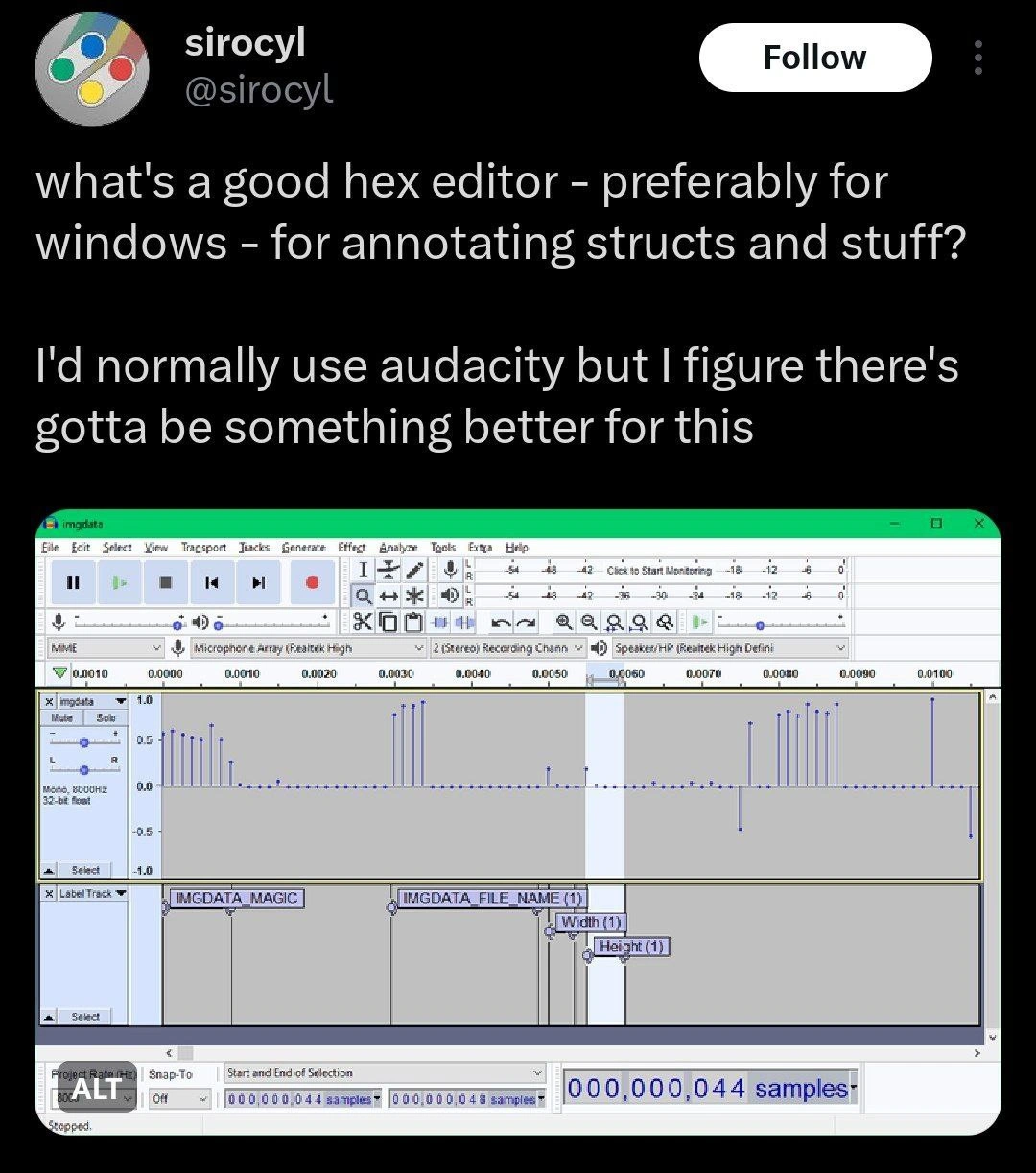
In the image, we see Audacity open with a track called “imgdata”. There’s a series of vertical spikes in the waveform display. Underneath, there’s a label track with labels such as IMGDATA_MAGIC, IMGDATA_FILE_NAME, Width (1), Height (1). What does that mean? It looks like the user imported a file (perhaps named imgdata) into Audacity as raw audio. The “000,000,044 samples” at the bottom suggests the file had 44 bytes (likely imported as 8-bit audio, 44 samples = 44 bytes). The user then added a label track to annotate certain positions:
IMGDATA_MAGICpresumably marks the region of samples corresponding to a magic identifier “IMGDATA” at the start of the file (maybe those first 7 bytes spell out "IMGDATA" in ASCII).IMGDATA_FILE_NAMEmight label the bytes that store a file name (perhaps the next chunk of bytes in the struct is a file name or some metadata).Width (1)andHeight (1)likely label single-byte positions for the width and height fields of an image. The “(1)” in the labels probably indicates 1 byte in size.
So effectively, this person manually labeled the binary file’s structure on Audacity’s timeline. Instead of the usual hex editor view which might look like:
00000000 49 4D 47 44 41 54 41 00 10 08 ...
^^^^^^^^^^^^^^^^ ^ ^ ^
"IMGDATA" | | |__ Height field (1 byte)
| |_____ Width field (1 byte)
|________ File name or other data
they are seeing it as a waveform with markers. The tall spikes in the waveform likely correspond to those ASCII codes or extremes in values that mark boundaries between these fields. It’s a bit like trying to recognize a word not by looking at the letters, but by looking at a graph of the ink used – weird, but you might still guess where one word ends and the next begins if there are spaces (analogous to spikes or gaps in data).
Now, why is this funny or interesting to developers? Because it’s a case of using the wrong tool for the job in a clever way. Audacity is a tool for editing sound, and here it’s being used to inspect binary data. It’s the equivalent of using a metal detector to find your lost car keys in your messy closet – not the typical approach! The meme highlights ToolMisuse in a lighthearted way: the developer’s question implies they know Audacity is not really the ideal solution (“there’s gotta be something better for this”), but it’s what they were using. Perhaps Audacity’s visual labeling was actually helpful for them, or maybe it was just the only thing on that PC at the moment that could open an arbitrary file.
For a junior developer or someone new to debugging, it’s also an introduction to how resourceful programmers can be. It demonstrates a bit of hacking mindset: if you understand the raw data, you can use any program that allows raw input to analyze it. In reverse engineering or low-level debugging, people sometimes do crazy things like this. For instance, someone might open a binary file as an image (each byte as a pixel color) to see if any visual pattern emerges, or load an executable into a text editor to search for readable text fragments. Here, loading data as audio is in the same spirit. It won’t give you literal hex values, but it gives a visual pattern that you can correlate with what you expect.
The tags like DebuggingTools and IDEsAndTextEditors are nudging at the fact that Audacity is neither an IDE nor a traditional debugging tool – yet here it’s pressed into service as one. It’s also a nod to DebuggingFrustration: sometimes debugging a problem (or figuring out a file format) means using whatever tool will give you insight, even if it’s unconventional. The meme is essentially an inside joke for programmers: “Ever been so frustrated trying to debug a binary file that you turned it into a sound wave? This person has!” And incredibly, it’s not entirely a joke – you can glean real information this way for small files if you know what you’re doing. But definitely, the tweet is asking for a more proper tool, implying “Okay, I admit this is crazy, any recommendations so I don’t keep doing it the crazy way?”
For context, on Windows there are indeed better suited hex editors (many folks might reply with suggestions like HxD, or the free Visual Studio Code with a hexdump extension, etc.). The tweet’s author likely knew Audacity was an odd choice and phrased it that way to get a chuckle from the community. And it worked – it’s funny because it shows a mix of ingenuity and absurdity. It also highlights a bit of the hacker spirit: seeing an audio waveform editor being repurposed to mark up a data structure is the kind of offbeat clever solution that gets developers smiling. After all, how many people would even think, “Hey, I can open this .imgdata file in Audacity”? It turns out Audacity will happily do it, because from its perspective, those bytes are just sound samples waiting to be heard (or in this case, seen).
So in simpler terms: the meme shows a software developer using an audio editing program (Audacity) as a makeshift file inspector to identify parts of a structured binary file. It’s funny because it’s the digital equivalent of using a tool in a very unintended way – like using a musical instrument to solve a coding problem. It highlights both the desperation and creativity often involved in debugging low-level data issues. And for anyone who’s struggled to parse a mysterious file or debug something with insufficient tools, it’s a relatable kind of geeky humor.
Level 3: The Audacity of Hex
It takes some audacity (pun intended) to use a digital audio workstation as your go-to Windows hex editor. The tweet in the meme sets up an absurd scenario that seasoned developers find both hilarious and oddly relatable. The user asks for a “good hex editor…for annotating structs and stuff,” then deadpans: “I’d normally use Audacity but I figure there’s gotta be something better.” Wait – Audacity? The program everyone knows as the free audio recording and editing app? That’s what they’ve been using to poke at binary structs? The sheer mismatch between tool and task is the core of the joke. It’s like hearing a carpenter say, “I usually use a Swiss Army knife to hammer nails, but maybe there’s a real hammer out there.” Experienced devs laugh because we’ve all seen (or done) wacky tool misuse when in a pinch, but this is on another level of creative improvisation.
Why might a developer even think to use Audacity as a hex editor? The meme’s screenshot gives clues: Audacity’s timeline and annotated label track are being used to mark byte offsets with labels such as IMGDATA_MAGIC, IMGDATA_FILE_NAME, Width (1), Height (1). The clever bit here is that Audacity can import raw binary data as audio – essentially plotting the bytes as a waveform. Each vertical spike in that waveform corresponds to a byte (or group of bytes) with a particular value. For instance, a magic number at the start of a file often contains distinctive bytes (like ASCII letters or specific flags) that, when interpreted as audio samples, might produce noticeable spikes or patterns distinct from the surrounding data. By zooming in and using Audacity’s labels, the developer can tag the exact positions of these struct fields visually on the time axis. In a sense, they’ve turned an audio editor into an improvised binary structure visualizer.
This resonates with senior engineers because it highlights both ToolMisuse and ingenious problem-solving born out of necessity. On Windows, finding a good hex editor that lets you annotate struct fields isn’t as straightforward as you’d think. Sure, there are dedicated tools like 010 Editor (which supports binary templates to map out struct fields) or the classic HxD for simple hex viewing. But maybe the developer didn’t have those at hand, or didn’t know about them, and instead reached for a tool they were familiar with – Audacity. It’s a bit of a running joke in programming that sometimes you solve a problem with whatever tool you know, even if it’s like fitting a square peg in a round hole. There’s an element of DebuggingFrustration here too: when you’re trying to troubleshoot a binary file format at 3 AM and your usual tools aren’t cutting it, you might just say, “Heck, this audio editor has a timeline and shows raw PCM data… maybe I can see the struct layout by eye!” And as absurd as it sounds, it can work for small files.
The tweet’s tone (“I’d normally use Audacity”) implies this isn’t the first wild trick in this developer’s book. It’s the casual confidence of someone who has done some heavy LowLevelProgramming or reverse engineering and isn’t afraid to jury-rig a solution. Reverse-engineers often have to dissect unknown file formats or memory dumps. While professional reverse engineering tools exist (like IDA Pro, Ghidra, or hexdump utilities), part of the culture is using creative visualization – even if that means opening a file in Photoshop or, in this case, an audio editor – to spot patterns. In fact, there’s a subversive joy in turning a tool against its intended purpose. It’s the kind of DeveloperHumor that elicits nods from veterans: “Haha, I once opened a core dump in Excel to find a pattern” or “I used strings and grep to debug an image file, but using Audacity – now that’s new!” The reverse_engineering_hack vibe is strong with this one.
Consider what the screenshot reveals: The project is named “imgdata” and the label track identifies things like width and height being 1 byte each, which suggests the file likely contains an image header. We can imagine the binary structure they’re examining. It might look something like this in code form:
// Hypothetical structure of the binary data
struct ImgDataHeader {
char magic[7]; // "IMGDATA" (7-byte magic string)
uint8_t width; // Width (1 byte)
uint8_t height; // Height (1 byte)
// ... possibly other fields ...
};
And the raw bytes in the file might be like:
49 4D 47 44 41 54 41 10 08 ...
^--"IMGDATA" magic--^ ^width^ ^height^
If you open these bytes in a regular hex editor, you’d see the hex values 49 4D 47 44 41 54 41 (which correspond to the ASCII letters "IMGDATA") and then 10 and 08 for width and height (16 and 8 in decimal, perhaps). In a normal hex editor, you have to mentally or manually note, “Bytes 0-6 are the magic string, byte 7 is width, byte 8 is height,” etc. Some advanced hex editors let you apply a template so it highlights these fields for you. But here, Audacity is being used in lieu of that: its waveform view shows a spike or distinctive shape where those ASCII letters are (letters like 'I' (0x49) and 'A' (0x41) are non-zero values that likely produce visible blips). The developer then dropped labels at those positions named IMGDATA_MAGIC, etc., essentially annotating the struct in a visual, timeline-based way. It’s a manual, visually-driven approach to what a parsing script or template could do automatically, but it’s admittedly satisfying to see it laid out like a little sound-scape of your file.
The comedic brilliance is also in the phrasing — “there’s gotta be something better for this.” Every experienced dev recognizes that feeling: when you’ve been using a convoluted workaround (like editing JSON in MS Paint… okay maybe not that convoluted!) and you pause to wonder, surely a proper tool exists. It’s the moment of both self-awareness and communal laugh. We’ve all been there, using the wrong tool for the job either out of habit, lack of knowledge, or sheer availability. The tweet in the meme is essentially a humorous cry for help: “I know this is crazy, please tell me I don’t have to use an audio editor to do hex dumps forever.” And the community finds it hilarious because Tooling in development can be a love-hate relationship. On one hand, specialized tools can save the day; on the other, a hacker’s ethos is “if it works, it isn’t stupid.” Here it does work – the proof is in the screenshot – but that doesn’t stop it from being delightfully absurd.
In sum, the meme lands so well with developers because it highlights an extreme case of DeveloperInJokes: repurposing a completely unrelated application (Audacity) to accomplish a niche debugging task (binary struct annotation). It’s an insider joke about the lengths we sometimes go to when dealing with LowLevelProgramming quirks or when proper tools are absent. And it also implicitly pokes fun at the eternal quest for better tools (“what’s a good hex editor for Windows?”) – a question that in itself is common on forums and Twitter. Only this time, the baseline comparison is not one hex editor vs another, but hex editor vs audio editor, which is just hilarious. The next time you see someone scrubbing through binary data with a music player or using Photoshop layers to compare memory dumps, remember this meme and have a good chuckle – it’s the TechHumor embodiment of “desperate times call for desperate (but clever) measures.” The developer had the “audacity” to do it, and we salute them for turning debugging into a pseudo-DJ session. 🎧💾
Level 4: Sonifying Binary Data
At a fundamental level, this meme showcases a form of data sonification – interpreting raw bytes as if they were audio. In computing, all files are ultimately just sequences of bits and bytes. How these bytes are interpreted depends on the program: an image editor will interpret them as pixels, a text editor as characters, and here an audio editor (Audacity) interprets them as sound wave samples. The humor arises from exploiting this low-level truth. By importing an arbitrary binary file as “raw audio,” the developer is effectively plotting the numeric byte values on a waveform. Each sample in the waveform corresponds to a byte from the file, with its amplitude determined by the byte’s numeric value. This is a cross-domain hack: bytes that might represent an image or structured data are being repurposed as amplitude values in a signal.
From a systems perspective, this is possible because uncompressed digital audio (like PCM) is just an array of numbers representing sound pressure. For example, an 8-bit PCM audio uses one byte per sample, ranging from 0 to 255 (or -128 to 127 if treated as signed). A sequence of bytes like 0x00, 0xFF, 0x00, 0xFF would appear as a series of extreme low/high amplitudes – literally a pattern of vertical spikes in a waveform. That’s exactly what we see in the Audacity screenshot: a series of narrow spikes indicates certain bytes deviate sharply from the baseline (zero), likely highlighting boundaries or specific constant values in the data. In more formal terms, the developer has taken a raw binary structure and visualized it in the time domain of an audio signal. It’s a bit like viewing a foreign text under ultraviolet light – a non-standard illumination that can reveal patterns not immediately obvious.
This creative misuse underscores a deeper point in computer science: context gives data its meaning. The binary file in question presumably encodes a struct (with fields like “magic number”, “file name”, width, height, etc.). Audacity knows nothing about file headers or structs – it treats the bytes as audio samples uniformly. Yet the human on the other end is using their knowledge to annotate those positions (with labels like IMGDATA_MAGIC) on Audacity’s timeline. In essence, the developer is manually imposing semantic structure onto a raw byte sequence using a tool from a completely different domain. It’s an ingenious reminder that the barriers between data formats are arbitrary: you can listen to an image, or visualize a sound as an image, if you’re audacious enough to ignore the intended use of the tools. This kind of off-label tool use has a precedent in hacker culture and reverse-engineering: for example, security researchers have famously visualized binary executables as images to spot patterns, or “played” network traffic as audio to detect anomalies. Here, the waveform_hex_view is letting the dev literally see the shape of the data. It’s a bizarre intersection of signal processing and low-level programming, where a file format becomes a sound waveform. The result is both absurd and enlightening – absurd because it’s not how hex analysis is normally done, enlightening because it reveals the pure, uninterpreted nature of bytes beneath our higher-level abstractions.
Finally, it’s worth noting that while this audacity_hex_editor trick can work for inspection, it’s limited by human pattern-recognition. You might spot a distinctive “signature” (like a magic number) as a recurring spike pattern, but you won’t hear an intelligible melody hidden in code (unless you’ve accidentally discovered some musical data!). The meme humorously celebrates this kind of low-level wizardry: the developer isn’t using formal tools like a parser or a proper hex editor with struct templates, but instead leveraging fundamental digital principles to solve a problem. It’s a tongue-in-cheek example of how understanding the essence of digital data — that it’s all just numbers — can lead to wildly creative debugging techniques. In theory, any data can be viewed through any lens (sound, image, text) if you map the bits appropriately; most of the time it’s not useful, but when you’re desperate or curious enough, even a trusty audio editor can uncover data patterns visually. This deep truth of computing — that at the bottom everything is ones and zeros — is what makes the scenario possible, and that’s why seasoned engineers find an almost poetic humor in it.
Description
Screenshot of a tweet from user “sirocyl” that reads: “what's a good hex editor - preferably for windows - for annotating structs and stuff? I'd normally use audacity but I figure there's gotta be something better for this”. Below the tweet is an Audacity window in light-grey classic theme: transport buttons, timeline ruler, and a single audio track whose waveform shows a series of narrow vertical spikes representing imported binary data. A label track underneath marks byte offsets with labels such as “IMGDATA_MAGIC”, “IMGDATA_FILE_NAME”, “Width (1)”, and “Height (1)”. At the bottom right the counter shows “000,000,044 samples”. The visual joke is a developer repurposing an audio editor as a hex editor to annotate binary structures, highlighting tool misuse and low-level hacking ingenuity familiar to systems programmers and reverse-engineers

Comments
20Comment deleted
I ditched Hex-Rays for Audacity - way cheaper, and you can literally hear the little-endian screaming whenever the struct alignment drifts by a byte
When you've been debugging binary formats so long that Audacity's waveform view starts looking like a perfectly reasonable struct inspector - and honestly, with its label tracks and precise sample navigation, it's probably more stable than half the actual hex editors that crash on files larger than 2GB
When your binary analysis workflow involves treating structs as 80kHz audio samples, you know you've achieved peak 'works on my machine' energy. Sure, you could use a proper hex editor with struct overlays like 010 Editor or ImHex, but where's the fun in that when you can literally *hear* your data corruption? Bonus points if you've ever tried to 'compress' your binary format by applying audio normalization, or debugged endianness issues by checking if your integers sound better in stereo
Audacity for structs: because who needs struct overlays when FFT turns magic bytes into a disco mix?
Using Audacity as a hex editor: finally a tool where endianness bugs are audible - misaligned structs click right at IMGDATA_MAGIC and the padding keeps the beat
Nothing screams enterprise tooling like annotating binary structs in Audacity because procurement won’t approve 010 Editor - offsets measured in samples, endianness set to stereo
Well, he definetely have the audacity Comment deleted
For those, who actually need the answer: Notepad++ with "HEX-editor" plugin. However, it's Windows only Comment deleted
THE WHAT Comment deleted
010editor Comment deleted
dahell is that spectrum Comment deleted
It's not a spectrum — it's a waveform. Comment deleted
oh shit is this an audio player? Comment deleted
No, it's an audio editing program. Comment deleted
audio editor Comment deleted
Use it to edit Commodore 64 datasettes Comment deleted
yo wtf 💀 Comment deleted
Lmfao i just got this, coincidence? Comment deleted
definetly no Comment deleted
Can you really use Audacity for hex editing? Comment deleted

