Skip to content
DevMeme
2953 of 7435
The Telltale Equals Signs of Base64
DataFormats Post #3262, on Jun 16, 2021 in TG

The Telltale Equals Signs of Base64

Why is this DataFormats meme funny?

Level 1: The Big Clue

Imagine you get a secret message from a friend, but it’s written in complete gibberish — just a long string of mixed-up letters and numbers. At first, you’re totally stumped. “I have no idea what this is,” you say. But then you notice something about the message: it ends with a special symbol, like two equal signs == at the very end. That’s strange — normal words or sentences don’t usually end with ==, right? It’s as if someone put a little signature or a stamp on the note.

Suddenly, it clicks in your head: Oh! You remember that this symbol was used in a particular secret code you learned about. In fact, it’s a big clue that the whole message is written in that code. In real life, this code is called Base64 – it’s not evil or magical, just a way to hide a regular message in a bunch of weird characters. Those two = at the end are like the secret code’s little mark or tell-tale sign. The moment you spot them, you realize, “Aha! I know what’s going on. This is that special encoding!”

It’s a bit like hearing someone speak in Pig Latin (that goofy language game where “hello” becomes “ello-hay”). If you don’t know Pig Latin, it just sounds like gibberish. But if you notice every word ends in “-ay”, that pattern gives it away and you suddenly know how to understand it. Here, the == at the end of the string is just like that “-ay” – a little hint that reveals the truth. As soon as you recognize the hint, the confusion turns into an “oh, I get it now!” moment.

In the meme, the developer was confused by the random string at first. But the instant they saw the == at the end, they exclaimed, “oh it’s base64.” They realized the gibberish wasn’t random at all — it was a message in disguise, using a known encoding. It’s funny because it shows how a tiny detail (just those two equals signs) can suddenly make everything clear. It’s a joyful “Eureka!” feeling, like solving a puzzle because you finally found the big clue that was there all along.

Level 2: The Padding Clue

Let’s break down what’s happening in simpler terms. Base64 is a common way to encode data — that means turning data into a special format that’s safe to transmit or store in text form. It’s part of the family of DataFormatsAndSerialization techniques developers use. For example, if you have some binary data (like an image or just raw bytes) and you need to send it over a text-only medium (say, an old-school email or within a JSON string), Base64 is super handy. It transforms the raw data into a string using only letters, numbers, and a couple of symbols. In Base64’s alphabet, we have 64 characters: A-Z, a-z, 0-9, +, and /. Each of those represents a little slice of the original data.

Now, why do Base64 strings often end with = or ==? This is all about padding. Base64 works by taking the original data and slicing it into chunks of 3 bytes (that’s 3 characters, if it was text). Each 3-byte chunk becomes 4 characters in the Base64 world. But sometimes the data isn’t a neat multiple of 3 bytes. Imagine you have just 1 or 2 bytes left at the end — not enough to make a full group of 3. Base64 handles this by adding some filler characters. It uses the = symbol as a pad to fill up the last group of 4 characters. It’s like adding blank tiles at the end of a Scrabble game to complete the rack of 7 letters. One = means there was 1 extra byte of data (so it pads 2 bytes worth of output), and == means there was only 1 byte of actual data in the final chunk (padding two bytes to make up the difference). These = signs aren’t actually part of your data — they’re just markers saying "nothing more here, this is just padding."

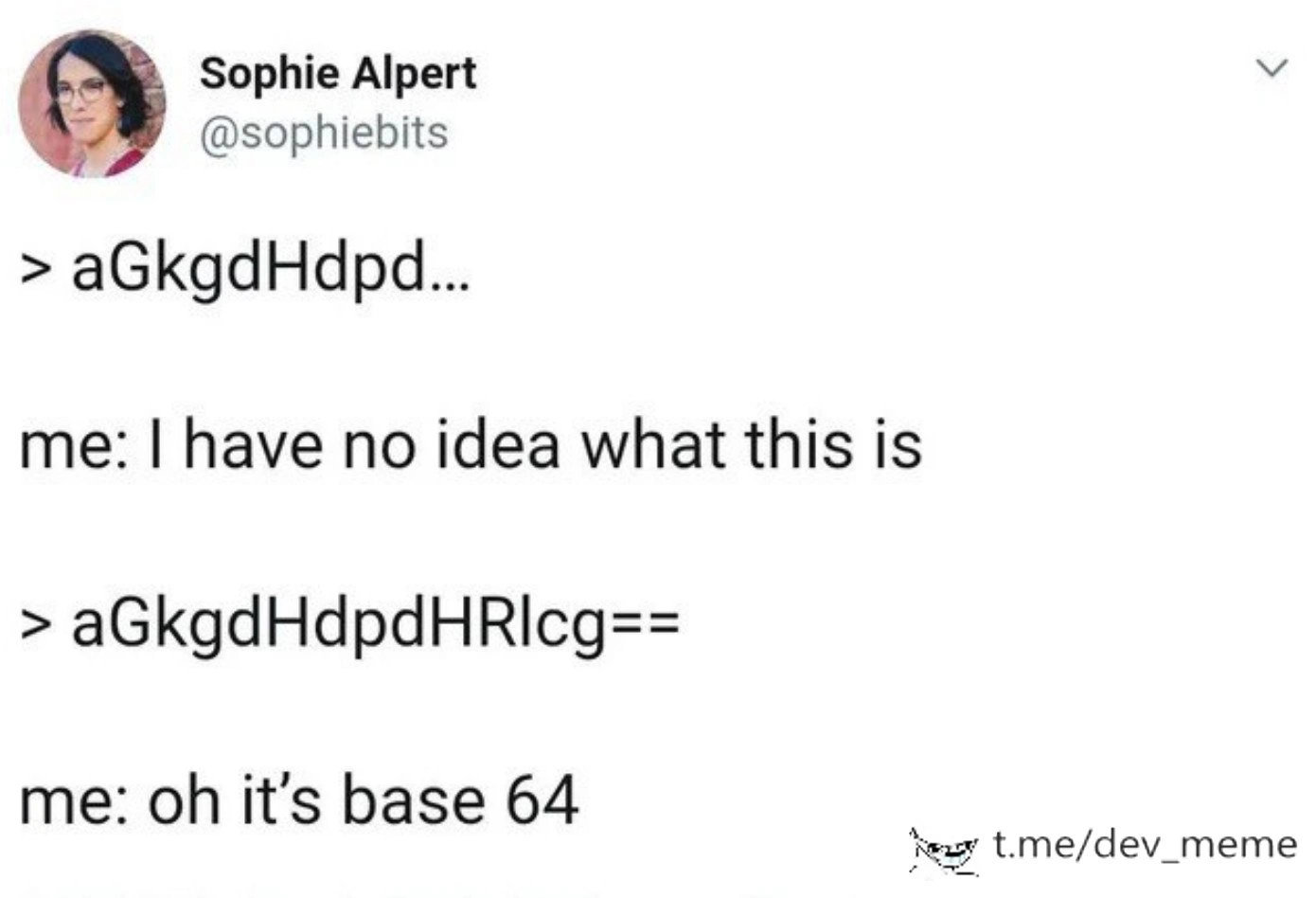
So, when a developer sees a random string like aGkgdHdpdHRlcg==, even if they don’t immediately recognize the content, that == at the end is a giant hint. It screams “I’m Base64-encoded data!”. It’s a bit of string_encoding_humor among programmers, because we encounter this so often. The meme jokes that at first the person had “no idea what this is” when looking at aGkgdHdpd... (which got cut off). But as soon as the full string aGkgdHdpdHRlcg== is visible, they go "oh it’s base64". Why such a sudden change? Because == is a pattern we’ve learned to spot. It’s the padding clue that triggers the realization.

Think about debugging_troubleshooting scenarios: maybe you find an environment variable in a server config that’s set to SNVjdXJlZFN0cmluZw==. At first glance, that looks like nonsense. But if you know about Base64, the moment you notice it’s all letters and numbers and ends with an equals sign, a lightbulb goes off. You’d recognize it as Base64 and decode it to see what’s inside (in this example, SNVjdXJlZFN0cmluZw== decodes to "ObscuredString"). In fact, a quick way to check is by literally decoding it using a tool or code. In Python, for instance, you could do:

import base64
encoded = b'aGkgdHdpdHRlcg=='        # our mysterious string in bytes form
decoded = base64.b64decode(encoded)  # decode from Base64 back to original
print(decoded)                       # output: b'hi twitter'

Or using a shell command as shown earlier. The key point is that once you suspect it’s Base64, you have a direct way to unravel the mystery. It’s not encryption or a secret code meant to be unbreakable — it’s just encoded text. Anyone can convert it back to the original form easily. The humor in the meme comes from how quickly the developer’s stance changes with just two characters (==). Before seeing them, they’re clueless. After seeing them, everything clicks. It’s like a mini-lesson many new developers go through: learn to recognize Base64.

To a newer developer (or a student), this meme also teaches a neat trick: if you ever see a long string of seemingly random characters, and especially if it has one or two = at the end, there’s a very good chance it’s Base64-encoded data. A classic example is when working with Serialization or web APIs. For instance, an API might return data or a token that looks like QmFzZTY0IGlzIGNvb2wh==. Rather than panicking, you’d now suspect it’s Base64. Decoding that would yield "Base64 is cool!" (because, yes, it is 😄).

So, what Sophie Alpert joked about in that tweet is really a rite of passage in programming: the moment you start spotting encodings by sight. It’s a mix of DeveloperHumor and practical knowledge. You realize you’ve leveled up as a developer when random serialized strings in logs start to look familiar. Double equals at the end? Time to break out the Base64 decoder — you’ve caught the encoded_string_recognition bug! The meme nails this learning moment in a funny way. After seeing it, a junior dev might smile and think, “Next time I see == at the end of a weird string, I’ll know what to do.”

Level 3: Double Equals Epiphany

At first glance, an output like aGkgdHdpd... looks like pure gibberish. The developer’s reaction “me: I have no idea what this is” is totally relatable — we’ve all stared at some opaque blob of text and thought what on earth...?. But the instant aGkgdHdpdHRlcg== appears, every seasoned engineer gets that mental jolt: oh, it’s Base64. The double equals sign (==) at the end is the dead giveaway. It’s a bit of pattern-recognition sorcery that comes from experience. We’ve seen enough data formats and weird encodings to know the telltale padding when we see it. In the world of debugging, especially in DataFormats and Serialization, certain patterns are like old friends. Here, == is practically waving and shouting “Hey! I’m base64_encoding!”.

Why is == such a big clue? It has to do with how Base64 works under the hood. Base64 encoding takes binary data and represents it in a textual data format using 64 characters (A-Z, a-z, 0-9, +, and /). It processes input in 3-byte chunks (24 bits). Those 24 bits get split into four 6-bit groups (because $2^6 = 64$ possible values). Each 6-bit group maps to one of the 64 allowed characters. But if the input data isn’t an exact multiple of 3 bytes, the encoder can’t form all four 6-bit groups for the last chunk — that’s where padding comes in. The = symbol is used as a padding character to indicate “nothing to see here, just filling space.” One = means 2 of the 3 bytes were filled (so 1 byte of actual data in that last group), and == means only 1 of the 3 slots had actual data (so 2 bytes of padding). In other words, == at the end implies the original data length was two bytes short of a multiple of 3. It’s an encoded_string_recognition marker as obvious to us as a red flag on a long string of random characters.

No normal English sentence or typical identifier ends with “==” out of the blue. So when a log line or an API response contains a string ending in ==, an experienced dev’s padding radar lights up. It’s a bit like a reflex. We’ve become pattern-matching machines for these kinds of clues (years of parsing log files will do that). In fact, many of us could be said to have a mental regex running: something like /^[A-Za-z0-9+\/]+={0,2}$/ quietly tests any mysterious string we see. If it fits (only base64 characters and maybe a = or two at the end), our brain goes “ping! likely Base64.”

The humor here is that DeveloperHumor often arises from these shared experiences and sudden realizations. One moment you’re frustrated (“I have no idea what this is”), the next you recognize the double_equals_padding and feel a mix of triumph and sheepishness (“of course it’s Base64, duh!”). It pokes fun at our ability to debug the most cryptic things by spotting one tiny clue. We’ve all been Sophie in that tweet, frowning at some "aGkgdHdpd..." string during a Debugging_Troubleshooting session. Maybe it’s a weird config value or an environment variable or a chunk of JSON that looks like alphabet soup. Then we catch a glimpse of those trailing equals signs, and it clicks. This comic timing — confusion followed by instant clarity — is what makes the meme so spot-on.

And once the epiphany hits, what do we do? We immediately decode it. It’s practically muscle memory:

$ echo 'aGkgdHdpdHRlcg==' | base64 --decode
hi twitter

In a real scenario, that gibberish might turn into something useful (perhaps "hi twitter", as in this case, or some JSON or a readable error message). The tweet format of the meme perfectly captures that inner dialogue: cluelessness transforming into nerdy excitement. It’s funny because it’s true — encountering an unreadable string and discovering it’s Base64 is almost a rite of passage in debugging. We crack a smile because recognizing that == is like being in on a little inside joke of the coding world. After enough time in the trenches of DebuggingFrustration, you instantly know when you’re dealing with Base64. The encoded_string_recognition becomes second nature. This meme just nails that moment when the brain’s parser finally catches up and yells, “Decode it, it’s Base64!”.

Description

A screenshot of a tweet from user Sophie Alpert (@sophiebits). The tweet demonstrates a common developer experience with data formats. It first presents a truncated, random-looking string: '> aGkgd...'. The author's reaction is 'me: I have no idea what this is'. Then, the full string is shown: '> aGkgdHdpdHRlcg=='. The key difference is the '==' at the end. The author's reaction immediately changes to 'me: oh it's base 64'. The humor lies in the instant pattern recognition familiar to any developer who has worked with encoded data. Base64 encoding often uses one or two equals signs as padding characters at the end, making it instantly identifiable even if the content itself is unreadable. It’s a subtle joke about the specific visual cues developers learn to spot in a sea of abstract data
Comments

26
Anonymous ★ Top Pick A junior dev sees a Base64 string and thinks it's encrypted. A senior dev sees a Base64 string and sighs, knowing they're about to have to decode it to find out which microservice is on fire
  1. Anonymous ★ Top Pick

    A junior dev sees a Base64 string and thinks it's encrypted. A senior dev sees a Base64 string and sighs, knowing they're about to have to decode it to find out which microservice is on fire

  2. Anonymous

    My eyes regex “==$” and before I know it my fingers are piping the log through `base64 --decode` - Pavlov had his bell, senior devs have padding

  3. Anonymous

    After 15 years of debugging API responses and JWT tokens, your brain develops a Base64 detector that triggers faster than your IDE's autocomplete - the '==' padding is basically our industry's version of a secret handshake

  4. Anonymous

    The '==' padding is basically Base64's way of saying 'I'm done here' - once you've debugged enough API responses at 2am, your brain just pattern-matches it before your coffee kicks in

  5. Anonymous

    After enough incident retros, you can detect Base64 by smell; two equals at the end means someone shipped serialization in a trench coat and called it security

  6. Anonymous

    Senior reflex: see '==' in a log line, mentally run base64 -d, then open a ticket titled “please stop shipping JSON in HTTP headers.”

  7. Anonymous

    The '=' padding: Base64's dead giveaway, like spotting a prod alert in a commit message

  8. @terziele 5y

    based

  9. @FunnyGuyU 5y

    Decrypt is needed for the lazy league

    1. @nkormakov 5y

      echo "aGkgdHdpdHRlcg==" | base64 -d “hi twitter”

      1. @FunnyGuyU 5y

        dHk=

        1. @nkormakov 5y

          bnAK

      2. @Mrdedmrz 5y

        echo "aGkgdHdpdHRIcg==" | base64 -d hi twittHr

        1. @nkormakov 5y

          3rd letter before == is not a capital i, that’s L in lowercase

  10. @Skatanic 5y

    hi twitter

  11. @MagnusEdvardsson 5y

    Maybe toddlers were speaking in base64 all along

  12. @azizhakberdiev 5y

    Writing css in css file: weak Writing css directly in the href attribute using base64: strong

  13. @adhdnigga 5y

    lol==

    1. @adhdnigga 5y

      FOrgoT+/rAnDOM+UPpeRcaSE==

  14. @Mrdedmrz 5y

    hi twitter actually is aGkgdHdpdHRlcgo=

  15. @Mrdedmrz 5y

    i just copied from comment)

    1. @nkormakov 5y

      Yeah, I didn’t update my comment when I found ambiguity

  16. @Mrdedmrz 5y

    but thx

  17. @ZgGPuo8dZef58K6hxxGVj3Z2 5y

    1625204371

    1. @ZgGPuo8dZef58K6hxxGVj3Z2 5y

      Who knows what this is?

    2. @ZhongXenon 5y

      Timestamp

Use J and K for navigation