Improvise, Adapt, Overcome: The IoT Workstation
Why is this IoT meme funny?
Level 1: Fridge to the Rescue
Imagine you were all set to play your favorite game or do your homework on your computer, but then your computer and tablet suddenly disappeared. You’d feel pretty stuck, right? Now, what’s one thing in your house that has a screen and isn’t gone? In this silly story, it’s the refrigerator! The person basically said, “Well, my phone and laptop are gone… but hey, the fridge has a screen I can use!” It’s a totally unexpected solution, which is why it’s so funny. It’s like if you lost your notebook and decided to draw on the fridge door with markers because there’s nowhere else to write. You end up doing something serious (like work or homework) on something that’s normally just an appliance for food. It looks a bit ridiculous – picture someone typing on a keyboard in front of a fridge – but it actually works for now. And there’s a bonus: whenever they’re thirsty or want a snack, they don’t even have to leave their “desk” because the desk is the kitchen! They can pour a cold drink or grab a piece of fruit from right inside their workstation. So why is this funny? Because everyone knows fridges are for keeping milk cold and making ice, not for writing emails or coding. Seeing a refrigerator being used as a computer is super silly and out of the ordinary. It shows how clever and determined the person is – they refuse to stop working, even if they have to use a giant fridge instead of a normal computer. It’s a bit like using a spoon as a shovel when you don’t have a shovel: you can do it, and it’s kind of ingenious, but also kind of goofy. In the end, the picture makes us laugh because it mixes two very different worlds: the everyday kitchen and high-tech work. It’s basically saying, “No laptop? No phone? No problem – the fridge will save the day!” That kind of creative fix is both admirable and amusing. Even a kid can see the humor: it’s doing something serious on the most un-serious device imaginable. The fridge turned into a hero here, helping out when everything else was lost – and that’s both funny and pretty cool in a weird way!
Level 2: From Laptop to Fridge Top
Let’s break down what’s happening in simple terms. The person in this meme had their phone and laptop stolen, which were presumably their main tools for working. In a modern RemoteWork situation (working away from the office, often from home), you rely heavily on your personal devices to connect to your job – things like sending emails, messaging your team, writing code, attending video calls. Suddenly losing those devices is a big problem. So, what’s the next best thing in the house that has a computer in it? Surprise: the smart fridge!
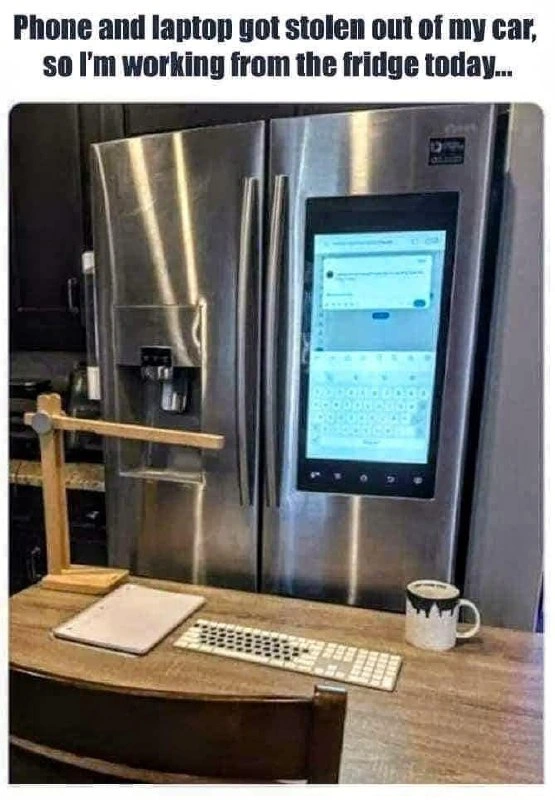
A "smart fridge" is a refrigerator that’s part of the Internet of Things (IoT) – meaning it has a built-in computer and can connect to the internet. These fridges often have a big touchscreen on the door (as shown in the image) and can do handy (or gimmicky) things like show your calendar, play music, display recipes, or let you leave digital notes. Essentially, it’s like having a giant tablet or smartphone on your fridge door. In the photo, that touchscreen is showing what looks like a messaging app (with an on-screen keyboard), similar to an Android texting or chat app. So yes, the fridge is actually running an operating system (likely a modified Android) that can run apps.
Now, the term workstation usually means a powerful computer or the primary computer you use for work. So when we say the developer’s only remaining workstation has an ice dispenser, it’s a joking way to say their only computer is now the fridge. Normally, a workstation might have specs to brag about like a fast processor, lots of memory, multiple monitors, etc. Here, the “specs” include an ice dispenser and a produce drawer! It’s a funny mismatch of purposes: you don’t expect your work computer to store vegetables, and you don’t expect your fridge to have Slack and Gmail open on it.
For someone early in their career (or anyone, really), a few key terms and issues here are worth explaining:
Internet of Things (IoT): This refers to everyday devices that aren’t traditional computers (like appliances, lights, thermostats, even your car) being connected to the internet and having smart features. A smart fridge is a great example. It has an internet connection and computing capabilities, so it’s part of the IoT. That’s why the developer could even think of using it to work – it’s not just a dumb fridge, it’s actually a computer + fridge combo.
Remote work setup: When working from home, people usually use laptops or desktops to connect to their company’s network, join video calls, write code, etc. If those devices become unavailable (stolen, broken, forgotten), you’re stuck unless you find an alternative. In this meme, the alternative is comically unconventional: using the fridge’s built-in computer. It’s the equivalent of using what you have on hand. (Think of it like if all your pencils broke and then realizing, “hey, I have a crayon in the drawer, I can use that!” It’s not ideal but it works in a pinch.)
Hardware limitations: A fridge’s built-in computer is much weaker than even a typical cheap laptop. It likely has a basic ARM processor (common in phones and tablets) and not a lot of memory or storage. It’s designed to do simple apps (like displaying your grocery list or weather), not heavy development tasks. So, if our developer tried to run a big programming project on it, it would be very slow or might not work at all. In tech terms, the fridge’s computing power is to a laptop what a go-kart is to a car — both have engines (or CPUs), but one is much slower and less capable of handling heavy loads.
No expansion or upgrades: When the caption jokes about "PCIe passthrough is still a no-go", it’s referencing something a bit technical. PCIe (Peripheral Component Interconnect Express) is basically the slots and connections inside a regular PC that let you add high-performance parts like graphics cards, extra USB ports, or other expansion cards. It’s how you would upgrade or enhance a normal computer. PCIe passthrough is a specific technique used in virtualization where you let a virtual machine use a physical component directly (for example, giving a virtual machine direct access to your graphics card for better performance). This is advanced stuff that normal computers can do, but obviously a refrigerator’s tiny computer doesn’t have any slots to add new hardware, let alone run virtual machines! The meme is playfully saying: “Sure, I have a fridge with an ice maker as my PC now, but don’t even think about doing something fancy like adding a graphics card to it.” In simple terms: you can’t upgrade this fridge-computer; it’s not modular like a desktop.
Latency and convenience: Latency means delay. When they say "lowest-latency access to cold beverages," they mean it jokingly: because the computer is part of the fridge, grabbing a cold drink or a snack while working takes practically no time. Normally, even at home, you’d have to stand up and go to the kitchen to get a drink (that’s a bit of a delay). Here, the developer can literally reach over to the fridge section or water/ice dispenser without leaving their chair. It’s a humorous way to describe a kitchen convenience in tech terms. So the benefit of this crazy setup is that refreshments are instantly at hand. It’s as if the fridge was saying, "Well, I may not be fast at computing, but I sure can deliver ice to your cup faster than any other PC!"
Desktop setup: In the image, they placed a small desk or table in front of the fridge with some typical work items: a lamp, a spiral notebook, a full-size keyboard, and a coffee mug. This shows that the person is trying to recreate a normal "desk" environment. The mechanical keyboard is interesting — developers and gamers often prefer mechanical keyboards for their tactile feel and speed. It’s not something you’d normally hook up to a fridge! But since serious work (like coding or typing long messages) on a touchscreen is painful, connecting a real keyboard makes it much easier. Many smart fridges have a USB port or Bluetooth that can allow a keyboard to connect. So the developer likely managed to connect the keyboard to the fridge’s computer. That way they can type as if it’s a normal PC. The coffee mug and lamp add to the vibe that "yes, this is my desk now, weird as it is."
To put the differences in perspective, let’s compare a typical laptop (what was stolen) with this smart fridge’s computer, as a workstation:
| Feature/Capability | Normal Developer Laptop | Smart Fridge’s Computer |
|---|---|---|
| Processing Power (CPU) | High – e.g. Intel Core i7 at ~3.0 GHz, can handle heavy apps and multitasking. | Low – an ARM chip ~1.0 GHz designed for simple tasks, struggles with intense apps. |
| Memory (RAM) | Plenty – 8 GB or more, so it can run an IDE, browser, etc., all at once. | Little – maybe 2 GB; enough for a few simple apps, but large programs might freeze or crash. |
| Operating System | Full OS (Windows, macOS, or Linux) – can install all the software needed for development. | Embedded OS (Android/Tizen) – limited to built-in or app-store apps; installing programming tools is difficult or not possible. |
| Input/Output & Ports | Lots – multiple USB ports, can plug in extra monitors, keyboard, mouse, external drives, etc. Expandable via PCIe slots for new hardware. | Very limited – maybe one USB port or Bluetooth for input devices. One fixed touchscreen. No way to add an extra monitor or internal hardware upgrades. |
| Portability | Very portable – you can carry a laptop anywhere (coffee shop, office, couch). Has a battery for mobile use. | Not portable at all – it's literally your fridge; you’re stuck working in the kitchen (at least you have snacks on demand!). |
| Special Features | Webcam, powerful graphics card, long battery life, etc., common on laptops for work. | Fridge features – keeps food cold, dispenses ice and water. (Cool, but doesn’t help with coding except to keep you hydrated.) |
Looking at this comparison, you can see how using a fridge as your computer is a huge compromise. You lose almost all the power and flexibility of a normal work laptop. Yet, in a desperate situation, it’s better than nothing! The developer in the meme is likely using the fridge’s browser or a simple text editor app to do basic tasks – maybe just contacting coworkers to explain the situation, checking emails, or editing some text. It’s unlikely they could run their full development environment on it, but they might use remote access (like connecting to a server or cloud computer) to handle anything heavy. Essentially, the fridge might just be acting as a big monitor and keyboard for another machine somewhere else.
The caption at the top of the meme says: "Phone and laptop got stolen out of my car, so I’m working from the fridge today..." This really sets the comedic tone. It’s written as if it’s a normal situation – like of course, the fridge is my next choice! For a junior developer or someone new to tech, it shows how far technology has spread. Computers aren’t just in phones and laptops; they’re hiding in our kitchen appliances too! And it highlights a can-do, humorous attitude: if Plan A fails, you use Plan B, even if Plan B is wacky (like turning your fridge into a computer).
In the developer community, this meme also pokes fun at our ability to adapt and how we find computers in the unlikeliest places. It’s part of DeveloperHumor culture to joke that if something has a processor, eventually a coder will try to use it for something unintended – whether that’s running a game like Doom on it, or in this case, treating a fridge like a work computer.
So, big picture: our developer’s main devices were stolen, and they improvised by using a smart fridge’s screen and computer to keep working. It’s a mix of cleverness and absurdity. We’ve explained what IoT and smart fridges are, why a fridge even has a computer inside, and how a fridge-as-PC stacks up against a normal laptop (spoiler: the fridge is way less powerful, but it has its quirky perks). This scenario shows that technology is truly everywhere around us, and if you’re inventive enough, you can make use of even the most unexpected gadget to get the job done (and maybe get a cold drink at the same time).
Level 3: Edge Case Workstation
For seasoned developers, this scenario is a prime example of turning an absurd edge case into a workable solution. Losing your phone and laptop in one swipe is every remote worker's nightmare scenario. But instead of calling it a day, our intrepid coder has done the unthinkable: set up shop on the smart fridge in the kitchen. This is literally an edge-case workstation – both because it's an extreme rare situation (who codes on a fridge?) and because the fridge is an edge device (an IoT gadget at the edge of the network). The humor is in the resourcefulness: when all traditional tools are gone, a developer will still find a way to code, even if it means using the family's IoT appliance as a computer. It's remote-work resilience taken to a comical level.
IoT creep is a big part of the joke here. Over the past decade, we've put computers in everything: thermostats, light bulbs, and yes, refrigerators. A smart fridge typically is meant to show you the weather, let you jot digital sticky notes, or maybe stream music in the kitchen. It’s not meant to be your primary coding rig. By turning the kitchen into a kitchen_office_setup, this meme riffs on just how blurry the line between appliances and computers has become. If it has a screen and runs an OS, a determined developer might just treat it like any other workstation. The fridge has basically become a giant, cold Android tablet bolted to a door – so why not answer emails on it or even review some code in a pinch?
Veteran devs will also appreciate the implied trade-offs of this fridge-based dev environment. On one hand, you have practically instant access to cold brew and snacks – the meme even jokes about "lowest-latency access to cold beverages". Need a brain freeze or a caffeine top-up during debugging? Just reach an arm out and you’re there. In a normal office or even WFH setup, you’d have to walk to the kitchen; here the kitchen is your desk. It's the ultimate lazy (or efficient?) coder setup in that sense. On the other hand, you’re stuck with a single vertical display that’s literally fridge-sized (not big, but tall and narrow) and likely underpowered hardware. Forget running heavyweight VMs or doing any serious local compiling. PCIe passthrough is still a no-go, as the meme text wryly points out. That's a tongue-in-cheek way of saying, "Sure, I have an ice dispenser attached to my PC, but I can’t exactly attach a high-end graphics card or any serious peripherals to this thing." In other words, the amenities are great, but the computing horsepower is lacking. It's like working in an office with unlimited free soda but the slowest computer on the floor.
This tension between comfort and capability is what makes the meme so relatable to developers. We've all dreamed of cushy perks (who wouldn't want a built-in ice dispenser next to their desk?), but we'd never sacrifice our CPU/RAM or dual monitors for it. Here the poor dev has no choice – they have the ultimate fridge perk, but at the cost of using a glorified IoT gadget as their PC. It's the exact opposite of those $5000 custom gaming developer rigs; it’s a desperate_remote_setup born out of necessity. Seasoned engineers might chuckle and think: "Been there, done something like that (though maybe not with a fridge)". Perhaps they recall debugging code on a woefully under-spec device or coding via SSH on a phone when their laptop died. Using a fridge just takes it to new heights (or lows, depending on how you see it).
Notice in the image how they tried to mimic a real desk environment in front of the fridge. There's a proper mechanical keyboard laid out, a notebook, a coffee mug, even a little wooden lamp for that authentic workspace vibe. This person is treating the fridge like a serious workstation, not just pecking at the touchscreen with a finger. That detail is golden: any developer with a bit of pride will try to get a real keyboard involved, even if the "computer" is a novelty. Mechanical keyboards are almost sacred in developer culture for comfort and speed, so of course they salvaged that from whatever the thieves left behind. The coffee mug is another nice touch – every dev knows coffee is fuel, and here you literally have the milk and cream chilling two inches away from the mug. Talk about a DeveloperLifestyle upgrade: code, coffee, and cola all in one place.
Now, beyond the fun, there’s an underlying commentary on RemoteWork ingenuity. Since 2020, working from home (or anywhere) has become common, and people have come up with all kinds of makeshift offices. We’ve seen coding from closets, from parked cars (for quiet), from backyards. But coding from a fridge? That’s a new level of improvisation. It’s both hilarious and oddly admirable. Instead of giving up when the usual tools were gone, this developer looked around and effectively said, “What’s the strongest computer I still have access to? Oh right, the fridge has a CPU!” Most people wouldn't even consider their kitchen appliance as part of their tech arsenal, but a true techie knows that nowadays InternetOfThings devices are basically computers in disguise. This mindset – seeing a fridge as just another Linux box – is something experienced devs can nod and laugh at. It's the same spirit that leads to jokes about running Doom on every device imaginable (yes, people have run the video game Doom on fridges, ATMs, oscilloscopes, you name it). So of course someone might try to run their workday on a fridge as well.
The meme also lightly touches on the idea of "containerized computing" as a pun. In software, containerization (like using Docker) is about packaging apps so they can run anywhere. Well, here our developer has kind of containerized their workflow into an actual physical container – the fridge (literally a container for food)! It’s a silly crossover of terminology: the only containers here are the Tupperware holding your lunch. There’s no Kubernetes cluster in the freezer (unless we joke that each ice cube is a node in a very cool cluster 😅). This pun might fly over some heads, but for those in on it, it’s a great geeky chuckle about how our tech lingo can collide with everyday objects.
From an organizational standpoint, this situation is both comic and telling. One could joke that IT always says “Don’t keep important equipment in your car,” and here’s the proof. The developer lost their proper gear due to a bit of misfortune (or poor OPSEC), and now the entire bus factor of their work relies on a kitchen appliance. You can imagine the stand-up meeting:
Manager: "Are you blocked on anything?"
Dev: "Just waiting for my fridge to finish rebooting after a firmware crash. Might deploy after I defrost the cache."
It’s the kind of absurd status update that belongs on DeveloperHumor forums but also reminds us about being prepared. Senior devs often have backup plans or spare hardware; maybe next time this dev will keep an old laptop as a contingency. But in the here and now, they’ve MacGyvered a solution out of what’s available.
Ultimately, the humor of this kitchen office setup comes from the contrast between the serious business of software development and the utterly domestic, not-serious setting of a refrigerator workstation. It’s a sight gag with layers: high-tech meets home appliance, desperation meets innovation. Experienced engineers laugh because it’s a ridiculous solution that somehow we can totally see working. We pride ourselves on being problem-solvers, and this meme says: "When life steals your devices, solve the problem with creativity (and maybe grab a soda while you're at it)." It's a salute to developer ingenuity, the ubiquity of computing, and the ability to find humor when tech life throws a curveball – or in this case, when life gives you lemons, use the fridge to make lemonade (literally).
Level 4: Liquid-Cooled IoT Hack
In the realm of IoT hardware, a modern smart refrigerator is essentially a computer disguised as a kitchen appliance. Behind the stainless-steel door, there's usually an ARM-based system-on-chip (SoC) quietly running a specialized OS. In this case, that big touchscreen on the fridge is likely powered by an ARM processor (think of the kind found in smartphones or a Raspberry Pi) running a customized Linux kernel or Android. So yes – your fridge door might literally be running Android under the hood, complete with a CPU, RAM, and flash storage. Veteran engineers see the humor in repurposing this embedded board as a dev machine: it's a bit like trying to do software development on a beefed-up dishwasher control unit.
The absurd trade-off becomes immediately clear: this workstation offers ultra-low latency for grabbing a cold drink (the I/O operation of retrieving a beverage is measured in mere seconds 🍺), but it completely lacks the I/O throughput and expandability of a real workstation. For instance, on a normal PC, you have a high-speed PCIe bus (Peripheral Component Interconnect Express) for things like graphics cards, NVMe storage, or other peripherals. You can even do PCIe passthrough in virtualization – assigning a physical GPU directly to a virtual machine for near-native performance. On this fridge's tiny ARM board, there's no concept of plugging in a discrete GPU or any expansion card at all; there's probably not even a PCIe slot present. Everything is embedded on the SoC: the CPU, a modest GPU core for the touchscreen, maybe Wi-Fi and some USB interfaces. So the idea of "PCIe passthrough" is laughably moot here – you can't pass through hardware that the system doesn't support or physically have! This means no external GPU acceleration for your compile jobs and no fancy peripherals beyond what's built-in. In other words, our intrepid dev has lowest-latency access to ice cubes, but zero access to high-performance computing extras.
From a hardware architecture perspective, this fridge's brain is radically different from your stolen laptop's Intel/AMD x86 processor. It's likely a multi-core ARM Cortex design, which uses a RISC (Reduced Instruction Set Computing) architecture focused on efficiency and low power consumption. That’s perfect for an appliance that runs 24/7 without frying your groceries, but it’s not going to compile Chromium in a reasonable time. The performance gap is huge: your typical developer laptop might have a 3+ GHz multi-core out-of-order processor with advanced pipelines and a big cooling fan. The fridge’s CPU might run at 1 GHz and is built for running a UI, a web browser widget, and maybe streaming music – not heavy software development tasks. It probably has memory in the ballpark of a few GB of RAM, whereas modern dev machines sport 16GB or more. This means our developer is effectively coding on a machine with the specs of an entry-level smartphone. If they tried to open a bulky IDE or run a large compile, they'd likely crash the poor thing or grind it to a halt. Swapping (using disk as emergency RAM) on a fridge’s flash storage? Let's hope not – that flash is likely eMMC with limited lifespan, not meant for constant read/write like an SSD in your laptop.
Now, let's talk operating system and software constraints. Many smart fridges (especially the fancy models with large touch screens) run a flavor of Android or a Linux-based OS like Samsung’s Tizen. That on-screen keyboard and messaging app are telltale signs of an Android UI in this meme. So essentially, this fridge is running something akin to an overgrown Android tablet on your kitchen wall. That’s both cool and problematic: Android wasn’t designed with multi-window coding in mind. There’s no built-in developer suite or compiler ready to go. Our resourceful dev would have to get creative to do any "real" programming here. For example, they might sideload a terminal emulator app or use adb (Android Debug Bridge) to enable a developer mode. If it’s a Tizen-based fridge, maybe there’s a hidden browser or some way to run a crude text editor. One could imagine using a web-based IDE: open the fridge’s browser (if it has one) and use an online code editor or connect to a cloud development environment. That way, the heavy lifting is done on a server, and the fridge is just displaying a remote session. It’s a clever workaround to turn an InternetOfThings device into a thin client for coding.
Connectivity is another interesting point. This fridge’s computer is almost certainly connected via Wi-Fi to your home network (few people run Ethernet to an appliance!). So the developer is relying on wireless networking for all their work-from-fridge needs. Luckily, basic web and messaging should work fine, but large file downloads or video meetings might be pushing it if the fridge’s Wi-Fi antenna isn’t great. And forget about a wired LAN connection or fancy networking features – we’re truly in edge computing territory here, the edge of the kitchen network if you will.
One surprisingly successful aspect of this desperate setup is input/output with human devices: the photo shows a full-size mechanical keyboard plugged in (or paired) and ready to go. Most smart fridges do have at least one USB port (sometimes hidden for technicians to service the software) or Bluetooth capability (to connect to phones or speakers). Our developer likely paired the keyboard via Bluetooth, or maybe they discovered a USB port behind a panel and plugged in a wireless keyboard dongle. It’s ironically impressive that the fridge’s OS recognizes the keyboard as a HID (Human Interface Device) and lets them type in that messaging app. That suggests the fridge’s software stack isn't completely locked down—it can handle standard input devices, which is a blessing for someone treating it like a PC. However, don’t expect multi-monitor support or fancy ergonomic settings. The "monitor" is literally the fridge door. Hope you like standing while coding, because unless you wheel the fridge into the office, this is a standing desk situation by default!
Security and maintenance are a final advanced concern. IoT devices like smart fridges are notorious for lagging behind in updates. If this fridge is running an older Android version that the manufacturer hasn’t updated in years, it could have unpatched vulnerabilities. A veteran engineer might chuckle and also cringe: you’re logging into work email or servers from a device that might be easier to hack than a five-year-old Android phone. Company IT policy probably never anticipated "fridge workstation" on the VPN. There’s also the risk of the fridge deciding to auto-update its firmware at the worst time (some smart appliances do get periodic updates, which could reboot the system). Imagine the fridge restarting to update its ice_dispenser_driver right in the middle of a critical code deploy! The horror.
On the flip side, from a computer science history standpoint, there’s poetic humor here. Early computers in the mid-20th century were gargantuan machines that often occupied whole rooms and indeed were sometimes compared in size to refrigerators. Now in 2025, we’ve literally come full circle: instead of computers the size of fridges, we have fridges with built-in computers. The convergence of Hardware and everyday life in IoT has turned the kitchen into a potential (if suboptimal) office. It's a reminder of just how far miniaturization and ubiquitous computing have come.
In summary, this "liquid-cooled" workstation is a marvel of modern tech improvisation: a tiny ARM computer in a fridge acting as a last-resort dev machine. It’s underpowered and unconventional, but undeniably cool in concept (pun intended). And hey, unlike your regular PC that might overheat under a heavy load, this rig has built-in cooling – not that the CPU really needs it, but your drinks sure stay frosty. When life steals your devices, a true engineer can even turn a refrigerator into a PC. That’s one way to get refreshingly close to your work – literally working from the fridge, with an ice dispenser doubling as the office water cooler.
Description
A photo meme with the caption: 'Phone and laptop got stolen out of my car, so I'm working from the fridge today...'. The image displays a modern, stainless steel smart refrigerator with a large vertical touchscreen on its right door. A makeshift desk setup is arranged in front of it, complete with an external keyboard, a notepad, a desk lamp, and a coffee mug. The fridge's screen is active, showing a user interface with an on-screen keyboard, implying it's being used as a computer. This meme humorously captures the absurd reality of the Internet of Things (IoT) and a tech professional's desperate resourcefulness. It finds humor in the scenario of being forced to use a kitchen appliance as a primary workstation, highlighting both the ridiculousness of smart-everything technology and the unyielding pressure to stay online and productive, even when primary devices are gone

Comments
12Comment deleted
My new dev environment has excellent cooling, but the OS is a bit frosty. Also, every time I hit compile, the ice dispenser spits out a single cube as a new build artifact
Finally achieved real cold storage: my dev environment now lives inside an actual appliance - and yes, the CI pipeline throttles when someone opens the door
Finally found a development environment that keeps your code fresh and your commits cool - though the daily standup now includes checking if we're out of milk
When your disaster recovery plan includes 'pivot to refrigerator computing,' you know IoT has gone too far. At least the fridge has better uptime than your laptop's battery, runs a Linux kernel, and keeps your deployment pipeline cool. Just hope nobody opens the door during your standup - nothing kills productivity like losing your SSH session to someone grabbing milk
Finally practicing literal edge computing - IDE on the Family Hub; cold starts are instant, but security still wants to enroll fridge‑01 in MDM and confirm whether SSH via the ice dispenser counts as MFA
Edge computing redefined: zero-latency deploys from the kitchen cluster, with built-in cooling for those hotfix sprints
Finally shipped to the edge: coding on the smart fridge - built-in cold storage, ice-maker autoscaling, and IAM enforced by fridge magnets
Its actually a hidden server inside Comment deleted
When life hands you lemons, put them in the fridge and go to work. Comment deleted
How did he take the photo then Comment deleted
Another fridge Comment deleted
Someone used to watch H1T1 on that Comment deleted