The Duality of Developer Organization
Why is this DesignPatterns Architecture meme funny?
Level 1: Toy Box Maze
Think of a kid who has a ton of toys. He decides to get super organized: all the Lego pieces go into one little box, which then goes inside a bigger bin of building toys; the toy cars go into another box inside the “vehicles” bin; every category of toy gets its own box inside a box, inside maybe another box, all neatly stacked in the closet. It sounds tidy, right? But now imagine the kid wants to play using a Lego piece and a toy car together. Uh-oh! To get them, he has to open the closet, pull out the big bin, then open the smaller box inside to find the Lego, and do the same for the car. By the time he’s done, there’s a pile of open boxes everywhere and he’s frustrated.
This is just like what happened in the code. The developers made a super tidy system of folders (like the kid’s nested toy boxes), but when the code needs something from far away in that structure, it has to go on a long journey through many folders to fetch it. All those "../" in the import are like the code climbing out of one box, then out of the next, again and again, to finally reach the other item it needs. The result is a bit funny: they tried to be very organized, but ended up creating a little maze for themselves. It’s ironic — sometimes being too organized can actually make it harder to find what you need!
Level 2: Dot-Dot Dilemma
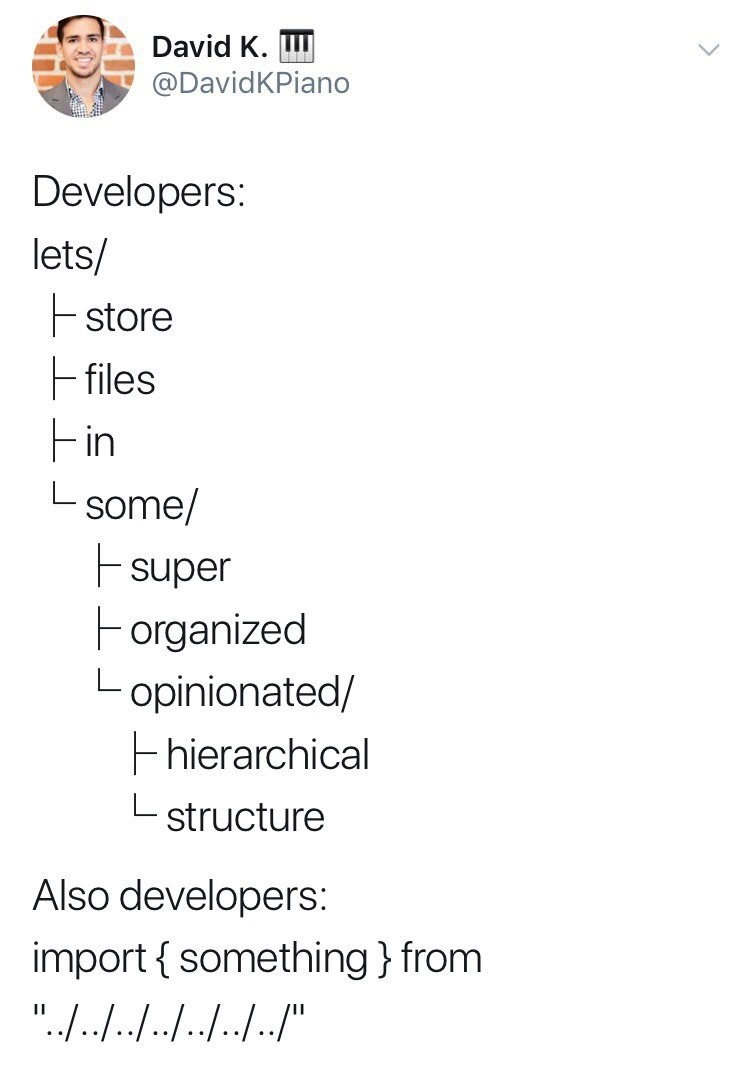
Let’s break this down more simply. In programming (especially in frontend JavaScript), we organize our project files into folders and subfolders. Think of it like having separate drawers or boxes for different kinds of items to keep things tidy. The meme shows a funny example of this. The developer says, “Let’s store files in some super organized hierarchical structure,” and they illustrate it with a tree diagram:
lets/
├─ store
├─ files
├─ in
└─ some/
├─ super
├─ organized
└─ opinionated/
├─ hierarchical
└─ structure
Each line here is a folder (the ones ending with / are directories). So, there’s a top-level folder named lets. Inside it, there are four items: store, files, in, and another folder called some. The some/ folder contains super, which contains organized, which contains opinionated/, and so on. All together, it forms a very deep path like lets/some/super/organized/opinionated/structure. That’s an extremely nested folder setup! It looks super neat and categorized – the codebase is organized like a closet where everything has its place.
Now, organizing files is fine, but you also need to use those files in your code. That’s where the second part of the meme comes in. It says: “Also developers:” and then shows a code line:
import { something } from "../../../../../../"
This is a JavaScript ES module import statement. It means “bring in the thing named something from a file located at the path ../../../../../../”. Those dot-dot slashes are a relative path telling the computer how to navigate through folders to find the file. Here’s how it works step by step:
.(a single dot) means “the current directory” (the folder you’re currently in)...(two dots) means “the parent directory” (go up one level to the folder containing the current one).- So
"../"means “move up one folder.” If you repeat it,"../../"means “move up two folders,” and so on.
So "../../../../../../" is telling the code to go up six levels from the current file’s location! Essentially, the code is climbing out of a very deep folder to get back to a higher-level folder. The meme leaves that import path dangling with a final / for comic effect (implying it would continue to some folder name), but we can guess they intended to go into another directory like store or files after backing out six levels. Either way, that import path is absurdly long. It’s the kind of thing you might see in a project with too many nested folders.
Why is this funny? Because it highlights a contradiction. The developers spent time making a perfectly organized set of folders, but when they actually write their code, they end up with this awkward, overly long import path. It’s like building a tall ladder of boxes and then realizing you have to climb all the way down and up to get something from another box. The very structure that was supposed to make things clean and easy to find has now made the act of importing (using) code a bit messy and annoying. It’s a classic “do as I say, not as I do” situation: we preach organization, but our actual code usage becomes convoluted.
If you’re new to coding, you might run into this yourself. For example, imagine a simple project structure:
project/
├─ components/
│ └─ modals/
│ └─ CloseButton.js
└─ utils/
└─ dateUtil.js
If CloseButton.js wants to use a function from dateUtil.js, and we haven’t set up any shortcuts, you’d write:
// Inside components/modals/CloseButton.js
import { formatDate } from "../../utils/dateUtil.js";
// "../../" goes up from modals to components, then up to project root, then into utils/.
Two ../ segments were needed here (one to go from modals up to components, and one to go from components up to the project root). That’s not too bad. But if CloseButton.js was in an even deeper subfolder, or the file you need lived in another deep branch, the relative path could get much longer. It might become:
import helper from "../../../../../../common/helper.js";
// Yikes – going up 6 levels then down into common/helper.js!
You can see how quickly this turns into a headache. It’s easy to make a mistake counting those dot-dots. One extra or missing "../" will break the import with an error because the path will be wrong. And if you ever rename or move folders around, you’ll have to find and fix every place you wrote a path like this. It’s a lot of cognitive load just to figure out file locations.
This is a common pain point for developers working on large front-end projects. Thankfully, there are ways to make it better. Many projects use build tools or compiler settings to allow absolute imports or aliases so you don’t have to write those long relative paths. For example, a tool like Webpack can be told that a certain prefix (like @ or ~) maps to a specific folder (like your src directory). Then, instead of writing import stuff from "../../../../utils/stuff", you could write import stuff from "@/utils/stuff" (assuming @ is set to your src folder). The build tool figures out where to find stuff because of that alias. In TypeScript, you can do something similar by setting a base URL in your tsconfig.json (for instance, "baseUrl": "src") and maybe defining path aliases. That way, your imports can start from the src as if it’s the root of the project. Our earlier example would become much cleaner:
import { formatDate } from "utils/dateUtil";
No dot-dot at all! Here, "utils/dateUtil" is understood by the tool because we configured the project to know that "utils" refers to the project/utils folder. This greatly improves the developer experience (DX) – think of it like the “user experience” of the codebase, making it easier for developers to navigate and maintain. With such setup, you don’t have to worry about how deep a file is; the import paths remain nice and short.
The key lesson for a newer developer is: organize your code, but don’t overdo the nesting, and use the available tools to keep your imports clean. Otherwise, you might end up with code that looks tidy in the file explorer, but feels like a maze when you try to import something. The meme exaggerates this to make a point: too much structure without considering developer convenience can backfire. It’s both a joke and a gentle reminder to balance code quality with developer experience.
Level 3: Directory Dissonance
Imagine a team meticulously over-engineering their folder structure for pristine code quality. The meme’s text shows an ASCII directory tree labeled “Developers:” organizing code into lets/ → store → files → in → some/ → super → organized → opinionated/ → hierarchical → structure. This structure literally spells out “lets store files in some super organized opinionated hierarchical structure” – a tongue-in-cheek example of a very nested directory layout. Such a deeply nested, opinionated hierarchy often comes from lengthy bikeshedding sessions where developers argue for the perfect folder structure to improve maintainability.
However, the punchline hits under “Also developers:” with a JS import statement:
import { something } from "../../../../../../";
Here we see a relative import path jam-packed with ../ segments. Each ../ instructs the module loader to go up one directory level (a form of traversing up the directory tree). A chain of six ../ means the importing file is buried six folders deep. This long chain is a direct result of extreme nested directory depth – when files are organized so many levels down, referencing them requires many ../. It’s the developer cognitive dissonance: we insist on a neatly structured tree of folders, yet end up writing brittle import paths that resemble an explorer retracing steps out of a maze.
This contrast is hilarious to experienced devs because it’s so relatable. On one hand, a hierarchical file tree promises clarity and separation of concerns. On the other, navigating that hierarchy in code can become a path traversal hell. Every ../ in the import is a step back from the neat structure, effectively saying “Oops, the code I need lives all the way up there, in a different branch of the tree.” It’s a classic developer irony: our attempt to organize code ironically creates a new kind of mess in our source. The meme pokes fun at how we claim to love clean architecture, yet tolerate (or ignore) the pain of unwieldy ../../.. chains in practice.
From a senior perspective, this highlights a real developer experience (DX) issue. Long relative paths are fragile and hard to read:
- Fragile, because if you move files or refactor the structure, all those import statements must be updated. One misplaced
../and nothing works – your app breaks with a “Module not found” error. - Hard to read, because developers have to mentally count
../../../../to figure out where it’s pointing. It’s easy to lose track of how many levels deep you are. Is it five ups or six? Whoops, off-by-one dot-dot!
Fortunately, we have tools to resolve this irony, but they’re sometimes neglected. In modern frontend projects, bundlers like Webpack or the TypeScript compiler can be configured to support alias paths or a project base URL to avoid these spaghetti imports. For example, using Webpack’s resolve.alias:
// webpack.config.js snippet
resolve: {
alias: {
"@app": "/path/to/lets/some/super/organized/opinionated"
}
}
Now, instead of writing a six-layer relative path, developers could import like:
import { something } from "@app/structure";
Here @app acts as a shortcut to that deeply nested folder. The code is much easier to follow with an alias – no need to count ../ anymore. Similarly, TypeScript allows setting a "baseUrl": "src" and custom "paths" in tsconfig.json. This means we can import from the root of the source as if it’s a module, e.g. import { foo } from "some/super/organized/opinionated/structure/foo" with zero ../. These configuration tweaks drastically improve the DX (making the codebase easier to navigate and refactor) by eliminating the need for long relative paths (and the potential mistakes they carry).
So why do teams end up stuck in this dot-dot dilemma despite such tools? Often it’s inertia or lack of initial setup: the default way to import local modules is via relative paths, and if a project isn’t configured with aliases early on, people stick with the familiar ../ out of habit. Sometimes teams avoid custom configs for simplicity – ironically trading a small upfront config for a long-term headache on every import. There’s also a human factor: it’s easy to overlook developer-experience issues until the pain accumulates. Debating folder names and structure feels productive (it’s tangible), whereas configuring build tools can seem tedious or low-priority. The result? Exactly what the meme shows: a codebase that’s beautifully organized on disk yet awkward to work with in code.
The humor lands because nearly every programmer has ridden this seesaw. We strive to be organized (which is good), but if we overdo it or miss a simple trick, everyday coding becomes a hassle. The meme exaggerates it to make us laugh and nod knowingly. We’ve all seen a path like "../../../../" in someone’s code (or our own) and done a facepalm. It’s both a self-own and a learning moment: maybe next time, either keep the structure a bit flatter or use the tools that make a deeply nested codebase easier to work with.
Description
This image is a screenshot of a tweet from David K. (@DavidKPiano). The tweet presents a humorous contradiction in developer behavior. The first part, under the heading 'Developers:', shows a text-based visualization of a deeply nested and meticulously organized directory structure, with folders like 'lets/', 'store/', 'files/', 'in/', 'some/', 'super/', 'organized/', 'opinionated/', 'hierarchical/', 'structure'. The second part, under 'Also developers:', displays a code snippet for a JavaScript import statement: 'import { something } from "../../../../../../"'. The joke highlights the irony that while developers strive to create highly structured and logical file hierarchies, the very depth of this organization often leads to unwieldy and confusingly long relative import paths. This 'path hell' is a common frustration in large projects, particularly in frontend development, where navigating complex component trees becomes a daily chore. It points to a common architectural challenge where the ideal of organization clashes with the practicalities of code maintainability
Comments
7Comment deleted
We architect our projects like a pristine library with a perfect Dewey Decimal System, but navigate them by crawling through six layers of ventilation shafts to borrow a book
Nothing says "clean architecture" like a folder named opinions/ two levels up from a path that starts looking like an IPv6 address to escape it
We spent three sprints architecting the perfect domain-driven folder structure, then hardcoded it all away with webpack aliases because counting dots is apparently a form of meditation no one asked for
Ah yes, the classic 'super organized opinionated hierarchical structure' that inevitably leads to import statements looking like you're trying to escape a directory prison with a rope made of slashes. Eight levels of '../' - that's not a path, that's a cry for help. This is why path aliases exist, but we all know the real reason we don't use them: we're too busy refactoring our folder structure for the fifth time this quarter to actually configure our build tools properly. The irony is that the more 'organized' and 'opinionated' your structure becomes, the more you're just creating job security for whoever has to move a file three months from now and update 47 import statements
Three architecture reviews on folder taxonomy, zero minutes on tsconfig paths - hence the hexagonal architecture with ../../../../../ imports
Enterprise JS in a monorepo: painstaking DDD folder trees, then '../../../..' because tsconfig paths, Webpack alias, Jest moduleNameMapper, and ESLint resolver form a four-way consensus algorithm that never reaches quorum
Relative paths so deep they violate the Law of Demeter - for files